 dhondta/python-codext
Python codecs 확장: 모든 것을 인코딩/디코딩하기 위한 CLI 도구를 갖춘









CodExt는 (Python2-3 호환) 라이브러리로, 네이티브 codecs 라이브러리를 확장하여 (새로운 사용자 정의 인코딩 및 문자 매핑 추가) 120개 이상의 새로운 코덱을 제공하며, 이름은 CODecs EXTension에서 유래했습니다. 또한 여러 인코딩 계층을 디코딩하기 위한 추측 모드와 편의를 위한 CLI 도구를 제공합니다.```sh
$ pip install codext
새 코덱을 기여하고 싶으신가요? | 새 매크로를 기여하고 싶으신가요?
:----------------------------------:|:------------------------------------:
먼저 [문서](https://python-codext.readthedocs.io/en/latest/howto)를 확인하세요<br>그런 다음 새 코덱을 [PR](https://github.com/dhondta/python-codext/pulls)로 제출하세요 | [PR](https://github.com/dhondta/python-codext/pulls)로 업데이트된 버전의 [`macros.json`](https://github.com/dhondta/python-codext/blob/main/codext/macros.json)를 제출하세요
## :mag: 데모
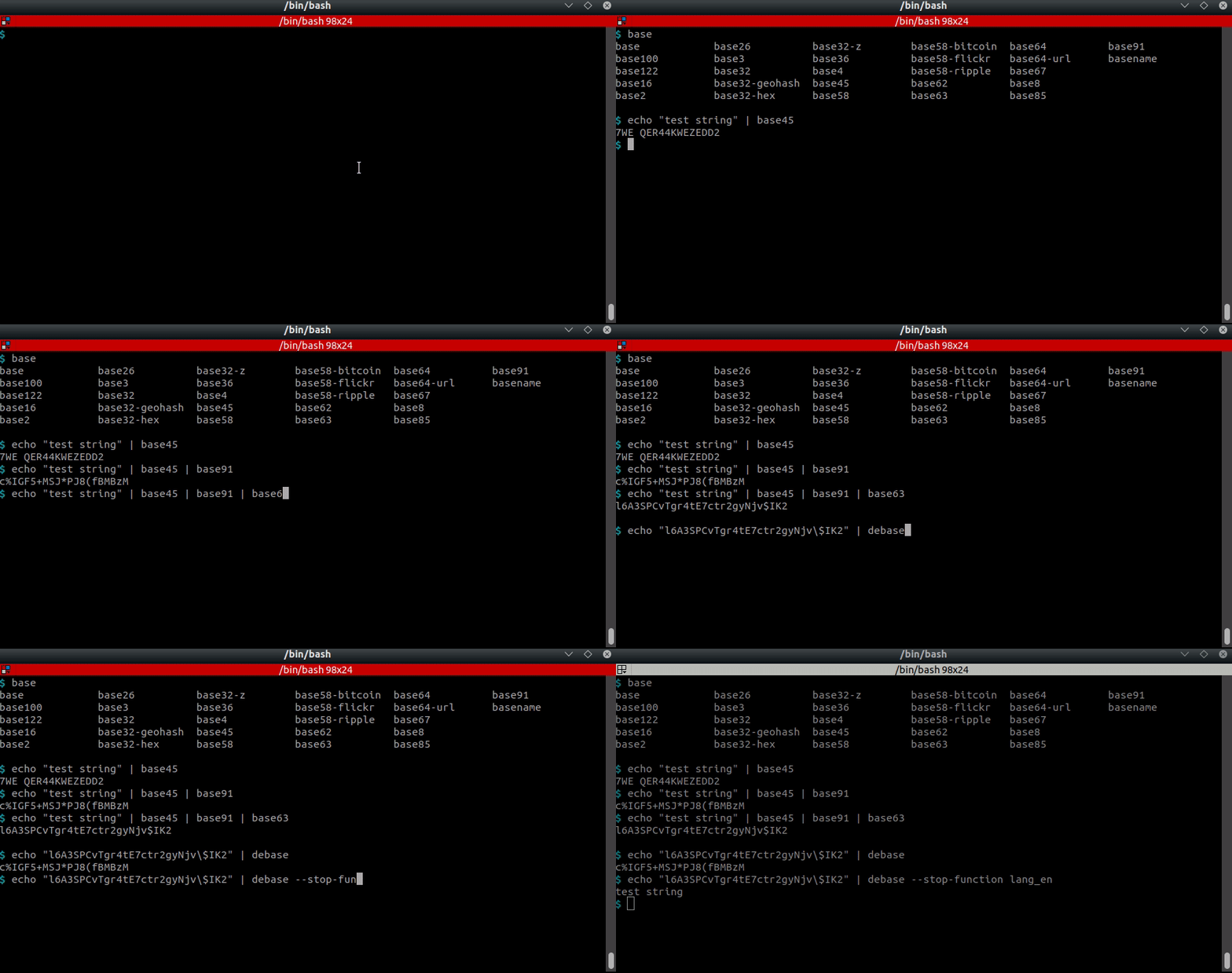
<p align="center"><img src="https://assets.kitploit.com/production/public/readmes/4821/81514bb87e41cfa9d482c93830d7a2e579352988aae9b0934778095692265bde.gif" alt="명령줄에서 CodExt 사용하기"></p>
<p align="center"><img src="https://assets.kitploit.com/production/public/readmes/4821/fa4848c3f817288ed56845964755dbb4c4a0098c76af8a6ac6e5c89f849a8d5e.gif" alt="명령줄에서 base 도구 사용하기"></p>
<p align="center">명령줄 도구 unbase 사용하기</p>
## :computer: 사용법 (주요 CLI 도구) <a href="https://twitter.com/intent/tweet?text=CodExt%20-%20Encode%2Fdecode%20anything.%0D%0APython%20tool%20for%20encoding%20and%20decoding%20almost%20anything,%20including%20a%20guess%20feature%20based%20on%20AI.%0D%0Ahttps%3a%2f%2fgithub%2ecom%2fdhondta%2fpython-codext%0D%0A&hashtags=python,encodings,codecs,cryptography,morse,base,stegano,steganography,ctftools"><img src="https://img.shields.io/badge/Tweet%20(codext)--lightgrey?logo=twitter&style=social" alt="codext에 트윗하기" height="20"/></a>```session
$ codext -i test.txt encode dna-1
GTGAGCGGGTATGTGA
$ echo -en "test" | codext encode morse
- . ... -
$ echo -en "test" | codext encode braille
⠞⠑⠎⠞
$ echo -en "test" | codext encode base100
👫👜👪👫
$ echo -en "Test string" | codext encode reverse gnirts tseT
$ echo -en "Test string" | codext encode reverse morse --. -. .. .-. - ... / - ... . -
$ echo -en "Test string" | codext encode reverse morse dna-2 AGTCAGTCAGTGAGAAAGTCAGTGAGAAAGTGAGTGAGAAAGTGAGTCAGTGAGAAAGTCAGAAAGTGAGTGAGTGAGAAAGTTAGAAAGTCAGAAAGTGAGTGAGTGAGAAAGTGAGAAAGTC
$ echo -en "Test string" | codext encode reverse morse dna-2 octal 101107124103101107124103101107124107101107101101101107124103101107124107101107101101101107124107101107124107101107101101101107124107101107124103101107124107101107101101101107124103101107101101101107124107101107124107101107124107101107101101101107124124101107101101101107124103101107101101101107124107101107124107101107124107101107101101101107124107101107101101101107124103
$ echo -en "AGTCAGTCAGTGAGAAAGTCAGTGAGAAAGTGAGTGAGAAAGTGAGTCAGTGAGAAAGTCAGAAAGTGAGTGAGTGAGAAAGTTAGAAAGTCAGAAAGTGAGTGAGTGAGAAAGTGAGAAAGTC" | codext -d dna-2 morse reverse test string
### :twisted_rightwards_arrows: 매크로 사용하기```sh
$ codext add-macro my-encoding-chain gzip base63 lzma base64

$ codext list macros
example-macro, my-encoding-chain

$ echo -en "Test string" | codext encode my-encoding-chain
CQQFAF0AAIAAABuTgySPa7WaZC5Sunt6FS0ko71BdrYE8zHqg91qaqadZIR2LafUzpeYDBalvE///ug4AA==

$ codext remove-macro my-encoding-chain

$ codext list macros
example-macro
baseXX CLI tools) --lightgrey?logo=twitter&style=social)
base 인코딩 다루기.```session $ echo "Test string !" | base122 *.7!ft9�-f9Â
$ echo "Test string !" | base91 "ONK;WDZM%Z%xE7L
$ echo "Test string !" | base91 | base85 B2P|BJ6A+nO(j|-cttl%
$ echo "Test string !" | base91 | base85 | base36 | base58-flickr QVx5tvgjvCAkXaMSuKoQmCnjeCV1YyyR3WErUUErFf
$ echo "Test string !" | base91 | base85 | base36 | base58-flickr | base58-flickr -d | base36 -d | base85 -d | base91 -d Test string !
(입력된 콘텐츠가 없습니다. 번역할 마크다운 내용을 제공해 주세요.)```session
$ echo "Test string !" | base91 | base85 | base36 | base58-flickr | unbase -m 3
Test string !

$ echo "Test string !" | base91 | base85 | base36 | base58-flickr | unbase -f Test
Test string !
codecs 나열.```session
$ codext list encodings
a1z26 adler32 affine alternative-rot ascii
atbash autoclave bacon barbie base
base1 base2 base3 base4 base8
<>
이름을 기준으로 코덱 찾기.```session
$ codext search bitcoin
base58
문자열 인코딩.```sesssion $ echo -en "This is a test" | codext encode polybius 44232443 2443 11 44154344
파일 인코딩 중.```session
$ echo -en "this is a test" > to_be_encoded.txt
$ codext encode base64 < to_be_encoded.txt > text.b64
$ cat text.b64
dGhpcyBpcyBhIHRlc3Q=
코덱 체이닝.```session $ echo -en "mrdvm6teie6t2cq=" | codext encode upper | codext decode base32 | codext decode base64 test
반복적으로 디코딩을 추측합니다.```session
$ echo -en "test" | codext encode base64 gzip | codext guess
Codecs: gzip
dGVzdA==
$ echo -en "test" | codext encode base64 gzip | codext guess gzip -i base
Codecs: gzip, base64
test
사용 가능한 코덱 목록을 가져옵니다.```python
import codext
codext.list() ['ascii85', 'base85', 'base100', 'base122', ..., 'tomtom', 'dna', 'html', 'markdown', 'url', 'resistor', 'sms', 'whitespace', 'whitespace-after-before']
Playing with some base encodings.
>>> codext.encode("this is a test", "base58-bitcoin")
'jo91waLQA1NNeBmZKUF'

>>> codext.encode("this is a test", "base58-ripple")
'jo9rA2LQwr44eBmZK7E'
