
Skip to content
KitploitKITPLOIT
도구블로그
제출
도구블로그
제출

해킹, 침투 테스트 및 사이버 보안 도구를 당신의 보안 무기고에!

Kitploit은 해킹, 사이버 보안 및 침투 테스트 도구 디렉토리입니다. 최신 프로젝트 업데이트를 발견하여 취약점을 찾고, 시스템을 분석하고, 테스트를 자동화하고, 보안을 강화하세요.

··피드·문의·개인정보·© 2026 Kitploit

도구 디렉토리

카테고리

모든 카테고리 보기
Loading categories
도구/GitHubGitHub/dheerajmadhukar/karma_v2
OSINT (Open Source Intelligence)ReconnaissanceVulnerability AnalysisDNS & Subdomain EnumerationInformation GatheringSubdomain EnumerationCrawler
GitHubdheerajmadhukar/karma_v2

karma_v2

⡷⠂𝚔𝚊𝚛𝚖𝚊 𝚟𝟸⠐⢾는 수동적 오픈소스 인텔리전스(OSINT) 자동 정찰(프레임워크)입니다.

저장소 보기
1.0k1852년 전Kitploit 검토 완료

인기

모두 보기 →

커뮤니티에서 가장 많이 사용되는 도구를 찾아보세요.

모든 도구 탐색

도구 컬렉션을 둘러보세요

모든 도구 보기 →
공유
karma_v2 — ⡷⠂𝚔𝚊𝚛𝚖𝚊 𝚟𝟸⠐⢾는 수동적 오픈소스 인텔리전스(OSINT) 자동 정찰(프레임워크)입니다. | Kitploit

웹사이트

karma_v2

⡷⠂𝚔𝚊𝚛𝚖𝚊 𝚟𝟸⠐⢾

𝚔𝚊𝚛𝚖𝚊 𝚟𝟸는 수동 오픈소스 인텔리전스(OSINT) 자동 정찰(프레임워크)입니다.

Follow on Twitter Version Build Build Donate

𝚔𝚊𝚛𝚖𝚊 𝚟𝟸는 Infosec 연구원, 침투 테스터, 버그 헌터가 대상에 대한 심층 정보, 추가 자산, WAF/CDN 우회 IP, 내부/외부 인프라, 공개적으로 노출된 유출 정보 등을 찾는 데 사용할 수 있습니다. 이 자동화를 사용하려면 Shodan Premium API 키가 필요합니다. 𝚔𝚊𝚛𝚖𝚊 𝚟𝟸의 출력은 화면에 표시되고 파일/디렉터리에 저장됩니다.

ℹ Premium Shodan API에 관한 자세한 내용은 Shodan 사이트를 참조하십시오.

Shodan 웹사이트: Shodan 웹사이트 API : 개발자 API

기능

  • Shodan Dork를 통한 강력하고 유연한 결과
  • SSL SHA1 체크섬/지문 검색
  • 범위 내 IP만 적중
  • 각 IP를 SSL/TLS 인증서 발급자 정규식과 일치 확인
  • 범위 외 IP 제공
  • 잘 알려진 포트/드문 포트/동적 포트 포함 모든 포트 발견
  • CVE 관련 모든 대상 취약점 수집
  • 각 IP, 제품, OS, 서비스 및 조직 등에 대한 배너 수집
  • 파비콘 아이콘 수집
  • Python3 mmh3 모듈을 사용한 파비콘 해시 생성
  • nuclei 사용자 정의 템플릿을 사용한 파비콘 기술 탐지
  • ASN 스캔
  • BGP 이웃
  • ASN에 대한 IPv4 및 IPv6 접두사
  • 인덱싱, NDMP, SMB, 로그인, 회원가입, OAuth, SSO, 상태 401/403/500, VPN, Citrix, Jfrog, 대시보드, OpenFire, 제어판, Wordpress, Laravel, Jetty, S3 버킷, Cloudfront, Jenkins, Kubernetes, Node Exports, Grafana, RabbitMQ, 컨테이너, GitLab, MongoDB, Elastic, FTP 익명, Memcached, DNS 재귀, Kibana, Prometheus, 기본 비밀번호, 보호된 객체, Moodle, Spring Boot, Django, Jira, Ruby, 비밀 키 등 흥미로운 유출 정보

설치

1. 저장소 클론

root@kitploit:~
# git clone https://github.com/Dheerajmadhukar/karma_v2.git

2. shodan 및 mmh3 파이썬 모듈 설치

root@kitploit:~
# python3 -m pip install shodan mmh3

3. JSON 파서 [JQ] 설치

root@kitploit:~
# apt install jq -y

4. httprobe @tomnomnom 설치 (요청 프로브용)

root@kitploit:~
# go install -v github.com/tomnomnom/httprobe@master

5. Interlace @codingo 설치 (멀티스레드용, codingo interlace 저장소 지침 참조)

root@kitploit:~
# git clone https://github.com/codingo/Interlace.git & 적절히 설치.

6. nuclei @projectdiscovery 설치

root@kitploit:~
# go install -v github.com/projectdiscovery/nuclei/v2/cmd/nuclei@latest

7. lolcat 설치

root@kitploit:~
# apt install lolcat -y

8. anew 설치

root@kitploit:~
# go install -v github.com/tomnomnom/anew@master

자, 어떻게 사용하나요?

root@kitploit:~
# cat > .token
SHODAN_PREMIUM_API_HERE

사용법

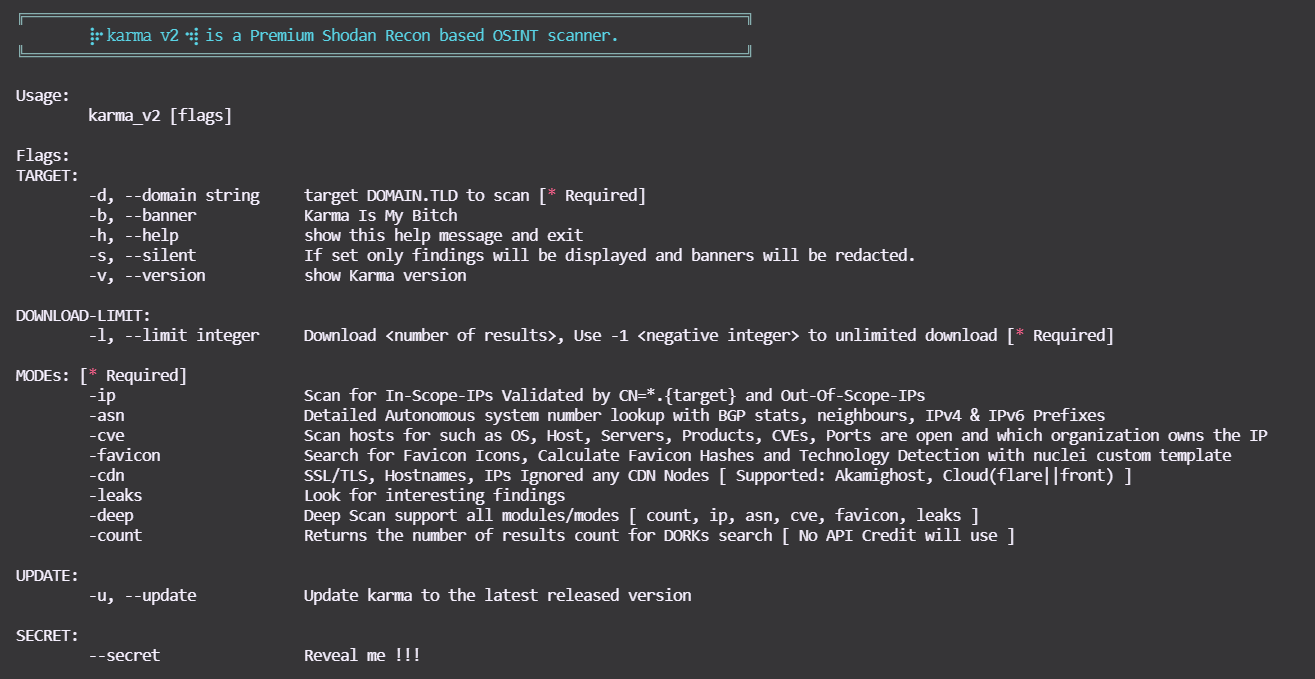
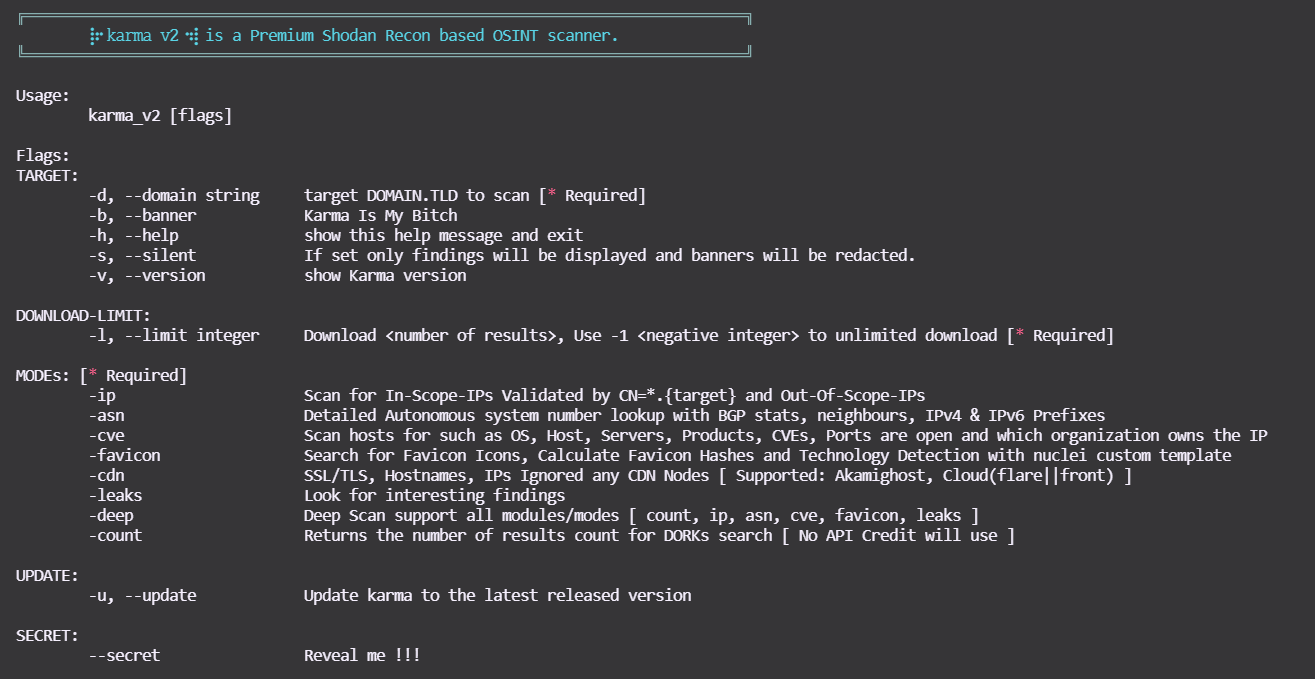
도움말을 확인하려면 다음 명령을 사용하세요:

root@kitploit:~
$ bash karma_v2 -h
karma_v2

모드

데모

  • karma_v2 [모드 -ip] asciicast

  • karma_v2 [모드 -asn] asciicast

  • karma_v2 [모드 -cve] asciicast

  • karma_v2 [모드 -favicon] asciicast

  • karma_v2 [모드 -leaks]

asciicast


  • karma_v2 [모드 -deep]

-deep는 위의 모든 모드를 지원합니다 (예: -count,-ip,-asn,-favicon,-cve,-leaks)!


출력

root@kitploit:~
output/bugcrowd.com-YYYY-MM-DD/ 

.
├── ASNs_Detailed_bugcrowd.com.txt
├── Collect
│   ├── host_domain_domain.tld.json.gz
│   ├── ssl_SHA1_12289a814...83029f8944b6088d60204a92e_domain.tld.json.gz
│   ├── ssl_SHA1_17537bf84...73cb1d684a495db7ea5aa611b_domain.tld.json.gz
│   ├── ssl_SHA1_198d6d4ec...681b77585190078b07b37c5e1_domain.tld.json.gz
│   ├── ssl_SHA1_26a9c5618...d60eae2947b42263e154d203f_domain.tld.json.gz
│   ├── ssl_SHA1_3da3825a2...3b852a42470410183adc3b9ee_domain.tld.json.gz
│   ├── ssl_SHA1_4d0eab730...68cf11d2db94cc2454c906532_domain.tld.json.gz
│   ├── ssl_SHA1_8907dab4c...12fdbdd6c445a4a8152f6b7b7_domain.tld.json.gz
│   ├── ssl_SHA1_9a9b99eba...5dc5106cea745a591bf96b044_domain.tld.json.gz
│   ├── ssl_SHA1_a7c14d201...b6fd4bc4e95ab2897e6a0bsfd_domain.tld.json.gz
│   ├── ssl_SHA1_a90f4ddb0...85780bdb06de83fefdc8a612d_domain.tld.json.gz
│   ├── ssl_domain_domain.tld.json.gz
│   ├── ssl_subjectCN_domain.tld.json.gz
│   └── ssl_subject_domain.tld.json.gz
|   └── . . .
├── IP_VULNS
│   ├── 104.x.x.x.json.gz
│   ├── 107.x.x.x.json.gz
│   └── 99.x.x.x.json.gz
|   └── . . .
├── favicons_domain.tld.txt
├── host_enum_domain.tld.txt
├── ips_inscope_domain.tld.txt
├── main_domain.tld.data
├── . . . 

karma_v2 새로 추가된 Shodan Dork

  • SonarQube
  • Apache hadoop node
  • Directory Listing
  • Oracle Business intelligence
  • Oracle Web Login
  • Docker Exec
  • Apache Status
  • Apache-Coyote/1.1 Tomcat-5.5
  • Swagger UI
  • H-SPHERE
  • Splunk
  • JBoss
  • phpinfo
  • ID_VC
  • Confluence
  • TIBCO_Jaspersoft
  • Shipyard_Docker_management
  • Symfony PHP info AWS creds
  • Ignored-by_CDNs
  • Django_Exposed
  • Cluster_Node_etcd
  • SAP_NetWeaver_Application

𝚔𝚊𝚛𝚖𝚊 𝚟𝟸 지원하는 Shodan Dork

𝚔𝚊𝚛𝚖𝚊 𝚟𝟸 새로 추가된 Shodan Dork

지원

⡷⠂𝚔𝚊𝚛𝚖𝚊 𝚟𝟸⠐⢾가 마음에 들고 업무, 돈/버그 바운티, 침투 테스트, 정찰에 도움이 되거나 단순히 기분을 좋게 해준다면 지원을 보여주세요! 🛑 지원 요청이나 질문을 위해 GitHub 이슈를 열지 마세요! 제가 계속 활동할 수 있도록 맥주 한 잔 사주세요 :)

Buy Me A Beer

도구 다운로드
모드예시
-ip bash karma_v2 -d <DOMAIN.TLD> -l <INTEGER> -ip
-asn bash karma_v2 -d <DOMAIN.TLD> -l <INTEGER> -asn
-cve bash karma_v2 -d <DOMAIN.TLD> -l <INTEGER> -cve
-cveid bash karma_v2 -d <DOMAIN.TLD> -l <INTEGER> -cveid CVE-2021-34473
-favicon bash karma_v2 -d <DOMAIN.TLD> -l <INTEGER> -favicon
-leaks bash karma_v2 -d <DOMAIN.TLD> -l <INTEGER> -leaks
-deep bash karma_v2 -d <DOMAIN.TLD> -l <INTEGER> -deep
-count bash karma_v2 -d <DOMAIN.TLD> -l <INTEGER> -count
DorkDorkDork
ssl.cert.fingerprinthttp.status:"302" oauth"Server: Jetty"
sslhttp.status:"302" ssoX-Amz-Bucket-Region
orgtitle:"401 Authorization Required""development" org:"Amazon.com"
hostnamehttp.html:"403 Forbidden""X-Jenkins" "Set-Cookie: JSESSIONID" http.title:"Jenkins [Jenkins]"
ssl.cert.issuer.cnhttp.html:"500 Internal Server Error"http.favicon.hash:81586312 200
ssl.cert.subject.cnssl.cert.subject.cn:*vpn*product:"Kubernetes" port:"10250, 2379"
ssl.cert.expired:truetitle:"citrix gateway"port:"9100" http.title:"Node Exporter"
ssl.cert.subject.commonNamehttp.html:"JFrog"http.title:"Grafana"
http.title:"Index of /""X-Jfrog"http.title:"RabbitMQ"
ftp port:"10000"http.title:"dashboard"HTTP/1.1 307 Temporary Redirect "Location: /containers"
"Authentication: disabled" port:445 product:"Samba"http.title:"Openfire Admin Console"http.favicon.hash:1278323681
title:"Login - Adminer"http.title:"control panel""MongoDB Server Information" port:27017 -authentication
http.title:"sign up"http.html:"* The wp-config.php creation script uses this file"port:"9200" all:"elastic indices"
http.title:"LogIn"clockwork"220" "230 Login successful." port:21
port:"11211" product:"Memcached""port: 53" Recursion: Enabledtitle:"kibana"
port:9090 http.title:"Prometheus Time Series Collection and Processing Server""default password"title:protected
http.component:Moodlehttp.favicon.hash:116323821html:"/login/?next=" title:"Django"
html:"/admin/login/?next=" title:"Django"title:"system dashboard" html:jirahttp.component:ruby port:3000
html:"secret_key_base"I will add more soon. . .
DorkDorkDork
"netweaver"port:"2379" product:"etcd"http.title:"DisallowedHost"
ssl:"${target}" "-AkamaiGHost" "-GHost"ssl:"${target}" "-Cloudflare"ssl:"${target}" "-Cloudfront"
"X-Debug-Token-Link" port:443http.title:"shipyard" HTTP/1.1 200 OK Accept-Ranges: bytes Content-Length: 5664http.title:"TIBCO Jaspersoft:" port:"443" "1970"
"Confluence"http.title:"SonarQube"html:"jmx?qry=Hadoop:*"
http.title:"Directory Listing"http.title:"H-SPHERE"http.title:"Swagger UI - "
Server: Apache-Coyote/1.1 Tomcat-5.5"port:2375 product:"Docker"http.title:"phpinfo()"
http.title:"ID_VC_Welcome""x-powered-by" "jboss"jboss http.favicon.hash:-656811182
http.title:"Welcome to JBoss"port:"8089, 8000" "splunkd"http.favicon.hash:-316785925
title:"splunkd" org:"Amazon.com"http.title:"oracle business intelligence sign in"http.title:"Oracle WebLogic Server Administration Console"
http.title:"Apache Status"I will add more soon. . .