 cyberark/skywrapper
SkyWrapper는 AWS에서 임시 토큰의 의심스러운 생성 형태와 사용을 발견하는 데 도움을 줍니다.




SkyWrapper는 주어진 AWS 계정에서 생성된 임시 토큰의 동작을 분석하는 오픈소스 프로젝트입니다. 이 도구는 악성 활동을 탐지하기 위해 임시 토큰의 의심스러운 생성 형태와 사용을 찾는 것을 목표로 합니다. AWS 계정을 분석하고 현재 살아있는 모든 임시 토큰을 포함하는 Excel 시트를 생성합니다. 각 실행 후 화면에 결과 요약이 출력됩니다.
SkyWrapper 데모:
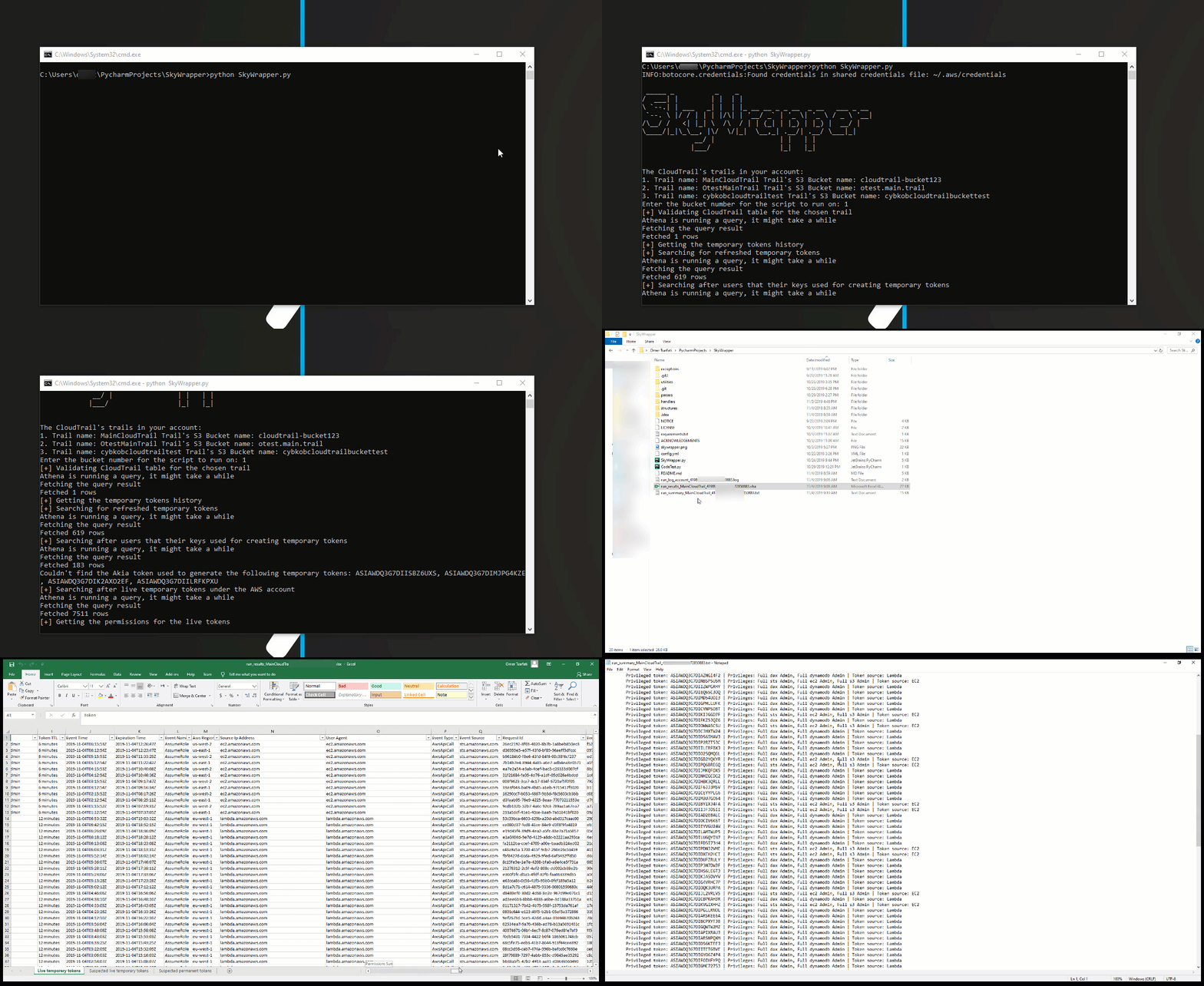
python SkyWrapper.py
이 스크립트를 실행하려면 최소한 다음 권한 정책이 필요합니다:
{
    "Version": "2012-10-17",
    "Statement": [
        {
            "Sid": "S3TrailBucketPermissions",
            "Effect": "Allow",
            "Action": [
                "s3:GetObject",
                "s3:ListBucketMultipartUploads",
                "s3:ListBucket",
                "s3:GetBucketLocation",
                "s3:ListMultipartUploadParts"
            ],
            "Resource": [
                "arn:aws:s3:::{cloudtrail_bucket_name}/*",
                "arn:aws:s3:::{cloudtrail_bucket_name}
            ]
        },
        {
            "Sid": "IAMReadPermissions",
            "Effect": "Allow",
            "Action": [
                "iam:ListAttachedRolePolicies",
                "iam:ListRolePolicies",
                "iam:GetRolePolicy",
                "iam:GetPolicyVersion",
                "iam:GetPolicy",
                "iam:ListRoles"
            ],
            "Resource": [
                "arn:aws:iam::*:policy/*",
                "arn:aws:iam::*:role/*"
            ]
        },
        {
            "Sid": "GLUEReadWritePermissions",
            "Effect": "Allow",
            "Action": [
                "glue:CreateTable",
                "glue:CreateDatabase",
                "glue:GetTable",
                "glue:GetDatabase"
            ],
            "Resource": "*"
        },
        {
            "Sid": "CLOUDTRAILReadPermissions",
            "Effect": "Allow",
            "Action": [
                "cloudtrail:DescribeTrails"
            ],
            "Resource": "*"
        },
        {
            "Sid": "ATHENAReadPermissions",
            "Effect": "Allow",
            "Action": [
                "athena:GetQueryResults",
                "athena:StartQueryExecution",
                "athena:GetQueryExecution"
            ],
            "Resource": "arn:aws:athena:*:*:workgroup/*"
        },
        {
            "Sid": "S3AthenaResultsBucketPermissions",
            "Effect": "Allow",
            "Action": [
                "s3:PutObject",
                "s3:GetObject",
                "s3:ListBucketMultipartUploads",
                "s3:CreateBucket",
                "s3:ListBucket",
                "s3:GetBucketLocation",
                "s3:ListMultipartUploadParts"
            ],
            "Resource": "arn:aws:s3:::aws-athena-query-results-*"
        }
    ]
}
"{trail_bucket}"를 추적 버킷 이름으로 변경해야 합니다!
스크립트를 사용하려는 추적이 여러 개인 경우, 해당 추적도 정책 권한 리소스 섹션에 추가해야 합니다.
**"config.yaml"**은 구성 파일입니다. 대부분의 경우 구성을 그대로 둘 수 있습니다. 변경이 필요한 경우 구성 파일에 문서화되어 있습니다.
athena: # Athena configuration
  database_name: default # The name of the database Athena uses for querying the trail bucket.
  table_name: cloudtrail_logs_{table_name} # The table name of the trail bucket name
  output_location: s3://aws-athena-query-results-{account_id}-{region}/ # The default output location bucket for the query results
output:
  excel_output_file: run_results_{trail}_{account_id}-{date}.xlsx # Excel results file
  summary_output_file: run_summary_{trail}_{account_id}-{date}.txt # Summary text results file
verify_https: True # Enable/ Disable verification of SSL certificates for HTTP requests
account:
    account_id: 0 # The account id - Keep it as 0 in case you don't know it
    aws_access_key_id: # If you keep it empty, the script will look after the default AWS credentials stored in ~/.aws/credentials
    aws_secret_access_key: # If you keep it empty, the script will look after the default AWS credentials stored in ~/.aws/credentials
    aws_session_token: # If you keep it empty, the script will look after the default AWS credentials stored in ~/.aws/credentials
더 많은 의견, 제안, 질문이 있으시면 Omer Tsarfati (@OmerTsarfati) 및 CyberArk Labs에 문의하실 수 있습니다. 저희가 개발한 다른 프로젝트는 https://github.com/cyberark/에서 확인하실 수 있습니다.
