
CORELIGHT 및 관련 정보를 위한 Chronicle 파서
이 문서에서는 Corelight Sensor와 Chronicle 포워더를 구성하여 Corelight Sensor 로그를 수집하는 방법을 설명합니다. 또한 지원되는 로그 유형과 지원되는 Corelight 버전을 나열합니다.
자세한 내용은 Chronicle로 데이터 수집을 참조하세요.
다음 배포 아키텍처 다이어그램은 두 가지 서로 다른 수집 아키텍처를 사용하여 Corelight Sensor가 Google Security Operations에 로그를 보내도록 설정되는 방식을 보여줍니다. 각 고객 배포는 이 표현과 다를 수 있으며 더 복잡할 수 있다는 점에 유의해야 합니다.
수집 라벨은 원시 로그 데이터를 구조화된 UDM 형식으로 정규화하는 파서를 식별합니다. 이 문서의 정보는 CORELIGHT 수집 라벨이 있는 파서에 적용됩니다.
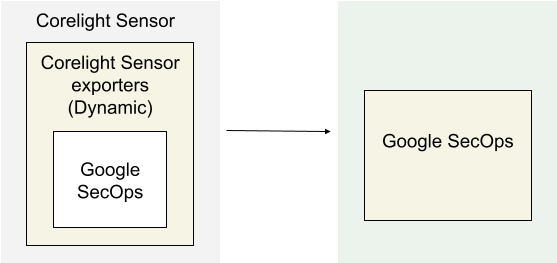
아키텍처 다이어그램은 다음 구성 요소를 보여줍니다.
Corelight Sensor: Corelight Sensor 를 실행하는 시스템입니다.
Corelight Sensor exporters: Corelight Sensor exporter는 Sensor에서 로그 데이터를 수집하여 Google Security Operations로 전달합니다.
Google Security Operations: Google Security Operations는 Corelight Sensor의 로그를 보관하고 분석합니다.
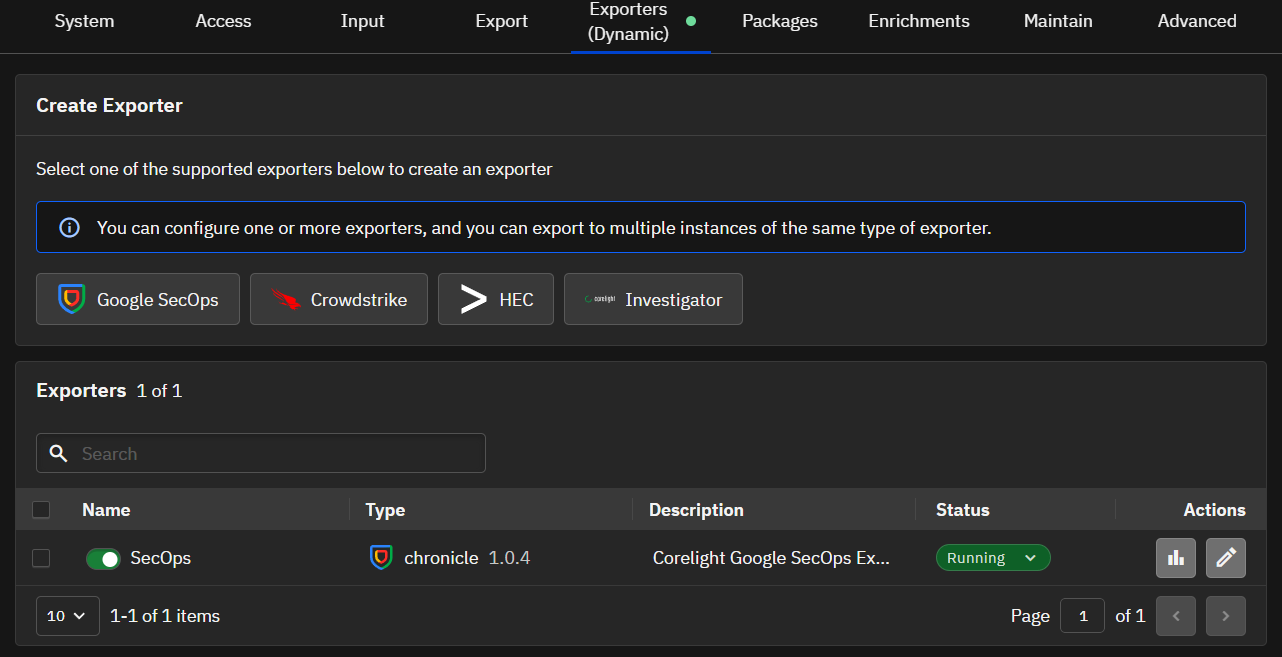
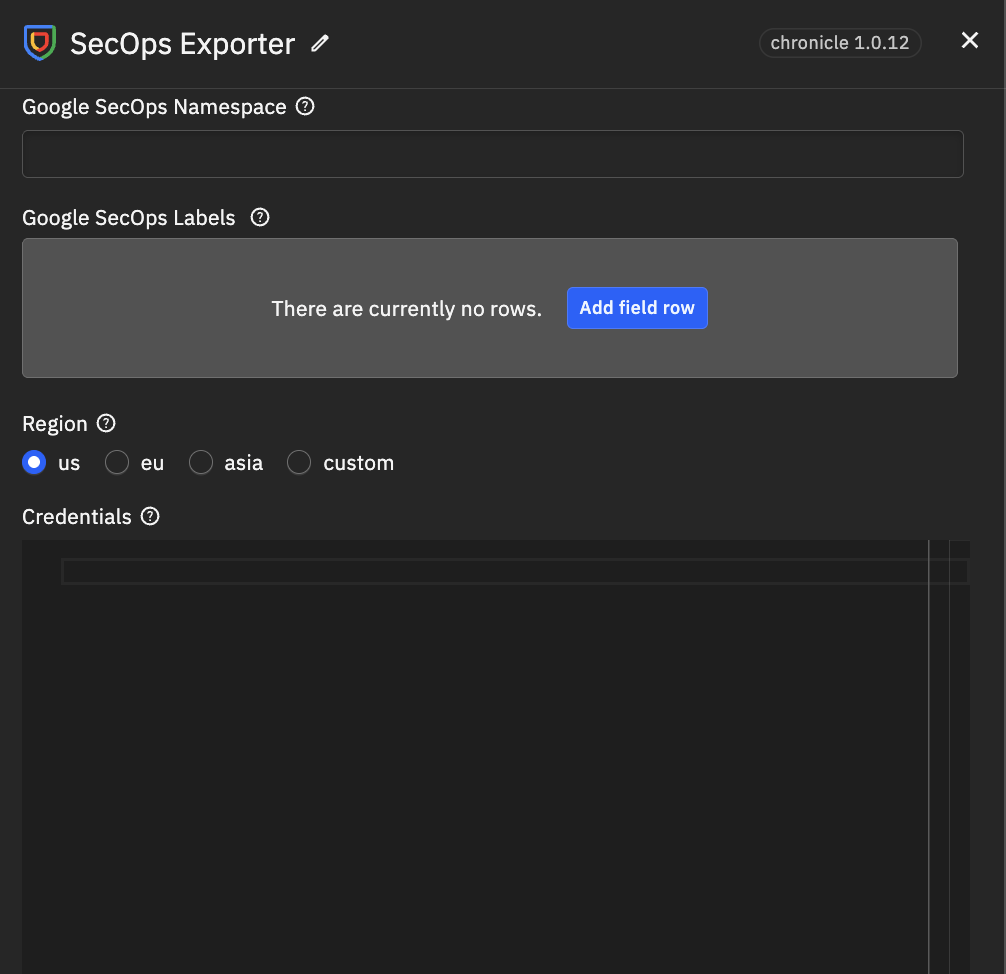
Sensor 또는 Fleet Manager 웹 인터페이스를 사용하여 Google SecOps 내보내기를 구성합니다. 이 구성은 Google SecOps 인스턴스의 API 자격 증명을 사용하여 보안 연결을 설정합니다.
관리자로 Corelight Sensor의 Fleet Manager 또는 Sensor 웹 인터페이스에 로그인합니다.
내보내기 구성 영역으로 이동합니다.
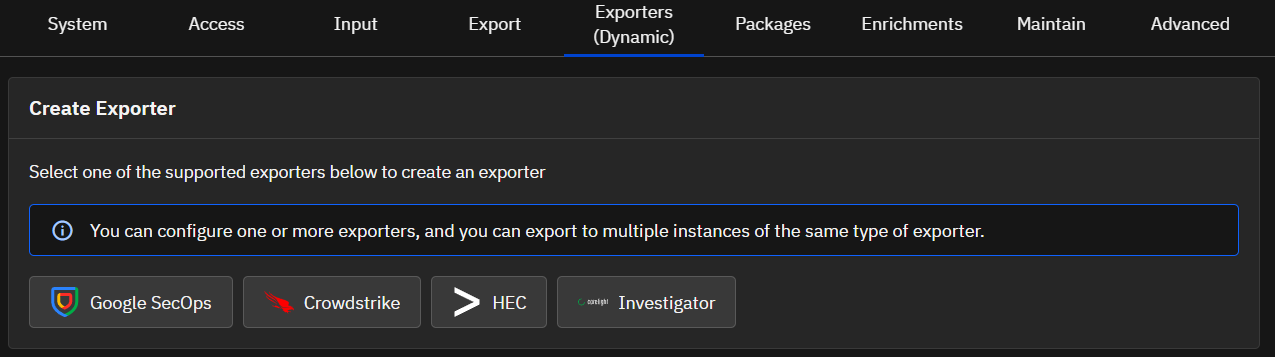
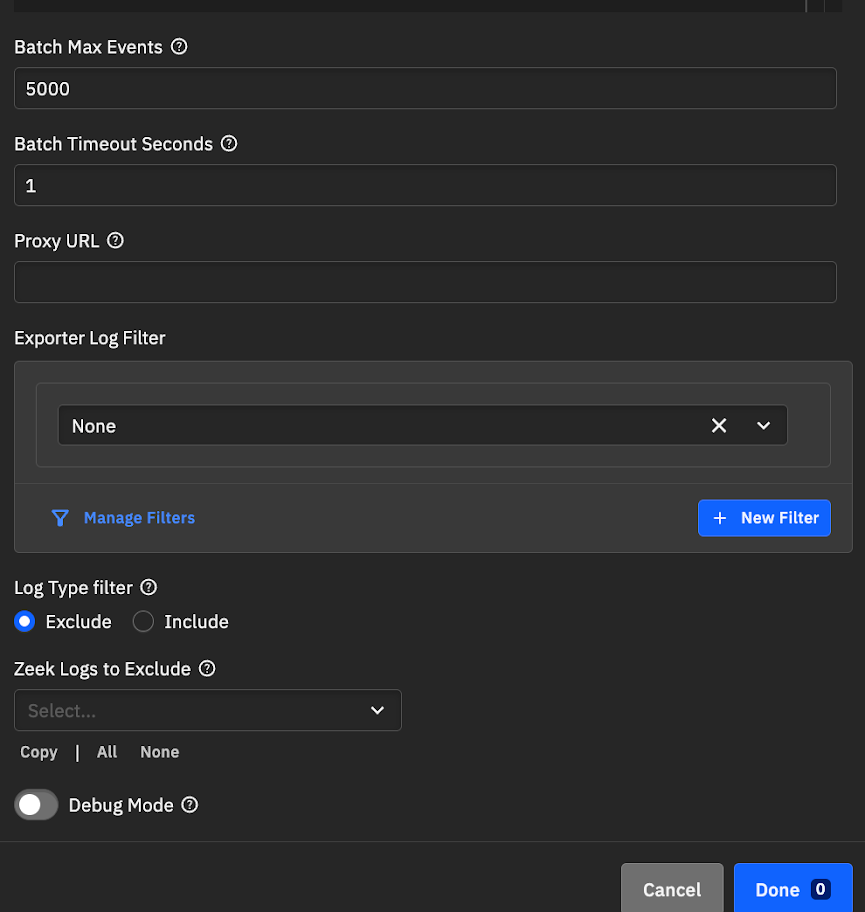
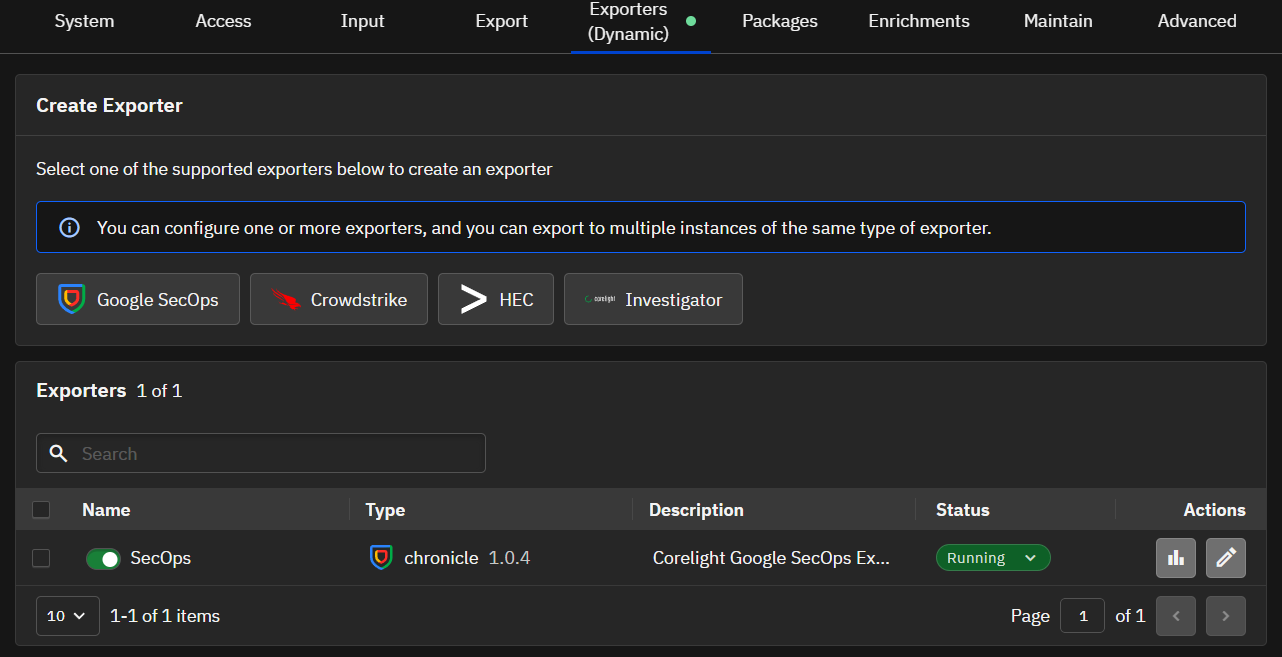
Create Exporter 섹션에서 Google SecOps를 클릭합니다.
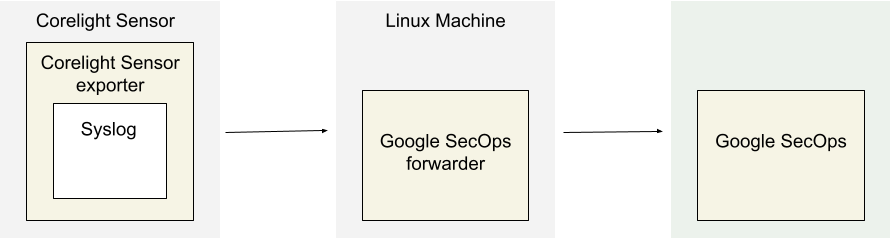
아키텍처 다이어그램은 다음 구성 요소를 보여줍니다.
Corelight Sensor: Corelight Sensor 를 실행하는 시스템입니다.
Corelight Sensor exporter: Corelight Sensor exporter는 Sensor에서 로그 데이터를 수집하여 Google Security Operations 포워더로 전달합니다.
Google Security Operations forwarder: Google Security Operations 포워더는 고객 네트워크에 배포되는 경량 소프트웨어 구성 요소로 syslog를 지원합니다. Google Security Operations 포워더는 로그를 Google Security Operations로 전달합니다.
Google Security Operations: Google Security Operations는 Corelight Sensor의 로그를 보관하고 분석합니다.
Google Security Operations 포워더를 구성하려면 다음을 수행합니다.
Google Security Operations 포워더를 설정합니다. Linux에서 포워더 설치 및 구성을 참조하세요.
Google Security Operations 포워더가 로그를 Google Security Operations로 보내도록 구성합니다. ```none collectors:
### Corelight Sensor 내보내기 구성
1. 관리자로 Corelight Sensor에 로그인합니다.
2. **Export** 탭을 선택합니다.
3. **EXPORT TO SYSLOG** 옵션을 찾아 활성화합니다.
4. **EXPORT TO SYSLOG**에서 다음 필드를 구성합니다.
* **SYSLOG SERVER**: Google Security Operations 포워더 syslog 리스너의 IP 주소와 포트를 지정합니다.
* **Advanced Settings > SYSLOG FORMAT**(으)로 이동하여 설정을 **Legacy**(으)로 변경합니다.
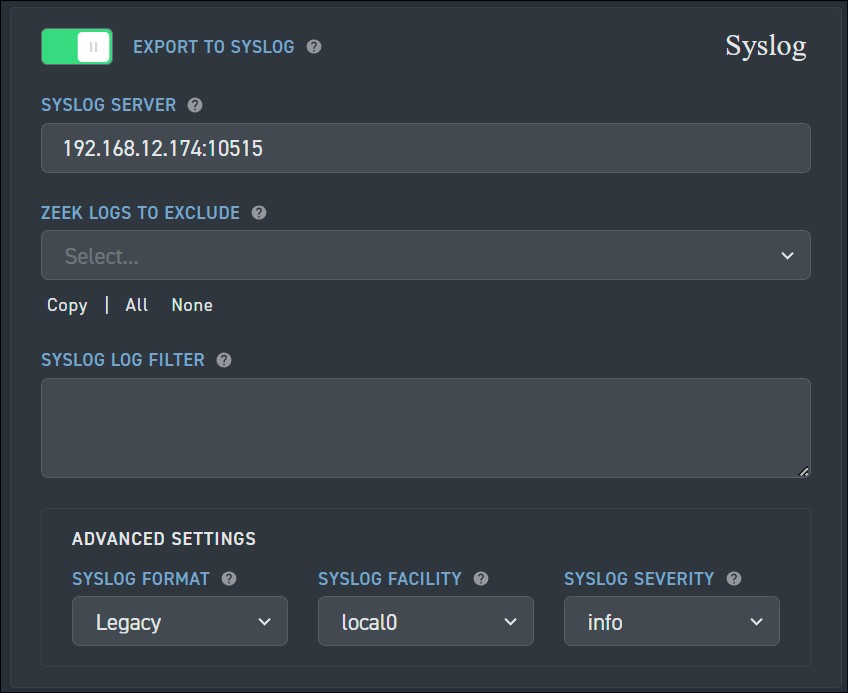
5. **Apply Changes**를 클릭합니다.
## 지원되는 Corelight 로그 유형
Corelight 파서는 다음 로그 유형을 지원합니다.
<div class="fixed" translate="no">
<h4>Log Type</h4>
<ul>
<li>asset_classification</li>
<li>conn</li>
<li>conn_long</li>
<li>conn_red</li>
<li>conn_agg</li>
<li>dce_rpc</li>
<li>dns</li>
<li>dns_red</li>
<li>files</li>
<li>files_red</li>
<li>http</li>
<li>http2</li>
<li>http_red</li>
<li>intel</li>
<li>irc</li>
<li>notice</li>
<li>rdp</li>
<li>sip</li>
<li>smb_files</li>
<li>smb_mapping</li>
<li>smtp</li>
<li>smtp_links</li>
<li>ssh</li>
<li>ssl</li>
<li>ssl_red</li>
<li>suricata_corelight</li>
<li>bacnet</li>
<li>cip</li>
<li>corelight_burst</li>
<li>corelight_metrics_bro</li>
<li>corelight_metrics_disk</li>
<li>corelight_metrics_iface</li>
<li>corelight_metrics_memory</li>
<li>corelight_metrics_system</li>
<li>corelight_metrics_zeek_doctor</li>
<li>corelight_overall_capture_loss</li>
<li>corelight_profiling</li>
<li>datared</li>
<li>dga</li>
<li>dhcp</li>
<li>dnp3</li>
<li>dpd</li>
<li>encrypted_dns</li>
<li>enip</li>
<li>enip_debug</li>
<li>enip_list_identity</li>
<li>etc_viz</li>
<li>ftp</li>
<li>generic_dns_tunnels</li>
<li>generic_icmp_tunnels</li>
<li>icmp_specific_tunnels</li>
<li>ipsec</li>
<li>iso_cotp</li>
<li>kerberos</li>
<li>known_certs</li>
<li>known_devices</li>
<li>known_domains</li>
<li>known_hosts</li>
<li>known_names</li>
<li>known_remotes</li>
<li>known_services</li>
<li>known_users</li>
<li>ldap</li>
<li>ldap_search</li>
<li>local_subnets</li>
<li>local_subnets_dj</li>
<li>local_subnets_graphs</li>
<li>log4shell</li>
<li>modbus</li>
<li>mqtt_connect</li>
<li>mqtt_publish</li>
<li>mqtt_subscribe</li>
<li>mysql</li>
<li>napatech_shunting</li>
<li>ntlm</li>
<li>ntp</li>
<li>pe</li>
<li>profinet</li>
<li>profinet_dce_rpc</li>
<li>profinet_debug</li>
<li>radius</li>
<li>reporter</li>
<li>rfb</li>
<li>s7comm</li>
<li>smartpcap</li>
<li>snmp</li>
<li>socks</li>
<li>software</li>
<li>specific_dns_tunnels</li>
<li>stepping</li>
<li>stun</li>
<li>stun_nat</li>
<li>suricata_eve</li>
<li>suricata_stats</li>
<li>syslog</li>
<li>tds</li>
<li>tds_rpc</li>
<li>tds_sql_batch</li>
<li>traceroute</li>
<li>tunnel</li>
<li>unknown-smartpcap</li>
<li>vpn</li>
<li>weird</li>
<li>weird_red</li>
<li>wireguard</li>
<li>x509</li>
<li>x509_red</li>
<li>dns_agg</li>
<li>files_agg</li>
<li>http_agg</li>
<li>ssl_agg</li>
<li>weird_agg</li>
<li>analyzer</li>
<li>anomaly</li>
<li>ssdp</li>
<li>telnet</li>
<li>websocket</li>
<li>first_seen</li>
</ul>
</div>
## 필드 매핑 참조
이 섹션에서는 Google Security Operations 파서가 Google Security Operations 필드를 Google Security Operations UDM(Unified Data Model) 필드에 매핑하는 방법을 설명합니다.
<h3>필드 매핑 참조: CORELIGHT - 공통 필드 </h3>
다음 표에는 <code>CORELIGHT</code> 로그의 공통 필드와 해당 UDM 필드가 나열되어 있습니다.
<div translate="no">
<devsite-filter sortable="0">
<input type="text" placeholder="Type a keyword to find a value.">
<table class="fixed">
<thead>
<tr>
<th>Log field</th>
<th>UDM mapping</th>
<th>Logic</th>
</tr>
</thead>
<tbody class="list">
<tr>
<td></td>
<td><code>metadata.vendor_name</code></td>
<td>The <code>metadata.vendor_name</code> UDM field is set to <code>Corelight</code>.</td>
</tr>
<tr>
<td><code>_path (string)</code></td>
<td><code>metadata.product_event_type</code></td>
<td></td>
</tr>
<tr>
<td><code>_system_name (string)</code></td>
<td><code>observer.hostname</code></td>
<td></td>
</tr>
<tr>
<td><code>ts (time)</code></td>
<td><code>metadata.event_timestamp</code></td>
<td></td>
</tr>
<tr>
<td><code>uid (string)</code></td>
<td><code>about.labels [uid], network.session_id</code></td>
<td></td>
</tr>
<tr>
<td><code>id.orig_h (string - addr)</code></td>
<td><code>principal.ip</code></td>
<td></td>
</tr>
<tr>
<td><code>id.orig_p (integer - port)</code></td>
<td><code>principal.port</code></td>
<td></td>
</tr>
<tr>
<td><code>id.resp_h (string - addr)</code></td>
<td><code>target.ip</code></td>
<td></td>
</tr>
<tr>
<td><code>id.resp_p (integer - port)</code></td>
<td><code>target.port</code></td>
<td></td>
</tr>
<tr>
<td><code>_write_ts</code></td><code></code>
<td><code>metadata.collected_timestamp</code></td>
<td></td>
</tr>
<tr>
<td><code>id.vlan (integer - int)</code></td>
<td><code>additional.fields [id_vlan]</code></td>
<td></td>
</tr>
<tr>
<td><code>id.vlan_inner (integer - int)</code></td>
<td><code>additional.fields [id_vlan_inner]</code></td>
<td></td>
</tr>
<tr>
<td><code>id.orig_ep_cid (string)</code></td>
<td><code>additional.fields [id_orig_ep_cid]</code></td>
<td></td>
</tr>
<tr>
<td><code>id.orig_ep_source (string)</code></td>
<td><code>additional.fields [id_orig_ep_source]</code></td>
<td></td>
</tr>
<tr>
<td><code>id.orig_ep_status (string)</code></td>
<td><code>additional.fields [id_orig_ep_status]</code></td>
<td></td>
</tr>
<tr>
<td><code>id.orig_ep_uid (string)</code></td>
<td><code>additional.fields [id_orig_ep_uid]</code></td>
<td></td>
</tr>
<tr>
<td><code>id.resp_ep_cid (string)</code></td>
<td><code>additional.fields [id_resp_ep_cid]</code></td>
<td></td>
</tr>
<tr>
<td><code>id.resp_ep_source (string)</code></td>
<td><code>additional.fields [id_resp_ep_source]</code></td>
<td></td>
</tr>
<tr>
<td><code>id.resp_ep_status (string)</code></td>
<td><code>additional.fields [id_resp_ep_status]</code></td>
<td></td>
</tr>
<tr>
<td><code>id.resp_ep_uid (string)</code></td>
<td><code>additional.fields [id_resp_ep_uid]</code></td>
<td></td>
</tr>
<tr>
<td><code>uids (array[string] - vector of string)</code></td>
<td><code>additional.fields [uid]</code></td>
<td></td>
</tr>
<tr>
<td><code>count (integer - int)</code></td>
<td><code>additional.fields [count]</code></td>
<td></td>
</tr>
<tr>
<td><code>ts_last</code></td>
<td><code>additional.fields [ts_last]</code></td>
<td></td>
</tr>
</tbody>
</table>
</devsite-filter>
</div>
<h3>필드 매핑 참조: CORELIGHT - asset_classification</h3>
다음 표에는 <code>asset_classification</code> 로그 유형의 로그 필드와 해당 UDM 필드가 나열되어 있습니다.
<div translate="no">
<devsite-filter sortable="0">
<input type="text" placeholder="Type a keyword to find a value.">
<table class="fixed">
<thead>
<tr>
<th>Log field</th>
<th>UDM mapping</th>
<th>Logic</th>
</tr>
</thead>
<tbody class="list">
<tr>
<td></td>
<td><code>metadata.event_type</code></td>
<td>The <code>metadata.event_type</code> UDM field is set to <code>STATUS_UPDATE</code>.</td>
</tr>
<tr>
<td></td>
<td><code>metadata.product_name</code></td>
<td>The <code>metadata.product_name</code> UDM field is set to <code>Zeek</code>.</td>
</tr>
<tr>
<td><code>ip (string - addr)</code></td>
<td><code>principal.ip</code></td>
<td></td>
</tr>
<tr>
<td><code>mac</code></td>
<td><code>principal.mac</code></td>
<td></td>
</tr>
<tr>
<td><code>vendor_mac (string)</code></td>
<td><code>about.asset.hardware.manufacturer</code></td>
<td></td>
</tr>
<tr>
<td><code>device_type (string)</code></td>
<td><code>about.asset.category</code></td>
<td></td>
</tr>
<tr>
<td><code>os_name (string)</code></td>
<td><code>about.platform</code></td>
<td></td>
</tr>
<tr>
<td><code>os_name (string)</code></td>
<td><code>about.asset.attribute.labels</code></td>
<td></td>
</tr>
<tr>
<td><code>type_group (string)</code></td>
<td><code>about.group.group_display_name</code></td>
<td></td>
</tr>
<tr>
<td><code>type_name (string)</code></td>
<td><code>about.resource.resource_subtype</code></td>
<td>The <code>about.resource.resource_type</code> UDM field is set to <code>DEVICE</code></td>
</tr>
<tr>
<td><code>brand (string)</code></td>
<td><code>about.user.company_name</code></td>
<td></td>
</tr>
<tr>
<td><code>model (string)</code></td>
<td><code>about.asset.hardware.model</code></td>
<td></td>
</tr>
<tr>
<td><code>confidence (integer)</code></td>
<td><code>about.security_result.confidence_score</code></td>
<td></td>
</tr>
<tr>
<td><code>os_ver (string)</code></td>
<td><code>about.platform_version</code></td>
<td></td>
</tr>
<tr>
<td><code>sources (array[string])</code></td>
<td><code>about.ip_geo_artifact.tags</code></td>
<td></td>
</tr>
</tbody>
</table>
</devsite-filter>
</div>
<h3>필드 매핑 참조: CORELIGHT - conn, conn_red, conn_long, conn_agg</h3>
다음 표에는 <code>conn, conn_red, conn_long, conn_agg</code> 로그 유형의 로그 필드와 해당 UDM 필드가 나열되어 있습니다.<div translate="no">
<devsite-filter sortable="0">
<input type="text" placeholder="값을 찾으려면 키워드를 입력하세요.">
<table class="fixed">
<thead>
<tr>
<th>로그 필드</th>
<th>UDM 매핑</th>
<th>로직</th>
</tr>
</thead>
<tbody class="list">
<tr>
<td></td>
<td><code>metadata.event_type</code></td>
<td><code>metadata.event_type</code> UDM 필드는 <code>NETWORK_CONNECTION</code>로 설정됩니다.</td>
</tr>
<tr>
<td></td>
<td><code>metadata.product_name</code></td>
<td><code>metadata.product_name</code> UDM 필드는 <code>Zeek</code>로 설정됩니다.</td>
</tr>
<tr>
<td><code>proto (string - enum)</code></td>
<td><code>network.ip_protocol</code></td>
<td></td>
</tr>
<tr>
<td><code>service (string)</code></td>
<td><code>network.application_protocol</code></td>
<td></td>
</tr>
<tr>
<td><code>duration (number - interval)</code></td>
<td><code>network.session_duration</code></td>
<td></td>
</tr>
<tr>
<td><code>orig_bytes (integer - count)</code></td>
<td><code>network.sent_bytes</code></td>
<td></td>
</tr>
<tr>
<td><code>resp_bytes (integer - count)</code></td>
<td><code>network.received_bytes</code></td>
<td></td>
</tr>
<tr>
<td><code>conn_state (string)</code></td>
<td><code>metadata.description</code></td>
<td>만약 <code>conn_state</code> 로그 필드 값이 <code>S0</code>와 같으면, <code>metadata.description</code> UDM 필드는 <code>S0: Connection attempt seen, no reply</code>로 설정됩니다.<br><br>그렇지 않고, <code>conn_state</code> 로그 필드 값이 <code>S1</code>와 같으면, <code>metadata.description</code> UDM 필드는 <code>S1: Connection established, not terminated</code>로 설정됩니다.<br><br>그렇지 않고, <code>conn_state</code> 로그 필드 값이 <code>S2</code>와 같으면, <code>metadata.description</code> UDM 필드는 <code>S2: Connection established and close attempt by originator seen (but no reply from responder)</code>로 설정됩니다.<br><br>그렇지 않고, <code>conn_state</code> 로그 필드 값이 <code>S3</code>와 같으면, <code>metadata.description</code> UDM 필드는 <code>S3: Connection established and close attempt by responder seen (but no reply from originator)</code>로 설정됩니다.<br><br>그렇지 않고, <code>conn_state</code> 로그 필드 값이 <code>SF</code>와 같으면, <code>metadata.description</code> UDM 필드는 <code>SF: Normal SYN/FIN completion</code>로 설정됩니다.<br><br>그렇지 않고, <code>conn_state</code> 로그 필드 값이 <code>REJ</code>와 같으면, <code>metadata.description</code> UDM 필드는 <code>REJ: Connection attempt rejected</code>로 설정됩니다.<br><br>그렇지 않고, <code>conn_state</code> 로그 필드 값이 <code>RSTO</code>와 같으면, <code>metadata.description</code> UDM 필드는 <code>RSTO: Connection established, originator aborted (sent a RST)</code>로 설정됩니다.<br><br>그렇지 않고, <code>conn_state</code> 로그 필드 값이 <code>RSTOS0</code>와 같으면, <code>metadata.description</code> UDM 필드는 <code>RSTOS0: Originator sent a SYN followed by a RST, we never saw a SYN-ACK from the responder</code>로 설정됩니다.<br><br>그렇지 않고, <code>conn_state</code> 로그 필드 값이 <code>RSTOSH</code>와 같으면, <code>metadata.description</code> UDM 필드는 <code>RSTOSH: Responder sent a SYN ACK followed by a RST, we never saw a SYN from the (purported) originator</code>로 설정됩니다.<br><br>그렇지 않고, <code>conn_state</code> 로그 필드 값이 <code>RSTR</code>와 같으면, <code>metadata.description</code> UDM 필드는 <code>RSTR: Established, responder aborted</code>로 설정됩니다.<br><br>그렇지 않고, <code>conn_state</code> 로그 필드 값이 <code>SH</code>와 같으면, <code>metadata.description</code> UDM 필드는 <code>SH: Originator sent a SYN followed by a FIN, we never saw a SYN ACK from the responder (hence the connection was "half" open)</code>로 설정됩니다.<br><br>그렇지 않고, <code>conn_state</code> 로그 필드 값이 <code>SHR</code>와 같으면, <code>metadata.description</code> UDM 필드는 <code>SHR: Responder sent a SYN ACK followed by a FIN, we never saw a SYN from the originator</code>로 설정됩니다.<br><br>그렇지 않고, <code>conn_state</code> 로그 필드 값이 <code>OTH</code>와 같으면, <code>metadata.description</code> UDM 필드는 <code>OTH: No SYN seen, just midstream traffic (a partial connection that was not later closed)</code>로 설정됩니다.</td>
</tr>
<tr>
<td><code>local_orig (boolean - bool)</code></td>
<td><code>about.labels [local_orig]</code></td>
<td></td>
</tr>
<tr>
<td><code>local_resp (boolean - bool)</code></td>
<td><code>about.labels [local_resp]</code></td>
<td></td>
</tr>
<tr>
<td><code>missed_bytes (integer - count)</code></td>
<td><code>about.labels [missed_bytes]</code></td>
<td></td>
</tr>
<tr>
<td><code>history (string)</code></td>
<td><code>about.labels [history]</code></td>
<td></td>
</tr>
<tr>
<td><code>orig_pkts (integer - count)</code></td>
<td><code>network.sent_packets</code></td>
<td></td>
</tr>
<tr>
<td><code>orig_ip_bytes (integer - count)</code></td>
<td><code>principal.labels [orig_ip_bytes]</code></td>
<td></td>
</tr>
<tr>
<td><code>resp_pkts (integer - count)</code></td>
<td><code>network.received_packets</code></td>
<td></td>
</tr>
<tr>
<td><code>resp_ip_bytes (integer - count)</code></td>
<td><code>target.labels [resp_ip_bytes]</code></td>
<td></td>
</tr>
<tr>
<td><code>tunnel_parents (array[string] - set[string])</code></td>
<td><code>intermediary.labels [tunnel_parent]</code></td>
<td></td>
</tr>
<tr>
<td><code>orig_cc (string)</code></td>
<td><code>principal.ip_geo_artifact.location.country_or_region</code></td>
<td></td>
</tr>
<tr>
<td><code>resp_cc (string)</code></td>
<td><code>target.ip_geo_artifact.location.country_or_region</code></td>
<td></td>
</tr>
<tr>
<td><code>suri_ids (array[string] - set[string])</code></td>
<td><code>security_result.rule_id</code></td>
<td></td>
</tr>
<tr>
<td><code>spcap.url (string)</code></td>
<td><code>security_result.url_back_to_product</code></td>
<td></td>
</tr>
<tr>
<td><code>spcap.rule (integer - count)</code></td>
<td><code>security_result.rule_labels [spcap_rule]</code></td>
<td></td>
</tr>
<tr>
<td><code>spcap.trigger (string)</code></td>
<td><code>security_result.detection_fields [spcap_trigger]</code></td>
<td></td>
</tr>
<tr>
<td><code>app (array[string] - vector of string)</code></td>
<td><code>about.application</code></td>
<td></td>
</tr>
<tr>
<td><code>corelight_shunted (boolean - bool)</code></td>
<td><code>about.labels [corelight_shunted]</code></td>
<td></td>
</tr>
<tr>
<td><code>orig_shunted_pkts (integer - count)</code></td>
<td><code>principal.labels [orig_shunted_pkts]</code></td>
<td></td>
</tr>
<tr>
<td><code>orig_shunted_bytes (integer - count)</code></td>
<td><code>principal.labels [orig_shunted_bytes]</code></td>
<td></td>
</tr>
<tr>
<td><code>resp_shunted_pkts (integer - count)</code></td>
<td><code>target.labels [resp_shunted_pkts]</code></td>
<td></td>
</tr>
<tr>
<td><code>resp_shunted_bytes (integer - count)</code></td>
<td><code>target.labels [resp_shunted_bytes]</code></td>
<td></td>
</tr>
<tr>
<td><code>orig_l2_addr (string)</code></td>
<td><code>principal.mac</code></td>
<td></td>
</tr>
<tr>
<td><code>resp_l2_addr (string)</code></td>
<td><code>target.mac</code></td>
<td></td>
</tr>
<tr>
<td><code>id_orig_h_n.src (string)</code></td>
<td><code>principal.labels [id_orig_h_n_src]</code></td>
<td></td>
</tr>
<tr>
<td><code>id_orig_h_n.vals (array[string] - set[string])</code></td>
<td><code>principal.labels [id_orig_h_n_val]</code></td>
<td></td>
</tr>
<tr>
<td><code>id_resp_h_n.src (string)</code></td>
<td><code>target.labels [id_resp_h_n_src]</code></td>
<td></td>
</tr>
<tr>
<td><code>id_resp_h_n.vals (array[string] - set[string])</code></td>
<td><code>target.labels [id_resp_h_n_val]</code></td>
<td></td>
</tr>
<tr>
<td><code>vlan (integer - int)</code></td>
<td><code>intermediary.labels [vlan]</code></td>
<td></td>
</tr>
<tr>
<td><code>inner_vlan (integer - int)</code></td>
<td><code>intermediary.labels [inner_vlan]</code></td>
<td></td>
</tr>
<tr>
<td><code>community_id (string)</code></td>
<td><code>network.community_id</code></td>
<td></td>
</tr>
<tr>
<td></td>
<td><code>security_result.severity</code></td>
<td><code>security_result.severity</code> UDM 필드는 <code>INFORMATIONAL</code>로 설정됩니다.</td>
</tr>
<tr>
<td><code>service (string)</code></td>
<td><code>about.labels [service]</code></td>
<td></td>
</tr>
<tr>
<td><code>orig_ep_cid (string)</code></td>
<td><code>additional.fields [orig_ep_cid]</code></td>
<td></td>
</tr>
<tr>
<td><code>orig_ep_source (string)</code></td>
<td><code>additional.fields [orig_ep_source]</code></td>
<td></td>
</tr>
<tr>
<td><code>orig_ep_status (string)</code></td>
<td><code>additional.fields [orig_ep_status]</code></td>
<td></td>
</tr>
<tr>
<td><code>orig_ep_uid (string)</code></td>
<td><code>additional.fields [orig_ep_uid]</code></td>
<td></td>
</tr>
<tr>
<td><code>resp_ep_cid (string)</code></td>
<td><code>additional.fields [resp_ep_cid]</code></td>
<td></td>
</tr>
<tr>
<td><code>resp_ep_source (string)</code></td>
<td><code>additional.fields [resp_ep_source]</code></td>
<td></td>
</tr>
<tr>
<td><code>resp_ep_status (string)</code></td>
<td><code>additional.fields [resp_ep_status]</code></td>
<td></td>
</tr>
<tr>
<td><code>resp_ep_uid (string)</code></td>
<td><code>additional.fields [resp_ep_uid]</code></td>
<td></td>
</tr>
<tr>
<td><code>id_orig_h_n</code></td>
<td><code>principal.ip</code></td>
<td></td>
</tr>
<tr>
<td><code>id_resp_h_n</code></td>
<td><code>target.ip</code></td>
<td></td>
</tr>
<tr>
<td><code>netskope_site_ids</code></td>
<td><code>additional.fields[netskope_site_ids]</code></td>
<td><code>netskope_site_ids</code> 로그 필드를 반복한 다음, <br><code>netskope_site_id_%{index}</code> 로그 필드는 <code>additional.fields.key</code> UDM 필드에 매핑되고 <code>netskope_site_id</code> 로그 필드는 <code>additional.fields.value</code> UDM 필드에 매핑됩니다.<br></td>
</tr>
<tr>
<td><code>netskope_user_ids</code></td>
<td><code>additional.fields[netskope_user_ids]</code></td>
<td><code>netskope_user_ids</code> 로그 필드를 반복한 다음, <br><code>netskope_user_id_%{index}</code> 로그 필드는 <code>additional.fields.key</code> UDM 필드에 매핑되고 <code>netskope_user_id</code> 로그 필드는 <code>additional.fields.value</code> UDM 필드에 매핑됩니다.<br></td>
</tr>
<tr>
<td><code>write_ts</code></td>
<td><code>additional.fields[write_ts]</code></td>
<td></td>
</tr>
<tr>
<td><code>spcap.urls (array[string] - vector of string)</code></td>
<td><code>security_result.url_back_to_product</code></td>
<td><code>spcap.urls</code> 로그 필드를 반복한 다음, <br><code>spcap.urls</code> 로그 필드는 <code>security_result.url_back_to_product</code> UDM 필드에 매핑됩니다.<br></td>
</tr>
<tr>
<td><code>community_ids (array[string] - vector of string)</code></td>
<td><code>network.community_id</code></td>
<td><code>community_ids</code> 로그 필드를 반복한 다음,<br> 인덱스가 <code>0</code>과 같으면, <code>community_id</code> 로그 필드는 <code>network.community_id</code> UDM 필드에 매핑됩니다. <br> 그렇지 않으면, <code>community_id_%{index}</code> 로그 필드는 <code>additional.fields.key</code> UDM 필드에 매핑되고 <code>community_id</code> 로그 필드는 <code>additional.fields.value</code> UDM 필드에 매핑됩니다.<br></td>
</tr>
<tr>
<td><code>capture_metadata.vpc.version</code></td>
<td><code>about.resource.attribute.labels[vpc_version]</code></td>
<td></td>
</tr>
<tr>
<td><code>capture_metadata.vpc.vpc_id</code></td>
<td><code>about.resource.product_object_id</code></td>
<td></td>
</tr>
<tr>
<td></td>
<td><code>about.resource.resource_type</code></td>
<td>만약 <code>capture_metadata.vpc.vpc_id</code>가 있으면, <code>about.resource.resource_type</code> UDM 필드는 <code>VPC_NETWORK</code>로 설정됩니다.</td>
</tr>
<tr>
<td><code>capture_source</code></td>
<td><code>about.resource.attribute.labels[capture_source]</code></td>
<td></td>
</tr>
<tr>
<td><code>orig_inst.az</code></td>
<td><code>principal.location.name</code></td>
<td></td>
</tr>
<tr>
<td><code>orig_inst.id</code></td>
<td><code>principal.resource.product_object_id</code></td>
<td></td>
</tr>
<tr>
<td><code>orig_inst.name</code></td>
<td><code>principal.resource.name</code></td>
<td></td>
</tr>
<tr>
<td><code>orig_inst.org_id</code></td>
<td><code>principal.resource.attribute.labels[org_id]</code></td>
<td></td>
</tr>
<tr>
<td><code>orig_inst.sg_ids</code></td>
<td><code>principal.resource.attribute.labels[sg_id]</code></td>
<td></td>
</tr>
<tr>
<td><code>orig_inst.subnet_id</code></td>
<td><code>principal.resource.attribute.labels[subnet_id]</code></td>
<td></td>
</tr>
<tr>
<td><code>orig_inst.vpc_id</code></td>
<td><code>principal.resource.attribute.labels[vpc_id]</code></td>
<td></td>
</tr>
<tr>
<td></td>
<td><code>principal.resource.resource_type</code></td>
<td>만약 <code>orig_inst.vpc_id</code>가 있으면, <code>principal.resource.resource_type</code> UDM 필드는 <code>VPC_NETWORK</code>로 설정됩니다.</td>
</tr>
<tr>
<td><code>orig_inst.profile</code></td>
<td><code>principal.resource.attribute.labels[profile]</code></td>
<td></td>
</tr>
<tr>
<td><code>resp_inst.az</code></td>
<td><code>target.location.name</code></td>
<td></td>
</tr>
<tr>
<td><code>resp_inst.id</code></td>
<td><code>target.resource.product_object_id</code></td>
<td></td>
</tr>
<tr>
<td><code>resp_inst.name</code></td>
<td><code>target.resource.name</code></td>
<td></td>
</tr>
<tr>
<td><code>resp_inst.org_id</code></td>
<td><code>target.resource.attribute.labels[org_id]</code></td>
<td></td>
</tr>
<tr>
<td><code>resp_inst.sg_ids</code></td>
<td><code>target.resource.attribute.labels[sg_id]</code></td>
<td></td>
</tr>
<tr>
<td><code>resp_inst.subnet_id</code></td>
<td><code>target.resource.attribute.labels[subnet_id]</code></td>
<td></td>
</tr>
<tr>
<td><code>resp_inst.vpc_id</code></td>
<td><code>target.resource.attribute.labels[vpc_id]</code></td>
<td></td>
</tr>
<tr>
<td></td>
<td><code>target.resource.resource_type</code></td>
<td>만약 <code>resp_inst.vpc_id</code>가 있으면, <code>target.resource.resource_type</code> UDM 필드는 <code>VPC_NETWORK</code>로 설정됩니다.</td>
</tr>
<tr>
<td><code>resp_inst.profile</code></td>
<td><code>target.resource.attribute.labels[profile]</code></td>
<td></td>
</tr>
<tr>
<td><code>local_orig</code> and <code>local_resp</code></td>
<td><code>additional.fields[direction]</code></td>
<td>만약 <code>local_orig</code> 로그 필드 값이 <code>true</code>와 같고 <code>local_resp</code> 로그 필드 값이 <code>true</code>와 같으면, <code>additional.fields[direction]</code> UDM 필드는 <code>internal</code>로 설정됩니다.<br><br>그렇지 않고, <code>local_orig</code> 로그 필드 값이 <code>true</code>와 같고 <code>local_resp</code> 로그 필드 값이 <code>false</code>와 같으면, <code>additional.fields[direction]</code> UDM 필드는 <code>outbound</code>로 설정됩니다.<br><br>그렇지 않고, <code>local_orig</code> 로그 필드 값이 <code>false</code>와 같고 <code>local_resp</code> 로그 필드 값이 <code>false</code>와 같으면, <code>additional.fields[direction]</code> UDM 필드는 <code>external</code>로 설정됩니다.<br><br>그렇지 않고, <code>local_orig</code> 로그 필드 값이 <code>false</code>와 같고 <code>local_resp</code> 로그 필드 값이 <code>true</code>와 같으면, <code>additional.fields[direction]</code> UDM 필드는 <code>inbound</code>로 설정됩니다.</td>
</tr>
</tbody>
</table>
</devsite-filter>
</div>
<h3>필드 매핑 참조: CORELIGHT - dce_rpc</h3>
다음 표는 <code>dce_rpc</code> 로그 유형의 로그 필드와 해당 UDM 필드를 나열합니다.
<div translate="no">
<devsite-filter sortable="0">
<input type="text" placeholder="값을 찾으려면 키워드를 입력하세요.">
<table class="fixed">
<thead>
<tr>
<th>로그 필드</th>
<th>UDM 매핑</th>
<th>로직</th>
</tr>
</thead>
<tbody class="list">
<tr>
<td></td>
<td><code>metadata.event_type</code></td>
<td><code>metadata.event_type</code> UDM 필드는 <code>NETWORK_CONNECTION</code>로 설정됩니다.</td>
</tr>
<tr>
<td></td>
<td><code>metadata.product_name</code></td>
<td><code>metadata.product_name</code> UDM 필드는 <code>Zeek</code>로 설정됩니다.</td>
</tr>
<tr>
<td><code>rtt (number - interval)</code></td>
<td><code>network.session_duration</code></td>
<td></td>
</tr>
<tr>
<td><code>named_pipe (string)</code></td>
<td><code>intermediary.resource.name</code></td>
<td></td>
</tr>
<tr>
<td></td>
<td><code>intermediary.resource.resource_type</code></td>
<td>만약 <code>named_pipe</code> 로그 필드 값이 <em>비어 있지 않으면</em>, <code>intermediary.resource.resource_type</code> UDM 필드는 <code>PIPE</code>로 설정됩니다.</td>
</tr>
<tr>
<td><code>endpoint (string)</code></td>
<td><code>target.labels [endpoint]</code></td>
<td></td>
</tr>
<tr>
<td><code>operation (string)</code></td>
<td><code>target.labels [operation]</code></td>
<td></td>
</tr>
<tr>
<td></td>
<td><code>network.application_protocol</code></td>
<td><code>network.application_protocol</code> UDM 필드는 <code>DCERPC</code>로 설정됩니다.</td>
</tr>
<tr>
<td></td>
<td><code>security_result.severity</code></td>
<td><code>security_result.severity</code> UDM 필드는 <code>INFORMATIONAL</code>로 설정됩니다.</td>
</tr>
<tr>
<td><code>operation, endpoint, named_pipe (string)</code></td>
<td><code>metadata.description</code></td>
<td><code>metadata.description</code> UDM 필드는 <code>operation</code>, <code>endpoint</code>, <code>named_pipe</code> 로그 필드를 사용하여 "`endpoint`에서 명명된 파이프 `named_pipe`를 사용하는 `operation` 작업"으로 설정됩니다.</td>
</tr>
<tr>
<td></td>
<td><code>network.ip_protocol</code></td>
<td><code>network.ip_protocol</code> UDM 필드는 <code>TCP</code>로 설정됩니다.</td>
</tr>
</tbody>
</table>
</devsite-filter>
</div>
<h3>필드 매핑 참조: CORELIGHT - dns, dns_red, dns_agg</h3>
다음 표는 <code>dns, dns_red, dns_agg</code> 로그 유형의 로그 필드와 해당 UDM 필드를 나열합니다.<div translate="no">
<devsite-filter sortable="0">
<input type="text" placeholder="값을 찾으려면 키워드를 입력하세요.">
<table class="fixed">
<thead>
<tr>
<th>로그 필드</th>
<th>UDM 매핑</th>
<th>로직</th>
</tr>
</thead>
<tbody class="list">
<tr>
<td></td>
<td><code>metadata.product_name</code></td>
<td><code>metadata.product_name</code> UDM 필드는 <code>Zeek</code>로 설정됩니다.</td>
</tr>
<tr>
<td></td>
<td><code>metadata.event_type</code></td>
<td><code>metadata.event_type</code> UDM 필드는 <code>NETWORK_DNS</code>로 설정됩니다.</td>
</tr>
<tr>
<td></td>
<td><code>network.application_protocol</code></td>
<td><code>network.application_protocol</code> UDM 필드는 <code>DNS</code>로 설정됩니다.</td>
</tr>
<tr>
<td><code>proto (string - enum)</code></td>
<td><code>network.ip_protocol</code></td>
<td></td>
</tr>
<tr>
<td><code>trans_id (integer - count)</code></td>
<td><code>network.dns.id</code></td>
<td></td>
</tr>
<tr>
<td><code>rtt (number - interval)</code></td>
<td><code>network.session_duration</code></td>
<td></td>
</tr>
<tr>
<td><code>query (string)</code></td>
<td><code>network.dns.questions.name</code></td>
<td></td>
</tr>
<tr>
<td><code>qclass (integer - count)</code></td>
<td><code>network.dns.questions.class</code></td>
<td></td>
</tr>
<tr>
<td><code>qclass_name (string)</code></td>
<td><code>about.labels [qclass_name]</code></td>
<td></td>
</tr>
<tr>
<td><code>qtype (integer - count)</code></td>
<td><code>network.dns.questions.type</code></td>
<td></td>
</tr>
<tr>
<td><code>qtype_name (string)</code></td>
<td><code>about.labels [qtype_name]</code></td>
<td></td>
</tr>
<tr>
<td><code>rcode (integer - count)</code></td>
<td><code>network.dns.response_code</code></td>
<td></td>
</tr>
<tr>
<td><code>rcode (integer - count)</code></td>
<td><code>network.dns.response</code></td>
<td><code>rcode</code> 로그 필드 값이 <em>비어 있지 않으면</em> <code>network.dns.response</code> UDM 필드가 <code>true</code>로 설정됩니다.</td>
</tr>
<tr>
<td><code>rcode_name (string)</code></td>
<td><code>about.labels [rcode_name]</code></td>
<td></td>
</tr>
<tr>
<td><code>AA (boolean - bool)</code></td>
<td><code>network.dns.authoritative</code></td>
<td></td>
</tr>
<tr>
<td><code>TC (boolean - bool)</code></td>
<td><code>network.dns.truncated</code></td>
<td></td>
</tr>
<tr>
<td><code>RD (boolean - bool)</code></td>
<td><code>network.dns.recursion_desired</code></td>
<td></td>
</tr>
<tr>
<td><code>RA (boolean - bool)</code></td>
<td><code>network.dns.recursion_available</code></td>
<td></td>
</tr>
<tr>
<td><code>Z (integer - count)</code></td>
<td><code>about.labels [Z]</code></td>
<td></td>
</tr>
<tr>
<td><code>answers (array[string] - vector of string)</code></td>
<td><code>network.dns.answers.name</code></td>
<td></td>
</tr>
<tr>
<td><code>TTLs (array[number] - vector of interval)</code></td>
<td><code>network.dns.answers.ttl</code></td>
<td></td>
</tr>
<tr>
<td><code>rejected (boolean - bool)</code></td>
<td><code>about.labels [rejected]</code></td>
<td></td>
</tr>
<tr>
<td><code>is_trusted_domain (string)</code></td>
<td><code>about.labels [is_trusted_domain]</code></td>
<td></td>
</tr>
<tr>
<td><code>icann_host_subdomain (string)</code></td>
<td><code>about.labels [icann_host_subdomain]</code></td>
<td></td>
</tr>
<tr>
<td><code>icann_domain (string)</code></td>
<td><code>network.dns_domain</code></td>
<td></td>
</tr>
<tr>
<td><code>icann_tld (string)</code></td>
<td><code>about.labels [icann_tld]</code></td>
<td></td>
</tr>
<tr>
<td><code>num (integer - count)</code></td>
<td><code>security_result.detection_fields [num]</code></td>
<td></td>
</tr>
</tbody>
</table>
</devsite-filter>
</div>
<h3>필드 매핑 참조: CORELIGHT - http, http_red, http2, http_agg</h3>
다음 표에는 <code>http, http_red, http2, http_agg</code> 로그 유형의 로그 필드와 해당 UDM 필드가 나열되어 있습니다.
<div translate="no">
<devsite-filter sortable="0">
<input type="text" placeholder="값을 찾으려면 키워드를 입력하세요.">
<table class="fixed">
<thead>
<tr>
<th>로그 필드</th>
<th>UDM 매핑</th>
<th>로직</th>
</tr>
</thead>
<tbody class="list">
<tr>
<td></td>
<td><code>metadata.event_type</code></td>
<td><code>metadata.event_type</code> UDM 필드는 <code>NETWORK_HTTP</code>로 설정됩니다.</td>
</tr>
<tr>
<td></td>
<td><code>metadata.product_name</code></td>
<td><code>metadata.product_name</code> UDM 필드는 <code>Zeek</code>로 설정됩니다.</td>
</tr>
<tr>
<td><code>trans_depth (integer - count)</code></td>
<td><code>about.labels [trans_depth]</code></td>
<td></td>
</tr>
<tr>
<td><code>method (string)</code></td>
<td><code>network.http.method</code></td>
<td></td>
</tr>
<tr>
<td><code>host (string)</code></td>
<td><code>target.hostname</code></td>
<td></td>
</tr>
<tr>
<td><code>uri (string)</code></td>
<td><code>target.url</code></td>
<td></td>
</tr>
<tr>
<td><code>referrer (string)</code></td>
<td><code>network.http.referral_url</code></td>
<td></td>
</tr>
<tr>
<td><code>version (string)</code></td>
<td><code>network.application_protocol_version</code></td>
<td></td>
</tr>
<tr>
<td><code>user_agent (string)</code></td>
<td><code>network.http.user_agent</code></td>
<td></td>
</tr>
<tr>
<td><code>origin (string)</code></td>
<td><code>principal.hostname</code></td>
<td></td>
</tr>
<tr>
<td><code>request_body_len (integer - count)</code></td>
<td><code>network.sent_bytes</code></td>
<td></td>
</tr>
<tr>
<td><code>response_body_len (integer - count)</code></td>
<td><code>network.received_bytes</code></td>
<td></td>
</tr>
<tr>
<td><code>status_code (integer - count)</code></td>
<td><code>network.http.response_code</code></td>
<td></td>
</tr>
<tr>
<td><code>status_msg (string)</code></td>
<td><code>about.labels [status_msg]</code></td>
<td></td>
</tr>
<tr>
<td><code>info_code (integer - count)</code></td>
<td><code>about.labels [info_code]</code></td>
<td></td>
</tr>
<tr>
<td><code>info_msg (string)</code></td>
<td><code>about.labels [info_msg]</code></td>
<td></td>
</tr>
<tr>
<td><code>tags (array[string] - set[enum])</code></td>
<td><code>about.labels [tags]</code></td>
<td></td>
</tr>
<tr>
<td><code>username (string)</code></td>
<td><code>principal.user.user_display_name</code></td>
<td></td>
</tr>
<tr>
<td><code>password (string)</code></td>
<td><code>extensions.auth.auth_details</code></td>
<td></td>
</tr>
<tr>
<td><code>proxied (array[string] - set[string])</code></td>
<td><code>intermediary.hostname</code></td>
<td></td>
</tr>
<tr>
<td><code>orig_fuids (array[string] - vector of string)</code></td>
<td><code>about.labels [orig_fuid]</code></td>
<td></td>
</tr>
<tr>
<td><code>orig_filenames (array[string] - vector of string)</code></td>
<td><code>src.file.names</code></td>
<td><code>orig_filenames</code> 로그 필드는 <code>orig_filenames</code>의 인덱스 값이 <code>0</code>과 같을 때 <code>src.file.names</code> UDM 필드에 매핑됩니다. <br><br>다른 모든 인덱스 값에서 <code>orig_filenames</code> 로그 필드는 <code>about.file.names</code>에 매핑됩니다.
</td>
</tr>
<tr>
<td><code>orig_mime_types (array[string] - vector of string)</code></td>
<td><code>src.file.mime_type</code></td>
<td><code>orig_mime_types</code> 로그 필드는 <code>orig_mime_types</code>의 인덱스 값이 <code>0</code>과 같을 때 <code>src.file.mime_type</code> UDM 필드에 매핑됩니다. <br><br>다른 모든 인덱스 값에서 <code>orig_mime_types</code> 로그 필드는 <code>about.file.mime_type</code>에 매핑됩니다.
</td>
</tr>
<tr>
<td><code>resp_fuids (array[string] - vector of string)</code></td>
<td><code>about.labels [resp_fuid]</code></td>
<td></td>
</tr>
<tr>
<td><code>resp_filenames (array[string] - vector of string)</code></td>
<td><code>target.file.names</code></td>
<td><code>resp_filenames</code> 로그 필드는 <code>resp_filenames</code>의 인덱스 값이 <code>0</code>과 같을 때 <code>target.file.names</code> UDM 필드에 매핑됩니다. <br><br>다른 모든 인덱스 값에서 <code>resp_filenames</code> 로그 필드는 <code>about.file.names</code>에 매핑됩니다.
</td>
</tr>
<tr>
<td><code>resp_mime_types (array[string] - vector of string)</code></td>
<td><code>target.file.mime_type</code></td>
<td><code>resp_mime_types</code> 로그 필드는 <code>resp_mime_types</code>의 인덱스 값이 <code>0</code>과 같을 때 <code>target.file.mime_type</code> UDM 필드에 매핑됩니다. <br><br>다른 모든 인덱스 값에서 <code>resp_mime_types</code> 로그 필드는 <code>about.file.mime_type</code>에 매핑됩니다.
</td>
</tr>
<tr>
<td><code>post_body (string)</code></td>
<td><code>about.labels [post_body]</code></td>
<td></td>
</tr>
<tr>
<td><code>stream_id (integer - count)</code></td>
<td><code>about.labels [stream_id]</code></td>
<td></td>
</tr>
<tr>
<td><code>encoding (string)</code></td>
<td><code>about.labels [encoding]</code></td>
<td></td>
</tr>
<tr>
<td><code>push (boolean - bool)</code></td>
<td><code>about.labels [push]</code></td>
<td></td>
</tr>
<tr>
<td><code>versions (array[float] - vector of float)</code></td>
<td><code>network.application_protocol_version</code></td>
<td><code>versions</code> 로그 필드를 반복한 다음,<br> 인덱스가 <code>0</code>이면 <code>version</code> 로그 필드가 <code>network.application_protocol_version</code> UDM 필드에 매핑됩니다. <br> 그렇지 않으면 <code>version_%{index}</code> 로그 필드가 <code>additional.fields.key</code> UDM 필드에 매핑되고 <code>version</code> 로그 필드가 <code>additional.fields.value</code> UDM 필드에 매핑됩니다.<br></td>
</tr>
<tr>
<td><code>user_agents (array[string] - vector of string)</code></td>
<td><code>network.http.user_agent</code></td>
<td><code>user_agents</code> 로그 필드를 반복한 다음,<br> 인덱스가 <code>0</code>이면 <code>user_agent</code> 로그 필드가 <code>network.http.user_agent</code> UDM 필드에 매핑됩니다. <br> 그렇지 않으면 <code>user_agent_%{index}</code> 로그 필드가 <code>additional.fields.key</code> UDM 필드에 매핑되고 <code>user_agent</code> 로그 필드가 <code>additional.fields.value</code> UDM 필드에 매핑됩니다.<br></td>
</tr>
</tbody>
</table>
</devsite-filter>
</div>
<h3>필드 매핑 참조: CORELIGHT - smtp_links</h3>
다음 표에는 <code>smtp_links</code> 로그 유형의 로그 필드와 해당 UDM 필드가 나열되어 있습니다.
<div translate="no">
<devsite-filter sortable="0">
<input type="text" placeholder="값을 찾으려면 키워드를 입력하세요.">
<table class="fixed">
<thead>
<tr>
<th>로그 필드</th>
<th>UDM 매핑</th>
<th>로직</th>
</tr>
</thead>
<tbody class="list">
<tr>
<td></td>
<td><code>metadata.event_type</code></td>
<td><code>metadata.event_type</code> UDM 필드는 <code>NETWORK_SMTP</code>로 설정됩니다.</td>
</tr>
<tr>
<td></td>
<td><code>metadata.product_name</code></td>
<td><code>metadata.product_name</code> UDM 필드는 <code>Zeek</code>로 설정됩니다.</td>
</tr>
<tr>
<td></td>
<td><code>network.application_protocol</code></td>
<td><code>network.application_protocol</code> UDM 필드는 <code>SMTP</code>로 설정됩니다.</td>
</tr>
<tr>
<td><code>fuid (string)</code></td>
<td><code>about.labels [fuid]</code></td>
<td></td>
</tr>
<tr>
<td><code>link (string)</code></td>
<td><code>about.url</code></td>
<td></td>
</tr>
<tr>
<td><code>domain (string)</code></td>
<td><code>about.domain.name</code></td>
<td></td>
</tr>
</tbody>
</table>
</devsite-filter>
</div>
<h3>필드 매핑 참조: CORELIGHT - irc</h3>
다음 표에는 <code>irc</code> 로그 유형의 로그 필드와 해당 UDM 필드가 나열되어 있습니다.
<div translate="no">
<devsite-filter sortable="0">
<input type="text" placeholder="값을 찾으려면 키워드를 입력하세요.">
<table class="fixed">
<thead>
<tr>
<th>로그 필드</th>
<th>UDM 매핑</th>
<th>로직</th>
</tr>
</thead>
<tbody class="list">
<tr>
<td></td>
<td><code>metadata.event_type</code></td>
<td><code>metadata.event_type</code> UDM 필드는 <code>NETWORK_UNCATEGORIZED</code>로 설정됩니다.</td>
</tr>
<tr>
<td></td>
<td><code>metadata.product_name</code></td>
<td><code>metadata.product_name</code> UDM 필드는 <code>Zeek</code>로 설정됩니다.</td>
</tr>
<tr>
<td><code>nick (string)</code></td>
<td><code>principal.user.user_display_name</code></td>
<td></td>
</tr>
<tr>
<td><code>user (string)</code></td>
<td><code>principal.user.userid</code></td>
<td><code>user</code> 로그 필드 값이 255 이하이면 <code>user</code> 로그 필드가 <code>principal.user.userid</code> UDM 필드에 매핑됩니다.<br><br>그렇지 않으면 <code>user</code> 로그 필드가 <code>about.labels</code> UDM 필드에 매핑됩니다.</td>
</tr>
<tr>
<td><code>command, value, addl</code></td>
<td><code>principal.process.command_line</code></td>
<td></td>
</tr>
<tr>
<td><code>dcc_file_name (string)</code></td>
<td><code>src.file.names</code></td>
<td></td>
</tr>
<tr>
<td><code>dcc_file_size (integer - count)</code></td>
<td><code>src.file.size</code></td>
<td></td>
</tr>
<tr>
<td><code>dcc_mime_type (string)</code></td>
<td><code>src.file.mime_type</code></td>
<td></td>
</tr>
<tr>
<td><code>fuid (string)</code></td>
<td><code>about.labels [fuid]</code></td>
<td></td>
</tr>
</tbody>
</table>
</devsite-filter>
</div>
<h3>필드 매핑 참조: CORELIGHT - files, files_red, files_agg</h3>
다음 표에는 <code>files, files_red, files_agg</code> 로그 유형의 로그 필드와 해당 UDM 필드가 나열되어 있습니다.<div translate="no">
<devsite-filter sortable="0">
<input type="text" placeholder="값을 찾으려면 키워드를 입력하세요.">
<table class="fixed">
<thead>
<tr>
<th>로그 필드</th>
<th>UDM 매핑</th>
<th>로직</th>
</tr>
</thead>
<tbody class="list">
<tr>
<td></td>
<td><code>metadata.event_type</code></td>
<td><code>metadata.event_type</code> UDM 필드는 <code>NETWORK_UNCATEGORIZED</code>로 설정됩니다.</td>
</tr>
<tr>
<td></td>
<td><code>metadata.product_name</code></td>
<td><code>metadata.product_name</code> UDM 필드는 <code>Zeek</code>로 설정됩니다.</td>
</tr>
<tr>
<td><code>fuid (string)</code></td>
<td><code>about.labels [fuid]</code></td>
<td></td>
</tr>
<tr>
<td><code>tx_hosts (array[string] - set[addr])</code></td>
<td><code>principal.ip</code></td>
<td></td>
</tr>
<tr>
<td><code>rx_hosts (array[string] - set[addr])</code></td>
<td><code>target.ip</code></td>
<td></td>
</tr>
<tr>
<td><code>conn_uids (array[string] - set[string])</code></td>
<td><code>about.labels [conn_uid]</code></td>
<td></td>
</tr>
<tr>
<td><code>source (string)</code></td>
<td><code>about.labels [source]</code></td>
<td></td>
</tr>
<tr>
<td><code>depth (integer - count)</code></td>
<td><code>about.labels [depth]</code></td>
<td></td>
</tr>
<tr>
<td><code>analyzers (array[string] - set[string])</code></td>
<td><code>about.labels [analyzer]</code></td>
<td></td>
</tr>
<tr>
<td><code>mime_type (string)</code></td>
<td><code>about.file.mime_type</code></td>
<td></td>
</tr>
<tr>
<td><code>filename (string)</code></td>
<td><code>about.file.names</code></td>
<td></td>
</tr>
<tr>
<td><code>duration (number - interval)</code></td>
<td><code>about.labels [duration]</code></td>
<td></td>
</tr>
<tr>
<td><code>local_orig (boolean - bool)</code></td>
<td><code>about.labels [local_orig]</code></td>
<td></td>
</tr>
<tr>
<td><code>is_orig (boolean - bool)</code></td>
<td><code>about.labels [is_orig]</code></td>
<td></td>
</tr>
<tr>
<td><code>seen_bytes (integer - count)</code></td>
<td><code>about.file.size</code></td>
<td></td>
</tr>
<tr>
<td><code>total_bytes (integer - count)</code></td>
<td><code>about.labels [total_bytes]</code></td>
<td></td>
</tr>
<tr>
<td><code>missing_bytes (integer - count)</code></td>
<td><code>about.labels [missing_bytes]</code></td>
<td></td>
</tr>
<tr>
<td><code>overflow_bytes (integer - count)</code></td>
<td><code>about.labels [overflow_bytes]</code></td>
<td></td>
</tr>
<tr>
<td><code>timedout (boolean - bool)</code></td>
<td><code>about.labels [timedout]</code></td>
<td></td>
</tr>
<tr>
<td><code>parent_fuid (string)</code></td>
<td><code>about.labels [parent_fuid]</code></td>
<td></td>
</tr>
<tr>
<td><code>md5 (string)</code></td>
<td><code>about.file.md5</code></td>
<td></td>
</tr>
<tr>
<td><code>sha1 (string)</code></td>
<td><code>about.file.sha1</code></td>
<td></td>
</tr>
<tr>
<td><code>sha256 (string)</code></td>
<td><code>about.file.sha256</code></td>
<td></td>
</tr>
<tr>
<td><code>md5 (string)</code></td>
<td><code>network.tls.client.certificate.md5</code></td>
<td>만약 <code>source</code> 로그 필드 값이 <code>ssl</code>이고 <code>mime_type</code> 로그 필드 값이 <code>application/x-x509-user-cert</code>이며 <code>_path</code> 로그 필드 값이 <code>files</code>이면, <code>network.tls.client.certificate.md5</code> UDM 필드는 <code>md5</code>로 설정됩니다.</td>
</tr>
<tr>
<td><code>sha1 (string)</code></td>
<td><code>network.tls.client.certificate.sha1</code></td>
<td>만약 <code>source</code> 로그 필드 값이 <code>ssl</code>이고 <code>mime_type</code> 로그 필드 값이 <code>application/x-x509-user-cert</code>이며 <code>_path</code> 로그 필드 값이 <code>files</code>이면, <code>network.tls.client.certificate.sha1</code> UDM 필드는 <code>sha1</code>로 설정됩니다.</td>
</tr>
<tr>
<td><code>sha256 (string)</code></td>
<td><code>network.tls.client.certificate.sha256</code></td>
<td>만약 <code>source</code> 로그 필드 값이 <code>ssl</code>이고 <code>mime_type</code> 로그 필드 값이 <code>application/x-x509-user-cert</code>이며 <code>_path</code> 로그 필드 값이 <code>files</code>이면, <code>network.tls.client.certificate.sha256</code> UDM 필드는 <code>sha256</code>로 설정됩니다.</td>
</tr>
<tr>
<td><code>md5 (string)</code></td>
<td><code>network.tls.server.certificate.md5</code></td>
<td>만약 <code>source</code> 로그 필드 값이 <code>ssl</code>이고 <code>mime_type</code> 로그 필드 값이 <code>application/x-x509-ca-cert</code>이며 <code>_path</code> 로그 필드 값이 <code>files</code>이면, <code>network.tls.server.certificate.md5</code> UDM 필드는 <code>md5</code>로 설정됩니다.</td>
</tr>
<tr>
<td><code>sha1 (string)</code></td>
<td><code>network.tls.server.certificate.sha1</code></td>
<td>만약 <code>source</code> 로그 필드 값이 <code>ssl</code>이고 <code>mime_type</code> 로그 필드 값이 <code>application/x-x509-ca-cert</code>이며 <code>_path</code> 로그 필드 값이 <code>files</code>이면, <code>network.tls.server.certificate.sha1</code> UDM 필드는 <code>sha1</code>로 설정됩니다.</td>
</tr>
<tr>
<td><code>sha256 (string)</code></td>
<td><code>network.tls.server.certificate.sha256</code></td>
<td>만약 <code>source</code> 로그 필드 값이 <code>ssl</code>이고 <code>mime_type</code> 로그 필드 값이 <code>application/x-x509-ca-cert</code>이며 <code>_path</code> 로그 필드 값이 <code>files</code>이면, <code>network.tls.server.certificate.sha256</code> UDM 필드는 <code>sha256</code>로 설정됩니다.</td>
</tr>
<tr>
<td><code>extracted (array[string] - set[string])</code></td>
<td><code>about.file.names</code></td>
<td></td>
</tr>
<tr>
<td><code>extracted_cutoff (boolean - bool)</code></td>
<td><code>about.labels [extracted_cutoff]</code></td>
<td></td>
</tr>
<tr>
<td><code>extracted_size (integer - count)</code></td>
<td><code>about.labels [extracted_size]</code></td>
<td></td>
</tr>
<tr>
<td><code>num (integer - count)</code></td>
<td><code>about.labels [num]</code></td>
<td></td>
</tr>
<tr>
<td><code>vlan (integer - int)</code></td>
<td><code>additional.fields [vlan]</code></td>
<td></td>
</tr>
<tr>
<td><code>vlan_inner (integer - int)</code></td>
<td><code>additional.fields [vlan_inner]</code></td>
<td></td>
</tr>
<tr>
<td><code>mime_types (array[string] - vector of string)</code></td>
<td><code>target.file.mime_type</code></td>
<td>다음 필드를 반복합니다: <code>mime_type</code>, 그런 다음<br> 인덱스가 <code>0</code>이면, <code>mime_type</code> 로그 필드는 <code>target.file.mime_type</code> UDM 필드에 매핑됩니다. <br> 그렇지 않으면 <code>mime_type_%{index}</code> 로그 필드는 <code>additional.fields.key</code> UDM 필드에 매핑되고 <code>mime_type</code> 로그 필드는 <code>additional.fields.value</code> UDM 필드에 매핑됩니다.<br></td>
</tr>
<tr>
<td><code>timedouts (array[boolean] - vector of bool)</code></td>
<td><code>additional.fields[timedouts]</code></td>
<td>다음 필드를 반복합니다: <code>timedouts</code>, 그런 다음 <br><code>timedout_%{index}</code> 로그 필드는 <code>additional.fields.key</code> UDM 필드에 매핑되고 <code>timedouts</code> 로그 필드는 <code>additional.fields.value</code> UDM 필드에 매핑됩니다.<br></td>
</tr>
</tbody>
</table>
</devsite-filter>
</div>
<h3>필드 매핑 참조: CORELIGHT - notice</h3>
다음 표에는 <code>notice</code> 로그 유형의 로그 필드와 해당 UDM 필드가 나열되어 있습니다.
<div translate="no">
<devsite-filter sortable="0">
<input type="text" placeholder="값을 찾으려면 키워드를 입력하세요.">
<table class="fixed">
<thead>
<tr>
<th>로그 필드</th>
<th>UDM 매핑</th>
<th>로직</th>
</tr>
</thead>
<tbody class="list">
<tr>
<td></td>
<td><code>metadata.event_type</code></td>
<td><code>metadata.event_type</code> UDM 필드는 <code>NETWORK_UNCATEGORIZED</code>로 설정됩니다.</td>
</tr>
<tr>
<td></td>
<td><code>metadata.product_name</code></td>
<td><code>metadata.product_name</code> UDM 필드는 <code>Zeek</code>로 설정됩니다.</td>
</tr>
<tr>
<td><code>fuid (string)</code></td>
<td><code>about.labels [fuid]</code></td>
<td></td>
</tr>
<tr>
<td><code>file_mime_type (string)</code></td>
<td><code>target.file.mime_type</code></td>
<td></td>
</tr>
<tr>
<td><code>file_desc (string)</code></td>
<td><code>about.labels [file_desc]</code></td>
<td></td>
</tr>
<tr>
<td><code>proto (string - enum)</code></td>
<td><code>network.ip_protocol</code></td>
<td></td>
</tr>
<tr>
<td><code>note (string - enum)</code></td>
<td><code>security_result.description</code></td>
<td></td>
</tr>
<tr>
<td><code>msg (string)</code></td>
<td><code>metadata.description</code></td>
<td></td>
</tr>
<tr>
<td><code>sub (string)</code></td>
<td><code>about.labels [sub]</code></td>
<td></td>
</tr>
<tr>
<td><code>src (string - addr)</code></td>
<td><code>principal.ip</code></td>
<td></td>
</tr>
<tr>
<td><code>dst (string - addr)</code></td>
<td><code>target.ip</code></td>
<td></td>
</tr>
<tr>
<td><code>p (integer - port)</code></td>
<td><code>about.port</code></td>
<td></td>
</tr>
<tr>
<td><code>n (integer - count)</code></td>
<td><code>about.labels [n]</code></td>
<td></td>
</tr>
<tr>
<td><code>peer_descr (string)</code></td>
<td><code>about.labels [peer_descr]</code></td>
<td></td>
</tr>
<tr>
<td></td>
<td><code>security_result.action </code></td>
<td><code>security_result.action</code> UDM 필드는 <code>ALLOW</code>로 설정됩니다.</td>
</tr>
<tr>
<td><code>actions (array[string] - set[enum])</code></td>
<td><code>security_result.action_details</code></td>
<td></td>
</tr>
<tr>
<td><code>suppress_for (number - interval)</code></td>
<td><code>about.labels [suppress_for]</code></td>
<td></td>
</tr>
<tr>
<td><code>remote_location.country_code (string)</code></td>
<td><code>about.location.country_or_region</code></td>
<td><code>about.location.country_or_region</code> UDM 필드는 <code>remote_location.country_code</code>, <code>remote_location.region</code> 로그 필드를 사용하여 "<code>remote_location.country_code</code>: <code>remote_location.region</code>" 형식으로 설정됩니다.</td>
</tr>
<tr>
<td><code>remote_location.region (string)</code></td>
<td><code>about.location.country_or_region</code></td>
<td><code>about.location.country_or_region</code> UDM 필드는 <code>remote_location.country_code</code>, <code>remote_location.region</code> 로그 필드를 사용하여 "<code>remote_location.country_code</code>: <code>remote_location.region</code>" 형식으로 설정됩니다.</td>
</tr>
<tr>
<td><code>remote_location.city (string)</code></td>
<td><code>about.location.city</code></td>
<td></td>
</tr>
<tr>
<td><code>remote_location.latitude (number - double)</code></td>
<td><code>about.location.region_coordinates.latitude</code></td>
<td></td>
</tr>
<tr>
<td><code>remote_location.longitude (number - double)</code></td>
<td><code>about.location.region_coordinates.longitude</code></td>
<td></td>
</tr>
<tr>
<td></td>
<td><code>security_result.severity</code></td>
<td><div style='margin-bottom: 0.0em;'></div>만약 <code>severity.level</code> 로그 필드 값에 다음 값 중 하나가 포함되어 있으면<div style='margin-top: -0.8em;'></div><ul><li><code>0</code></li><li><code> 1</code></li></ul><div style='margin-top: -0.8em;'></div> 그러면 <code> security_result.severity </code> UDM 필드가 <code>HIGH</code>로 설정됩니다. <br> <div style='margin-bottom: 0.5em;'></div>그렇지 않고, <code>severity.level</code> 로그 필드 값이 <code> 2 </code>이면, <code> security_result.severity </code> UDM 필드가 <code>CRITICAL</code>로 설정됩니다. <br> <div style='margin-bottom: 0.5em;'></div>그렇지 않고, <code>severity.level</code> 로그 필드 값이 <code> 3 </code>이면, <code> security_result.severity </code> UDM 필드가 <code>ERROR</code>로 설정됩니다. <br> <div style='margin-bottom: 0.5em;'></div>그렇지 않고, <code>severity.level</code> 로그 필드 값에 다음 값 중 하나가 포함되어 있으면<div style='margin-top: -0.8em;'></div><ul><li><code>4</code></li><li><code>5</code></li><li><code>6</code></li></ul><div style='margin-top: -0.8em;'></div> 그러면 <code> security_result.severity </code> UDM 필드가 <code>INFORMATIONAL</code>로 설정됩니다. <br> <div style='margin-bottom: 0.5em;'></div>그렇지 않고, <code>severity.level</code> 로그 필드 값이 <code> 7 </code>이면, <code> security_result.severity </code> UDM 필드가 <code>LOW</code>로 설정됩니다. <br> <div style='margin-bottom: 0.5em;'></div>그 외에는 <code> security_result.severity </code> UDM 필드가 <code>UNKNOWN_SEVERITY</code>로 설정됩니다. <br></td>
</tr>
<tr>
<td><code>severity.name</code></td>
<td><code>security_result.severity_details</code></td>
<td></td>
</tr>
<tr>
<td><code>severity.level</code></td>
<td><code>security_result.detection_fields [severity_level]</code></td>
<td></td>
</tr>
<tr>
<td><code>resp_vulnerable_host.criticality (string)</code></td>
<td><code>target.asset.vulnerabilities.severity</code></td>
<td><div style='margin-bottom: 0.0em;'></div>만약 <code>resp_vulnerable_host.criticality</code> 로그 필드 값이 정규식 패턴 <code> "(?i)Critical" 또는 <code>resp_vulnerable_host.criticality</code> 로그 필드 값이 <code> "4 </code>" </code>이면, <code> "target.asset.vulnerabilities.severity" </code> UDM 필드가 <code>CRITICAL</code>로 설정됩니다. <br> <div style='margin-bottom: 0.5em;'></div>그렇지 않고, <code>resp_vulnerable_host.criticality</code> 로그 필드 값이 정규식 패턴 <code> "(?i)High" 또는 <code>resp_vulnerable_host.criticality</code> 로그 필드 값이 <code> "3 </code>" </code>이면, <code> "target.asset.vulnerabilities.severity" </code> UDM 필드가 <code>HIGH</code>로 설정됩니다. <br> <div style='margin-bottom: 0.5em;'></div>그렇지 않고, <code>resp_vulnerable_host.criticality</code> 로그 필드 값이 정규식 패턴 <code> "(?i)Low" 또는 <code>resp_vulnerable_host.criticality</code> 로그 필드 값이 <code> "1 </code>" </code>이면, <code> "target.asset.vulnerabilities.severity" </code> UDM 필드가 <code>LOW</code>로 설정됩니다. <br> <div style='margin-bottom: 0.5em;'></div>그렇지 않고, <code>resp_vulnerable_host.criticality</code> 로그 필드 값이 정규식 패턴 <code> "(?i)Medium" 또는 <code>resp_vulnerable_host.criticality</code> 로그 필드 값이 <code> "2 </code>" </code>이면, <code> "target.asset.vulnerabilities.severity" </code> UDM 필드가 <code>MEDIUM</code>로 설정됩니다. <br> <div style='margin-bottom: 0.5em;'></div>그렇지 않고, <code>resp_vulnerable_host.criticality</code> 로그 필드 값이 정규식 패턴 <code> "(?i)Unknown_Severity" </code> 또는 <code>resp_vulnerable_host.criticality</code> 로그 필드 값이 <code> "0 </code>"이면, <code> "target.asset.vulnerabilities.severity" </code> UDM 필드가 <code>UNKNOWN_SEVERITY</code>로 설정됩니다. <br></td>
</tr>
<tr>
<td><code>resp_vulnerable_host.criticality (string)</code></td>
<td><code>target.asset.vulnerabilities.severity_details</code></td>
<td></td>
</tr>
<tr>
<td><code>resp_vulnerable_host.cve (string)</code></td>
<td><code>target.asset.vulnerabilities.cve_id</code></td>
<td></td>
</tr>
<tr>
<td><code>resp_vulnerable_host.host_uid (string)</code></td>
<td><code>additional.fields [resp_vulnerable_host_uid]</code></td>
<td></td>
</tr>
<tr>
<td><code>resp_vulnerable_host.hostname (string)</code></td>
<td><code>target.asset.hostname</code></td>
<td></td>
</tr>
<tr>
<td><code>resp_vulnerable_host.machine_domain (string)</code></td>
<td><code>target.asset.network_domain</code></td>
<td></td>
</tr>
<tr>
<td><code>resp_vulnerable_host.os_version (string)</code></td>
<td><code>target.asset.platform_software.platform_version</code></td>
<td></td>
</tr>
<tr>
<td><code>resp_vulnerable_host.source (string)</code></td>
<td><code>target.asset.vulnerabilities.cve_description</code></td>
<td></td>
</tr>
<tr>
<td><code>orig_vulnerable_host.criticality (string)</code></td>
<td><code>principal.asset.vulnerabilities.severity</code></td>
<td><div style='margin-bottom: 0.0em;'></div>만약 <code>orig_vulnerable_host.criticality</code> 로그 필드 값이 정규식 패턴 <code> "(?i)Critical" 또는 <code>orig_vulnerable_host.criticality</code> 로그 필드 값이 <code> "4 </code>" </code>이면, <code> "principal.asset.vulnerabilities.severity" </code> UDM 필드가 <code>CRITICAL</code>로 설정됩니다. <br> <div style='margin-bottom: 0.5em;'></div>그렇지 않고, <code>orig_vulnerable_host.criticality</code> 로그 필드 값이 정규식 패턴 <code> "(?i)High" 또는 <code>orig_vulnerable_host.criticality</code> 로그 필드 값이 <code> "3 </code>" </code>이면, <code> "principal.asset.vulnerabilities.severity" </code> UDM 필드가 <code>HIGH</code>로 설정됩니다. <br> <div style='margin-bottom: 0.5em;'></div>그렇지 않고, <code>orig_vulnerable_host.criticality</code> 로그 필드 값이 정규식 패턴 <code> "(?i)Low" 또는 <code>orig_vulnerable_host.criticality</code> 로그 필드 값이 <code> "1 </code>" </code>이면, <code> "principal.asset.vulnerabilities.severity" </code> UDM 필드가 <code>LOW</code>로 설정됩니다. <br> <div style='margin-bottom: 0.5em;'></div>그렇지 않고, <code>orig_vulnerable_host.criticality</code> 로그 필드 값이 정규식 패턴 <code> "(?i)Medium" 또는 <code>orig_vulnerable_host.criticality</code> 로그 필드 값이 <code> "2 </code>" </code>이면, <code> "principal.asset.vulnerabilities.severity" </code> UDM 필드가 <code>MEDIUM</code>로 설정됩니다. <br> <div style='margin-bottom: 0.5em;'></div>그렇지 않고, <code>orig_vulnerable_host.criticality</code> 로그 필드 값이 정규식 패턴 <code> "(?i)Unknown_Severity" </code> 또는 <code>orig_vulnerable_host.criticality</code> 로그 필드 값이 <code> "0 </code>"이면, <code> "principal.asset.vulnerabilities.severity" </code> UDM 필드가 <code>UNKNOWN_SEVERITY</code>로 설정됩니다. <br></td>
</tr>
<tr>
<td><code>orig_vulnerable_host.criticality (string)</code></td>
<td><code>principal.asset.vulnerabilities.severity_details</code></td>
<td></td>
</tr>
<tr>
<td><code>orig_vulnerable_host.cve (array[string] - vector of string)</code></td>
<td><code>principal.asset.vulnerabilities.cve_id</code></td>
<td></td>
</tr>
<tr>
<td><code>orig_vulnerable_host.host_uid (string)</code></td>
<td><code>additional.fields [orig_vulnerable_host_uid]</code></td>
<td></td>
</tr>
<tr>
<td><code>orig_vulnerable_host.hostname (string)</code></td>
<td><code>principal.asset.hostname</code></td>
<td></td>
</tr>
<tr>
<td><code>orig_vulnerable_host.machine_domain (string)</code></td>
<td><code>principal.asset.network_domain</code></td>
<td></td>
</tr>
<tr>
<td><code>orig_vulnerable_host.os_version (string)</code></td>
<td><code>principal.asset.platform_software.platform_version</code></td>
<td></td>
</tr>
<tr>
<td><code>orig_vulnerable_host.source (string)</code></td>
<td><code>principal.asset.vulnerabilities.cve_description</code></td>
<td></td>
</tr>
</tbody>
</table>
</devsite-filter>
</div>
<h3>필드 매핑 참조: CORELIGHT - smb_files</h3>
다음 표에는 <code>smb_files</code> 로그 유형의 로그 필드와 해당 UDM 필드가 나열되어 있습니다.<div translate="no">
<devsite-filter sortable="0">
<input type="text" placeholder="값을 찾으려면 키워드를 입력하세요.">
<table class="fixed">
<thead>
<tr>
<th>로그 필드</th>
<th>UDM 매핑</th>
<th>로직</th>
</tr>
</thead>
<tbody class="list">
<tr>
<td></td>
<td><code>metadata.event_type</code></td>
<td><code>action</code> 로그 필드 값이 <code>SMB::FILE_READ</code>와 같으면 <code>metadata.event_type</code> UDM 필드가 <code>FILE_READ</code>로 설정됩니다.<br><br>그 외에, <code>action</code> 로그 필드 값이 <code>SMB::FILE_WRITE</code>와 같으면 <code>metadata.event_type</code> UDM 필드가 <code>FILE_MODIFICATION</code>으로 설정됩니다.<br><br>그 외에, <code>action</code> 로그 필드 값이 <code>SMB::FILE_OPEN</code>과 같으면 <code>metadata.event_type</code> UDM 필드가 <code>FILE_OPEN</code>으로 설정됩니다.<br><br>그 외에, <code>action</code> 로그 필드 값이 <code>SMB::FILE_CLOSE</code>와 같으면 <code>metadata.event_type</code> UDM 필드가 <code>FILE_UNCATEGORIZED</code>로 설정됩니다.<br><br>그 외에, <code>action</code> 로그 필드 값이 <code>SMB::FILE_DELETE</code>와 같으면 <code>metadata.event_type</code> UDM 필드가 <code>FILE_DELETION</code>으로 설정됩니다.<br><br>그 외에, <code>action</code> 로그 필드 값이 <code>SMB::FILE_RENAME</code>과 같으면 <code>metadata.event_type</code> UDM 필드가 <code>FILE_MOVE</code>로 설정됩니다.<br><br>그 외에, <code>action</code> 로그 필드 값이 <code>SMB::FILE_SET_ATTRIBUTE</code>와 같으면 <code>metadata.event_type</code> UDM 필드가 <code>FILE_UNCATEGORIZED</code>로 설정됩니다.<br><br>그 외에는 <code>metadata.event_type</code> UDM 필드가 <code>FILE_UNCATEGORIZED</code>로 설정됩니다.</td>
</tr>
<tr>
<td></td>
<td><code>metadata.product_name</code></td>
<td><code>metadata.product_name</code> UDM 필드는 <code>Zeek</code>로 설정됩니다.</td>
</tr>
<tr>
<td></td>
<td><code>network.application_protocol</code></td>
<td><code>network.application_protocol</code> UDM 필드는 <code>SMB</code>로 설정됩니다.</td>
</tr>
<tr>
<td></td>
<td><code>network.ip_protocol</code></td>
<td><code>network.ip_protocol</code> UDM 필드는 <code>TCP</code>로 설정됩니다.</td>
</tr>
<tr>
<td><code>action, name</code></td>
<td><code>metadata.description</code></td>
<td><code>metadata.description</code> UDM 필드는 <code>action</code>, <code>name</code> 로그 필드를 사용하여 "action: <code>action</code> on: <code>name</code>" 형식으로 설정됩니다.</td>
</tr>
<tr>
<td></td>
<td><code>security_result.severity</code></td>
<td><code>security_result.severity</code> UDM 필드는 <code>INFORMATIONAL</code>로 설정됩니다.</td>
</tr>
<tr>
<td></td>
<td><code>security_result.action</code></td>
<td><code>security_result.action</code> UDM 필드는 <code>ALLOW</code>로 설정됩니다.</td>
</tr>
<tr>
<td><code>fuid (string)</code></td>
<td><code>about.labels [fuid]</code></td>
<td></td>
</tr>
<tr>
<td><code>action (string - enum)</code></td>
<td><code>target.labels [action]</code></td>
<td></td>
</tr>
<tr>
<td><code>path (string)</code></td>
<td><code>target.file.full_path</code></td>
<td></td>
</tr>
<tr>
<td><code>name (string)</code></td>
<td><code>target.file.names</code></td>
<td></td>
</tr>
<tr>
<td><code>size (integer - count)</code></td>
<td><code>target.file.size</code></td>
<td></td>
</tr>
<tr>
<td><code>prev_name (string)</code></td>
<td><code>src.file.names</code></td>
<td></td>
</tr>
<tr>
<td><code>times.modified (time)</code></td>
<td><code>target.file.last_modification_time</code></td>
<td></td>
</tr>
<tr>
<td><code>times.accessed (time)</code></td>
<td><code>target.file.last_seen_time</code></td>
<td></td>
</tr>
<tr>
<td><code>times.created (time)</code></td>
<td><code>target.file.first_seen_time</code></td>
<td></td>
</tr>
<tr>
<td><code>times.changed (time)</code></td>
<td><code>target.labels [times_changed]</code></td>
<td></td>
</tr>
<tr>
<td><code>data_offset_req (integer - count)</code></td>
<td><code>target.labels [data_offset_req]</code></td>
<td></td>
</tr>
<tr>
<td><code>data_len_req (integer - count)</code></td>
<td><code>target.labels [data_len_req]</code></td>
<td></td>
</tr>
<tr>
<td><code>data_len_rsp (integer - count)</code></td>
<td><code>target.labels [data_len_rsp]</code></td>
<td></td>
</tr>
</tbody>
</table>
</devsite-filter>
</div>
<h3>필드 매핑 참조: CORELIGHT - smb_mapping</h3>
다음 표는 <code>smb_mapping</code> 로그 유형의 로그 필드와 해당 UDM 필드를 나열합니다.
<div translate="no">
<devsite-filter sortable="0">
<input type="text" placeholder="값을 찾으려면 키워드를 입력하세요.">
<table class="fixed">
<thead>
<tr>
<th>로그 필드</th>
<th>UDM 매핑</th>
<th>로직</th>
</tr>
</thead>
<tbody class="list">
<tr>
<td></td>
<td><code>metadata.event_type</code></td>
<td><code>metadata.event_type</code> UDM 필드는 <code>NETWORK_CONNECTION</code>으로 설정됩니다.</td>
</tr>
<tr>
<td></td>
<td><code>metadata.product_name</code></td>
<td><code>metadata.product_name</code> UDM 필드는 <code>Zeek</code>로 설정됩니다.</td>
</tr>
<tr>
<td></td>
<td><code>network.application_protocol</code></td>
<td><code>network.application_protocol</code> UDM 필드는 <code>SMB</code>로 설정됩니다.</td>
</tr>
<tr>
<td></td>
<td><code>network.ip_protocol</code></td>
<td><code>network.ip_protocol</code> UDM 필드는 <code>TCP</code>로 설정됩니다.</td>
</tr>
<tr>
<td></td>
<td><code>security_result.severity</code></td>
<td><code>security_result.severity</code> UDM 필드는 <code>INFORMATIONAL</code>로 설정됩니다.</td>
</tr>
<tr>
<td></td>
<td><code>security_result.action</code></td>
<td><code>security_result.action</code> UDM 필드는 <code>ALLOW</code>로 설정됩니다.</td>
</tr>
<tr>
<td><code>path (string)</code></td>
<td><code>target.resource.attribute.labels [path]</code></td>
<td></td>
</tr>
<tr>
<td><code>service (string)</code></td>
<td><code>target.application</code></td>
<td></td>
</tr>
<tr>
<td><code>native_file_system (string)</code></td>
<td><code>target.resource.attribute.labels [native_file_system]</code></td>
<td></td>
</tr>
<tr>
<td><code>share_type (string)</code></td>
<td><code>target.resource.resource_type</code></td>
<td><code>share_type</code> 로그 필드 값이 <code>DISK</code>와 같으면 <code>target.resource.resource_type</code> UDM 필드가 <code>STORAGE_OBJECT</code>로 설정됩니다.<br><br>그 외에, <code>share_type</code> 로그 필드 값이 <code>PIPE</code>와 같으면 <code>target.resource.resource_type</code> UDM 필드가 <code>PIPE</code>로 설정됩니다.<br><br>그 외에는 <code>target.resource.resource_type</code> UDM 필드가 <code>UNSPECIFIED</code>로 설정됩니다.</td>
</tr>
<tr>
<td><code>share_type (string)</code></td>
<td><code>target.resource.resource_subtype</code></td>
<td></td>
</tr>
</tbody>
</table>
</devsite-filter>
</div>
<h3>필드 매핑 참조: CORELIGHT - ssl, ssl_red, ssl_agg</h3>
다음 표는 <code>ssl, ssl_red, ssl_agg</code> 로그 유형의 로그 필드와 해당 UDM 필드를 나열합니다.
<div translate="no">
<devsite-filter sortable="0">
<input type="text" placeholder="값을 찾으려면 키워드를 입력하세요.">
<table class="fixed">
<thead>
<tr>
<th>로그 필드</th>
<th>UDM 매핑</th>
<th>로직</th>
</tr>
</thead>
<tbody class="list">
<tr>
<td></td>
<td><code>metadata.event_type</code></td>
<td><code>metadata.event_type</code> UDM 필드는 <code>NETWORK_CONNECTION</code>으로 설정됩니다.</td>
</tr>
<tr>
<td></td>
<td><code>metadata.product_name</code></td>
<td><code>metadata.product_name</code> UDM 필드는 <code>Zeek</code>로 설정됩니다.</td>
</tr>
<tr>
<td></td>
<td><code>network.application_protocol</code></td>
<td><code>network.application_protocol</code> UDM 필드는 <code>HTTPS</code>로 설정됩니다.</td>
</tr>
<tr>
<td></td>
<td><code>network.ip_protocol</code></td>
<td><code>network.ip_protocol</code> UDM 필드는 <code>TCP</code>로 설정됩니다.</td>
</tr>
<tr>
<td></td>
<td><code>security_result.severity</code></td>
<td><code>security_result.severity</code> UDM 필드는 <code>INFORMATIONAL</code>로 설정됩니다.</td>
</tr>
<tr>
<td></td>
<td><code>security_result.action</code></td>
<td><code>security_result.action</code> UDM 필드는 <code>ALLOW</code>로 설정됩니다.</td>
</tr>
<tr>
<td><code>version (string)</code></td>
<td><code>network.tls.version</code></td>
<td></td>
</tr>
<tr>
<td><code>cipher (string)</code></td>
<td><code>network.tls.cipher</code></td>
<td></td>
</tr>
<tr>
<td><code>curve (string)</code></td>
<td><code>network.tls.curve</code></td>
<td></td>
</tr>
<tr>
<td><code>server_name (string)</code></td>
<td><code>network.tls.client.server_name</code></td>
<td></td>
</tr>
<tr>
<td><code>resumed (boolean - bool)</code></td>
<td><code>network.tls.resumed</code></td>
<td></td>
</tr>
<tr>
<td><code>last_alert (string)</code></td>
<td><code>security_result.description</code></td>
<td></td>
</tr>
<tr>
<td><code>next_protocol (string)</code></td>
<td><code>network.tls.next_protocol</code></td>
<td></td>
</tr>
<tr>
<td><code>established (boolean - bool)</code></td>
<td><code>network.tls.established</code></td>
<td></td>
</tr>
<tr>
<td><code>ssl_history (string)</code></td>
<td><code>about.labels [ssl_history]</code></td>
<td></td>
</tr>
<tr>
<td><code>cert_chain_fps (array[string] - vector of string)</code></td>
<td><code>target.labels [cert_chain_fps]</code></td>
<td></td>
</tr>
<tr>
<td><code>client_cert_chain_fps (array[string] - vector of string)</code></td>
<td><code>principal.labels [client_cert_chain_fps]</code></td>
<td></td>
</tr>
<tr>
<td><code>sni_matches_cert (boolean - bool)</code></td>
<td><code>about.labels [sni_matches_cert]</code></td>
<td></td>
</tr>
<tr>
<td><code>validation_status (string)</code></td>
<td><code>security_result.description</code></td>
<td></td>
</tr>
<tr>
<td><code>ja3 (string)</code></td>
<td><code>network.tls.client.ja3</code></td>
<td></td>
</tr>
<tr>
<td><code>ja3s (string)</code></td>
<td><code>network.tls.server.ja3s</code></td>
<td></td>
</tr>
</tbody>
</table>
</devsite-filter>
</div>
<h3>필드 매핑 참조: CORELIGHT - rdp</h3>
다음 표는 <code>rdp</code> 로그 유형의 로그 필드와 해당 UDM 필드를 나열합니다.
<div translate="no">
<devsite-filter sortable="0">
<input type="text" placeholder="값을 찾으려면 키워드를 입력하세요.">
<table class="fixed">
<thead>
<tr>
<th>로그 필드</th>
<th>UDM 매핑</th>
<th>로직</th>
</tr>
</thead>
<tbody class="list">
<tr>
<td></td>
<td><code>metadata.event_type</code></td>
<td><code>metadata.event_type</code> UDM 필드는 <code>NETWORK_CONNECTION</code>으로 설정됩니다.</td>
</tr>
<tr>
<td></td>
<td><code>metadata.product_name</code></td>
<td><code>metadata.product_name</code> UDM 필드는 <code>Zeek</code>로 설정됩니다.</td>
</tr>
<tr>
<td><code>cookie (string)</code></td>
<td><code>principal.user.userid</code></td>
<td></td>
</tr>
<tr>
<td><code>result (string)</code></td>
<td><code>about.labels [result]</code></td>
<td></td>
</tr>
<tr>
<td><code>security_protocol (string)</code></td>
<td><code>target.labels [security_protocol]</code></td>
<td></td>
</tr>
<tr>
<td><code>client_channels (array[string] - vector of string)</code></td>
<td><code>intermediary.labels [client_channels]</code></td>
<td></td>
</tr>
<tr>
<td><code>keyboard_layout (string)</code></td>
<td><code>principal.labels [keyboard_layout]</code></td>
<td></td>
</tr>
<tr>
<td><code>client_build (string)</code></td>
<td><code>principal.asset.software.version</code></td>
<td></td>
</tr>
<tr>
<td><code>client_name (string)</code></td>
<td><code>principal.hostname</code></td>
<td></td>
</tr>
<tr>
<td><code>client_dig_product_id (string)</code></td>
<td><code>principal.asset.product_object_id</code></td>
<td></td>
</tr>
<tr>
<td><code>desktop_width (integer - count)</code></td>
<td><code>principal.labels [desktop_width]</code></td>
<td></td>
</tr>
<tr>
<td><code>desktop_height (integer - count)</code></td>
<td><code>principal.labels [desktop_height]</code></td>
<td></td>
</tr>
<tr>
<td><code>requested_color_depth (string)</code></td>
<td><code>principal.labels [requested_color_depth]</code></td>
<td></td>
</tr>
<tr>
<td><code>cert_type (string)</code></td>
<td><code>about.labels [cert_type]</code></td>
<td></td>
</tr>
<tr>
<td><code>cert_count (integer - count)</code></td>
<td><code>about.labels [cert_count]</code></td>
<td></td>
</tr>
<tr>
<td><code>cert_permanent (boolean - bool)</code></td>
<td><code>about.labels [cert_permanent ]</code></td>
<td></td>
</tr>
<tr>
<td><code>encryption_level (string)</code></td>
<td><code>about.labels [encryption_level]</code></td>
<td></td>
</tr>
<tr>
<td><code>encryption_method (string)</code></td>
<td><code>about.labels [encryption_method]</code></td>
<td></td>
</tr>
<tr>
<td><code>auth_success (boolean - bool)</code></td>
<td><code>security_result.action</code></td>
<td><code>auth_success</code> 로그 필드 값이 <code>true</code>와 같으면 <code>security_result.action</code> UDM 필드가 <code>ALLOW</code>로 설정됩니다. <br> 그 외에는 <code>security_result.action</code> UDM 필드가 <code>FAIL</code>로 설정됩니다.</td>
</tr>
<tr>
<td><code>channels_joined (integer - int)</code></td>
<td><code>intermediary.labels [channels_joined]</code></td>
<td></td>
</tr>
<tr>
<td><code>inferences (array[string] - set[string])</code></td>
<td><code>about.labels [inferences]</code></td>
<td></td>
</tr>
<tr>
<td><code>rdpeudp_uid (string)</code></td>
<td><code>about.labels [rdpeudp_uid]</code></td>
<td></td>
</tr>
<tr>
<td></td>
<td><code>network.ip_protocol</code></td>
<td><code>network.ip_protocol</code> UDM 필드는 <code>TCP</code>로 설정됩니다.</td>
</tr>
<tr>
<td><code>rdfp_string (string)</code></td>
<td><code>principal.labels [rdfp_string]</code></td>
<td></td>
</tr>
<tr>
<td><code>rdfp_hash (string)</code></td>
<td><code>principal.labels [rdfp_hash]</code></td>
<td></td>
</tr>
<tr>
<td><code>result, security_protocol</code></td>
<td><code>security_result.description</code></td>
<td><code>security_result.description</code> UDM 필드는 <code>result</code>, <code>security_protocol</code> 로그 필드를 사용하여 "<code>result</code> connection with security protocol <code>security_protocol</code>" 형식으로 설정됩니다.</td>
</tr>
<tr>
<td></td>
<td><code>security_result.severity</code></td>
<td><code>security_result.severity</code> UDM 필드는 <code>INFORMATIONAL</code>로 설정됩니다.</td>
</tr>
</tbody>
</table>
</devsite-filter>
</div>
<h3>필드 매핑 참조: CORELIGHT - sip</h3>
다음 표는 <code>sip</code> 로그 유형의 로그 필드와 해당 UDM 필드를 나열합니다.
<div translate="no">
<devsite-filter sortable="0">
<input type="text" placeholder="값을 찾으려면 키워드를 입력하세요.">
<table class="fixed">
<thead>
<tr>
<th>로그 필드</th>
<th>UDM 매핑</th>
<th>로직</th>
</tr>
</thead>
<tbody class="list">
<tr>
<td></td>
<td><code>metadata.event_type</code></td>
<td><code>metadata.event_type</code> UDM 필드는 <code>NETWORK_UNCATEGORIZED</code>로 설정됩니다.</td>
</tr>
<tr>
<td></td>
<td><code>metadata.product_name</code></td>
<td><code>metadata.product_name</code> UDM 필드는 <code>Zeek</code>로 설정됩니다.</td>
</tr>
<tr>
<td></td>
<td><code>network.application_protocol</code></td>
<td><code>network.application_protocol</code> UDM 필드는 <code>SIP</code>로 설정됩니다.</td>
</tr>
<tr>
<td><code>trans_depth (integer - count)</code></td>
<td><code>about.labels [trans_depth]</code></td>
<td></td>
</tr>
<tr>
<td><code>method (string)</code></td>
<td><code>about.labels [method]</code></td>
<td></td>
</tr>
<tr>
<td><code>uri (string)</code></td>
<td><code>target.url</code></td>
<td></td>
</tr>
<tr>
<td><code>date (string)</code></td>
<td><code>about.labels [date]</code></td>
<td></td>
</tr>
<tr>
<td><code>request_from (string)</code></td>
<td><code>principal.labels [request_from]</code></td>
<td></td>
</tr>
<tr>
<td><code>request_to (string)</code></td>
<td><code>target.labels [request_to]</code></td>
<td></td>
</tr>
<tr>
<td><code>response_from</code></td>
<td><code>principal.labels [response_from]</code></td>
<td></td>
</tr>
<tr>
<td><code>response_to (string)</code></td>
<td><code>target.labels [response_to]</code></td>
<td></td>
</tr>
<tr>
<td><code>reply_to (string)</code></td>
<td><code>about.labels [reply_to]</code></td>
<td></td>
</tr>
<tr>
<td><code>call_id (string)</code></td>
<td><code>about.labels[call_id]</code></td>
<td></td>
</tr>
<tr>
<td><code>seq (string)</code></td>
<td><code>about.labels [seq]</code></td>
<td></td>
</tr>
<tr>
<td><code>subject (string)</code></td>
<td><code>about.labels [subject]</code></td>
<td></td>
</tr>
<tr>
<td><code>request_path (array[string] - vector of string)</code></td>
<td><code>about.labels [request_path]</code></td>
<td></td>
</tr>
<tr>
<td><code>response_path (array[string] - vector of string)</code></td>
<td><code>about.labels [response_path]</code></td>
<td></td>
</tr>
<tr>
<td><code>user_agent (string)</code></td>
<td><code>about.labels [user_agent]</code></td>
<td></td>
</tr>
<tr>
<td><code>status_code (integer - count)</code></td>
<td><code>about.labels [status_code]</code></td>
<td></td>
</tr>
<tr>
<td><code>status_msg (string)</code></td>
<td><code>security_result.description</code></td>
<td></td>
</tr>
<tr>
<td><code>warning (string)</code></td>
<td><code>security_result.summary</code></td>
<td></td>
</tr>
<tr>
<td><code>request_body_len (integer - count)</code></td>
<td><code>network.sent_bytes</code></td>
<td></td>
</tr>
<tr>
<td><code>response_body_len (integer - count)</code></td>
<td><code>network.received_bytes</code></td>
<td></td>
</tr>
<tr>
<td><code>content_type (string)</code></td>
<td><code>about.labels [content_type]</code></td>
<td></td>
</tr>
</tbody>
</table>
</devsite-filter>
</div>
<h3>필드 매핑 참조: CORELIGHT - intel</h3>
다음 표는 <code>intel</code> 로그 유형의 로그 필드와 해당 UDM 필드를 나열합니다.<div translate="no">
<devsite-filter sortable="0">
<input type="text" placeholder="값을 찾으려면 키워드를 입력하세요.">
<table class="fixed">
<thead>
<tr>
<th>로그 필드</th>
<th>UDM 매핑</th>
<th>로직</th>
</tr>
</thead>
<tbody class="list">
<tr>
<td></td>
<td><code>metadata.event_type</code></td>
<td><code>metadata.event_type</code> UDM 필드는 <code>SCAN_NETWORK</code>로 설정됩니다.</td>
</tr>
<tr>
<td></td>
<td><code>metadata.product_name</code></td>
<td><code>metadata.product_name</code> UDM 필드는 <code>Zeek</code>로 설정됩니다.</td>
</tr>
<tr>
<td><code>seen.indicator_type (string - enum)</code></td>
<td><code>entity.metadata.entity_type</code></td>
<td>만약 <code>indicator.type</code> 로그 필드 값이 <code>Intel::ADDR</code>과 같으면, <code>metadata.entity_type</code> UDM 필드는 <code>IP_ADDRESS</code>로 설정됩니다.<br><br>그렇지 않고, 만약 <code>indicator.type</code> 로그 필드 값이 <code>Intel::SUBNET</code>, <code>Intel::SOFTWARE</code>, <code>Intel::CERT_HASH</code> 또는 <code>Intel::PUBKEY_HASH</code> 중 하나와 같으면, <code>metadata.entity_type</code> UDM 필드는 <code>RESOURCE</code>로 설정됩니다.<br><br>그렇지 않고, 만약 <code>indicator.type</code> 로그 필드 값이 <code>Intel::URL</code>과 같으면, <code>metadata.entity_type</code> UDM 필드는 <code>URL</code>로 설정됩니다.<br><br>그렇지 않고, 만약 <code>indicator.type</code> 로그 필드 값이 <code>Intel::EMAIL</code> 또는 <code>Intel::USER_NAME</code>과 같으면, <code>metadata.entity_type</code> UDM 필드는 <code>USER</code>로 설정됩니다.<br><br>그렇지 않고, 만약 <code>indicator.type</code> 로그 필드 값이 <code>Intel::DOMAIN</code>과 같으면, <code>metadata.entity_type</code> UDM 필드는 <code>DOMAIN_NAME</code>으로 설정됩니다.<br><br>그렇지 않고, 만약 <code>indicator.type</code> 로그 필드 값이 <code>Intel::FILE_HASH</code> 또는 <code>Intel::FILE_NAME</code>과 같으면, <code>metadata.entity_type</code> UDM 필드는 <code>FILE</code>로 설정됩니다.<br><br>그 외에는, <code>metadata.entity_type</code> UDM 필드는 <code>RESOURCE</code>로 설정됩니다.</td>
</tr>
<tr>
<td><code>seen.indicator (string)</code></td>
<td><code>entity.ip</code></td>
<td>만약 <code>indicator.type</code> 로그 필드 값이 <code>Intel::ADDR</code>과 같으면, <code>seen.indicator</code> 로그 필드는 <code>entity.ip</code> UDM 필드에 매핑됩니다.</td>
</tr>
<tr>
<td><code>seen.indicator (string)</code></td>
<td><code>entity.url</code></td>
<td>만약 <code>indicator.type</code> 로그 필드 값이 <code>Intel::URL</code>과 같으면, <code>seen.indicator</code> 로그 필드는 <code>entity.url</code> UDM 필드에 매핑됩니다.</td>
</tr>
<tr>
<td><code>seen.indicator (string)</code></td>
<td><code>entity.domain.name</code></td>
<td>만약 <code>indicator.type</code> 로그 필드 값이 <code>Intel::DOMAIN</code>과 같으면, <code>seen.indicator</code> 로그 필드는 <code>entity.domain.name</code> UDM 필드에 매핑됩니다.</td>
</tr>
<tr>
<td><code>seen.indicator (string)</code></td>
<td><code>entity.user.email_address</code></td>
<td>만약 <code>indicator.type</code> 로그 필드 값이 <code>Intel::USER_NAME</code> 또는 <code>Intel::EMAIL</code>과 같으면, <code>seen.indicator</code> 로그 필드는 <code>entity.user.email_address</code> UDM 필드에 매핑됩니다.</td>
</tr>
<tr>
<td><code>seen.indicator (string)</code></td>
<td><code>entity.file.names</code></td>
<td>만약 <code>indicator.type</code> 로그 필드 값이 <code>Intel::FILE_HASH</code> 또는 <code>Intel::FILE_NAME</code>과 같으면, <code>seen.indicator</code> 로그 필드는 <code>entity.file.full_path</code> UDM 필드에 매핑됩니다.</td>
</tr>
<tr>
<td><code>seen.indicator (string)</code></td>
<td><code>entity.resource.name</code></td>
<td>만약 <code>metadata.entity_type</code> 로그 필드 값이 <code>RESOURCE</code>와 같으면, <code>seen.indicator</code> 로그 필드는 <code>entity.resource.name</code> UDM 필드에 매핑됩니다.</td>
</tr>
<tr>
<td></td>
<td><code>entity.resource.resource_type</code></td>
<td>만약 <code>indicator.type</code> 로그 필드 값이 <code>Intel::SUBNET</code>과 같으면, <code>entity.resource.resource_name</code> UDM 필드는 <code>VPC_NETWORK</code>로 설정됩니다.</td>
</tr>
<tr>
<td><code>seen.indicator_type (string - enum)</code></td>
<td><code>entity.resource.resource_sub_type</code></td>
<td>만약 <code>metadata.entity_type</code> 로그 필드 값이 <code>RESOURCE</code>와 같으면, <code>seen.indicator_type</code> 로그 필드는 <code>entity.resource.resource_sub_type</code> UDM 필드에 매핑됩니다.</td>
</tr>
<tr>
<td><code>seen.where (string - enum)</code></td>
<td><code>entity.metadata.source_labels [seen_where]</code></td>
<td></td>
</tr>
<tr>
<td><code>matched (array[string] - set[enum])</code></td>
<td><code>entity.labels [matched]</code></td>
<td></td>
</tr>
<tr>
<td><code>sources (array[string] - set[string])</code></td>
<td><code>entity.metadata.source_labels [source]</code></td>
<td></td>
</tr>
<tr>
<td><code>fuid (string)</code></td>
<td><code>about.labels [fuid]</code></td>
<td></td>
</tr>
<tr>
<td><code>file_mime_type (string)</code></td>
<td><code>entity.file.mime_type</code></td>
<td></td>
</tr>
<tr>
<td><code>file_desc (string)</code></td>
<td><code>metadata.threat.detection_fields [file_desc]</code></td>
<td></td>
</tr>
<tr>
<td><code>desc (array[string] - set[string])</code></td>
<td><code>ioc.description</code></td>
<td><code>desc</code> 로그 필드는 <code>desc</code>의 인덱스 값이 <code>0</code>과 같을 때 <code>ioc.description</code> UDM 필드에 매핑됩니다.<br><br>그 외의 모든 인덱스 값에서는 <code>entity.labels.key</code> UDM 필드가 <code>desc</code>로 설정되고 <code>desc</code> 로그 필드는 <code>entity.labels.value</code>에 매핑됩니다.</td>
</tr>
<tr>
<td><code>url (array[string] - set[string])</code></td>
<td><code>metadata.threat.url_back_to_product</code></td>
<td></td>
</tr>
<tr>
<td><code>confidence (array[number] - set[double])</code></td>
<td><code>ioc.confidence_score</code></td>
<td><code>confidence</code> 로그 필드는 <code>confidence</code>의 인덱스 값이 <code>0</code>과 같을 때 <code>ioc.confidence_score</code> UDM 필드에 매핑됩니다.<br><br>그 외의 모든 인덱스 값에서는 <code>entity.labels.key</code> UDM 필드가 <code>confidence</code>로 설정되고 <code>confidence</code> 로그 필드는 <code>entity.labels.value</code>에 매핑됩니다.</td>
</tr>
<tr>
<td><code>firstseen (array[string] - set[string])</code></td>
<td><code>ioc.active_timerange.start</code></td>
<td><code>firstseen</code> 로그 필드는 <code>firstseen</code>의 인덱스 값이 <code>0</code>과 같을 때 <code>ioc.active_timerange.start</code> UDM 필드에 매핑됩니다.<br><br>그 외의 모든 인덱스 값에서는 <code>entity.labels.key</code> UDM 필드가 <code>firstseen</code>으로 설정되고 <code>firstseen</code> 로그 필드는 <code>entity.labels.value</code>에 매핑됩니다.</td>
</tr>
<tr>
<td><code>lastseen (array[string] - set[string])</code></td>
<td><code>ioc.active_timerange.end</code></td>
<td><code>lastseen</code> 로그 필드는 <code>lastseen</code>의 인덱스 값이 <code>0</code>과 같을 때 <code>ioc.active_timerange.end</code> UDM 필드에 매핑됩니다.<br><br>그 외의 모든 인덱스 값에서는 <code>entity.labels.key</code> UDM 필드가 <code>lastseen</code>으로 설정되고 <code>lastseen</code> 로그 필드는 <code>entity.labels.value</code>에 매핑됩니다.</td>
</tr>
<tr>
<td><code>associated (array[string] - set[string])</code></td>
<td><code>entity.labels [associated]</code></td>
<td></td>
</tr>
<tr>
<td><code>category (array[string] - set[string])</code></td>
<td><code>ioc.categorization</code></td>
<td><code>category</code> 로그 필드는 <code>category</code>의 인덱스 값이 <code>0</code>과 같을 때 <code>ioc.categorization</code> UDM 필드에 매핑됩니다.<br><br>그 외의 모든 인덱스 값에서는 <code>entity.labels.key</code> UDM 필드가 <code>category</code>로 설정되고 <code>category</code> 로그 필드는 <code>entity.labels.value</code>에 매핑됩니다.</td>
</tr>
<tr>
<td><code>campaigns (array[string] - set[string])</code></td>
<td><code>entity.labels [campaign]</code></td>
<td></td>
</tr>
<tr>
<td><code>reports (array[string] - set[string])</code></td>
<td><code>entity.labels [report]</code></td>
<td></td>
</tr>
<tr>
<td><code>seen.indicator (string)</code></td>
<td><code>about.labels [indicator]</code></td>
<td></td>
</tr>
<tr>
<td><code>seen.indicator_type (string - enum)</code></td>
<td><code>about.labels [indicator_type]</code></td>
<td></td>
</tr>
<tr>
<td><code>seen.where (string - enum)</code></td>
<td><code>about.labels [where]</code></td>
<td></td>
</tr>
<tr>
<td><code>sources (array[string] - set[string])</code></td>
<td><code>about.labels [sources]</code></td>
<td></td>
</tr>
<tr>
<td><code>confidence (array[number] - set[double])</code></td>
<td><code>about.labels [confidence]</code></td>
<td></td>
</tr>
<tr>
<td><code>category (array[string] - set[string])</code></td>
<td><code>about.labels [category]</code></td>
<td></td>
</tr>
<tr>
<td><code>threat_score (array[number] - set[double])</code></td>
<td><code>entity.security_result.detection_fields[threat_score]</code></td>
<td></td>
</tr>
<tr>
<td><code>verdict (array[string] - set[string])</code></td>
<td><code>entity.security_result.verdict_info.verdict_response</code></td>
<td><code>verdict</code>를 반복합니다.<div style='margin-bottom: 0.5em;'></div><div style='margin-bottom: 0.0em;'></div>만약 <code>verdict</code> 로그 필드 값이 정규식 패턴 <code> "(?i)Malicious" or the <code>verdict</code> log field value is equal to <code> "1" </code> </code>과 일치하면, <code> "entity.security_result.verdict_info.verdict_response" </code> UDM 필드는 <code>MALICIOUS</code>로 설정됩니다. <br> <div style='margin-bottom: 0.5em;'></div>그렇지 않고, 만약 <code>verdict</code> 로그 필드 값이 정규식 패턴 <code> "(?i)Benign" or the <code>verdict</code> log field value is equal to <code> "2" </code> </code>과 일치하면, <code> "entity.security_result.verdict_info.verdict_response" </code> UDM 필드는 <code>BENIGN</code>으로 설정됩니다. <br> <div style='margin-bottom: 0.5em;'></div>그 외에는 <code> "entity.security_result.verdict_info.verdict_response" </code> UDM 필드가 <code>VERDICT_RESPONSE_UNSPECIFIED</code>로 설정됩니다. <br></td>
</tr>
<tr>
<td><code>verdict_source (array[string] - set[string])</code></td>
<td><code>entity.security_result.verdict_info.source_provider</code></td>
<td><code>verdict_source</code>를 반복합니다.<div style='margin-bottom: 0.5em;'></div><code>verdict_source</code> 로그 필드는 <code> entity.security_result.VerdictInfo.source_provider </code> UDM 필드에 매핑됩니다.</td>
</tr>
</tbody>
</table>
</devsite-filter>
</div>
<h3>필드 매핑 참조: CORELIGHT - smtp</h3>
다음 표는 <code>smtp</code> 로그 유형의 로그 필드와 해당 UDM 필드를 나열합니다.
<div translate="no">
<devsite-filter sortable="0">
<input type="text" placeholder="값을 찾으려면 키워드를 입력하세요.">
<table class="fixed">
<thead>
<tr>
<th>로그 필드</th>
<th>UDM 매핑</th>
<th>로직</th>
</tr>
</thead>
<tbody class="list">
<tr>
<td></td>
<td><code>metadata.event_type</code></td>
<td><code>metadata.event_type</code> UDM 필드는 <code>NETWORK_SMTP</code>로 설정됩니다.</td>
</tr>
<tr>
<td></td>
<td><code>metadata.product_name</code></td>
<td><code>metadata.product_name</code> UDM 필드는 <code>Zeek</code>로 설정됩니다.</td>
</tr>
<tr>
<td></td>
<td><code>network.application_protocol</code></td>
<td><code>network.application_protocol</code> UDM 필드는 <code>SMTP</code>로 설정됩니다.</td>
</tr>
<tr>
<td><code>trans_depth (integer - count)</code></td>
<td><code>about.labels [trans_depth]</code></td>
<td></td>
</tr>
<tr>
<td><code>helo (string)</code></td>
<td><code>network.smtp.helo</code></td>
<td></td>
</tr>
<tr>
<td><code>mailfrom (string)</code></td>
<td><code>network.smtp.mail_from</code></td>
<td></td>
</tr>
<tr>
<td><code>rcptto (array[string] - set[string])</code></td>
<td><code>network.smtp.rcpt_to</code></td>
<td></td>
</tr>
<tr>
<td><code>date (string)</code></td>
<td><code>about.labels [date]</code></td>
<td></td>
</tr>
<tr>
<td><code>from (string)</code></td>
<td><code>network.email.from</code></td>
<td></td>
</tr>
<tr>
<td><code>to (array[string] - set[string])</code></td>
<td><code>network.email.to</code></td>
<td></td>
</tr>
<tr>
<td><code>cc (array[string] - set[string])</code></td>
<td><code>network.email.cc</code></td>
<td></td>
</tr>
<tr>
<td><code>reply_to (string)</code></td>
<td><code>network.email.reply_to</code></td>
<td></td>
</tr>
<tr>
<td><code>msg_id (string)</code></td>
<td><code>network.email.mail_id</code></td>
<td></td>
</tr>
<tr>
<td><code>in_reply_to (string)</code></td>
<td><code>about.labels [in_reply_to]</code></td>
<td></td>
</tr>
<tr>
<td><code>subject (string)</code></td>
<td><code>network.email.subject</code></td>
<td></td>
</tr>
<tr>
<td><code>x_originating_ip (string - addr)</code></td>
<td><code>principal.ip</code></td>
<td></td>
</tr>
<tr>
<td><code>first_received (string)</code></td>
<td><code>about.labels [first_received]</code></td>
<td></td>
</tr>
<tr>
<td><code>second_received (string)</code></td>
<td><code>about.labels [second_received]</code></td>
<td></td>
</tr>
<tr>
<td><code>last_reply (string)</code></td>
<td><code>network.smtp.server_response</code></td>
<td></td>
</tr>
<tr>
<td><code>path (array[string] - vector of addr)</code></td>
<td><code>network.smtp.message_path</code></td>
<td>로그 필드 <code>path</code>를 반복한 다음,<br> 만약 <code>index</code> 값이 <code>0</code>이면, <code>path</code> 로그 필드는 <code>network.smtp.message_path</code> UDM 필드에 매핑됩니다. <br> 그렇지 않으면, <code>path</code> 로그 필드는 <code>intermediary.ip</code> UDM 필드에 매핑됩니다.<br></td>
</tr>
<tr>
<td><code>user_agent (string)</code></td>
<td><code>principal.application</code></td>
<td></td>
</tr>
<tr>
<td><code>tls (boolean - bool)</code></td>
<td><code>network.smtp.is_tls</code></td>
<td></td>
</tr>
<tr>
<td><code>fuids (array[string] - vector of string)</code></td>
<td><code>about.labels [fuid]</code></td>
<td></td>
</tr>
<tr>
<td><code>is_webmail (boolean - bool)</code></td>
<td><code>network.smtp.is_webmail</code></td>
<td></td>
</tr>
<tr>
<td><code>urls (array[string] - set[string])</code></td>
<td><code>about.url</code></td>
<td></td>
</tr>
<tr>
<td><code>domains (array[string] - set[string])</code></td>
<td><code>about.domain.name</code></td>
<td></td>
</tr>
</tbody>
</table>
</devsite-filter>
</div>
<h3>필드 매핑 참조: CORELIGHT - ssh</h3>
다음 표는 <code>ssh</code> 로그 유형의 로그 필드와 해당 UDM 필드를 나열합니다.<div translate="no">
<devsite-filter sortable="0">
<input type="text" placeholder="값을 찾으려면 키워드를 입력하세요.">
<table class="fixed">
<thead>
<tr>
<th>로그 필드</th>
<th>UDM 매핑</th>
<th>로직</th>
</tr>
</thead>
<tbody class="list">
<tr>
<td></td>
<td><code>metadata.event_type</code></td>
<td><code>metadata.event_type</code> UDM 필드는 <code>NETWORK_UNCATEGORIZED</code>로 설정됩니다.</td>
</tr>
<tr>
<td></td>
<td><code>metadata.product_name</code></td>
<td><code>metadata.product_name</code> UDM 필드는 <code>Zeek</code>로 설정됩니다.</td>
</tr>
<tr>
<td></td>
<td><code>network.application_protocol</code></td>
<td><code>network.application_protocol</code> UDM 필드는 <code>SSH</code>로 설정됩니다.</td>
</tr>
<tr>
<td><code>version (integer - count)</code></td>
<td><code>network.application_protocol_version</code></td>
<td><code>network.application_protocol_version</code> UDM 필드는 <code>version</code> 로그 필드를 사용하여 "SSH <code>version</code>"으로 설정됩니다.</td>
</tr>
<tr>
<td><code>auth_success (boolean - bool)</code></td>
<td><code>security_result.action_details</code></td>
<td></td>
</tr>
<tr>
<td><code>auth_success (boolean - bool)</code></td>
<td><code>security_result.action</code></td>
<td><code>auth_success</code> 로그 필드 값이 <code>true</code>와 <em>같지 않으면</em>, <code>security_result.action</code> UDM 필드는 <code>ALLOW</code>로 설정됩니다.<br><br>그렇지 않으면, <code>security_result.action</code> UDM 필드는 <code>BLOCK</code>으로 설정됩니다.</td>
</tr>
<tr>
<td><code>auth_attempts (integer - count)</code></td>
<td><code>extensions.auth.auth_details</code></td>
<td><code>extensions.auth.auth_details</code> UDM 필드는 <code>auth_attempts</code> 로그 필드를 사용하여 "auth_attempts: <code>auth_attempts</code>"로 설정됩니다.</td>
</tr>
<tr>
<td><code>direction (string - enum)</code></td>
<td><code>network.direction</code></td>
<td><code>direction</code> 로그 필드 값이 <code>INBOUND</code>와 같으면, <code>network.direction</code> UDM 필드는 <code>INBOUND</code>로 설정됩니다.<br><br>그렇지 않고, <code>direction</code> 로그 필드 값이 <code>OUTBOUND</code>와 같으면, <code>network.direction</code> UDM 필드는 <code>OUTBOUND</code>로 설정됩니다.</td>
</tr>
<tr>
<td><code>client (string)</code></td>
<td><code>principal.asset.software.version</code></td>
<td></td>
</tr>
<tr>
<td><code>server (string)</code></td>
<td><code>target.asset.software.version</code></td>
<td></td>
</tr>
<tr>
<td><code>cipher_alg (string)</code></td>
<td><code>network.tls.cipher</code></td>
<td></td>
</tr>
<tr>
<td><code>mac_alg (string)</code></td>
<td><code>security_result.detection_fields [mac_alg]</code></td>
<td></td>
</tr>
<tr>
<td><code>compression_alg (string)</code></td>
<td><code>security_result.detection_fields [compression_alg]</code></td>
<td></td>
</tr>
<tr>
<td><code>kex_alg (string)</code></td>
<td><code>security_result.detection_fields [kex_alg]</code></td>
<td></td>
</tr>
<tr>
<td><code>host_key_alg (string)</code></td>
<td><code>network.tls.server.certificate.version</code></td>
<td></td>
</tr>
<tr>
<td><code>host_key (string)</code></td>
<td><code>network.tls.server.certificate.sha256</code></td>
<td></td>
</tr>
<tr>
<td><code>remote_location.country_code (string)</code></td>
<td><code>target.location.country_or_region</code></td>
<td></td>
</tr>
<tr>
<td><code>remote_location.region (string)</code></td>
<td><code>target.location.country_or_region</code></td>
<td></td>
</tr>
<tr>
<td><code>remote_location.city (string)</code></td>
<td><code>target.location.city</code></td>
<td></td>
</tr>
<tr>
<td><code>remote_location.latitude (number - double)</code></td>
<td><code>target.location.region_coordinates.latitude</code></td>
<td></td>
</tr>
<tr>
<td><code>remote_location.longitude (number - double)</code></td>
<td><code>target.location.region_coordinates.longitude</code></td>
<td></td>
</tr>
<tr>
<td><code>hasshVersion (string)</code></td>
<td><code>about.labels [hassh_version]</code></td>
<td></td>
</tr>
<tr>
<td><code>hassh (string)</code></td>
<td><code>principal.labels [hassh]</code></td>
<td></td>
</tr>
<tr>
<td><code>hasshServer (string)</code></td>
<td><code>target.labels [hassh_server]</code></td>
<td></td>
</tr>
<tr>
<td><code>cshka (string)</code></td>
<td><code>about.labels [cshka]</code></td>
<td></td>
</tr>
<tr>
<td><code>hasshAlgorithms (string)</code></td>
<td><code>about.labels [hassh_algorithms]</code></td>
<td></td>
</tr>
<tr>
<td><code>sshka (string)</code></td>
<td><code>about.labels [sshka]</code></td>
<td></td>
</tr>
<tr>
<td><code>hasshServerAlgorithms (string)</code></td>
<td><code>about.labels [hassh_server_algorithms]</code></td>
<td></td>
</tr>
<tr>
<td><code>inferences (array[string] - set[string])</code></td>
<td><code>security_result.summary, security_result.description, security_result.detection_fields[inferences]</code></td>
<td><code>inferences</code> 로그 필드 값이 <code>ABP</code>와 같으면, <code>security_result.summary</code> UDM 필드는 <code>Client Authentication Bypass</code>로 설정되고, <code>security_result.description</code> UDM 필드는 <code>A client wasn't adhering to expectations of SSH either through server exploit or by the client and server switching to a protocol other than SSH after encryption begins</code>로 설정됩니다.<br><br>
<code>inferences</code> 로그 필드 값이 <code>AFR</code>와 같으면, <code>security_result.summary</code> UDM 필드는 <code>SSH Agent Forwarding Requested</code>로 설정되고, <code>security_result.description</code> UDM 필드는 <code>Agent Forwarding is requested by the Client</code>로 설정됩니다.<br><br>
<code>inferences</code> 로그 필드 값이 <code>APWA</code>와 같으면, <code>security_result.summary</code> UDM 필드는 <code>Automated Password Authentication</code>로 설정되고, <code>security_result.description</code> UDM 필드는 <code>The client authenticated with an automated password tool (like sshpass)</code>로 설정됩니다.<br><br>
<code>inferences</code> 로그 필드 값이 <code>AUTO</code>와 같으면, <code>security_result.summary</code> UDM 필드는 <code>Automated Interaction</code>로 설정되고, <code>security_result.description</code> UDM 필드는 <code>The client is a script automated utility and not driven by a user</code>로 설정됩니다.<br><br>
<code>inferences</code> 로그 필드 값이 <code>BAN</code>와 같으면, <code>security_result.summary</code> UDM 필드는 <code>Server Banner</code>로 설정되고, <code>security_result.description</code> UDM 필드는 <code>The server sent the client a pre-authentication banner, likely for legal reasons</code>로 설정됩니다.<br><br>
<code>inferences</code> 로그 필드 값이 <code>BF</code>와 같으면, <code>security_result.summary</code> UDM 필드는 <code>Client Brute Force Guessing</code>로 설정되고, <code>security_result.description</code> UDM 필드는 <code>A client made a number of authentication attempts that exceeded some configured, pre-connection threshold</code>로 설정됩니다.<br><br>
<code>inferences</code> 로그 필드 값이 <code>BFS</code>와 같으면, <code>security_result.summary</code> UDM 필드는 <code>Client Brute Force Success</code>로 설정되고, <code>security_result.description</code> UDM 필드는 <code>A client made a number of authentication attempts that exceeded some configured, pre-connection threshold</code>로 설정됩니다.<br><br>
<code>inferences</code> 로그 필드 값이 <code>CTS</code>와 같으면, <code>security_result.summary</code> UDM 필드는 <code>Client Trusted Server</code>로 설정되고, <code>security_result.description</code> UDM 필드는 <code>The client already has an entry in its known_hosts file for this server</code>로 설정됩니다.<br><br>
<code>inferences</code> 로그 필드 값이 <code>CUS</code>와 같으면, <code>security_result.summary</code> UDM 필드는 <code>Client Untrusted Server</code>로 설정되고, <code>security_result.description</code> UDM 필드는 <code>The client did not have an entry in its known_hosts file for this server</code>로 설정됩니다.<br><br>
<code>inferences</code> 로그 필드 값이 <code>IPWA</code>와 같으면, <code>security_result.summary</code> UDM 필드는 <code>Interactive Password Authentication</code>로 설정되고, <code>security_result.description</code> UDM 필드는 <code>The client interactively typed their password to authenticate</code>로 설정됩니다.<br><br>
<code>inferences</code> 로그 필드 값이 <code>KS</code>와 같으면, <code>security_result.summary</code> UDM 필드는 <code>Keystrokes</code>로 설정되고, <code>security_result.description</code> UDM 필드는 <code>An interactive session occurred in which the client set user-driven keystrokes to the server</code>로 설정됩니다.<br><br>
<code>inferences</code> 로그 필드 값이 <code>LFD</code>와 같으면, <code>security_result.summary</code> UDM 필드는 <code>Large Client File Download</code>로 설정되고, <code>security_result.description</code> UDM 필드는 <code>A file transfer occurred in which the server sent a sequence of bytes to the client</code>로 설정됩니다.<br><br>
<code>inferences</code> 로그 필드 값이 <code>LFU</code>와 같으면, <code>security_result.summary</code> UDM 필드는 <code>Large Client File Upload</code>로 설정되고, <code>security_result.description</code> UDM 필드는 <code>A file transfer occurred in which the client sent a sequence of bytes to the server. Large file are identified dynamically based on trains of MTU-sized packets</code>로 설정됩니다.<br><br>
<code>inferences</code> 로그 필드 값이 <code>MFA</code>와 같으면, <code>security_result.summary</code> UDM 필드는 <code>Multifactor Authentication</code>로 설정되고, <code>security_result.description</code> UDM 필드는 <code>The server required a second form of authentication (a code) after password or public key was accepted, and the client successfully provided it</code>로 설정됩니다.<br><br>
<code>inferences</code> 로그 필드 값이 <code>NA</code>와 같으면, <code>security_result.summary</code> UDM 필드는 <code>None Authentication</code>로 설정되고, <code>security_result.description</code> UDM 필드는 <code>The client successfully authenticated using the None method</code>로 설정됩니다.<br><br>
<code>inferences</code> 로그 필드 값이 <code>NRC</code>와 같으면, <code>security_result.summary</code> UDM 필드는 <code>No Remote Command</code>로 설정되고, <code>security_result.description</code> UDM 필드는 <code>The -N flag was used in SSH authentication</code>로 설정됩니다.<br><br>
<code>inferences</code> 로그 필드 값이 <code>PKA</code>와 같으면, <code>security_result.summary</code> UDM 필드는 <code>Public Key Authentication</code>로 설정되고, <code>security_result.description</code> UDM 필드는 <code>The client automatically authenticated using pubkey authentication</code>로 설정됩니다.<br><br>
<code>inferences</code> 로그 필드 값이 <code>RSI</code>와 같으면, <code>security_result.summary</code> UDM 필드는 <code>Reverse SSH Initiated</code>로 설정되고, <code>security_result.description</code> UDM 필드는 <code>The Reverse session is initiated from the server back to the client</code>로 설정됩니다.<br><br>
<code>inferences</code> 로그 필드 값이 <code>RSIA</code>와 같으면, <code>security_result.summary</code> UDM 필드는 <code>Reverse SSH Initiated Automated</code>로 설정되고, <code>security_result.description</code> UDM 필드는 <code>The inititation of the Reverse session happened very early in the packet stream, indicating automation</code>로 설정됩니다.<br><br>
<code>inferences</code> 로그 필드 값이 <code>RSK</code>와 같으면, <code>security_result.summary</code> UDM 필드는 <code>Reverse SSH Keystrokes</code>로 설정되고, <code>security_result.description</code> UDM 필드는 <code>Keystrokes are detected within the Reverse tunnel</code>로 설정됩니다.<br><br>
<code>inferences</code> 로그 필드 값이 <code>RSL</code>와 같으면, <code>security_result.summary</code> UDM 필드는 <code>Reverse SSH Logged In</code>로 설정되고, <code>security_result.description</code> UDM 필드는 <code>The Reverse Tunnel login has succeeded</code>로 설정됩니다.<br><br>
<code>inferences</code> 로그 필드 값이 <code>RSP</code>와 같으면, <code>security_result.summary</code> UDM 필드는 <code>Reverse SSH Provisioned</code>로 설정되고, <code>security_result.description</code> UDM 필드는 <code>The client connected with -R flag, which provisions the port to be used for a Reverse Session set up at any future time</code>로 설정됩니다.<br><br>
<code>inferences</code> 로그 필드 값이 <code>SA</code>와 같으면, <code>security_result.summary</code> UDM 필드는 <code>Authentication Scanning</code>로 설정되고, <code>security_result.description</code> UDM 필드는 <code>The client scanned authentication method with the server and then disconnected</code>로 설정됩니다.<br><br>
<code>inferences</code> 로그 필드 값이 <code>SC</code>와 같으면, <code>security_result.summary</code> UDM 필드는 <code>Capabilities Scanning</code>로 설정되고, <code>security_result.description</code> UDM 필드는 <code>The client exchanged capabilities with the server and then disconnected</code>로 설정됩니다.<br><br>
<code>inferences</code> 로그 필드 값이 <code>SFD</code>와 같으면, <code>security_result.summary</code> UDM 필드는 <code>Small Client File Download</code>로 설정되고, <code>security_result.description</code> UDM 필드는 <code>A file transfer occurred in which the server sent a sequence of bytes to the client</code>로 설정됩니다.<br><br>
<code>inferences</code> 로그 필드 값이 <code>SFU</code>와 같으면, <code>security_result.summary</code> UDM 필드는 <code>Small Client File Upload</code>로 설정되고, <code>security_result.description</code> UDM 필드는 <code>A file transfer occurred in which the client sent a sequence of bytes to the server</code>로 설정됩니다.<br><br>
<code>inferences</code> 로그 필드 값이 <code>SP</code>와 같으면, <code>security_result.summary</code> UDM 필드는 <code>Other Scanning</code>로 설정되고, <code>security_result.description</code> UDM 필드는 <code>A client and server didn't exchange encrypted packets but the client wasn't a version or capabilities scanner</code>로 설정됩니다.<br><br>
<code>inferences</code> 로그 필드 값이 <code>SV</code>와 같으면, <code>security_result.summary</code> UDM 필드는 <code>Version Scanning</code>로 설정되고, <code>security_result.description</code> UDM 필드는 <code>A client exchanged version strings with the server and than disconnected</code>로 설정됩니다.<br><br>
<code>inferences</code> 로그 필드 값이 <code>UA</code>와 같으면, <code>security_result.summary</code> UDM 필드는 <code>Unknown Authentication</code>로 설정되고, <code>security_result.description</code> UDM 필드는 <code>The authentication method is not determinated or is unknown</code>로 설정됩니다.</td>
</tr>
</tbody>
</table>
</devsite-filter>
</div>
<h3>필드 매핑 참조: CORELIGHT - suricata_corelight</h3>
다음 표에는 <code>suricata_corelight</code> 로그 유형의 로그 필드와 해당 UDM 필드가 나열되어 있습니다.<div translate="no">
<devsite-filter sortable="0">
<input type="text" placeholder="값을 찾으려면 키워드를 입력하세요.">
<table class="fixed">
<thead>
<tr>
<th>로그 필드</th>
<th>UDM 매핑</th>
<th>로직</th>
</tr>
</thead>
<tbody class="list">
<tr>
<td></td>
<td><code>metadata.event_type</code></td>
<td><code>metadata.event_type</code> UDM 필드는 <code>SCAN_NETWORK</code>으로 설정됩니다.</td>
</tr>
<tr>
<td></td>
<td><code>metadata.product_name</code></td>
<td><code>metadata.product_name</code> UDM 필드는 <code>Suricata</code>로 설정됩니다.</td>
</tr>
<tr>
<td><code>id.vlan (integer - count)</code></td>
<td><code>intermediary.labels [id_vlan]</code></td>
<td></td>
</tr>
<tr>
<td><code>id.vlan_inner (integer - count)</code></td>
<td><code>intermediary.labels [id_vlan_inner]</code></td>
<td></td>
</tr>
<tr>
<td><code>icmp_type (integer - count)</code></td>
<td><code>about.labels [icmp_type]</code></td>
<td></td>
</tr>
<tr>
<td><code>icmp_code (integer - count)</code></td>
<td><code>about.labels [icmp_code]</code></td>
<td></td>
</tr>
<tr>
<td><code>suri_id (string)</code></td>
<td><code>metadata.product_log_id</code></td>
<td></td>
</tr>
<tr>
<td><code>service (string)</code></td>
<td><code>network.application_protocol</code></td>
<td></td>
</tr>
<tr>
<td><code>flow_id (integer - count)</code></td>
<td><code>about.labels[flow_id]</code></td>
<td></td>
</tr>
<tr>
<td><code>tx_id (integer - count)</code></td>
<td><code>about.labels [tx_id]</code></td>
<td></td>
</tr>
<tr>
<td><code>pcap_cnt (integer - count)</code></td>
<td><code>about.labels [pcap_cnt]</code></td>
<td></td>
</tr>
<tr>
<td><code>alert.action (string)</code></td>
<td><code>security_result.action_details</code></td>
<td></td>
</tr>
<tr>
<td><code>alert.gid (integer - count)</code></td>
<td><code>security_result.detection_fields [alert_gid]</code></td>
<td></td>
</tr>
<tr>
<td><code>alert.signature_id (integer - count)</code></td>
<td><code>security_result.rule_id</code></td>
<td></td>
</tr>
<tr>
<td><code>alert.rev (integer - count)</code></td>
<td><code>security_result.rule_version</code></td>
<td></td>
</tr>
<tr>
<td><code>alert.signature (string)</code></td>
<td><code>security_result.summary</code></td>
<td></td>
</tr>
<tr>
<td><code>alert.signature (string)</code></td>
<td><code>security_result.rule_name</code></td>
<td></td>
</tr>
<tr>
<td><code>alert.category (string)</code></td>
<td><code>security_result.category_details</code></td>
<td></td>
</tr>
<tr>
<td><code>alert.severity (integer - count)</code></td>
<td><code>security_result.severity_details</code></td>
<td></td>
</tr>
<tr>
<td><code>alert.metadata (array[string] - vector of string)</code></td>
<td><code>security_result.rule_labels[alert_metadata]</code></td>
<td></td>
</tr>
<tr>
<td><code>community_id (string)</code></td>
<td><code>network.community_id</code></td>
<td></td>
</tr>
<tr>
<td><code>payload (string)</code></td>
<td><code>about.labels [payload]</code></td>
<td></td>
</tr>
<tr>
<td><code>payload (string)</code></td>
<td><code>about.labels [payload_decoded]</code></td>
<td></td>
</tr>
<tr>
<td><code>packet (string)</code></td>
<td><code>about.labels [packet]</code></td>
<td></td>
</tr>
<tr>
<td><code>packet (string)</code></td>
<td><code>about.labels [packet_decoded]</code></td>
<td></td>
</tr>
<tr>
<td><code>metadata (array[string] - vector of string)</code></td>
<td><code>security_result.rule_labels[metadata]</code></td>
<td></td>
</tr>
<tr>
<td><code>orig_cve (string)</code></td>
<td><code>extensions.vulns.vulnerabilities.cve_id</code></td>
<td></td>
</tr>
<tr>
<td><code>resp_cve (string)</code></td>
<td><code>extensions.vulns.vulnerabilities.cve_id</code></td>
<td></td>
</tr>
<tr>
<td><code>signature_severity</code></td>
<td><code>security_result.severity</code></td>
<td>만약 <code>alert.rule</code> 로그 필드 값이 grok 패턴 <code>signature_severity (?<signature_severity>Critical|Major|Minor|Informational)</code>과 일치하면 <div style='margin-bottom: 0.0em;'></div>추출된 <code>signature_severity</code> 필드 값이 <code>Critical</code>과 같으면, <code>security_result.severity</code> UDM 필드는 <code>CRITICAL</code>으로 설정되고 추출된 <code>signature_severity</code> 필드는 <code>security_result.severity_details</code> UDM 필드에 매핑됩니다. <br> <div style='margin-bottom: 0.5em;'></div>그렇지 않고, 추출된 <code>signature_severity</code> 필드 값이 <code>Major</code>와 같으면, <code>security_result.severity</code> UDM 필드는 <code>MEDIUM</code>으로 설정되고 추출된 <code>signature_severity</code> 필드는 <code> security_result.severity_details</code> UDM 필드에 매핑됩니다. <br> <div style='margin-bottom: 0.5em;'></div>그렇지 않고, 추출된 <code>signature_severity</code> 필드 값이 <code>Minor</code>와 같으면, <code>security_result.severity</code> UDM 필드는 <code>LOW</code>로 설정되고 추출된 <code>signature_severity</code> 필드는 <code>security_result.severity_details</code> UDM 필드에 매핑됩니다. <br> <div style='margin-bottom: 0.5em;'></div>그렇지 않고, 추출된 <code>signature_severity</code> 필드 값이 <code>Informational</code>과 같으면, <code>security_result.severity</code> UDM 필드는 <code>INFORMATIONAL</code>으로 설정되고 추출된 <code>signature_severity</code> 필드는 <code>security_result.severity_details</code> UDM 필드에 매핑됩니다.<br></td>
</tr>
<tr>
<td><code>orig_vulnerable_host.cve (array[string] - vector of string)</code></td>
<td><code>principal.asset.vulnerabilities.cve_id</code></td>
<td></td>
</tr>
<tr>
<td><code>orig_vulnerable_host.hostname(string)</code></td>
<td><code>principal.asset.hostname</code></td>
<td></td>
</tr>
<tr>
<td><code>orig_vulnerable_host.host_uid(string)</code></td>
<td><code>about.labels [orig_vulnerable_host_uid]</code></td>
<td></td>
</tr>
<tr>
<td><code>orig_vulnerable_host.machine_domain(string)</code></td>
<td><code>principal.asset.network_domain</code></td>
<td></td>
</tr>
<tr>
<td><code>orig_vulnerable_host.os_version(string)</code></td>
<td><code>principal.asset.platform_software.platform_version</code></td>
<td></td>
</tr>
<tr>
<td><code>orig_vulnerable_host.source(string)</code></td>
<td><code>principal.asset.vulnerabilities.cve_description</code></td>
<td></td>
</tr>
<tr>
<td><code>resp_vulnerable_host.cve(string)</code></td>
<td><code>target.asset.vulnerabilities.cve_id</code></td>
<td></td>
</tr>
<tr>
<td><code>resp_vulnerable_host.hostname(string)</code></td>
<td><code>target.asset.hostname</code></td>
<td></td>
</tr>
<tr>
<td><code>resp_vulnerable_host.host_uid(string)</code></td>
<td><code>about.labels [resp_vulnerable_host_uid]</code></td>
<td></td>
</tr>
<tr>
<td><code>resp_vulnerable_host.machine_domain(string)</code></td>
<td><code>target.asset.network_domain</code></td>
<td></td>
</tr>
<tr>
<td><code>resp_vulnerable_host.os_version(string)</code></td>
<td><code>target.asset.platform_software.platform_version</code></td>
<td></td>
</tr>
<tr>
<td><code>resp_vulnerable_host.source(string)</code></td>
<td><code>target.asset.vulnerabilities.cve_description</code></td>
<td></td>
</tr>
<tr>
<td><code>service (string)</code></td>
<td><code>about.labels [service]</code></td>
<td></td>
</tr>
<tr>
<td><code>alert.rule (string)</code></td>
<td><code>security_result.description</code></td>
<td></td>
</tr>
<tr>
<td><code>alert.references (array[string] - vector of string)</code></td>
<td><code>security_result.detection_fields[alert_references]</code></td>
<td>alert.references를 반복하며,<div style='margin-bottom: 0.5em;'></div><code>alert.references</code> 로그 필드는 <code> security_result.detection_fields.alert_references </code> UDM 필드에 매핑됩니다.</td>
</tr>
<tr>
<td><code>payload_printable (string)</code></td>
<td><code>security_result.detection_fields[payload_printable]</code></td>
<td></td>
</tr>
<tr>
<td><code>references (array[string] - vector of string)</code></td>
<td><code>security_result.detection_fields[references]</code></td>
<td>references를 반복하며,<div style='margin-bottom: 0.5em;'></div><code>references</code> 로그 필드는 <code> security_result.detection_fields.references </code> UDM 필드에 매핑됩니다.</td>
</tr>
<tr>
<td><code>orig_vulnerable_host.criticality (string)</code></td>
<td><code>principal.asset.vulnerabilities.severity</code></td>
<td><div style='margin-bottom: 0.0em;'></div>만약 <code>orig_vulnerable_host.criticality</code> 로그 필드 값이 정규 표현식 패턴 <code> "(?i)Critical"과 일치하거나 <code>orig_vulnerable_host.criticality</code> 로그 필드 값이 <code> "4" </code> </code>와 같으면, <code> "principal.asset.vulnerabilities.severity" </code> UDM 필드는 <code>CRITICAL</code>으로 설정됩니다. <br> <div style='margin-bottom: 0.5em;'></div>그렇지 않고, <code>orig_vulnerable_host.criticality</code> 로그 필드 값이 정규 표현식 패턴 <code> "(?i)High"과 일치하거나 <code>orig_vulnerable_host.criticality</code> 로그 필드 값이 <code> "3" </code> </code>와 같으면, <code> "principal.asset.vulnerabilities.severity" </code> UDM 필드는 <code>HIGH</code>로 설정됩니다. <br> <div style='margin-bottom: 0.5em;'></div>그렇지 않고, <code>orig_vulnerable_host.criticality</code> 로그 필드 값이 정규 표현식 패턴 <code> "(?i)Low"과 일치하거나 <code>orig_vulnerable_host.criticality</code> 로그 필드 값이 <code> "1" </code> </code>와 같으면, <code> "principal.asset.vulnerabilities.severity" </code> UDM 필드는 <code>LOW</code>로 설정됩니다. <br> <div style='margin-bottom: 0.5em;'></div>그렇지 않고, <code>orig_vulnerable_host.criticality</code> 로그 필드 값이 정규 표현식 패턴 <code> "(?i)Medium"과 일치하거나 <code>orig_vulnerable_host.criticality</code> 로그 필드 값이 <code> "2" </code> </code>와 같으면, <code> "principal.asset.vulnerabilities.severity" </code> UDM 필드는 <code>MEDIUM</code>으로 설정됩니다. <br> <div style='margin-bottom: 0.5em;'></div>그렇지 않고, <code>orig_vulnerable_host.criticality</code> 로그 필드 값이 정규 표현식 패턴 <code> "(?i)Unknown_Severity"과 일치하거나 <code>orig_vulnerable_host.criticality</code> 로그 필드 값이 <code> "0" </code> </code>와 같으면, <code> "principal.asset.vulnerabilities.severity" </code> UDM 필드는 <code>UNKNOWN_SEVERITY</code>로 설정됩니다. <br></td>
</tr>
<tr>
<td><code>orig_vulnerable_host.criticality (string)</code></td>
<td><code>principal.asset.vulnerabilities.severity_details</code></td>
<td></td>
</tr>
<tr>
<td><code>resp_vulnerable_host.criticality (string)</code></td>
<td><code>target.asset.vulnerabilities.severity</code></td>
<td><div style='margin-bottom: 0.0em;'></div>만약 <code>resp_vulnerable_host.criticality</code> 로그 필드 값이 정규 표현식 패턴 <code> "(?i)Critical"과 일치하거나 <code>resp_vulnerable_host.criticality</code> 로그 필드 값이 <code> "4 </code>" </code>와 같으면, <code> "target.asset.vulnerabilities.severity" </code> UDM 필드는 <code>CRITICAL</code>으로 설정됩니다. <br> <div style='margin-bottom: 0.5em;'></div>그렇지 않고, <code>resp_vulnerable_host.criticality</code> 로그 필드 값이 정규 표현식 패턴 <code> "(?i)High"과 일치하거나 <code>resp_vulnerable_host.criticality</code> 로그 필드 값이 <code> "3 </code>" </code>와 같으면, <code> "target.asset.vulnerabilities.severity" </code> UDM 필드는 <code>HIGH</code>로 설정됩니다. <br> <div style='margin-bottom: 0.5em;'></div>그렇지 않고, <code>resp_vulnerable_host.criticality</code> 로그 필드 값이 정규 표현식 패턴 <code> "(?i)Low"과 일치하거나 <code>resp_vulnerable_host.criticality</code> 로그 필드 값이 <code> "1 </code>" </code>와 같으면, <code> "target.asset.vulnerabilities.severity" </code> UDM 필드는 <code>LOW</code>로 설정됩니다. <br> <div style='margin-bottom: 0.5em;'></div>그렇지 않고, <code>resp_vulnerable_host.criticality</code> 로그 필드 값이 정규 표현식 패턴 <code> "(?i)Medium"과 일치하거나 <code>resp_vulnerable_host.criticality</code> 로그 필드 값이 <code> "2 </code>" </code>와 같으면, <code> "target.asset.vulnerabilities.severity" </code> UDM 필드는 <code>MEDIUM</code>으로 설정됩니다. <br> <div style='margin-bottom: 0.5em;'></div>그렇지 않고, <code>resp_vulnerable_host.criticality</code> 로그 필드 값이 정규 표현식 패턴 <code> "(?i)Unknown_Severity"과 일치하거나 <code>resp_vulnerable_host.criticality</code> 로그 필드 값이 <code> "0 </code>" </code>와 같으면, <code> "target.asset.vulnerabilities.severity" </code> UDM 필드는 <code>UNKNOWN_SEVERITY</code>로 설정됩니다. <br></td>
</tr>
<tr>
<td><code>resp_vulnerable_host.criticality (string)</code></td>
<td><code>target.asset.vulnerabilities.severity_details</code></td>
<td></td>
</tr>
<tr>
<td><code>rule_content</code></td>
<td><code>security_result.detection_fields[alert_rule_content]</code></td>
<td>만약 <code>alert.rule</code> 로그 필드 값이 grok 패턴 <code>%{GREEDYDATA:_}content:\\"%{GREEDYDATA:rule_content}\\"</code>과 일치하면, 추출된 <code>rule_content</code> 필드는 <code>security_result.detection_fields [alert_rule_content]</code> UDM 필드에 매핑됩니다.</td>
</tr>
<tr>
<td><code>rule_classtype</code></td>
<td><code>security_result.detection_fields [alert_rule_classtype]</code></td>
<td>만약 <code>alert.rule</code> 로그 필드 값이 grok 패턴 <code>%{GREEDYDATA:_}classtype:%{DATA:rule_classtype};</code>과 일치하면, 추출된 <code>rule_classtype</code> 필드는 <code>security_result.detection_fields [alert_rule_classtype]</code> UDM 필드에 매핑됩니다.</td>
</tr>
<tr>
<td><code>reference_url</code></td>