 cobbr/c2bridge
C2Bridges를 통해 개발자는 새로운 맞춤형 통신 프로토콜을 생성하고 Covenant 내에서 신속하게 활용할 수 있습니다.

C2Bridge를 사용하면 개발자가 새로운 맞춤형 통신 프로토콜을 만들고 Covenant 내에서 빠르게 활용할 수 있습니다.
C2Bridge는 Covenant 코드를 수정하지 않고 아웃바운드 명령 및 제어 프로토콜을 개발하는 데 사용됩니다. 새로운 리스너 통합에 익숙한 개발자의 경우, 새 C2 프로토콜은 인터페이스에 완전히 통합된 일급(first-class) 새 리스너 유형으로 추가되어야 합니다. 그러나 일부 상황에서는 개념 증명(proof-of-concept)이나 새 프로토콜 테스트를 위해 Covenant 외부에 C2Bridge를 만들고 이를 BridgeListener에 연결하는 것이 더 빠를 수 있습니다.
개발자는 C2Bridge 프로젝트를 새 C2Bridge 생성용 템플릿으로 사용할 수 있습니다. C2Bridge 프로젝트에는 추상 C2Bridge 클래스가 있습니다. 개발자는 이 클래스를 상속하여 선택한 새 C2 프로토콜을 사용해 임플란트에서 BridgeListener로 읽고 쓰는 데 필요한 함수를 구현할 수 있습니다.
using System.Threading;
using System.Threading.Tasks;

namespace C2Bridge
{
    /// <summary>
    /// IC2Bridge is an interface implemented by the C2Bridge class.
    /// </summary>
    public interface IC2Bridge
    {
        Task RunAsync(CancellationToken token);
    }

    /// <summary>
    /// C2Bridge is an abstract class that new C2Bridges should inherit from.
    /// </summary>
    public abstract class C2Bridge : IC2Bridge
    {
        // The BridgeConnector handles communication between the Covenant server and the C2Bridge
        protected BridgeConnector BridgeConnector { get; set; }
        // The BridgeProfile handles parsing and formatting data passed between the implant and Covenant
        protected BridgeProfile BridgeProfile { get; set; }

        /// <summary>
        /// The constructor for the C2Bridge. New C2Bridges should use their own constructor that accepts
        /// any command line arguments needed for the C2Bridge to function.
        /// </summary>
        /// <param name="Connector">The BridgeConnector that handles communication with the Covenant server.</param>
        /// <param name="Profile">The BridgeProfile that handles the parsing and formatting of data.</param>
        protected C2Bridge(BridgeConnector Connector, BridgeProfile Profile)
        {
            this.BridgeConnector = Connector;
            this.BridgeProfile = Profile;
            BridgeConnector.OnReadBridge += OnReadBridge;
        }

        /// <summary>
        /// The RunAsync function is the main function that should start the C2Bridge and continue to run until you
        /// are done with your operation. C2Bridge developers should implement the logic to start and run the listener
        /// within this function.
        /// </summary>
        /// <param name="Token">The CancellationToken that will cancel the C2Bridge if the source of the token is cancelled.</param>
        /// <returns></returns>
        public abstract Task RunAsync(CancellationToken Token);

        /// <summary>
        /// The OnReadBridge function is called each time data is read from the Covenant server meant for an implant.
        /// C2Bridge developers should implement the logic to determine which implant this data is meant for and write
        /// this data to the implant.
        /// </summary>
        /// <param name="sender">
        /// Sender is the object that called the OnReadBridge function. C2Bridge developers can safely ignore this parameter.
        /// </param>
        /// <param name="args">Args contains the data that should be written from the Covenant server to the implant.</param>
        protected abstract void OnReadBridge(object sender, BridgeConnector.ReadBridgeArgs args);

        /// <summary>
        /// The WriteToConnector function handles writing data from an implant to the Covenant server. This logic should be the
        /// same for all C2Bridge types, but can be overloaded by the C2Bridge developer if custom logic is needed.
        ///
        /// When calling this function, the returned GUID string should be used to track implant GUID values by the C2Bridge.
        /// </summary>
        /// <param name="Data">The data read from the implant that should be written to the Covenant server.</param>
        /// <returns>
        /// Returns the GUID value parsed out of the Data. This value should be used to track implant GUID values by the C2Bridge.
        /// </returns>
        protected virtual string WriteToConnector(string Data)
        {
            var parsed = this.BridgeProfile.ParseWrite(Data);
            if (parsed != null)
            {
                _ = this.BridgeConnector.Write(this.BridgeProfile.FormatRead(parsed));
                return parsed.Guid;
            }
            return null;
        }

        /// <summary>
        /// The GetBridgeMessengerCode function should contain the code to be embedded in the implant for communication with
        /// the C2Bridge. This function is not actually used anywhere within the project, but is here so that the necessary
        /// implant code can be found along with the C2Bridge. C2Bridge developers should place the code here for use within
        /// a BridgeProfile's BridgeMessengerCode property.
        /// </summary>
        /// <returns></returns>
        protected abstract string GetBridgeMessengerCode();
    }
}
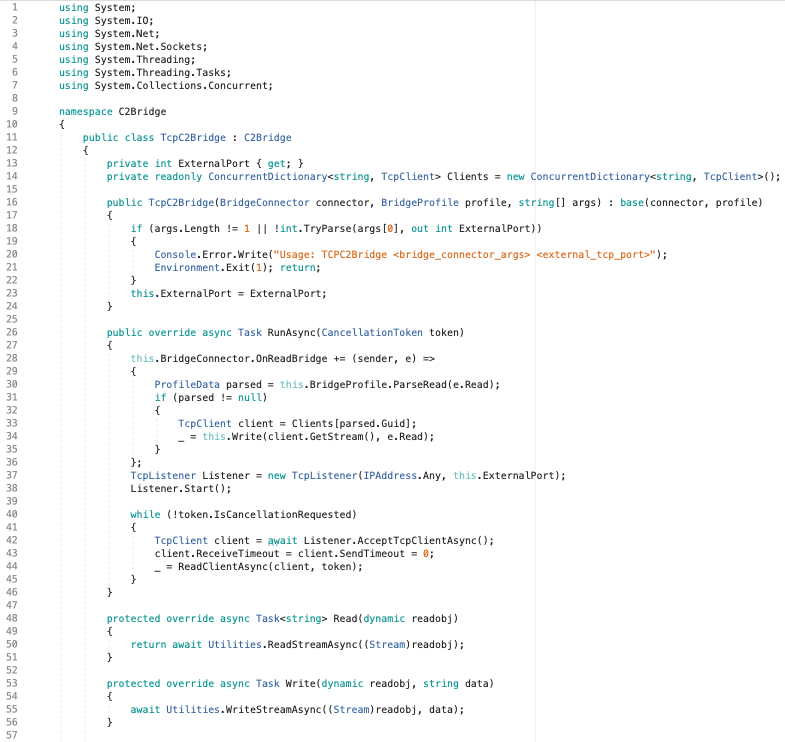
C2Bridge 프로젝트에는 이 인터페이스를 상속하는 예제 TCPC2Bridge 클래스가 포함되어 있으며, 구현 방법의 예를 제공합니다.
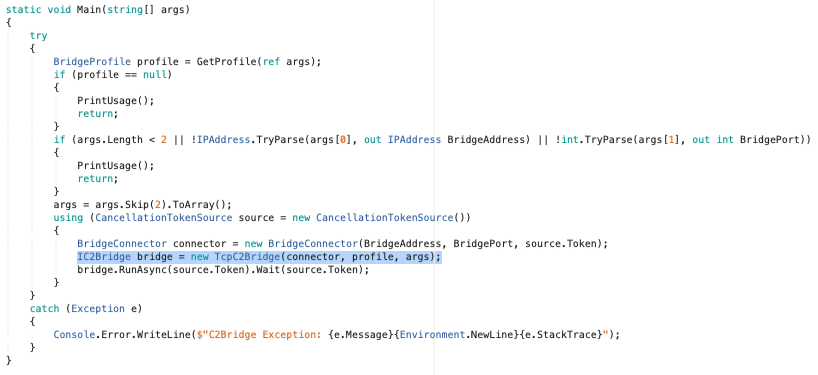
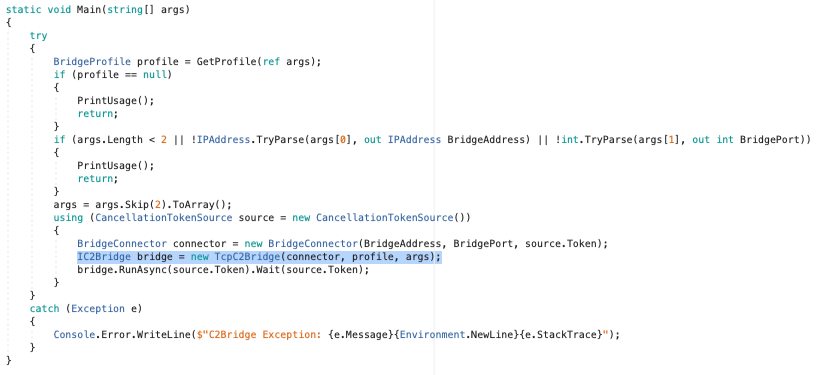
새 C2Bridge를 작성한 후에는 Main() 함수 내의 TCPC2Bridge 생성자 호출을 새 생성자로 대체할 수 있습니다:
추상 GetBridgeMessengerCode() 메서드는 실제로 C2Bridge 프로젝트 내 어디에서도 사용되지 않지만, C2Bridge와 임플란트를 연결하는 데 사용됩니다. 임플란트는 아웃바운드 C2Bridge에 읽고 쓸 수 있는 코드가 필요합니다. 이 코드는 특정 C2Bridge에 한정되며, 상속된 GetBridgeMessengerCode() 메서드 안에 배치되어야 합니다. C2Bridge를 활용하는 Covenant 사용자는 이 메서드에서 BridgeMessengerCode를 가져와 BridgeProfile 내에서 사용합니다.
C2Bridge를 활용하는 Covenant 사용자는 해당 C2Bridge에 특화된 BridgeProfile을 구성해야 합니다. Grunt 임플란트는 아웃바운드 C2Bridge에 읽고 쓰는 방법을 알아야 합니다. BridgeProfile.BridgeMessengerCode 속성은 임플란트에 배치될 코드를 나타내며, 아웃바운드 C2Bridge에 대한 읽기 및 쓰기를 담당합니다. 이 코드는 C2Bridge의 GetBridgeMessengerCode() 메서드에서 찾을 수 있습니다.
사용자는 완전히 새로운 BridgeProfile을 만들거나 올바른 BridgeMessengerCode로 DefaultBridgeProfile을 편집할 수 있습니다. 그러려면 리스너(listeners) 탐색 페이지로 이동하여 "Profiles" 탭을 선택하세요:
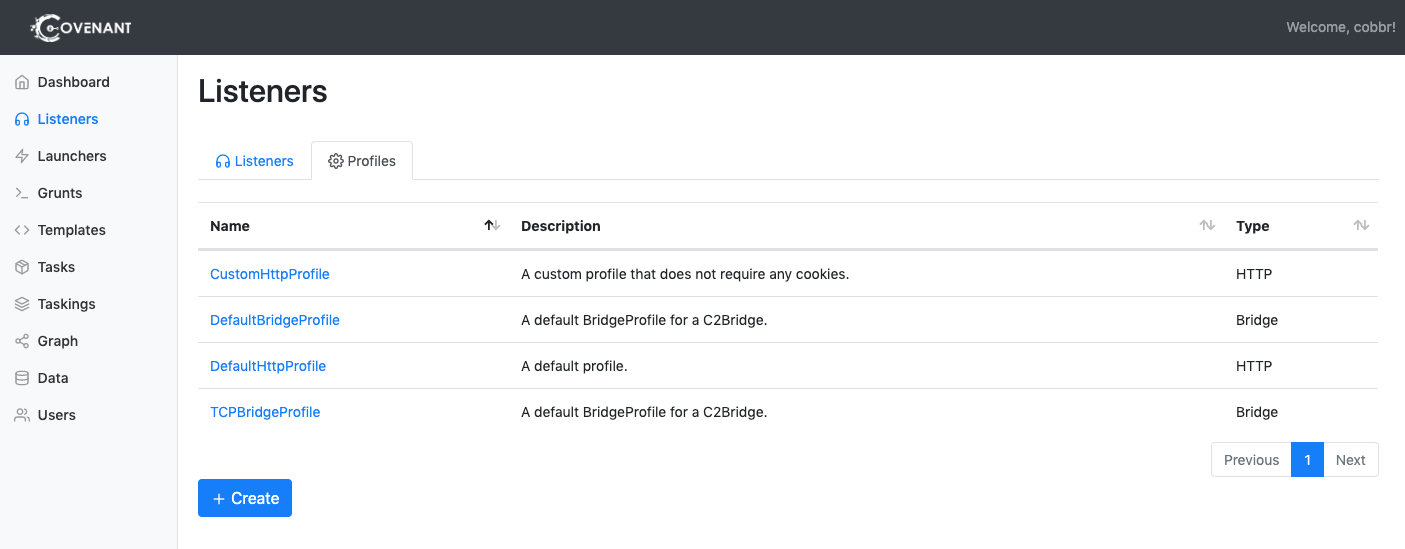
새 프로필을 만들려면 "Create" 버튼을 클릭하세요. 특정 프로필을 편집하려면 프로필 이름을 클릭하세요. 활성 리스너와 연결된 프로필은 편집할 수 없다는 점에 유의하세요.
"Create"를 클릭한 후 "BridgeProfile" 탭을 선택하세요:
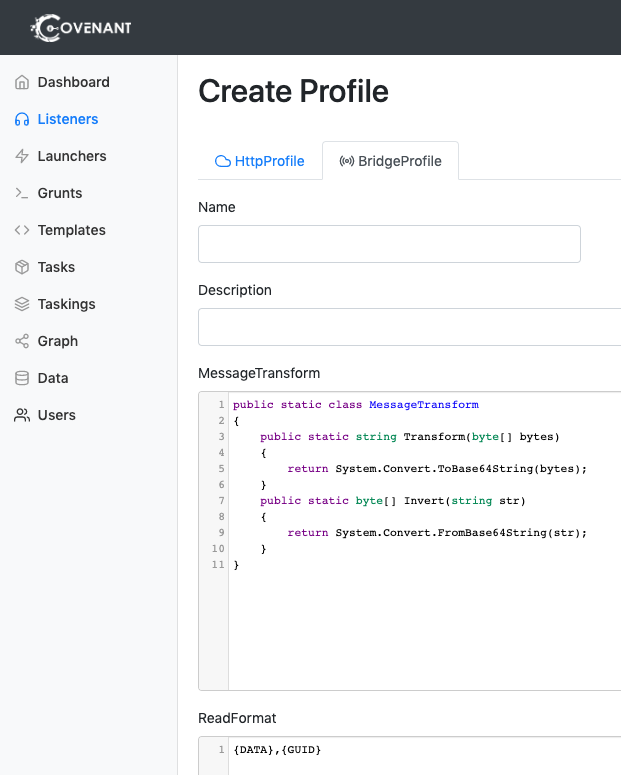
프로필을 편집하거나 만들 때 다음 옵션을 구성해야 합니다:
Name입니다. 알아보기 쉬운 이름을 선택하세요!Description입니다. 운영자가 읽고 프로필이 어떻게 작동하는지, 어떤 사용 사례에 이 프로필을 사용하는 것이 적절한지 쉽게 이해할 수 있는 철저한 설명이어야 합니다.MessageTransform은 ReadFormat 및 WriteFormat에 지정된 형식으로 배치되기 전에 통신 데이터가 변환되는 방식을 지정하는 고유한 방법입니다. MessageTransform은 public Transform 함수와 public Invert 함수를 포함하는 MessageTransform이라는 이름의 정적 C# 클래스여야 합니다. Transform 함수와 Invert 함수가 서로 대칭(즉, data == MessageTransform.Invert(MessageTransform.Transform(data)))인 한, 클래스는 원하는 어떤 방식으로든 데이터를 변환할 수 있습니다. MessageTransform 클래스는 크로스 플랫폼과 호환되어야 하며 Net40, Net35, NetCore21에서 컴파일되어야 합니다.ReadFormat은 Grunt가 C2Bridge에서 데이터를 읽을 때의 메시지 형식입니다. 형식에는 데이터와 Grunt GUID가 배치될 위치가 포함되어야 합니다. 데이터가 배치되어야 할 위치를 나타내려면 "{DATA}" 문자열을, GUID가 배치되어야 할 위치를 나타내려면 "{GUID}" 문자열을 포함하세요.WriteFormat은 Grunt가 C2Bridge에 데이터를 쓸 때의 메시지 형식입니다. 형식에는 데이터와 Grunt GUID가 배치될 위치가 포함되어야 합니다. 데이터가 배치되어야 할 위치를 나타내려면 "{DATA}" 문자열을, GUID가 배치되어야 할 위치를 나타내려면 "{GUID}" 문자열을 포함하세요.BridgeMessengerCode는 임플란트에 배치될 코드로, 아웃바운드 C2Bridge에 대한 읽기 및 쓰기를 담당합니다. 이 코드는 C2Bridge의 GetBridgeMessengerCode() 메서드에서 찾을 수 있습니다.