

해커를 위한 재귀적 인터넷 스캐너. 🧡
[](https://github.com/blacklanternsecurity/bbot)
[](https://www.python.org) [](https://github.com/blacklanternsecurity/bbot/blob/dev/LICENSE) [](https://pepy.tech/project/bbot) [](https://github.com/astral-sh/ruff) [](https://github.com/blacklanternsecurity/bbot/actions?query=workflow%3A"tests") [](https://codecov.io/gh/blacklanternsecurity/bbot) [](https://discord.com/invite/PZqkgxu5SA)
### **BEE·bot**은 [Spiderfoot](https://github.com/smicallef/spiderfoot)에서 영감을 받은 다목적 스캐너로, **Recon**(리콘), **Bug Bounties**(버그 바운티), **ASM**을 자동화하도록 제작되었습니다!
https://github.com/blacklanternsecurity/bbot/assets/20261699/e539e89b-92ea-46fa-b893-9cde94eebf81
_[VivaGraphJS](https://github.com/blacklanternsecurity/bbot-vivagraphjs)로 시각화한 실시간 BBOT 스캔_
## 설치
```bash
# stable version
pipx install bbot
# bleeding edge (dev branch)
pipx install --pip-args '\--pre' bbot
```
_[Docker](https://hub.docker.com/r/blacklanternsecurity/bbot)를 포함한 더 많은 설치 방법은 [Getting Started](https://www.blacklanternsecurity.com/bbot/Stable/)를 참조하세요_
> **2.x에서 업그레이드하시나요?** BBOT 3.0에는 CLI, 프리셋, 모듈, 이벤트 및 Python API에 대한 주요 변경 사항이 포함되어 있습니다. 업그레이드 전에 [2.x → 3.0 마이그레이션 가이드](https://www.blacklanternsecurity.com/bbot/Stable/migration/3.0_breaking_changes/)([소스](https://github.com/blacklanternsecurity/bbot/blob/stable/docs/migration/3.0_breaking_changes.md))를 확인하세요.
> **속도 팁:** BBOT의 DNS 리졸버([blastdns](https://github.com/blacklanternsecurity/blastdns))는 `/etc/resolv.conf`의 리졸버마다 여러 스레드를 생성합니다. 필터링되지 않은 리졸버를 더 추가하면 스캔 속도가 크게 빨라집니다. 자세한 내용은 [샘플 resolv.conf](https://github.com/blacklanternsecurity/bbot/blob/stable/docs/data/resolv-sample.conf)와 [팁과 요령](https://www.blacklanternsecurity.com/bbot/Stable/scanning/tips_and_tricks/#speed-up-scans-with-more-dns-resolvers)을 참조하세요.
## 예제 명령어
### 1) 서브도메인 파인더
패시브 API 소스와 타겟별 서브도메인 변형을 이용한 재귀적 DNS 무차별 대입(brute-force).
```bash
# find subdomains of evilcorp.com
bbot -t evilcorp.com -p subdomain-enum
# passive sources only
bbot -t evilcorp.com -p subdomain-enum -rf passive
```
<!-- BBOT SUBDOMAIN-ENUM PRESET EXPANDABLE -->
<details>
<summary><b><code>subdomain-enum.yml</code></b></summary>
```yaml
description: Enumerate subdomains via APIs, brute-force
flags:
# enable every module with the subdomain-enum flag
- subdomain-enum
output_modules:
# output unique subdomains to TXT file
- subdomains
config:
dns:
threads: 25
brute_threads: 1000
# put your API keys here
# modules:
# github:
# api_key: ""
# chaos:
# api_key: ""
# securitytrails:
# api_key: ""
```
</details>
<!-- END BBOT SUBDOMAIN-ENUM PRESET EXPANDABLE -->
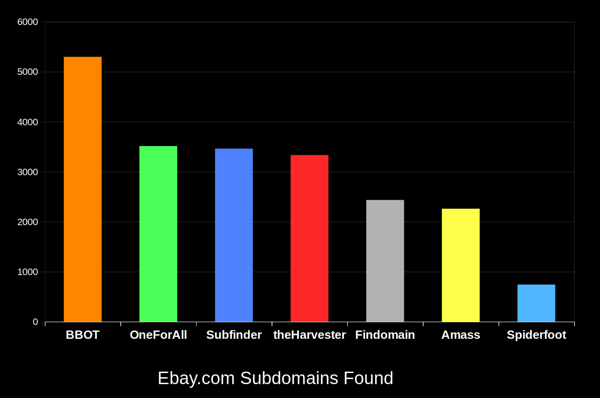
BBOT은 다른 도구보다 지속적으로 20-50% 더 많은 서브도메인을 찾아냅니다. 도메인이 클수록 그 차이는 더 커집니다. 이것이 어떻게 가능한지 알아보려면 [작동 방식](https://www.blacklanternsecurity.com/bbot/Stable/how_it_works/)을 참조하세요.
### 2) 웹 스파이더
```bash
# crawl evilcorp.com, extracting emails and other goodies
bbot -t evilcorp.com -p spider
```
<!-- BBOT SPIDER PRESET EXPANDABLE -->
<details>
<summary><b><code>spider.yml</code></b></summary>
```yaml
description: Recursive web spider
modules:
- http
blacklist:
# Prevent spider from invalidating sessions by logging out
- "RE:/.*(sign|log)[_-]?out"
config:
web:
# how many links to follow in a row
spider_distance: 2
# don't follow links whose directory depth is higher than 4
spider_depth: 4
# maximum number of links to follow per page
spider_links_per_page: 25
```
</details>
<!-- END BBOT SPIDER PRESET EXPANDABLE -->
### 3) 이메일 수집기
```bash
# quick email enum with free APIs + scraping
bbot -t evilcorp.com -p email-enum
# pair with subdomain enum + web spider for maximum yield
bbot -t evilcorp.com -p email-enum subdomain-enum spider
```
<!-- BBOT EMAIL-ENUM PRESET EXPANDABLE -->
<details>
<summary><b><code>email-enum.yml</code></b></summary>
```yaml
description: Enumerate email addresses from APIs, web crawling, etc.
flags:
- email-enum
output_modules:
- emails
```
</details>
<!-- END BBOT EMAIL-ENUM PRESET EXPANDABLE -->
### 4) 웹 스캐너
```bash
# run a light web scan against www.evilcorp.com
bbot -t www.evilcorp.com -p web
# run a heavy web scan against www.evilcorp.com
bbot -t www.evilcorp.com -p web-heavy
```
<!-- BBOT WEB PRESET EXPANDABLE -->
<details>
<summary><b><code>web.yml</code></b></summary>
```yaml
description: Quick web scan
include:
- iis-shortnames
flags:
- web
```
</details>
<!-- END BBOT WEB PRESET EXPANDABLE -->
<!-- BBOT WEB-HEAVY PRESET EXPANDABLE -->
<details>
<summary><b><code>web-heavy.yml</code></b></summary>
```yaml
description: Aggressive web scan
include:
# include the web preset
- web
flags:
- web-heavy
```
</details>
<!-- END BBOT WEB-HEAVY PRESET EXPANDABLE -->
### 5) 모든 것을 한꺼번에
```bash
# everything everywhere all at once
bbot -t evilcorp.com -p kitchen-sink
# roughly equivalent to:
bbot -t evilcorp.com -p subdomain-enum cloud-enum code-enum email-enum spider web paramminer webbrute web-screenshots
```
<!-- BBOT KITCHEN-SINK PRESET EXPANDABLE -->
<details>
<summary><b><code>kitchen-sink.yml</code></b></summary>
```yaml
description: Everything everywhere all at once
include:
- subdomain-enum
- cloud-enum
- code-enum
- email-enum
- spider
- web
- paramminer
- webbrute
- web-screenshots
- baddns-heavy
config:
modules:
dnsbrute:
recursive_mutations: true
dnscommonsrv:
recursive_mutations: true
webbrute:
avoid_wafs: False
wayback:
urls: True
parameters: True
archive: True
```
</details>
<!-- END BBOT KITCHEN-SINK PRESET EXPANDABLE -->
## 작동 방식
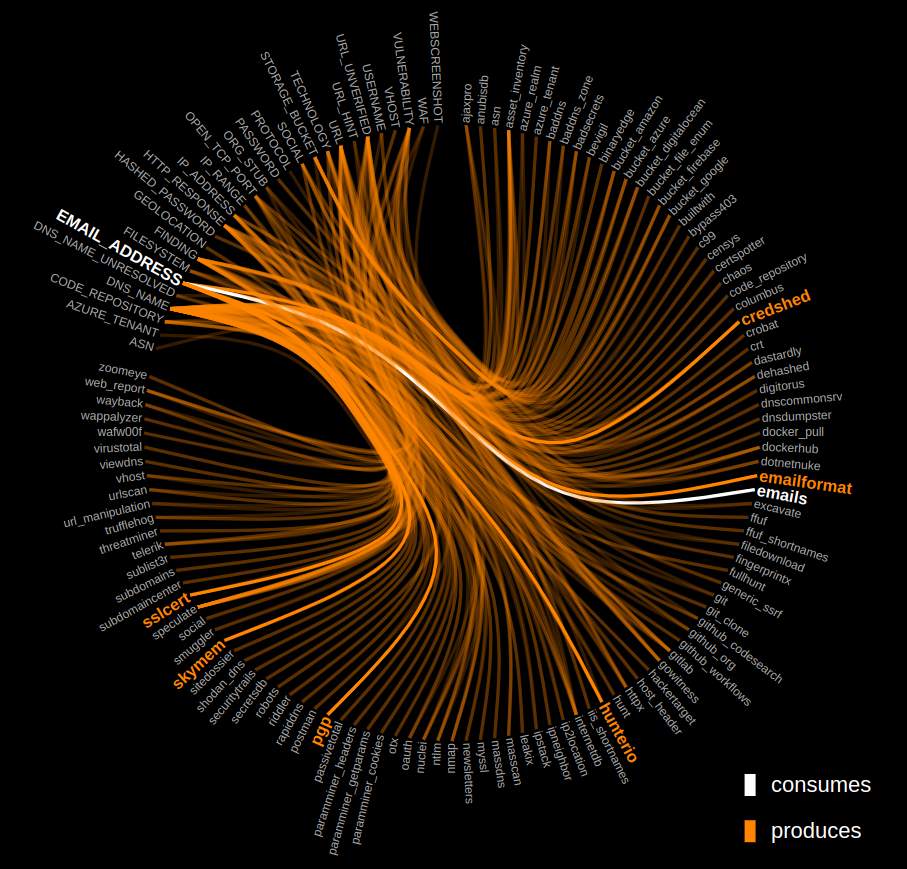
아래 그래프를 클릭하여 BBOT의 [내부 동작 방식](https://www.blacklanternsecurity.com/bbot/Stable/how_it_works/)을 살펴보세요.
[](https://www.blacklanternsecurity.com/bbot/Stable/how_it_works/)
## 출력 모듈
- [Neo4j](https://github.com/blacklanternsecurity/bbot/blob/stable/docs/scanning/output.md#neo4j)
- [Teams](https://github.com/blacklanternsecurity/bbot/blob/stable/docs/scanning/output.md#teams)
- [Discord](https://github.com/blacklanternsecurity/bbot/blob/stable/docs/scanning/output.md#discord)
- [Slack](https://github.com/blacklanternsecurity/bbot/blob/stable/docs/scanning/output.md#slack)
- [Postgres](https://github.com/blacklanternsecurity/bbot/blob/stable/docs/scanning/output.md#postgres)
- [MySQL](https://github.com/blacklanternsecurity/bbot/blob/stable/docs/scanning/output.md#mysql)
- [SQLite](https://github.com/blacklanternsecurity/bbot/blob/stable/docs/scanning/output.md#sqlite)
- [Splunk](https://github.com/blacklanternsecurity/bbot/blob/stable/docs/scanning/output.md#splunk)
- [Elasticsearch](https://github.com/blacklanternsecurity/bbot/blob/stable/docs/scanning/output.md#elasticsearch)
- [CSV](https://github.com/blacklanternsecurity/bbot/blob/stable/docs/scanning/output.md#csv)
- [JSON](https://github.com/blacklanternsecurity/bbot/blob/stable/docs/scanning/output.md#json)
- [HTTP](https://github.com/blacklanternsecurity/bbot/blob/stable/docs/scanning/output.md#http)
- [Websocket](https://github.com/blacklanternsecurity/bbot/blob/stable/docs/scanning/output.md#websocket)
...그리고 [더 보기](https://github.com/blacklanternsecurity/bbot/blob/stable/docs/scanning/output.md)!
## Python 라이브러리로서의 BBOT
#### 동기(Synchronous)
```python
from bbot.scanner import Scanner
if __name__ == "__main__":
scan = Scanner("evilcorp.com", presets=["subdomain-enum"])
for event in scan.start():
print(event)
```
#### 비동기(Asynchronous)
```python
from bbot.scanner import Scanner
async def main():
scan = Scanner("evilcorp.com", presets=["subdomain-enum"])
async for event in scan.async_start():
print(event.json())
if __name__ == "__main__":
import asyncio
asyncio.run(main())
```
<details>
<summary><b>보기: 이 사악한 디스코드 봇</b></summary>
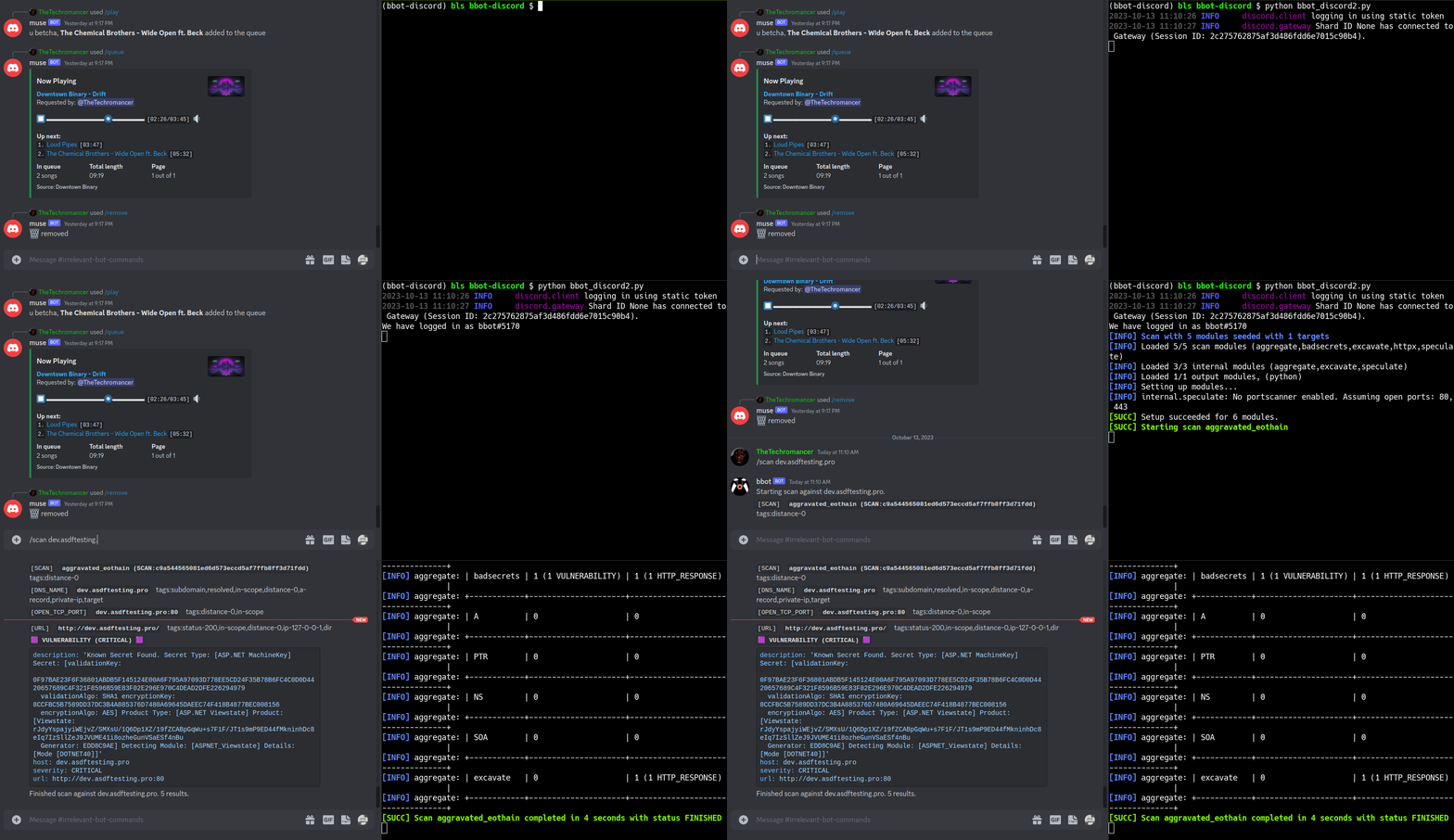
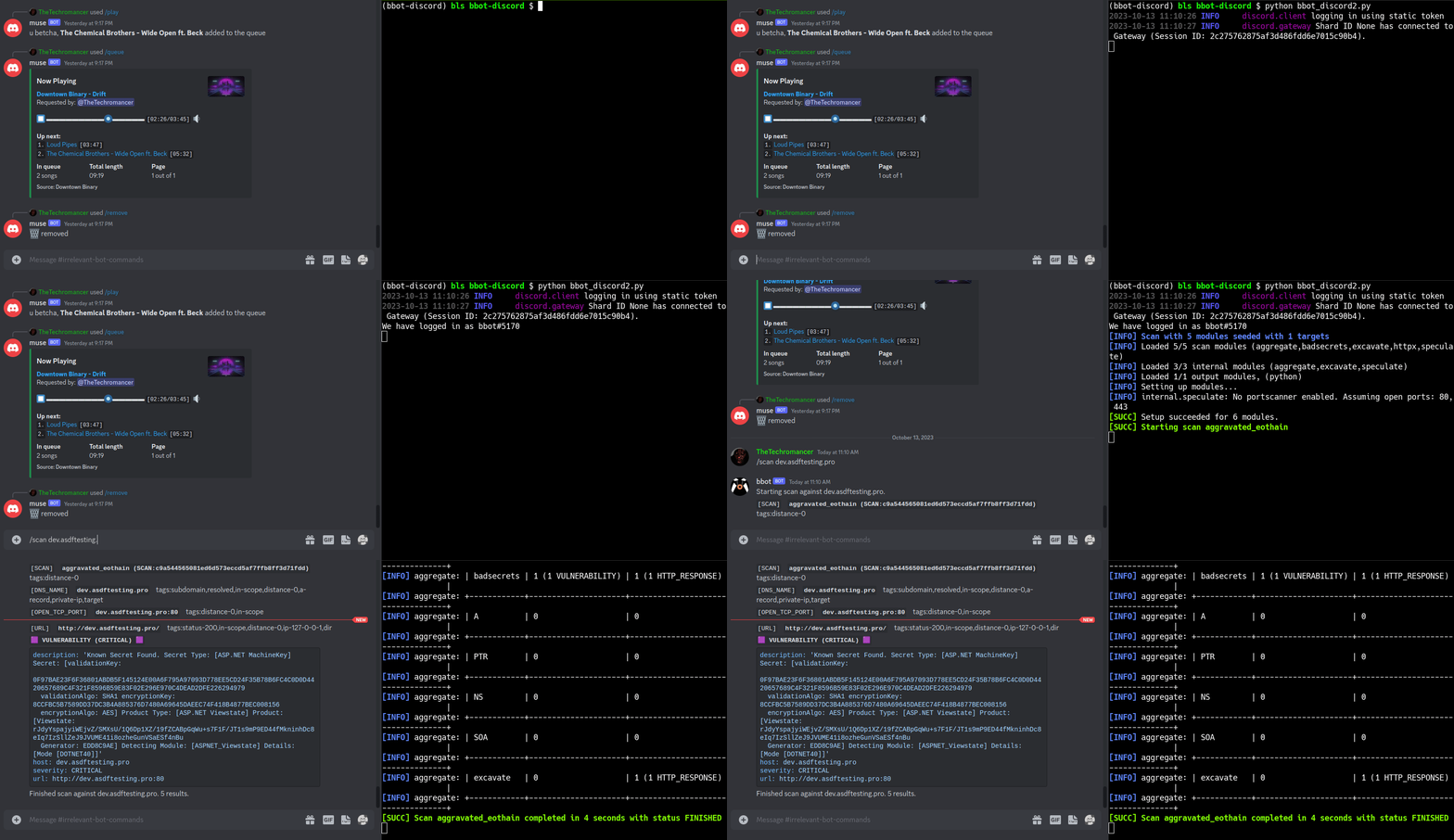
`/scan` 명령에 응답하는 [BBOT 디스코드 봇](https://www.blacklanternsecurity.com/bbot/Stable/dev/#discord-bot-example)입니다. 디스코드 서버에서 편안하게 인터넷을 스캔하세요!
</details>
## 기능 개요
- 다중 타겟 지원
- 웹 스크린샷
- 공격적 웹 모듈 모음
- NLP 기반 서브도메인 변형
- Neo4j(및 기타) 기본 출력
- Ansible을 통한 자동 의존성 설치
- 사용자 정의 YARA 규칙으로 전체 공격 표면 검색
- Python API + 개발자 문서
## 타겟
BBOT은 `-t`를 통해 무제한의 타겟을 허용합니다. 타겟은 명령줄에서 직접 지정하거나 파일로 지정할 수 있습니다(둘 다 가능!):
```bash
bbot -t evilcorp.com evilcorp.org 1.2.3.0/24 -p subdomain-enum
```
타겟은 다음 중 하나가 될 수 있습니다:
- DNS 이름 (`evilcorp.com`)
- IP 주소 (`1.2.3.4`)
- IP 범위 (`1.2.3.0/24`)
- 열린 TCP 포트 (`192.168.0.1:80`)
- URL (`https://www.evilcorp.com`)
- 이메일 주소 (`[email protected]`)
- 조직 (`ORG:evilcorp`)
- 사용자 이름 (`USER:bobsmith`)
- 파일시스템 (`FILESYSTEM:/tmp/asdf`)
- 모바일 앱 (`MOBILE_APP:https://play.google.com/store/apps/details?id=com.evilcorp.app`)
자세한 내용은 [타겟](https://www.blacklanternsecurity.com/bbot/Stable/scanning/#targets-t)을 참조하세요. BBOT이 범위(scope)를 처리하는 방법을 알아보려면 [범위](https://www.blacklanternsecurity.com/bbot/Stable/scanning/#scope)를 참조하세요.
## API 키
Amass나 Subfinder와 유사하게, BBOT은 SecurityTrails 등 다양한 서드파티 서비스의 API 키를 지원합니다.
일반적인 방법은 **`~/.config/bbot/secrets.yml`** 에 API 키를 입력하는 것입니다. 여러 API 키를 사용할 수 있습니다:
```yaml
modules:
shodan_dns:
api_key: 4f41243847da693a4f356c0486114bc6
c99:
# multiple API keys
api_key:
- 21a270d5f59c9b05813a72bb41707266
- ea8f243d9885cf8ce9876a580224fd3c
- 5bc6ed268ab6488270e496d3183a1a27
virustotal:
api_key: dd5f0eee2e4a99b71a939bded450b246
securitytrails:
api_key: d9a05c3fd9a514497713c54b4455d0b0
```
원한다면 명령줄에서도 지정할 수 있습니다:
```bash
bbot -c modules.virustotal.api_key=dd5f0eee2e4a99b71a939bded450b246
```
자세한 내용은 [구성](https://www.blacklanternsecurity.com/bbot/Stable/scanning/configuration/)을 참조하세요.
## 모듈, 플래그 등의 전체 목록
- [모듈](https://www.blacklanternsecurity.com/bbot/Stable/modules/list_of_modules/) 전체 목록.
- [플래그](https://www.blacklanternsecurity.com/bbot/Stable/scanning/#list-of-flags) 전체 목록.
- [프리셋](https://www.blacklanternsecurity.com/bbot/Stable/scanning/presets_list/) 전체 목록.
- [전역 구성 옵션](https://www.blacklanternsecurity.com/bbot/Stable/scanning/configuration/#global-config-options) 전체 목록.
- [모듈 구성 옵션](https://www.blacklanternsecurity.com/bbot/Stable/scanning/configuration/#module-config-options) 전체 목록.
## 문서
<!-- BBOT DOCS TOC -->
- **사용자 매뉴얼**
- **기본**
- [시작하기](https://www.blacklanternsecurity.com/bbot/Stable/)
- [작동 방식](https://www.blacklanternsecurity.com/bbot/Stable/how_it_works)
- [다른 도구와의 비교](https://www.blacklanternsecurity.com/bbot/Stable/comparison)
- **스캐닝**
- [스캐닝 개요](https://www.blacklanternsecurity.com/bbot/Stable/scanning/)
- **프리셋**
- [개요](https://www.blacklanternsecurity.com/bbot/Stable/scanning/presets)
- [프리셋 목록](https://www.blacklanternsecurity.com/bbot/Stable/scanning/presets_list)
- [이벤트](https://www.blacklanternsecurity.com/bbot/Stable/scanning/events)
- [출력](https://www.blacklanternsecurity.com/bbot/Stable/scanning/output)
- [팁과 요령](https://www.blacklanternsecurity.com/bbot/Stable/scanning/tips_and_tricks)
- [고급 사용법](https://www.blacklanternsecurity.com/bbot/Stable/scanning/advanced)
- [구성](https://www.blacklanternsecurity.com/bbot/Stable/scanning/configuration)
- [스캔 검증](https://www.blacklanternsecurity.com/bbot/Stable/scanning/scan_sanity)
- **모듈**
- [모듈 목록](https://www.blacklanternsecurity.com/bbot/Stable/modules/list_of_modules)
- [내부 모듈](https://www.blacklanternsecurity.com/bbot/Stable/modules/internal_modules)
- [Nuclei](https://www.blacklanternsecurity.com/bbot/Stable/modules/nuclei)
- [Wayback](https://www.blacklanternsecurity.com/bbot/Stable/modules/wayback)
- [사용자 정의 YARA 규칙](https://www.blacklanternsecurity.com/bbot/Stable/modules/custom_yara_rules)
- [Lightfuzz](https://www.blacklanternsecurity.com/bbot/Stable/modules/lightfuzz)
- [Webbrute](https://www.blacklanternsecurity.com/bbot/Stable/modules/webbrute)
- **마이그레이션**
- [2.x → 3.0 주요 변경 사항](https://www.blacklanternsecurity.com/bbot/Stable/migration/3.0_breaking_changes)
- **기타**
- [기여](https://www.blacklanternsecurity.com/bbot/Stable/contribution)
- [릴리스 기록](https://www.blacklanternsecurity.com/bbot/Stable/release_history)
- [문제 해결](https://www.blacklanternsecurity.com/bbot/Stable/troubleshooting)
- **개발자 매뉴얼**
- [개발 개요](https://www.blacklanternsecurity.com/bbot/Stable/dev/)
- [개발 환경 설정](https://www.blacklanternsecurity.com/bbot/Stable/dev/dev_environment)
- [핵심 의존성](https://www.blacklanternsecurity.com/bbot/Stable/dev/core_dependencies)
- [BBOT 내부 아키텍처](https://www.blacklanternsecurity.com/bbot/Stable/dev/architecture)
- [BBOT 모듈 작성 방법](https://www.blacklanternsecurity.com/bbot/Stable/dev/module_howto)
- [프리셋 검증 및 점검](https://www.blacklanternsecurity.com/bbot/Stable/dev/preset_validation)
- [단위 테스트](https://www.blacklanternsecurity.com/bbot/Stable/dev/tests)
- [디스코드 봇 예제](https://www.blacklanternsecurity.com/bbot/Stable/dev/discord_bot)
- **코드 참조**
- [Scanner](https://www.blacklanternsecurity.com/bbot/Stable/dev/scanner)
- [Presets](https://www.blacklanternsecurity.com/bbot/Stable/dev/presets)
- [Event](https://www.blacklanternsecurity.com/bbot/Stable/dev/event)
- [Target](https://www.blacklanternsecurity.com/bbot/Stable/dev/target)
- [BaseModule](https://www.blacklanternsecurity.com/bbot/Stable/dev/basemodule)
- [BBOTCore](https://www.blacklanternsecurity.com/bbot/Stable/dev/core)
- **헬퍼**
- [개요](https://www.blacklanternsecurity.com/bbot/Stable/dev/helpers/)
- [명령](https://www.blacklanternsecurity.com/bbot/Stable/dev/helpers/command)
- [DNS](https://www.blacklanternsecurity.com/bbot/Stable/dev/helpers/dns)
- [Interactsh](https://www.blacklanternsecurity.com/bbot/Stable/dev/helpers/interactsh)
- [기타](https://www.blacklanternsecurity.com/bbot/Stable/dev/helpers/misc)
- [Web](https://www.blacklanternsecurity.com/bbot/Stable/dev/helpers/web)
- [워드 클라우드](https://www.blacklanternsecurity.com/bbot/Stable/dev/helpers/wordcloud)
<!-- END BBOT DOCS TOC -->
## 기여
최고의 BBOT 모듈 중 상당수는 커뮤니티에서 작성되었습니다. BBOT은 지속적으로 개선되고 있으며, 나날이 더 강력해지고 있습니다!
코드뿐만 아니라 아이디어도 환영합니다! 새로운 기능에 대한 아이디어가 있다면 [Discussions](https://github.com/blacklanternsecurity/bbot/discussions)에서 알려주세요. 직접 참여하고 싶다면 [기여](https://www.blacklanternsecurity.com/bbot/Stable/contribution/)를 참조하세요. 여기에서 BBOT 모듈 작성 방법에 대한 설정 지침과 간단한 튜토리얼을 찾을 수 있습니다. 또한 방대한 [개발자 문서](https://www.blacklanternsecurity.com/bbot/Stable/dev/)도 제공됩니다.
BBOT에 기여해 주신 놀라운 분들께 감사드립니다! :heart:
<p align="center">
<a href="https://github.com/blacklanternsecurity/bbot/graphs/contributors">
<img src="https://contrib.rocks/image?repo=blacklanternsecurity/bbot&max=500">
</a>
</p>
특별히 감사드립니다:
- BBOT을 만든 @TheTechromancer
- [badsecrets](https://github.com/blacklanternsecurity/badsecrets)와 [baddns](https://github.com/blacklanternsecurity/baddns)를 포함한 BBOT의 웹 해킹 기능에 많은 작업을 기여한 @liquidsec
- Spiderfoot을 만든 Steve Micallef (@smicallef)
- Neo4j와 Ansible 전문 지식을 제공한 @kerrymilan
- 멋진 코드 수집 계열 모듈을 만든 @domwhewell-sage
- 철저한 테스트를 수행한 @aconite33와 @amiremami
- bbot Pypi 저장소의 소유권을 양도해 주신 Aleksei Kornev (@alekseiko) <3