
Skip to content
KitploitKITPLOIT
도구블로그
제출
도구블로그
제출

해킹, 침투 테스트 및 사이버 보안 도구를 당신의 보안 무기고에!

Kitploit은 해킹, 사이버 보안 및 침투 테스트 도구 디렉토리입니다. 최신 프로젝트 업데이트를 발견하여 취약점을 찾고, 시스템을 분석하고, 테스트를 자동화하고, 보안을 강화하세요.

··피드·문의·개인정보·© 2026 Kitploit

도구 디렉토리

카테고리

모든 카테고리 보기
Loading categories
Next.js_exploit_CVE-2024-34351 — Next.js의 SSRF(서버 측 요청 위조) 취약점(CVE-2024-34351)에 대한 교육용 데모로, 단계별 악용 및 완화 예제가 포함됩니다. | Kitploit
도구/GitHubGitHub/avergnaud/next.js_exploit_cve-2024-34351
Vulnerability AnalysisWeb Application ExploitationWeb SecurityLearning & EducationLabs & Practice
GitHubavergnaud/next.js_exploit_cve-2024-34351

Next.js_exploit_CVE-2024-34351

Next.js의 SSRF(서버 측 요청 위조) 취약점(CVE-2024-34351)에 대한 교육용 데모로, 단계별 악용 및 완화 예제가 포함됩니다.

저장소 보기

인기

모두 보기 →

커뮤니티에서 가장 많이 사용되는 도구를 찾아보세요.

모든 도구 탐색

도구 컬렉션을 둘러보세요

모든 도구 보기 →
12년 전아직 검토되지 않음
공유

csr-rsc-ssg-isr-ssr-ssrf

이 저장소는 하나 이상의 미트업을 발표하기 위한 자료로 사용될 수 있습니다. 과정은 다음과 같습니다...

  • "CSR" Client Side Rendering: 표준 SPA 라이브러리로서의 React
  • "RSC" React Server Components: 오직 서버 측에서만 실행되는 React 컴포넌트
  • "SSG" Static Site Generation: 빌드 시점에 React 컴포넌트 실행
  • "ISR" Incremental Static Regeneration: 요청 시 컴포넌트 재생성
  • "SSR" Server Side Rendering: 서버 측 사전 렌더링 후 클라이언트 측 실행 (hydration)
  • "SSRF" Server Side Request Forgery: 최근 Next.JS에서 수정된 보안 취약점

이 작업은 주로 두 가지 출처에 기반합니다:

  • https://demystifying-rsc.vercel.app/
  • https://www.assetnote.io/resources/research/digging-for-ssrf-in-nextjs-apps

mind map

CSR Client Side Rendering

1-csr-load-data vanilla react SPA loading data

mind map CSR

[!IMPORTANT] CSR(Client-Side Rendering): React 코드가 브라우저로 전달되어 DOM에 삽입될 콘텐츠를 생성합니다.
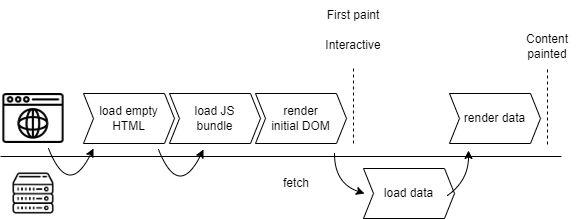
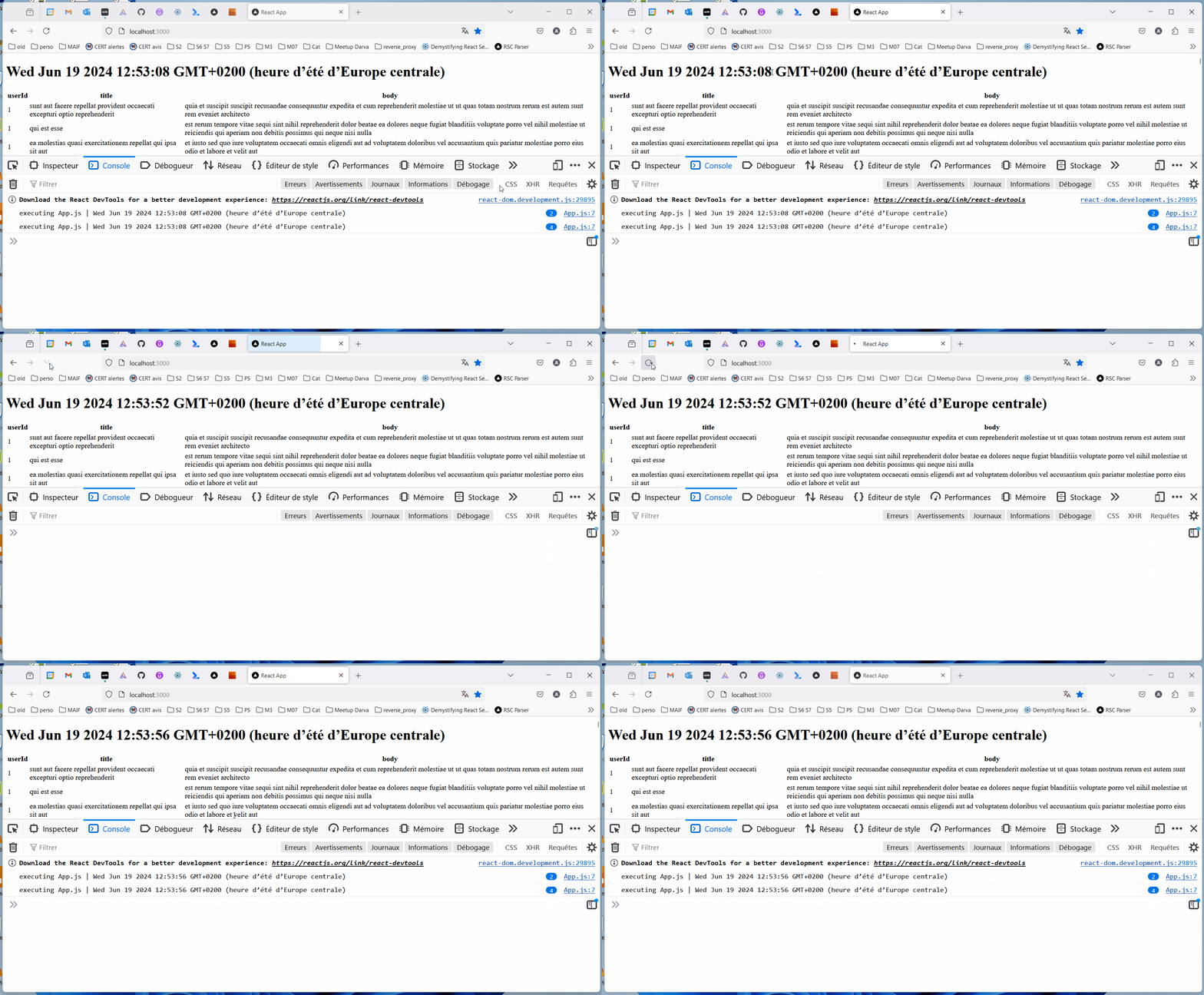
client side rendering loading data

데모

root@kitploit:~
cd 1-csr-load-data
npm start

CSR load data gif

2-csr-router vanilla react SPA routing

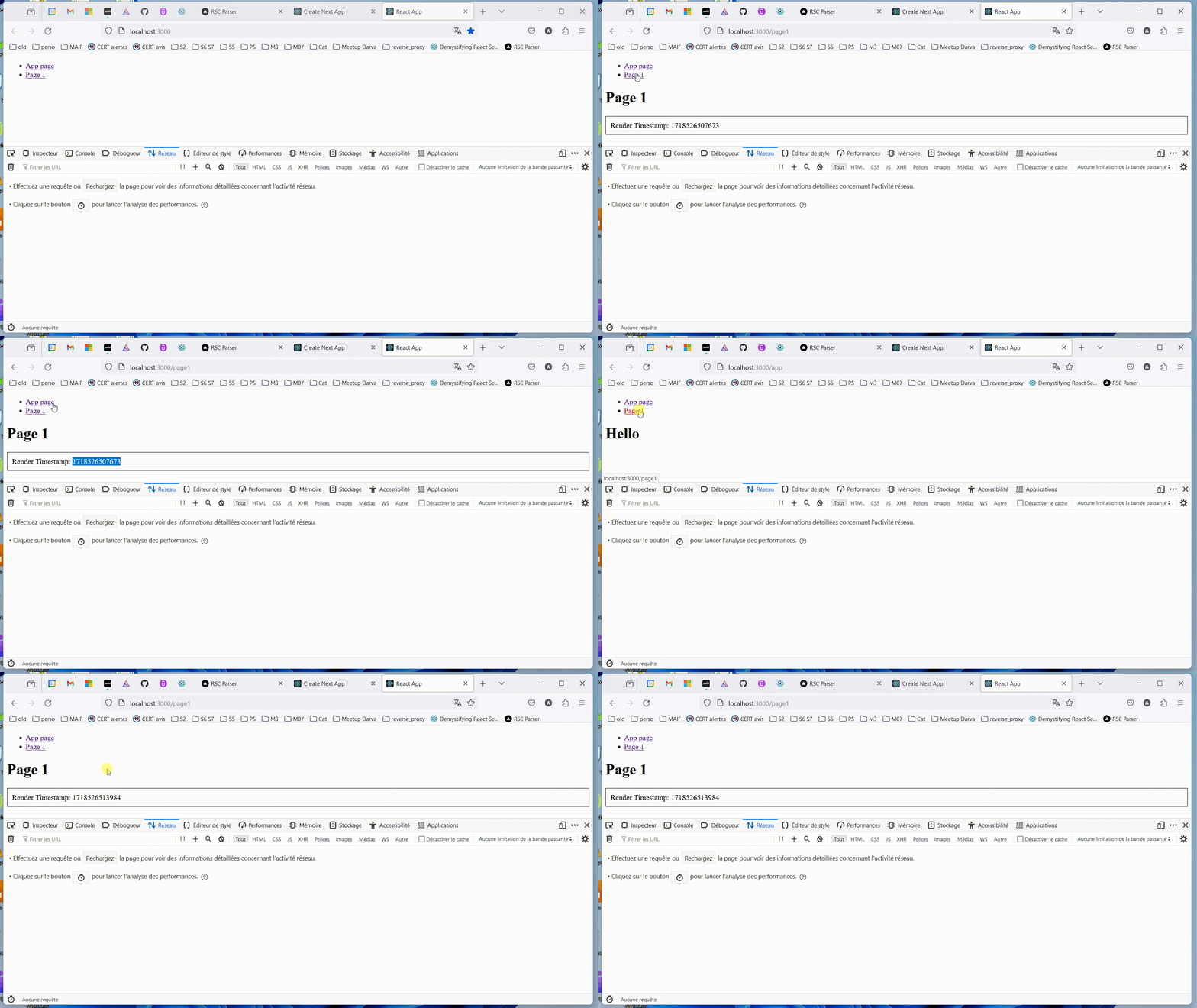
[!IMPORTANT] 페이지가 처음 로드된 후, 동일한 웹사이트 내에서 다른 페이지로 이동할 때 JavaScript를 사용하여 전체 페이지를 새로 고치지 않고 페이지의 일부를 다시 렌더링합니다.

데모

root@kitploit:~
cd 2-csr-router
npm start

client side rendering routing

RSC React Server Components

3-rsc-load-data React Server Components (Next.js impl) loading data

mind map CSR

[!IMPORTANT] 브라우저가 아닌 서버에서 만 실행되도록 작성된 React 컴포넌트.
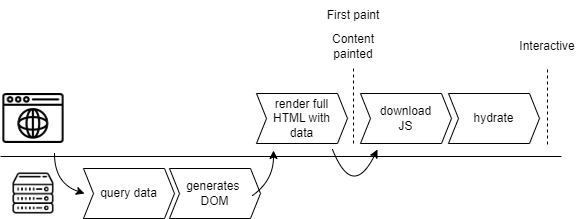
React Server Components loading data

데모

root@kitploit:~
cd 3-rsc-load-data
npm run build
npm run start
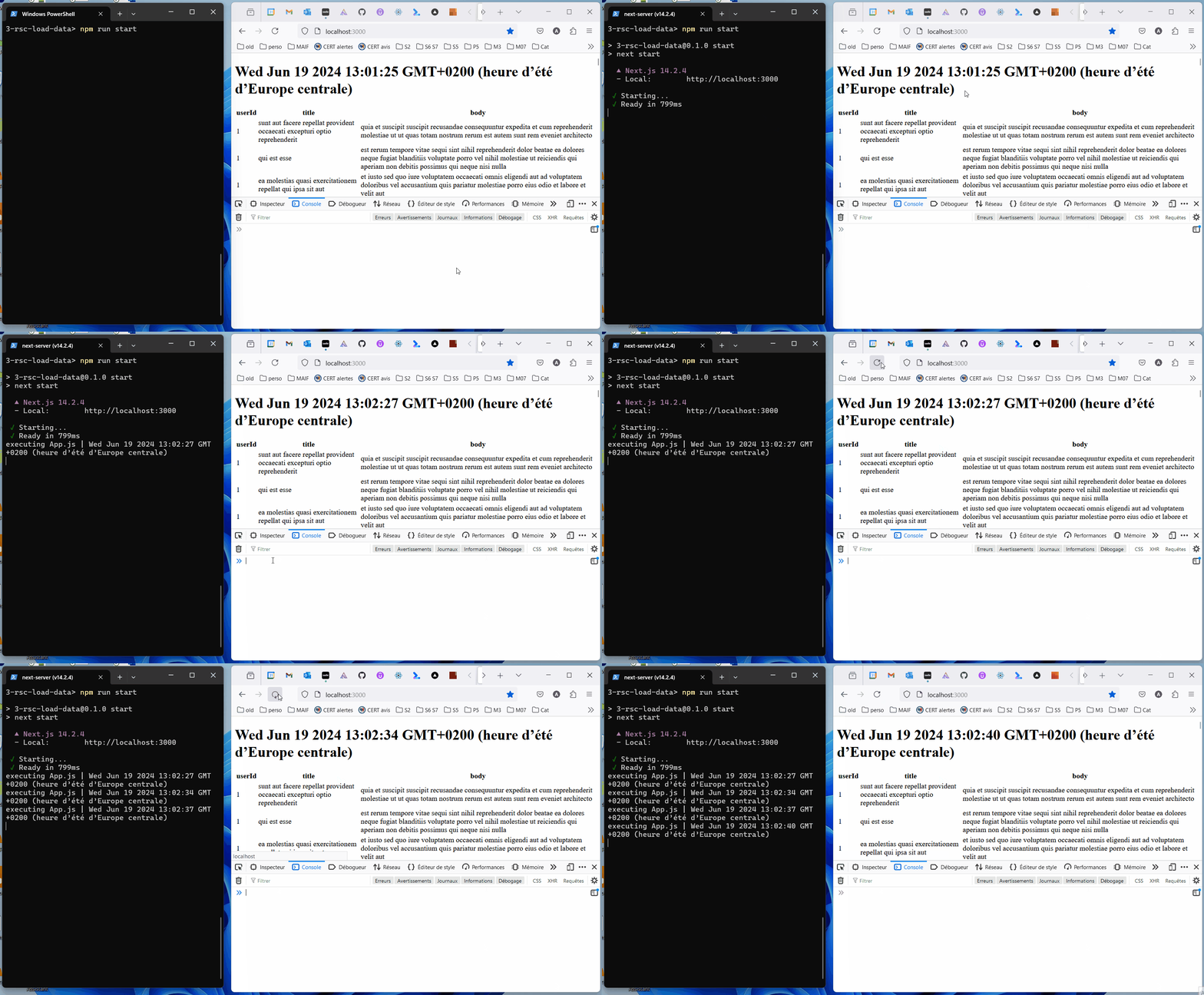
client side rendering routing

4-rsc-router React Server Components (Next.js impl) routing

mind map CSR

[!IMPORTANT] 컴포넌트가 서버에서만 실행됩니다. 기본 동작은 정적 렌더링입니다: 컴포넌트가 빌드 시점에 실행됩니다.

데모

root@kitploit:~
cd 4-rsc-router
npm run build
npm run start
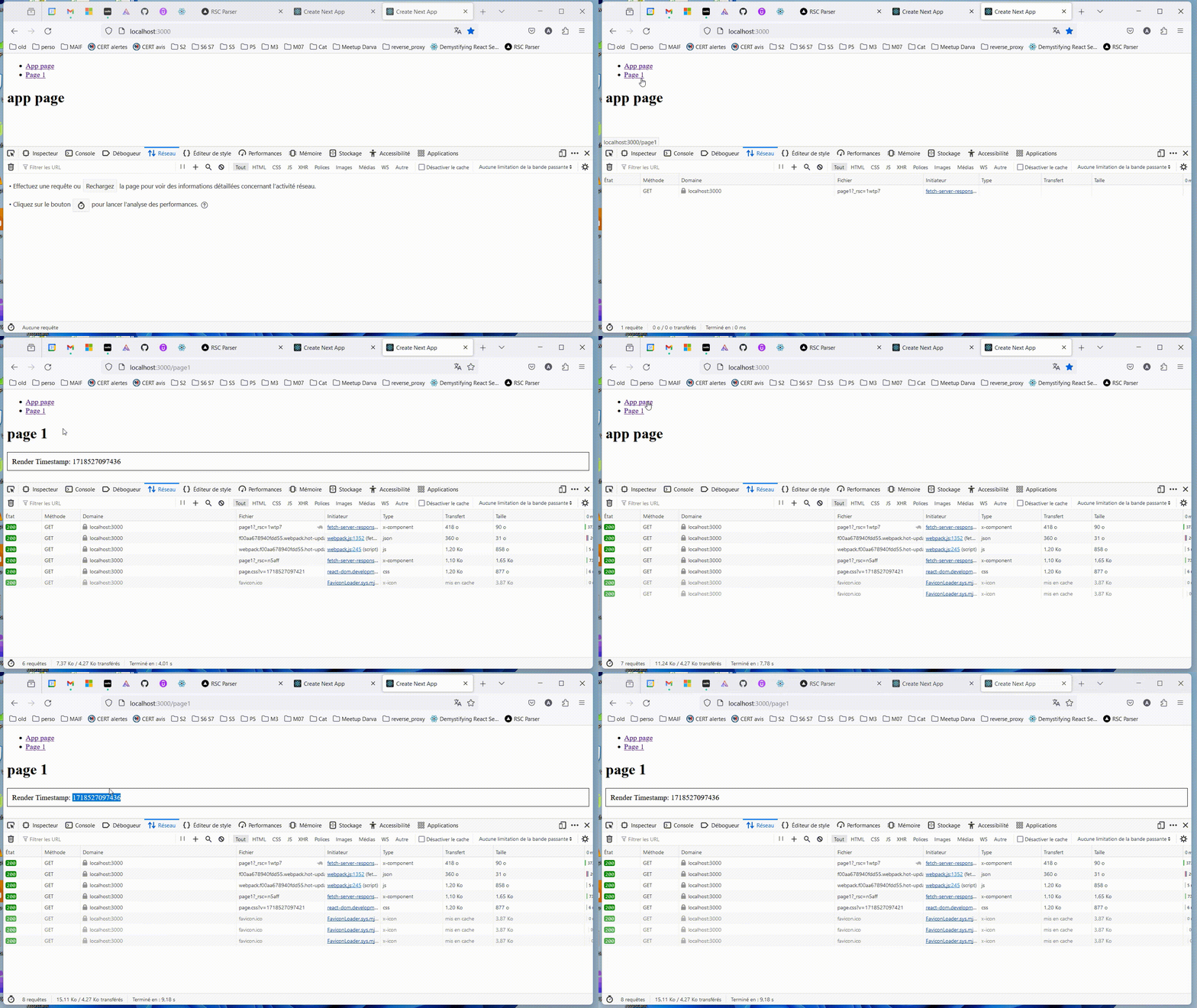
React server components routing

5-SSR SSR Server Side Rendering

mind map SSR

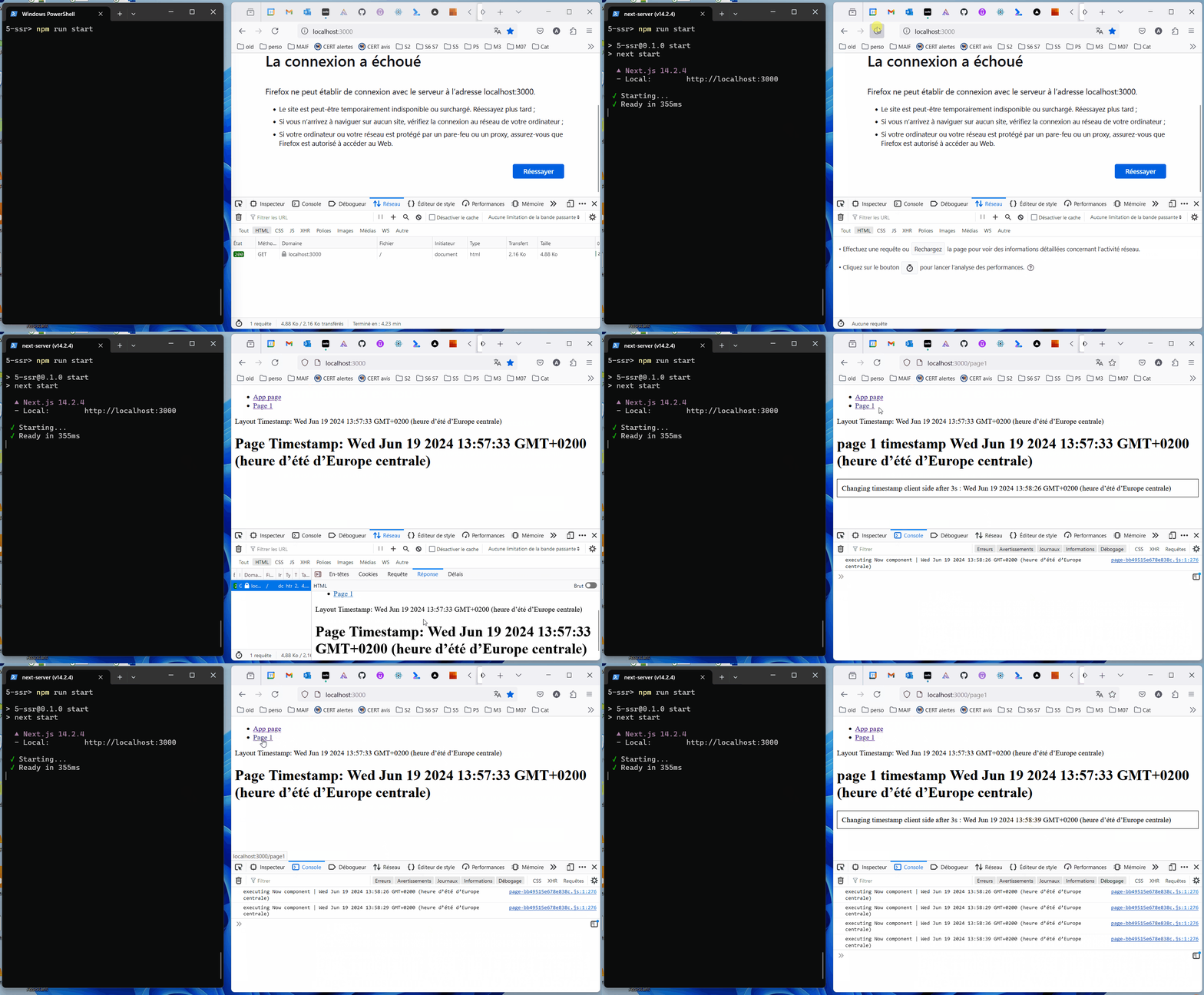
[!IMPORTANT] SSR은 클라이언트 컴포넌트를 서버에서 사전 렌더링하는 것을 의미합니다. React 코드가 요청 시점에 실행됩니다. 결과는 향후 요청을 위해 캐시될 수 있습니다.

모범 사례: 가능한 한 컴포넌트 트리 아래쪽에 'use client'; 컴포넌트를 정의하세요.

https://nextjs.org/docs/app/building-your-application/rendering/composition-patterns#moving-client-components-down-the-tree

Hydration

[!IMPORTANT] "React에서 'hydration'은 React가 서버 환경에서 이미 렌더링된 기존 HTML에 '연결'되는 방식입니다. hydration 중에 React는 기존 마크업에 이벤트 리스너를 연결하고 클라이언트에서 앱 렌더링을 인계받으려고 시도합니다. 완전히 React로 구축된 앱에서는 일반적으로 시작 시 전체 앱에 대해 하나의 '루트'만 한 번 hydration합니다."

https://react.dev/reference/react-dom/client/hydrateRoot

https://www.gatsbyjs.com/docs/conceptual/partial-hydration/

데모

root@kitploit:~
cd 5-ssr
npm run build
npm run start

SSR

6-pages-router-ssg (Next.js impl)

mind map page router SSG

[!IMPORTANT] pages 라우터를 사용한 SSG(Static Site Generation): 애플리케이션을 빌드할 때 React 코드가 실행되며, 생성된 출력은 정적입니다.

데모

root@kitploit:~
cd 6-pages-router-ssg
npm run build
npm run start

7-pages-router-isr (Next.js impl)

mind map page router ISR

[!IMPORTANT] ISR(pages 라우터 사용): "Next.js를 사용하면 사이트를 구축한 후 정적 페이지를 생성하거나 업데이트할 수 있습니다. ISR(Incremental Static Regeneration)을 사용하면 전체 사이트를 다시 빌드할 필요 없이 페이지 단위로 정적 생성을 사용할 수 있습니다. ISR을 사용하면 수백만 개의 페이지로 확장하면서도 정적의 이점을 유지할 수 있습니다."

데모

root@kitploit:~
cd 7-pages-router-isr
npm run build
npm run start

ISR이 필요한 이유?

"요청 시 데이터가 오래될(stale) 수 있습니다"

https://vercel.com/blog/nextjs-server-side-rendering-vs-static-generation

Server actions

https://react.dev/reference/rsc/server-actions

SSRF (NextJS v14.1.1에서 수정됨)

SSRF 정의

...

이유?

  • 취약한 서버에 접근할 수 있지만 대상 서버에 직접 접근할 수 없는 경우(DMZ, FireWall 등)
  • 자신의 출처를 숨기면서 요청을 실행하려는 경우
  • ...

데모 8-ssrf-14.1.0

컨텍스트

SSRF A

https://www.assetnote.io/resources/research/digging-for-ssrf-in-nextjs-apps

목표

SSRF B, objectif

CVE-2024-34351 악용 조건

  • 14.1.1 미만 버전의 Next.JS 기반 애플리케이션
  • redirect 함수 사용 (절대 경로 포함). 데모에서는 addTodo.js: redirect(/blog/${inputValue});

redirect 함수 작동 방식

출처: https://www.assetnote.io/resources/research/digging-for-ssrf-in-nextjs-apps

  • Next.JS redirect 함수는 브라우저에 HTTP 302 응답을 반환하지 않습니다.

Next.JS는 서버 측에서 요청을 실행한 후 결과를 브라우저에 반환합니다:

  • 요청을 실행하려면 Next.JS가 호출할 URL을 구성해야 합니다. 데모에서 addTodo.js: redirect('/blog/123'); 함수는 URL http://207.154.209.99/blog/123을 구성합니다. 이 URL을 구성하기 위해 Next.JS는 초기 요청의 HTTP 헤더에서 호스트 207.154.209.99를 가져옵니다.
  • Next.JS는 먼저 HTTP HEAD로 URL을 요청합니다.
  • 응답이 Content-Type: text/x-component 헤더를 반환하면 Next.JS는 URL을 HTTP GET으로 요청합니다.

SSRF C, intro

악용

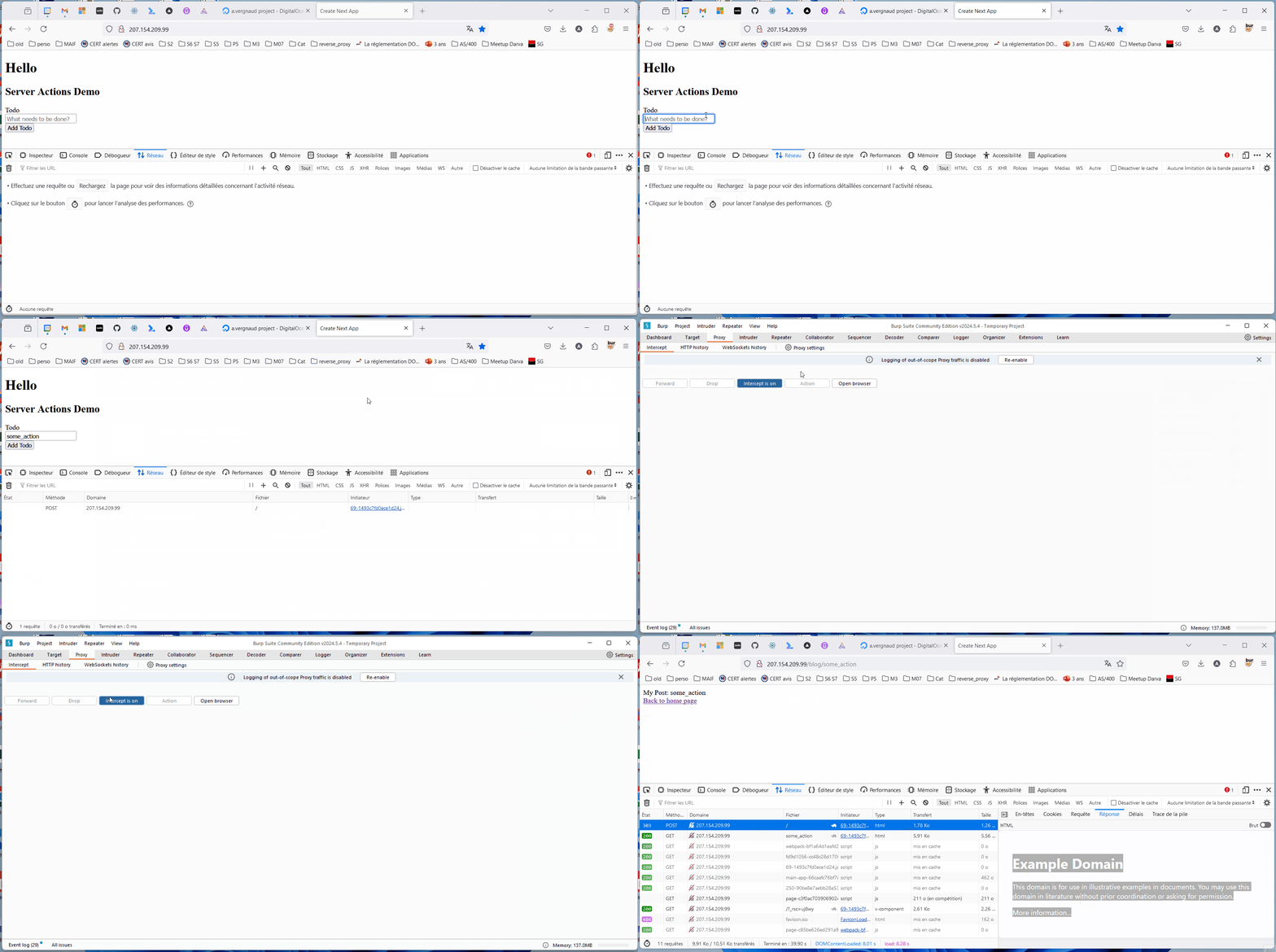
대상 서버에서 SSRF를 발생시키려면 다른 서버를 실행해야 합니다:

  • 모든 경로(query path)에서 수신 대기
  • 모든 HEAD 요청에 대해 HTTP 200과 Content-Type: text/x-component 헤더 반환
  • 모든 GET 요청에 대해 대상 서버로 HTTP 302 반환

SSRF D, exploit

CSR load data gif

8-ssrf-14.1.0의 취약점 수정

해결책 1 (영구적이지 않음): 호스트를 강제하는 nginx 설정

/etc/nginx/sites-available/nextjs에서

이전:

root@kitploit:~
server {
  listen 80 default_server;
  location / {
    proxy_pass http://localhost:3000;
    proxy_http_version 1.1;
    proxy_set_header Upgrade $http_upgrade;
    proxy_set_header Connection 'upgrade';
    proxy_set_header Host $host;
    proxy_cache_bypass $http_upgrade;
  }
}

이후:

root@kitploit:~
server {
  listen 80;
  server_name 207.154.209.99;
  location / {
    proxy_pass http://localhost:3000;
    proxy_set_header Host 207.154.209.99;
    proxy_http_version 1.1;
    proxy_set_header Upgrade $http_upgrade;
    proxy_set_header Connection 'upgrade';
    proxy_set_header Host $host;
    proxy_cache_bypass $http_upgrade;
  }
}

부작용 위험...

https://nginxtutorials.com/nginx-proxy_set_header-directive/

해결책 2: Next.js 업데이트

https://github.com/vercel/next.js/security/advisories/GHSA-fr5h-rqp8-mj6g

Notes

"Extra attributes from the server"

https://stackoverflow.com/questions/75337953/what-causes-nextjs-warning-extra-attributes-from-the-server-data-new-gr-c-s-c

"getStaticProps" is not supported in app/. Read more: https://nextjs.org/docs/app/building-your-application/data-fetching

https://nextjs.org/docs/app/building-your-application/upgrading/app-router-migration#static-site-generation-getstaticprops

create-next-app

https://nextjs.org/docs/app/building-your-application/upgrading/app-router-migration#step-4-migrating-pages

app 디렉토리의 페이지는 기본적으로 서버 컴포넌트입니다. 이는 페이지가 클라이언트 컴포넌트인 pages 디렉토리와 다릅니다.

Next.js 13으로 업그레이드할 때 새 App Router를 사용할 필요는 없습니다. 두 디렉토리에서 모두 작동하는 새 기능과 함께 pages를 계속 사용할 수 있습니다.

성능

다양한 솔루션의 로딩 성능을 비교하려면 console.log에 웹 코어 바이탈 메트릭을 추가할 수 있습니다.

https://web.dev/articles/fcp?hl=fr

기타 출처 / 참고 자료

https://rsc-parser.vercel.app/

https://stackoverflow.com/questions/76325862/what-is-the-difference-between-react-server-components-rsc-and-server-side-ren

https://github.com/reactjs/server-components-demo?tab=readme-ov-file#should-i-use-this-demo-for-benchmarks

https://github.com/reactjs/rfcs/blob/main/text/0188-server-components.md#does-this-replace-ssr

https://www.youtube.com/watch?v=jEJEFAc8tSI

App 라우터를 사용하는 ISR?

https://nextjs.org/docs/pages/building-your-application/data-fetching/incremental-static-regeneration

Next.js App Router에서는 가져온 모든 데이터가 기본적으로 정적이며, 빌드 시점에 렌더링됩니다. 그러나 이는 쉽게 변경할 수 있습니다. Next.js는 캐싱 및 재검증 규칙에 유연성을 제공하기 위해 fetch 옵션 객체를 확장합니다. fetch 요청에 {next: {revalidate: number}} 옵션을 사용하여 설정된 간격이나 백엔드 변경 시 정적 데이터를 새로 고칠 수 있으며(Incremental Static Regeneration), 동적 데이터(서버 측 렌더링)를 위해서는 {cache: 'no-store'} 옵션을 전달할 수 있습니다.

https://www.telerik.com/blogs/current-state-react-server-components-guide-perplexed

https://react.dev/blog/2023/03/22/react-labs-what-we-have-been-working-on-march-2023#react-server-components

https://github.com/reactjs/server-components-demo

https://dev.to/vteacher/let-s-make-a-web-application-with-react-server-components-5dmg

https://react.dev/blog/2024/04/25/react-19

https://react.dev/reference/rsc/server-components

https://www.youtube.com/watch?v=ePAPd9qzGyM

https://www.joshwcomeau.com/react/server-components/

https://nextjs.org/docs/app/building-your-application/rendering/server-components#server-rendering-strategies

https://nextjs.org/docs/pages/building-your-application/rendering/static-site-generation

https://nextjs.org/docs/pages/building-your-application/data-fetching/get-static-props

https://react.dev/reference/rsc/server-components#server-components-without-a-server

도구 다운로드