 alexbakker/log4shell-tools
최근 log4j의 취약점(CVE-2021-44228 및 CVE-2021-45046)에 영향을 받는 애플리케이션이 있는지 확인하는 테스트를 실행하는 도구


__log4shell.tools__는 최근 log4j의 취약점(CVE-2021-44228 및 CVE-2021-45046)에 영향을 받는지 테스트를 실행할 수 있는 도구입니다.
이것은 https://log4shell.alexbakker.me를 실행하는 코드입니다. 코드를 검사하거나 자신의 환경에서 인스턴스를 실행하려면 올바른 위치에 오셨습니다.
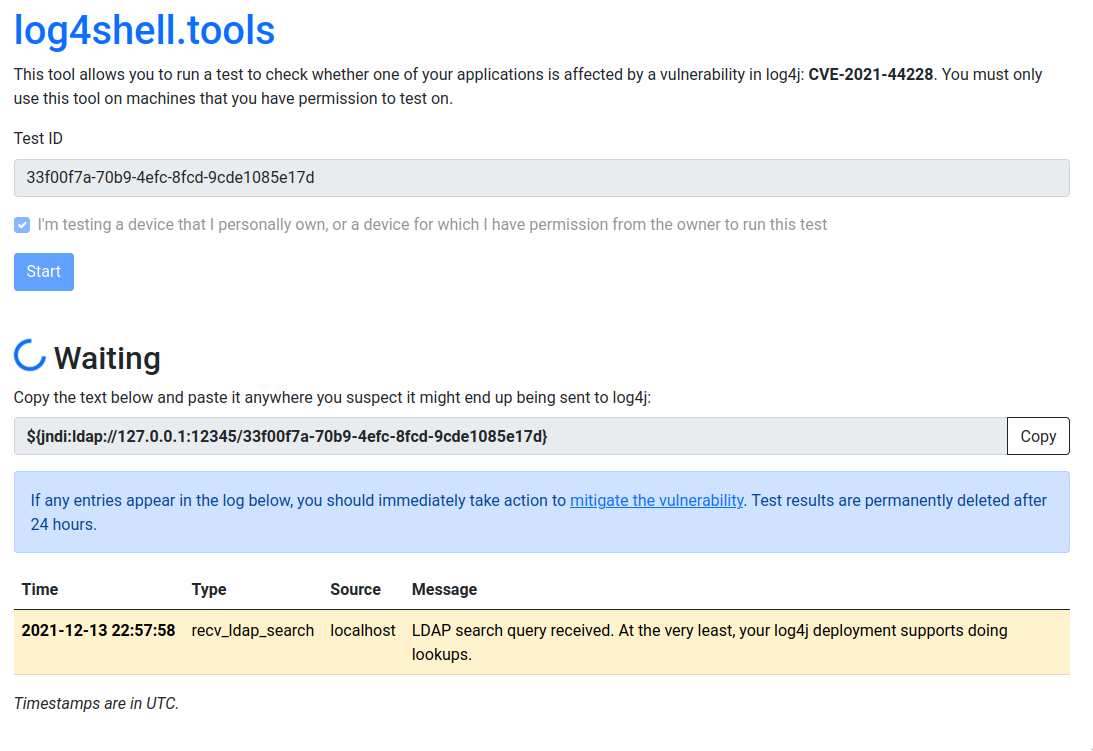
이 도구는 테스트용 고유 ID를 생성합니다. 시작을 클릭하면 다음과 같은 텍스트가 생성됩니다: ${jndi:ldap://*.dns.log4shell.tools:12345/*}. 이 텍스트를 복사하여 log4j를 통해 전달될 가능성이 있는 곳에 붙여넣으세요. 예: 검색 상자, 양식 필드 또는 HTTP 헤더.
오래된 버전의 log4j가 이 문자열을 보면, __*.dns.log4shell.tools__의 IP 주소를 얻기 위해 DNS 조회를 수행합니다. 이런 일이 발생하면 정보 유출에 대한 취약성의 첫 번째 신호로 간주됩니다. 그 다음, __log4shell.tools:12345__에 LDAP 검색 요청을 시도합니다. 도구는 Java 클래스 설명과 함께 이를 얻을 수 있는 URL로 응답합니다. log4j는 클래스 파일을 가져오려고 시도할 수도 있습니다. 도구는 404를 반환하고 테스트를 종료합니다.
이 도구는 Go 1.16에서 테스트되었습니다. Go(또는 최신 버전)가 설치되어 있는지 확인하고 다음 명령을 실행하세요:
go install github.com/alexbakker/log4shell-tools/cmd/log4shell-tools-server
바이너리는 $GOPATH/bin에서 사용할 수 있습니다.
이 도구는 단일 바이너리로 컴파일되므로, 실행만 하면 log4shell.tools 인스턴스를 자체 호스팅할 수 있습니다. 네트워크의 다른 머신에서 접근 가능하게 하려면 몇 가지 플래그를 전달하여 루프백 인터페이스에서만 수신 대기하지 않도록 해야 합니다. 인터넷에 노출하는 경우 HTTP 서버 앞에 리버스 프록시를 두는 것이 좋습니다. DNS 옵션은 지금은 무시하세요. 간단한 내부 배포에는 필요하지 않습니다.
전체 플래그 목록을 보려면 log4shell-tools-server -h를 실행하세요:
Usage of ./log4shell-tools-server:

This tool only listens on 127.0.0.1 by default. Pass the flags below to customize for your environment.

  -dns-a string
    	the IPv4 address to respond with to any A record queries for 'dns-zone' (default "127.0.0.1")
  -dns-aaaa string
    	the IPv6 address to respond with to any AAAA record queries for 'dns-zone' (default "::1")
  -dns-addr string
    	listening address for the DNS server (default "127.0.0.1:12346")
  -dns-enable
    	enable the DNS server
  -dns-zone string
    	DNS zone that is forwarded to the tool's DNS server (example: "dns.log4shell.tools")
  -http-addr string
    	listening address for the HTTP server (default "127.0.0.1:8001")
  -http-addr-external string
    	address where the HTTP server can be reached externally (default "127.0.0.1:8001")
  -ldap-addr string
    	listening address for the LDAP server (default "127.0.0.1:12345")
  -ldap-addr-external string
    	address where the LDAP server can be reached externally (default "127.0.0.1:12345")
  -ldap-http-proto string
    	the HTTP protocol to use in the payload URL that the LDAP server responds with (default "http")
  -storage string
    	storage connection URI (either memory:// or a postgres:// URI (default "memory://")
  -test-timeout int
    	test timeout in minutes (default 30)
기본적으로 이 도구는 메모리 내 스토리지 백엔드를 사용합니다. 재시작 후에도 테스트 결과를 유지해야 하는 경우 Postgres 백엔드를 사용하는 것이 좋습니다.
DNS 서버는 기본적으로 비활성화되어 있습니다. 현재 구성 옵션이 https://log4shell.alexbakker.me의 설정에 매우 특화되어 있기 때문입니다. 이를 더 일반화하는 데 도움을 주고 싶다면 알려주세요.
