 alessandroz/lazagneforensic
덤프 파일에서 Windows 비밀번호 복호화

==
__라자뉴 프로젝트__가 돌아왔습니다 !!!
LaZagne는 CryptUnprotectData라는 내부 Windows 함수를 사용하여 사용자 비밀번호를 복호화합니다. 이 API는 피해자 사용자 세션에서 호출되어야 하며, 그렇지 않으면 작동하지 않습니다. 컴퓨터가 시작되지 않은 경우(오프라인으로 마운트된 디스크에서 분석이 수행될 때) 또는 원격 호스트에 바이너리를 드롭하고 싶지 않은 경우, 비밀번호를 검색할 수 없습니다.
LaZagneForensic은 이 문제를 해결하기 위해 만들어졌습니다. 이 작업은 Jean-Michel Picod와 Elie Bursztein이 DPAPICK에서, 그리고 Francesco Picasso가 Windows DPAPI laboratory에서 수행한 멋진 작업에서 영감을 받았습니다.
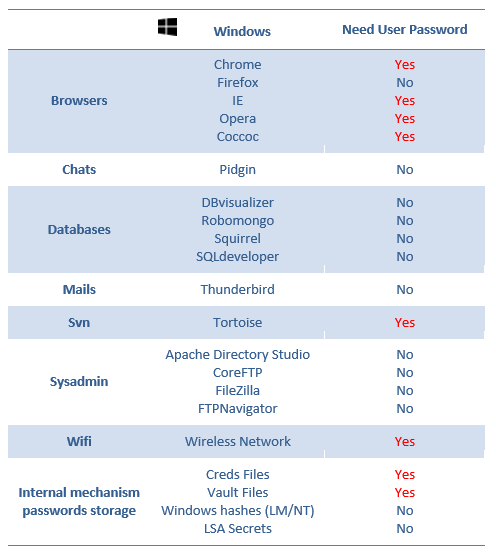
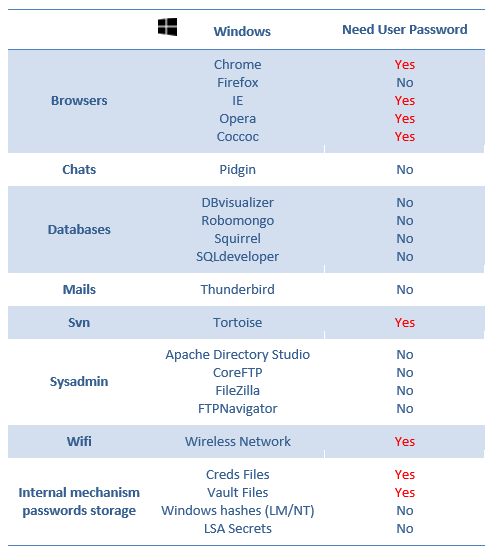
참고: 주요 문제는 이러한 비밀번호를 복호화하려면 사용자 Windows 비밀번호가 필요하다는 것입니다.
sudo wget https://bootstrap.pypa.io/pip/2.7/get-pip.py
sudo python2 ./get-pip.py
sudo apt install python2-dev
pip2 install markerlib
pip2 install distribute
pip2 install -r requirements.txt
PS C:\Users\test\Desktop> Import-Module .\dump.ps1
PS C:\Users\test\Desktop> Dump
Folder dump created successfully !
python dump.py
python laZagneForensic.py all -remote /tmp/dump -password 'ZapataVive'
python laZagneForensic.py all -remote /tmp/dump
test:~$ ls /tmp/disk/
total 769M
drwxr-xr-x 2 root root    0 févr.  1 14:05 ProgramData
-rwxr-xr-x 1 root root 256M févr.  1 14:05 swapfile.sys
-rwxr-xr-x 1 root root 512M févr.  1 14:05 pagefile.sys
drwxr-xr-x 2 root root    0 janv. 31 00:35 System Volume Information
dr-xr-xr-x 2 root root    0 janv. 26 10:17 Program Files (x86)
dr-xr-xr-x 2 root root    0 janv. 25 18:13 Program Files
drwxr-xr-x 2 root root    0 janv. 19 10:09 Windows
drwxr-xr-x 2 root root    0 janv. 16 15:52 Homeware
drwxr-xr-x 2 root root    0 janv.  9 17:33 PerfLogs
drwxr-xr-x 2 root root    0 nov.  22 20:37 Recovery
drwxr-xr-x 2 root root 4,0K nov.  22 20:31 Documents and Settings
dr-xr-xr-x 2 root root    0 nov.  22 20:31 Users
python laZagneForensic.py all -local /tmp/disk -password 'ZapataVive'
python laZagneForensic.py all -local /tmp/disk
참고: __-v__는 자세한 모드, __-vv__는 디버그 모드에 사용합니다.
참고: 아래 이미지를 확인하여 사용자 Windows 비밀번호 없이 복호화할 수 있는 비밀번호를 이해하세요. 발견된 모든 자격 증명은 사용자가 동일한 비밀번호를 재사용하는 경우 Windows 비밀번호로 테스트됩니다.
기부를 통해 제 작업을 지원해 주시면 감사하겠습니다:
| Alessandro ZANNI |
|---|
| [email protected] |
