 aalex954/whisperpair-poc-tool
CVE-2025-36911: Fast Pair Pairing Mode Bypass 취약점을 식별하고 시연하는 보안 연구 도구

CVE-2025-36911과 Google Fast Pair 생태계의 보안 취약점에 대한 심층 분석
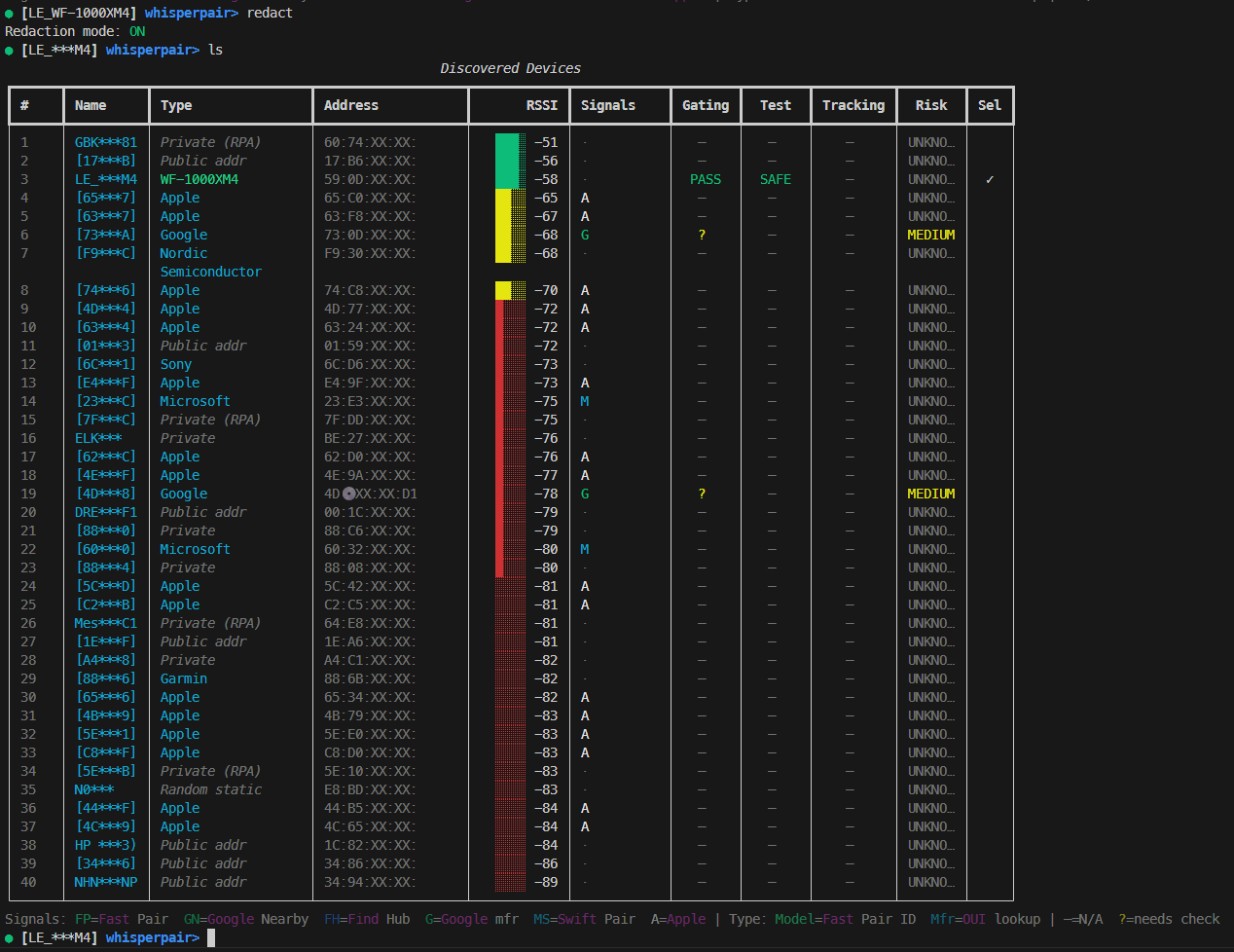
Google Fast Pair는 Bluetooth 페어링을 매끄럽게 만들기 위해 설계되었습니다. 알림을 탭하면 연결되는 방식입니다. 하지만 이 매끄러운 경험이 보안상의 책임이 되면 어떻게 될까요? WhisperPair-PoC-Tool은 수백만 개의 Bluetooth 액세서리에 영향을 미치는 두 가지 중요한 취약점 클래스, 즉 무단 페어링 우회와 Find My Device 네트워크 추적 악용을 드러내는 보안 연구 도구입니다.
이 글은 WhisperPair-PoC-Tool의 기술적 내부 구조, 이 도구가 악용하는 프로토콜 취약점, 그리고 이것이 Bluetooth 액세서리 생태계에 의미하는 바를 자세히 설명합니다.
Google Fast Pair 사양은 명시적으로 다음과 같이 명시합니다:
"선택적 공개 키(Public Key) 필드가 있는 경우: 기기가 페어링 모드가 아니면 쓰기를 무시하고 종료합니다."
이것이 중요한 보안 관문입니다. 기기는 사용자가 명시적으로 페어링 모드로 전환한 경우(일반적으로 버튼을 길게 누름)에만 키 기반 페어링(Key-Based Pairing) 요청에 응답해야 합니다. 이는 사용자 의도를 보장하므로, 상대방이 착용 중인 이어버드에 페어링할 수 없습니다.
문제점: 많은 제조사가 이 검사를 완전히 건너뜁니다. 페어링 모드 상태와 관계없이 페어링 요청을 처리하여 다음과 같은 문제를 가능하게 합니다:
Google의 Find My Device 네트워크(FMDN)는 크라우드소싱된 Android 기기 네트워크를 통해 Bluetooth 액세서리를 추적할 수 있게 해줍니다. 이를 위해서는 기기를 Google 계정에 연결하는 16바이트 대칭 키인 **계정 키(Account Key)**가 필요합니다.
문제점: Account Key 특성(characteristic)은 인증 없이 쓰기를 허용하는 경우가 많습니다:
악용에 대해 자세히 살펴보기 전에, 정상적인 Fast Pair 흐름을 이해해 봅시다:
┌─────────────────────────────────────────────────────────────┐
│                    BLE Advertisement                         │
├─────────────────────────────────────────────────────────────┤
│  Service UUID: 0xFE2C (Fast Pair)                           │
│  Service Data:                                               │
│    [Pairing Mode]   → 3 bytes: Model ID only                │
│    [Not Pairing]    → 4+ bytes: 0x00 + Account Key Filter   │
└─────────────────────────────────────────────────────────────┘
광고 형식은 페어링 상태를 드러냅니다:
Seeker (Phone)                              Provider (Accessory)
      │                                              │
      │───── GATT Connect ──────────────────────────>│
      │                                              │
      │───── Discover Services ─────────────────────>│
      │<──── Service: 0xFE2C ────────────────────────│
      │                                              │
      │───── Enable Notifications (0xFE2C1234) ─────>│
      │                                              │
      │───── Write Key-Based Pairing Request ───────>│
      │      [16-byte encrypted block]               │
      │      [64-byte ECDH Public Key] (optional)    │
      │                                              │
      │      ┌────────────────────────────────────┐  │
      │      │ SECURITY CHECK:                    │  │
      │      │ If Public Key present AND          │  │
      │      │ device NOT in pairing mode:        │  │
      │      │   → IGNORE and EXIT                │  │
      │      │ Else:                              │  │
      │      │   → Process request                │  │
      │      └────────────────────────────────────┘  │
      │                                              │
      │<──── Notification: Encrypted Response ───────│
      │      [Provider's BR/EDR Address]             │
      │                                              │
      │═══════ Bluetooth Classic Pairing ═══════════>│
취약점은 기기가 'SECURITY CHECK' 상자를 완전히 건너뛸 때 발생합니다.
WhisperPair-PoC-Tool은 Bleak BLE 라이브러리 기반의 Python 기반 보안 연구 도구입니다. 여러 단계로 작동합니다:
┌────────────────────────────────────────────────────────────────┐
│                        WhisperPair-PoC-Tool                          │
├────────────────────────────────────────────────────────────────┤
│  CLI Layer                                                      │
│  ├── Argument parsing (--target-name, --scan-duration)         │
│  ├── TargetPolicy construction                                  │
│  └── REPL initialization                                        │
├────────────────────────────────────────────────────────────────┤
│  Discovery Engine                                               │
│  ├── BLE scanning via Bleak                                    │
│  ├── Advertisement parsing                                      │
│  ├── Protocol detection (Fast Pair, FMDN, Swift Pair)          │
│  └── Device fingerprinting (Model ID, OUI lookup)              │
├────────────────────────────────────────────────────────────────┤
│  Check Engines                                                  │
│  ├── FastPairCheckEngine (passive advertisement analysis)      │
│  ├── FastPairBypass (active CVE-2025-36911 testing)           │
│  ├── FindHubCheckEngine (Account Key status detection)         │
│  └── RiskScorer (composite vulnerability assessment)           │
├────────────────────────────────────────────────────────────────┤
│  Connection Manager                                             │
│  ├── GATT connect with MTU negotiation                         │
│  ├── Service/characteristic discovery                          │
│  ├── Read/Write/Notify operations                              │
│  └── Error handling and retry logic                            │
├────────────────────────────────────────────────────────────────┤
│  Exploitation Modules                                           │
│  ├── ring_device() - Trigger locator sound                     │
│  ├── set_account_key() - Write Account Key                     │
│  └── Response parsing (BR/EDR address extraction)              │
└────────────────────────────────────────────────────────────────┘
discovery.py)스캐너는 Bleak의 탐지 콜백을 사용하여 BLE 광고를 캡처합니다:
async def _detection_callback(
    self, device: BLEDevice, advertisement_data: AdvertisementData
) -> None:
    """Process each detected BLE advertisement."""
    discovered = DiscoveredDevice(
        address=device.address,
        name=device.name or advertisement_data.local_name,
        rssi=advertisement_data.rssi,
        advertisement=self._convert_advertisement(advertisement_data),
        first_seen=datetime.now(UTC),
        last_seen=datetime.now(UTC),
    )
    self._devices[device.address] = discovered
각 기기에 대해 도구는 다음을 추출합니다:
0xFE2C, FMDN 0xFD44 등 탐지)0x00E0, Apple 0x004C)fastpair.py)기기의 광고를 분석하여 페어링 모드를 결정합니다:
