vigolium v0.4.8
Vigolium - 에이전트형 AI와 네이티브 속도, 모듈성, 정밀도를 융합한 고정밀 취약점 스캐너

Vigolium - 에이전트형 AI와 네이티브 속도, 모듈성, 정밀성을 결합한 고충실도 취약점 스캐너
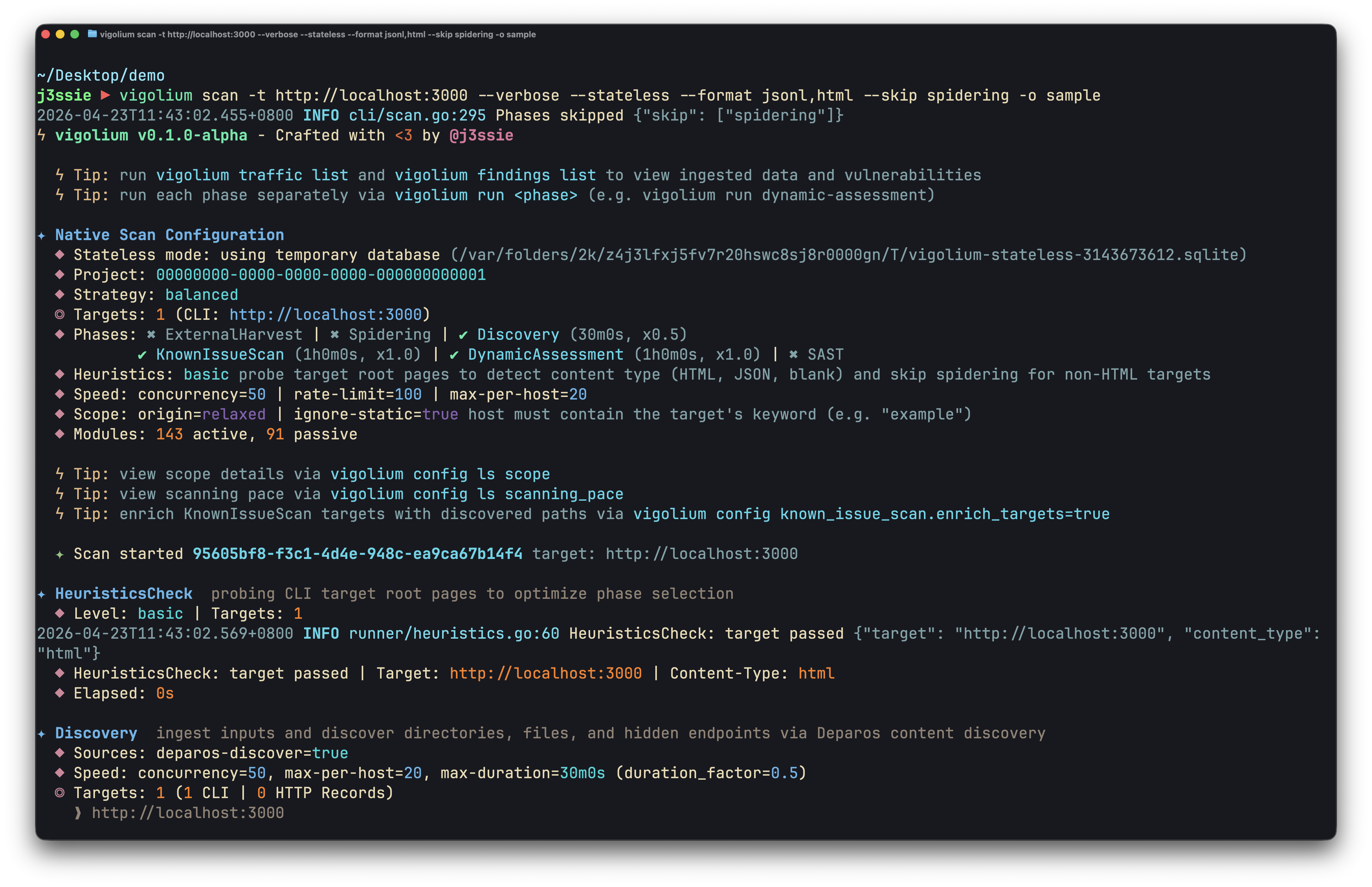
Vigolium은 상호 보완적인 두 가지 스캐닝 모드를 제공합니다:
-
Native Scan (
vigolium scan): 빠르고 강력하며 유연합니다. 콘텐츠 탐색, 브라우저/SPA 스파이더링, 능동/수동 감사를 아우르는 317개 모듈을 통한 결정론적 다단계 스캐닝으로, 인젝션, 접근 제어, 파일/경로, API/프로토콜, 프레임워크별, 클라우드/인프라, 대역 외(OAST) 취약점 클래스를 포괄합니다. -
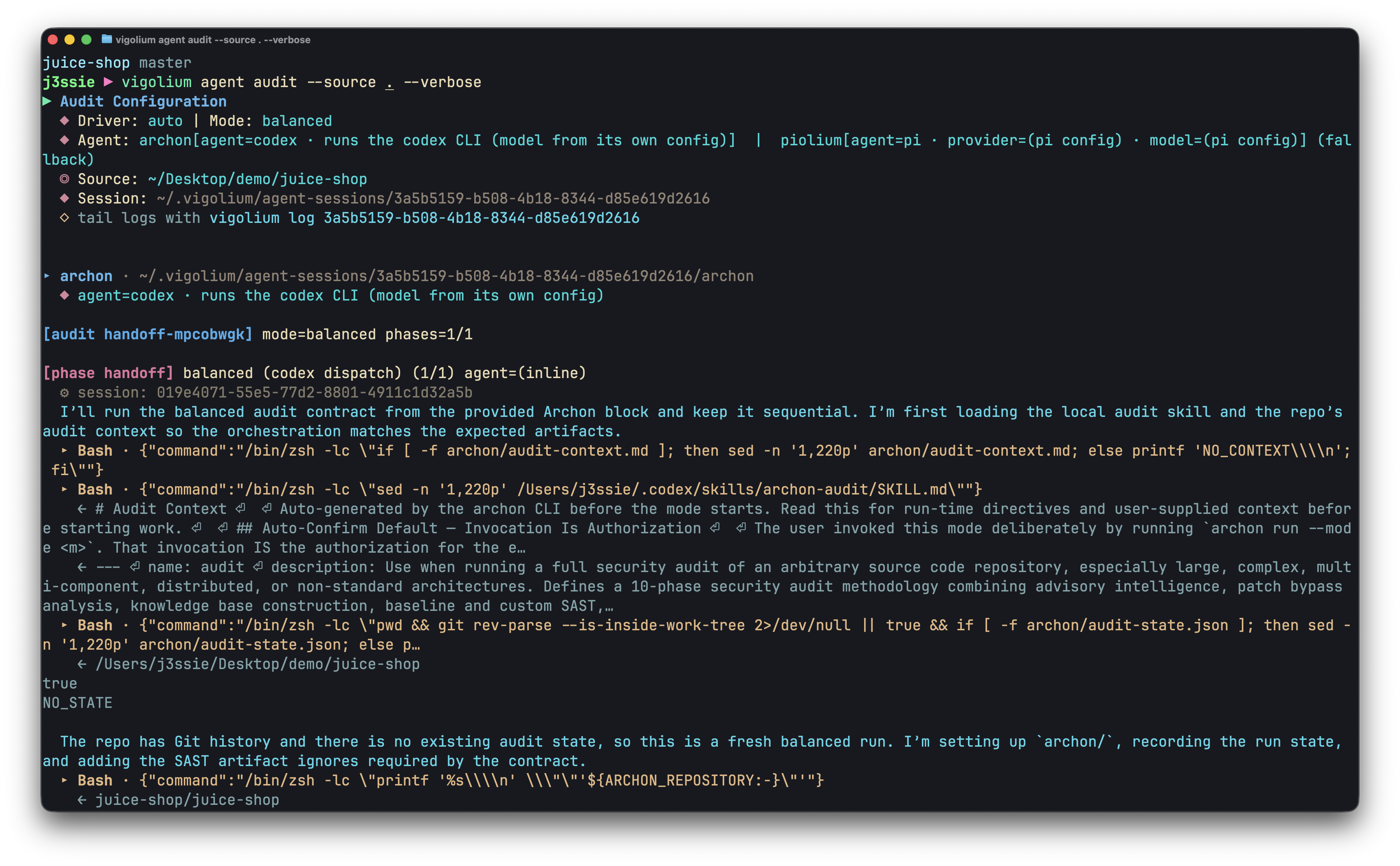
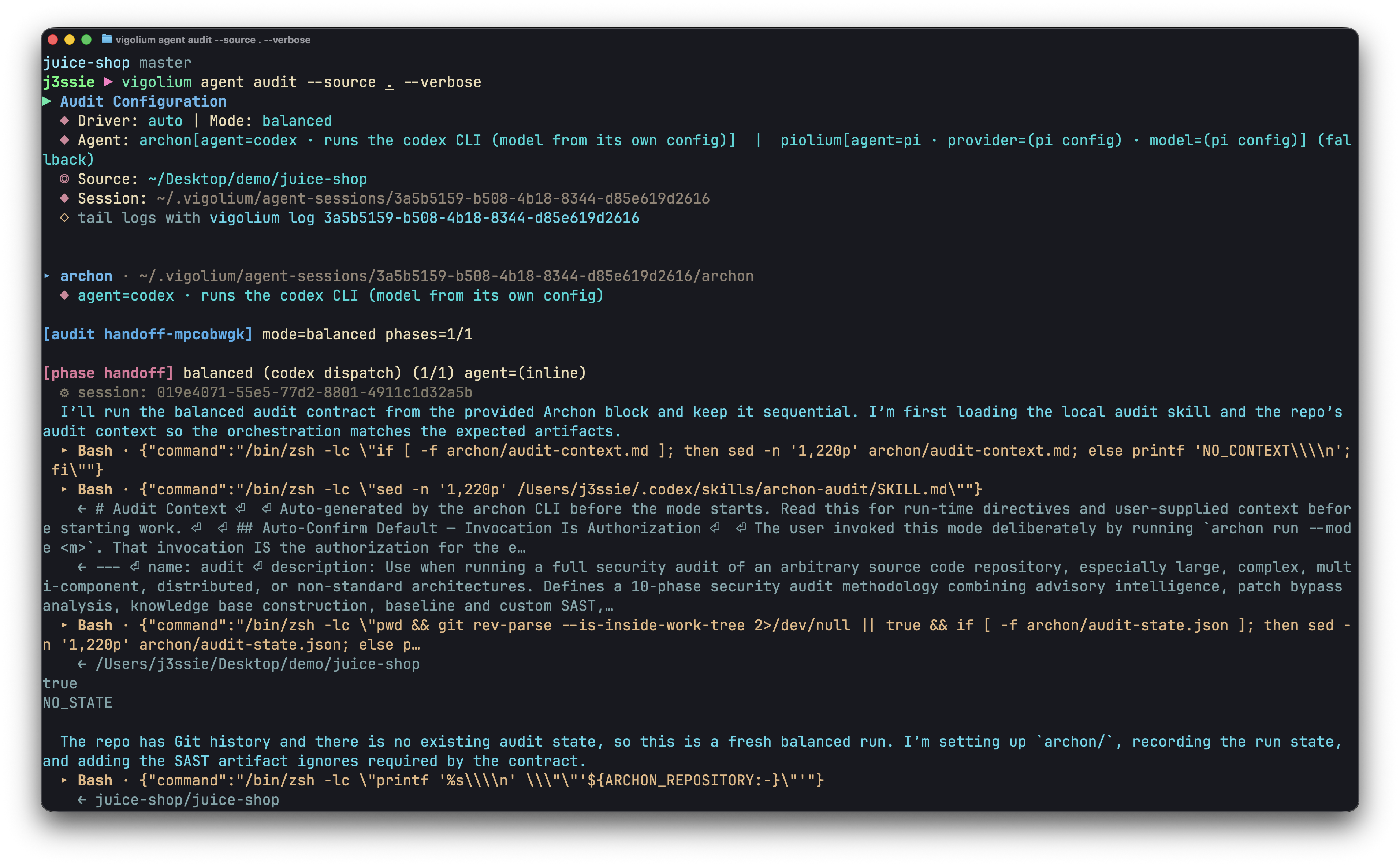
Agentic Scan (
vigolium agent): 코드베이스를 철저히 감사합니다. 공격을 자율적으로 계획하고, 모듈을 선택하며, 사용자 정의 확장을 생성하고, 결과를 분류하는 AI 기반 스캐닝으로, 심층 소스 코드 감사와 자율 및 표적 취약점 스캐닝을 결합합니다.
설치
빠른 설치 (권장)```bash
curl -fsSL https://vigolium.com/install.sh | bash
### [npm](https://www.npmjs.com/package/@vigolium/vigolium)```bash
npm install -g @vigolium/vigolium
Windows
위의 npm 설치 방법은 Windows에서도 작동합니다. 또는
릴리스 페이지에서
vigolium_<version>_windows_amd64.zip을 다운로드하여 압축을 풀고,
vigolium.exe를 PATH 어딘가에 두면 됩니다.
Windows는 x64로만 제공되며, Windows ARM에서는 에뮬레이션으로 실행됩니다. 위의 셸 설치 프로그램은 POSIX 전용이므로 Windows에서는
vigolium update를 사용할 수 없습니다 — 업그레이드하려면 npm 설치를 다시 실행하거나 최신 zip을 다운로드하세요.
Docker 또는 소스에서 빌드와 같은 다른 방법
Docker```bash
docker pull j3ssie/vigolium:latest docker run --rm j3ssie/vigolium:latest scan -h
### 소스에서 빌드```bash
git clone https://github.com/vigolium/vigolium.git
cd vigolium
make build # build and install to $GOPATH/bin
**Go 1.27+**와 **bun 1.3.11+**가 필요합니다. 필수 요구 사항과 빌드 세부 정보는 HACKING.md를 참조하세요.
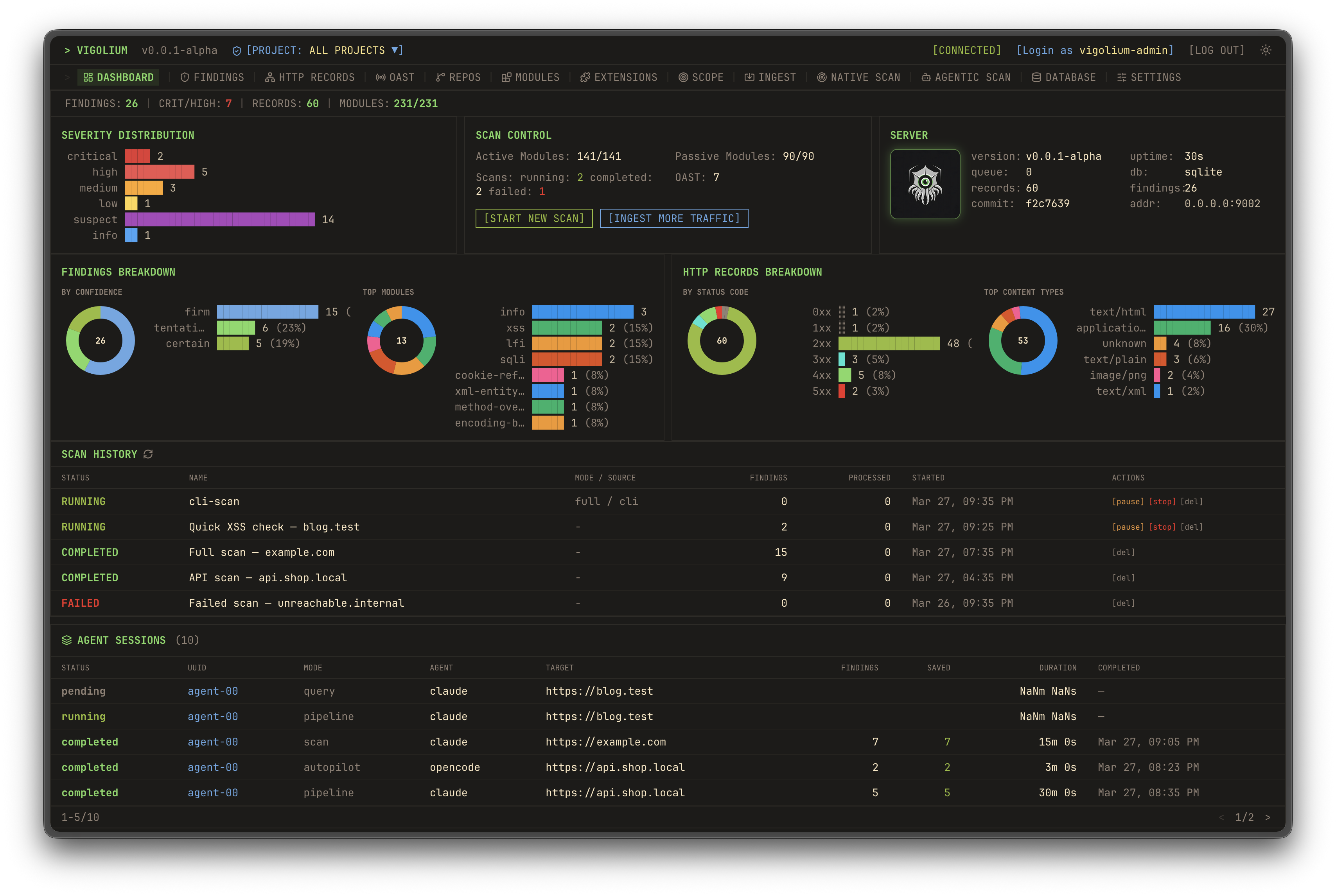
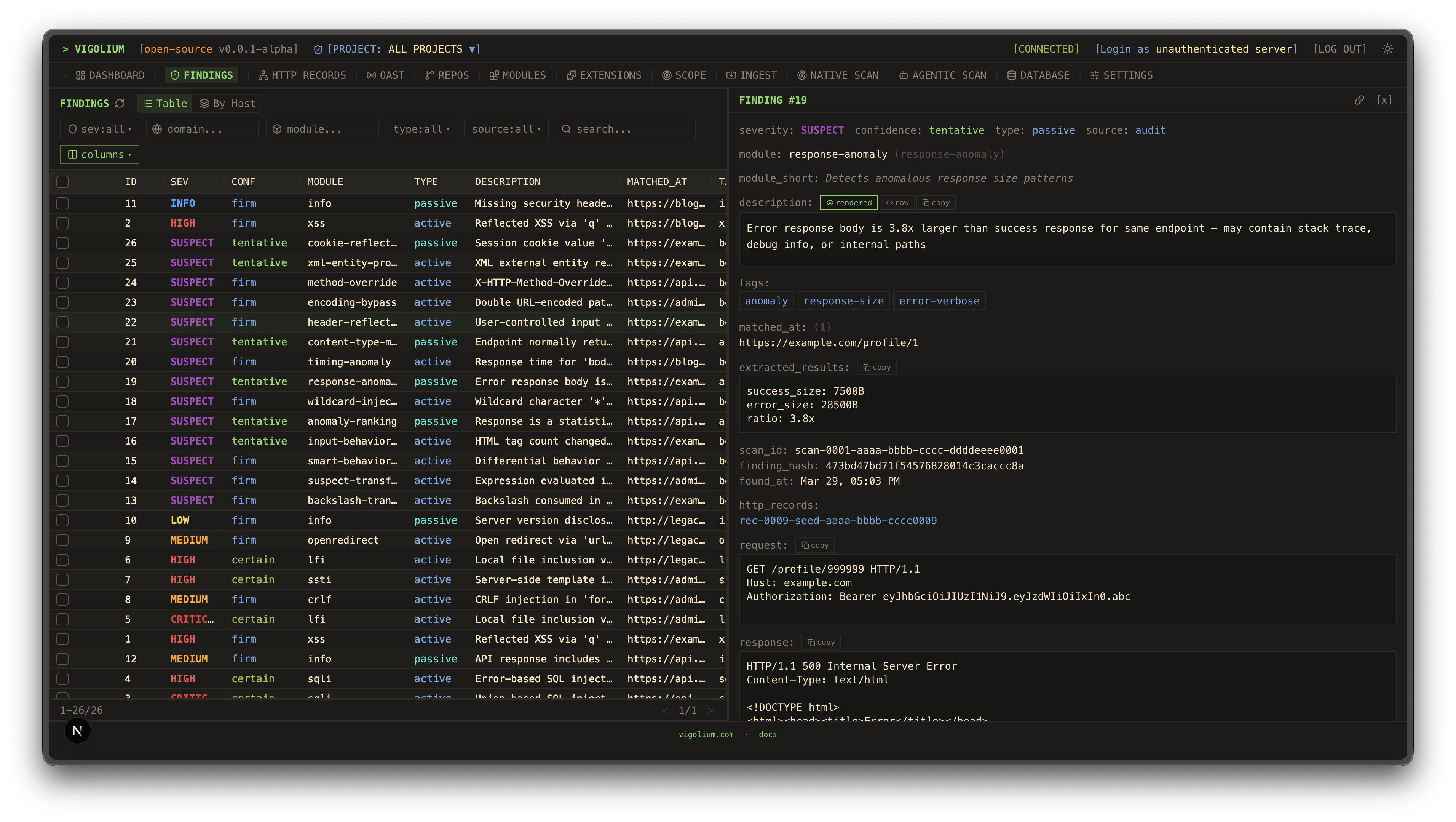
| UI 대시보드 | 트래픽 대시보드 |
|---|---|
![]() | ![]() |
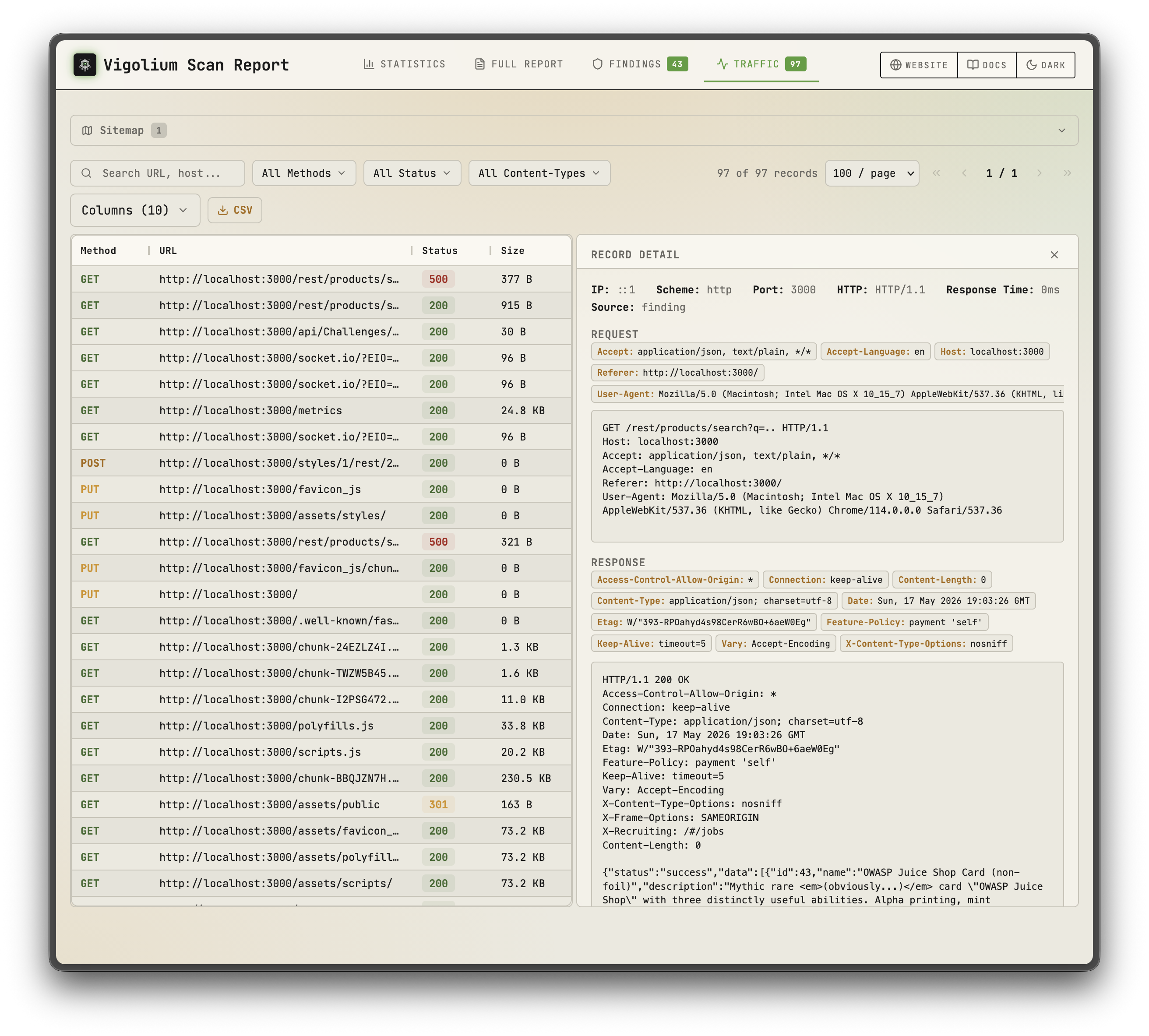
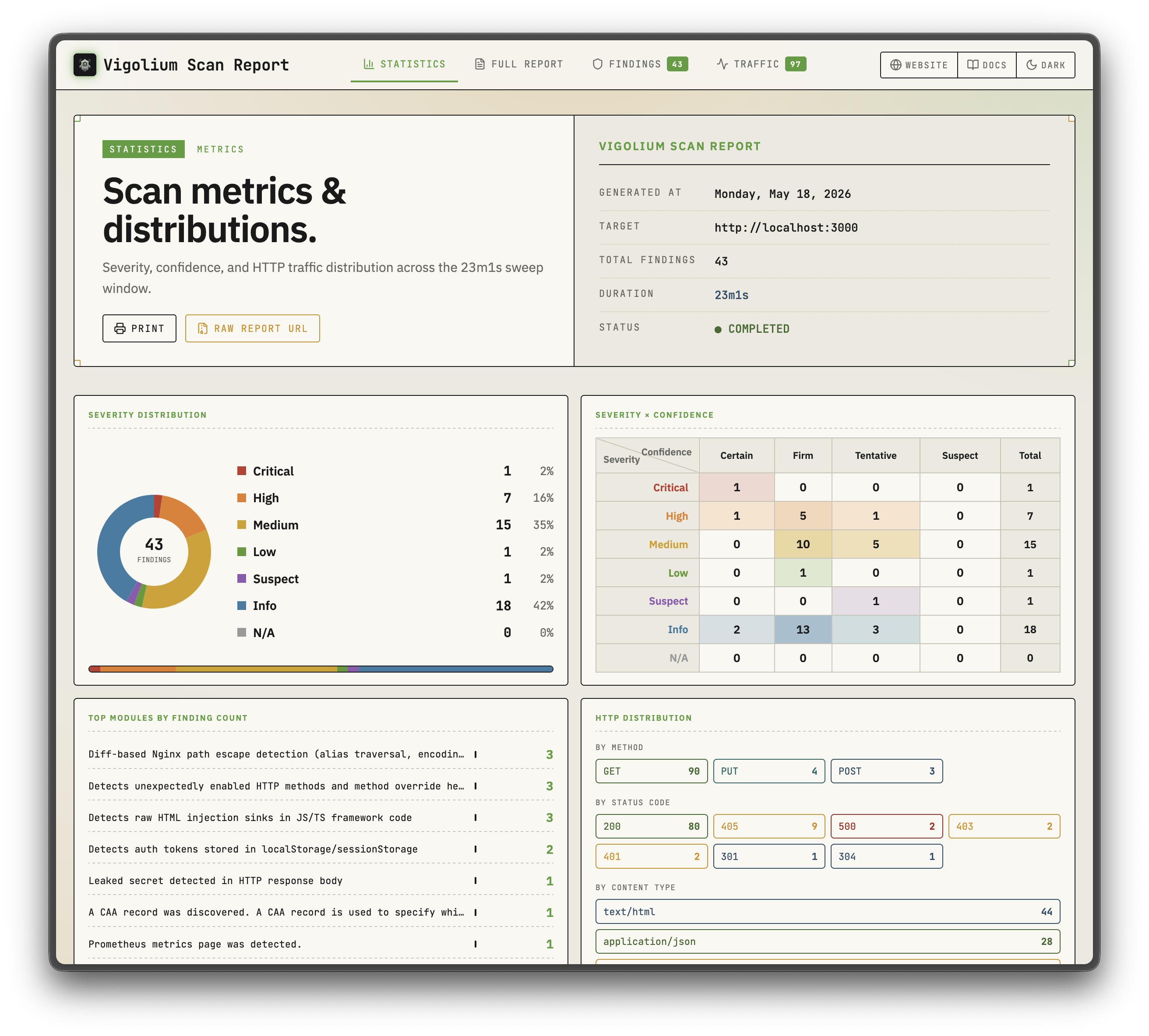
| 정적 보고서 | 정적 보고서 |
|---|---|
![]() | ![]() |
| 네이티브 스캔 | 에이전틱 스캔 |
|---|---|
![]() | ![]() |
스폰서
샌드박스 인프라를 후원해 주신 Daytona에 감사드립니다
주요 기능
네이티브 스캔
- 324개 스캐너 모듈: 207개 활성(퍼징) + 117개 수동(패턴 매칭), OWASP Top 10 및 그 이상을 커버
- 대역 외 테스트(OAST): interactsh 콜백을 통한 블라인드 XSS/SSRF/명령어 인젝션과 자동 페이로드 상관 분석
- 값 인식 변이: 파라미터를 의미 유형(정수, UUID, JWT, 이메일)별로 분류하고 의도에 따라 변이
- 다단계 파이프라인: 외부 수집, 콘텐츠 탐색(Deparos), 브라우저/SPA 스파이더링(Spitolas), 감사로 구성되며 전략 프리셋과 스캐닝 프로필로 제어
- 유연한 입력: URL, OpenAPI/Swagger, Postman, Burp Suite, cURL, Nuclei JSONL
- 다중 세션 인증: 인라인 세션, 세션 파일, 또는 로그인 흐름·토큰 추출·IDOR/BOLA 테스트를 포함한 전체 인증 구성
- JavaScript 확장: 내장 JS 엔진을 통한 사용자 정의 모듈 및 훅과 세션 인식 HTTP API
- 확장성 및 보고: 호스트별 속도 제한이 있는 동시 워커 풀, 하이브리드 인메모리/디스크/Redis 큐, 자체 포함 HTML 보고서
에이전틱 스캔
- 인프로세스 olium 런타임: 모든 에이전트 모드는 네이티브 Go
pkg/olium엔진에서 실행됩니다: 턴 기반 루프, 내장 도구 레지스트리, 스킬 지원, 플러그 가능한 프로바이더 드라이버(서브프로세스 SDK 풀 없음) - Autopilot: 에이전트가 자율적으로 엔드포인트를 탐색하고 스캔을 실행하며 결과를 분류하고, 선택적 다중 전문가 파이프라인과 세션 재개 지원
- Swarm: 마스터 에이전트가 모듈을 선택하고, 사용자 정의 JS 공격 확장을 생성하고, 코드 감사 + SAST를 실행하고, 스캔을 수행하고, 결과를 분류합니다; 대상 지정 또는 전체 범위(
--discover), 변경 중심 실행을 위한--diff/--last-commits지원 - 소스 감사 드라이버:
audit,piolium, 그리고 통합audit디스패처가 하나의 파인딩 스키마와 DB 태깅을 공유하는 포그라운드 소스 코드 감사를 실행 - 쿼리 모드: 코드 리뷰, 엔드포인트 탐색, 시크릿 탐지를 위한 단일 실행 프롬프트
- 플러그 가능한 프로바이더:
openai-compatible(기본값),openai-codex-oauth,openai-api-key,openai-responses,anthropic-api-key,anthropic-oauth,anthropic-cli,anthropic-compatible,anthropic-vertex,google-vertex. 동일한 모드가 SSE 스트리밍과 OpenAI 호환 채팅 엔드포인트를 갖춘 REST API를 통해 노출됩니다
빠른 시작: 네이티브 스캔```bash
Scan a single target (default: balanced strategy)
vigolium scan -t https://example.com
Scan with a strategy preset
vigolium scan -t https://example.com --strategy deep
Scan specific modules only
vigolium scan -t https://example.com -m xss-reflected,sqli-error
Scan from an OpenAPI spec
vigolium scan -T openapi.yaml -I openapi
Pipe URLs from stdin
cat urls.txt | vigolium scan
Run a single phase directly
vigolium run discovery -t https://example.com
Generate an HTML report
vigolium scan -t https://example.com --only discovery --format html -o report.html
전체 파이프라인에 대해서는 [아키텍처 개요](https://docs.vigolium.com/architecture/overview)를, 전략, 프로필, 속도 설정에 대해서는 [전략 가이드](https://docs.vigolium.com/native-scan/strategies)를 참조하세요. 빠른 명령어 참조는 [docs.vigolium.com/getting-started/cheat-sheet](https://docs.vigolium.com/getting-started/cheat-sheet)를 참조하세요.
## 서버 모드```bash
# Start API server with authentication
vigolium server -k my-secret-key
# Enable transparent HTTP proxy for traffic recording
vigolium server -k my-key --ingest-proxy-port 9003
# Auto-scan ingested traffic
vigolium server -k my-key --scan-on-receive
주요 기능
- 다중 소스 수집: Shodan, Censys, FOFA, Hunter, Quake, ZoomEye, Netlas, Criminal IP, PublicWWW, Google, Bing, Baidu, Yandex, 360, URLScan, VirusTotal, Bitbucket, GitHub, GitLab, Gitee, Postman, Swagger, Sourcegraph, Codeberg, Hugging Face, npm, PyPI, Maven, NuGet, Packagist, RubyGems, crates.io, Docker Hub, Terraform, Ansible Galaxy, Kaggle, Google Play, App Store, APKPure, F-Droid, Huawei AppGallery, Tencent Xuanwu, 51CTO, CSDN, Juejin, Zhihu, JianShu, Weibo, Douyin, Bilibili, Xiaohongshu, Kuaishou, Toutiao, Baijiahao, Sohu, NetEase, Sina, Tencent Cloud, Alibaba Cloud, Huawei Cloud, Baidu Cloud, JD Cloud, UCloud, QingCloud, Kingsoft Cloud, Volcengine, China Mobile Cloud, China Telecom Cloud, China Unicom Cloud, and more
- 다중 형식 파싱: HTML, JSON, XML, YAML, CSV, TSV, Markdown, reStructuredText, AsciiDoc, LaTeX, PDF, DOCX, XLSX, PPTX, ODT, ODS, ODP, EPUB, MOBI, AZW3, FB2, RTF, TXT, LOG, INI, CONF, ENV, PROPERTIES, TOML, HCL, SQL, GraphQL, Protobuf, Thrift, Avro, Parquet, ORC, Arrow, and more
- 다중 언어 지원: Python, JavaScript, TypeScript, Java, Go, Rust, C, C++, C#, Ruby, PHP, Swift, Kotlin, Scala, Perl, Lua, R, MATLAB, Julia, Haskell, Erlang, Elixir, Clojure, F#, OCaml, Dart, Groovy, Shell, PowerShell, Batch, SQL, and more
- 다중 프로토콜 지원: HTTP, HTTPS, FTP, FTPS, SFTP, SCP, SSH, Telnet, SMTP, SMTPS, POP3, POP3S, IMAP, IMAPS, DNS, DoH, DoT, DoQ, LDAP, LDAPS, Kerberos, SMB, NFS, AFP, WebDAV, Rsync, Git, SVN, Mercurial, Docker, Kubernetes, and more
- 다중 데이터베이스 지원: MySQL, PostgreSQL, SQLite, Oracle, SQL Server, MongoDB, Redis, Cassandra, Elasticsearch, Neo4j, InfluxDB, ClickHouse, Snowflake, BigQuery, Redshift, DynamoDB, Cosmos DB, Firestore, Firebase, Supabase, and more
- 다중 클라우드 지원: AWS, Azure, GCP, Alibaba Cloud, Tencent Cloud, Huawei Cloud, Baidu Cloud, JD Cloud, UCloud, QingCloud, Kingsoft Cloud, Volcengine, China Mobile Cloud, China Telecom Cloud, China Unicom Cloud, and more
- 다중 컨테이너 지원: Docker, Podman, containerd, CRI-O, Kubernetes, OpenShift, Rancher, Nomad, Mesos, Swarm, ECS, EKS, GKE, AKS, and more
- 다중 CI/CD 지원: Jenkins, GitLab CI, GitHub Actions, CircleCI, Travis CI, Azure Pipelines, TeamCity, Bamboo, Drone, Tekton, ArgoCD, FluxCD, Spinnaker, and more
- 다중 모니터링 지원: Prometheus, Grafana, Zabbix, Nagios, Datadog, New Relic, Dynatrace, AppDynamics, Splunk, ELK, and more
- 다중 보안 지원: WAF, IDS, IPS, SIEM, SOAR, EDR, XDR, MDR, CASB, DLP, and more
- 다중 규정 준수 지원: GDPR, CCPA, HIPAA, PCI DSS, SOX, ISO 27001, NIST, SOC 2, FedRAMP, and more
- 다중 거버넌스 지원: ITIL, COBIT, TOGAF, Zachman, and more
- 다중 위험 관리 지원: ISO 31000, COSO, FAIR, and more
- 다중 비즈니스 연속성 지원: ISO 22301, BCI, and more
- 다중 재해 복구 지원: ISO 27031, NIST SP 800-34, and more
- 다중 사고 대응 지원: NIST SP 800-61, ISO 27035, and more
- 다중 포렌식 지원: NIST SP 800-86, ISO 27037, and more
- 다중 전자 증거 개시 지원: EDRM, and more
- 다중 개인정보 보호 지원: ISO 27701, and more
- 다중 클라우드 보안 지원: ISO 27017, ISO 27018, and more
- 다중 공급망 보안 지원: ISO 28000, and more
- 다중 사이버 보안 지원: ISO 27032, and more
- 다중 IoT 보안 지원: ISO 27400, and more
- 다중 AI 보안 지원: ISO 42001, and more
- 다중 블록체인 보안 지원: ISO 22739, and more
- 다중 양자 보안 지원: ISO 23837, and more
- 다중 우주 보안 지원: ISO 24143, and more
- 다중 해양 보안 지원: ISO 24144, and more
- 다중 항공 보안 지원: ISO 24145, and more
- 다중 철도 보안 지원: ISO 24146, and more
- 다중 자동차 보안 지원: ISO 24147, and more
- 다중 의료 보안 지원: ISO 24148, and more
- 다중 교육 보안 지원: ISO 24149, and more
- 다중 에너지 보안 지원: ISO 24150, and more
- 다중 물 보안 지원: ISO 24151, and more
- 다중 식품 보안 지원: ISO 24152, and more
- 다중 농업 보안 지원: ISO 24153, and more
- 다중 건설 보안 지원: ISO 24154, and more
- 다중 제조 보안 지원: ISO 24155, and more
- 다중 소매 보안 지원: ISO 24156, and more
- 다중 물류 보안 지원: ISO 24157, and more
- 다중 운송 보안 지원: ISO 24158, and more
- 다중 관광 보안 지원: ISO 24159, and more
- 다중 환대 보안 지원: ISO 24160, and more
- 다중 엔터테인먼트 보안 지원: ISO 24161, and more
- 다중 미디어 보안 지원: ISO 24162, and more
- 다중 통신 보안 지원: ISO 24163, and more
- 다중 방송 보안 지원: ISO 24164, and more
- 다중 출판 보안 지원: ISO 24165, and more
- 다중 광고 보안 지원: ISO 24166, and more
- 다중 마케팅 보안 지원: ISO 24167, and more
- 다중 영업 보안 지원: ISO 24168, and more
- 다중 고객 서비스 보안 지원: ISO 24169, and more
- 다중 HR 보안 지원: ISO 24170, and more
- 다중 재무 보안 지원: ISO 24171, and more
- 다중 회계 보안 지원: ISO 24172, and more
- 다중 감사 보안 지원: ISO 24173, and more
- 다중 법률 보안 지원: ISO 24174, and more
- 다중 규정 준수 보안 지원: ISO 24175, and more
- 다중 위험 보안 지원: ISO 24176, and more
- 다중 거버넌스 보안 지원: ISO 24177, and more
- 다중 전략 보안 지원: ISO 24178, and more
- 다중 혁신 보안 지원: ISO 24179, and more
- 다중 연구 보안 지원: ISO 24180, and more
- 다중 개발 보안 지원: ISO 24181, and more
- 다중 운영 보안 지원: ISO 24182, and more
- 다중 유지보수 보안 지원: ISO 24183, and more
- 다중 지원 보안 지원: ISO 24184, and more
- 다중 서비스 보안 지원: ISO 24185, and more
- 다중 제품 보안 지원: ISO 24186, and more
- 다중 프로젝트 보안 지원: ISO 24187, and more
- 다중 프로그램 보안 지원: ISO 24188, and more
- 다중 포트폴리오 보안 지원: ISO 24189, and more
- 다중 자산 보안 지원: ISO 24190, and more
- 다중 구성 보안 지원: ISO 24191, and more
- 다중 변경 보안 지원: ISO 24192, and more
- 다중 릴리스 보안 지원: ISO 24193, and more
- 다중 배포 보안 지원: ISO 24194, and more
- 다중 운영 보안 지원: ISO 24195, and more
- 다중 모니터링 보안 지원: ISO 24196, and more
- 다중 사고 보안 지원: ISO 24197, and more
- 다중 문제 보안 지원: ISO 24198, and more
- 다중 문제 보안 지원: ISO 24199, and more
- 다중 문제 보안 지원: ISO 24200, and more
- 다중 문제 보안 지원: ISO 24201, and more
- 다중 문제 보안 지원: ISO 24202, and more
- 다중 문제 보안 지원: ISO 24203, and more
- 다중 문제 보안 지원: ISO 24204, and more
- 다중 문제 보안 지원: ISO 24205, and more
- 다중 문제 보안 지원: ISO 24206, and more
- 다중 문제 보안 지원: ISO 24207, and more
- 다중 문제 보안 지원: ISO 24208, and more
- 다중 문제 보안 지원: ISO 24209, and more
- 다중 문제 보안 지원: ISO 24210, and more
- 다중 문제 보안 지원: ISO 24211, and more
- 다중 문제 보안 지원: ISO 24212, and more
- 다중 문제 보안 지원: ISO 24213, and more
- 다중 문제 보안 지원: ISO 24214, and more
- 다중 문제 보안 지원: ISO 24215, and more
- 다중 문제 보안 지원: ISO 24216, and more
- 다중 문제 보안 지원: ISO 24217, and more
- 다중 문제 보안 지원: ISO 24218, and more
- 다중 문제 보안 지원: ISO 24219, and more
- 다중 문제 보안 지원: ISO 24220, and more
- 다중 문제 보안 지원: ISO 24221, and more
- 다중 문제 보안 지원: ISO 24222, and more
- 다중 문제 보안 지원: ISO 24223, and more
- 다중 문제 보안 지원: ISO 24224, and more
- 다중 문제 보안 지원: ISO 24225, and more
- 다중 문제 보안 지원: ISO 24226, and more
- 다중 문제 보안 지원: ISO 24227, and more
- 다중 문제 보안 지원: ISO 24228, and more
- 다중 문제 보안 지원: ISO 24229, and more
- 다중 문제 보안 지원: ISO 24230, and more
- 다중 문제 보안 지원: ISO 24231, and more
- 다중 문제 보안 지원: ISO 24232, and more
- 다중 문제 보안 지원: ISO 24233, and more
- 다중 문제 보안 지원: ISO 24234, and more
- 다중 문제 보안 지원: ISO 24235, and more
- 다중 문제 보안 지원: ISO 24236, and more
- 다중 문제 보안 지원: ISO 24237, and more
- 다중 문제 보안 지원: ISO 24238, and more
- 다중 문제 보안 지원: ISO 24239, and more
- 다중 문제 보안 지원: ISO 24240, and more
- 다중 문제 보안 지원: ISO 24241, and more
- 다중 문제 보안 지원: ISO 24242, and more
- 다중 문제 보안 지원: ISO 24243, and more
- 다중 문제 보안 지원: ISO 24244, and more
- 다중 문제 보안 지원: ISO 24245, and more
- 다중 문제 보안 지원: ISO 24246, and more
- 다중 문제 보안 지원: ISO 24247, and more
- 다중 문제 보안 지원: ISO 24248, and more
- 다중 문제 보안 지원: ISO 24249, and more
- 다중 문제 보안 지원: ISO 24250, and more
- 다중 문제 보안 지원: ISO 24251, and more
- 다중 문제 보안 지원: ISO 24252, and more
- 다중 문제 보안 지원: ISO 24253, and more
- 다중 문제 보안 지원: ISO 24254, and more
- 다중 문제 보안 지원: ISO 24255, and more
- 다중 문제 보안 지원: ISO 24256, and more
- 다중 문제 보안 지원: ISO 24257, and more
- 다중 문제 보안 지원: ISO 24258, and more
- 다중 문제 보안 지원: ISO 24259, and more
- 다중 문제 보안 지원: ISO 24260, and more
- 다중 문제 보안 지원: ISO 24261, and more
- 다중 문제 보안 지원: ISO 24262, and more
- 다중 문제 보안 지원: ISO 24263, and more
- 다중 문제 보안 지원: ISO 24264, and more
- 다중 문제 보안 지원: ISO 24265, and more
- 다중 문제 보안 지원: ISO 24266, and more
- 다중 문제 보안 지원: ISO 24267, and more
- 다중 문제 보안 지원: ISO 24268, and more
- 다중 문제 보안 지원: ISO 24269, and more
- 다중 문제 보안 지원: ISO 24270, and more
- 다중 문제 보안 지원: ISO 24271, and more
- 다중 문제 보안 지원: ISO 24272, and more
- 다중 문제 보안 지원: ISO 24273, and more
- 다중 문제 보안 지원: ISO 24274, and more
- 다중 문제 보안 지원: ISO 24275, and more
- 다중 문제 보안 지원: ISO 24276, and more
- 다중 문제 보안 지원: ISO 24277, and more
- 다중 문제 보안 지원: ISO 24278, and more
- 다중 문제 보안 지원: ISO 24279, and more
- 다중 문제 보안 지원: ISO 24280, and more
- 다중 문제 보안 지원: ISO 24281, and more
- 다중 문제 보안 지원: ISO 24282, and more
- 다중 문제 보안 지원: ISO 24283, and more
- 다중 문제 보안 지원: ISO 24284, and more
- 다중 문제 보안 지원: ISO 24285, and more
- 다중 문제 보안 지원: ISO 24286, and more
- 다중 문제 보안 지원: ISO 24287, and more
- 다중 문제 보안 지원: ISO 24288, and more
- 다중 문제 보안 지원: ISO 24289, and more
- 다중 문제 보안 지원: ISO 24290, and more
- 다중 문제 보안 지원: ISO 24291, and more
- 다중 문제 보안 지원: ISO 24292, and more
- 다중 문제 보안 지원: ISO 24293, and more
- 다중 문제 보안 지원: ISO 24294, and more
- 다중 문제 보안 지원: ISO 24295, and more
- 다중 문제 보안 지원: ISO 24296, and more
- 다중 문제 보안 지원: ISO 24297, and more
- 다중 문제 보안 지원: ISO 24298, and more
- 다중 문제 보안 지원: ISO 24299, and more
- 다중 문제 보안 지원: ISO 24300, and more```bash
Ingest traffic to a running server
cat urls.txt | vigolium ingest -s http://localhost:9002
Ingest an OpenAPI spec
vigolium ingest -s http://localhost:9002 -i api.yaml -I openapi
서버 설정은 [running the server](https://docs.vigolium.com/server-mode/running-the-server)를, 수집 워크플로는 [ingestion](https://docs.vigolium.com/server-mode/ingestion)을, 전체 REST API 레퍼런스는 [API overview](https://docs.vigolium.com/api-overview)를 참고하세요.
> **프록시 통합**: Burp Suite용 [burp-vigolium](https://github.com/vigolium/burp-vigolium) 확장 또는 Caido용 [caido-vigolium](https://github.com/vigolium/caido-vigolium) 플러그인을 사용하여 실시간 프록시 트래픽을 실행 중인 Vigolium 서버로 전달할 수 있습니다. 두 플러그인 모두 동일한 브리지 프로토콜(`-B/--burp-bridge-url`, 별칭 `--caido-bridge-url`)을 제공하며, 수집된 트래픽에는 해당 트래픽이 유래한 프록시가 라벨로 표시됩니다.
## 인증된 스캐닝
Vigolium은 IDOR/BOLA 테스트 및 권한 상승 검사를 위한 다중 세션 인증 스캐닝을 지원합니다:```bash
# Inline session via CLI flag (name:Header:value)
vigolium scan -t https://example.com \
--auth "admin:Cookie:session_id=abc123" \
--auth "user:Cookie:session_id=xyz789"
# Load session(s) from a YAML/JSON file
vigolium scan -t https://example.com --auth-file ./admin-session.yaml
# Auth file with an automated login flow (token extraction, etc.)
vigolium scan -t https://example.com --auth-file ./login-flow.yaml
# Add custom headers (works with sessions)
vigolium scan -t https://example.com -H "Authorization: Bearer token123"
Auth 파일은 정적 헤더, 베어러 토큰, 그리고 쿠키, JSON 응답 또는 헤더에서 토큰을 추출하는 자동화된 로그인 흐름을 지원합니다. 사전 설정 예제는 public/presets/sessions/에서 확인할 수 있습니다. 전체 가이드는 인증 가이드를 참조하세요.
--auth/--auth-file플래그는 이전에--session/--session-file이라는 이름이었습니다. 이전 이름은 더 이상 사용되지 않는 별칭으로 여전히 작동합니다.
Agentic Scan
AI 기반 스캐닝으로, 에이전트가 기본 스캔 엔진을 기반으로 취약점 평가를 자율적으로 계획, 실행 및 분류합니다:```bash
Autopilot: autonomous AI-driven scanning (in-process olium engine)
vigolium agent autopilot -t https://example.com vigolium agent autopilot -t https://example.com --source ./src --prompt "focus on auth bypass" vigolium agent autopilot -t https://example.com --diff main...feature/auth # diff-focused vigolium agent autopilot -t https://example.com --intensity deep # preset bundle
Swarm: AI-guided targeted or full-scope vulnerability scanning
vigolium agent swarm -t https://example.com/api/users --vuln-type sqli vigolium agent swarm -t https://example.com --discover # full-scope vigolium agent swarm -t https://example.com --source ./src --discover # source-aware full-scope vigolium agent swarm --input "curl -X POST https://example.com/api/login -d '{"user":"admin"}'"
Source-audit drivers (separate harness, do not route through olium)
vigolium agent audit --source ./src # default: auto (audit, fall back to piolium) vigolium agent audit --source ./src --driver audit --mode deep # vigolium-audit only (claude/codex) vigolium agent audit --source ./src --driver piolium --mode balanced # Pi-native (pi extension) only vigolium agent audit --source ./src --driver both # audit then piolium, back-to-back vigolium agent audit --source ./src --modes deep,confirm # chain modes (same as --intensity deep) vigolium agent audit --source ./src -S --output-dir ./audit-out # throwaway DB + bundled HTML report vigolium audit --source ./src # top-level alias
Direct olium access (TUI or headless)
vigolium ol # launch the olium TUI vigolium ol --prompt "..." # one-shot prompt (-p implies headless)
Agentic 스캔 모드:
- **Autopilot**: 자율 스캔. CLI는 `pkg/olium/autopilot.Run`을 직접 호출하며, 서버는 동일한 루프 주위에 vigolium-audit 준비, 인증 설정, 고정된 컨텍스트 번들을 추가합니다
- **Swarm**: 타겟팅된 단일 요청 및 전체 범위(`--discover`)를 지원하는 AI 기반 취약점 스캔. 마스터 에이전트가 입력을 분석하고, 모듈을 선택하고, 사용자 정의 JS 확장을 생성하고, 코드 감사 및 SAST를 실행하고, 스캔을 수행하고, 결과를 분류합니다
- **Audit**: `vigolium agent audit`를 통한 소스 코드 감사 — 내장된 **vigolium-audit**(claude/codex) 및/또는 **piolium**(Pi-native) 하네스를 실행하는 통합 디스패처로, `--driver {auto|both|audit|piolium}`로 선택합니다(기본값 `auto`: audit 레그를 사전 점검하고, 해석된 `claude`/`codex` CLI가 PATH에 있고, 바이너리가 내장되어 있으며, 체인에 audit 지원 모드가 있을 때 실행하고, 그렇지 않으면 audit을 실행하지 않고 piolium으로 폴백합니다. 실행 중 audit 실패는 드라이버를 전환하지 않고 표면화됩니다). 별도의 하네스이며, **olium을 통해 라우팅하지 마십시오**. 하나의 상위 AgenticScan 아래에 드라이버별 자식 행이 있으며, 후처리 단계에서 발견 사항이 중복 제거됩니다. 독립 실행형 `agent piolium` 하위 명령은 없습니다 — piolium은 `--driver=piolium`을 통해 실행됩니다
> **독립 실행형 audit CLI**: agentic 보안 감사는 Vigolium과 독립적으로 실행할 수 있는 독립 실행형 CLI로도 제공됩니다: [vigolium-audit](https://github.com/vigolium/vigolium-audit)(`vigolium agent audit` 뒤의 하네스) 및 [piolium](https://github.com/vigolium/piolium)(`vigolium agent audit --driver=piolium` 뒤의 Pi-native 드라이버).
전체 가이드는 [agent 모드 가이드](https://docs.vigolium.com/agentic-scan/agent-mode)를 참조하십시오.
## ⚡ Vigolium Cloud Console
인프라를 관리하지 않고 Vigolium의 성능을 원하는 팀을 위한 클라우드 기반 솔루션입니다. Console은 **Vigolium의 업그레이드된 완전 기능 버전**으로, 전체 작업을 이끄는 **고급 자율 에이전트**가 주도합니다 — 타겟에 대해 추론하고, 자체 공격 경로를 선택하고, 발견한 내용을 확인하며 — 호스팅 스캔과 공유 결과가 오픈소스 코어 위에 계층화되어, 도구 유지 관리 대신 취약점 수정에 집중할 수 있습니다.
> 관심이 있으신가요? [데모를 위해 문의하십시오](https://www.vigolium.com/request-demo).
## 네이티브 스캔 레이어
네이티브 스캔 파이프라인은 모듈식 레이어로 구성되며, 각각 별도로 문서화되어 있습니다:
| 레이어 | 설명 | 문서 |
|-------|-------------|------|
| **Content Discovery (Deparos)** | 핑거프린트 기반 소프트 404 탐지를 통한 적응형 디렉터리/파일 열거 | [docs.vigolium.com/native-scan/phases/discovery](https://docs.vigolium.com/native-scan/phases/discovery) |
| **Browser Spider (Spitolas)** | CDP 트래픽 캡처를 갖춘 Chromium 기반 상태 머신 크롤러 | [docs.vigolium.com/native-scan/phases/spidering](https://docs.vigolium.com/native-scan/phases/spidering) |
| **Audit** | 삽입 지점 추출 및 DiffScan 프레임워크를 갖춘 능동/수동 취약점 스캔 | [docs.vigolium.com/native-scan/phases/audit](https://docs.vigolium.com/native-scan/phases/audit) |
| **Scanner Modules** | OWASP Top 10 및 그 이상을 커버하는 207개의 능동 및 117개의 수동 모듈 | [docs.vigolium.com/native-scan/modules-reference](https://docs.vigolium.com/native-scan/modules-reference) |
## 문서
전체 문서는 [docs.vigolium.com](https://docs.vigolium.com/)에 있습니다. 릴리스 노트와 버전 기록은 [CHANGELOG](https://github.com/vigolium/vigolium/blob/main/CHANGELOG.md)에 있습니다. 빠른 링크:
| 주제 | 링크 |
|-------|------|
| 에이전트 설정 | [docs.vigolium.com/getting-started/setup-agent](https://docs.vigolium.com/getting-started/setup-agent) |
| 네이티브 스캔 시작 | [docs.vigolium.com/getting-started/native-scan](https://docs.vigolium.com/getting-started/native-scan) |
| Agentic 스캔 시작 | [docs.vigolium.com/getting-started/agentic-scan](https://docs.vigolium.com/getting-started/agentic-scan) |
| Agentic 감사 시작 | [docs.vigolium.com/getting-started/agentic-security-audit](https://docs.vigolium.com/getting-started/agentic-security-audit) |
| 빠른 시작 | [docs.vigolium.com/getting-started/quickstart](https://docs.vigolium.com/getting-started/quickstart) |
| 치트 시트 | [docs.vigolium.com/getting-started/cheat-sheet](https://docs.vigolium.com/getting-started/cheat-sheet) |
| 서버 및 수집 | [docs.vigolium.com/getting-started/server-and-ingestion](https://docs.vigolium.com/getting-started/server-and-ingestion) |
| 확장 작성 | [docs.vigolium.com/customization/writing-extensions](https://docs.vigolium.com/customization/writing-extensions) |
## JavaScript 엔진
JavaScript/TypeScript 코드를 직접 실행하거나 재컴파일 없이 사용자 정의 스캔 모듈과 훅을 작성하십시오:```bash
# Execute inline JavaScript
vigolium js --code 'let r = vigolium.http.get(TARGET); console.log(r.status)' -t https://example.com
# Run a JS file with timeout
vigolium js --code-file ./my-script.js -t https://example.com --timeout 60s
# Manage extensions
vigolium ext ls # list loaded extensions
vigolium ext docs --example # browse API with code examples
vigolium ext preset # install starter scripts
JS 엔진은 인증된 테스트를 위한 세션 인식 HTTP API를 제공합니다:```javascript // Create a persistent session with shared cookie jar. // post() takes a string body — serialize objects yourself. let session = vigolium.http.session(); session.post( "https://app.example.com/login", JSON.stringify({ user: "admin", pass: "secret" }), { headers: { "Content-Type": "application/json" } } ); session.get("https://app.example.com/dashboard"); // cookies auto-sent
// Automated login flow with token extraction let authed = vigolium.http.login({ url: "https://app.example.com/api/auth", method: "POST", body: JSON.stringify({ username: "admin", password: "pass" }), extract: [{ source: "json", path: "$.token", apply_as: "Authorization: Bearer {value}" }] });
// IDOR/BOLA testing across multiple sessions let results = vigolium.http.authTest({ sessions: { admin: adminSession, user: userSession }, requests: [{ method: "GET", url: "https://app.example.com/api/users/1" }] });
// Multi-step authentication sequences let result = vigolium.http.sequence([ { url: "/csrf", extract: [{ source: "cookie", name: "csrf_token", as: "token" }] }, { url: "/login", method: "POST", body: "csrf={token}&user=admin" } ]);
// Parallel request batching (race conditions, IDOR) let responses = vigolium.http.batch([req1, req2, req3], { concurrency: 10 });
// CSRF token extraction let csrf = vigolium.http.csrf("https://app.example.com/form");
// HTTP request replay with variations let varied = vigolium.http.replay(rawRequest, [ { headers: { "Authorization": "Bearer admin_token" } }, { headers: { "Authorization": "Bearer user_token" } } ]);
See [writing extensions](https://docs.vigolium.com/customization/writing-extensions) for the extension authoring guide and `pkg/jsext/vigolium.d.ts` for the full TypeScript API definitions.
## CLI Reference
<details>
<summary>Expand the full commands & flags reference</summary>
### Commands```
Scanning:
vigolium scan Run a native scan (deterministic multi-phase vulnerability scanning)
vigolium run <phase> Run a single native scan phase (alias for scan --only <phase>)
vigolium scan-url <url> Quick native scan of a single URL
vigolium scan-request Native scan from a raw HTTP request
Agentic scan (in-process olium engine):
vigolium agent autopilot Autonomous AI-driven vulnerability scanning
vigolium agent swarm AI-guided targeted or full-scope vulnerability scanning
vigolium agent query Single-shot prompt (code review, endpoint discovery)
vigolium agent olium Direct olium TUI (or one-shot non-interactive via -p)
vigolium agent audit Unified driver dispatcher (vigolium-audit and/or piolium, --driver=auto|both|audit|piolium)
vigolium agent session Browse/replay agent session artifacts
vigolium olium | vigolium ol Top-level alias for `vigolium agent olium`
Server & ingestion:
vigolium server Start the API server with traffic ingestion
vigolium ingest Ingest traffic to a running server
vigolium storage Interact with cloud object storage (uploads, downloads)
Data & projects:
vigolium db Database operations (list, stats, export, clean, seed)
vigolium finding Browse and manage findings (load, tui)
vigolium traffic Browse and replay HTTP records (tui, replay)
vigolium replay Mutate a stored/supplied HTTP request and diff baseline vs replay
vigolium project Manage projects (create, list, use, config)
vigolium scope Manage scope rules
vigolium import Import findings/data from external sources
vigolium export Export scan results
Extensions & auth:
vigolium js Execute JavaScript/TypeScript code
vigolium ext Manage JavaScript extensions (eval, lint)
vigolium auth Manage authentication sessions (list, load, lint, totp)
Setup & introspection:
vigolium init Initialize a Vigolium workspace
vigolium config Manage configuration (ls, set, path, clean)
vigolium strategy Inspect scanning strategies and phases
vigolium module Inspect/enable scanner modules
vigolium doctor Diagnose environment & dependencies
vigolium version Show version info
플래그```
Native Scan (vigolium scan / run): -t, --target Target URL -T, --target-file File containing target URLs -i, --input Input file path (- for stdin) -I, --input-mode Input format: urls, openapi, swagger, burp, curl, nuclei, har -m, --modules Modules to run (comma-separated or 'all') --strategy Strategy preset: lite, balanced, deep --scanning-profile Scanning profile name or YAML path --only Phases to run (comma-separated): ingestion, discovery (deparos), external-harvest, spidering (spitolas), known-issue-scan, dynamic-assessment, extension --skip Phases to skip (repeatable, same names as --only) -S, --stateless Use a throwaway temp database, discarded after the scan --fail-on Exit non-zero when a finding at/above this severity is present
Authentication: --auth Inline session definition (name:Header:value, repeatable) --auth-file Session YAML/JSON file path, supports login flows (repeatable) -H, --header Custom HTTP header (repeatable)
Performance: -c, --concurrency Concurrent workers (default: 25) -r, --rate-limit Max requests/sec (default: 0 = unlimited) --max-per-host Per-host concurrency cap (default: 2) --proxy HTTP/SOCKS5 proxy URL --timeout HTTP request timeout (default: 15s)
Agentic Scan (vigolium agent autopilot / swarm / query):
--source Path to source code for source-aware scanning
--files Specific files to include relative to --source
--source-label Label for source code ingestion
--provider Olium provider: openai-compatible (default), openai-codex-oauth,
openai-api-key, openai-responses, anthropic-api-key,
anthropic-oauth, anthropic-cli, anthropic-compatible,
anthropic-claude-sdk-bridge, anthropic-vertex, google-vertex
--model Model ID override
--oauth-token OAuth bearer token (anthropic-oauth)
--oauth-cred OAuth/SA file path (openai-codex-oauth, anthropic-vertex,
google-vertex)
--llm-api-key API key (anthropic-api-key, openai-api-key)
--vuln-type Vulnerability type focus (sqli, xss, ssrf, ...)
--prompt Free-text task guidance (same as the positional [prompt])
--plan-file Plan file mixing guidance + raw seed HTTP request(s)
--knowledge-base File/dir describing the app; prose is distilled, traffic
exports (HAR/Burp/curl/OpenAPI/Postman) are ingested
--prior-context Front-load existing project traffic/findings: auto, summary, off
--intensity Preset bundle: quick, balanced, deep
--diff Diff range / PR URL / HEADN for change-focused scans
--last-commits Shorthand for --diff HEADN
--code-audit Enable AI code audit (default: on with --source)
--discover Run discovery+spidering before planning (swarm)
--audit vigolium-audit mode: lite, balanced, deep, mock, off
--piolium Piolium audit mode (empty = auto-pick)
--resume Resume a durable-autopilot run by agentic-scan UUID
--session-dir Pin the session dir for this run's debug artifacts
--transcript Copy transcript.jsonl out after the run
--max-iterations Max triage-rescan iterations
--max-commands Cap on agent tool calls
--token-budget Cap on aggregate tokens
--max-duration Max agent wall-clock time (0 = no limit)
--only / --skip / --start-from Phase control (swarm)
Source audit (vigolium agent audit / vigolium audit): --driver auto (default), both, audit, piolium --intensity Preset: quick, balanced, deep (deep = modes deep,confirm) --mode Mode override: lite, balanced, deep, revisit, confirm, merge, ... --modes Chain modes back-to-back (e.g. deep,confirm) --list-modes Print the audit mode graph and exit --agent Coding agent for the audit leg: claude or codex --keep-raw Keep raw output under /vigolium-results/ (on by default) --clean-raw Remove the source-tree raw copy after the run -S, --stateless Run into a throwaway DB and auto-render an HTML report --output-dir Bundle the HTML report + raw results into one folder (needs -S) --no-dedup Skip the post-pass project-wide findings dedup --no-preflight Skip the pre-audit auth/model roundtrip checks -i, --interactive Drive the audit yourself in the coding agent (audit driver only)
JavaScript: --code Inline JavaScript to execute --code-file Path to JS/TS file to execute --timeout Execution timeout (default: 30s)
Output: -j, --json Compact, token-aware JSON output (read/query commands) --format Output format (comma-separated for multiple): console, jsonl, html, sqlite (needs -S), fs (flat traffic/finding tree) -o, --output Output file path --silent Suppress all output except findings -v, --verbose Verbose logging
</details>
## 저장소 레이아웃
`platform/` 디렉터리에는 외부 도구와 UI 대시보드가 포함되어 있으며 핵심 스캐너의 일부가 아닙니다. 이 디렉터리에는 어떠한 변경도 가해져서는 안 됩니다.
## 벤치마크
Vigolium은 의도적으로 취약하게 만든 애플리케이션을 대상으로 지속적으로 벤치마킹되며, 버그 바운티 및 책임 있는 공개 프로그램을 통해 실제 환경의 대상에 대해서도 광범위하게 테스트됩니다.
- **자체 호스팅(Docker):** [DVWA](https://github.com/digininja/DVWA), [OWASP Juice Shop](https://github.com/juice-shop/juice-shop), [VAmPI](https://github.com/erev0s/VAmPI), [crAPI](https://github.com/OWASP/crAPI), [Vulnerable Java App](https://github.com/DataDog/vulnerable-java-application), [Vulnerable Nginx](https://github.com/detectify/vulnerable-nginx), [OopsSec Store](https://github.com/kOaDT/oss-oopssec-store)(커스텀 Next.js 앱)
- **외부(호스팅):** [Acunetix TestPHP](http://testphp.vulnweb.com), [Gin & Juice Shop](https://ginandjuice.shop), [Testfire](http://demo.testfire.net)
- **XSS 및 다중 취약점:** [BruteLogic XSS](https://github.com/vigolium/vigolium/blob/main/test/benchmark/xss_scanner), [XBOW](https://github.com/vigolium/vigolium/blob/main/test/benchmark/definitions/xbow)(XSS, SQLi, SSTI, LFI, SSRF, XXE, 명령어 주입)
`make test-canary`(Docker 앱) 또는 `make test-integration`(XSS)로 벤치마크를 실행하세요.
## 개발```bash
make build # build and install
make test # run all tests (auto-installs gotestsum)
make test-unit # fast unit tests (-short, no external deps)
make test-e2e # E2E tests (requires Docker)
make lint # run linter
make fmt # format code
전체 빌드 가이드, 코드베이스 맵, 모듈 개발 가이드는 HACKING.md를 참고하세요.
보안
Vigolium은 공격적 보안 도구이며, 두 부분이 의도적으로 관대하게 설정되어 있습니다: 에이전트 모드는 샌드박스 없이 실행되며(LLM이 호스트에서 전체 셸, 파일, 네트워크 접근 권한을 가짐), 확장 기능은 임의 명령을 실행할 수 있습니다. 에이전트 모드는 해당 작업 범위에 맞춰진 일회용 컨테이너/VM에서 실행하고, 신뢰할 수 없는 확장 기능은 신뢰할 수 없는 코드처럼 취급하세요. 시작하기 전에 SECURITY.md를 확인하고, Vigolium 자체의 취약점은 [email protected]으로 비공개로 제보해 주세요.
라이선스
Vigolium은 MIT License에 따라 배포됩니다.
@j3ssie가 ♥를 담아 제작했으며, @theblackturtle이 핵심 초기 기여자로 참여했습니다.