업데이트로 돌아가기
New releaseAug 7, 2026

vigolium v0.3.9

Vigolium - 에이전트형 AI와 네이티브 속도, 모듈성, 정밀도를 융합한 고정밀 취약점 스캐너

공유

Vigolium
Vigolium - 에이전트형 AI와 네이티브 속도, 모듈성, 정밀도를 결합한 고충실도 취약점 스캐너


Vigolium은 두 가지 상호 보완적인 스캔 모드를 제공합니다:

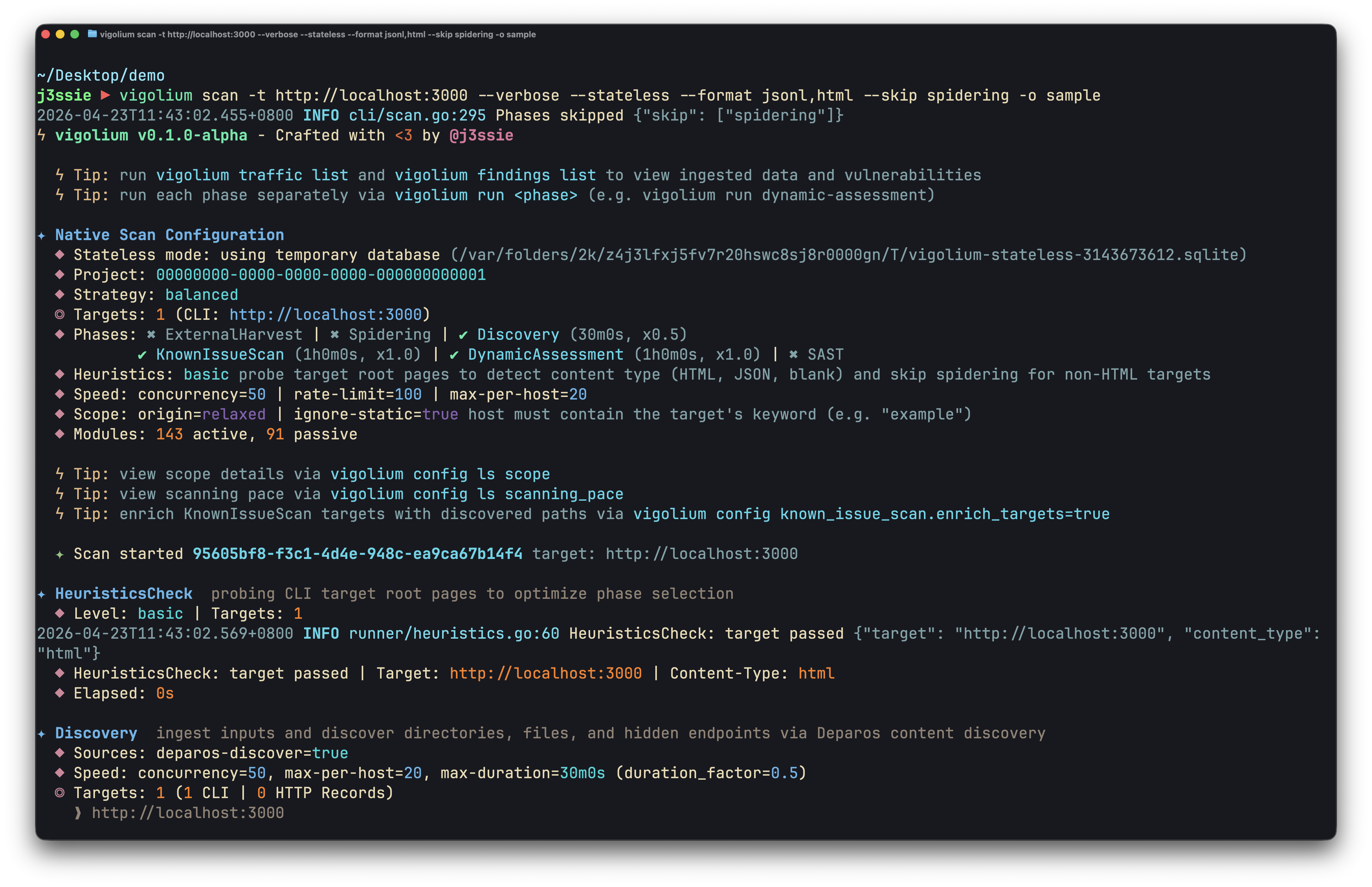
  • Native Scan (vigolium scan): 빠르고 강력하며 유연합니다. 결정적(deterministic) 다단계 스캐닝으로 콘텐츠 발견, 브라우저/SPA 스파이더링, 능동/수동 감사에 걸친 317개 모듈을 사용하며, 주입, 접근 제어, 파일/경로, API/프로토콜, 프레임워크별, 클라우드/인프라, OAST(Out-of-Band) 취약점 클래스를 포괄합니다.

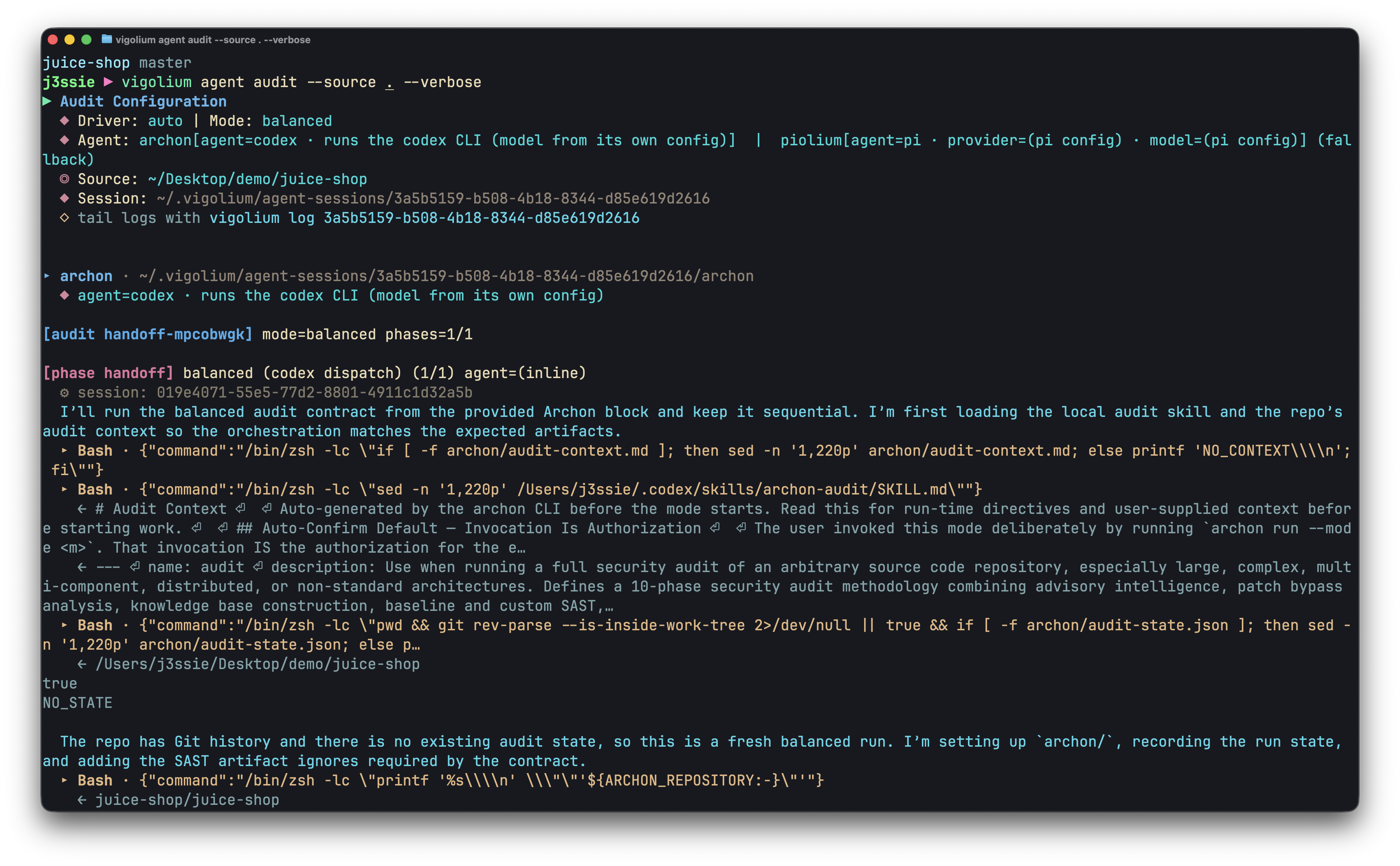
  • Agentic Scan (vigolium agent): 코드베이스를 철저히 감사합니다. AI 기반 스캐닝으로 공격을 자율적으로 계획하고, 모듈을 선택하며, 맞춤형 확장을 생성하고, 결과를 분류합니다. 심층 소스코드 감사와 자율적이고 표적화된 취약점 스캐닝을 결합합니다.

설치

빠른 설치 (권장)```bash

curl -fsSL https://vigolium.com/install.sh | bash

### [npm](https://www.npmjs.com/package/@vigolium/vigolium)```bash
npm install -g @vigolium/vigolium
Docker 또는 소스에서 빌드와 같은 다른 방법

Docker```bash

docker pull j3ssie/vigolium:latest docker run --rm j3ssie/vigolium:latest scan -h

### 소스에서 빌드```bash
git clone https://github.com/vigolium/vigolium.git
cd vigolium
make build         # build and install to $GOPATH/bin

Requires Go 1.26+ and bun 1.3.11+. See HACKING.md for prerequisites and build details.

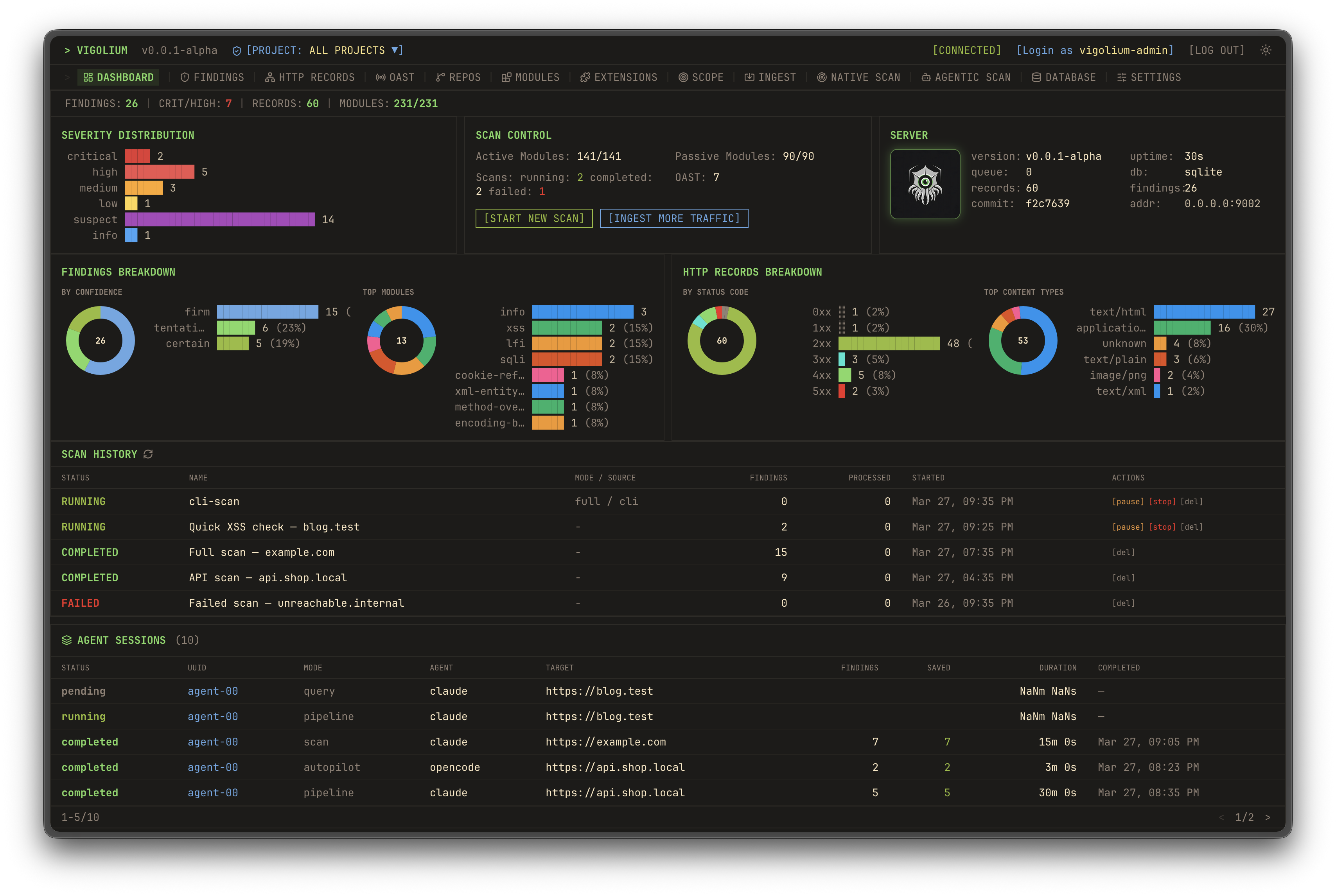
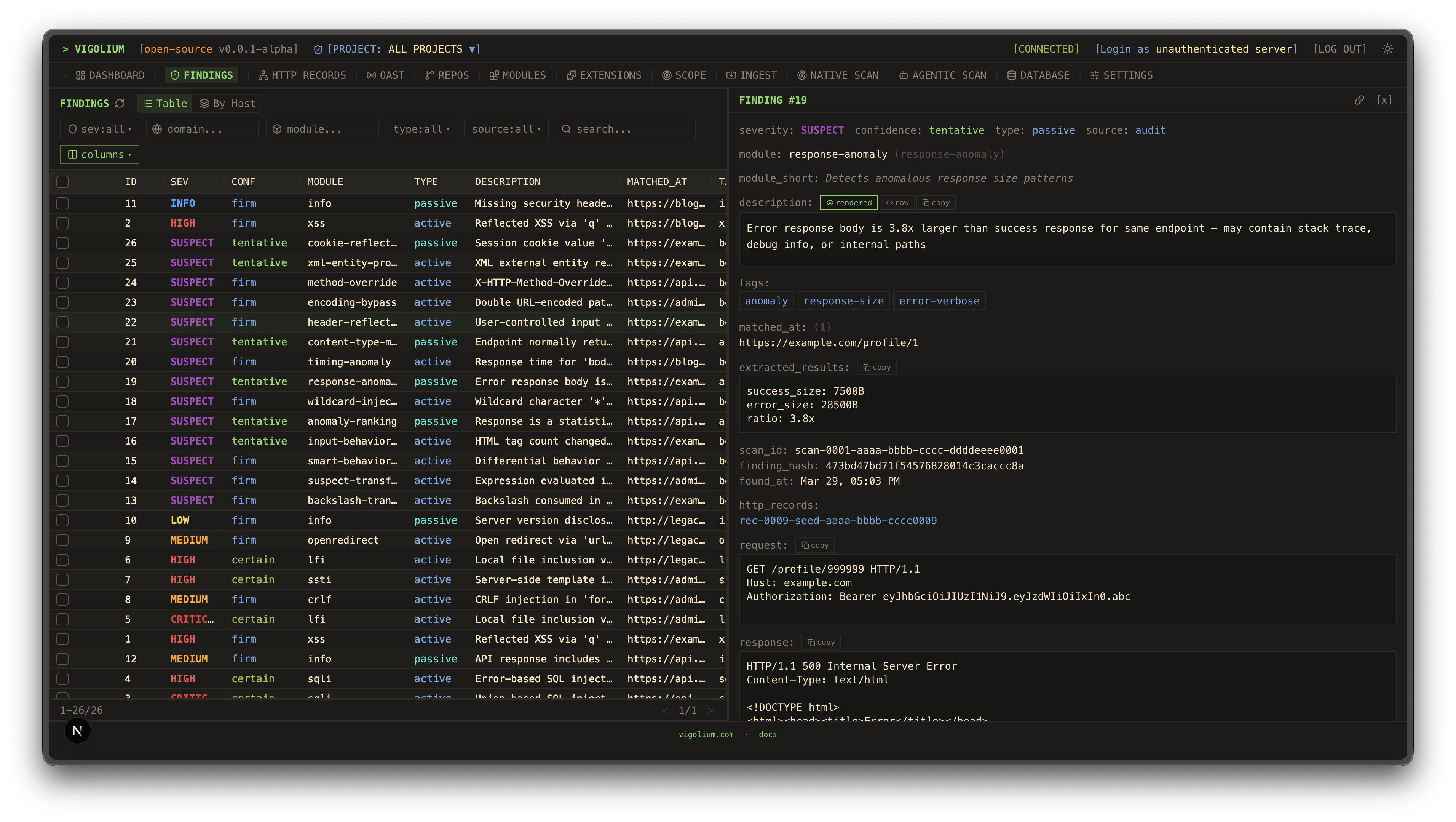
UI 대시보드트래픽 대시보드
대시보드 1대시보드 2
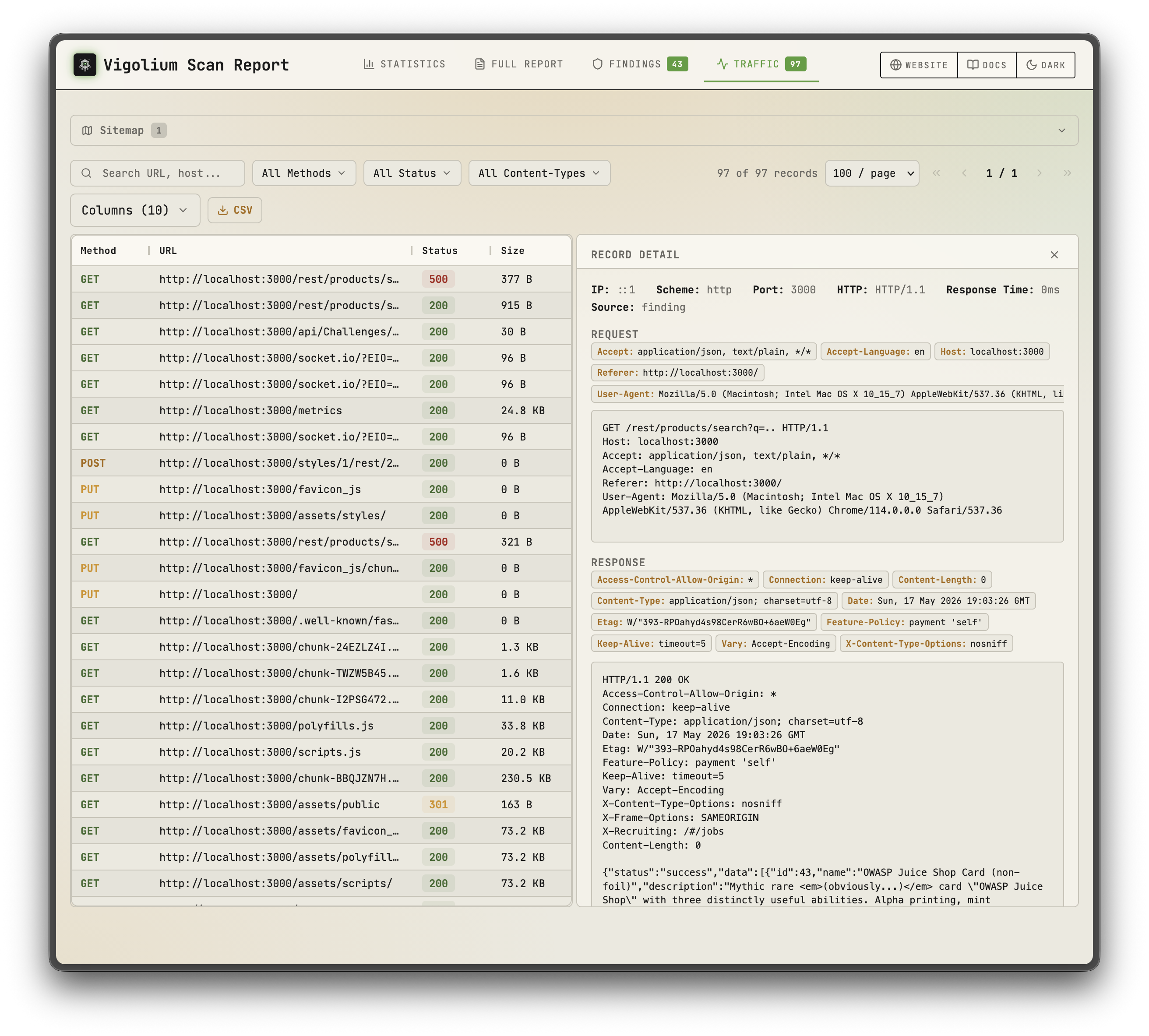
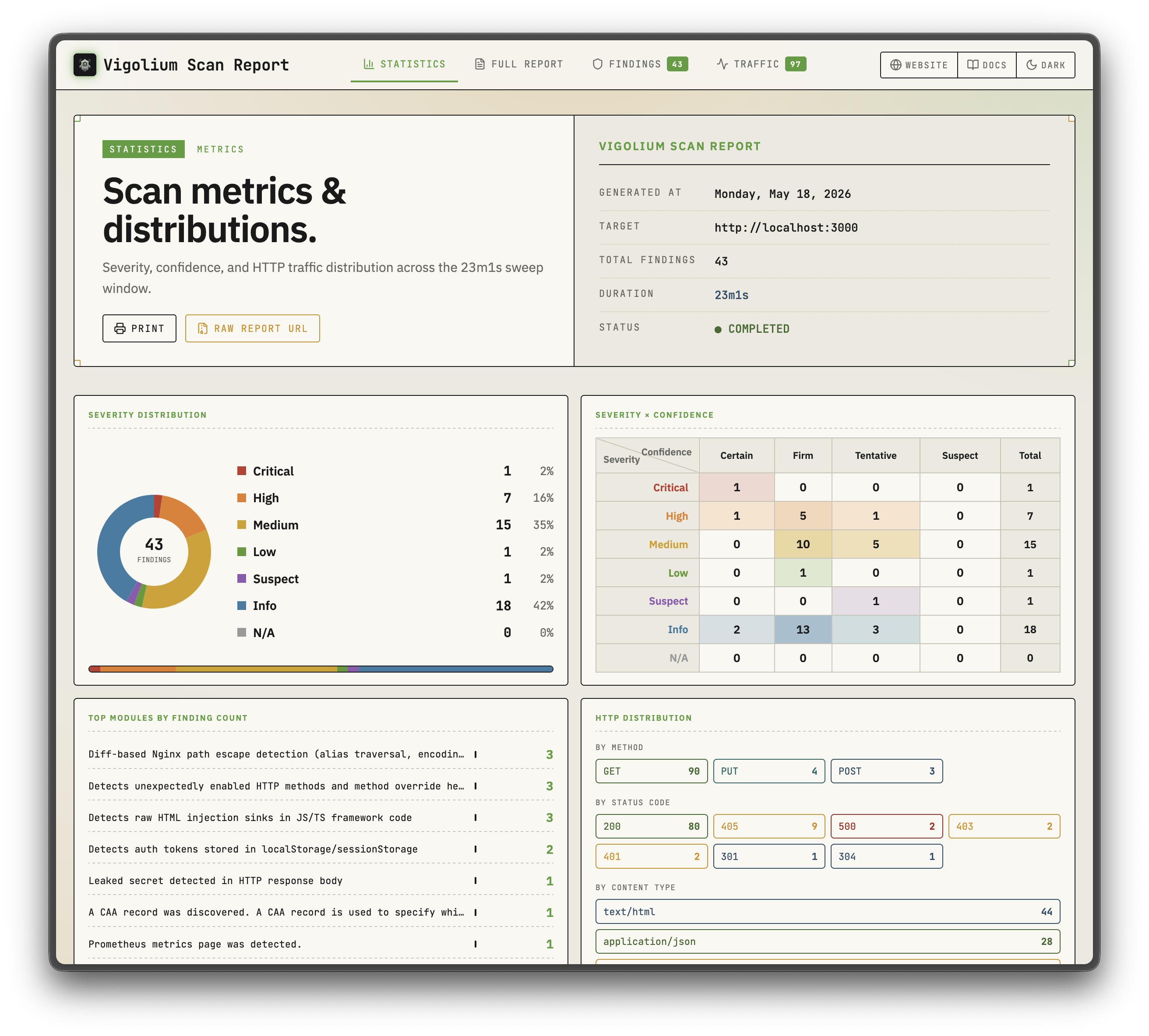
정적 보고서정적 보고서
정적 보고서 1정적 보고서 2
네이티브 스캔에이전틱 스캔
네이티브 스캔에이전틱 스캔

주요 기능

네이티브 스캔

  • 323개 스캐너 모듈: 능동(퍼징) 207개 + 수동(패턴 매칭) 116개로 OWASP Top 10 이상을 포괄합니다.
  • 대역 외 테스트(OAST): interactsh 콜백을 통한 블라인드 XSS/SSRF/명령 주입 및 자동 페이로드 상관관계 분석
  • 값 인지 변형: 매개변수를 의미론적 유형(정수, UUID, JWT, 이메일)으로 분류하고 의도에 따라 변형합니다.
  • 다단계 파이프라인: 외부 수집, 콘텐츠 디스커버리(Deparos), 브라우저/SPA 스파이더링(Spitolas), 감사(audit)로 구성되며 전략 프리셋과 스캔 프로필로 제어됩니다.
  • 유연한 입력: URL, OpenAPI/Swagger, Postman, Burp Suite, cURL, Nuclei JSONL
  • 다중 세션 인증: 인라인 세션, 세션 파일, 또는 로그인 흐름, 토큰 추출, IDOR/BOLA 테스트를 포함한 전체 인증 구성
  • JavaScript 확장: 내장 JS 엔진과 세션 인식 HTTP API를 통해 사용자 정의 모듈 및 훅을 제공합니다.
  • 확장 가능 및 보고 가능: 호스트별 속도 제한이 있는 동시 워커 풀, 인메모리/디스크/Redis 하이브리드 대기열, 자체 포함 HTML 보고서

에이전틱 스캔

  • 인프로세스 olium 런타임: 모든 에이전트 모드는 네이티브 Go pkg/olium 엔진에서 실행됩니다. 턴 기반 루프, 내장 도구 레지스트리, 스킬 지원, 플러그형 제공자 드라이버(하위 프로세스 SDK 풀 없음)
  • 오토파일럿: 에이전트가 엔드포인트를 자율적으로 발견하고, 스캔을 실행하며, 결과를 분류합니다. 선택적으로 다중 전문가 파이프라인과 세션 재개를 지원합니다.
  • 스웜: 마스터 에이전트가 모듈을 선택하고, 사용자 지정 JS 공격 확장을 생성하며, 코드 감사 + SAST를 실행하고, 스캔을 수행한 뒤 결과를 분류합니다. 대상 지정 또는 전체 범위(--discover)로 실행할 수 있으며, 변경 중심 실행에는 --diff/--last-commits를 사용합니다.
  • 소스 감사 드라이버: audit, piolium, 그리고 통합 audit 디스패처는 하나의 파인딩 스키마와 DB 태깅을 공유하며 포그라운드 소스 코드 감사를 실행합니다.
  • 쿼리 모드: 코드 리뷰, 엔드포인트 발견, 비밀 감지를 위한 원샷 프롬프트
  • 플러그형 제공자: openai-compatible(기본), openai-codex-oauth, openai-api-key, openai-responses, anthropic-api-key, anthropic-oauth, anthropic-cli, anthropic-compatible, anthropic-vertex, google-vertex. 동일한 모드가 SSE 스트리밍 및 OpenAI 호환 채팅 엔드포인트와 함께 REST API로 노출됩니다.

빠른 시작: 네이티브 스캔```bash

Scan a single target (default: balanced strategy)

vigolium scan -t https://example.com

Scan with a strategy preset

vigolium scan -t https://example.com --strategy deep

Scan specific modules only

vigolium scan -t https://example.com -m xss-reflected,sqli-error

Scan from an OpenAPI spec

vigolium scan -T openapi.yaml -I openapi

Pipe URLs from stdin

cat urls.txt | vigolium scan

Run a single phase directly

vigolium run discovery -t https://example.com

Generate an HTML report

vigolium scan -t https://example.com --only discovery --format html -o report.html

전체 파이프라인은 [아키텍처 개요](https://docs.vigolium.com/architecture/overview)를, 전략·프로필·속도 구성은 [전략 가이드](https://docs.vigolium.com/native-scan/strategies)를 참조하세요. 빠른 명령어 참조는 [docs.vigolium.com/getting-started/cheat-sheet](https://docs.vigolium.com/getting-started/cheat-sheet)를 확인하세요.

## 서버 모드```bash
# Start API server with authentication
vigolium server -k my-secret-key

# Enable transparent HTTP proxy for traffic recording
vigolium server -k my-key --ingest-proxy-port 9003

# Auto-scan ingested traffic
vigolium server -k my-key --scan-on-receive

입력된 청크 내용이 비어 있어 번역할 내용이 없습니다.```bash

Ingest traffic to a running server

cat urls.txt | vigolium ingest -s http://localhost:9002

Ingest an OpenAPI spec

vigolium ingest -s http://localhost:9002 -i api.yaml -I openapi

서버 설정은 [서버 실행](https://docs.vigolium.com/server-mode/running-the-server), 수집 워크플로는 [수집](https://docs.vigolium.com/server-mode/ingestion), 전체 REST API 참조는 [API 개요](https://docs.vigolium.com/api-overview) 문서를 참조하세요.

> **Burp Suite 통합**: 실행 중인 Vigolium 서버에 [burp-vigolium](https://github.com/vigolium/burp-vigolium) 확장 프로그램으로 실시간 Burp Suite 트래픽을 전달하세요.

## 인증 스캔

Vigolium은 IDOR/BOLA 테스트 및 권한 상승 검사를 위한 다중 세션 인증 스캔을 지원합니다:```bash
# Inline session via CLI flag (name:Header:value)
vigolium scan -t https://example.com \
  --auth "admin:Cookie:session_id=abc123" \
  --auth "user:Cookie:session_id=xyz789"

# Load session(s) from a YAML/JSON file
vigolium scan -t https://example.com --auth-file ./admin-session.yaml

# Auth file with an automated login flow (token extraction, etc.)
vigolium scan -t https://example.com --auth-file ./login-flow.yaml

# Add custom headers (works with sessions)
vigolium scan -t https://example.com -H "Authorization: Bearer token123"

인증 파일은 정적 헤더, 베어러 토큰, 그리고 쿠키, JSON 응답 또는 헤더에서 토큰을 추출하는 자동화된 로그인 흐름을 지원합니다. 사전 설정 예제는 public/presets/sessions/에서 확인할 수 있습니다. 전체 가이드는 인증 가이드를 참조하세요.

--auth / --auth-file 플래그는 이전에 --session / --session-file로 명명되었습니다. 이전 이름은 더 이상 사용되지 않는 별칭(alias)으로 계속 작동합니다.

Agentic Scan

에이전트가 내부 네이티브 스캔 엔진을 기반으로 취약점 평가를 자율적으로 계획, 실행, 분류하는 AI 기반 스캐닝:```bash

Autopilot: autonomous AI-driven scanning (in-process olium engine)

vigolium agent autopilot -t https://example.com vigolium agent autopilot -t https://example.com --source ./src --prompt "focus on auth bypass" vigolium agent autopilot -t https://example.com --diff main...feature/auth # diff-focused vigolium agent autopilot -t https://example.com --intensity deep # preset bundle

Swarm: AI-guided targeted or full-scope vulnerability scanning

vigolium agent swarm -t https://example.com/api/users --vuln-type sqli vigolium agent swarm -t https://example.com --discover # full-scope vigolium agent swarm -t https://example.com --source ./src --discover # source-aware full-scope vigolium agent swarm --input "curl -X POST https://example.com/api/login -d '{"user":"admin"}'"

Source-audit drivers (separate harness, do not route through olium)

vigolium agent audit --source ./src # default: auto (audit, fall back to piolium) vigolium agent audit --source ./src --driver audit --mode deep # vigolium-audit only (claude/codex) vigolium agent audit --source ./src --driver piolium --mode balanced # Pi-native (pi extension) only vigolium agent audit --source ./src --driver both # audit then piolium, back-to-back vigolium agent audit --source ./src --modes deep,confirm # chain modes (same as --intensity deep) vigolium agent audit --source ./src -S --output-dir ./audit-out # throwaway DB + bundled HTML report vigolium audit --source ./src # top-level alias

Direct olium access (TUI or headless)

vigolium ol # launch the olium TUI vigolium ol --prompt "..." # one-shot prompt (-p implies headless)

Agentic scan modes:
- **Autopilot**: 자율 스캐닝. CLI는 `pkg/olium/autopilot.Run`을 직접 호출하며, 서버는 동일한 루프 주위에 vigolium-audit 준비, 인증 설정, 동결된 컨텍스트 번들을 추가합니다
- **Swarm**: AI 기반 취약점 스캐닝으로, 대상 지정 단일 요청 및 전체 범위(`--discover`)를 지원합니다. 마스터 에이전트는 입력을 분석하고, 모듈을 선택하고, 맞춤형 JS 확장을 생성하고, 코드 감사 및 SAST를 실행하고, 스캔을 수행하며, 결과를 분류합니다
- **Audit**: `vigolium agent audit`를 통한 소스 코드 감사 — 내장된 **vigolium-audit**(claude/codex) 및/또는 **piolium**(Pi 네이티브) 하네스를 실행하는 통합 디스패처로, `--driver {auto|both|audit|piolium}`로 선택합니다(기본값 `auto`: 감사를 실행하고, 감사가 실패할 때만 piolium으로 대체). 별도의 하네스이며, olium을 통해 **라우팅하지 마십시오**. 드라이버별 하위 행이 하나의 상위 AgenticScan 아래 생성되며, 패스 후 발견 결과가 중복 제거됩니다. 독립형 `agent piolium` 하위 명령은 없습니다 — piolium은 `--driver=piolium`으로 실행됩니다

> **독립형 감사 CLI**: 에이전트 보안 감사는 Vigolium과 독립적으로 실행할 수 있는 독립형 CLI로도 제공됩니다: [vigolium-audit](https://github.com/vigolium/vigolium-audit) (`vigolium agent audit`의 기반이 되는 하네스) 및 [piolium](https://github.com/vigolium/piolium) (`vigolium agent audit --driver=piolium`의 기반이 되는 Pi 네이티브 드라이버).

전체 가이드는 [에이전트 모드 가이드](https://docs.vigolium.com/agentic-scan/agent-mode)를 참조하세요.

## ⚡ Vigolium 클라우드 콘솔

인프라를 관리하지 않고도 Vigolium의 강력한 기능을 원하는 팀을 위한 클라우드 기반 솔루션입니다. Console은 **업그레이드되고 완전한 기능을 갖춘 Vigolium 버전**입니다: 관리형 스캐닝, 중앙 집중식 보고, 팀 협업, 그리고 오픈소스 코어 위에 더해진 추가 기능을 제공하여, 도구 유지보수 대신 취약점 수정에 집중할 수 있습니다.

> [console.vigolium.com](https://console.vigolium.com/)에서 Cloud Console을 확인하세요.

## 네이티브 스캔 레이어

네이티브 스캔 파이프라인은 모듈식 레이어로 구성되며, 각 레이어는 별도로 문서화되어 있습니다:

| 레이어 | 설명 | 문서 |
|-------|-------------|------|
| **Content Discovery (Deparos)** | 적응형 디렉터리/파일 열거 및 핑거프린트 기반 소프트 404 감지 | [docs.vigolium.com/native-scan/phases/discovery](https://docs.vigolium.com/native-scan/phases/discovery) |
| **Browser Spider (Spitolas)** | CDP 트래픽 캡처를 사용하는 Chromium 기반 상태 머신 크롤러 | [docs.vigolium.com/native-scan/phases/spidering](https://docs.vigolium.com/native-scan/phases/spidering) |
| **Audit** | 삽입 지점 추출 및 DiffScan 프레임워크를 통한 능동/수동 취약점 스캐닝 | [docs.vigolium.com/native-scan/phases/audit](https://docs.vigolium.com/native-scan/phases/audit) |
| **Scanner Modules** | OWASP Top 10 이상을 포함한 207개의 능동 및 116개의 수동 모듈 | [docs.vigolium.com/native-scan/modules-reference](https://docs.vigolium.com/native-scan/modules-reference) |

## 문서

전체 문서는 [docs.vigolium.com](https://docs.vigolium.com/)에서 확인할 수 있습니다. 릴리스 노트와 버전 기록은 [CHANGELOG](https://github.com/vigolium/vigolium/blob/HEAD/CHANGELOG.md)에 있습니다. 빠른 링크:

| 주제 | 링크 |
|-------|------|
| 에이전트 설정 | [docs.vigolium.com/getting-started/setup-agent](https://docs.vigolium.com/getting-started/setup-agent) |
| 네이티브 스캔 시작 | [docs.vigolium.com/getting-started/native-scan](https://docs.vigolium.com/getting-started/native-scan) |
| 에이전트 스캔 시작 | [docs.vigolium.com/getting-started/agentic-scan](https://docs.vigolium.com/getting-started/agentic-scan) |
| 에이전트 감사 시작 | [docs.vigolium.com/getting-started/agentic-security-audit](https://docs.vigolium.com/getting-started/agentic-security-audit) |
| 빠른 시작 | [docs.vigolium.com/getting-started/quickstart](https://docs.vigolium.com/getting-started/quickstart) |
| 치트 시트 | [docs.vigolium.com/getting-started/cheat-sheet](https://docs.vigolium.com/getting-started/cheat-sheet) |
| 서버 및 수집 | [docs.vigolium.com/getting-started/server-and-ingestion](https://docs.vigolium.com/getting-started/server-and-ingestion) |
| 확장 프로그램 작성 | [docs.vigolium.com/customization/writing-extensions](https://docs.vigolium.com/customization/writing-extensions) |

## JavaScript 엔진

JavaScript/TypeScript 코드를 직접 실행하거나 재컴파일 없이 맞춤형 스캔 모듈과 훅을 작성할 수 있습니다:```bash
# Execute inline JavaScript
vigolium js --code 'let r = vigolium.http.get(TARGET); console.log(r.status)' -t https://example.com

# Run a JS file with timeout
vigolium js --code-file ./my-script.js -t https://example.com --timeout 60s

# Manage extensions
vigolium ext ls                # list loaded extensions
vigolium ext docs --example    # browse API with code examples
vigolium ext preset            # install starter scripts

JS 엔진은 인증된 테스트를 위한 세션 인식 HTTP API를 노출합니다:```javascript // Create a persistent session with shared cookie jar. // post() takes a string body — serialize objects yourself. let session = vigolium.http.session(); session.post( "https://app.example.com/login", JSON.stringify({ user: "admin", pass: "secret" }), { headers: { "Content-Type": "application/json" } } ); session.get("https://app.example.com/dashboard"); // cookies auto-sent

// Automated login flow with token extraction let authed = vigolium.http.login({ url: "https://app.example.com/api/auth", method: "POST", body: JSON.stringify({ username: "admin", password: "pass" }), extract: [{ source: "json", path: "$.token", apply_as: "Authorization: Bearer {value}" }] });

// IDOR/BOLA testing across multiple sessions let results = vigolium.http.authTest({ sessions: { admin: adminSession, user: userSession }, requests: [{ method: "GET", url: "https://app.example.com/api/users/1" }] });

// Multi-step authentication sequences let result = vigolium.http.sequence([ { url: "/csrf", extract: [{ source: "cookie", name: "csrf_token", as: "token" }] }, { url: "/login", method: "POST", body: "csrf={token}&user=admin" } ]);

// Parallel request batching (race conditions, IDOR) let responses = vigolium.http.batch([req1, req2, req3], { concurrency: 10 });

// CSRF token extraction let csrf = vigolium.http.csrf("https://app.example.com/form");

// HTTP request replay with variations let varied = vigolium.http.replay(rawRequest, [ { headers: { "Authorization": "Bearer admin_token" } }, { headers: { "Authorization": "Bearer user_token" } } ]);

확장 프로그램 작성 가이드는 [writing extensions](https://docs.vigolium.com/customization/writing-extensions)을(를) 참조하고, 전체 TypeScript API 정의는 `pkg/jsext/vigolium.d.ts`를 참조하세요.

## CLI 참조

<details>
<summary>전체 명령어 및 플래그 참조 펼치기</summary>

### 명령어```
Scanning:
  vigolium scan                Run a native scan (deterministic multi-phase vulnerability scanning)
  vigolium run <phase>         Run a single native scan phase (alias for scan --only <phase>)
  vigolium scan-url <url>      Quick native scan of a single URL
  vigolium scan-request        Native scan from a raw HTTP request

Agentic scan (in-process olium engine):
  vigolium agent autopilot     Autonomous AI-driven vulnerability scanning
  vigolium agent swarm         AI-guided targeted or full-scope vulnerability scanning
  vigolium agent query         Single-shot prompt (code review, endpoint discovery)
  vigolium agent olium         Direct olium TUI (or one-shot non-interactive via -p)
  vigolium agent audit         Unified driver dispatcher (vigolium-audit and/or piolium, --driver=auto|both|audit|piolium)
  vigolium agent session       Browse/replay agent session artifacts
  vigolium olium | vigolium ol Top-level alias for `vigolium agent olium`

Server & ingestion:
  vigolium server              Start the API server with traffic ingestion
  vigolium ingest              Ingest traffic to a running server
  vigolium storage             Interact with cloud object storage (uploads, downloads)

Data & projects:
  vigolium db                  Database operations (list, stats, export, clean, seed)
  vigolium finding             Browse and manage findings (load, tui)
  vigolium traffic             Browse and replay HTTP records (tui, replay)
  vigolium replay              Mutate a stored/supplied HTTP request and diff baseline vs replay
  vigolium project             Manage projects (create, list, use, config)
  vigolium scope               Manage scope rules
  vigolium import              Import findings/data from external sources
  vigolium export              Export scan results

Extensions & auth:
  vigolium js                  Execute JavaScript/TypeScript code
  vigolium ext                 Manage JavaScript extensions (eval, lint)
  vigolium auth                Manage authentication sessions (list, load, lint, totp)

Setup & introspection:
  vigolium init                Initialize a Vigolium workspace
  vigolium config              Manage configuration (ls, set, path, clean)
  vigolium strategy            Inspect scanning strategies and phases
  vigolium module              Inspect/enable scanner modules
  vigolium doctor              Diagnose environment & dependencies
  vigolium version             Show version info

플래그```

Native Scan (vigolium scan / run): -t, --target Target URL -T, --target-file File containing target URLs -i, --input Input file path (- for stdin) -I, --input-mode Input format: urls, openapi, swagger, burp, curl, nuclei, har -m, --modules Modules to run (comma-separated or 'all') --strategy Strategy preset: lite, balanced, deep --scanning-profile Scanning profile name or YAML path --only Phases to run (comma-separated): ingestion, discovery (deparos), external-harvest, spidering (spitolas), known-issue-scan, dynamic-assessment, extension --skip Phases to skip (repeatable, same names as --only) -S, --stateless Use a throwaway temp database, discarded after the scan --fail-on Exit non-zero when a finding at/above this severity is present

Authentication: --auth Inline session definition (name:Header:value, repeatable) --auth-file Session YAML/JSON file path, supports login flows (repeatable) -H, --header Custom HTTP header (repeatable)

Performance: -c, --concurrency Concurrent workers (default: 50) -r, --rate-limit Max requests/sec (default: 0 = unlimited) --max-per-host Per-host concurrency cap (default: 2) --proxy HTTP/SOCKS5 proxy URL --timeout HTTP request timeout (default: 15s)

Agentic Scan (vigolium agent autopilot / swarm / query): --source Path to source code for source-aware scanning --files Specific files to include relative to --source --source-label Label for source code ingestion --provider Olium provider: openai-compatible (default), openai-codex-oauth, openai-api-key, openai-responses, anthropic-api-key, anthropic-oauth, anthropic-cli, anthropic-compatible, anthropic-claude-sdk-bridge, anthropic-vertex, google-vertex --model Model ID override --oauth-token OAuth bearer token (anthropic-oauth) --oauth-cred OAuth/SA file path (openai-codex-oauth, anthropic-vertex, google-vertex) --llm-api-key API key (anthropic-api-key, openai-api-key) --vuln-type Vulnerability type focus (sqli, xss, ssrf, ...) --prompt Free-text task guidance (same as the positional [prompt]) --plan-file Plan file mixing guidance + raw seed HTTP request(s) --knowledge-base File/dir describing the app; prose is distilled, traffic exports (HAR/Burp/curl/OpenAPI/Postman) are ingested --prior-context Front-load existing project traffic/findings: auto, summary, off --intensity Preset bundle: quick, balanced, deep --diff Diff range / PR URL / HEADN for change-focused scans --last-commits Shorthand for --diff HEADN --code-audit Enable AI code audit (default: on with --source) --discover Run discovery+spidering before planning (swarm) --audit vigolium-audit mode: lite, balanced, deep, mock, off --piolium Piolium audit mode (empty = auto-pick) --resume Resume a durable-autopilot run by agentic-scan UUID --session-dir Pin the session dir for this run's debug artifacts --transcript Copy transcript.jsonl out after the run --max-iterations Max triage-rescan iterations --max-commands Cap on agent tool calls --token-budget Cap on aggregate tokens --max-duration Max agent wall-clock time (0 = no limit) --only / --skip / --start-from Phase control (swarm)

Source audit (vigolium agent audit / vigolium audit): --driver auto (default), both, audit, piolium --intensity Preset: quick, balanced, deep (deep = modes deep,confirm) --mode Mode override: lite, balanced, deep, revisit, confirm, merge, ... --modes Chain modes back-to-back (e.g. deep,confirm) --list-modes Print the audit mode graph and exit --agent Coding agent for the audit leg: claude or codex --keep-raw Keep raw output under /vigolium-results/ (on by default) --clean-raw Remove the source-tree raw copy after the run -S, --stateless Run into a throwaway DB and auto-render an HTML report --output-dir Bundle the HTML report + raw results into one folder (needs -S) --no-dedup Skip the post-pass project-wide findings dedup --no-preflight Skip the pre-audit auth/model roundtrip checks -i, --interactive Drive the audit yourself in the coding agent (audit driver only)

JavaScript: --code Inline JavaScript to execute --code-file Path to JS/TS file to execute --timeout Execution timeout (default: 30s)

Output: -j, --json Compact, token-aware JSON output (read/query commands) --format Output format (comma-separated for multiple): console, jsonl, html, sqlite (needs -S), fs (flat traffic/finding tree) -o, --output Output file path --silent Suppress all output except findings -v, --verbose Verbose logging

</details>

## 저장소 구조

`platform/` 디렉터리에는 외부 도구와 UI 대시보드가 포함되어 있으며 핵심 스캐너의 일부가 아닙니다. 이 디렉터리는 변경해서는 안 됩니다.

## 벤치마크

Vigolium은 의도적으로 취약하게 만든 애플리케이션에 대해 지속적으로 벤치마킹되고 있으며, 버그 바운티 및 책임 있는 공개 프로그램을 통해 실제 대상에 대해서도 집중적으로 테스트됩니다.

- **자체 호스팅(Docker):** [DVWA](https://github.com/digininja/DVWA), [OWASP Juice Shop](https://github.com/juice-shop/juice-shop), [VAmPI](https://github.com/erev0s/VAmPI), [crAPI](https://github.com/OWASP/crAPI), [Vulnerable Java App](https://github.com/DataDog/vulnerable-java-application), [Vulnerable Nginx](https://github.com/detectify/vulnerable-nginx), [OopsSec Store](https://github.com/kOaDT/oss-oopssec-store) (사용자 지정 Next.js 앱)
- **외부(호스팅):** [Acunetix TestPHP](http://testphp.vulnweb.com), [Gin & Juice Shop](https://ginandjuice.shop), [Testfire](http://demo.testfire.net)
- **XSS 및 다중 취약점:** [BruteLogic XSS](https://github.com/vigolium/vigolium/blob/HEAD/test/benchmark/xss_scanner/), [XBOW](https://github.com/vigolium/vigolium/blob/HEAD/test/benchmark/definitions/xbow/) (XSS, SQLi, SSTI, LFI, SSRF, XXE, 명령 주입)

`make test-canary`(Docker 앱) 또는 `make test-integration`(XSS)로 벤치마크를 실행하세요.

## 개발```bash
make build          # build and install
make test           # run all tests (auto-installs gotestsum)
make test-unit      # fast unit tests (-short, no external deps)
make test-e2e       # E2E tests (requires Docker)
make lint           # run linter
make fmt            # format code

See HACKING.md for the full build guide, codebase map, and module development guide.

Security

Vigolium is an offensive security tool, and two parts of it are intentionally permissive: agent mode runs with no sandbox (the LLM has full shell, file, and network access on the host) and extensions can run arbitrary commands. Run agent mode in a disposable container/VM scoped to the engagement, and treat untrusted extensions like untrusted code. See SECURITY.md before you start, and report vulnerabilities in Vigolium itself privately to [email protected].

License

Vigolium is released under the GNU Affero General Public License v3.0. Derivative works must remain open under the same terms.

Crafted with ♥ by @j3ssie, with @theblackturtle as a core initial contributor.

카테고리