secretlint v13.0.4
크리덴셜 커밋을 방지하는 플러그형 린팅 도구.
Secretlint 

Secretlint은 커밋 자격 증명을 방지하기 위한 플러그형 린팅 도구입니다.
기능
- 스캐너: 프로젝트에서 자격 증명을 찾아 보고합니다.
- 프로젝트 친화적: 프로젝트 설정 및 CI 서비스 통합이 쉽습니다.
- 사전 커밋 훅: 자격 증명 파일의 커밋을 방지합니다.
- 플러그형: 사용자 정의 규칙 생성 및 유연한 구성을 허용합니다.
- 문서화: 규칙이 이를 비밀로 감지하는 이유를 설명합니다.
빠른 데모
비밀린트 린팅 결과는 https://secretlint.github.io/에서 확인할 수 있습니다.
빠른 시작
한 번의 명령으로 프로젝트에서 Secretlint를 사용해 볼 수 있습니다.
Docker가 이미 설치되어 있다면:
docker run -v `pwd`:`pwd` -w `pwd` --rm -it secretlint/secretlint secretlint "**/*"
Node.js가 이미 설치되어 있다면:
npx @secretlint/quick-start "**/*"
실행 후,
결과가 비어 있고 종료 상태가 0이면 프로젝트가 안전합니다.
그렇지 않으면 오류 보고서가 표시되며, 프로젝트에 자격 증명이 원시 데이터로 포함되어 있습니다.

지속적인 보안을 원한다면 다음 설치 가이드를 참조하고 사전 커밋 훅 및 CI를 설정하세요.
설치
Docker 사용
전제 조건: Docker 필요
다운로드만큼 빠르게 Node.js와 secretlint가 실행되는 환경을 얻으려면 Docker 컨테이너를 사용하세요.
다음 명령으로 현재 디렉토리 아래의 모든 파일을 secretlint로 확인할 수 있습니다:
docker run -v `pwd`:`pwd` -w `pwd` --rm -it secretlint/secretlint secretlint "**/*"
설계상 secretlint/secretlint Docker 컨테이너는 구성 없이 작동합니다.
이 Docker 이미지에는 다음과 같은 패키지가 내장되어 있습니다:
- @secretlint/secretlint-rule-preset-recommend
- @secretlint/secretlint-rule-pattern
- @secretlint/secretlint-formatter-sarif
자세한 내용은 secretlint의 Dockerfile을 참조하세요.
Node.js 사용
전제 조건: Node.js 22+ 필요
Secretlint는 JavaScript로 작성되었습니다.
npm을 사용하여 Secretlint를 설치할 수 있습니다:``` npm install secretlint @secretlint/secretlint-rule-preset-recommend --save-dev
그런 다음 구성 파일을 설정하십시오:```
npx secretlint --init
마지막으로, Secretlint를 다음과 같이 모든 파일이나 디렉토리에서 실행할 수 있습니다:``` npx secretlint "**/*"
:memo: Secretlint는 [glob 패턴](https://github.com/mrmlnc/fast-glob#basic-syntax)을 지원하며, glob 패턴은 큰따옴표로 감싸야 합니다.
또한 `npm install --global`을 사용하여 Secretlint를 전역으로 설치할 수 있습니다. 하지만 전역 설치는 권장하지 않습니다. 일부 규칙이 전역에서 깨질 수 있기 때문입니다.
### 단일 실행 바이너리 사용
**전제 조건:** 없음
단일 실행 바이너리를 사용하면 Node.js 없이도 `secretlint` 명령을 사용할 수 있습니다.
1. 최신 바이너리를 [릴리스 페이지](https://github.com/secretlint/secretlint/releases)에서 다운로드하세요.
2. 파일 권한을 실행 가능으로 변경: `chmod +x ./secretlint`
3. 설정 파일 생성을 위해 `./secretlint --init`을 실행하세요.
4. 프로젝트를 린트하려면 `./secretlint "**/*"`을 실행하세요.
자세한 내용은 [publish/binary-compiler](https://github.com/secretlint/secretlint/blob/HEAD/publish/binary-compiler) README를 참조하세요.
## 사용법
`secretlint --help`는 사용법을 보여줍니다.
Secretlint CLI that scan secret/credential data.
Usage
$ secretlint [file|glob*]
Note
supported glob syntax is based on picomatch (the engine used by micromatch)
https://github.com/micromatch/picomatch#globbing-features
https://github.com/micromatch/micromatch#matching-features
Options
--init setup config file. Create .secretlintrc.json file from your package.json
--format [String] formatter name. Default: "stylish". Available Formatter: checkstyle, compact, github, jslint-xml, junit, pretty-error, stylish, tap, unix, json, mask-result, table
--output [path:String] output file path that is written of reported result.
--secretlintrc [path:String] path to .secretlintrc config file. Default: .secretlintrc.*
--secretlintignore [path:String] path to .secretlintignore file. Default: .secretlintignore
--stdinFileName [String] filename to process STDIN content. Some rules depend on filename to check content.
--no-color disable ANSI-color of output.
--no-terminalLink disable terminalLink of output.
--no-maskSecrets disable masking of secret values; secrets are masked by default.
--no-glob disable glob pattern interpretation; treat all inputs as literal file paths.
--no-gitignore disable .gitignore cascade respect; .gitignore files are
respected by default (since v13).
Options for Developer
--profile Enable performance profile.
--secretlintrcJSON [String] a JSON string of .secretlintrc. use JSON string instead of rc file.
Experimental Options
--locale [String] locale tag for translating message. Default: en
Examples
# Scan a single file
$ secretlint ./README.md
# Scan all files (wrap glob in double quotes to avoid shell expansion)
$ secretlint "**/*"
$ secretlint "source/**/*.ini"
# Treat inputs as literal paths (for SvelteKit (group) / Next.js [param] etc.)
$ secretlint --no-glob "src/(auth)/login.ts"
# Lint STDIN content (filename hint affects which rules apply)
$ echo "SECRET" | secretlint --stdinFileName=secret.txt
# Use a custom config file
$ secretlint "**/*" --secretlintrc=.secretlintrc.custom.json
# Scan files ignored by .gitignore (e.g. to verify build artifacts)
$ secretlint --no-gitignore "dist/**/*"
# Mask secrets in a file in-place
$ secretlint .zsh_history --format=mask-result --output=.zsh_history
# Output JSON for programmatic parsing
$ secretlint "**/*" --format=json --output=secretlint-report.json
# Output GitHub Actions annotations in CI
$ secretlint "**/*" --format=github
Exit Status
Secretlint exits with the following values:
- 0:
- Linting succeeded, no errors found.
- Found lint error but --output is specified.
- 1:
- Linting failed, errors found.
- 2:
- Unexpected error occurred, fatal error.
## 구성
Secretlint는 `.secretlintrc.{json,yml,js}` 설정 파일을 사용합니다.
- 문서: [Secretlint 구성](https://github.com/secretlint/secretlint/blob/HEAD/docs/configuration.md)
`secretlint --init`을 실행하면 디렉터리에 `.secretlintrc.json` 파일이 생성됩니다.
파일 안에는 다음과 같은 구성된 규칙들을 볼 수 있습니다:```json
{
"rules": [
{
"id": "@secretlint/secretlint-rule-preset-recommend"
}
]
}
id 속성은 secretlint 규칙 패키지의 이름입니다.
Secretlint에는 내장 규칙이 없습니다.
규칙을 추가하려면 패키지를 설치하고 .secretlintrc 파일에 규칙을 추가해야 합니다.
각 규칙은 동일한 구성 패턴을 가집니다:
options: 규칙에 대한 옵션 정의입니다. 자세한 내용은 각 규칙의 문서를 참조하십시오.disabled:disabled가true이면 규칙을 비활성화합니다.allowMessageIds:allowMessageIds는 오류 보고를 억제하려는 메시지 ID의 배열입니다.- 메시지 ID는 각 규칙에 정의되어 있으며, 규칙 문서를 참조하십시오.
예제: options
예를 들어, @secretlint/secretlint-rule-example은 options에 allows를 가지고 있습니다.
이 allows 옵션은 무시하려는 RegExp-like String 목록을 정의합니다.```json
{
"rules": [
{
"id": "@secretlint/secretlint-rule-example",
"options": {
"allows": [
"/dummy_secret/i"
]
}
}
]
}
`@secretlint/secretlint-rule-preset-recommend` 같은 프리셋을 사용할 때는 옵션을 `rules`에 넣어야 합니다.
예를 들어, `@secretlint/secretlint-rule-preset-recommend > @secretlint/secretlint-rule-aws` 에 대한 옵션은```json5
{
"rules": [
{
"id": "@secretlint/secretlint-rule-preset-recommend",
"rules": [
{
"id": "@secretlint/secretlint-rule-aws",
"options": {
"allows": [
// it will be ignored
"xxxx-xxxx-xxxx-xxxx-xxxx"
]
}
}
]
}
]
}
Example: allowMessageIds
예를 들어, secretlint를 실행하여 다음과 같은 오류 보고를 받았다고 가정해 보겠습니다:```
$ secretlint "**/*"
SECRET.txt 1:8 error [EXAMPLE_MESSAGE] found secret: SECRET @secretlint/secretlint-rule-example
✖ 1 problem (1 error, 0 warnings)
이 오류의 메시지 ID는 `EXAMPLE_MESSAGE` (`@secretlint/secretlint-rule-example`)입니다.
이 오류를 무시하려면 `allowMessageIds`를 사용하세요.```json
{
"rules": [
{
"id": "@secretlint/secretlint-rule-example",
"allowMessageIds": ["EXAMPLE_MESSAGE"]
}
]
}
@secretlint/secretlint-rule-preset-recommend와 같은 프리셋을 사용할 때는 옵션을 rules에 넣어야 합니다.
예를 들어, @secretlint/secretlint-rule-aws의 "AWSAccountID"와 "AWSAccessKeyID"를 무시하려면 다음과 같이 작성할 수 있습니다.```json5
{
"rules": [
{
"id": "@secretlint/secretlint-rule-preset-recommend",
"rules": [
{
"id": "@secretlint/secretlint-rule-aws",
"allowMessageIds": ["AWSAccountID", "AWSAccessKeyID"]
}
]
}
]
}
### `.gitignore` 및 `.secretlintignore`를 통한 파일 무시
Secretlint는 Git과 동일한 방식으로 파일 시스템을 탐색하며, 중첩된 `.gitignore` 파일을 존중합니다. 작업 디렉터리에서 파일까지의 경로에 있는 `.gitignore`에 매칭되는 파일이나 디렉터리는 건너뜁니다.
`.secretlintignore`는 `.gitignore`와 동일하게 작동하며 추가로 참조됩니다. 해석 순서는 다음과 같습니다:
1. 내장 무시 항목: `.git`, `node_modules`, `.secretlintrc*` 계열.
2. `--secretlintignore`가 가리키는 파일 (기본값: `.secretlintignore`).
3. 각 디렉터리의 `.gitignore` (계단식).
Git에 무시된 파일을 스캔하려면 (예: `.env`가 gitignore된 프로젝트에서 `.env` 파일), `--no-gitignore`를 전달하세요:```
secretlint --no-gitignore "**/*"
v13으로 마이그레이션:
- 이제
.gitignore가 기본적으로 존중됩니다. 이전에는 secretlint가.gitignore와 관계없이 일치하는 모든 파일을 검사했습니다. 이전 동작을 복원하려면--no-gitignore를 전달하세요.- 포함 패턴은 picomatch glob 구문(브레이스 확장,
**, 문자 클래스 등)을 따릅니다. 계단식 무시 스택(.gitignore,.secretlintignore, 내장 무시 목록)은 표준.gitignore의미 체계를 따르며, 브레이스 확장을 지원하지 않습니다. 따라서 무시 패턴의 경우**/{cache,tmp}대신**/.cache를 작성하세요.- 패턴은 기본적으로 glob로 해석됩니다. 패턴이 디스크에 존재하는 경로로 확인되면, 이름에 glob 메타문자(
[,(,{,?)가 포함되어 있어도 walker는 이를 리터럴로 처리합니다(globby의 이전convertPathToPattern동작과 동일). 디스크에 아직 존재하지 않는 경로에 대해 리터럴 처리를 강제하려면--no-glob을 전달하세요.- 검색 중에 디렉터리 심볼릭 링크가 따라가지만(이전 globby 기반 동작과 일치),
.gitignore와.secretlintignore규칙이 보는 것은 링크 경로(해결된 대상이 아님)입니다. 사이클은realpath를 통해 감지되므로 각 고유 대상은 최대 한 번만 입력됩니다.
주석으로 무시하기
@secretlint/secretlint-rule-filter-comments는 secretlint-disable과 같은 무시 주석을 지원합니다.```
// secretlint-disable
THIS IS SECRET, BUT IT WILL BE IGNORED
// secretlint-enable
자세한 내용은 [Secretlint 설정](https://github.com/secretlint/secretlint/blob/HEAD/docs/configuration.md)을 참조하세요.
## 사용 사례
### 린트 오류 메시지에서 비밀 마스킹 (기본 동작)
Secretlint는 기본적으로 린트 오류 메시지에서 비밀을 마스킹합니다. 이는 CI 로그, 터미널 출력 또는 AI 에이전트 도구 사용 시 우발적인 비밀 노출을 방지하는 데 유용합니다.```bash
# Secrets are masked by default
$ secretlint "**/*"
출력에서 실제 비밀 값을 표시하려면 --no-maskSecrets를 사용하세요:```bash
$ secretlint --no-maskSecrets "**/*"
### 시크릿 수정
Secretlint는 시크릿을 자동으로 수정할 수 없습니다.
하지만 `--format=mask-result`를 사용하여 입력 파일의 시크릿을 마스킹하는 것은 유용합니다.
예를 들어, `.zsh_history` 파일의 시크릿을 마스킹하고 덮어쓸 수 있습니다.
cat .zsh_history | secretlint --format=mask-result > .zsh_history
$ secretlint .zsh_history --format=mask-result --output=.zsh_history
```
## 규칙 패키지
Secretlint 규칙은 분리된 모듈로 구현되었습니다.
- [@secretlint/secretlint-rule-npm](https://github.com/secretlint/secretlint/blob/HEAD/packages/@secretlint/secretlint-rule-npm)
- [@secretlint/secretlint-rule-aws](https://github.com/secretlint/secretlint/blob/HEAD/packages/@secretlint/secretlint-rule-aws)
- [@secretlint/secretlint-rule-gcp](https://github.com/secretlint/secretlint/blob/HEAD/packages/@secretlint/secretlint-rule-gcp)
- [@secretlint/secretlint-rule-github](https://github.com/secretlint/secretlint/blob/HEAD/packages/@secretlint/secretlint-rule-github)
- [@secretlint/secretlint-rule-gitlab](https://github.com/secretlint/secretlint/blob/HEAD/packages/@secretlint/secretlint-rule-gitlab)
- [@secretlint/secretlint-rule-privatekey](https://github.com/secretlint/secretlint/blob/HEAD/packages/@secretlint/secretlint-rule-privatekey)
- [@secretlint/secretlint-rule-basicauth](https://github.com/secretlint/secretlint/blob/HEAD/packages/@secretlint/secretlint-rule-basicauth)
- [@secretlint/secretlint-rule-slack](https://github.com/secretlint/secretlint/blob/HEAD/packages/@secretlint/secretlint-rule-slack)
- [@secretlint/secretlint-rule-sendgrid](https://github.com/secretlint/secretlint/blob/HEAD/packages/@secretlint/secretlint-rule-sendgrid)
- [@secretlint/secretlint-rule-shopify](https://github.com/secretlint/secretlint/blob/HEAD/packages/@secretlint/secretlint-rule-shopify)
- [@secretlint/secretlint-rule-stripe](https://github.com/secretlint/secretlint/blob/HEAD/packages/@secretlint/secretlint-rule-stripe)
- [@secretlint/secretlint-rule-openai](https://github.com/secretlint/secretlint/blob/HEAD/packages/@secretlint/secretlint-rule-openai)
- [@secretlint/secretlint-rule-anthropic](https://github.com/secretlint/secretlint/blob/HEAD/packages/@secretlint/secretlint-rule-anthropic)
- [@secretlint/secretlint-rule-grafana](https://github.com/secretlint/secretlint/blob/HEAD/packages/@secretlint/secretlint-rule-grafana)
- [@secretlint/secretlint-rule-groq](https://github.com/secretlint/secretlint/blob/HEAD/packages/@secretlint/secretlint-rule-groq)
- [@secretlint/secretlint-rule-linear](https://github.com/secretlint/secretlint/blob/HEAD/packages/@secretlint/secretlint-rule-linear)
- [@secretlint/secretlint-rule-1password](https://github.com/secretlint/secretlint/blob/HEAD/packages/@secretlint/secretlint-rule-1password)
- [@secretlint/secretlint-rule-database-connection-string](https://github.com/secretlint/secretlint/blob/HEAD/packages/@secretlint/secretlint-rule-database-connection-string)
- [@secretlint/secretlint-rule-databricks](https://github.com/secretlint/secretlint/blob/HEAD/packages/@secretlint/secretlint-rule-databricks)
- [@secretlint/secretlint-rule-hashicorp-vault](https://github.com/secretlint/secretlint/blob/HEAD/packages/@secretlint/secretlint-rule-hashicorp-vault)
- [@secretlint/secretlint-rule-vercel](https://github.com/secretlint/secretlint/blob/HEAD/packages/@secretlint/secretlint-rule-vercel)
- [@secretlint/secretlint-rule-azure](https://github.com/secretlint/secretlint/blob/HEAD/packages/@secretlint/secretlint-rule-azure)
- [@secretlint/secretlint-rule-docker](https://github.com/secretlint/secretlint/blob/HEAD/packages/@secretlint/secretlint-rule-docker)
- [@secretlint/secretlint-rule-figma](https://github.com/secretlint/secretlint/blob/HEAD/packages/@secretlint/secretlint-rule-figma)
- [@secretlint/secretlint-rule-cloudflare](https://github.com/secretlint/secretlint/blob/HEAD/packages/@secretlint/secretlint-rule-cloudflare)
- [@secretlint/secretlint-rule-tailscale](https://github.com/secretlint/secretlint/blob/HEAD/packages/@secretlint/secretlint-rule-tailscale)
- [@secretlint/secretlint-rule-huggingface](https://github.com/secretlint/secretlint/blob/HEAD/packages/@secretlint/secretlint-rule-huggingface)
- [@secretlint/secretlint-rule-notion](https://github.com/secretlint/secretlint/blob/HEAD/packages/@secretlint/secretlint-rule-notion)
- [@secretlint/secretlint-rule-secp256k1-privatekey](https://github.com/secretlint/secretlint/blob/HEAD/packages/@secretlint/secretlint-rule-secp256k1-privatekey)
- [@secretlint/secretlint-rule-no-k8s-kind-secret](https://github.com/secretlint/secretlint/blob/HEAD/packages/@secretlint/secretlint-rule-no-k8s-kind-secret)
- [@secretlint/secretlint-rule-pattern](https://github.com/secretlint/secretlint/blob/HEAD/packages/@secretlint/secretlint-rule-pattern)
- [@secretlint/secretlint-rule-no-homedir](https://github.com/secretlint/secretlint/blob/HEAD/packages/@secretlint/secretlint-rule-no-homedir)
- [@secretlint/secretlint-rule-no-dotenv](https://github.com/secretlint/secretlint/blob/HEAD/packages/@secretlint/secretlint-rule-no-dotenv)
- [@secretlint/secretlint-rule-filter-comments](https://github.com/secretlint/secretlint/blob/HEAD/packages/@secretlint/secretlint-rule-filter-comments)
또한 Secretlint는 권장 규칙 세트를 포함하는 규칙 프리셋을 제공합니다.
- [@secretlint/secretlint-rule-preset-recommend](https://github.com/secretlint/secretlint/blob/HEAD/packages/@secretlint/secretlint-rule-preset-recommend)
- 권장 규칙 세트
## 사용자 정의 규칙
자신만의 secretlint 규칙을 만들 수 있습니다.
프로젝트에 적합한 secretlint 규칙을 원한다면 직접 만들 수 있습니다!
secretlint 규칙은 npm 패키지일 뿐입니다.
secretlint 규칙 생성 방법을 알고 싶다면 [docs/secretlint-rule.md](https://github.com/secretlint/secretlint/blob/HEAD/docs/secretlint-rule.md)를 참조하세요.
## 통합
### 프로젝트별 Pre-commit 훅
Secretlint를 일부 pre-commit 도구와 함께 사용할 수 있습니다.
Secretlint로 린트하여 비밀 데이터가 커밋되는 것을 방지할 수 있습니다.
프로젝트에 secretlint를 적용하면 팀 개발에서 보안을 향상시킬 수 있습니다.
#### [Husky](https://github.com/typicode/husky) + [lint-staged](https://github.com/okonet/lint-staged)
**사용 사례:** Node.js 프로젝트에 secretlint를 도입하려는 경우 이 조합이 유용합니다.
[Husky](https://github.com/typicode/husky)와 [lint-staged](https://github.com/okonet/lint-staged)를 설치하세요:```
npx husky-init && npm install lint-staged --save-dev
```
`.husky/pre-commit`에 훅을 추가하세요:```
npx husky add .husky/pre-commit "npx --no-install lint-staged"
```
`package.json` 편집:```json5
{
// add "lint-staged" field
"lint-staged": {
"*": [
"secretlint --no-glob"
]
}
}
```
> **참고:** `--no-glob` 플래그가 필요한 이유는 lint-staged가 리터럴 파일 경로를 전달하며, 이 경로에는 Next.js, SvelteKit 등에서 사용하는 라우팅 패턴(예: `(group)` 또는 `[param]`)과 같은 glob 특수 문자가 포함될 수 있기 때문입니다.
이는 커밋 전에 Secretlint가 각 스테이징된 파일을 검사한다는 의미입니다.
#### [pre-commit](https://github.com/pre-commit/pre-commit)
**사용 사례:** Docker로 개발 중인 프로젝트가 있습니다. secretlint에 쉽게 통합할 수 있습니다.
[pre-commit](https://pre-commit.com/#install) 설치
# macOS. see also https://pre-commit.com/#install
brew install pre-commit
`.pre-commit-config.yaml` 생성:```
- repo: local
hooks:
- id: secretlint
name: secretlint
language: docker_image
entry: secretlint/secretlint:latest secretlint
```
예제 설정 저장소:
- https://github.com/azu/secretlint-pre-commit-example
#### Bash 스크립트
또는 이 스크립트를 `.git/hooks/pre-commit`에 저장하고 실행 권한(`chmod +x .git/hooks/pre-commit`)을 부여할 수 있습니다:```bash
#!/bin/sh
FILES=$(git diff --cached --name-only --diff-filter=ACMR | sed 's| |\\ |g')
[ -z "$FILES" ] && exit 0
# Secretlint all selected files
echo "$FILES" | xargs ./node_modules/.bin/secretlint --no-glob
# If you using docker
# echo "$FILES" | xargs docker run -v `pwd`:`pwd` -w `pwd` --rm secretlint/secretlint secretlint
RET=$?
if [ $RET -eq 0 ] ;then
exit 0
else
exit 1
fi
```
### Pre-commit Hook 전역 설정
**사용 사례:** secretlint로 모든 프로젝트를 검사하려면 전역 git 훅을 사용할 수 있습니다.
[Git 2.9+](https://github.blog/2016-06-13-git-2-9-has-been-released/)는 [`core.hooksPath`](https://git-scm.com/docs/githooks)를 지원합니다. 이를 통해 secretlint를 전역적으로 통합할 수 있습니다.
우리는 secretlint + Docker를 사용하는 예제 git 훅 프로젝트를 만들었습니다.
- [secretlint/git-hooks](https://github.com/secretlint/git-hooks)
- 요구 사항: Docker
다음 단계에 따라 설정할 수 있습니다:```shell script
# clone this repository
git clone https://github.com/secretlint/git-hooks git-hooks
cd git-hooks
# integrate secretlint to git hook globally
git config --global core.hooksPath $(pwd)/hooks
```
`core.hooksPath` 설정 후, secretlint는 커밋 전에 모든 파일을 검사합니다.
자세한 내용은 [secretlint/git-hooks](https://github.com/secretlint/git-hooks) 프로젝트를 참조하세요.
Node.js 버전은 글로벌 git 훅에도 사용할 수 있습니다.
관심이 있다면 [@azu/git-hooks](https://github.com/azu/git-hooks)를 확인하세요.
### CI
#### GitHub Actions
이미 secretlint를 [Node.js 사용하기](#using-nodejs)로 설정했다면, [GitHub Actions](https://github.co.jp/features/actions)에서 설정과 함께 secretlint를 실행할 수 있습니다.
저장소에 `.github/workflows/secretlint.yml`을 넣으세요.```yaml
name: Secretlint
on: [push, pull_request]
permissions:
contents: read
jobs:
test:
name: "Secretlint"
runs-on: ubuntu-latest
steps:
- name: checkout
uses: actions/checkout@v3
- name: setup Node.js
uses: actions/setup-node@v3
with:
node-version: 22
- name: Install
run: npm ci
- name: Lint with Secretlint
run: npx secretlint "**/*"
```
##### `--format github`의 풀 리퀘스트 주석 지원
`--format github`을 사용하여 린트 오류를 풀 리퀘스트 파일의 주석으로 표시할 수 있습니다.
이 포맷터는 풀 리퀘스트의 변경된 파일에 오류 주석을 직접 표시하는 [GitHub Actions 워크플로 명령어](https://docs.github.com/en/actions/using-workflows/workflow-commands-for-github-actions)를 출력합니다.```yaml
- name: Lint with Secretlint
run: npx secretlint --format github "**/*"
```
이 구성은 Pull Request 리뷰 주석을 통합합니다.

- 예시 저장소: https://github.com/secretlint/secretlint-github-actions-example
- 예시 Pull Request: https://github.com/secretlint/secretlint-github-actions-example/pull/1/files
차이(diff) 파일만 확인하려면 다음 예시를 참조하세요:```yaml
name: test-diff
on:
push:
pull_request:
jobs:
test-diff:
permissions:
contents: read
name: "Run secretlint to diff files"
runs-on: ubuntu-latest
steps:
- name: checkout
uses: actions/checkout@v4
with:
# fetch history to get all changed files on push or pull_request event
fetch-depth: 0
- name: Get changed files
id: changed-files
uses: tj-actions/changed-files@v44
with:
quotepath: "false"
- name: setup Node ${{ matrix.node-version }}
uses: actions/setup-node@v4
with:
node-version: 22
- name: Show changed files
run: echo "${{ steps.changed-files.outputs.all_changed_files }}"
- name: Install
if: steps.changed-files.outputs.any_changed == 'true'
run: npm ci
- name: Run secretlint
if: steps.changed-files.outputs.any_changed == 'true'
run: npx secretlint --no-glob ${{ steps.changed-files.outputs.all_changed_files }}
```
#### Mega-Linter
[Mega-Linter](https://nvuillam.github.io/mega-linter/)는 모든 CI 도구와 기본적으로 호환되는 린터 집계 도구로, 기본적으로 [**secretlint**](https://nvuillam.github.io/mega-linter/descriptors/credentials_secretlint/)를 포함한 [80개 이상의 린팅 앱](https://nvuillam.github.io/mega-linter/supported-linters/)을 내장하고 있습니다.
다음 명령어를 사용하여 모든 저장소 프로젝트에 [설치](https://nvuillam.github.io/mega-linter/installation/)할 수 있습니다 (Node.js가 미리 설치되어 있어야 합니다)```shell
npx mega-linter-runner --install
```

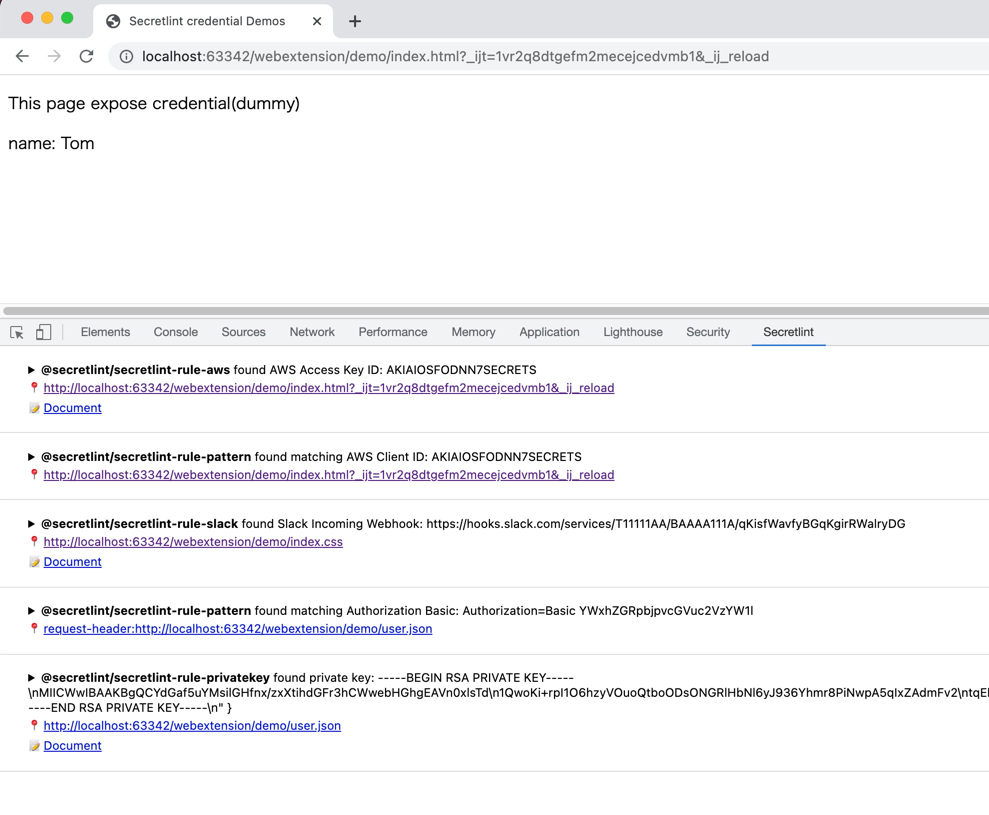
### 브라우저
[Secretlint WebExtension](https://github.com/secretlint/webextension)는 브라우저에서 작동합니다.
- Firefox: <https://addons.mozilla.org/ja/firefox/addon/secretlint/>
- Chrome: <https://chrome.google.com/webstore/detail/secretlint/hidpojbnemkajlnibhmeilpgoddkjjkf>
이 웹 확장 프로그램은 요청/응답에 포함된 자격 증명을 찾는 것을 목표로 합니다.

Secretlint WebExtension은 Chrome/Firefox의 DevTools에 통합됩니다.
이 확장 프로그램은 웹 개발자가 노출된 자격 증명을 인지하는 데 도움을 줍니다.
### macOS
[SecureClipboard](https://github.com/secretlint/secure-clipboard)는 클립보드에 있는 비밀을 다른 곳에 붙여넣기 전에 Secretlint를 사용하여 감지하고 마스킹하는 macOS 메뉴 바 애플리케이션입니다.
### 기타
#### SARIF 형식 지원
[@secretlint/secretlint-formatter-sarif](https://github.com/secretlint/secretlint/blob/HEAD/packages/@secretlint/secretlint-formatter-sarif)를 사용하세요.```
npm install @secretlint/secretlint-formatter-sarif --dev
secretlint --format @secretlint/secretlint-formatter-sarif "**/*"
```
## 시맨틱 버전 관리 정책
Secretlint 프로젝트는 [Semantic Versioning](https://semver.org/ "Semantic Versioning")을 따릅니다([secretlint-rule-preset-canary](https://github.com/secretlint/secretlint/blob/HEAD/packages/@secretlint/secretlint-rule-preset-canary)는 예외입니다).
- 패치 릴리스 (빌드가 손상되지 않도록 의도됨)
- CLI 또는 코어의 버그 수정 (포매터 포함).
- 문서 개선.
- 리팩토링과 같은 사용자에게 보이지 않는 변경.
- 실패한 릴리스 후 재릴리스 (즉, 아무도 사용할 수 없는 릴리스 공개).
- 마이너 릴리스 (빌드가 손상될 수 있음)
- 새로운 옵션.
- 기존 규칙이 사용 중단됨.
- 새로운 CLI 기능 생성.
- 새로운 공개 API 추가 (새 클래스, 새 메서드, 기존 메서드에 새 인수 등).
- TypeScript 정의가 손상될 수 있음
- 새로운 포매터 생성.
- 메이저 릴리스 (빌드 손상)
- 기존 규칙에 새로운 옵션이 추가되어 secretlint가 기본적으로 더 많은 오류를 보고함.
- 기존 포매터 제거.
- 규칙 프리셋에 새로운 기본 규칙 추가.
- 공개 API의 일부가 호환되지 않는 방식으로 제거되거나 변경됨.
## 동기
- [git-secrets](https://github.com/awslabs/git-secrets)은 유용하지만 프로젝트별로 설정하기 어렵습니다.
- 주 사용 사례는 전역 설치입니다.
- Secretlint는 프로젝트에 설치하고 프로젝트별로 설정을 사용자 정의하려고 합니다.
- [repo-security-scanner](https://github.com/UKHomeOffice/repo-security-scanner), [Gitleaks](https://github.com/zricethezav/gitleaks) 및 [truffleHog](https://github.com/dxa4481/truffleHog)는 좋은 스캔 도구입니다.
- Secretlint는 무시 정의, 사용자 정의 규칙을 포함한 유연한 사용자 정의가 필요합니다.
- [detect-secrets](https://github.com/Yelp/detect-secrets)는 유사한 도구이지만, opt-out 방식을 채택합니다.
- Secretlint는 opt-in 방식을 채택합니다.
- 또한 사용자가 규칙을 사용자 정의할 필요가 있습니다.
- 참조: [Bring-your own-plugins (BYOP), via --custom-plugins option by KevinHock · Pull Request #255 · Yelp/detect-secrets](https://github.com/Yelp/detect-secrets/pull/255)
- GitHub은 [secret scanning](https://docs.github.com/en/code-security/secret-security/about-secret-scanning)을 지원하지만, 커밋 후에만 작동합니다 [~~push~~](https://docs.github.com/en/code-security/secret-scanning/push-protection-for-users).
- Secretlint는 로컬 머신에서 작동하며, Secretlint는 커밋을 방지할 수 있습니다.
## 철학
- 린팅의 오탐지(False-positive) 감소
- 개발 워크플로우 통합
- 사용자의 기여 활성화
### Opt-in 대신 Opt-out
Secretlint는 opt-in 방식을 채택합니다.
저희 경험에 따르면, 기본적으로 다양한 오류를 보고하는 린팅 도구는 사용하기 어렵습니다.
Opt-in 접근 방식은 Secretlint를 점진적으로 도입하는 데 도움이 됩니다.
구성을 통해 오탐지를 줄이는 데 도움이 됩니다.
### 문서로서의 규칙
저희는 규칙을 문서로 간주합니다.
따라서 각 규칙은 합리적인 문서를 가져야 합니다.
왜 이 파일이 오류인지 설명해야 합니다.
문서가 없는 규칙은 단지 독단적인 것입니다.
오류의 이유를 설명하면 오탐지 오류를 줄이는 데 도움이 됩니다.
또한 Secretlint CLI는 터미널에서 하이퍼링크를 지원합니다.
즉, 린트 오류 메시지에서 직접 규칙 문서로 이동할 수 있습니다.

> iTerm 2에서의 예: Cmd + 클릭으로 error's messageId를 클릭하고 브라우저에서 [AWSSecretAccessKey](https://github.com/secretlint/secretlint/blob/master/packages/%40secretlint/secretlint-rule-aws/README.md#awssecretaccesskey)를 엽니다.
지원되는 터미널에 대해 알고 싶다면 [Hyperlinks in Terminal Emulators](https://gist.github.com/egmontkob/eb114294efbcd5adb1944c9f3cb5feda)를 참조하세요.
또한 secretlint 문서에 대한 기여를 환영합니다!
### 왜 Node.js인가?
- 패키지 관리자
- 유연한 플러그인 시스템을 실현하려면 패키지 관리자가 필요합니다.
- Node.js는 npm과 pnpm을 패키지 관리자로 가지고 있습니다.
- 패키지 관리자는 사용자가 사용자 정의 플러그인/규칙을 설치하는 데 도움을 줍니다.
- 기존 참조 구현
- Node.js에는 이미 ESLint, textlint, stylelint 등과 같은 플러그인 가능한 린팅 도구가 있습니다.
- 따라서 Node.js 사용자는 플러그인 가능한 린팅 도구에 익숙합니다.
- 이전에 저도 같은 접근 방식으로 textlint를 만들었기 때문에 Node.js에 익숙합니다.
- 사용자
- JavaScript는 인기 있는 언어입니다.
- 사용자가 기여할 수 있도록 합니다.
- 사용자가 직접 규칙을 만들 수 있습니다.
물론 secretlint는 [Docker](https://hub.docker.com/r/secretlint/secretlint)도 지원합니다.
## 변경 로그
[Releases page](https://github.com/secretlint/secretlint/releases)를 참조하세요.
## 기여하기
풀 리퀘스트와 별표는 항상 환영합니다.
버그 및 기능 요청은 [이슈를 생성](https://github.com/secretlint/secretlint/issues)해 주세요.
또한 [CONTRIBUTING.md](https://github.com/secretlint/secretlint/blob/HEAD/CONTRIBUTING.md)와 [CODE_OF_CONDUCT.md](https://github.com/secretlint/secretlint/blob/HEAD/CODE_OF_CONDUCT.md)를 참조하세요.
### 새 규칙 추가
`pnpm run gen:rule` 명령어를 사용하여 새 규칙을 생성할 수 있습니다.```shell script
pnpm run gen:rule
```
자세한 내용은 [CONTRIBUTING.md](https://github.com/secretlint/secretlint/blob/HEAD/CONTRIBUTING.md)를 참조하세요.
### 벤치마크
벤치마크 워크플로우는 모든 커밋에서 실행됩니다.
- 벤치마크: https://secretlint.github.io/secretlint/dev/bench/
## 저자
- [github/azu](https://github.com/azu)
- [twitter/azu_re](https://twitter.com/azu_re)
## 라이선스
MIT © azu