업데이트로 돌아가기
New releaseJul 21, 2026

secretlint v13.0.3

크리덴셜 커밋을 방지하는 플러그형 린팅 도구.

공유

Secretlint Actions Status

Secretlint은 커밋 자격 증명을 방지하기 위한 플러그형 린팅 도구입니다.

Secretlint은 커밋 자격 증명을 방지하기 위한 플러그형 린팅 도구입니다.

기능

  • 스캐너: 프로젝트에서 자격 증명을 찾아 보고합니다.
  • 프로젝트 친화적: 프로젝트 설정 및 CI 서비스 통합이 쉽습니다.
  • 사전 커밋 훅: 자격 증명 파일의 커밋을 방지합니다.
  • 플러그형: 사용자 정의 규칙 생성 및 유연한 구성을 허용합니다.
  • 문서화: 규칙이 이를 비밀로 감지하는 이유를 설명합니다.

빠른 데모

비밀린트 린팅 결과는 https://secretlint.github.io/에서 확인할 수 있습니다.

빠른 시작

한 번의 명령으로 프로젝트에서 Secretlint를 사용해 볼 수 있습니다.

Docker가 이미 설치되어 있다면:

docker run -v `pwd`:`pwd` -w `pwd` --rm -it secretlint/secretlint secretlint "**/*"

Node.js가 이미 설치되어 있다면:

npx @secretlint/quick-start "**/*"

실행 후, 결과가 비어 있고 종료 상태가 0이면 프로젝트가 안전합니다. 그렇지 않으면 오류 보고서가 표시되며, 프로젝트에 자격 증명이 원시 데이터로 포함되어 있습니다.

secretlint 결과의 예

지속적인 보안을 원한다면 다음 설치 가이드를 참조하고 사전 커밋 훅 및 CI를 설정하세요.

설치

Docker 사용

전제 조건: Docker 필요

다운로드만큼 빠르게 Node.js와 secretlint가 실행되는 환경을 얻으려면 Docker 컨테이너를 사용하세요.

다음 명령으로 현재 디렉토리 아래의 모든 파일을 secretlint로 확인할 수 있습니다:

docker run -v `pwd`:`pwd` -w `pwd` --rm -it secretlint/secretlint secretlint "**/*"

설계상 secretlint/secretlint Docker 컨테이너는 구성 없이 작동합니다.

이 Docker 이미지에는 다음과 같은 패키지가 내장되어 있습니다:

자세한 내용은 secretlint의 Dockerfile을 참조하세요.

Node.js 사용

전제 조건: Node.js 22+ 필요

Secretlint는 JavaScript로 작성되었습니다.

npm을 사용하여 Secretlint를 설치할 수 있습니다:``` npm install secretlint @secretlint/secretlint-rule-preset-recommend --save-dev

그런 다음 구성 파일을 설정하십시오:```
npx secretlint --init

마지막으로, Secretlint를 다음과 같이 모든 파일이나 디렉토리에서 실행할 수 있습니다:``` npx secretlint "**/*"

:memo: Secretlint는 [glob 패턴](https://github.com/mrmlnc/fast-glob#basic-syntax)을 지원하며, glob 패턴은 큰따옴표로 감싸야 합니다.

또한 `npm install --global`을 사용하여 Secretlint를 전역으로 설치할 수 있습니다. 하지만 전역 설치는 권장하지 않습니다. 일부 규칙이 전역에서 깨질 수 있기 때문입니다.

### 단일 실행 바이너리 사용

**전제 조건:** 없음

단일 실행 바이너리를 사용하면 Node.js 없이도 `secretlint` 명령을 사용할 수 있습니다.

1. 최신 바이너리를 [릴리스 페이지](https://github.com/secretlint/secretlint/releases)에서 다운로드하세요.
2. 파일 권한을 실행 가능으로 변경: `chmod +x ./secretlint`
3. 설정 파일 생성을 위해 `./secretlint --init`을 실행하세요.
4. 프로젝트를 린트하려면 `./secretlint "**/*"`을 실행하세요.

자세한 내용은 [publish/binary-compiler](https://github.com/secretlint/secretlint/blob/HEAD/publish/binary-compiler) README를 참조하세요.

## 사용법

`secretlint --help`는 사용법을 보여줍니다.

    Secretlint CLI that scan secret/credential data.
    
    Usage
    $ secretlint [file|glob*]
    
    Note
    supported glob syntax is based on picomatch (the engine used by micromatch)
    https://github.com/micromatch/picomatch#globbing-features
    https://github.com/micromatch/micromatch#matching-features
    
    Options
    --init             setup config file. Create .secretlintrc.json file from your package.json
    --format           [String] formatter name. Default: "stylish". Available Formatter: checkstyle, compact, github, jslint-xml, junit, pretty-error, stylish, tap, unix, json, mask-result, table
    --output           [path:String] output file path that is written of reported result.
    --secretlintrc     [path:String] path to .secretlintrc config file. Default: .secretlintrc.*
    --secretlintignore [path:String] path to .secretlintignore file. Default: .secretlintignore
    --stdinFileName    [String] filename to process STDIN content. Some rules depend on filename to check content.
    --no-color         disable ANSI-color of output.
    --no-terminalLink  disable terminalLink of output.
    --no-maskSecrets   disable masking of secret values; secrets are masked by default.
    --no-glob          disable glob pattern interpretation; treat all inputs as literal file paths.
    --no-gitignore     disable .gitignore cascade respect; .gitignore files are
                       respected by default (since v13).
    
    Options for Developer
    --profile          Enable performance profile.
    --secretlintrcJSON [String] a JSON string of .secretlintrc. use JSON string instead of rc file.
    
    Experimental Options
    --locale            [String] locale tag for translating message. Default: en
    
    Examples
    # Scan a single file
    $ secretlint ./README.md

    # Scan all files (wrap glob in double quotes to avoid shell expansion)
    $ secretlint "**/*"
    $ secretlint "source/**/*.ini"

    # Treat inputs as literal paths (for SvelteKit (group) / Next.js [param] etc.)
    $ secretlint --no-glob "src/(auth)/login.ts"

    # Lint STDIN content (filename hint affects which rules apply)
    $ echo "SECRET" | secretlint --stdinFileName=secret.txt

    # Use a custom config file
    $ secretlint "**/*" --secretlintrc=.secretlintrc.custom.json

    # Scan files ignored by .gitignore (e.g. to verify build artifacts)
    $ secretlint --no-gitignore "dist/**/*"

    # Mask secrets in a file in-place
    $ secretlint .zsh_history --format=mask-result --output=.zsh_history

    # Output JSON for programmatic parsing
    $ secretlint "**/*" --format=json --output=secretlint-report.json

    # Output GitHub Actions annotations in CI
    $ secretlint "**/*" --format=github
    
    Exit Status
    Secretlint exits with the following values:
    
        - 0:
          - Linting succeeded, no errors found.
          - Found lint error but --output is specified.
        - 1:
          - Linting failed, errors found.
        - 2:
          - Unexpected error occurred, fatal error.

## 구성

Secretlint는 `.secretlintrc.{json,yml,js}` 설정 파일을 사용합니다.

- 문서: [Secretlint 구성](https://github.com/secretlint/secretlint/blob/HEAD/docs/configuration.md)

`secretlint --init`을 실행하면 디렉터리에 `.secretlintrc.json` 파일이 생성됩니다.

파일 안에는 다음과 같은 구성된 규칙들을 볼 수 있습니다:```json
{
  "rules": [
    {
      "id": "@secretlint/secretlint-rule-preset-recommend"
    }
  ]
}

id 속성은 secretlint 규칙 패키지의 이름입니다.

Secretlint에는 내장 규칙이 없습니다. 규칙을 추가하려면 패키지를 설치하고 .secretlintrc 파일에 규칙을 추가해야 합니다.

각 규칙은 동일한 구성 패턴을 가집니다:

  • options: 규칙에 대한 옵션 정의입니다. 자세한 내용은 각 규칙의 문서를 참조하십시오.
  • disabled: disabledtrue이면 규칙을 비활성화합니다.
  • allowMessageIds: allowMessageIds는 오류 보고를 억제하려는 메시지 ID의 배열입니다.
    • 메시지 ID는 각 규칙에 정의되어 있으며, 규칙 문서를 참조하십시오.

예제: options

예를 들어, @secretlint/secretlint-rule-exampleoptionsallows를 가지고 있습니다. 이 allows 옵션은 무시하려는 RegExp-like String 목록을 정의합니다.```json { "rules": [ { "id": "@secretlint/secretlint-rule-example", "options": { "allows": [ "/dummy_secret/i" ] } } ] }

`@secretlint/secretlint-rule-preset-recommend` 같은 프리셋을 사용할 때는 옵션을 `rules`에 넣어야 합니다.

예를 들어, `@secretlint/secretlint-rule-preset-recommend > @secretlint/secretlint-rule-aws` 에 대한 옵션은```json5
{
  "rules": [
    {
      "id": "@secretlint/secretlint-rule-preset-recommend",
      "rules": [
        {
          "id": "@secretlint/secretlint-rule-aws",
            "options": {
              "allows": [
	            // it will be ignored
                "xxxx-xxxx-xxxx-xxxx-xxxx"
              ]
            }
        }
      ]
    }
  ]
}

Example: allowMessageIds

예를 들어, secretlint를 실행하여 다음과 같은 오류 보고를 받았다고 가정해 보겠습니다:``` $ secretlint "**/*"

SECRET.txt 1:8 error [EXAMPLE_MESSAGE] found secret: SECRET @secretlint/secretlint-rule-example

✖ 1 problem (1 error, 0 warnings)

이 오류의 메시지 ID는 `EXAMPLE_MESSAGE` (`@secretlint/secretlint-rule-example`)입니다.

이 오류를 무시하려면 `allowMessageIds`를 사용하세요.```json
{
  "rules": [
    {
      "id": "@secretlint/secretlint-rule-example",
      "allowMessageIds": ["EXAMPLE_MESSAGE"]
    }
  ]
}

@secretlint/secretlint-rule-preset-recommend와 같은 프리셋을 사용할 때는 옵션을 rules에 넣어야 합니다.

예를 들어, @secretlint/secretlint-rule-aws의 "AWSAccountID"와 "AWSAccessKeyID"를 무시하려면 다음과 같이 작성할 수 있습니다.```json5 { "rules": [ { "id": "@secretlint/secretlint-rule-preset-recommend", "rules": [ { "id": "@secretlint/secretlint-rule-aws", "allowMessageIds": ["AWSAccountID", "AWSAccessKeyID"] } ] } ] }

### `.gitignore` 및 `.secretlintignore`를 통한 파일 무시

Secretlint는 Git과 동일한 방식으로 파일 시스템을 탐색하며, 중첩된 `.gitignore` 파일을 존중합니다. 작업 디렉터리에서 파일까지의 경로에 있는 `.gitignore`에 매칭되는 파일이나 디렉터리는 건너뜁니다.

`.secretlintignore`는 `.gitignore`와 동일하게 작동하며 추가로 참조됩니다. 해석 순서는 다음과 같습니다:

1. 내장 무시 항목: `.git`, `node_modules`, `.secretlintrc*` 계열.
2. `--secretlintignore`가 가리키는 파일 (기본값: `.secretlintignore`).
3. 각 디렉터리의 `.gitignore` (계단식).

Git에 무시된 파일을 스캔하려면 (예: `.env`가 gitignore된 프로젝트에서 `.env` 파일), `--no-gitignore`를 전달하세요:```
secretlint --no-gitignore "**/*"

v13으로 마이그레이션:

  • 이제 .gitignore가 기본적으로 존중됩니다. 이전에는 secretlint가 .gitignore와 관계없이 일치하는 모든 파일을 검사했습니다. 이전 동작을 복원하려면 --no-gitignore를 전달하세요.
  • 포함 패턴은 picomatch glob 구문(브레이스 확장, **, 문자 클래스 등)을 따릅니다. 계단식 무시 스택(.gitignore, .secretlintignore, 내장 무시 목록)은 표준 .gitignore 의미 체계를 따르며, 브레이스 확장을 지원하지 않습니다. 따라서 무시 패턴의 경우 **/{cache,tmp} 대신 **/.cache를 작성하세요.
  • 패턴은 기본적으로 glob로 해석됩니다. 패턴이 디스크에 존재하는 경로로 확인되면, 이름에 glob 메타문자([, (, {, ?)가 포함되어 있어도 walker는 이를 리터럴로 처리합니다(globby의 이전 convertPathToPattern 동작과 동일). 디스크에 아직 존재하지 않는 경로에 대해 리터럴 처리를 강제하려면 --no-glob을 전달하세요.
  • 검색 중에 디렉터리 심볼릭 링크가 따라가지만(이전 globby 기반 동작과 일치), .gitignore.secretlintignore 규칙이 보는 것은 링크 경로(해결된 대상이 아님)입니다. 사이클은 realpath를 통해 감지되므로 각 고유 대상은 최대 한 번만 입력됩니다.

주석으로 무시하기

@secretlint/secretlint-rule-filter-commentssecretlint-disable과 같은 무시 주석을 지원합니다.``` // secretlint-disable

THIS IS SECRET, BUT IT WILL BE IGNORED

// secretlint-enable

자세한 내용은 [Secretlint 설정](https://github.com/secretlint/secretlint/blob/HEAD/docs/configuration.md)을 참조하세요.

## 사용 사례

### 린트 오류 메시지에서 비밀 마스킹 (기본 동작)

Secretlint는 기본적으로 린트 오류 메시지에서 비밀을 마스킹합니다. 이는 CI 로그, 터미널 출력 또는 AI 에이전트 도구 사용 시 우발적인 비밀 노출을 방지하는 데 유용합니다.```bash
# Secrets are masked by default
$ secretlint "**/*"

출력에서 실제 비밀 값을 표시하려면 --no-maskSecrets를 사용하세요:```bash $ secretlint --no-maskSecrets "**/*"

### 시크릿 수정

Secretlint는 시크릿을 자동으로 수정할 수 없습니다.
하지만 `--format=mask-result`를 사용하여 입력 파일의 시크릿을 마스킹하는 것은 유용합니다.

예를 들어, `.zsh_history` 파일의 시크릿을 마스킹하고 덮어쓸 수 있습니다.

cat .zsh_history | secretlint --format=mask-result > .zsh_history

$ secretlint .zsh_history --format=mask-result --output=.zsh_history
```
## 규칙 패키지

Secretlint 규칙은 분리된 모듈로 구현되었습니다.

- [@secretlint/secretlint-rule-npm](https://github.com/secretlint/secretlint/blob/HEAD/packages/@secretlint/secretlint-rule-npm)
- [@secretlint/secretlint-rule-aws](https://github.com/secretlint/secretlint/blob/HEAD/packages/@secretlint/secretlint-rule-aws)
- [@secretlint/secretlint-rule-gcp](https://github.com/secretlint/secretlint/blob/HEAD/packages/@secretlint/secretlint-rule-gcp)
- [@secretlint/secretlint-rule-github](https://github.com/secretlint/secretlint/blob/HEAD/packages/@secretlint/secretlint-rule-github)
- [@secretlint/secretlint-rule-gitlab](https://github.com/secretlint/secretlint/blob/HEAD/packages/@secretlint/secretlint-rule-gitlab)
- [@secretlint/secretlint-rule-privatekey](https://github.com/secretlint/secretlint/blob/HEAD/packages/@secretlint/secretlint-rule-privatekey)
- [@secretlint/secretlint-rule-basicauth](https://github.com/secretlint/secretlint/blob/HEAD/packages/@secretlint/secretlint-rule-basicauth)
- [@secretlint/secretlint-rule-slack](https://github.com/secretlint/secretlint/blob/HEAD/packages/@secretlint/secretlint-rule-slack)
- [@secretlint/secretlint-rule-sendgrid](https://github.com/secretlint/secretlint/blob/HEAD/packages/@secretlint/secretlint-rule-sendgrid)
- [@secretlint/secretlint-rule-shopify](https://github.com/secretlint/secretlint/blob/HEAD/packages/@secretlint/secretlint-rule-shopify)
- [@secretlint/secretlint-rule-stripe](https://github.com/secretlint/secretlint/blob/HEAD/packages/@secretlint/secretlint-rule-stripe)
- [@secretlint/secretlint-rule-openai](https://github.com/secretlint/secretlint/blob/HEAD/packages/@secretlint/secretlint-rule-openai)
- [@secretlint/secretlint-rule-anthropic](https://github.com/secretlint/secretlint/blob/HEAD/packages/@secretlint/secretlint-rule-anthropic)
- [@secretlint/secretlint-rule-grafana](https://github.com/secretlint/secretlint/blob/HEAD/packages/@secretlint/secretlint-rule-grafana)
- [@secretlint/secretlint-rule-groq](https://github.com/secretlint/secretlint/blob/HEAD/packages/@secretlint/secretlint-rule-groq)
- [@secretlint/secretlint-rule-linear](https://github.com/secretlint/secretlint/blob/HEAD/packages/@secretlint/secretlint-rule-linear)
- [@secretlint/secretlint-rule-1password](https://github.com/secretlint/secretlint/blob/HEAD/packages/@secretlint/secretlint-rule-1password)
- [@secretlint/secretlint-rule-database-connection-string](https://github.com/secretlint/secretlint/blob/HEAD/packages/@secretlint/secretlint-rule-database-connection-string)
- [@secretlint/secretlint-rule-databricks](https://github.com/secretlint/secretlint/blob/HEAD/packages/@secretlint/secretlint-rule-databricks)
- [@secretlint/secretlint-rule-hashicorp-vault](https://github.com/secretlint/secretlint/blob/HEAD/packages/@secretlint/secretlint-rule-hashicorp-vault)
- [@secretlint/secretlint-rule-vercel](https://github.com/secretlint/secretlint/blob/HEAD/packages/@secretlint/secretlint-rule-vercel)
- [@secretlint/secretlint-rule-azure](https://github.com/secretlint/secretlint/blob/HEAD/packages/@secretlint/secretlint-rule-azure)
- [@secretlint/secretlint-rule-docker](https://github.com/secretlint/secretlint/blob/HEAD/packages/@secretlint/secretlint-rule-docker)
- [@secretlint/secretlint-rule-figma](https://github.com/secretlint/secretlint/blob/HEAD/packages/@secretlint/secretlint-rule-figma)
- [@secretlint/secretlint-rule-cloudflare](https://github.com/secretlint/secretlint/blob/HEAD/packages/@secretlint/secretlint-rule-cloudflare)
- [@secretlint/secretlint-rule-tailscale](https://github.com/secretlint/secretlint/blob/HEAD/packages/@secretlint/secretlint-rule-tailscale)
- [@secretlint/secretlint-rule-huggingface](https://github.com/secretlint/secretlint/blob/HEAD/packages/@secretlint/secretlint-rule-huggingface)
- [@secretlint/secretlint-rule-notion](https://github.com/secretlint/secretlint/blob/HEAD/packages/@secretlint/secretlint-rule-notion)
- [@secretlint/secretlint-rule-secp256k1-privatekey](https://github.com/secretlint/secretlint/blob/HEAD/packages/@secretlint/secretlint-rule-secp256k1-privatekey)
- [@secretlint/secretlint-rule-no-k8s-kind-secret](https://github.com/secretlint/secretlint/blob/HEAD/packages/@secretlint/secretlint-rule-no-k8s-kind-secret)
- [@secretlint/secretlint-rule-pattern](https://github.com/secretlint/secretlint/blob/HEAD/packages/@secretlint/secretlint-rule-pattern)
- [@secretlint/secretlint-rule-no-homedir](https://github.com/secretlint/secretlint/blob/HEAD/packages/@secretlint/secretlint-rule-no-homedir)
- [@secretlint/secretlint-rule-no-dotenv](https://github.com/secretlint/secretlint/blob/HEAD/packages/@secretlint/secretlint-rule-no-dotenv)
- [@secretlint/secretlint-rule-filter-comments](https://github.com/secretlint/secretlint/blob/HEAD/packages/@secretlint/secretlint-rule-filter-comments)

또한 Secretlint는 권장 규칙 세트를 포함하는 규칙 프리셋을 제공합니다.

- [@secretlint/secretlint-rule-preset-recommend](https://github.com/secretlint/secretlint/blob/HEAD/packages/@secretlint/secretlint-rule-preset-recommend)
    - 권장 규칙 세트

## 사용자 정의 규칙

자신만의 secretlint 규칙을 만들 수 있습니다.

프로젝트에 적합한 secretlint 규칙을 원한다면 직접 만들 수 있습니다!
secretlint 규칙은 npm 패키지일 뿐입니다.

secretlint 규칙 생성 방법을 알고 싶다면 [docs/secretlint-rule.md](https://github.com/secretlint/secretlint/blob/HEAD/docs/secretlint-rule.md)를 참조하세요.

## 통합

### 프로젝트별 Pre-commit 훅

Secretlint를 일부 pre-commit 도구와 함께 사용할 수 있습니다.
Secretlint로 린트하여 비밀 데이터가 커밋되는 것을 방지할 수 있습니다.
프로젝트에 secretlint를 적용하면 팀 개발에서 보안을 향상시킬 수 있습니다.

#### [Husky](https://github.com/typicode/husky) + [lint-staged](https://github.com/okonet/lint-staged)

**사용 사례:** Node.js 프로젝트에 secretlint를 도입하려는 경우 이 조합이 유용합니다.

[Husky](https://github.com/typicode/husky)와 [lint-staged](https://github.com/okonet/lint-staged)를 설치하세요:```
npx husky-init && npm install lint-staged --save-dev
```
`.husky/pre-commit`에 훅을 추가하세요:```
npx husky add .husky/pre-commit "npx --no-install lint-staged"
```
`package.json` 편집:```json5
{
  // add "lint-staged" field
  "lint-staged": {
    "*": [
      "secretlint --no-glob"
    ]
  }
}
```
> **참고:** `--no-glob` 플래그가 필요한 이유는 lint-staged가 리터럴 파일 경로를 전달하며, 이 경로에는 Next.js, SvelteKit 등에서 사용하는 라우팅 패턴(예: `(group)` 또는 `[param]`)과 같은 glob 특수 문자가 포함될 수 있기 때문입니다.

이는 커밋 전에 Secretlint가 각 스테이징된 파일을 검사한다는 의미입니다.

#### [pre-commit](https://github.com/pre-commit/pre-commit)

**사용 사례:** Docker로 개발 중인 프로젝트가 있습니다. secretlint에 쉽게 통합할 수 있습니다.

[pre-commit](https://pre-commit.com/#install) 설치

    # macOS. see also https://pre-commit.com/#install
    brew install pre-commit

`.pre-commit-config.yaml` 생성:```
-   repo: local
    hooks:
    -   id: secretlint
        name: secretlint
        language: docker_image
        entry: secretlint/secretlint:latest secretlint
```
예제 설정 저장소:

- https://github.com/azu/secretlint-pre-commit-example

#### Bash 스크립트

또는 이 스크립트를 `.git/hooks/pre-commit`에 저장하고 실행 권한(`chmod +x .git/hooks/pre-commit`)을 부여할 수 있습니다:```bash
#!/bin/sh
FILES=$(git diff --cached --name-only --diff-filter=ACMR | sed 's| |\\ |g')
[ -z "$FILES" ] && exit 0

# Secretlint all selected files
echo "$FILES" | xargs ./node_modules/.bin/secretlint --no-glob
# If you using docker
# echo "$FILES" | xargs docker run -v `pwd`:`pwd` -w `pwd` --rm secretlint/secretlint secretlint
RET=$?
if [ $RET -eq 0 ] ;then
    exit 0
else
    exit 1
fi
```
### Pre-commit Hook 전역 설정

**사용 사례:** secretlint로 모든 프로젝트를 검사하려면 전역 git 훅을 사용할 수 있습니다.

[Git 2.9+](https://github.blog/2016-06-13-git-2-9-has-been-released/)는 [`core.hooksPath`](https://git-scm.com/docs/githooks)를 지원합니다. 이를 통해 secretlint를 전역적으로 통합할 수 있습니다.

우리는 secretlint + Docker를 사용하는 예제 git 훅 프로젝트를 만들었습니다.

- [secretlint/git-hooks](https://github.com/secretlint/git-hooks)
    - 요구 사항: Docker

다음 단계에 따라 설정할 수 있습니다:```shell script
# clone this repository
git clone https://github.com/secretlint/git-hooks git-hooks
cd git-hooks
# integrate secretlint to git hook globally
git config --global core.hooksPath $(pwd)/hooks
```
`core.hooksPath` 설정 후, secretlint는 커밋 전에 모든 파일을 검사합니다.  

자세한 내용은 [secretlint/git-hooks](https://github.com/secretlint/git-hooks) 프로젝트를 참조하세요.

Node.js 버전은 글로벌 git 훅에도 사용할 수 있습니다.
관심이 있다면 [@azu/git-hooks](https://github.com/azu/git-hooks)를 확인하세요.

### CI

#### GitHub Actions

이미 secretlint를 [Node.js 사용하기](#using-nodejs)로 설정했다면, [GitHub Actions](https://github.co.jp/features/actions)에서 설정과 함께 secretlint를 실행할 수 있습니다.

저장소에 `.github/workflows/secretlint.yml`을 넣으세요.```yaml
name: Secretlint
on: [push, pull_request]
permissions:
  contents: read
jobs:
  test:
    name: "Secretlint"
    runs-on: ubuntu-latest
    steps:
      - name: checkout
        uses: actions/checkout@v3
      - name: setup Node.js
        uses: actions/setup-node@v3
        with:
          node-version: 22
      - name: Install
        run: npm ci
      - name: Lint with Secretlint
        run: npx secretlint "**/*"
```
##### `--format github`의 풀 리퀘스트 주석 지원

`--format github`을 사용하여 린트 오류를 풀 리퀘스트 파일의 주석으로 표시할 수 있습니다.
이 포맷터는 풀 리퀘스트의 변경된 파일에 오류 주석을 직접 표시하는 [GitHub Actions 워크플로 명령어](https://docs.github.com/en/actions/using-workflows/workflow-commands-for-github-actions)를 출력합니다.```yaml
      - name: Lint with Secretlint
        run: npx secretlint --format github "**/*"
```
이 구성은 Pull Request 리뷰 주석을 통합합니다.

![github-actions.png](https://assets.kitploit.com/production/public/readmes/6649/c4558d395907512504eb827499bbb28e442b4dd57164ca6bd64b836a0e2988eb.png)

- 예시 저장소: https://github.com/secretlint/secretlint-github-actions-example
- 예시 Pull Request: https://github.com/secretlint/secretlint-github-actions-example/pull/1/files

차이(diff) 파일만 확인하려면 다음 예시를 참조하세요:```yaml
name: test-diff
on:
  push:
  pull_request:
jobs:
  test-diff:
    permissions:
      contents: read
    name: "Run secretlint to diff files"
    runs-on: ubuntu-latest
    steps:
      - name: checkout
        uses: actions/checkout@v4
        with:
          # fetch history to get all changed files on push or pull_request event
          fetch-depth: 0
      - name: Get changed files
        id: changed-files
        uses: tj-actions/changed-files@v44
        with:
          quotepath: "false"
      - name: setup Node ${{ matrix.node-version }}
        uses: actions/setup-node@v4
        with:
          node-version: 22
      - name: Show changed files
        run: echo "${{ steps.changed-files.outputs.all_changed_files }}"
      - name: Install
        if: steps.changed-files.outputs.any_changed == 'true'
        run: npm ci
      - name: Run secretlint
        if: steps.changed-files.outputs.any_changed == 'true'
        run: npx secretlint --no-glob ${{ steps.changed-files.outputs.all_changed_files }}
```
#### Mega-Linter

[Mega-Linter](https://nvuillam.github.io/mega-linter/)는 모든 CI 도구와 기본적으로 호환되는 린터 집계 도구로, 기본적으로 [**secretlint**](https://nvuillam.github.io/mega-linter/descriptors/credentials_secretlint/)를 포함한 [80개 이상의 린팅 앱](https://nvuillam.github.io/mega-linter/supported-linters/)을 내장하고 있습니다.

다음 명령어를 사용하여 모든 저장소 프로젝트에 [설치](https://nvuillam.github.io/mega-linter/installation/)할 수 있습니다 (Node.js가 미리 설치되어 있어야 합니다)```shell
npx mega-linter-runner --install
```
![megalinter-secretlint-failure.png](https://assets.kitploit.com/production/public/readmes/6649/3db15386c6559c762029a095a5f3c0d83bb55255d261809254296d55fa6d6748.png)

### 브라우저

[Secretlint WebExtension](https://github.com/secretlint/webextension)는 브라우저에서 작동합니다.

- Firefox: <https://addons.mozilla.org/ja/firefox/addon/secretlint/>
- Chrome: <https://chrome.google.com/webstore/detail/secretlint/hidpojbnemkajlnibhmeilpgoddkjjkf>

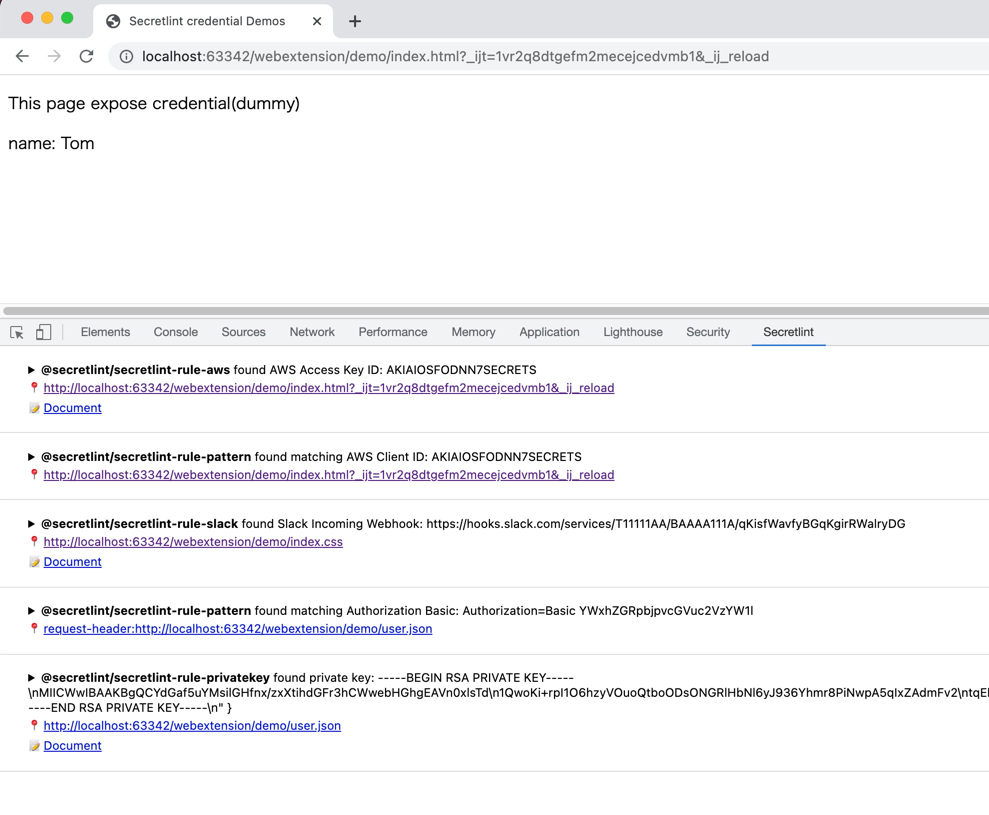
이 웹 확장 프로그램은 요청/응답에 포함된 자격 증명을 찾는 것을 목표로 합니다.

![Secretlint WebExtension](https://assets.kitploit.com/production/public/readmes/6649/ecb458b32d60007d85b13d2c238cb235e0ac856c7cbea6590fde520e3bcf07f0.png)

Secretlint WebExtension은 Chrome/Firefox의 DevTools에 통합됩니다.
이 확장 프로그램은 웹 개발자가 노출된 자격 증명을 인지하는 데 도움을 줍니다.

### macOS

[SecureClipboard](https://github.com/secretlint/secure-clipboard)는 클립보드에 있는 비밀을 다른 곳에 붙여넣기 전에 Secretlint를 사용하여 감지하고 마스킹하는 macOS 메뉴 바 애플리케이션입니다.

### 기타

#### SARIF 형식 지원

[@secretlint/secretlint-formatter-sarif](https://github.com/secretlint/secretlint/blob/HEAD/packages/@secretlint/secretlint-formatter-sarif)를 사용하세요.```
npm install @secretlint/secretlint-formatter-sarif --dev
secretlint --format @secretlint/secretlint-formatter-sarif "**/*"
```
## 시맨틱 버전 관리 정책

Secretlint 프로젝트는 [Semantic Versioning](https://semver.org/ "Semantic Versioning")을 따릅니다([secretlint-rule-preset-canary](https://github.com/secretlint/secretlint/blob/HEAD/packages/@secretlint/secretlint-rule-preset-canary)는 예외입니다).

- 패치 릴리스 (빌드가 손상되지 않도록 의도됨)
    - CLI 또는 코어의 버그 수정 (포매터 포함).
    - 문서 개선.
    - 리팩토링과 같은 사용자에게 보이지 않는 변경.
    - 실패한 릴리스 후 재릴리스 (즉, 아무도 사용할 수 없는 릴리스 공개).
- 마이너 릴리스 (빌드가 손상될 수 있음)
    - 새로운 옵션.
    - 기존 규칙이 사용 중단됨.
    - 새로운 CLI 기능 생성.
    - 새로운 공개 API 추가 (새 클래스, 새 메서드, 기존 메서드에 새 인수 등).
        - TypeScript 정의가 손상될 수 있음
    - 새로운 포매터 생성.
- 메이저 릴리스 (빌드 손상)
    - 기존 규칙에 새로운 옵션이 추가되어 secretlint가 기본적으로 더 많은 오류를 보고함.
    - 기존 포매터 제거.
    - 규칙 프리셋에 새로운 기본 규칙 추가.
    - 공개 API의 일부가 호환되지 않는 방식으로 제거되거나 변경됨.

## 동기

- [git-secrets](https://github.com/awslabs/git-secrets)은 유용하지만 프로젝트별로 설정하기 어렵습니다.
    - 주 사용 사례는 전역 설치입니다.
    - Secretlint는 프로젝트에 설치하고 프로젝트별로 설정을 사용자 정의하려고 합니다.
- [repo-security-scanner](https://github.com/UKHomeOffice/repo-security-scanner), [Gitleaks](https://github.com/zricethezav/gitleaks) 및 [truffleHog](https://github.com/dxa4481/truffleHog)는 좋은 스캔 도구입니다.
    - Secretlint는 무시 정의, 사용자 정의 규칙을 포함한 유연한 사용자 정의가 필요합니다.
- [detect-secrets](https://github.com/Yelp/detect-secrets)는 유사한 도구이지만, opt-out 방식을 채택합니다.
    - Secretlint는 opt-in 방식을 채택합니다.
    - 또한 사용자가 규칙을 사용자 정의할 필요가 있습니다.
        - 참조: [Bring-your own-plugins (BYOP), via --custom-plugins option by KevinHock · Pull Request #255 · Yelp/detect-secrets](https://github.com/Yelp/detect-secrets/pull/255)
- GitHub은 [secret scanning](https://docs.github.com/en/code-security/secret-security/about-secret-scanning)을 지원하지만, 커밋 후에만 작동합니다 [~~push~~](https://docs.github.com/en/code-security/secret-scanning/push-protection-for-users).
    - Secretlint는 로컬 머신에서 작동하며, Secretlint는 커밋을 방지할 수 있습니다.

## 철학

- 린팅의 오탐지(False-positive) 감소
- 개발 워크플로우 통합
- 사용자의 기여 활성화

### Opt-in 대신 Opt-out

Secretlint는 opt-in 방식을 채택합니다.

저희 경험에 따르면, 기본적으로 다양한 오류를 보고하는 린팅 도구는 사용하기 어렵습니다.
Opt-in 접근 방식은 Secretlint를 점진적으로 도입하는 데 도움이 됩니다.

구성을 통해 오탐지를 줄이는 데 도움이 됩니다.

### 문서로서의 규칙

저희는 규칙을 문서로 간주합니다.
따라서 각 규칙은 합리적인 문서를 가져야 합니다.

왜 이 파일이 오류인지 설명해야 합니다.
문서가 없는 규칙은 단지 독단적인 것입니다.

오류의 이유를 설명하면 오탐지 오류를 줄이는 데 도움이 됩니다.

또한 Secretlint CLI는 터미널에서 하이퍼링크를 지원합니다.
즉, 린트 오류 메시지에서 직접 규칙 문서로 이동할 수 있습니다.

![클릭 가능한 링크 출력](https://assets.kitploit.com/production/public/readmes/6649/890de2bdbaaae05b3b40c5bbe32b8389a7672beb231308453e585e308afca2be.png)

> iTerm 2에서의 예: Cmd + 클릭으로 error's messageId를 클릭하고 브라우저에서 [AWSSecretAccessKey](https://github.com/secretlint/secretlint/blob/master/packages/%40secretlint/secretlint-rule-aws/README.md#awssecretaccesskey)를 엽니다.

지원되는 터미널에 대해 알고 싶다면 [Hyperlinks in Terminal Emulators](https://gist.github.com/egmontkob/eb114294efbcd5adb1944c9f3cb5feda)를 참조하세요.

또한 secretlint 문서에 대한 기여를 환영합니다!

### 왜 Node.js인가?

- 패키지 관리자
    - 유연한 플러그인 시스템을 실현하려면 패키지 관리자가 필요합니다.
    - Node.js는 npm과 pnpm을 패키지 관리자로 가지고 있습니다.
    - 패키지 관리자는 사용자가 사용자 정의 플러그인/규칙을 설치하는 데 도움을 줍니다.
- 기존 참조 구현
    - Node.js에는 이미 ESLint, textlint, stylelint 등과 같은 플러그인 가능한 린팅 도구가 있습니다.
    - 따라서 Node.js 사용자는 플러그인 가능한 린팅 도구에 익숙합니다.
    - 이전에 저도 같은 접근 방식으로 textlint를 만들었기 때문에 Node.js에 익숙합니다.
- 사용자
    - JavaScript는 인기 있는 언어입니다.
    - 사용자가 기여할 수 있도록 합니다.
    - 사용자가 직접 규칙을 만들 수 있습니다.

물론 secretlint는 [Docker](https://hub.docker.com/r/secretlint/secretlint)도 지원합니다.

## 변경 로그

[Releases page](https://github.com/secretlint/secretlint/releases)를 참조하세요.

## 기여하기

풀 리퀘스트와 별표는 항상 환영합니다.

버그 및 기능 요청은 [이슈를 생성](https://github.com/secretlint/secretlint/issues)해 주세요.

또한 [CONTRIBUTING.md](https://github.com/secretlint/secretlint/blob/HEAD/CONTRIBUTING.md)와 [CODE_OF_CONDUCT.md](https://github.com/secretlint/secretlint/blob/HEAD/CODE_OF_CONDUCT.md)를 참조하세요.

### 새 규칙 추가

`pnpm run gen:rule` 명령어를 사용하여 새 규칙을 생성할 수 있습니다.```shell script
pnpm run gen:rule
```
자세한 내용은 [CONTRIBUTING.md](https://github.com/secretlint/secretlint/blob/HEAD/CONTRIBUTING.md)를 참조하세요.

### 벤치마크

벤치마크 워크플로우는 모든 커밋에서 실행됩니다.

- 벤치마크: https://secretlint.github.io/secretlint/dev/bench/

## 저자

- [github/azu](https://github.com/azu)
- [twitter/azu_re](https://twitter.com/azu_re)

## 라이선스

MIT © azu

카테고리