업데이트로 돌아가기
New releaseAug 31, 2026

seccomp-tools v1.7.1

seccomp 분석을 위한 강력한 도구 제공

공유

Downloads

Gem Version Build Status Maintainability Code Coverage Inline docs Yard Docs MIT License

Seccomp Tools

seccomp 분석을 위한 강력한 도구입니다.

이 프로젝트는 주로(그러나 전적으로는 아닌) CTF pwn 챌린지에서 seccomp 샌드박스를 분석하는 데 목적을 둡니다. 일부 기능은 CTF에 특화되어 있지만, 실제 환경의 seccomp 필터를 분석하는 데에도 그만큼 유용합니다.

기능

  • Dump - 실행 파일에서 seccomp BPF를 자동으로 덤프합니다.
  • Disasm - seccomp BPF를 사람이 읽을 수 있는 형식으로 변환합니다.
    • 간단한 역컴파일 지원.
    • 가능한 경우 syscall 이름과 인자 표시.
    • 컬러풀!
  • Asm - seccomp 규칙 작성이 코드 작성만큼 쉬워집니다.
  • Emu - seccomp 규칙을 에뮬레이션합니다.
  • Explain - 필터를 동작별 정책(어떤 syscall이 허용/차단되는지, 그리고 언제)으로 요약합니다.
  • Audit - 필터에서 취약점과 탈출 경로(누락된 arch/x32 가드, 위험한 syscall 등)를 스캔합니다.
  • 다중 아키텍처 지원.

설치

RubyGems.org에서 이용 가능합니다!``` $ gem install seccomp-tools

컴파일이 실패하면 다음을 시도하세요:```
sudo apt install gcc ruby-dev make

그런 다음 seccomp-tools를 다시 설치합니다.

명령줄 인터페이스

seccomp-tools```bash

$ seccomp-tools --help

Usage: seccomp-tools [--version] [--help] []

List of commands:

asm Seccomp bpf assembler.

audit Assess a seccomp filter for weaknesses and escape routes.

completion Print a shell completion script.

disasm Disassemble seccomp bpf.

dump Automatically dump seccomp bpf from executable(s).

emu Emulate seccomp rules.

explain Summarize a seccomp filter as a per-action policy.

See 'seccomp-tools --help' to read about a specific subcommand.

$ seccomp-tools dump --help

dump - Automatically dump seccomp bpf from executable(s).

NOTE: This command is only available on Linux.

Usage: seccomp-tools dump [EXEC] [options]

-c, --sh-exec Executes the given command (via sh) and dumps its seccomp.

Use this to pass arguments or pipe things to the executable.

e.g. use -c "./bin > /dev/null" to keep the program output out of the result.

Takes precedence over the positional argument.

-l, --limit LIMIT Dump only the first LIMIT installed filters.

Only meaningful when the input is an executable or --pid. Default: 1

An executable is killed once it reaches LIMIT.

-p, --pid PID Dump the seccomp filters installed on an existing process.

You must have CAP_SYS_ADMIN (e.g. be root) to use this option.

-t, --timeout SEC Timeout (seconds) for the execution. Default: no timeout

This option is ignored when --pid is given.

-f, --format FORMAT Output format. FORMAT can only be one of <disasm|raw|inspect>.

Default: disasm

-o, --output FILE Write output to FILE instead of stdout.

If multiple seccomp syscalls have been invoked (see --limit),

results are written to FILE, FILE_1, FILE_2, etc.

For example, with "--output out.bpf" the output files are out.bpf, out_1.bpf, ...

### dump

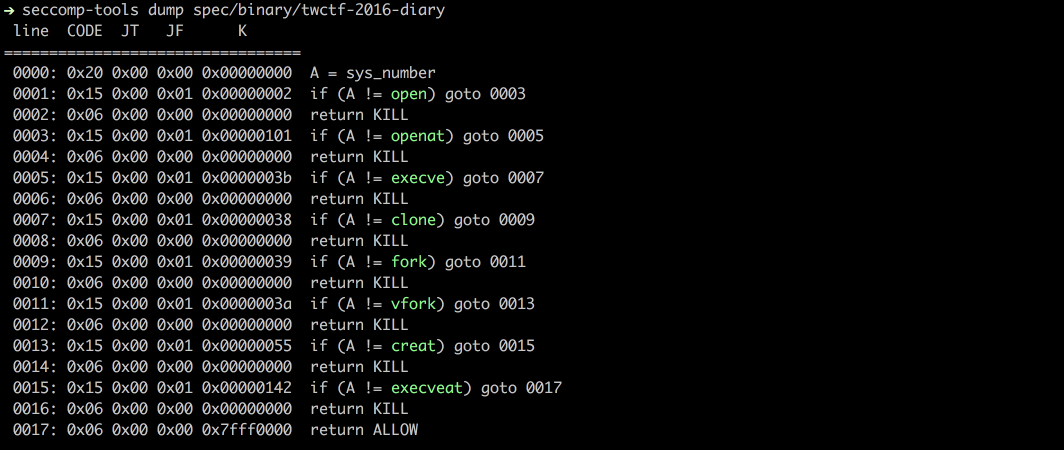
`ptrace` 시스템 콜을 사용하여 실행 파일에서 seccomp BPF를 덤프합니다.

참고: 대상 실행 파일이 실제로 실행되므로 신뢰할 수 없는 바이너리에는 주의하세요.```bash
$ file spec/binary/twctf-2016-diary
# spec/binary/twctf-2016-diary: ELF 64-bit LSB executable, x86-64, version 1 (SYSV), dynamically linked, interpreter /lib64/ld-linux-x86-64.so.2, for GNU/Linux 2.6.24, BuildID[sha1]=3648e29153ac0259a0b7c3e25537a5334f50107f, not stripped

$ seccomp-tools dump spec/binary/twctf-2016-diary
#  line  CODE  JT   JF      K
# =================================
#  0000: 0x20 0x00 0x00 0x00000000  A = sys_number
#  0001: 0x15 0x00 0x01 0x00000002  if (A != open) goto 0003
#  0002: 0x06 0x00 0x00 0x00000000  return KILL
#  0003: 0x15 0x00 0x01 0x00000101  if (A != openat) goto 0005
#  0004: 0x06 0x00 0x00 0x00000000  return KILL
#  0005: 0x15 0x00 0x01 0x0000003b  if (A != execve) goto 0007
#  0006: 0x06 0x00 0x00 0x00000000  return KILL
#  0007: 0x15 0x00 0x01 0x00000038  if (A != clone) goto 0009
#  0008: 0x06 0x00 0x00 0x00000000  return KILL
#  0009: 0x15 0x00 0x01 0x00000039  if (A != fork) goto 0011
#  0010: 0x06 0x00 0x00 0x00000000  return KILL
#  0011: 0x15 0x00 0x01 0x0000003a  if (A != vfork) goto 0013
#  0012: 0x06 0x00 0x00 0x00000000  return KILL
#  0013: 0x15 0x00 0x01 0x00000055  if (A != creat) goto 0015
#  0014: 0x06 0x00 0x00 0x00000000  return KILL
#  0015: 0x15 0x00 0x01 0x00000142  if (A != execveat) goto 0017
#  0016: 0x06 0x00 0x00 0x00000000  return KILL
#  0017: 0x06 0x00 0x00 0x7fff0000  return ALLOW

$ seccomp-tools dump spec/binary/twctf-2016-diary -f inspect
# "\x20\x00\x00\x00\x00\x00\x00\x00\x15\x00\x00\x01\x02\x00\x00\x00\x06\x00\x00\x00\x00\x00\x00\x00\x15\x00\x00\x01\x01\x01\x00\x00\x06\x00\x00\x00\x00\x00\x00\x00\x15\x00\x00\x01\x3B\x00\x00\x00\x06\x00\x00\x00\x00\x00\x00\x00\x15\x00\x00\x01\x38\x00\x00\x00\x06\x00\x00\x00\x00\x00\x00\x00\x15\x00\x00\x01\x39\x00\x00\x00\x06\x00\x00\x00\x00\x00\x00\x00\x15\x00\x00\x01\x3A\x00\x00\x00\x06\x00\x00\x00\x00\x00\x00\x00\x15\x00\x00\x01\x55\x00\x00\x00\x06\x00\x00\x00\x00\x00\x00\x00\x15\x00\x00\x01\x42\x01\x00\x00\x06\x00\x00\x00\x00\x00\x00\x00\x06\x00\x00\x00\x00\x00\xFF\x7F"

$ seccomp-tools dump spec/binary/twctf-2016-diary -f raw | xxd
# 00000000: 2000 0000 0000 0000 1500 0001 0200 0000   ...............
# 00000010: 0600 0000 0000 0000 1500 0001 0101 0000  ................
# 00000020: 0600 0000 0000 0000 1500 0001 3b00 0000  ............;...
# 00000030: 0600 0000 0000 0000 1500 0001 3800 0000  ............8...
# 00000040: 0600 0000 0000 0000 1500 0001 3900 0000  ............9...
# 00000050: 0600 0000 0000 0000 1500 0001 3a00 0000  ............:...
# 00000060: 0600 0000 0000 0000 1500 0001 5500 0000  ............U...
# 00000070: 0600 0000 0000 0000 1500 0001 4201 0000  ............B...
# 00000080: 0600 0000 0000 0000 0600 0000 0000 ff7f  ................

disasm

원시 seccomp BPF를 읽을 수 있는 형식으로 역어셈블합니다.```bash $ xxd spec/data/twctf-2016-diary.bpf | head -n 3

00000000: 2000 0000 0000 0000 1500 0001 0200 0000 ...............

00000010: 0600 0000 0000 0000 1500 0001 0101 0000 ................

00000020: 0600 0000 0000 0000 1500 0001 3b00 0000 ............;...

$ seccomp-tools disasm spec/data/twctf-2016-diary.bpf

line CODE JT JF K

=================================

0000: 0x20 0x00 0x00 0x00000000 A = sys_number

0001: 0x15 0x00 0x01 0x00000002 if (A != open) goto 0003

0002: 0x06 0x00 0x00 0x00000000 return KILL

0003: 0x15 0x00 0x01 0x00000101 if (A != openat) goto 0005

0004: 0x06 0x00 0x00 0x00000000 return KILL

0005: 0x15 0x00 0x01 0x0000003b if (A != execve) goto 0007

0006: 0x06 0x00 0x00 0x00000000 return KILL

0007: 0x15 0x00 0x01 0x00000038 if (A != clone) goto 0009

0008: 0x06 0x00 0x00 0x00000000 return KILL

0009: 0x15 0x00 0x01 0x00000039 if (A != fork) goto 0011

0010: 0x06 0x00 0x00 0x00000000 return KILL

0011: 0x15 0x00 0x01 0x0000003a if (A != vfork) goto 0013

0012: 0x06 0x00 0x00 0x00000000 return KILL

0013: 0x15 0x00 0x01 0x00000055 if (A != creat) goto 0015

0014: 0x06 0x00 0x00 0x00000000 return KILL

0015: 0x15 0x00 0x01 0x00000142 if (A != execveat) goto 0017

0016: 0x06 0x00 0x00 0x00000000 return KILL

0017: 0x06 0x00 0x00 0x7fff0000 return ALLOW

### asm

seccomp 규칙을 원시 바이트로 어셈블합니다.
자체 seccomp 규칙을 작성하려는 경우 유용합니다.

점프 레이블과 시스템 호출 이름을 지원합니다. 아래 예시를 참조하세요.```bash
$ seccomp-tools asm
# asm - Seccomp bpf assembler.
#
# Usage: seccomp-tools asm IN_FILE [options]
#     -o, --output FILE                Write output to FILE instead of stdout.
#     -f, --format FORMAT              Output format. FORMAT can only be one of <inspect|raw|c_array|c_source|assembly>.
#                                      Default: inspect
#     -a, --arch ARCH                  Specify architecture.
#                                      Supported architectures are <aarch64|amd64|i386|riscv64|s390x>.
#                                      Default: auto-detected from the host machine.
#                                      Set it when the filter targets an architecture other than the host.

# Input file for asm
$ cat spec/data/libseccomp.asm
# # check if arch is X86_64
# A = arch
# A == ARCH_X86_64 ? next : dead
# A = sys_number
# A >= 0x40000000 ? dead : next
# A == write ? ok : next
# A == close ? ok : next
# A == dup ? ok : next
# A == exit ? ok : next
# return ERRNO(5)
# ok:
# return ALLOW
# dead:
# return KILL

$ seccomp-tools asm spec/data/libseccomp.asm
# " \x00\x00\x00\x04\x00\x00\x00\x15\x00\x00\b>\x00\x00\xC0 \x00\x00\x00\x00\x00\x00\x005\x00\x06\x00\x00\x00\x00@\x15\x00\x04\x00\x01\x00\x00\x00\x15\x00\x03\x00\x03\x00\x00\x00\x15\x00\x02\x00 \x00\x00\x00\x15\x00\x01\x00<\x00\x00\x00\x06\x00\x00\x00\x05\x00\x05\x00\x06\x00\x00\x00\x00\x00\xFF\x7F\x06\x00\x00\x00\x00\x00\x00\x00"

$ seccomp-tools asm spec/data/libseccomp.asm -f c_source
# #include <linux/seccomp.h>
# #include <stdio.h>
# #include <stdlib.h>
# #include <sys/prctl.h>
#
# static void install_seccomp() {
#   static unsigned char filter[] = {32,0,0,0,4,0,0,0,21,0,0,8,62,0,0,192,32,0,0,0,0,0,0,0,53,0,6,0,0,0,0,64,21,0,4,0,1,0,0,0,21,0,3,0,3,0,0,0,21,0,2,0,32,0,0,0,21,0,1,0,60,0,0,0,6,0,0,0,5,0,5,0,6,0,0,0,0,0,255,127,6,0,0,0,0,0,0,0};
#   struct prog {
#     unsigned short len;
#     unsigned char *filter;
#   } rule = {
#     .len = sizeof(filter) >> 3,
#     .filter = filter
#   };
#   if(prctl(PR_SET_NO_NEW_PRIVS, 1, 0, 0, 0) < 0) { perror("prctl(PR_SET_NO_NEW_PRIVS)"); exit(2); }
#   if(prctl(PR_SET_SECCOMP, SECCOMP_MODE_FILTER, &rule) < 0) { perror("prctl(PR_SET_SECCOMP)"); exit(2); }
# }

$ seccomp-tools asm spec/data/libseccomp.asm -f assembly
# install_seccomp:
#   push   rbp
#   mov    rbp, rsp
#   push   38
#   pop    rdi
#   push   0x1
#   pop    rsi
#   xor    eax, eax
#   mov    al, 0x9d
#   syscall
#   push   22
#   pop    rdi
#   lea    rdx, [rip + _filter]
#   push   rdx /* .filter */
#   push   _filter_end - _filter >> 3 /* .len */
#   mov    rdx, rsp
#   push   0x2
#   pop    rsi
#   xor    eax, eax
#   mov    al, 0x9d
#   syscall
#   leave
#   ret
# _filter:
# .ascii "\040\000\000\000\004\000\000\000\025\000\000\010\076\000\000\300\040\000\000\000\000\000\000\000\065\000\006\000\000\000\000\100\025\000\004\000\001\000\000\000\025\000\003\000\003\000\000\000\025\000\002\000\040\000\000\000\025\000\001\000\074\000\000\000\006\000\000\000\005\000\005\000\006\000\000\000\000\000\377\177\006\000\000\000\000\000\000\000"
# _filter_end:


# let's asm then disasm!
$ seccomp-tools asm spec/data/libseccomp.asm -f raw | seccomp-tools disasm -
#  line  CODE  JT   JF      K
# =================================
#  0000: 0x20 0x00 0x00 0x00000004  A = arch
#  0001: 0x15 0x00 0x08 0xc000003e  if (A != ARCH_X86_64) goto 0010
#  0002: 0x20 0x00 0x00 0x00000000  A = sys_number
#  0003: 0x35 0x06 0x00 0x40000000  if (A >= 0x40000000) goto 0010
#  0004: 0x15 0x04 0x00 0x00000001  if (A == write) goto 0009
#  0005: 0x15 0x03 0x00 0x00000003  if (A == close) goto 0009
#  0006: 0x15 0x02 0x00 0x00000020  if (A == dup) goto 0009
#  0007: 0x15 0x01 0x00 0x0000003c  if (A == exit) goto 0009
#  0008: 0x06 0x00 0x00 0x00050005  return ERRNO(5)
#  0009: 0x06 0x00 0x00 0x7fff0000  return ALLOW
#  0010: 0x06 0x00 0x00 0x00000000  return KILL

v1.6.0 [아직 릴리스되지 않음]부터 asm은 yacc 기반 파서로 전환되어 더 유연하고 직관적인 구문을 지원합니다!```bash $ cat spec/data/example.asm

# An example of supported assembly syntax

if (A == X)

goto next # 'next' is a reserved label, means the next statement ("A = args[0]" in this example)

else

goto err_label # custom defined label

A = args[0]

if (

A # put a comment here is also valid

== 0x123

) goto disallow

if (! (A & 0x1337)) # support bang in if-conditions

goto 0 # equivalent to 'goto next'

else goto 2 # goto $ + 2, 'mem[0] = A' in this example

A = sys_number

A = instruction_pointer >> 32

mem[0] = A

A = data[4] # equivalent to 'A = arch'

err_label: return ERRNO(1337)

disallow:

return KILL

$ seccomp-tools asm spec/data/example.asm -f raw | seccomp-tools disasm -

line CODE JT JF K

=================================

0000: 0x1d 0x00 0x07 0x00000000 if (A != X) goto 0008

0001: 0x20 0x00 0x00 0x00000010 A = args[0]

0002: 0x15 0x06 0x00 0x00000123 if (A == 0x123) goto 0009

0003: 0x45 0x02 0x00 0x00001337 if (A & 0x1337) goto 0006

0004: 0x20 0x00 0x00 0x00000000 A = sys_number

0005: 0x20 0x00 0x00 0x0000000c A = instruction_pointer >> 32

0006: 0x02 0x00 0x00 0x00000000 mem[0] = A

0007: 0x20 0x00 0x00 0x00000004 A = arch

0008: 0x06 0x00 0x00 0x00050539 return ERRNO(1337)

0009: 0x06 0x00 0x00 0x00000000 return KILL

`seccomp-tools disasm <file> --asm-able`의 출력은 `asm`에 대한 유효한 입력입니다:```bash
$ seccomp-tools disasm spec/data/x32.bpf --asm-able
# 0000: A = arch
# 0001: if (A != ARCH_X86_64) goto 0011
# 0002: A = sys_number
# 0003: if (A < 0x40000000) goto 0011
# 0004: if (A == x32_read) goto 0011
# 0005: if (A == x32_write) goto 0011
# 0006: if (A == x32_iopl) goto 0011
# 0007: if (A != x32_mmap) goto 0011
# 0008: A = args[0]
# 0009: if (A == 0x0) goto 0011
# 0010: return ERRNO(5)
# 0011: return ALLOW


# disasm then asm then disasm!
$ seccomp-tools disasm spec/data/x32.bpf --asm-able | seccomp-tools asm - -f raw | seccomp-tools disasm -
#  line  CODE  JT   JF      K
# =================================
#  0000: 0x20 0x00 0x00 0x00000004  A = arch
#  0001: 0x15 0x00 0x09 0xc000003e  if (A != ARCH_X86_64) goto 0011
#  0002: 0x20 0x00 0x00 0x00000000  A = sys_number
#  0003: 0x35 0x00 0x07 0x40000000  if (A < 0x40000000) goto 0011
#  0004: 0x15 0x06 0x00 0x40000000  if (A == x32_read) goto 0011
#  0005: 0x15 0x05 0x00 0x40000001  if (A == x32_write) goto 0011
#  0006: 0x15 0x04 0x00 0x400000ac  if (A == x32_iopl) goto 0011
#  0007: 0x15 0x00 0x03 0x40000009  if (A != x32_mmap) goto 0011
#  0008: 0x20 0x00 0x00 0x00000010  A = addr # x32_mmap(addr, len, prot, flags, fd, pgoff)
#  0009: 0x15 0x01 0x00 0x00000000  if (A == 0x0) goto 0011
#  0010: 0x06 0x00 0x00 0x00050005  return ERRNO(5)
#  0011: 0x06 0x00 0x00 0x7fff0000  return ALLOW

Emu

sys_nr, arg0, arg1 등이 주어졌을 때 seccomp를 에뮬레이션합니다.```bash $ seccomp-tools emu --help

emu - Emulate seccomp rules.

Usage: seccomp-tools emu [options] BPF_FILE [sys_nr [arg0 [arg1 ... arg5]]]

-a, --arch ARCH Specify architecture.

Supported architectures are <aarch64|amd64|i386|riscv64|s390x>.

Default: auto-detected from the host machine.

Set it when the filter targets an architecture other than the host.

-q, --[no-]quiet Run quietly, only show emulation result.

-i, --ip=VAL Set instruction pointer.

$ seccomp-tools emu spec/data/libseccomp.bpf write 0x3

line CODE JT JF K

=================================

0000: 0x20 0x00 0x00 0x00000004 A = arch

0001: 0x15 0x00 0x08 0xc000003e if (A != ARCH_X86_64) goto 0010

0002: 0x20 0x00 0x00 0x00000000 A = sys_number

0003: 0x35 0x06 0x00 0x40000000 if (A >= 0x40000000) goto 0010

0004: 0x15 0x04 0x00 0x00000001 if (A == write) goto 0009

0005: 0x15 0x03 0x00 0x00000003 if (A == close) goto 0009

0006: 0x15 0x02 0x00 0x00000020 if (A == dup) goto 0009

0007: 0x15 0x01 0x00 0x0000003c if (A == exit) goto 0009

0008: 0x06 0x00 0x00 0x00050005 return ERRNO(5)

0009: 0x06 0x00 0x00 0x7fff0000 return ALLOW

0010: 0x06 0x00 0x00 0x00000000 return KILL

return ALLOW at line 0009

### 설명

전체 필터를 작업별 정책으로 요약합니다: 어떤 syscall이 `ALLOW`, `KILL`, `ERRNO` 등으로 끝나는지,
그리고 어떤 인자 제약 조건 하에서 그런지 보여줍니다. 입력은 덤프된 BPF 파일, 실행 파일(`dump`처럼 seccomp가 먼저 덤프됨), 또는 `--pid`를 통한 실행 중인 프로세스가 될 수 있습니다.```bash
$ seccomp-tools explain --help
# explain - Summarize a seccomp filter as a per-action policy.
#
# Usage: seccomp-tools explain [options] [BPF_FILE|EXEC]
#     -c, --sh-exec <command>          Executes the given command (via sh) and explains its seccomp.
#                                      Use this to pass arguments or pipe things to the executable.
#                                      e.g. use `-c "./bin > /dev/null"` to keep the program output out of the result.
#                                      Takes precedence over the positional argument.
#     -l, --limit LIMIT                Explain only the first LIMIT installed filters.
#                                      Only meaningful when the input is an executable or --pid. Default: 1
#                                      An executable is killed once it reaches LIMIT.
#     -p, --pid PID                    Explain the seccomp filters installed on an existing process.
#                                      You must have CAP_SYS_ADMIN (e.g. be root) to use this option.
#     -t, --timeout SEC                Timeout (seconds) for the execution. Default: no timeout
#                                      This option is ignored when --pid is given.
#     -a, --arch ARCH                  Specify architecture.
#                                      Supported architectures are <aarch64|amd64|i386|riscv64|s390x>.
#                                      Default: auto-detected from the host machine.
#                                      Set it when the filter targets an architecture other than the host.
#                                      With an executable or --pid the architecture is auto-detected instead.

$ seccomp-tools explain spec/data/libseccomp.bpf -a amd64
# Seccomp policy for spec/data/libseccomp.bpf
#
# Architecture: amd64
#
#   ALLOW:
#     write, close, dup, exit
#
#   ERRNO(5):
#     <default> (any other syscall)
#
#   KILL:
#     sys_number >= 0x40000000  (x32 ABI)
#
# Other architectures: KILL

0CTF/TCTF 2023 "Nothing is True" 필터의 더 복잡한 예시로, 32/64비트 허용 목록이 분리되어 있고 open, mmap, execve에 대한 인자 검사가 포함되어 있습니다:```bash $ seccomp-tools explain spec/data/tctf-2023-nothing-is-true.bpf -a amd64

Seccomp policy for spec/data/tctf-2023-nothing-is-true.bpf

Architecture: i386

ALLOW:

exit, read, write, brk, mmap, munmap, exit_group

KILL:

(any other syscall)

Architecture: amd64

ALLOW:

close, munmap, brk, exit, exit_group

open when filename == 0x31337 && flags == 0x0

mmap when prot == 0x2

execve when filename == 0x7ffea12f7d0e

KILL:

sys_number >= 0x40000000 (x32 ABI)

(any other syscall)

Other architectures: KILL

### 감사(Audit)

필터에서 취약점과 잠재적 우회 경로를 검사합니다 - 누락된 아키텍처 또는 x32 가드, 허용적인(차단 목록 기반) 기본값, 동등한 시스템 콜 간격(예: `execve`는 차단되었지만 `execveat`는 차단되지 않은 경우), 열기/읽기/쓰기 체인, 또는 `ALLOW`로 도달 가능한 위험한 시스템 콜 - 각각을 심각도와 함께 보고합니다. 지원되는 모든 아키텍처에서 실행되며(amd64의 x32와 같은 아키텍처별 특성은 해당 아키텍처에만 적용), `explain`과 동일한 입력(BPF 파일, 실행 파일 또는 `--pid`)을 받습니다.```bash
$ seccomp-tools audit --help
# audit - Assess a seccomp filter for weaknesses and escape routes.
#
# Usage: seccomp-tools audit [options] [BPF_FILE|EXEC]
#     -c, --sh-exec <command>          Executes the given command (via sh) and audits its seccomp.
#                                      Use this to pass arguments or pipe things to the executable.
#                                      e.g. use `-c "./bin > /dev/null"` to keep the program output out of the result.
#                                      Takes precedence over the positional argument.
#     -l, --limit LIMIT                Audit only the first LIMIT installed filters.
#                                      Only meaningful when the input is an executable or --pid. Default: 1
#                                      An executable is killed once it reaches LIMIT.
#     -p, --pid PID                    Audit the seccomp filters installed on an existing process.
#                                      You must have CAP_SYS_ADMIN (e.g. be root) to use this option.
#     -t, --timeout SEC                Timeout (seconds) for the execution. Default: no timeout
#                                      This option is ignored when --pid is given.
#     -a, --arch ARCH                  Specify architecture.
#                                      Supported architectures are <aarch64|amd64|i386|riscv64|s390x>.
#                                      Default: auto-detected from the host machine.
#                                      Set it when the filter targets an architecture other than the host.
#                                      With an executable or --pid the architecture is auto-detected instead.
#     -f, --format FORMAT              Output format, one of <human|json>.
#                                      Default: human

Auditing a denylist with several escape routes (the TokyoWesterns CTF 2016 "diary" filter):```bash $ seccomp-tools audit spec/data/twctf-2016-diary.bpf -a amd64

Seccomp audit of spec/data/twctf-2016-diary.bpf

Architectures: amd64

[HIGH] Architecture is never validated

The filter checks syscall numbers without ever comparing data[4] (arch). Numbers mean different syscalls under

another AUDIT_ARCH, so the checks can be dodged by invoking through a different ABI (e.g. i386 numbering on amd64).

fix: Compare data[4] against your AUDIT_ARCH_* and KILL every architecture you do not explicitly handle.

[HIGH] io_uring_setup is allowed (amd64)

io_uring_setup reaches ALLOW - reads/writes/opens as ring operations, bypassing filters on those syscalls.

fix: Block io_uring_setup unless the program genuinely needs it.

[HIGH] process_vm_readv is allowed (amd64)

process_vm_readv reaches ALLOW - read another process's memory.

fix: Block process_vm_readv unless the program genuinely needs it.

[HIGH] process_vm_writev is allowed (amd64)

process_vm_writev reaches ALLOW - write another process's memory.

fix: Block process_vm_writev unless the program genuinely needs it.

[HIGH] ptrace is allowed (amd64)

ptrace reaches ALLOW - inspect/inject into other processes.

fix: Block ptrace unless the program genuinely needs it.

[HIGH] A file can be opened and its contents copied out (amd64)

openat2, read and write all reach ALLOW, so the contents of an arbitrary file (e.g. the flag) can be copied straight

back out.

fix: Deny the open-family syscalls unless the program genuinely needs arbitrary files.

[HIGH] Default action is ALLOW (denylist) (amd64)

Any syscall the filter does not explicitly block is allowed; a denylist is bypassable by any syscall the author

overlooked.

fix: Use an allowlist: default to KILL/ERRNO and permit only the needed syscalls.

[HIGH] open/openat blocked but openat2 allowed (amd64)

open, openat denied, but the equivalent openat2 reaches ALLOW - same capability, different syscall number.

fix: Deny every equivalent in the group: also block openat2.

[HIGH] x32 ABI is not guarded (amd64)

Syscalls blocked by their native number are reachable via their x32 number (nr | 0x40000000): open, clone, fork,

vfork, execve, creat, openat, execveat.

fix: After the arch check, KILL when sys_number >= 0x40000000 (or jset 0x40000000).

[MEDIUM] connect is allowed (amd64)

connect reaches ALLOW - network access (exfiltration).

fix: Block connect unless the program genuinely needs it.

[MEDIUM] socket is allowed (amd64)

socket reaches ALLOW - network access (exfiltration).

fix: Block socket unless the program genuinely needs it.

[MEDIUM] fork/vfork/clone blocked but clone3 allowed (amd64)

fork, vfork, clone denied, but the equivalent clone3 reaches ALLOW - same capability, different syscall number.

fix: Deny every equivalent in the group: also block clone3.

`--format json`을 CI 또는 도구에서 사용하세요:```bash
$ seccomp-tools audit spec/data/gctf-2019-quals-caas.bpf -a amd64 -f json
# {
#   "stacked_filters": 1,
#   "reports": [
#     {
#       "source": "spec/data/gctf-2019-quals-caas.bpf",
#       "arches": [
#         "amd64"
#       ],
#       "truncated": false,
#       "findings": [
#         {
#           "id": "dangerous-allow",
#           "severity": "medium",
#           "title": "connect is allowed",
#           "detail": "connect reaches ALLOW - network access (exfiltration).",
#           "arch": "amd64",
#           "syscalls": [
#             "connect"
#           ],
#           "condition": null,
#           "remediation": "Block connect unless the program genuinely needs it."
#         },
#         {
#           "id": "dangerous-allow",
#           "severity": "medium",
#           "title": "socket is allowed",
#           "detail": "socket reaches ALLOW - network access (exfiltration).",
#           "arch": "amd64",
#           "syscalls": [
#             "socket"
#           ],
#           "condition": "family == 0x2 && type == 0x1 && protocol == 0x0",
#           "remediation": "Block socket unless the program genuinely needs it."
#         }
#       ]
#     }
#   ]
# }

Shell Completion

seccomp-tools completion <bash|zsh|fish>는 지정된 셸에 대한 완성 스크립트를 출력합니다. 셸의 시작 파일에서 로드하세요:```bash

bash (~/.bashrc)

eval "$(seccomp-tools completion bash)"

zsh (~/.zshrc, after compinit)

eval "$(seccomp-tools completion zsh)"

fish (~/.config/fish/config.fish)

seccomp-tools completion fish | source

매번 평가하는 시작 비용을 피하려면, 셸이 완성(completion)을 로드하는 디렉터리에 스크립트를 작성하세요. 예: `seccomp-tools completion zsh > "${fpath[1]}/_seccomp-tools"`.

## 스크린샷

### Dump
![dump](https://raw.githubusercontent.com/david942j/seccomp-tools/master/examples/dump-diary.png?raw=true)

### Emu
![emu](https://raw.githubusercontent.com/david942j/seccomp-tools/master/examples/emu-libseccomp.png?raw=true)

![emu](https://raw.githubusercontent.com/david942j/seccomp-tools/master/examples/emu-amigo.png?raw=true)

## 지원 아키텍처

- [x] x86_64
- [x] x32
- [x] x86
- [x] arm64 (@saagarjha)
- [x] s390x (@iii-i)
- [x] riscv64

더 많은 아키텍처를 지원하는 Pull Request는 언제나 환영합니다!

## 개발

Ruby 환경을 관리하려면 [rbenv](https://github.com/rbenv/rbenv) 사용을 권장합니다.

### 설정

- bundler 설치
  - `$ gem install bundler`
- 소스 클론
  - `$ git clone https://github.com/david942j/seccomp-tools && cd seccomp-tools`
- 의존성 설치
  - `$ bundle install`

### 테스트 실행

`$ bundle exec rake`

## 도움이 필요합니다

제안이나 기능 요청은 언제나 환영합니다!
이슈를 등록하거나 Pull Request를 보내 주세요.
그리고 이 프로젝트가 마음에 드신다면 [star](https://github.com/david942j/seccomp-tools/stargazers)를 눌러 주시면 감사하겠습니다 :grimacing:

카테고리


