
 zinja-coder/jadx-ai-mcp
JADXにMCPサーバーを統合するためのプラグイン
<div align="center">
# JADX-AI-MCP (Zin MCP Suite の一部)
⚡ LLM と MCP 経由で通信し、Claude などの LLM を用いて Android APK を解析するために構築された、完全自動化された MCP サーバー + JADX プラグイン — 脆弱性の発見、APK の解析、リバースエンジニアリングを手間なく行えます。






[](http://www.apache.org/licenses/LICENSE-2.0.html)
#### ⭐ コントリビューター
これらの素晴らしい方々の貢献に感謝します ⭐
<table>
<tr align="center">
<td>
<a href="https://github.com/ljt270864457">
<img src="https://assets.kitploit.com/production/public/readmes/6657/a21f05ae54dafc25c40b8b86dd848ae6cc62a165c11d1aaa484a2971191c04c0.jpg" width="30px;" alt=""/>
<br /><sub><b>ljt270864457</b></sub>
</a>
</td>
<td>
<a href="https://github.com/p0px">
<img src="https://assets.kitploit.com/production/public/readmes/6657/87812519c4f48c0cb45aa6e7605ed82ba5cb0f0a410c7bec0c031b407330d683.png" width="30px;" alt=""/>
<br /><sub><b>p0px</b></sub>
</a>
</td>
<td>
<a href="https://github.com/bx33661">
<img src="https://assets.kitploit.com/production/public/readmes/6657/cc055bf866f36cc8ba4680bb158f91d2a459559a0ea31ce3525f2024e81d9d1b.png" width="30px;" alt=""/>
<br /><sub><b>bx33661</b></sub>
</a>
</td>
<td>
<a href="https://github.com/Haicaji">
<img src="https://assets.kitploit.com/production/public/readmes/6657/70bd2a092000ef110c6ef9a177ae39889c5fa12af384165218ecdc65ab87cca2.png" width="30px;" alt=""/>
<br /><sub><b>Haicaji</b></sub>
</a>
</td>
<td>
<a href="https://github.com/mostafaNazari702">
<img src="https://assets.kitploit.com/production/public/readmes/6657/c15b7582722221365f89b5900f1e2d53a5de4bfe888f1f4cf3c24a09ca74553b.jpg" width="30px;" alt=""/>
<br /><sub><b>Mostafa Nazari</b></sub>
</a>
</td>
<td>
<a href="https://github.com/ChineseAStar">
<img src="https://assets.kitploit.com/production/public/readmes/6657/69e2a4cd0bbb7228e06fd1ccc32a37c30d1406fc6b06cfce0a6e2d22f5bbf6b0.png" width="30px;" alt=""/>
<br /><sub><b>ChineseAStar</b></sub>
</a>
</td>
<td>
<a href="https://github.com/cyal1r">
<img src="https://assets.kitploit.com/production/public/readmes/6657/f81a8c01f47c36dbf03f4117810d43075e3ca85f2d2d3c5d70cfb6ea20f45290.jpg" width="30px;" alt=""/>
<br /><sub><b>cyal1</b></sub>
</a>
</td>
<td>
<a href="https://github.com/badmonkey7">
<img src="https://assets.kitploit.com/production/public/readmes/6657/07d2eb4e3cd4cc09c5dca57d877c4d816247baab606e7848af7a0ab7d23c040d.jpg" width="30px;" alt=""/>
<br /><sub><b>badmonkey7</b></sub>
</a>
</td>
<td>
<a href="https://github.com/tiann">
<img src="https://assets.kitploit.com/production/public/readmes/6657/73dc97b271331bb2711fc80543636b25ec03cb523b985af1af05ea9ab6f40cfd.jpg" width="30px;" alt=""/>
<br /><sub><b>tiann</b></sub>
</a>
</td>
<td>
<a href="https://github.com/ZERO-A-ONE">
<img src="https://assets.kitploit.com/production/public/readmes/6657/73c55a088226d05d6fbf5ff1d14caee34ef98224c00e463acd07d6f4bb65e655.png" width="30px;" alt=""/>
<br /><sub><b>ZERO-A-ONE</b></sub>
</a>
</td>
<td>
<a href="https://github.com/neoz">
<img src="https://assets.kitploit.com/production/public/readmes/6657/77a4659904d1ba9253e77f8ff592547b305b3a1a9f46e289d1a900c5a7983d68.jpg" width="30px;" alt=""/>
<br /><sub><b>neoz</b></sub>
</a>
</td>
<td>
<a href="https://github.com/SamadiPour">
<img src="https://assets.kitploit.com/production/public/readmes/6657/4a39a74e2cd9e53f1ef326afc4a7d177d8689e7238dce567aa7dede879ce8f9f.jpg" width="30px;" alt=""/>
<br /><sub><b>SamadiPour</b></sub>
</a>
</td>
<td>
<a href="https://github.com/wuseluosi">
<img src="https://assets.kitploit.com/production/public/readmes/6657/3ada2b6e2ed063020ca3b0ce57bd5cd5c1cba2416454d2d038f630a667b88e8c.png" width="30px;" alt=""/>
<br /><sub><b>wuseluosi</b></sub>
</a>
</td>
<td>
<a href="https://github.com/CainYzb">
<img src="https://assets.kitploit.com/production/public/readmes/6657/b6bdcfb4162b1366cb4850ba880ab59e42f705ddd91fbf25dd8912ddfa7dd2bf.png" width="30px;" alt=""/>
<br /><sub><b>CainYzb</b></sub>
</a>
</td>
<td>
<a href="https://github.com/tbodt">
<img src="https://assets.kitploit.com/production/public/readmes/6657/bb6b73635bffe086662106c496032717f4cfeee9d0341799d0afaf5f9d009e92.jpg" width="30px;" alt=""/>
<br /><sub><b>tbodt</b></sub>
</a>
</td>
<td>
<a href="https://github.com/LilNick0101">
<img src="https://assets.kitploit.com/production/public/readmes/6657/628dc1638821f28b99dbfe9a971259713d16e0bcfc5718783f91eb09acebd64f.png" width="30px;" alt=""/>
<br /><sub><b>LilNick0101</b></sub>
</a>
</td>
<td>
<a href="https://github.com/lwsinclair">
<img src="https://assets.kitploit.com/production/public/readmes/6657/e3169690505f7a2b7fd0968057af5807f29830292553cbaa6eaf0ad418521b59.jpg" width="30px;" alt=""/>
<br /><sub><b>lwsinclair</b></sub>
</a>
</td>
</tr>
<tr align="center">
<td>
<a href="https://github.com/LYC-Android">
<img src="https://assets.kitploit.com/production/public/readmes/6657/6f0596bf4a8146f7b79a95baa7704b130d61c0852890ef3e0aa3fc8f898d0a35.jpg" width="30px;" alt=""/>
<br /><sub><b>LYC-Android</b></sub>
</a>
</td>
<td>
<a href="https://github.com/zbhello">
<img src="https://assets.kitploit.com/production/public/readmes/6657/03a9374ed3b190d5b659fd30d28202aeebc237753bced41b02be84efed36a24e.jpg" width="30px;" alt=""/>
<br /><sub><b>zbhello</b></sub>
</a>
</td>
<td>
<a href="https://github.com/1yearning1">
<img src="https://assets.kitploit.com/production/public/readmes/6657/903595003df5d7eab06f7e32897f8e34a15fe9f677485f7c8e3939ddd895bffd.png" width="30px;" alt=""/>
<br /><sub><b>1yearning1</b></sub>
</a>
</td>
<td>
<a href="https://github.com/mhsjzsq">
<img src="https://assets.kitploit.com/production/public/readmes/6657/dadd027e0da3b8c59babf87a66dd50985c6815676c75677523148ea640b1926a.png" width="30px;" alt=""/>
<br /><sub><b>mhsjzsq</b></sub>
</a>
</td>
<td>
<a href="https://github.com/darkblack1234">
<img src="https://assets.kitploit.com/production/public/readmes/6657/02fd1704e19e0fd764f024e440eef0f47afe420baa415e24227a020b3f9f21c8.png" width="30px;" alt=""/>
<br /><sub><b>darkblack1234</b></sub>
</a>
</td>
<td>
<a href="https://github.com/Merrg1n">
<img src="https://assets.kitploit.com/production/public/readmes/6657/43cdc3b100677e85f4e063711c59fe487d994fb66a8e57ba68444f6d9fb0dfd3.png" width="30px;" alt=""/>
<br /><sub><b>Merrg1n</b></sub>
</a>
</td>
</tr>
</table>
</div>
<!-- まだ開発の初期段階にあるため、バグ、クラッシュ、論理エラーが発生する可能性があります。-->
<!-- [JADX](https://github.com/skylot/jadx) 用のスタンドアロンプラグイン(フォークとして開始)。Claude を使用した AI による静的コード解析、リアルタイムのコードレビュー、リバースエンジニアリングタスクのための Model Context Protocol (MCP) 統合を備えています。-->
<div align="center">
<img alt="banner" height="480px" widht="620px" src="https://assets.kitploit.com/production/public/readmes/6657/54d557a38e17d9886d933b2e480910702f245c4cf62dc720a842cfe40994efe2.png">
</div>
<!--  AI ツールを使用して生成された画像。 -->
#### ドキュメントを読む
- ドキュメントが公開されました: https://jadx-ai-mcp.readthedocs.io/en/latest/
---
## 🤖 JADX-AI-MCP とは?
**JADX-AI-MCP** は、[JADX デコンパイラ](https://github.com/skylot/jadx) 用のプラグインで、[Model Context Protocol (MCP)](https://github.com/anthropic/mcp) と直接統合し、**Claude などの LLM によるライブリバースエンジニアリング支援**を提供します。
つまり、「デコンパイル → コンテキストを考慮したコードレビュー → AI による推奨事項」をすべてリアルタイムで行います。
#### 高レベルシーケンス図
```mermaid
sequenceDiagram
LLM CLIENT->>JADX MCP SERVER: INVOKE MCP TOOL
JADX MCP SERVER->>JADX AI MCP PLUGIN: INVOKE HTTP REQUEST
JADX AI MCP PLUGIN->>REQUEST HANDLERS: INVOKE HTTP REQUEST HANDLER
REQUEST HANDLERS->>JADX GUI: PERFORM ACTION/GATHER DATA
JADX GUI->>REQUEST HANDLERS: ACTION PERFORMED/DATA GATHERED
REQUEST HANDLERS->>JADX AI MCP PLUGIN: CRAFT HTTP RESPONSE
JADX AI MCP PLUGIN->>JADX MCP SERVER:HTTP RESPONSE
JADX MCP SERVER->>LLM CLIENT: MCP TOOL RESULT
```
### デモを見る!
- **迅速な分析を実行**
https://github.com/user-attachments/assets/b65c3041-fde3-4803-8d99-45ca77dbe30a
- **脆弱性をすばやく発見**
https://github.com/user-attachments/assets/c184afae-3713-4bc0-a1d0-546c1f4eb57f
- **複数のAIエージェントをサポート**
https://github.com/user-attachments/assets/6342ea0f-fa8f-44e6-9b3a-4ceb8919a5b0
- **お気に入りのLLMクライアントで実行**
https://github.com/user-attachments/assets/b4a6b280-5aa9-4e76-ac72-a0abec73b809
- **APKリソースを分析**
https://github.com/user-attachments/assets/f42d8072-0e3e-4f03-93ea-121af4e66eb1
- **JADXを使ったAPKのデバッグ中のAIアシスタント**
https://github.com/user-attachments/assets/2b0bd9b1-95c1-4f32-9b0c-38b864dd6aec
これは2つのツールの組み合わせです:
1. JADX-AI-MCP
2. [JADX MCP SERVER](https://github.com/zinja-coder/jadx-mcp-server)
## 🤖 JADX-MCP-SERVERとは?
**JADX MCP Server** は、MCP(Model Context Protocol)を介して `JADX-AI-MCP` プラグイン(参照:[jadx-ai-mcp](https://github.com/zinja-coder/jadx-ai-mcp))と連携するスタンドアロンのPythonサーバーです。これにより、LLMはデコンパイルされたAndroidアプリのコンテキストとリアルタイムで通信できます。
---
## Zin MCP Suiteのその他のプロジェクト
- **[APKTool-MCP-Server](https://github.com/zinja-coder/apktool-mcp-server)**
- **[JADX-MCP-Server](https://github.com/zinja-coder/jadx-mcp-server)**
- **[ZIN-MCP-Client](https://github.com/zinja-coder/zin-mcp-client)**
## 現在のMCPツール
以下のMCPツールが利用可能です:
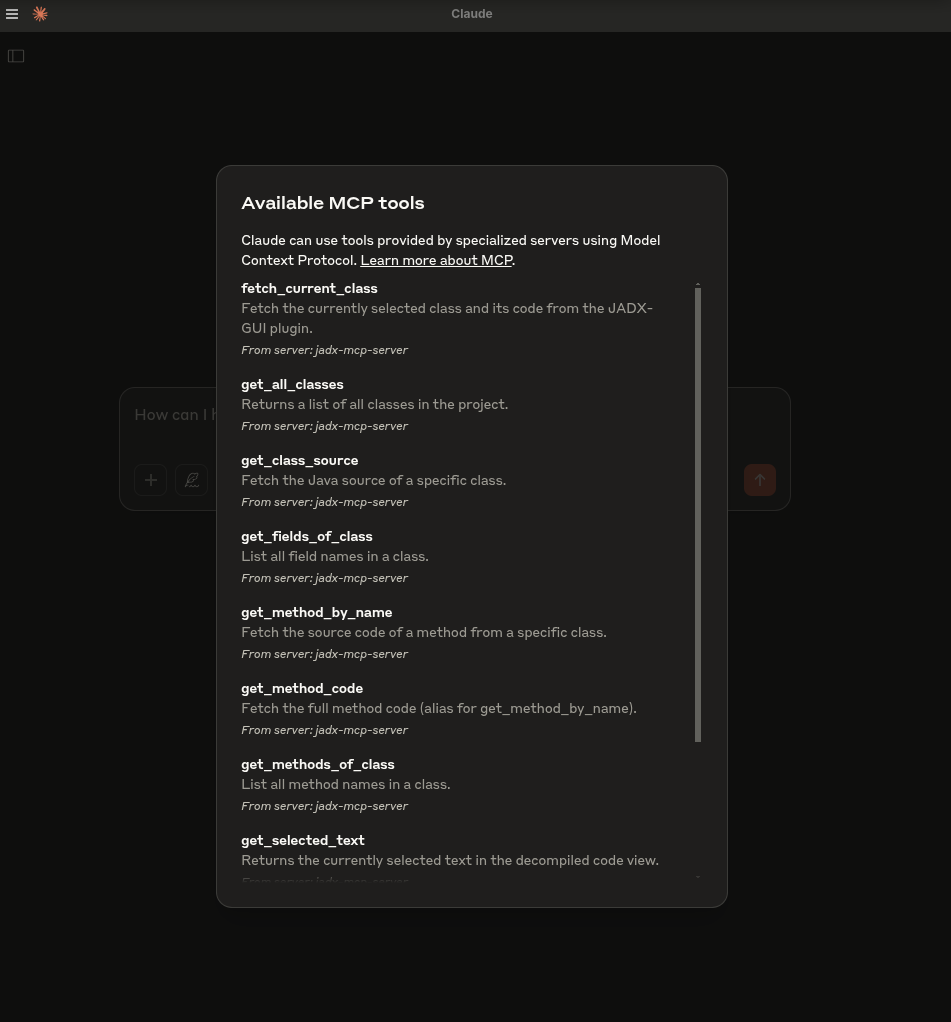
- `fetch_current_class()` — 選択したクラスのクラス名と完全なソースを取得
- `get_selected_text()` — 現在選択されているテキストを取得
- `get_all_classes()` — プロジェクト内のすべてのクラスを一覧表示
- `get_class_source()` — 指定したクラスの完全なソースを取得
- `get_method_by_name()` — メソッドのソースを取得
- `search_method_by_name()` — クラスを横断してメソッドを検索
- `search_classes_by_keyword()` — ソースコードに特定のキーワードを含むクラスを検索(ページネーション対応)
- `get_methods_of_class()` — クラス内のメソッドを一覧表示
- `get_fields_of_class()` — クラス内のフィールドを一覧表示
- `get_smali_of_class()` — クラスのsmaliを取得
- `get_main_activity_class()` — AndroidManifest.xmlファイルに記載されたjadxのメインアクティビティを取得
- `get_main_application_classes_code()` — AndroidManifest.xmlで定義されたパッケージ名に基づいて、メインアプリケーションクラスのコードをすべて取得
- `get_main_application_classes_names()` — AndroidManifest.xmlで定義されたパッケージ名に基づいて、メインアプリケーションクラスの名前をすべて取得
- `get_android_manifest()` — AndroidManifest.xmlの内容を取得して返す
- `get_manifest_component` - マニフェストファイル全体ではなく、特定のマニフェストコンポーネントを取得
- `get_strings()` : strings.xmlファイルを取得
- `get_all_resource_file_names()` : アプリケーション内に存在するすべてのリソースファイル名を取得
- `get_resource_file()` : リソースファイルの内容を取得
- `rename_class()` : クラス名を変更
- `rename_method()` : メソッド名を変更
- `rename_field()` : フィールド名を変更
- `rename_package()` : パッケージ全体を変更
- `rename_variable()` : メソッド内の変数名を変更
- `add_comment()` : クラス、メソッド、フィールド、または単一のコード行(`line=`、デコンパイルされたソースの1始まりの行番号)にコメントを追加し、JADX-GUIに表示してプロジェクトとともに保存(同じ対象に再度コメントすると更新され、空のコメントは削除)
- `list_comments()` : プロジェクトに保存されたコメントを一覧表示(オプションで1つのクラスに絞り込み可能)
- `debug_get_stack_frames()` : jadxデバッガーからスタックフレームを取得
- `debug_get_threads()` : jadxデバッガーからスレッドのインサイトを取得
- `debug_get_variables()` : jadxデバッガーから変数を取得
- `xrefs_to_class()` : クラスへのすべての参照を検索(メソッドレベルとクラスレベルの参照を返し、ページネーション対応)
- `xrefs_to_method()` : メソッドへのすべての参照を検索(オーバーライド関連のメソッドを含み、ページネーション対応)
- `xrefs_to_field()` : フィールドへのすべての参照を検索(フィールドにアクセスするメソッドを返し、ページネーション対応)
---
## 🗒️ サンプルプロンプト
🔍 基本的なコード理解
"このクラスが何をするのかを1段落で説明してください。"
"このメソッドの責務を要約してください。"
"このクラスに難読化は含まれていますか?"
"このクラスが必要とする可能性のあるAndroidパーミッションをすべて挙げてください。"
🛡️ 脆弱性検出
"このメソッドに安全でないAPIの使用はありますか?"
"このクラスにハードコードされたシークレットや認証情報がないか確認してください。"
"このメソッドは使用前にユーザー入力をサニタイズしていますか?"
"このコードによってどのようなセキュリティ脆弱性が導入される可能性がありますか?"
🛠️ リバースエンジニアリング支援
"難読化を解除し、クラスとメソッドを読みやすい名前に変更してください。"
"このsmaliメソッドの本来の目的を推測できますか?"
"このクラスはどのライブラリやSDKの一部であると思われますか?"
"'encryption'に関連するコードを含むクラスを教えてください。"
📦 静的解析
"このクラス内のネットワーク関連のAPI呼び出しをすべて挙げてください。"
"ファイルI/O操作とその潜在的なリスクを特定してください。"
"このメソッドはデバイス情報やPIIを漏洩していますか?"
🤖 AIによるコード修正
"このメソッドを可読性向上のためにリファクタリングしてください。"
"各ステップを説明するコメントをこのコードに追加してください。"
"解析のために、このJavaメソッドをPythonで書き直してください。"
📄 ドキュメントとメタデータ
"すべてのメソッドに対してJavadoc形式のコメントを生成してください。"
"このクラスはどのパッケージまたはアプリコンポーネントに属する可能性が高いですか?"
"Androidコンポーネントの種類(Activity、Serviceなど)を特定できますか?"
🐞 デバッガアシスタント
```
"Fetch stack frames, varirables and threads from debugger and provide summary"
"Based the stack frames from debugger, explain the execution flow of the application"
"Based on the state of variables, is there security threat?"
```
## 🛠️ はじめに
### 1. Releases からダウンロード: https://github.com/zinja-coder/jadx-ai-mcp/releases
> [!NOTE]
>
> `jadx-ai-mcp-<version>.jar` と `jadx-mcp-server-<version>.zip` の両方のファイルをダウンロードしてください。
```bash
# 0. Download the jadx-ai-mcp-<version>.jar and jadx-mcp-server-<version>.zip
https://github.com/zinja-coder/jadx-ai-mcp/releases
# 1.
unzip jadx-mcp-server-<version>.zip
├jadx-mcp-server/
├── jadx_mcp_server.py
├── requirements.txt
├── README.md
├── LICENSE
├── src/
├── static/
├── examples/
└── test.sh
├jadx-ai-mcp-<version>.jar
# 2. Install the plugin
# For this you can follow two approaches:
## 1. One liner - execute below command in your shell
jadx plugins --install "github:zinja-coder:jadx-ai-mcp"
## The above one line code will install the latest version of the plugin directly into the jadx, no need to download the jadx-ai-mcp's .jar file.
## 2. Or you can use JADX-GUI to install it by following images as shown below:
```
<div align="center">
<img alt="バナー" height="480px" widht="620px" src="https://assets.kitploit.com/production/public/readmes/6657/1c2660639daf7352d2bdeafeb7b5e0846e3c0bed45846ee52256b7bf3d316386.png">
</div>
<div align="center">
<img alt="バナー" height="480px" widht="620px" src="https://assets.kitploit.com/production/public/readmes/6657/ccc2cc3566566517abad1097711afad3c668a999dc105d82686c4ffb791eba3b.png">
</div>
<div align="center">
<img alt="バナー" height="480px" widht="620px" src="https://assets.kitploit.com/production/public/readmes/6657/0f9770bc38f4234826a661e6d37bc205a801ad38380363fd4394a903bd35ff94.png">
</div>
```bash
## 3. GUI method, download the .jar file and follow below steps shown in images
```
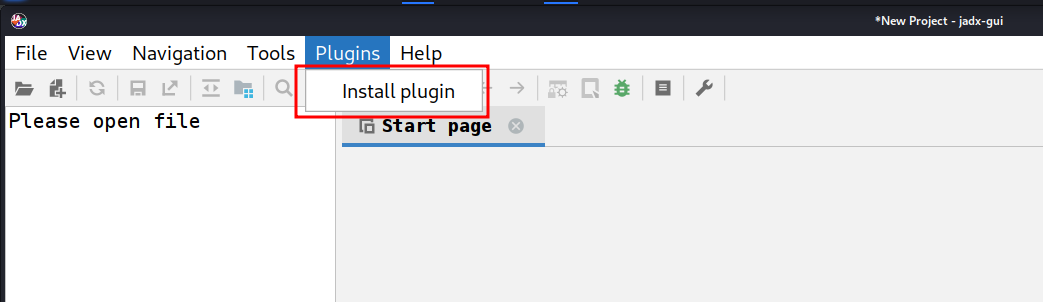
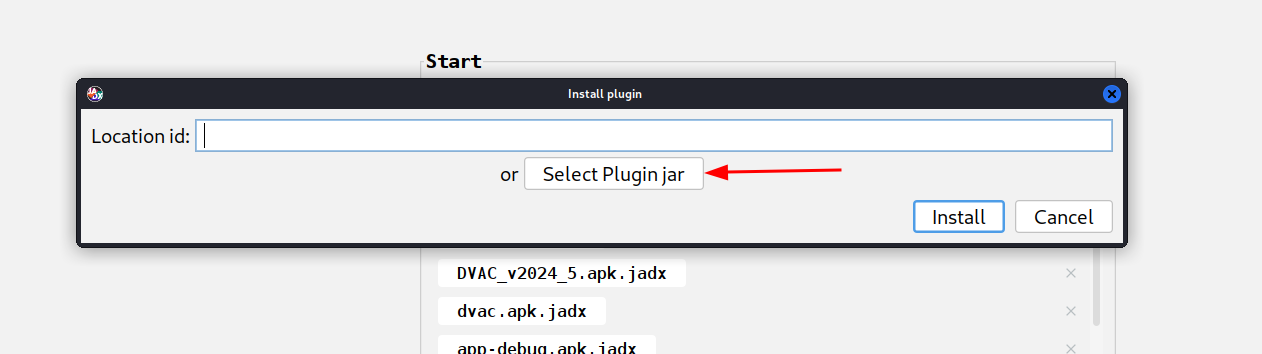
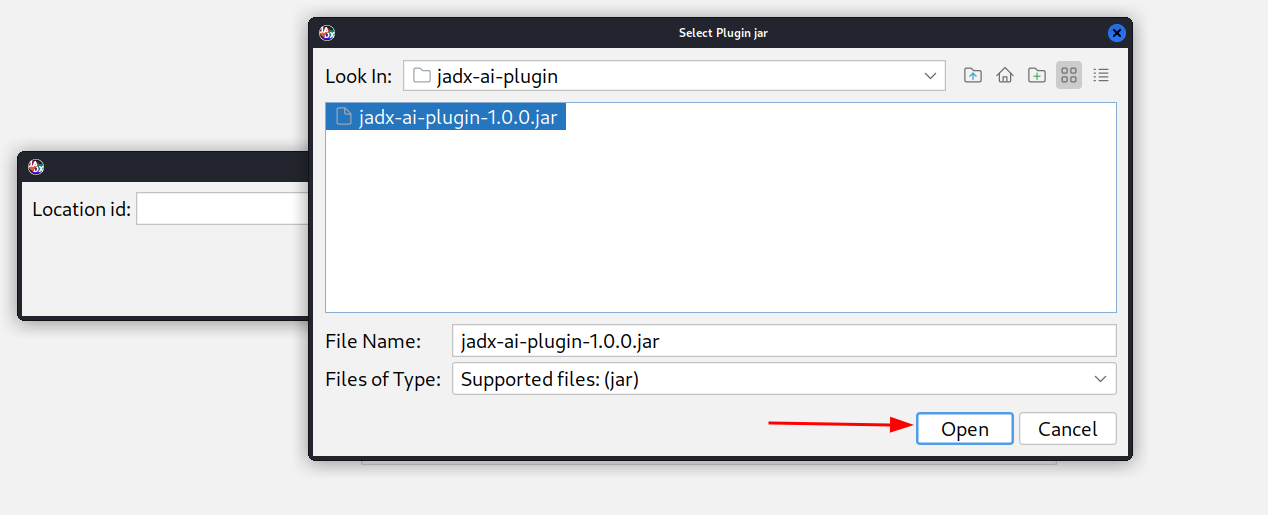
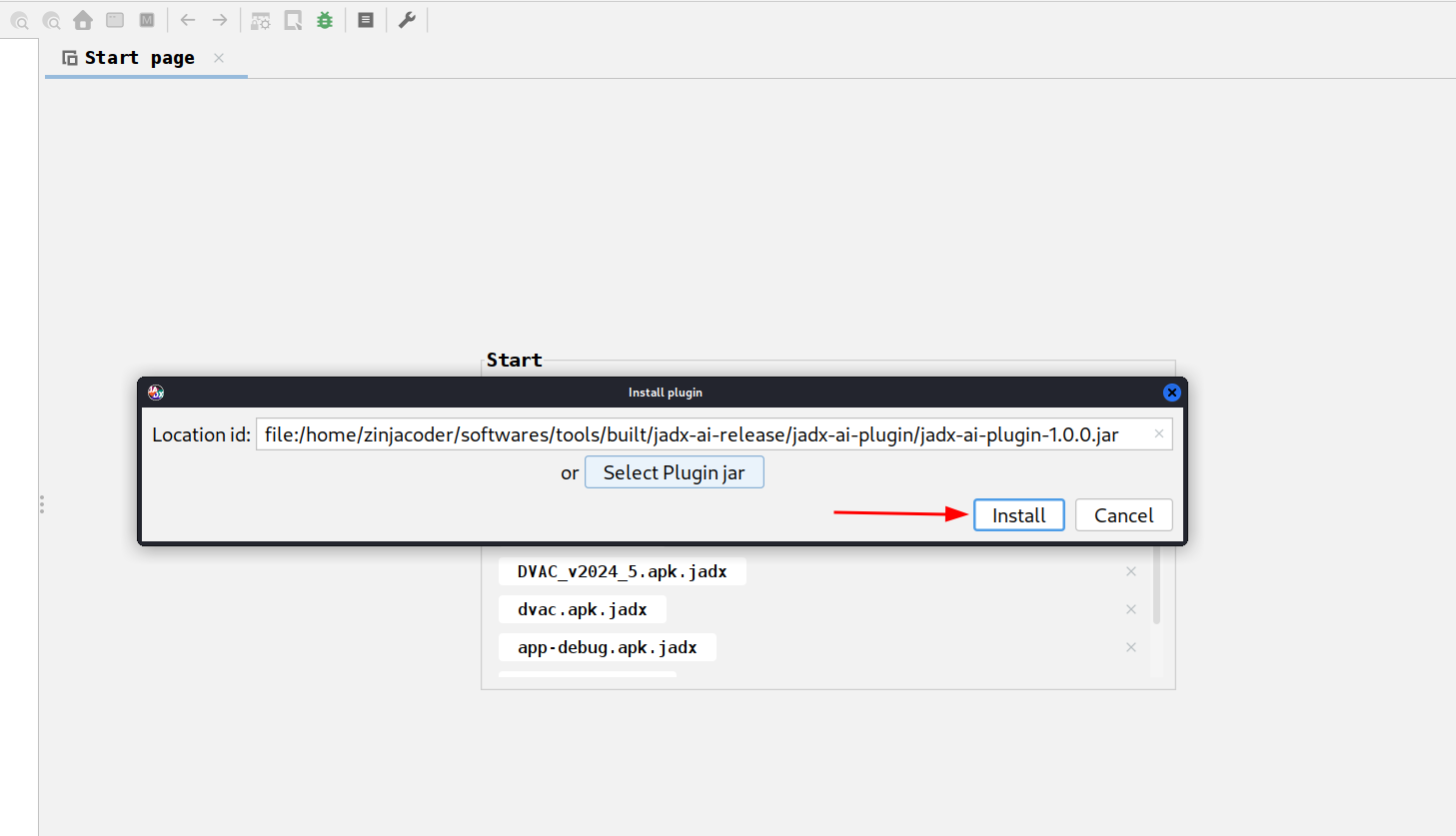
```bash
# 3. Navigate to jadx-mcp-server directory
cd jadx-mcp-server
# 4. This project uses uv - https://github.com/astral-sh/uv instead of pip for dependency management.
## a. Install uv (if you dont have it yet)
curl -LsSf https://astral.sh/uv/install.sh | sh
## b. OPTIONAL, if for any reasons, you get dependecy errors in jadx-mcp-server, Set up the environment
uv venv
source .venv/bin/activate # or .venv\Scripts\activate on Windows
## c. OPTIONAL Install dependencies
uv pip install httpx fastmcp
# The setup for jadx-ai-mcp and jadx_mcp_server is done.
```
## 🤖 2. Claude Desktop を使用する
MCP が有効な状態で Claude Desktop が実行されていることを確認してください。
例えば、私は Kali Linux で以下を使用しました: https://github.com/aaddrick/claude-desktop-debian
MCP サーバーを設定して LLM ファイルに追加します:
```bash
nano ~/.config/Claude/claude_desktop_config.json
```
対象:
- Windows: `%APPDATA%\Claude\claude_desktop_config.json`
- macOS: `~/Library/Application Support/Claude/claude_desktop_config.json`
そしてその中に以下の内容を記述します:
```json
{
"mcpServers": {
"jadx-mcp-server": {
"command": "/<path>/<to>/uv",
"args": [
"--directory",
"</PATH/TO/>jadx-mcp-server/",
"run",
"jadx_mcp_server.py"
]
}
}
}
```
置換対象:
- `path/to/uv` を実際の `uv` 実行ファイルのパスに置き換えます
- `path/to/jadx-mcp-server` をこのリポジトリをクローンした絶対パスに置き換えます
その後、組み込みの統合機能を使用して、リアルタイムのコードレビュープロンプトでコードをナビゲートし、操作します。
**または**
以下のコマンドを使用して、jadx_mcp_server を直接実行可能ファイルとして直接インストールすることもできます:
```
uv tool install git+https://github.com/zinja-coder/jadx-mcp-server
```
そして、MCP設定の`command`セクションに`jadx_mcp_server`を指定するだけです。
## 3. Cherry Studioを使用する
Cherry StudioでMCPツールを設定したい場合は、以下の設定を参照してください。
- タイプ: stdio
- コマンド: uv
- 引数:
```bash
--directory
path/to/jadx-mcp-server
run
jadx_mcp_server.py
```
- `path/to/jadx-mcp-server` に、このリポジトリをクローンした絶対パスを指定します
## 4. LMStudio の使用
LM Studio の mcp.json ファイルを設定することで、JADX AI MCP Server を LM Studio で使用することもできます。以下は動画ガイドです。
https://github.com/user-attachments/assets/b4a6b280-5aa9-4e76-ac72-a0abec73b809
## 5. HTTP ストリームモードでの実行
以下に示すように、`jadx_mcp_server.py` で `--http` オプションを使用することで、Jadx を HTTP ストリームモードで使用することもできます:
```bash
uv run jadx_mcp_server.py --http
OR
uv run jadx_mcp_server.py --http --port 9999
```
### 高度なCLIオプション — フラグの理解
**2つの別々の接続**があり、それぞれに独自のホスト/ポートがあります:
```
┌─────────────┐ --host / --port ┌──────────────────┐ --jadx-host / --jadx-port ┌──────────────────┐
│ LLM Client │ ◄──────────────────► │ jadx-mcp-server │ ──────────────────────────► │ JADX-GUI Plugin │
│ (Claude, │ Where the MCP server │ │ Where the MCP server looks │ (jadx-ai-mcp) │
│ Codex..) │ LISTENS for clients │ │ for the JADX plugin │ │
└─────────────┘ └──────────────────┘ └──────────────────┘
```
| フラグ | デフォルト | 制御内容 |
|------|---------|----------|
| `--http` | オフ | stdio の代わりに HTTP トランスポートを使用する |
| `--host` | `127.0.0.1` | **MCP サーバーがリッスンする場所**(LLM クライアント用のバインドアドレス) |
| `--port` | `8651` | **MCP サーバーがリッスンするポート** |
| `--jadx-host` | `127.0.0.1` | **JADX プラグインを探す場所**(対象の JADX-GUI マシン) |
| `--jadx-port` | `8650` | **JADX プラグインが使用するポート** |
### 使用例
**シナリオ 1 — すべて同じマシン上(最も一般的):**
```bash
# Default: MCP server on localhost:8651, connects to JADX plugin on localhost:8650
uv run jadx_mcp_server.py --http
```
**シナリオ2 — DockerコンテナまたはWSL(ホストネットワークからMCPサーバーにアクセス可能):**
```bash
# MCP server listens on ALL interfaces so the host can reach it
# JADX plugin is still on the same machine
uv run jadx_mcp_server.py --http --host 0.0.0.0
```
**シナリオ3 — JADX-GUIが別のマシン(例:リモートVM)で実行されている場合:**
```bash
# MCP server runs locally, but connects to JADX plugin on a remote machine
uv run jadx_mcp_server.py --http --jadx-host 192.168.1.100
```
**シナリオ4 — 完全リモートセットアップ(すべて別々のマシン上):**
```bash
# MCP server listens on all interfaces on port 9999
# JADX plugin is on a different machine at 192.168.1.100:8652
uv run jadx_mcp_server.py --http --host 0.0.0.0 --port 9999 --jadx-host 192.168.1.100 --jadx-port 8652
```
> [!CAUTION]
> ### ⚠️ セキュリティ警告 — リモートバインド
>
> `--host 0.0.0.0`(または localhost 以外の任意のアドレス)を使用すると、MCP サーバーは**認証なしの平文 HTTP** で**すべてのネットワークインターフェース**にバインドされます。つまり:
>
> - **ネットワーク上の誰でも**接続してすべての MCP ツールを呼び出せる
> - **TLS 暗号化はない** — 通信は傍受されうる
> - 攻撃者はサーバーを利用して**逆コンパイルされたコードを読み取り**、**クラス/メソッドの名前を変更**し、**デバッグ情報にアクセス**できる
>
> **緩和策:**
> - `0.0.0.0` へのバインドは**信頼できる隔離されたネットワーク**(例: Docker ブリッジ、ローカル VM)でのみ行う
> - **ファイアウォール**を使用して MCP ポートへのアクセスを制限する
> - 代わりに **SSH トンネル**の使用を検討する: `ssh -L 8651:127.0.0.1:8651 remote-host`
### Stdio モードの互換性
> [!NOTE]
> **stdio** モード(デフォルト、`--http` なし)で実行する場合、人間が読めるすべての出力(バナー、ヘルスチェック)は **stderr** に書き込まれ、**stdout** は MCP JSON-RPC ストリーム用に予約されます。これにより、Codex、Claude Desktop、およびその他の stdio ベースの MCP クライアントとの互換性が確保されます。
## 6. JADX AI MCP Plugin のカスタムポートとホスト設定
<img width="800" height="335" alt="image" src="https://assets.kitploit.com/production/public/readmes/6657/34e13964afba1fa722733838892491b2ec9ea2d11f2dfd4e8612aa62817dfa41.png" />
1. Configure Port: JADX AI MCP Plugin が待ち受けるポートを設定します。
2. Default Port: 変更を元に戻し、デフォルトポートで待ち受けます。
3. Restart Server: JADX AI MCP Plugin サーバーを強制的に再起動します。
4. Server Status: JADX AI MCP Plugin サーバーのステータスを確認します。
カスタムポートで実行中の JADX AI MCP Plugin に接続するには、以下に示すように `--jadx-port` オプションを使用します:
```
uv run jadx_mcp_server.py --jadx-port 8652
```
JADX AI MCP Plugin が**別のマシン**で実行されている場合(例:JADX はリモート VM 上、MCP サーバーはローカルホスト上)、`--jadx-host` オプションを使用します:
```bash
# Connect to JADX plugin on a remote host
uv run jadx_mcp_server.py --jadx-host 192.168.1.100 --jadx-port 8650
```
### CLIリファレンス — フラグの理解
**2つの別々の接続**があり、それぞれに独自のホスト/ポートがあります:
```
┌─────────────┐ --host / --port ┌──────────────────┐ --jadx-host / --jadx-port ┌──────────────────┐
│ LLM Client │ ◄──────────────────► │ jadx-mcp-server │ ──────────────────────────► │ JADX-GUI Plugin │
│ (Claude, │ Where the MCP server │ │ Where the MCP server looks │ (jadx-ai-mcp) │
│ Codex..) │ LISTENS for clients │ │ for the JADX plugin │ │
└─────────────┘ └──────────────────┘ └──────────────────┘
```
| フラグ | デフォルト | 制御内容 |
|------|---------|----------|
| `--http` | オフ | stdio の代わりに HTTP トランスポートを使用する |
| `--host` | `127.0.0.1` | **MCP サーバーがリッスンする場所**(LLM クライアント用のバインドアドレス) |
| `--port` | `8651` | **MCP サーバーがリッスンするポート** |
| `--jadx-host` | `127.0.0.1` | **JADX プラグインを探す場所**(対象の JADX-GUI マシン) |
| `--jadx-port` | `8650` | **JADX プラグインが使用するポート** |
### 使用例
**シナリオ 1 — すべて同じマシン上(最も一般的):**
```bash
# Default: MCP server on localhost:8651, connects to JADX plugin on localhost:8650
uv run jadx_mcp_server.py --http
```
**シナリオ2 — DockerコンテナまたはWSL(ホストネットワークからMCPサーバーにアクセス可能):**
```bash
# MCP server listens on ALL interfaces so the host can reach it
# JADX plugin is still on the same machine
uv run jadx_mcp_server.py --http --host 0.0.0.0
```
**シナリオ3 — JADX-GUIが別のマシン(例:リモートVM)で実行されている場合:**
```bash
# MCP server runs locally, but connects to JADX plugin on a remote machine
uv run jadx_mcp_server.py --http --jadx-host 192.168.1.100
```
**シナリオ4 — 完全リモートセットアップ(すべて別々のマシン上):**
```bash
# MCP server listens on all interfaces on port 9999
# JADX plugin is on a different machine at 192.168.1.100:8652
uv run jadx_mcp_server.py --http --host 0.0.0.0 --port 9999 --jadx-host 192.168.1.100 --jadx-port 8652
```
claude 用のカスタム jadx ポート向け MCP 設定は次のとおりです:
```
{
"mcpServers": {
"jadx-mcp-server": {
"command": "/path/to/uv",
"args": [
"--directory",
"/path/to/jadx-mcp-server/",
"run",
"jadx_mcp_server.py",
"--jadx-port",
"8652"
]
}
}
}
```
## 試してみる
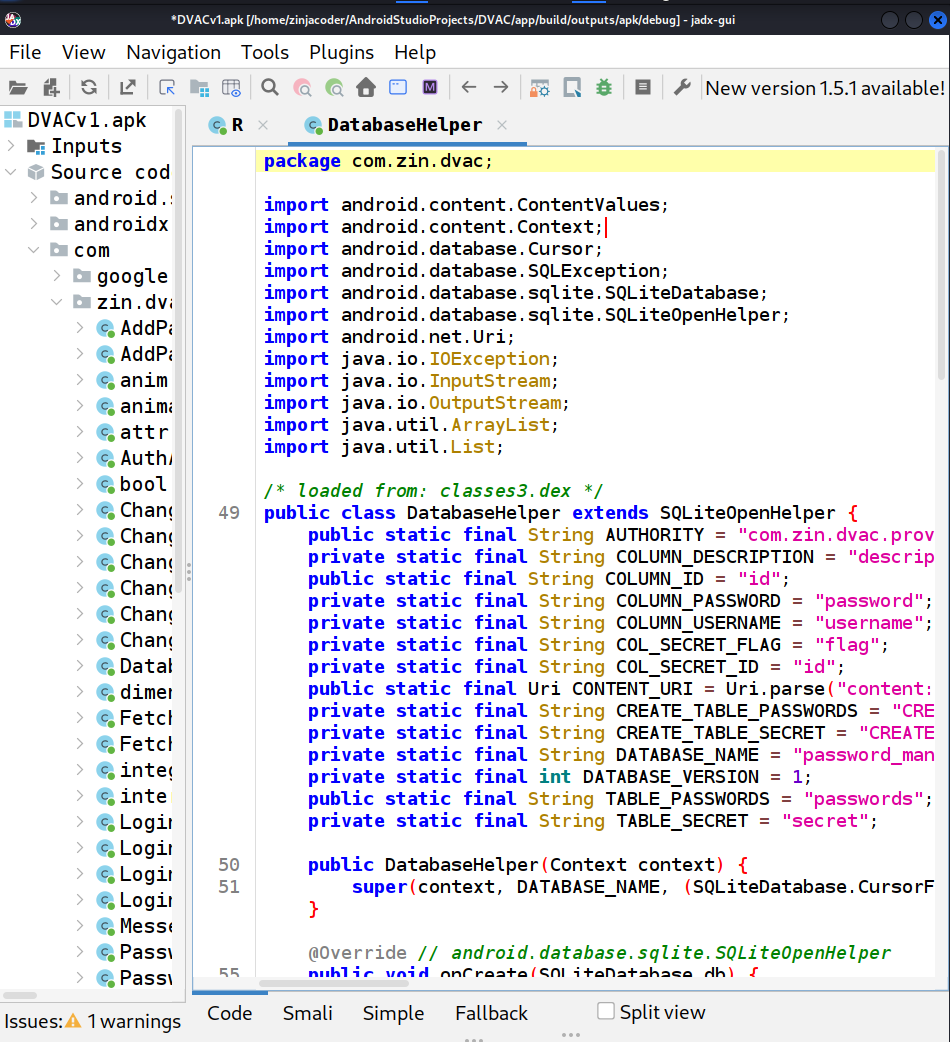
1. jadx-gui を実行し、任意の .apk ファイルを読み込みます
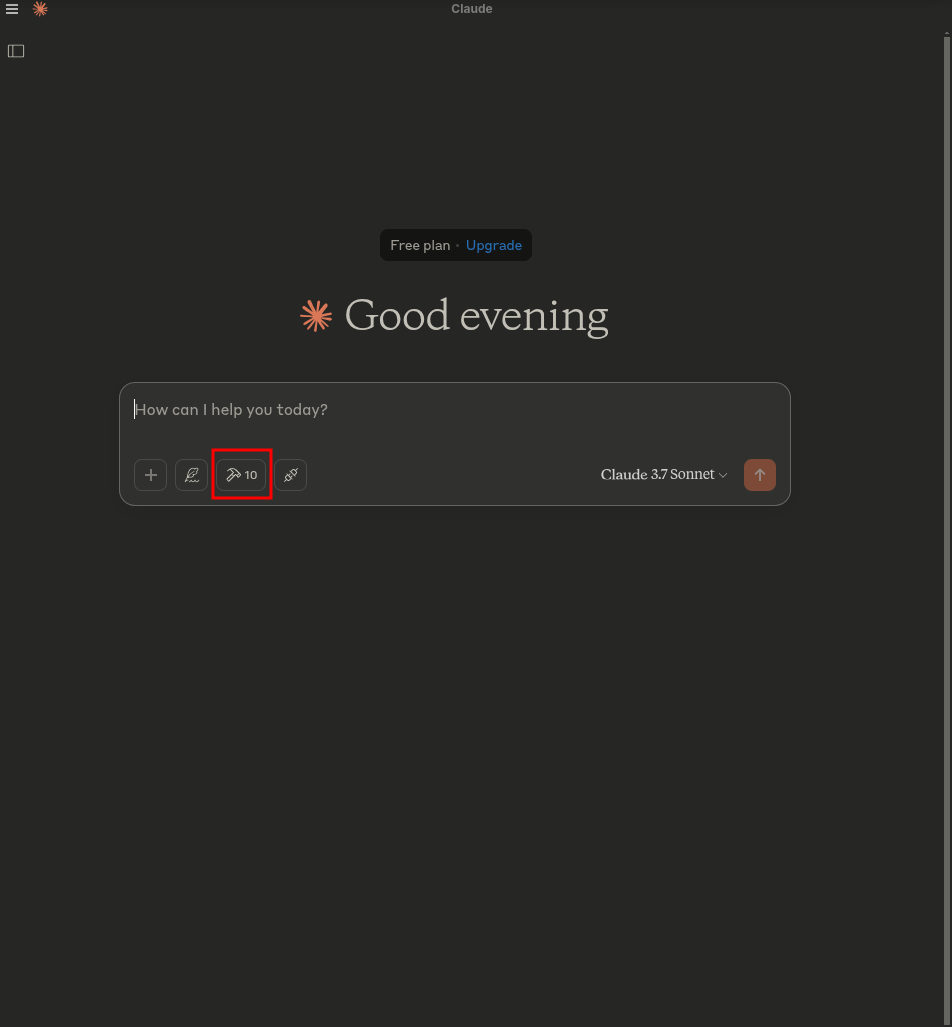
2. claude を起動します - ハンマーのシンボルが表示されるはずです
3. `hammer` シンボルをクリックすると、次のようなものが表示されるはずです:
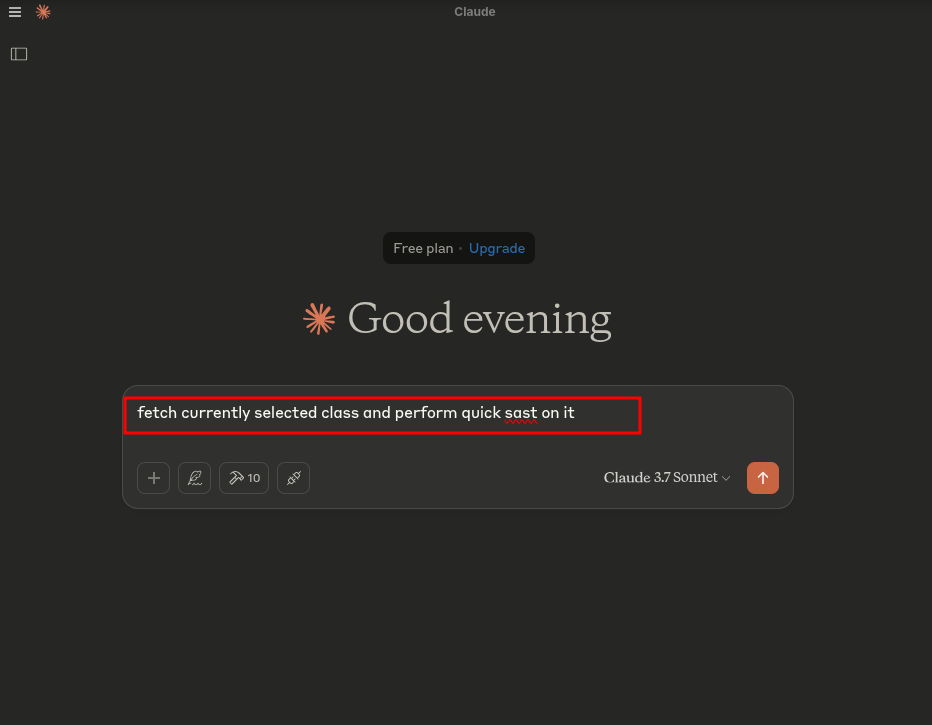
4. 次のプロンプトを実行します:
```text
fetch currently selected class and perform quick sast on it
```
5. プロンプトが表示されたらアクセスを許可します:
---
[Read more](https://github.com/zinja-coder/jadx-ai-mcp)
