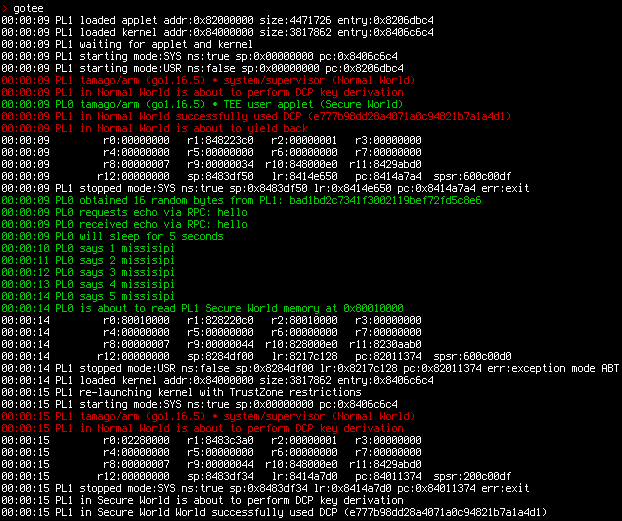

GoTEEフレームワークは、TamaGoベースのユニカーネルの並行インスタンス化を特権モードと非特権モードで実装し、モニターモードとカスタムシステムコールを介して相互にやり取りします。
これらの機能によりGoTEEは、TamaGoベースのTrusted Execution Environments(TEE)を実装し、ARM TrustZone Secure WorldまたはRISC-V Supervisor Execution Environments内のベアメタル実行にGoのメモリ安全性、利便性、および機能をもたらします。
GoTEEは、GoTEE APIを実装する純粋なGo、Rust、またはCベースのフリースタンディングなTrusted Appletだけでなく、ARM TrustZone Normal WorldまたはRISC-V Sモードで実行可能なLinuxなどの任意のオペレーティングシステムも監督できます。
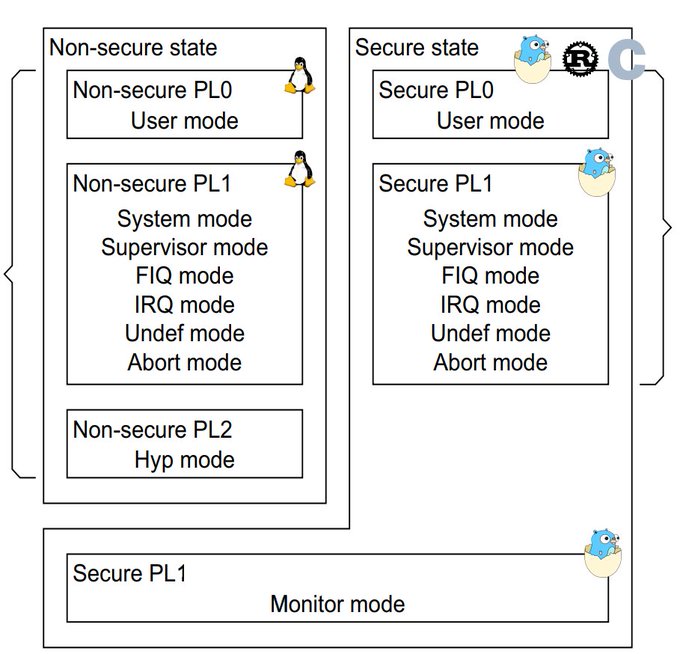
隔離された実行コンテキスト(ARMユーザーモード、TrustZone Normal World、またはRISC-V Supervisor Mode向け)
Trusted OS実装のためのAPI(Syscall、JSON-RPC、および例外ハンドラ)

チュートリアルを含む主要なドキュメントは、プロジェクトwikiにあります。
パッケージAPIドキュメントはpkg.go.devにあります。
次の表は、現在サポートされているSoCとボードの概要を示しています。
| SoC | ボード | SoCパッケージ | ボードパッケージ |
|---|---|---|---|
| NXP i.MX6ULZ | USB armory Mk II | imx6ul | usbarmory/mk2 |
| NXP i.MX6ULL | MCIMX6ULL-EVK | imx6ul | mx6ullevk |
| SiFive FU540 | QEMU sifive_u | fu540 | qemu/sifive_u |
TEEの用語では、特権ユニカーネルは一般にTrusted OSと呼ばれ、非特権ユニカーネルはTrusted Appletを表します。
GoTEEの例は、Trusted OS、Trusted Applet、およびMain OSとして動作するGoユニカーネルの並行動作を示しています。
[!WARNING] Main OSは任意の「リッチ」OS(例:Linux)でよく、TamaGoは単に自己完結型の例として使用されています。Trusted Appletについても同様で、ユーザーモードで実行可能でGoTEE APIを実装する任意のベアメタルアプリケーション(フリースタンディングなCまたはRustプログラムなど)を使用できます。
Rustの例を使用する場合は、ビルド時に
trusted_applet_goをtrusted_applet_rustに置き換えることができます。
この例のTrusted OS/アプレットの組み合わせは、異なる特権レベルでの3つのTamaGoユニカーネルの並行実行に関する基本的なテストを実行します。
Main OSはモニターコールで制御を戻します。
Trusted Appletは5秒間スリープした後、Trusted OSのメモリの読み取りを試みます。これにより、スーパーバイザーが処理してTrusted Appletを終了させる例外がトリガーされます。
GoTEEのsyscallインターフェースは、Trusted OSとTrusted Applet間の通信のために実装されています。
USB armory Mk IIで起動すると、この例のアプリケーションはEthernet over USB(LinuxおよびmacOSホストでサポートされているECMプロトコル)を介してSSHでアクセスできます:
$ ssh [email protected]
tamago/arm • TEE security monitor (Secure World system/monitor)

allgptr                                          # memory forensics of applet goroutines
csl                                              # show config security levels (CSL)
csl             <periph> <slave> <hex csl>       # set config security level (CSL)
dbg                                              # show ARM debug permissions
exit, quit                                       # close session
gotee                                            # TrustZone example w/ TamaGo unikernels
help                                             # this help
linux           <uSD|eMMC>                       # boot NonSecure USB armory Debian base image
lockstep        <fault %>                        # tandem applet example w/ fault injection
peek            <hex offset> <size>              # memory display (use with caution)
poke            <hex offset> <hex value>         # memory write   (use with caution)
reboot                                           # reset device
sa                                               # show security access (SA)
sa              <id> <secure|nonsecure>          # set security access (SA)
stack                                            # stack trace of current goroutine
stackall                                         # stack trace of all goroutines

>
この例はgoteeコマンドで起動でき、実際のハードウェアペリフェラルを使用して、TrustZone制限が有効になる前後の動作を示すためにMain OSを2回起動します。
さらに、linuxコマンドを使用して、USB armory DebianベースイメージをNon-secureメインOSとして起動できます。
[!NOTE] Non-secure動作でサポートされているのは、USB armory Debianベースイメージのリリース20211129以降のみです。
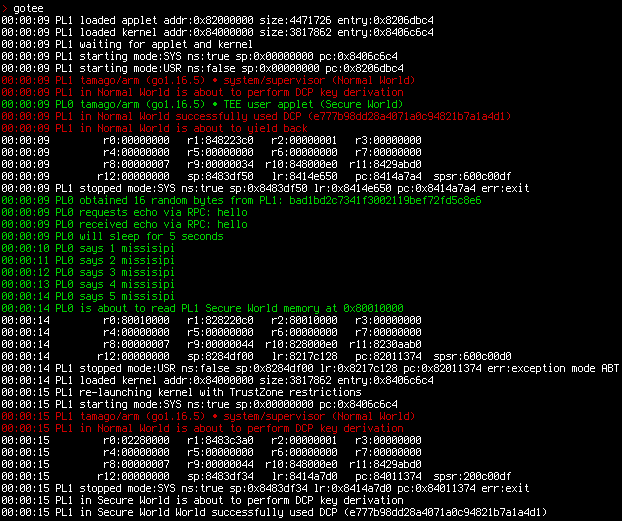
この例はQEMUエミュレーションでも実行できます。
[!NOTE] エミュレーション実行は、QEMUによる完全なTrustZone/PMPサポートの欠如により、部分的なテストのみを実行します。
make qemu
...
> gotee
00:00:00 tamago/arm • TEE security monitor (Secure World system/monitor)
00:00:00 SM loaded applet addr:0x9c000000 entry:0x9c072740 size:4940275
00:00:00 SM loaded kernel addr:0x80000000 entry:0x8007100c size:4577643
00:00:00 SM waiting for applet and kernel
00:00:00 SM starting mode:USR sp:0x9e000000 pc:0x9c072740 ns:false
00:00:00 SM starting mode:SYS sp:0x00000000 pc:0x8007100c ns:true
00:00:00 tamago/arm (go1.19.1) • TEE user applet
00:00:00 tamago/arm (go1.19.1) • system/supervisor (Non-secure)
00:00:00 supervisor is about to yield back
00:00:00 SM stopped mode:SYS sp:0x8146bf54 lr:0x801937a4 pc:0x80193884 ns:true err:exit
00:00:00 applet obtained 16 random bytes from monitor: b4cc4764dd30291a52545b182313003c
00:00:00 applet requests echo via RPC: hello
00:00:00 applet received echo via RPC: hello
00:00:00 applet will sleep for 5 seconds
00:00:01 applet says 1 mississippi
...
00:00:05 applet says 5 mississippi
00:00:05 applet is about to read secure memory at 0x98010000
00:00:05    r0:98010000  r1:9c8240c0  r2:98010000  r3:00000000
00:00:05    r4:00000000  r5:00000000  r6:00000000  r7:9c86bec8
00:00:05    r8:00000007  r9:0000003d r10:9c8020f0 r11:9c342f41 cpsr:600001d7 (ABT)
00:00:05   r12:00000061  sp:9c86bf08  lr:9c1b1be8  pc:9c011330 spsr:600001d0 (USR)
00:00:05 SM stopped mode:USR sp:0x9c86bf08 lr:0x9c1b1be8 pc:0x9c011330 ns:false err:ABT

