trufflesecurity/trufflehog
漏洩した認証情報を発見、検証、分析する

漏洩した認証情報を見つけます。

Git、Jira、Slack、Confluence、Microsoft Teams、Sharepoint(およびその他)を継続的に監視して認証情報を探すことに興味がありますか?エンタープライズ製品が役立ちます!詳細はこちら: https://trufflesecurity.com/trufflehog-enterprise。
エンタープライズ製品の収益は、コミュニティ全体が利益を得られる、より素晴らしいオープンソースプロジェクトの資金に充てています。
TruffleHogは、最も強力なシークレットの発見、分類、検証、分析ツールです。この文脈では、シークレットとは、マシンが別のマシンに対して認証するために使用する認証情報を指します。これには、APIキー、データベースパスワード、秘密暗号鍵などが含まれます。
TruffleHogは、Git、チャット、Wiki、ログ、APIテストプラットフォーム、オブジェクトストア、ファイルシステムなど、さまざまな場所でシークレットを探すことができます。
TruffleHogは800以上のシークレットタイプを分類し、それぞれが属する特定のIDにマッピングします。AWSのシークレットですか?Stripeのシークレットですか?Cloudflareのシークレットですか?Postgresのパスワードですか?SSL秘密鍵ですか?見ただけでは判断が難しいこともあるため、TruffleHogは見つけたすべてを分類します。
TruffleHogが分類できるすべてのシークレットについて、実際にログインしてそのシークレットが有効かどうかを確認することもできます。このステップは、現在進行形の危険があるかどうかを知るために重要です。
最も一般的に漏洩する約20種類の認証情報については、シークレットがログインできるかどうかを確認するために1回のリクエストを送信するのではなく、TruffleHogは多くのリクエストを送信して、シークレットに関するあらゆる情報を調べることができます。誰が作成したのか?どのリソースにアクセスできるのか?それらのリソースに対してどのような権限を持っているのか?
質問はありますか?フィードバックは?SlackまたはDiscordに飛び込んで、一緒に交流しましょう。
Slackコミュニティに参加
 ```bash
docker run --rm -it -v "$PWD:/pwd" trufflesecurity/trufflehog:latest github --org=trufflesecurity
```bash
docker run --rm -it -v "$PWD:/pwd" trufflesecurity/trufflehog:latest github --org=trufflesecurity
# :floppy_disk: インストール

いくつかのオプションがあります。

### MacOS ユーザー向け```bash
brew install trufflehog
以下のコマンドを実行する前に、Dockerエンジンが動作していることを確認してください:
docker run --rm -it -v "$PWD:/pwd" trufflesecurity/trufflehog:latest github --repo https://github.com/trufflesecurity/test_keys
####     Windows コマンド プロンプト```bash
docker run --rm -it -v "%cd:/=\%:/pwd" trufflesecurity/trufflehog:latest github --repo https://github.com/trufflesecurity/test_keys
docker run --rm -it -v "${PWD}:/pwd" trufflesecurity/trufflehog github --repo https://github.com/trufflesecurity/test_keys
####     M1およびM2 Mac```bash
docker run --platform linux/arm64 --rm -it -v "$PWD:/pwd" trufflesecurity/trufflehog:latest github --repo https://github.com/trufflesecurity/test_keys
Download and unpack from https://github.com/trufflesecurity/trufflehog/releases
### ソースからコンパイル```bash
git clone https://github.com/trufflesecurity/trufflehog.git
cd trufflehog; go install
curl -sSfL https://raw.githubusercontent.com/trufflesecurity/trufflehog/main/scripts/install.sh | sh -s -- -b /usr/local/bin
### インストールスクリプトを使用し、チェックサム署名を検証する(cosignのインストールが必要)```bash
curl -sSfL https://raw.githubusercontent.com/trufflesecurity/trufflehog/main/scripts/install.sh | sh -s -- -v -b /usr/local/bin
curl -sSfL https://raw.githubusercontent.com/trufflesecurity/trufflehog/main/scripts/install.sh | sh -s -- -b /usr/local/bin
# :closed_lock_with_key: アーティファクトの検証

すべてのアーティファクトにチェックサムが適用され、結果のチェックサムファイルはcosignを使用して署名されます。

署名を検証するには以下のツールが必要です:

- [Cosign](https://docs.sigstore.dev/cosign/system_config/installation/)

検証手順は以下の通りです:

1. 必要なアーティファクトファイルと、[リリース](https://github.com/trufflesecurity/trufflehog/releases)ページから以下のファイルをダウンロードします。

   - trufflehog\_{version}\_checksums.txt
   - trufflehog\_{version}\_checksums.txt.pem
   - trufflehog\_{version}\_checksums.txt.sig

2. 署名を検証します:   ```shell
   cosign verify-blob <path to trufflehog_{version}_checksums.txt> \
   --certificate <path to trufflehog_{version}_checksums.txt.pem> \
   --signature <path to trufflehog_{version}_checksums.txt.sig> \
   --certificate-identity-regexp 'https://github\.com/trufflesecurity/trufflehog/\.github/workflows/.+' \
   --certificate-oidc-issuer "https://token.actions.githubusercontent.com"
{version} をダウンロードしたファイルのバージョンに置き換えてください
あるいは、インストールスクリプトを使用する場合は、-v オプションを指定して署名検証を実行してください。これには、インストールスクリプトを実行する前に Cosign バイナリがインストールされている必要があります。
コマンド:```bash trufflehog git https://github.com/trufflesecurity/test_keys --results=verified
期待される出力:```
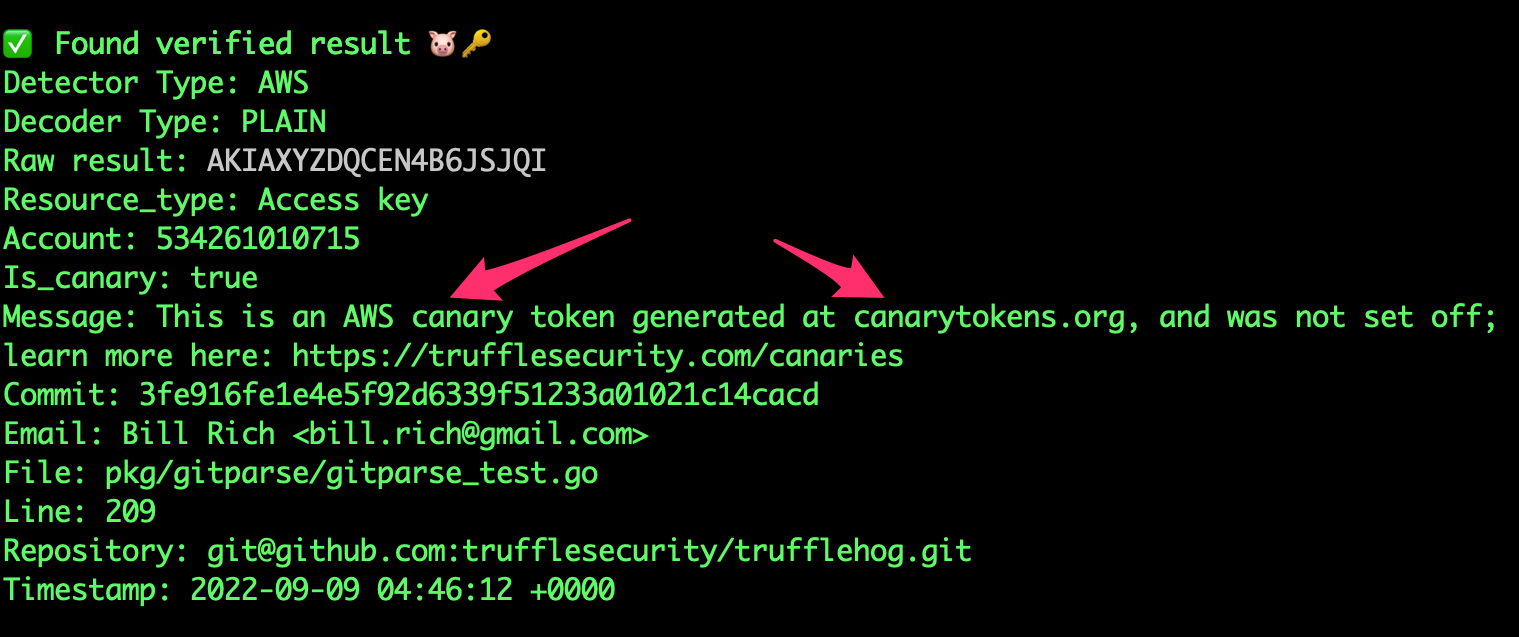
🐷🔑🐷  TruffleHog. Unearth your secrets. 🐷🔑🐷

Found verified result 🐷🔑
Detector Type: AWS
Decoder Type: PLAIN
Raw result: AKIAYVP4CIPPERUVIFXG
Line: 4
Commit: fbc14303ffbf8fb1c2c1914e8dda7d0121633aca
File: keys
Email: counter <[email protected]>
Repository: https://github.com/trufflesecurity/test_keys
Timestamp: 2022-06-16 10:17:40 -0700 PDT
...
trufflehog github --org=trufflesecurity --results=verified
## 3: GitHub Organizationのスキャン(アーカイブリポジトリ除外)```bash
trufflehog github --org=trufflesecurity --exclude-archived
コマンド:```bash trufflehog git https://github.com/trufflesecurity/test_keys --results=verified --json
期待される出力:```
{"SourceMetadata":{"Data":{"Git":{"commit":"fbc14303ffbf8fb1c2c1914e8dda7d0121633aca","file":"keys","email":"counter \[email protected]\u003e","repository":"https://github.com/trufflesecurity/test_keys","timestamp":"2022-06-16 10:17:40 -0700 PDT","line":4}}},"SourceID":0,"SourceType":16,"SourceName":"trufflehog - git","DetectorType":2,"DetectorName":"AWS","DecoderName":"PLAIN","Verified":true,"Raw":"AKIAYVP4CIPPERUVIFXG","Redacted":"AKIAYVP4CIPPERUVIFXG","ExtraData":{"account":"595918472158","arn":"arn:aws:iam::595918472158:user/canarytokens.com@@mirux23ppyky6hx3l6vclmhnj","user_id":"AIDAYVP4CIPPJ5M54LRCY"},"StructuredData":null}
...
trufflehog github --repo=https://github.com/trufflesecurity/test_keys --issue-comments --pr-comments
## 6: S3バケットを高信頼性の結果 (確認済み + 不明) のためにスキャンする```bash
trufflehog s3 --bucket=<bucket name> --results=verified,unknown
trufflehog s3 --role-arn=
## 8: SSH認証を使用してGitHubリポジトリをDockerでスキャンする```bash
docker run --rm -v "$HOME/.ssh:/root/.ssh:ro" trufflesecurity/trufflehog:latest git ssh://github.com/trufflesecurity/test_keys
trufflehog filesystem path/to/file1.txt path/to/file2.txt path/to/dir
## 10: ローカルのGitリポジトリをスキャンする