iblessingはiOSセキュリティエクスプロイトツールキットで、主にアプリケーション情報収集、静的解析、動的解析を含みます。リバースエンジニアリング、バイナリ解析、脆弱性調査に使用できます。
☠️ ██╗██████╗ ██╗ ███████╗███████╗███████╗██╗███╗ ██╗ ██████╗ ██║██╔══██╗██║ ██╔════╝██╔════╝██╔════╝██║████╗ ██║██╔════╝ ██║██████╔╝██║ █████╗ ███████╗███████╗██║██╔██╗ ██║██║ ███╗ ██║██╔══██╗██║ ██╔══╝ ╚════██║╚════██║██║██║╚██╗██║██║ ██║ ██║██████╔╝███████╗███████╗███████║███████║██║██║ ╚████║╚██████╔╝ ╚═╝╚═════╝ ╚══════╝╚══════╝╚══════╝╚══════╝╚═╝╚═╝ ╚═══╝ ╚═════╝
iblessing はiOSセキュリティエクスプロイティングツールキットであり、主にアプリケーション情報収集、静的解析、動的解析を含みます。iblessing は unicorn engine、capstone engine、keystone engine をベースとしています。🔥 クロスプラットフォーム: macOS と Ubuntu でテスト済み。
iOSアプリの静的情報抽出(メタデータ、ディープリンク、URLなど)。
Mach-Oパーサーとdyldシンボルバインディングシミュレーター
Objective-Cクラスの実現と解析
arm64アセンブリコードの動的解析を行い、キー情報や攻撃面を見つけるスキャナー
unicornを使用してMach-O arm64コード実行を部分的にシミュレートし、特定の機能を見つけるスキャナー
スキャナーのレポートを二次処理してクエリサーバーを起動したり、IDA用スクリプトを生成するジェネレーター
スーパー objc_msgSend xrefs スキャナー 😄
テスト
Androidスキャナー対応
診断ログ
新しいスキャナープラグイン向けのより柔軟なスキャナー基盤
iblessingや関連項目についてサポートが必要な場合は、以下を利用できます:
⚠️⚠️⚠️ バイナリスキャナーはMach-Oファイルをロードするために12GBの仮想メモリ空間を必要としますが、それほど消費しません。したがって、作業用マシンの物理メモリが12GB以上であるか、スワップファイル機構により割り当て可能な仮想メモリが12GB以上であることを確認する必要があります。
iblessingのコンパイルを開始するには、以下の手順に従ってください:``` git clone --recursive -j4 https://github.com/Soulghost/iblessing cd iblessing ./compile-cmake.sh
## ショートカット
- [基本概念](https://github.com/Soulghost/iblessing#basic-concepts)
- スキャナー
- [AppInfosをスキャン](https://github.com/Soulghost/iblessing#scan-for-appinfos) ⚠️ 現在Linuxでは利用できません
- [クラスXREFをスキャン](https://github.com/Soulghost/iblessing#scan-for-class-xrefs)
- [すべてのobjc_msgSend XREFをスキャン](https://github.com/Soulghost/iblessing#scan-for-all-objc_msgsend-xrefs)
- [シンプルなシンボルラッパーをスキャン](https://github.com/Soulghost/iblessing/blob/features/anti_wrapper/README.md#scan-for-symbol-wrappers)
- ジェネレーター
- [objc_msgSend Xrefsクエリサーバーを生成](https://github.com/Soulghost/iblessing#generate-objc_msgsend-xrefs-query-server)
- [objc_msgSend xrefs用のIDAスクリプトを生成](https://github.com/Soulghost/iblessing#generate-ida-scripts-for-objc_msgsend-xrefs)
- [objc関数ラッパーの名前変更とプロトタイプ修正のためのIDAスクリプトを生成](https://github.com/Soulghost/iblessing/blob/features/anti_wrapper/README.md#genereate-ida-script-for-objc-runtime-function-rename-and-prototype-modification)
***エラーが発生した場合、手動でcapstoneとunicornをコンパイルし、libcapstone.aとlibunicorn.aをXcodeプロジェクトのvendor/libsにドラッグしてください。***
すべてが正常に実行された場合、ビルドディレクトリにバイナリがあります:```
> ls ./build
iblessing
> file ./build/iblessing
./build/iblessing: Mach-O 64-bit executable x86_64
$ iblessing -h
☠️
██╗██████╗ ██╗ ███████╗███████╗███████╗██╗███╗ ██╗ ██████╗
██║██╔══██╗██║ ██╔════╝██╔════╝██╔════╝██║████╗ ██║██╔════╝
██║██████╔╝██║ █████╗ ███████╗███████╗██║██╔██╗ ██║██║ ███╗
██║██╔══██╗██║ ██╔══╝ ╚════██║╚════██║██║██║╚██╗██║██║ ██║
██║██████╔╝███████╗███████╗███████║███████║██║██║ ╚████║╚██████╔╝
╚═╝╚═════╝ ╚══════╝╚══════╝╚══════╝╚══════╝╚═╝╚═╝ ╚═══╝ ╚═════╝
[] iblessing iOS Security Exploiting Toolkit Beta 0.1.1 (http://blog.asm.im) [] Author: Soulghost (高级页面仔) @ (https://github.com/Soulghost)
Usage: iblessing [options...] Options: -m, --mode mode selection: * scan: use scanner * generator: use generator -i, --identifier choose module by identifier: * : use specific scanner * : use specific generator -f, --file input file path -o, --output output file path -l, --list list available scanners -d, --data extra data -h, --help Shows this page
## 基本概念
### スキャナー
スキャナーは、バイナリファイルの静的および動的解析を通じて分析レポートを出力するために使用されるコンポーネントです。例えば、objc-msg-xref スキャナーは、ほとんどの objc_msgSend クロスリファレンスを動的に分析できます。```
[*] Scanner List:
- app-info: extract app infos
- objc-class-xref: scan for class xrefs
- objc-msg-xref: generate objc_msgSend xrefs record
- predicate: scan for NSPredicate xrefs and sql injection surfaces
- symbol-wrapper: detect symbol wrappers
ジェネレーターは、スキャナーによって生成されたレポートに対して二次処理を実行するコンポーネントです。例えば、objc-msg-xrefスキャナーのクロスリファレンスレポートに基づいてIDAスクリプトを生成することができます。``` [*] Generator List: - ida-objc-msg-xref: generator ida scripts to add objc_msgSend xrefs from objc-msg-xref scanner's report - objc-msg-xref-server: server to query objc-msg xrefs - objc-msg-xref-statistic: statistics among objc-msg-send reports
## 基本的な使い方
### AppInfosのスキャン
⚠️ **Cocoaへの依存関係の一部がまだ解消されていないため(例:bplistパーサー)、現在Linuxでは利用できません。**```
> iblessing -m scan -i app-info -f <path-to-app-bundle>
WeChatを例に挙げてみましょう:```
iblessing -m scan -i app-info -f WeChat.app [] set output path to /opt/one-btn/tmp/apps/WeChat/Payload [] input file is WeChat.app [] start App Info Scanner [+] find default plist file Info.plist! [] find version info: Name: 微信(WeChat) Version: 7.0.14(18E226) ExecutableName: WeChat [] Bundle Identifier: com.tencent.xin [] the app allows HTTP requests without exception domains! [+] find app deeplinks |-- wechat:// |-- weixin:// |-- fb290293790992170:// |-- weixinapp:// |-- prefs:// |-- wexinVideoAPI:// |-- QQ41C152CF:// |-- wx703:// |-- weixinULAPI:// [] find app callout whitelist |-- qqnews:// |-- weixinbeta:// |-- qqnewshd:// |-- qqmail:// |-- whatsapp:// |-- wxwork:// |-- wxworklocal:// |-- wxcphonebook:// |-- mttbrowser:// |-- mqqapi:// |-- mqzonev2:// |-- qqmusic:// |-- tenvideo2:// ... [+] find 507403 string literals in binary [] process with string literals, this maybe take some time [+] find self deeplinks URLs: |-- weixin://opennativeurl/devicerankview |-- weixin://dl/offlinepay/?appid=%@ |-- weixin://opennativeurl/rankmyhomepage ... [+] find other deeplinks URLs: |-- wxpay://f2f/f2fdetail |-- file://%@?lang=%@&fontRatio=%.2f&scene=%u&version=%u&type=%llu&%@=%d&qqFaceFolderPath=%@&platform=iOS&netType=%@&query=%@&searchId=%@&isHomePage=%d&isWeAppMore=%d&subType=%u&extParams=%@&%@=%@&%@=%@ ... [*] write report to path /opt/one-btn/tmp/apps/WeChat/Payload/WeChat.app_info.iblessing.txt
ls -alh -rw-r--r--@ 1 soulghost wheel 29K Jul 23 14:01 WeChat.app_info.iblessing.txt
### クラスXREFのスキャン
***注意: ARM64バイナリのみ***```
iblessing -m scan -i objc-class-xref -f <path-to-binary> -d 'classes=<classname_to_scan>,<classname_to_scan>,...'
[apps]
app = "xell"
title = "xell"
entry = ["xell"]
[args]
cmd = { type = "str", long = "run", short = "c", default = "", help = "実行するコマンド" }
[[args.subcmds]]
name = "xell run"
help = "指定されたコマンドを実行する"
restore-symbol WeChat -o WeChat.restored iblessing -m scan -i objc-class-xref -f WeChat.restored -d 'classes=NSPredicate' [] set output path to /opt/one-btn/tmp/apps/WeChat/Payload [] input file is WeChat [+] detect mach-o header 64 [+] detect litten-endian [] start Objc Class Xref Scanner [] try to find OBJC_CLASS$_NSPredicate [] Step 1. locate class refs [+] find OBJC_CLASS$_NSPredicate at 0x108eb81d8 [] Step 2. find __TEXT,__text [+] find __TEXT,__text at 0x4000 [] Step 3. scan in __text [] start disassembler at 0x100004000 [] \ 0x1002e1a50/0x1069d9874 (2.71%) [+] find OBJC_CLASS$_NSPredicate ref at 0x1002e1a54 ... [] Step 4. symbolicate ref addresses [+] OBJC_CLASS$_NSPredicate -| [+] find OBJC_CLASS$_NSPredicate ref -[WCWatchNotificationMgr addYoCount:contact:type:] at 0x1002e1a54 [+] find OBJC_CLASS$_NSPredicate ref -[NotificationActionsMgr handleSendMsgResp:] at 0x1003e0e28 [+] find OBJC_CLASS$_NSPredicate ref -[FLEXClassesTableViewController searchBar:textDidChange:] at 0x1004a090c [+] find OBJC_CLASS$_NSPredicate ref +[GameCenterUtil parameterValueForKey:fromQueryItems:] at 0x1005a823c [+] find OBJC_CLASS$_NSPredicate ref +[GameCenterUtil getNavigationBarColorForUrl:defaultColor:] at 0x1005a8cd8 ...
### すべての objc_msgSend XREF をスキャン
***注意: ARM64 バイナリのみ***
#### シンプルモード```
iblessing -m scan -i objc-msg-xref -f <path-to-binary>
iblessing -m scan -i objc-msg-xref -f WeChat -d 'antiWrapper=1'
アンチラッパーモードはobjc_msgSendラッパーを検出し、変換を行います。例:```arm
; __int64 __usercall objc_msgSend_X0_X22_X20@<X0>(void *obj@<X0>, const char *sel@<X22>, id anyObj@<X20>, ...)
objc_msgSend_X0_X22_X20:
MOV X1, X22
MOV X2, X20
B objc_msgSend
iblessing -m scan -i objc-msg-xref -f WeChat -d 'antiWrapper=1' [] set output path to /opt/one-btn/tmp/apps/WeChat/Payload [] input file is WeChat [+] detect mach-o header 64 [+] detect litten-endian
[] !!! Notice: enter anti-wrapper mode, start anti-wrapper scanner [] start Symbol Wrapper Scanner [] try to find wrappers for_objc_msgSend [] Step1. find __TEXT,__text [+] find __TEXT,__text at 0x100004000 [+] mapping text segment 0x100000000 ~ 0x107cb0000 to unicorn engine [] Step 2. scan in __text [] start disassembler at 0x100004000 [] / 0x1069d986c/0x1069d9874 (100.00%) [] reach to end of __text, stop [+] anti-wrapper finished
[] start ObjcMethodXrefScanner Exploit Scanner [] Step 1. realize all app classes [] realize classes 14631/14631 (100.00%) [+] get 667318 methods to analyze [] Step 2. dyld load non-lazy symbols [] Step 3. track all calls [] progress: 667318 / 667318 (100.00%) [] Step 4. serialize call chains to file [] saved to /opt/one-btn/tmp/apps/WeChat/Payload/WeChat_method-xrefs.iblessing.txt
ls -alh WeChat_method-xrefs.iblessing.txt -rw-r--r-- 1 soulghost wheel 63M Jul 23 14:46 WeChat_method-xrefs.iblessing.txt
head WeChat_method-xrefs.iblessing.txt iblessing methodchains,ver:0.2; chainId,sel,prefix,className,methodName,prevMethods,nextMethods 182360,0x1008a0ab8,+[A8KeyControl initialize],+,A8KeyControl,initialize,[],[4429#0x1008a1064@4376#0x1008a1050@13769#0x1008a10d0] 182343,0x1008a0ad0,+[A8KeyControl_QueryStringTransferCookie initialize],+,A8KeyControl_QueryStringTransferCookie,initialize,[],[4429#0x1008a1064@4376#0x1008a1050@13769#0x1008a10d0] 145393,0x1008c2220,+[A8KeyResultCookieWriter initWithDomain:weakWebView:andCompleteBlock:],+,A8KeyResultCookieWriter,initWithDomain:weakWebView:andCompleteBlock:,[145386#0x10036367c],[] 145396,0x1008c3df8,+[A8KeyResultCookieWriter setA8KeyCookieExpireTime:],+,A8KeyResultCookieWriter,setA8KeyCookieExpireTime:,[145386#0x1003636e8],[] 145397,0x1008c27e8,+[A8KeyResultCookieWriter writeCompleteMarkerCookieValue:forKey:],+,A8KeyResultCookieWriter,writeCompleteMarkerCookieValue:forKey:,[145386#0x10036380c],[] 253456,0x0,+[AAOperationReq init],+,AAOperationReq,init,[253455#0x1039a9d30],[] 253457,0x0,+[AAOperationReq setBaseRequest:],+,AAOperationReq,setBaseRequest:,[253455#0x1039a9d8c],[] 186847,0x0,+[AAOperationRes length],+,AAOperationRes,length,[186845#0x10342aa54],[]
レポートはジェネレーターで使用できます。さあ始めましょう。
### Generate objc_msgSend Xrefs クエリサーバーを生成する
iblessingのobjc-msg-xref-serverジェネレーターを使用してサーバーを起動し、すべてのobjc_msgSend xrefsをクエリできます。```
iblessing -m generator -i objc-msg-xref-server -f <path-to-report-generated-by-objc-msg-xref-scanner>
デフォルトの待受アドレスは127.0.0.1:2345です。-dオプションで指定できます。``` iblessing -m generator -i objc-msg-xref-server -f WeChat_method-xrefs.iblessing.txt -d 'host=0.0.0.0;port=12345'
#### 使用例
***注意: objc-msg-xref は unicorn をベースとしています。解析を高速化するため、呼び出しを追跡しません。そのため、結果は部分的に欠落します。***```
> iblessing -m generator -i objc-msg-xref-server -f WeChat_method-xrefs.iblessing.txt
[*] set output path to /opt/one-btn/tmp/apps/WeChat/Payload
[*] input file is WeChat_method-xrefs.iblessing.txt
[*] start ObjcMsgXREFServerGenerator
[*] load method-chain db for version iblessing methodchains,ver:0.2;
[*] table keys chainId,sel,prefix,className,methodName,prevMethods,nextMethods
[-] bad line 104467,0x0,+[TPLock P, ],+,TPLock,P, ,[104426#0x1043b9904],[]
[-] bad line 114905,0x0,?[0x108ce1578 (,],?,0x108ce1578,(,,[114900#0x1011e8c68],[]
[-] bad line 104464,0x0,?[? P, ],?,?,P, ,[104426#0x1043b98a8],[]
[-] bad line 139234,0x0,?[? X
[-] bad line ],?,?,X
[-] bad line ,[139205#0x1013c222c],[]
[+] load storage from disk succeeded!
[*] listening on http://127.0.0.1:2345
Next you can open http://127.0.0.1:2345 with a browser to query any objc_msgSend xrefs you like:

objc-msg-xref スキャナーで生成された objc_msgSend xrefs を追加することで、リバースエンジニアリングの旅をより速く快適にすることができます。``` iblessing -m generator -i ida-objc-msg-xref -f
#### 使用例
***注意: objc-msg-xref は unicorn に基づいています。解析を高速化するため、いかなる呼び出しも追跡しません。そのため、結果は部分的に欠落しています。***```
> iblessing -m generator -i ida-objc-msg-xref -f WeChat_method-xrefs.iblessing.txt
[*] set output path to /opt/one-btn/tmp/apps/WeChat/Payload
[*] input file is WeChat_method-xrefs.iblessing.txt
[*] start IDAObjMsgXREFGenerator
[*] load method-chain db for version iblessing methodchains,ver:0.2;
[*] table keys chainId,sel,prefix,className,methodName,prevMethods,nextMethods
[-] bad line 104467,0x0,+[TPLock P, ],+,TPLock,P, ,[104426#0x1043b9904],[]
[-] bad line 114905,0x0,?[0x108ce1578 (,],?,0x108ce1578,(,,[114900#0x1011e8c68],[]
[-] bad line 104464,0x0,?[? P, ],?,?,P, ,[104426#0x1043b98a8],[]
[-] bad line 139234,0x0,?[? X
[-] bad line ],?,?,X
[-] bad line ,[139205#0x1013c222c],[]
[+] load storage from disk succeeded!
[*] Generating XREF Scripts ...
[*] saved to /opt/one-btn/tmp/apps/WeChat/Payload/WeChat_method-xrefs.iblessing.txt_ida_objc_msg_xrefs.iblessing.py
> ls -alh WeChat_method-xrefs.iblessing.txt_ida_objc_msg_xrefs.iblessing.py
-rw-r--r-- 1 soulghost wheel 23M Jul 23 16:16 WeChat_method-xrefs.iblessing.txt_ida_objc_msg_xrefs.iblessing.py
> head WeChat_method-xrefs.iblessing.txt_ida_objc_msg_xrefs.iblessing.py
def add_objc_xrefs():
ida_xref.add_cref(0x10036367c, 0x1008c2220, XREF_USER)
ida_xref.add_cref(0x1003636e8, 0x1008c3df8, XREF_USER)
ida_xref.add_cref(0x10036380c, 0x1008c27e8, XREF_USER)
ida_xref.add_cref(0x103add16c, 0x700006e187a8, XREF_USER)
ida_xref.add_cref(0x102cbee0c, 0x101143ee8, XREF_USER)
ida_xref.add_cref(0x10085c92c, 0x1005e9360, XREF_USER)
ida_xref.add_cref(0x10085c8bc, 0x1005e9274, XREF_USER)
ida_xref.add_cref(0x10085c8dc, 0x1005e92bc, XREF_USER)
ida_xref.add_cref(0x10085c8cc, 0x1005e9298, XREF_USER)
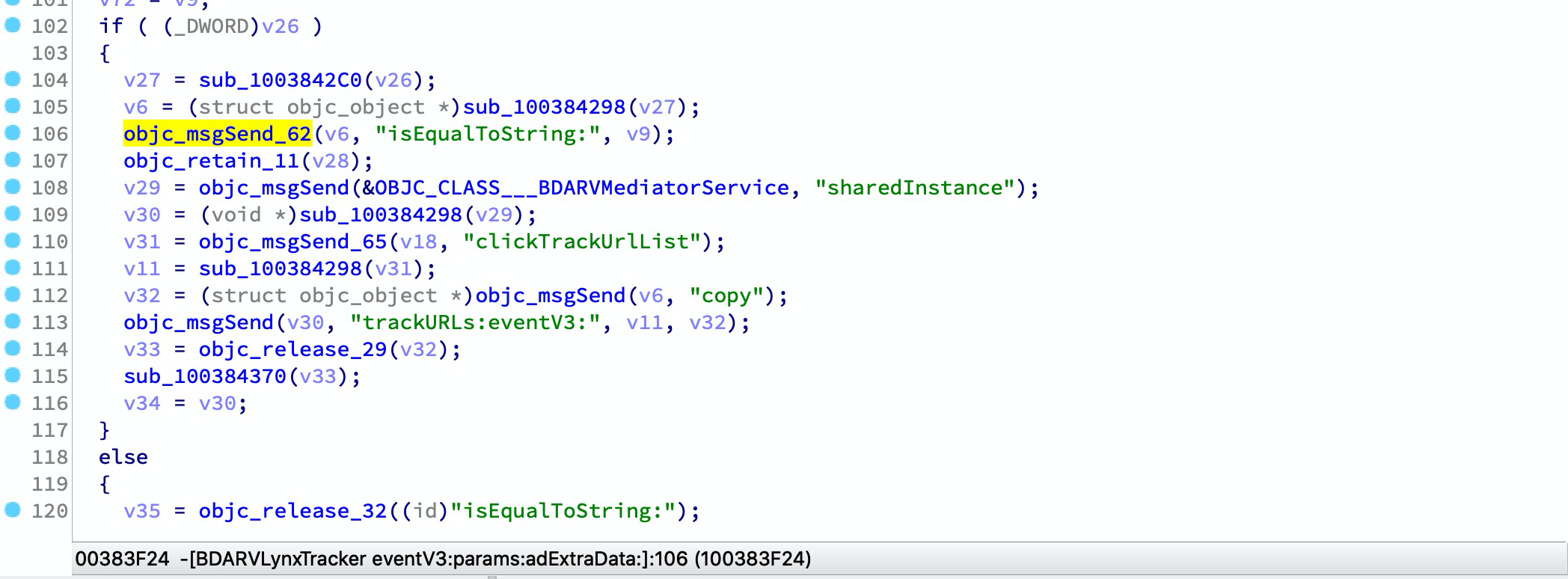
次に、IDAを開いて File -> Script File を選択し、スクリプトをロードしてください。この手順は時間がかかる場合があります。完了すると、objcメソッドに対して多数のxrefsが見つかります:

Mach-Oファイルには、よく使われる動的ライブラリのインポートシンボルのラッパーが複数含まれている場合があります。例:```arm __text:00000001003842D8 sub_1003842CC ; CODE XREF: -[BDARVLynxTracker eventV3:params:adExtraData:]+168↑p __text:00000001003842D8 ; -[BDARVLynxTracker eventV3:params:adExtraData:]+214↑p ... __text:00000001003842D8 MOV X1, X27 __text:00000001003842DC MOV X2, X19 __text:00000001003842E0 B objc_msgSend
usercall を使ってラッパーを変換できます:```arm
__text:00000001003842CC ; id __usercall objc_msgSend_61@<X0>(id@<X23>, const char *@<X28>, ...)
__text:00000001003842CC _objc_msgSend_61 ; CODE XREF: -[BDARVLynxTracker eventV3:params:adExtraData:]+2CC↑p
__text:00000001003842CC ; -[BDARVLynxTracker eventV3:params:adExtraData:]+320↑p ...
__text:00000001003842CC MOV X0, X23
__text:00000001003842D0 MOV X1, X28
__text:00000001003842D4 B objc_msgSend
スキャナーはすべてのラッパーを記録するレポートを生成できます。その後、ida-symbol-wrapper-naming ジェネレーターを使用してIDAスクリプトを生成し、このラッパーの名前変更とプロトタイプ変更を実装できます。
iblessing -m scan -i symbol-wrapper -f -d 'symbols=_objc_msgSend,_objc_retain,_objc_release' iblessing -m scan -i symbol-wrapper -f -d 'symbols=*'
#### 使用例
例としてTikTok中国を取り上げます:```
> iblessing -m scan -i symbol-wrapper -f /opt/one-btn/tmp/apps/抖音短视频/Payload/Aweme -d 'symbols=*'
[*] set output path to /Users/soulghost/Desktop/git/iblessing-public/iblessing/build/Debug
[*] input file is /opt/one-btn/tmp/apps/抖音短视频/Payload/Aweme
[+] detect mach-o header 64
[+] detect litten-endian
[*] start Symbol Wrapper Scanner
[*] try to find wrappers for_objc_autoreleaseReturnValue, _objc_msgSend, _objc_release, _objc_releaseAndReturn, _objc_retain, _objc_retainAutorelease, _objc_retainAutoreleaseAndReturn, _objc_retainAutoreleaseReturnValue, _objc_retainAutoreleasedReturnValue
[*] Step1. find __TEXT,__text
[+] find __TEXT,__text at 0x100004000
[+] mapping text segment 0x100000000 ~ 0x106da0000 to unicorn engine
[*] Step 2. scan in __text
[*] start disassembler at 0x100004000
[*] / 0x106b68a54/0x106b68a58 (100.00%)
[*] reach to end of __text, stop
[*] Step 3. serialize wrapper graph to file
[*] saved to /Users/soulghost/Desktop/git/iblessing-public/iblessing/build/Debug/Aweme_wrapper-graph.iblessing.txt
> head Aweme_wrapper-graph.iblessing.txt
iblessing symbol-wrappers,ver:0.1;
wrapperId;address;name;prototype
0;0x100022190;_objc_retainAutoreleasedReturnValue;id __usercall f@<x0>(id@<x0>)
1;0x100022198;_objc_retainAutoreleasedReturnValue;id __usercall f@<x0>(id@<x0>)
2;0x1000221a0;_objc_release;id __usercall f@<x0>(id@<x22>)
3;0x1000221a8;_objc_msgSend;id __usercall f@<x0>(id@<x0>, const char*@<x20>, ...)
4;0x100022448;_objc_release;id __usercall f@<x0>(id@<x21>)
5;0x10009c19c;_objc_autoreleaseReturnValue;id __usercall f@<x0>(id@<x0>)
6;0x1000b6f94;_objc_msgSend;id __usercall f@<x0>(id@<x0>, const char*@<x1>, ...)
7;0x100100248;_objc_autoreleaseReturnValue;id __usercall f@<x0>(id@<x0>)
次に、このレポートからIDAスクリプトを生成できます。
iblessing -m generator -i ida-symbol-wrapper-naming -f
#### 使用例```
> iblessing -m generator -i ida-symbol-wrapper-naming -f Aweme_wrapper-graph.iblessing.txt
[*] set output path to /Users/soulghost/Desktop/git/iblessing-public/iblessing/build/Debug
[*] input file is Aweme_wrapper-graph.iblessing.txt
[*] start IDAObjMsgXREFGenerator
[*] load symbol-wrappers db for version iblessing symbol-wrappers,ver:0.1;
[*] table keys wrapperId;address;name;prototype
[*] Generating Naming Scripts ...
[*] saved to /Users/soulghost/Desktop/git/iblessing-public/iblessing/build/Debug/Aweme_wrapper-graph.iblessing.txt_ida_symbol_wrapper_naming.iblessing.py
> head Aweme_wrapper-graph.iblessing.txt_ida_symbol_wrapper_naming.iblessing.py
def namingWrappers():
idc.set_name(0x100022190, '_objc_retainAutoreleasedReturnValue', ida_name.SN_FORCE)
idc.apply_type(0x100022190, idc.parse_decl('id __usercall f@<x0>(id@<x0>)', idc.PT_SILENT))
idc.set_name(0x100022198, '_objc_retainAutoreleasedReturnValue', ida_name.SN_FORCE)
idc.apply_type(0x100022198, idc.parse_decl('id __usercall f@<x0>(id@<x0>)', idc.PT_SILENT))
idc.set_name(0x1000221a0, '_objc_release', ida_name.SN_FORCE)
idc.apply_type(0x1000221a0, idc.parse_decl('id __usercall f@<x0>(id@<x22>)', idc.PT_SILENT))
idc.set_name(0x1000221a8, '_objc_msgSend', ida_name.SN_FORCE)
idc.apply_type(0x1000221a8, idc.parse_decl('id __usercall f@<x0>(id@<x0>, const char*@<x20>, ...)', idc.PT_SILENT))
idc.set_name(0x100022448, '_objc_release', ida_name.SN_FORCE)
次に、IDAを開いて「ファイル」→「スクリプトファイル」を選択し、スクリプトをロードします。この手順には時間がかかる場合があります。完了すると、デコンパイルされたコードにいくつかの変更が見られるはずです。

⬇️ ⬇️ ⬇️

