
Microsoft Sentinel で KQL を使用するためのヒント、コツ、例をいくつか紹介します。
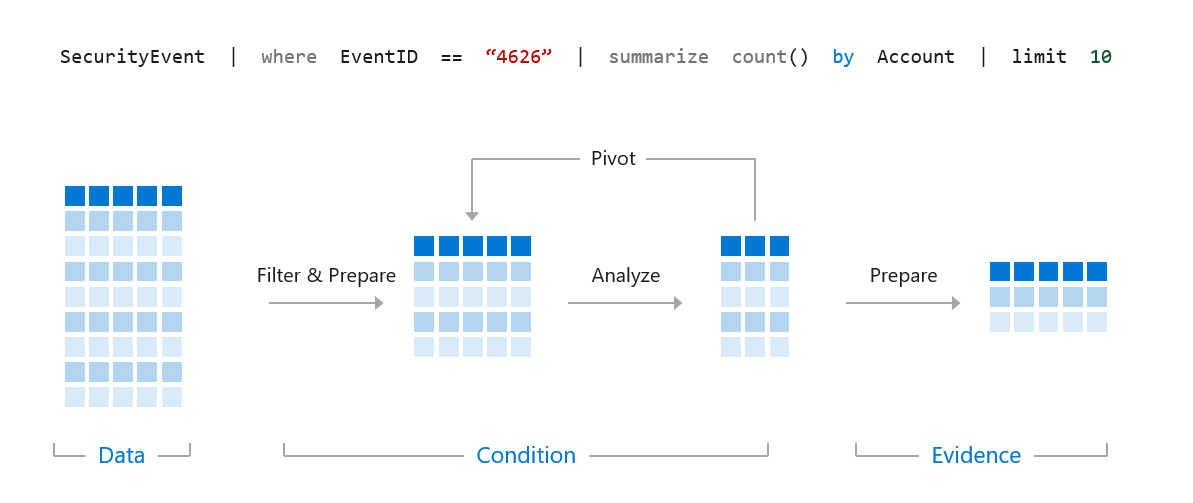
Kusto Query Language は、Azure Monitor、Azure Data Explorer、Azure Log Analytics(Microsoft Sentinel が内部で使用しているもの)全体で使用される言語です。KQL に関するこの視覚化は常に役立つと感じています -
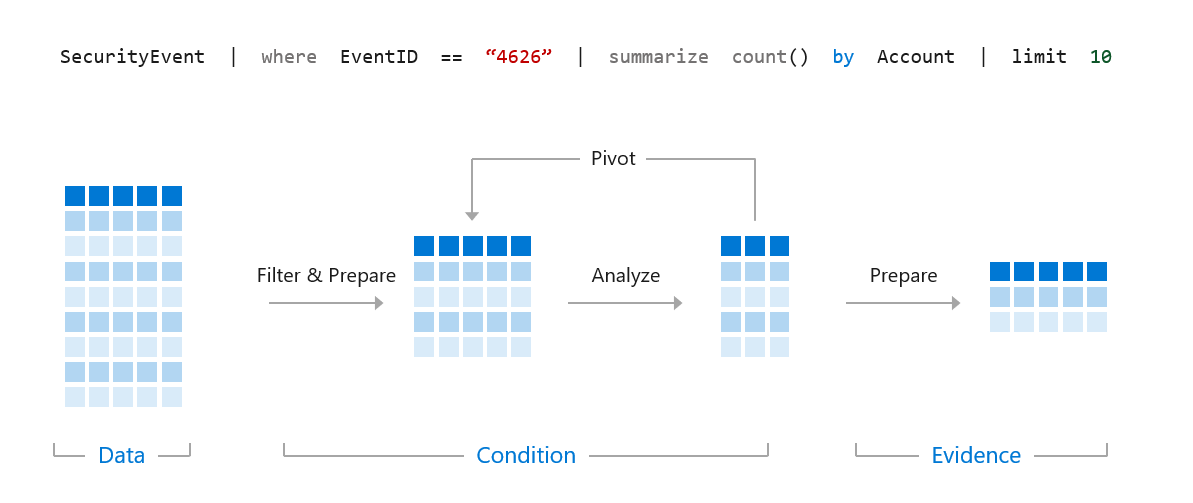
私たちは、KQL を使用して、より大きなデータセット内から脅威、検出、パターン、異常を発見するための、正確で効率的なクエリを作成したいと考えています。
以下のクエリを例として見てみましょう。```kql SigninLogs | where TimeGenerated > ago(14d) | where UserPrincipalName == "[email protected]" | where ResultType == "0" | where AppDisplayName == "Microsoft Teams" | project TimeGenerated, Location, IPAddress, UserAgent
このようなクエリを実行すると、最初の行はMicrosoft Sentinelに対して、どのテーブルでデータを検索するかを指示します。そのため、この場合、Azure ADのサインインデータが送信されるSigninLogsテーブルを検索します。テーブルの一覧は[こちら](https://docs.microsoft.com/en-us/azure/sentinel/data-source-schema-reference)で確認できます。

Microsoft Sentinelはクエリを順番に実行し、各行を1つずつ実行して最後に達するか、エラーが発生するまで続けます。それでは、クエリを1行ずつ説明します。```kql
SigninLogs
ではまず、SigninLogs テーブルを選択しました。```kql SigninLogs | where TimeGenerated > ago(14d)
次に、Sentinel にこのテーブル内の過去14日分のデータを参照するよう指示します。```kql
SigninLogs
| where TimeGenerated > ago(14d)
| where UserPrincipalName == "[email protected]"
次に、SentinelにUserPrincipalNameが"[email protected]"と等しいログのみを検索するよう要求します。```kql SigninLogs | where TimeGenerated > ago(14d) | where UserPrincipalName == "[email protected]" | where ResultType == "0"
次に、ResultType == 0 であるログのみを探します。これは Azure AD への正常なログオンです。```kql
SigninLogs
| where TimeGenerated > ago(14d)
| where UserPrincipalName == "[email protected]"
| where ResultType == "0"
| where AppDisplayName == "Microsoft Teams"
次に、Microsoft Teams へのサインインのみを探します。```kql SigninLogs | where TimeGenerated > ago(14d) | where UserPrincipalName == "[email protected]" | where ResultType == "0" | where AppDisplayName == "Microsoft Teams" | project TimeGenerated, Location, IPAddress, UserAgent
最後の行では project 演算子を使用して、ログから4つのフィールドのみを返しています。そのため、SigninLogs データから返されるのは TimeGenerated、Location、IPAddress、UserAgent のみになります。

これがクエリの構築方法です。次は基本です。

## 基本

### 時間の基本

Microsoft Sentinel と KQL は時間フィルター向けに高度に最適化されているため、検索したいデータの期間がわかっている場合は、すぐに時間範囲をフィルターする必要があります。直近14日間のログを取得してから、以下のクエリのようにユーザー名を検索します -```kql
SigninLogs
| where TimeGenerated > ago(14d)
| where UserPrincipalName == "[email protected]"
ユーザー名を先に検索してから期間を検索するよりも、はるかに効率的です -```kql SigninLogs | where UserPrincipalName == "[email protected]" | where TimeGenerated > ago(14d)
KQLには、特定の期間をクエリするための多くのオプションがあります。```kql
SigninLogs
| where TimeGenerated > ago(14d)
最初の例と同様に、これは過去14日間を検索します。```kql SigninLogs | where TimeGenerated > ago(14h)
時間も指定できます。```kql
SigninLogs
| where TimeGenerated > ago(14m)
そして分。
KQLは、時間範囲間のクエリもサポートしています -```kql SigninLogs | where TimeGenerated between (ago(14d) .. ago(7d))
これは、14日前から7日前までのSigninLogsデータを検索します。```kql
SigninLogs
| where TimeGenerated between (ago(14h) .. ago(7h))
14時間前から7時間前の間。```kql SigninLogs | where TimeGenerated between (ago(14m) .. ago(7m))
そして、14分前から7分前の間です。

### Where の基本

Where は、基本的に作成するすべてのクエリで使用する演算子です。これは、Microsoft Sentinel に特定のデータを検索させる方法です。where 演算子では、構文が非常に重要です。同じ例を使う場合は、次のようになります。```kql
SigninLogs
| where TimeGenerated > ago(14d)
| where UserPrincipalName == "[email protected]"
これにより、当社のSigninLogsテーブルを過去14日間にわたって検索し、UserPrincipalNameが[email protected]と完全一致するものを探します。KQLでは==は大文字と小文字を区別するため、[email protected]を検索しても、実際のユーザー名が[email protected]の場合は結果が得られません。大文字と小文字を区別しない同等の演算子は=です。```kql
SigninLogs
| where TimeGenerated > ago(14d)
| where UserPrincipalName = "[email protected]"
これは、大文字と小文字の区別に関係なく、[email protected] に一致するすべてのものを検索します。

equals の代わりに、contains を使用することもできます。```kql
SigninLogs
| where TimeGenerated > ago(14d)
| where UserPrincipalName contains "reprise_99"
これは、UserPrincipalName に reprise_99 が含まれるログエントリをすべて検索します。[email protected] と [email protected] のデータがある場合、両方が検索されます。contains 演算子は大文字と小文字を区別しませんが、contains_cs を使用すると大文字と小文字を区別できます。
特定のパターンを検索する場合は、startswith または endswith のどちらかを使用できます。```kql SigninLogs | where TimeGenerated > ago(14d) | where UserPrincipalName startswith "reprise_99"
SigninLogs | where TimeGenerated > ago(14d) | where UserPrincipalName endswith "testdomain.com"
startswith と endswith はどちらも大文字と小文字を区別しませんが、startswith_cs または endswith_cs を使用すると大文字と小文字を区別するようにできます。

完全な単語 (4文字より長い) を検索する場合、KQL では has 演算子を使用できます。データはインデックス化されているため、'has' を使用する方が 'contains' よりも効率的です。```kql
SigninLogs
| where TimeGenerated > ago(14d)
| where AppDisplayName has "Teams"
This will find any SigninLogs where the application display name has the word Teams in it, that could include "Microsoft Teams" and "Microsoft Teams Web Client", both satisfy the query.
If you are searching for multiple words you can use has_any or has_all.```kql SigninLogs | where TimeGenerated > ago(14d) | where AppDisplayName has_any ("Teams","Outlook")
これにより、アプリケーションの表示名に"Teams"または"Outlook"が含まれる結果が返されます。```kql
SigninLogs
| where TimeGenerated > ago(14d)
| where AppDisplayName has_all ("Teams","Outlook")
これにより、アプリケーションの表示名に「Teams」と「Outlook」が含まれる結果が返されます。
どのフィールドを検索すればよいかわからない場合は、ワイルドカードを使用することもできます。効率的ではありませんが、目的のものを見つける手がかりになるかもしれません。```kql SigninLogs | where TimeGenerated > ago(14d) | where * contains "reprise_99"
これにより、SigninLogs テーブル内の任意のフィールドで reprise_99 を含むものを検索します。

これらのオプションの多くは、! を使用してクエリを反転し、条件が真でない結果を検索することもサポートしています。```kql
SigninLogs
| where TimeGenerated > ago(14d)
| where UserPrincipalName != "[email protected]"
このクエリは、UserPrincipalNameが[email protected]と一致しないすべてのSigninLogsを検索します。```kql SigninLogs | where TimeGenerated > ago(14d) | where UserPrincipalName !contains "reprise_99"
このクエリは、UserPrincipalName に reprise_99 が含まれていないすべての SigninLogs を検索します。```kql
SigninLogs
| where TimeGenerated > ago(14d)
| where AppDisplayName !has "Teams"
このクエリは、アプリケーションの表示名に「Teams」が含まれない SigninLogs を検索します。
Project を使用すると、クエリで返される列とその順序を選択できます。```kql SigninLogs | where TimeGenerated > ago(14d) | where UserPrincipalName == "[email protected]" | where ResultType == "0" | where AppDisplayName == "Microsoft Teams" | project TimeGenerated, Location, IPAddress, UserAgent
このクエリは、過去14日間のSigninLogsデータを検索します。UserPrincipalnameが[email protected]と等しく、ResultTypeが0で、アプリケーションの表示名が"Microsoft Teams"と等しいものを検索し、そのクエリに一致する各レコードについてTimeGenerated、Location、IPAddress、UserAgentを返します。

同じ関数の一部として列名を変更することもできます。```kql
| project LogTime=TimeGenerated, SigninLocation=Location, IP=IPAddress, Agent=UserAgent
これは同じデータを返しますが、列名が LogTime、SigninLocation、IP、Agent に変更されます。
また、project 演算子を使用して、出力をインラインで操作することもできます。```kql | project LocalTime=TimeGenerated+5h, Location, IPAddress, UserAgent
これは同じデータを返しますが、TimeGenerated の名前を LocalTime に変更し、そのタイムゾーンで作業している場合は +5h のタイムゾーンに変換します。

project-away は project の逆で、クエリから列を削除します。```kql
SigninLogs
| where TimeGenerated > ago(14d)
| project-away UserAgent
| where UserPrincipalName == "[email protected]"
| where ResultType == "0"
| where AppDisplayName == "Microsoft Teams"
このクエリでは UserAgent を削除します。列を削除すると、後でクエリ内でその列にアクセスできなくなることに注意してください。
Summarize は、クエリの内容を集計したテーブルを生成します。Summarize には、基盤となる多数の集計関数があります。再びサンプル クエリを使用すると、summarize を使用して結果をさまざまな方法で操作できます。```kql SigninLogs | where TimeGenerated > ago(14d) | where UserPrincipalName == "[email protected]" | where ResultType == "0" | summarize count() by AppDisplayName
このクエリは、SigninLogs テーブル内の過去 14 日間のイベントを検索し、[email protected] に一致するもののうち、結果が成功 (ResultType == 0) であるものを探し、それらのイベントをアプリケーション表示名ごとに集計します。

