
CI/CD統合のためのリーチャビリティ分析、SBOM生成、ライセンス監査、コンテナイメージスキャンを備えた次世代依存関係脆弱性スキャナ。
OWASP dep-scan は、既知の脆弱性、アドバイザリ、およびプロジェクト依存関係のライセンス制限に基づく、次世代のセキュリティおよびリスク監査ツールです。入力としてローカルリポジトリとコンテナイメージの両方をサポートしており、ASPM/VM プラットフォームや CI 環境への統合に最適です。
完全なコンテキストに基づいて、アプリケーション内の到達可能パスと非到達可能パスの両方を特定する詳細なデータフロー。
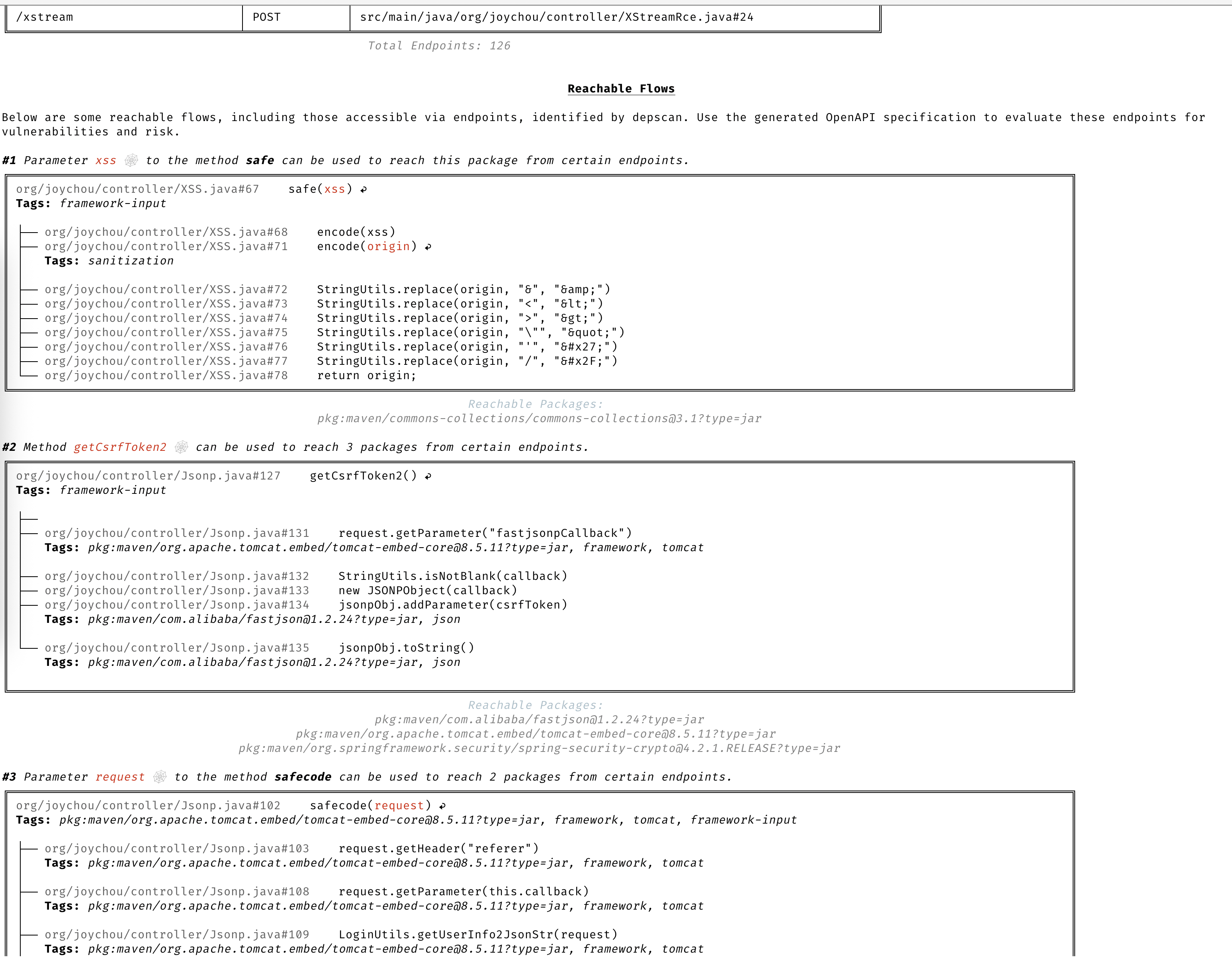
dep-scan は、4つのスライサーを通じて7つの言語エコシステムの到達可能性を計算します。実際に実行パス上にあるコードを持つ脆弱なパッケージは Reachable とマークされ、BOM に宣言されているが呼び出されていないパッケージはそうではありません。各スライサーは同じ共有の purl キー付き到達可能性エンジンにフィードされるため、動作は言語間で統一されています。到達可能性はデフォルトで有効です(--reachability-analyzer FrameworkReachability)。SemanticReachability はさらに、到達したサービス、エンドポイント、およびビルド後(バイナリ/コンテナ)の到達可能性を属性として付与します。
到達可能性と優先順位付けの概念については、到達可能性モデル および 優先順位付け の章をお読みください。言語別の実例については、言語ガイド を参照してください。コンプライアンス(VDR および CSAF VEX)については、VDR ガイド および CSAF VEX ガイド を参照してください。
到達可能性は --profile research でデフォルトで有効になります。これは dep-scan が到達可能性を有効にしたときに使用するプロファイルです。以下のコマンドで始めるのに十分です。言語別ガイドでは、バイナリ解決、バックエンドおよびネットワークの安全性、復元要件、およびリポジトリ内のフィクスチャでの実例について説明しています。
Rust (rusi). cdxgen は rusi を実行し、そのレポートを永続化します。dep-scan はそれを共有パイプラインに変換するため、実際に呼び出されるクレート(例: RUSTSEC-2020-0071 の time::now())は Reachable とマークされ、単に存在するだけのものはそうなりません。Rust 到達可能性ガイド を参照してください。```bash
depscan -i ./my-rust-app -o ./reports --profile research
**Go (golem).** dep-scanは、Goプロジェクトに対して [golem](https://github.com/cdxgen/cdxgen-plugins-bin) を直接呼び出し(`PATH` に `go` が必要)、その関数がトレースされたパス上にある場合にモジュールを Reachable としてマークします。信頼できないリポジトリでウォームモジュールキャッシュを使用する場合は、`--go-analyzer-network offline` を使用してください。詳細は [Go reachability guide](https://depscan.readthedocs.io/languages/go-reachability) を参照してください。```bash
depscan -i ./my-go-app -o ./reports -t go
.NET (dosai). cdxgen は dosai を実行し、パッケージごとの明示的な到達可能性判定(PackageReachability と ReachabilityKind、Confidence)を出力します。dep-scan はこれを信頼できる情報として扱うため、例えば制御された入力に対して JsonConvert.DeserializeObject を実際に呼び出す NuGet パッケージは「到達可能 (Reachable)」と判断されます。復元されたツリーからバージョン付きの purl をスキャンします。詳細は .NET 到達可能性ガイド を参照してください。```bash
depscan -i ./my-dotnet-app -o ./reports -t dotnet
**JVM、JavaScript/TypeScript、Python、PHP(atom)。** これら4つのエコシステムは、言語に依存しない中間表現を構築し、静的スライシングを実行する[atom](https://github.com/AppThreat/atom)スライサーを共有しています。詳細は [JVM、JS、Python、PHPのリーチャビリティガイド](https://depscan.readthedocs.io/languages/jvm-js-python-php-reachability) を参照してください。```bash
depscan --profile research -t java -i ./my-java-app -o ./reports --explain
フレームワークの前方到達可能性からエンドポイント、サービス、およびポストビルド層に移行するには、--reachability-analyzer SemanticReachability とライフサイクルBOMの --bom-dir を渡します。詳しくはセマンティック到達可能性ガイドを参照してください。
説明文を読まなくてもCVEを明確に理解できます。
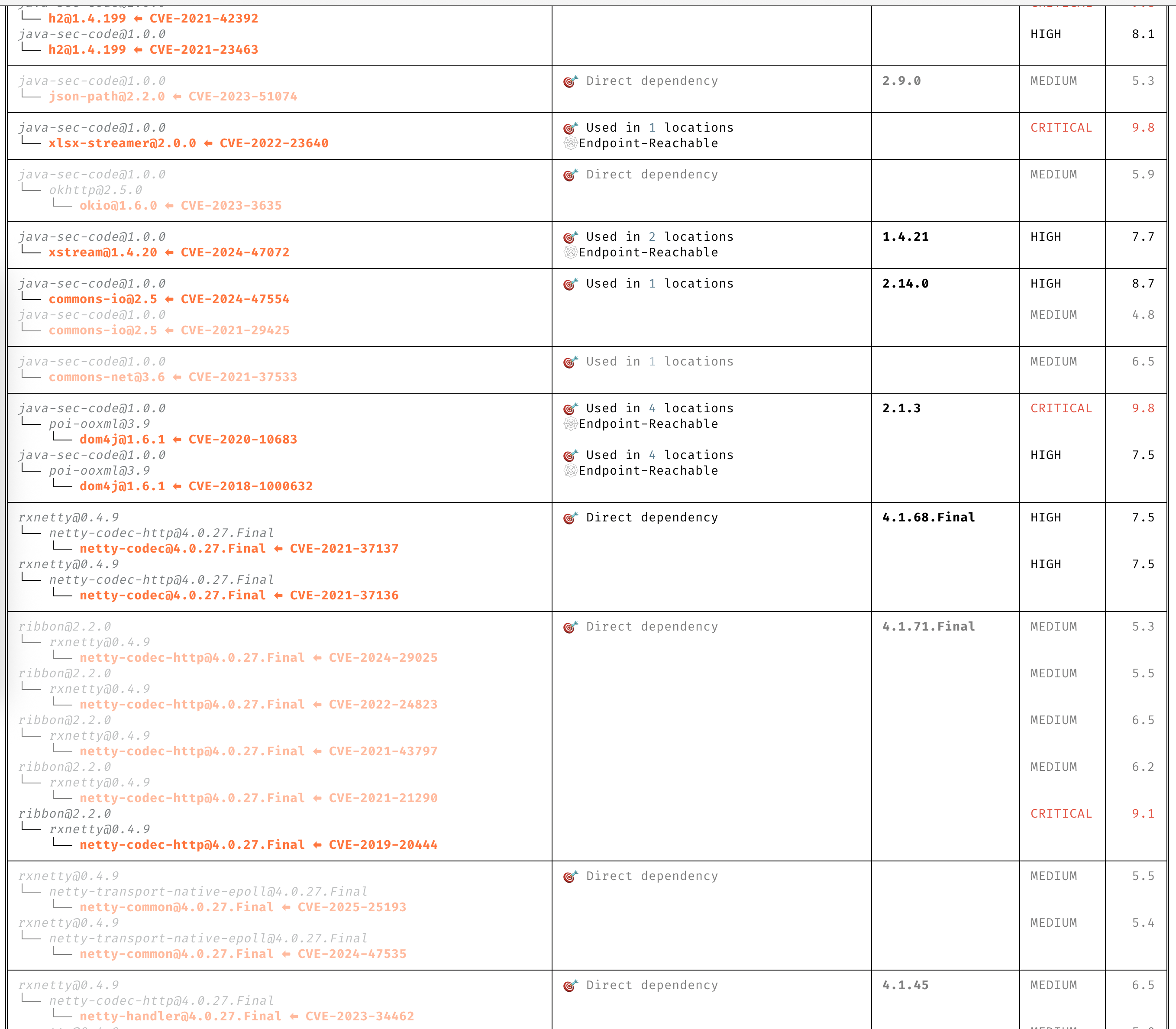
注意が必要なCVEのみに焦点を当てます。
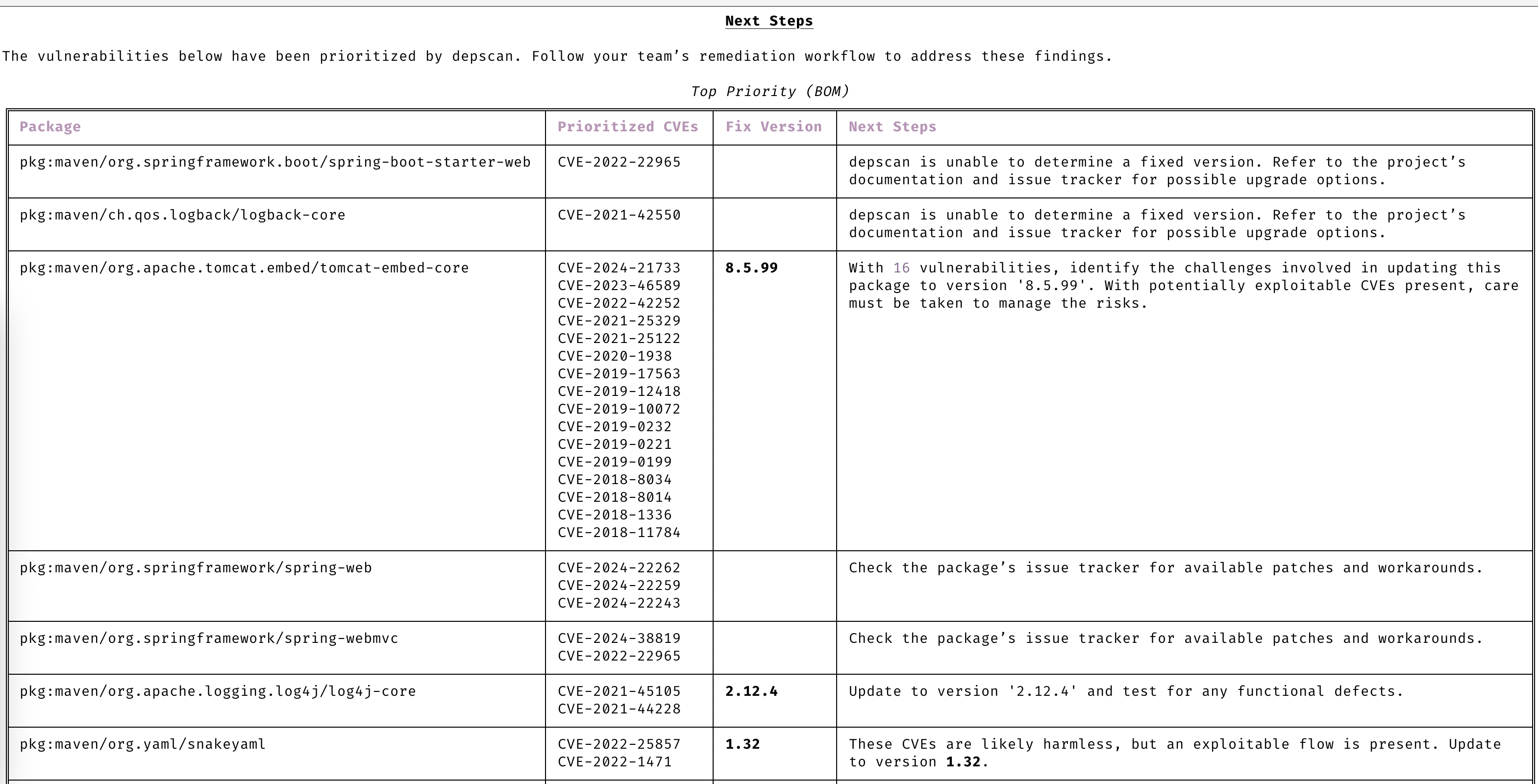
高度な脆弱性とエクスプロイト予測により、常に一歩先を行きます。
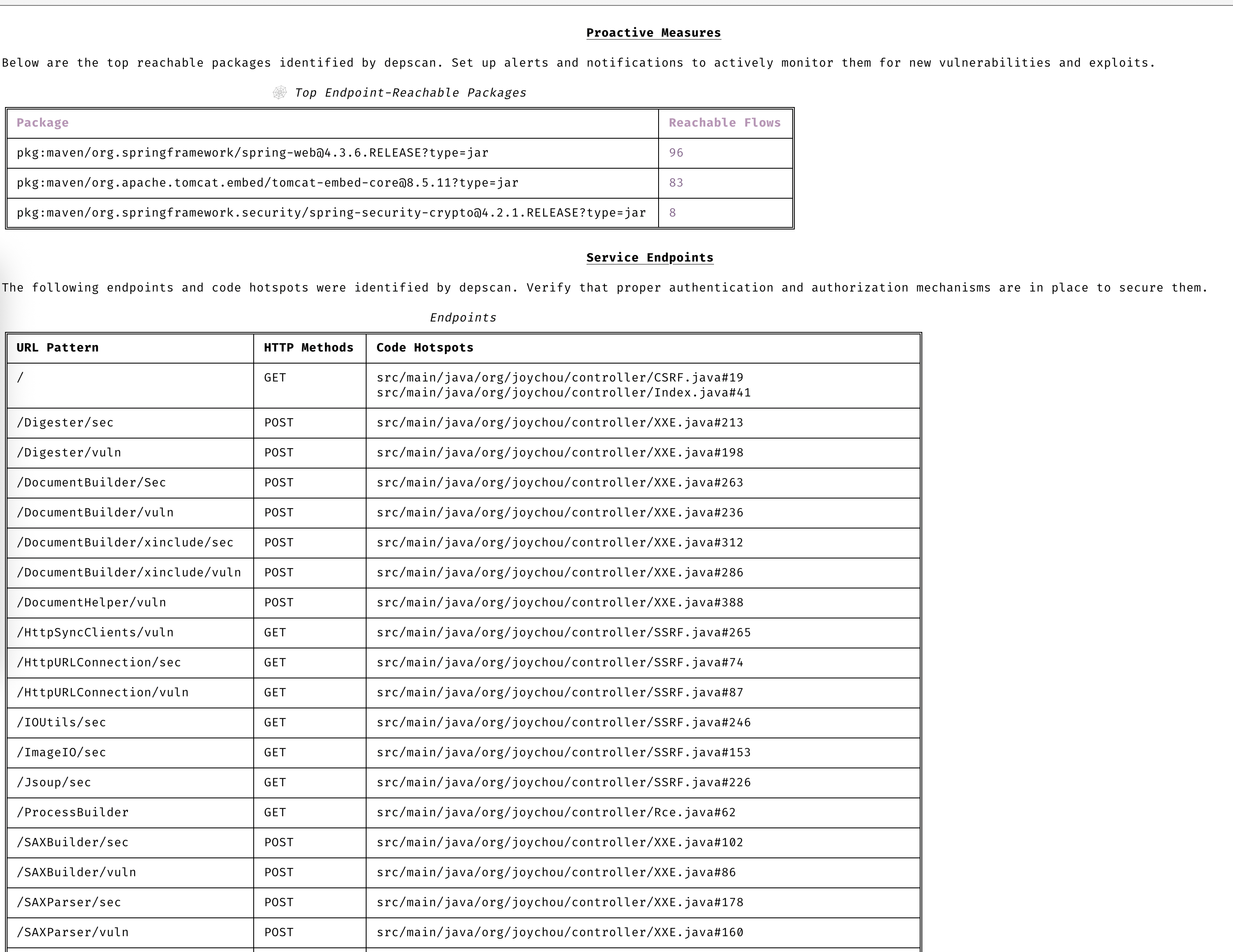
dep-scanは継続的インテグレーション(CI)やローカル開発ツールとしての使用に最適です。
sudo npm install -g @cyclonedx/cdxgen
pip install owasp-depscan
pip install owasp-depscan[all]
これにより、`cdxgen` と `depscan` という2つのコマンドがインストールされます。
スキャンコマンドは、さまざまなオプションを指定して直接呼び出すことができます。```bash
cd <project to scan>
depscan --src $PWD --reports-dir $PWD/reports
オプションの完全なリストは以下の通りです:```text usage: depscan [-h] [--config CONFIG] [--no-banner] [-i SRC_DIR_IMAGE] [-o REPORTS_DIR] [--csaf] [--profile {appsec,research,operational,threat-modeling,license-compliance,generic,machine-learning,ml,deep-learning,ml-deep,ml-tiny}] [--lifecycle {pre-build,build,post-build} [{pre-build,build,post-build} ...]] [--technique {auto,source-code-analysis,binary-analysis,manifest-analysis,hash-comparison,instrumentation,filename} [{auto,source-code-analysis,binary-analysis,manifest-analysis,hash-comparison,instrumentation,filename} ...]] [--bom-engine {auto,CdxgenGenerator,CdxgenServerGenerator,CdxgenImageBasedGenerator,BlintGenerator} | --vulnerability-analyzer {auto,VDRAnalyzer,LifecycleAnalyzer}] [--reachability-analyzer {off,FrameworkReachability,SemanticReachability}] [--no-suggest] [--risk-audit] [--cdxgen-args CDXGEN_ARGS] [--private-ns PRIVATE_NS] [-t PROJECT_TYPE [PROJECT_TYPE ...]] [--bom BOM | --bom-dir BOM_DIR | --purl SEARCH_PURL] [--report-template REPORT_TEMPLATE] [--report-name REPORT_NAME] [--deep] [--fuzzy-search] [--search-order {purl,pcu,cpe,cpu,url}] [--no-universal] [--no-vuln-table] [--server] [--server-host SERVER_HOST] [--server-port SERVER_PORT] [--cdxgen-server CDXGEN_SERVER] [--debug] [-q | --explain] [-v]
Fully open-source security and license audit for application dependencies and container images based on known vulnerabilities and advisories.
options: -h, --help show this help message and exit --config CONFIG Path to the configuration file. Default: $PWD/.config/depscan.toml --no-banner Do not display the logo and donation banner. Please make a donation to OWASP before using this argument. -i, --src SRC_DIR_IMAGE Source directory or container image or binary file -o, --reports-dir REPORTS_DIR Reports directory --csaf Generate a OASIS CSAF VEX document --profile {appsec,research,operational,threat-modeling,license-compliance,generic,machine-learning,ml,deep-learning,ml-deep,ml-tiny} Profile to use while generating the BOM. For granular control, use the arguments --bom-engine, --vulnerability-analyzer, or --reachability-analyzer. --lifecycle {pre-build,build,post-build} [{pre-build,build,post-build} ...] Product lifecycle for the generated BOM. Multiple values allowed. --technique {auto,source-code-analysis,binary-analysis,manifest-analysis,hash-comparison,instrumentation,filename} [{auto,source-code-analysis,binary-analysis,manifest-analysis,hash-comparison,instrumentation,filename} ...] Analysis technique to use for BOM generation. Multiple values allowed. --bom-engine {auto,CdxgenGenerator,CdxgenServerGenerator,CdxgenImageBasedGenerator,BlintGenerator} BOM generation engine to use. Defaults to automatic selection based on project type and lifecycle. --vulnerability-analyzer {auto,VDRAnalyzer,LifecycleAnalyzer} Vulnerability analyzer to use. Defaults to automatic selection based on bom_dir argument. --reachability-analyzer {off,FrameworkReachability,SemanticReachability} Reachability analyzer to use. Default FrameworkReachability. --no-suggest Disable suggest mode --risk-audit Perform package risk audit (slow operation). Npm only. --cdxgen-args CDXGEN_ARGS Additional arguments to pass to cdxgen --private-ns PRIVATE_NS Private namespace to use while performing oss risk audit. Private packages should not be available in public registries by default. Comma separated values accepted. -t, --type PROJECT_TYPE [PROJECT_TYPE ...] Override project types if auto-detection is incorrect. Multiple values supported. --bom BOM Examine using the given Software Bill-of-Materials (SBOM) file in CycloneDX format. Use cdxgen command to produce one. --bom-dir BOM_DIR Examine all the Bill-of-Materials (BOM) files in the given directory. --purl SEARCH_PURL Scan a single package url. --custom-data CUSTOM_DATA Path to directory containing custom vulnerability data (JSON/YAML/TOML) to override/augment results. --report-template REPORT_TEMPLATE Jinja template file used for rendering a custom report --report-name REPORT_NAME Filename of the custom report written to the --reports-dir --deep Perform deep scan by passing this --deep argument to cdxgen. Useful while scanning docker images and OS packages. --fuzzy-search Perform fuzzy search by creating variations of package names. Use this when the input SBOM lacks a PURL. --search-order {purl,pcu,cpe,cpu,url} Attributes to use while searching for vulnerabilities. Default: PURL, CPE, URL (pcu). --no-universal Depscan would attempt to perform a single universal scan instead of individual scans per language type. --no-vuln-table Do not print the table with the full list of vulnerabilities. This can help reduce console output. --server Run depscan as a server --server-host SERVER_HOST depscan server host --server-port SERVER_PORT depscan server port --server-allowed-hosts [SERVER_ALLOWED_HOSTS ...] List of allowed hostnames or IPs that can access the server (e.g., 'localhost 192.168.1.10'). If unspecified, no host allowlist is enforced. --server-allowed-paths [SERVER_ALLOWED_PATHS ...] List of allowed filesystem paths that can be scanned by the server. Restricts parameter in /scan requests. --cdxgen-server CDXGEN_SERVER cdxgen server url. Eg: --debug Run depscan in debug mode. -q, --quiet Makes depscan quiet. --explain Makes depscan to explain the various analysis. Useful for creating detailed reports. --explanation-mode {Endpoints,EndpointsAndReachables,NonReachables,LLMPrompts} Style of explanation needed. Defaults to Endpoints and Reachables. --annotate Include the generated text VDR report as an annotation. Defaults to true when explain is enabled; false otherwise. -v, --version Display the version
### スタンドアロンバイナリ(PythonやNode.jsは不要)
各 [GitHub リリース](https://github.com/owasp-dep-scan/dep-scan/releases) には、事前ビルドされた単一ファイルの実行可能ファイルが添付されています。これらは対応する [cdxgen](https://github.com/cdxgen/cdxgen) SEA バイナリをバンドルしているため、Python、Node.js、cdxgen をインストールしなくても BOM 生成がすぐに動作します。
| プラットフォーム | アーキテクチャ | アセット |
| --------------------- | ------------- | --------------------------- |
| Linux (glibc) | x86_64 | `depscan-linux-amd64` |
| Linux (glibc) | arm64 | `depscan-linux-arm64` |
| Linux (musl / Alpine) | x86_64 | `depscan-linux-amd64-musl` |
| Linux (musl / Alpine) | arm64 | `depscan-linux-arm64-musl` |
| macOS | Apple silicon | `depscan-darwin-arm64` |
| macOS | Intel | `depscan-darwin-amd64` |
| Windows | x86_64 | `depscan-windows-amd64.exe` |
各アセットには、検証用の対応する `.sha256` ファイルがあります。```bash
# Example: Linux x86_64
curl -LO https://github.com/owasp-dep-scan/dep-scan/releases/latest/download/depscan-linux-amd64
curl -LO https://github.com/owasp-dep-scan/dep-scan/releases/latest/download/depscan-linux-amd64.sha256
sha256sum -c depscan-linux-amd64.sha256
chmod +x depscan-linux-amd64
./depscan-linux-amd64 --src $PWD --reports-dir $PWD/reports
[!NOTE] macOSバイナリは現在署名されていません。初回実行時にmacOSのGatekeeperがブロックする可能性があります。その場合は、
xattr -d com.apple.quarantine ./depscan-darwin-arm64で隔離属性をクリアするか、システム設定>プライバシーとセキュリティでバイナリを許可してください。
[!NOTE] 脆弱性データベースは初回実行時にダウンロードされます。バンドルされているのはcdxgenのみで、脆弱性DBは含まれません。特定のデータベースバリアントを選択するには、
depscan-vdbコマンドを使用します。例えば、アプリのみの小規模なデータベースを使用するにはdepscan-vdb download --scope appを実行します。完全なイメージマトリックスについては、脆弱性データベースガイド を参照してください。
すべてのスタンドアロンバイナリには blint がバンドルされていますが、オプションの逆アセンブリバックエンド nyxstone は含まれていません(nyxstone にはwheelsがなく、Windowsもサポートされていません)。そのため、スタンドアロンバイナリでは深い逆アセンブリベースのバイナリ分析は利用できません。必要な場合はPythonパッケージ(pip install owasp-depscan[all])を使用してください。
Javaプロジェクトをスキャンします。```bash depscan --src -o containertests -t java
スキャン `latest` コンテナのタグ `shiftleft/scan-slim````bash
depscan --src shiftleft/scan-slim -o containertests -t docker
ライセンス監査を実行するために、タイプに license を含めてください。```bash
depscan --src shiftleft/scan-slim -o containertests -t docker license
sha256ダイジェストを使用してイメージを指定することもできます。```bash
depscan --src redmine@sha256:a5c5f8a64a0d9a436a0a6941bc3fb156be0c89996add834fe33b66ebeed2439e -o containertests -t docker
dockerまたはpodmanのsaveコマンドを使用してコンテナイメージを保存し、そのアーカイブをdepscanに渡してスキャンすることもできます。```bash docker save -o /tmp/scanslim.tar shiftleft/scan-slim:latest
depscan --src /tmp/scanslim.tar -o reports -t docker
詳細については、このリポジトリのGitHub ActionsワークフローにあるDockerテストを参照してください。
### プロジェクトのローカルスキャン(Dockerコンテナ)
`ghcr.io/owasp-dep-scan/dep-scan` コンテナイメージを使用してスキャンを実行できます。
デフォルト設定でスキャンするには```bash
docker run --rm -v $PWD:/app ghcr.io/owasp-dep-scan/dep-scan depscan --src /app --reports-dir /app/reports
カスタム環境変数ベースの設定でスキャンする```bash
docker run --rm
-e VDB_HOME=/db
-e GITHUB_TOKEN=
-v /tmp:/db
-v $PWD:/app ghcr.io/owasp-dep-scan/dep-scan depscan --src /app --reports-dir /app/reports
上記の例では、`/tmp`がコンテナ内に`/db`としてマウントされています。このディレクトリは脆弱性情報をキャッシュするために`VDB_HOME`として指定されます。これにより、データベースをキャッシュして再利用でき、パフォーマンスが向上します。
### サーバーモード
dep-scanとcdxgenはサーバーモードで実行できます。付属のdocker-composeファイルを使用して開始してください。```bash
git clone https://github.com/owasp-dep-scan/dep-scan
docker compose up
バンドルされたcomposeファイルでは、デフォルトでDEPSCAN_SERVER_API_KEYが開発用プレースホルダーに設定されており、dep-scanサービスが0.0.0.0にバインドできるようになっています。サービスをローカルラボの外部に公開する前に、この値を上書きしてください。```bash
depscan --server --server-host 127.0.0.1 --server-port 7070
If you need to bind dep-scan to a non-local address, set an API key first:```bash
export DEPSCAN_SERVER_API_KEY="change-this-before-production"
depscan --server --server-host 0.0.0.0 --server-port 7070
[!IMPORTANT] dep-scanは、
DEPSCAN_SERVER_API_KEYがないか、DEPSCAN_SERVER_ALLOW_UNAUTHENTICATED_BIND=trueによる明示的なオプトインがない限り、非ローカルアドレスへのバインドを拒否します。
/scanエンドポイントを使用してスキャンを実行します。
[!NOTE]
typeパラメータはサーバーモードでは必須です。APIキー認証が有効な場合、X-API-KeyまたはAuthorization: Bearer <key>を使用してキーを送信します。
- GitHubリポジトリのスキャン中。```bash
curl \
-H 'Authorization: Bearer dev-only-change-me' \
--json '{"url": "https://github.com/HooliCorp/vulnerable-aws-koa-app", "type": "js"}' \
http://127.0.0.1:7070/scan \
-o app.vdr.json
## ローカル開発
公式[ドキュメント](https://docs.astral.sh/uv/)に従ってuvをセットアップしてください。```shell
uv sync --all-extras --all-packages
uv run depscan --help
uv run pytest
vdb --clean vdb --download-image
### ローカル depscan のスキャン```shell
uv run depscan --config .config/depscan-dev.toml
これにより、ローカル設定ファイルに指定された設定が自動的に使用されます。
完全なドキュメントはdepscan.readthedocs.ioにあります。主なページ:
MITライセンス
このプロジェクトは2023年8月にAppThreat LtdによってOWASP Foundationに寄贈されました。
このプロジェクトは、NLnetが設立し、欧州委員会のNext Generation Internetプログラムからの財政的支援を受けた基金であるNGI Zero Coreを通じて資金提供されています。詳細はNLnetプロジェクトページをご覧ください。
| 言語 / エコシステム | 到達可能性エンジン | デフォルトアナライザー |
|---|
| Java / JVM (Groovy, Kotlin, Scala) | atom | FrameworkReachability |
| JavaScript / TypeScript | atom | FrameworkReachability |
| Python | atom | FrameworkReachability |
| PHP | atom | FrameworkReachability |
| Rust | rusi | FrameworkReachability |
| Go | golem | FrameworkReachability |
| .NET (C#, VB, F#, R) | dosai | FrameworkReachability |
path

