
 maximilianfeix/hexvero
Know what changed inside your Electron release: diff two builds for IPC, preload, windows, fuses and hosts, with file:line. CLI, CI gate, MCP server.

Know what changed inside your Electron release.
Diff two builds of an Electron app and see the IPC channels, preload bridge, window settings and network hosts that changed, with file and line on both sides.


Website · Try it · CI · AI agents · Comparison · Limits · Docs
English · Deutsch · Español · Français · Português (Brasil) · Русский · 中文 · 日本語 · 한국어
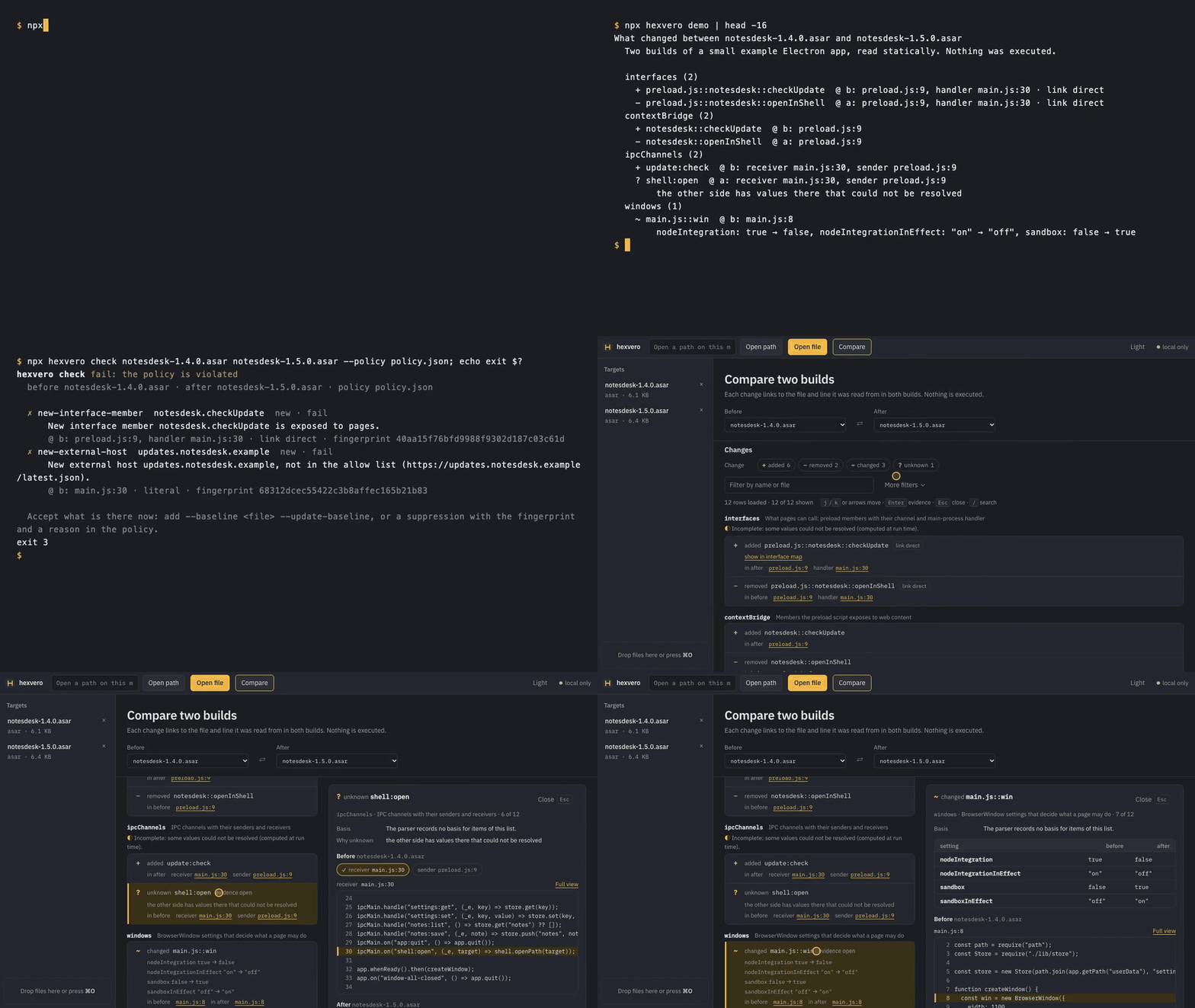
30 seconds of real output: a terminal recording and a browser recording, joined with a fade · mp4 · terminal: release-review-terminal.tape, UI: record-release-review.mjs
npx hexvero demo
Needs Node.js 22.12 or newer. It copies two builds of a small example app (NotesDesk 1.4.0 and 1.5.0) into ./hexvero-demo and shows what changed. Excerpt, … marks cuts:
What changed between notesdesk-1.4.0.asar and notesdesk-1.5.0.asar
  Two builds of a small example Electron app, read statically. Nothing was executed.

  interfaces (2)
    + preload.js::notesdesk::checkUpdate  @ b: preload.js:9, handler main.js:30 · link direct
    - preload.js::notesdesk::openInShell  @ a: preload.js:9, handler main.js:30 · link direct
  …
  ipcChannels (2)
    + update:check  @ b: receiver main.js:30, sender preload.js:9
    ? shell:open  @ a: receiver main.js:30, sender preload.js:9
        the other side has values there that could not be resolved
  windows (1)
    ~ main.js::win  @ b: main.js:8
        nodeIntegration: true → false, nodeIntegrationInEffect: "on" → "off", sandbox: false → true
  …
  endpoints (1)
    + main.js::fetch::https://updates.notesdesk.example/latest.json  @ b: main.js:30 · literal
? means hexvero could not tell, so shell:open is reported as unknown, not as removed. Then turn it into a gate:
$ npx hexvero check hexvero-demo/notesdesk-1.4.0.asar hexvero-demo/notesdesk-1.5.0.asar --policy hexvero-demo/policy.json
hexvero check fail: the policy is violated
  ✗ new-interface-member  notesdesk.checkUpdate  new · fail
  ✗ new-external-host  updates.notesdesk.example  new · fail
  …
$ echo $?
3
npx hexvero ui --demo --open shows the same comparison in a local web UI with the source lines of both builds side by side. The full tour: walkthrough.
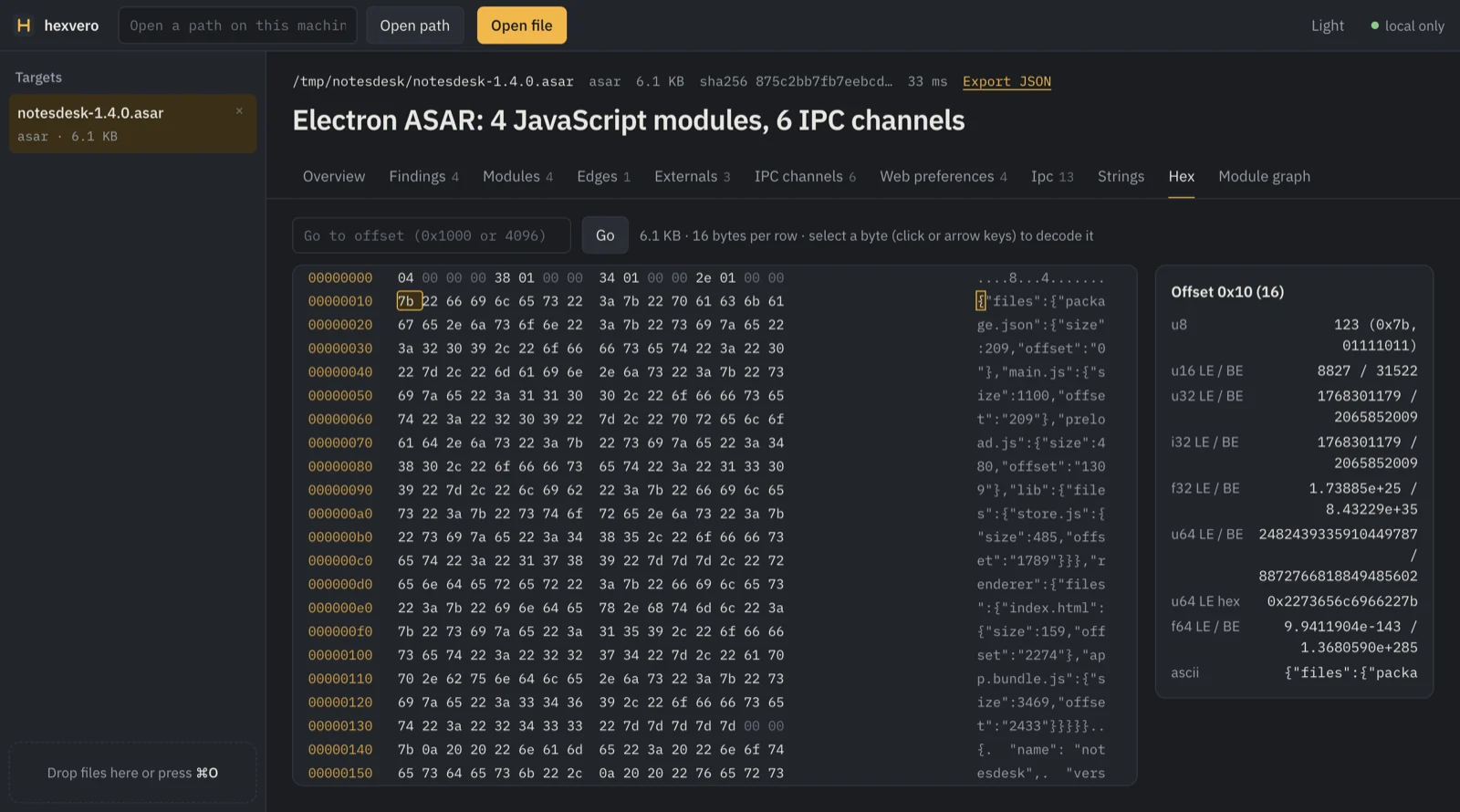
app.asar; running the app to find out is not always allowed, and a checklist scanner looks at one build, not the change.| IPC and bridge map | window → contextBridge member → IPC channel → ipcMain handler, with how each link was read |
| Window settings | webPreferences per window, and whether nodeIntegration and sandbox are in effect |
| Runtime and fuses | Electron, Chromium and Node versions, fuses and the ASAR integrity record, read from packaged binaries |
| Hosts and storage | network endpoints and localStorage/sessionStorage keys, literal or inferred |
| CI gate and SARIF | hexvero check: exit 0 pass, 3 violated, 4 not decidable; baseline, suppressions, SARIF 2.1.0 |
| MCP for agents | 16 tools with small paged answers, so a coding agent can run the same review |
| Local web UI | the comparison with both builds' source lines side by side, plus an offline HTML report |
Inputs: an app.asar, a macOS .app, a Windows or Linux install directory, or the release .zip you publish. Installers (.dmg, setup .exe, AppImage) need unpacking first. Per-platform paths: docs/cli.md.
npx hexvero compare old/YourApp.app new/YourApp.app --report report.html   # one offline HTML page
npx hexvero init old/YourApp.app                                            # starting policy, current hosts allowed
npx hexvero check old/YourApp.app new/YourApp.app --policy .hexvero/policy.json
To accept what is there today, add --baseline .hexvero/baseline.json --update-baseline once; later runs fail only on new findings.
One build instead of two, with the single-build checks known from Electronegativity (CSP, shell.openExternal, permission handlers, window settings, certificate and command-line switches; from 0.13 also <webview>, custom protocols, executeJavaScript with code that is not a literal, resources over plain http and an Electron runtime past its end of support):
npx hexvero audit YourApp.app --format sarif > audit.sarif # exit 3 when a rule is violated
Pinned to a version so a release cannot change your results unannounced:

