実行中の関数を逆アセンブルし、LLMを使用して検証済みの擬似コードを生成するWinDbg x64拡張機能。
このプロジェクトは、Windows x64 WinDbg 拡張スケルトンであり、名前またはアドレスで関数を解決し、決定論的な制御フロービューを再構築し、拡張機能から直接 LLM に問い合わせて擬似コードを生成するものです。
src/extension: WinDbg 拡張 DLL と !decomp コマンド。src/shared: 拡張機能で共有される JSON、アナライザー、プロトコル、検証コード。scripts: ビルドおよびベンダーコピーのヘルパー。third_party/dbgeng: オプションでベンダー提供の dbgeng.h と dbgeng.lib のコピー。third_party/zydis: ベンダー提供の安定版 Zydis ソースツリー。存在する場合、デフォルトで使用されます。xmm0 から xmm3 までの SIMD/FP 対応 Microsoft x64 引数復元。偽の受信引数を回避するためのベクトルゼロイディオムガード付き/deobf:on|off に加えた難読化解除準備ファクトビルド出力から拡張機能をロードし、シンボルまたはアドレスに対して !decomp を実行します。```text
.load C:\path\to\decomp.dll
!decomp /doctor
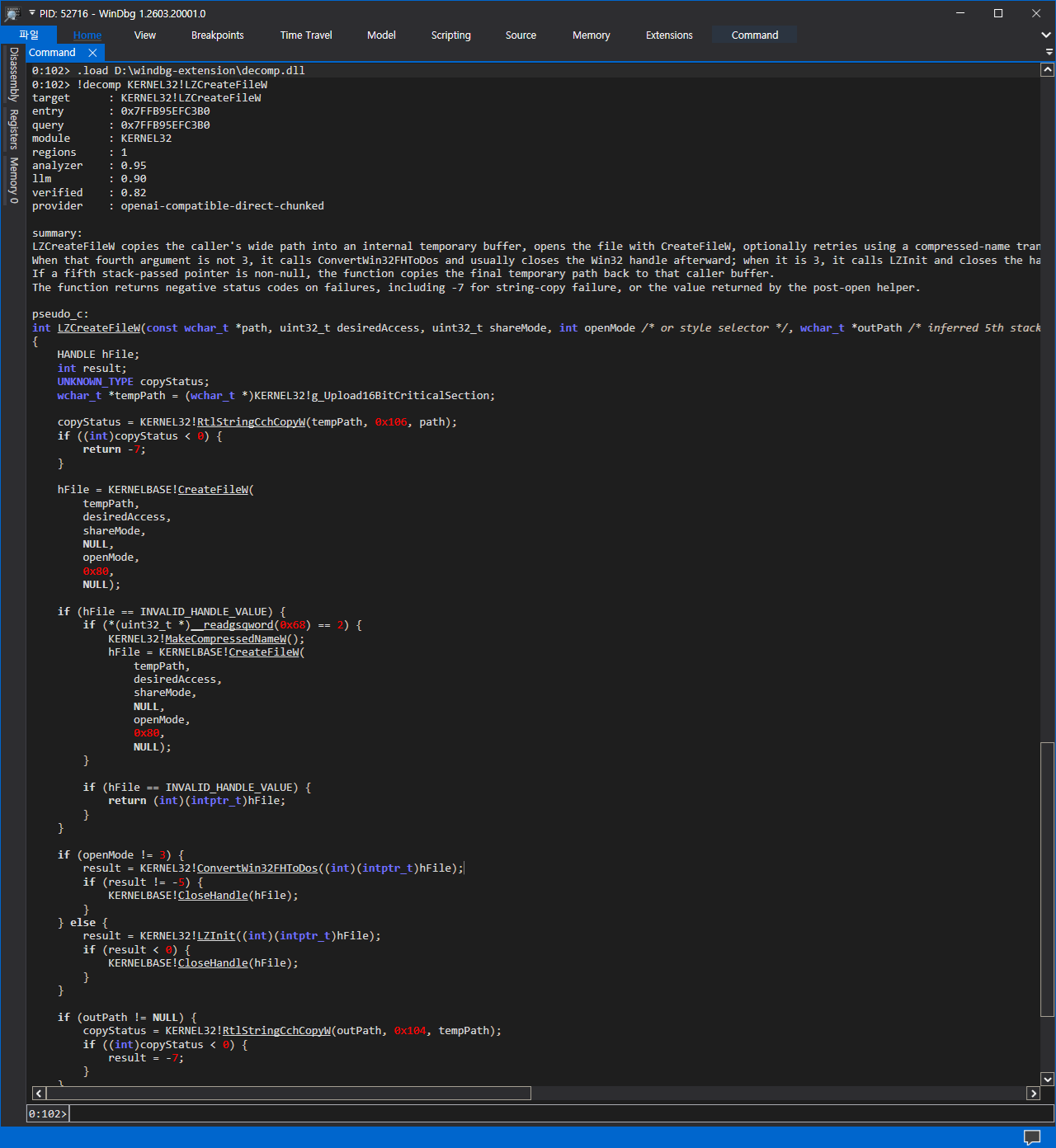
!decomp module!FunctionName
!decomp 0x7ffb`12345678
セットアップが正しくないように見える場合、またはLLMプロバイダーを有効化する前に `/doctor` を使用してください:```text
!decomp /doctor
!decomp /doctor:net
/doctor は対象を必要とせず、プロバイダーを呼び出しません。設定ファイルのパス/読み込み状態、プロバイダー/モデル/エンドポイントの概要、シークレットを含まない認証情報の有無、タイムアウト/トークン/チャンク化設定、DML サポート、セッションクラス/修飾子、プロセッサタイプ、および PDB の注意事項を報告します。/doctor:net は明示的なネットワークチェック要求として受け入れられますが、現在はプロバイダーの ping がスキップされることを報告します。この拡張機能は doctor モードからネットワークプローブを実行しません。ターゲットは、パブリック/プライベートシンボル、エクスポートされた関数名、またはアドレスにすることができます。ターゲットが関数内のアドレスに解決される場合、拡張機能はシンボル、アンワインドデータ、および制御フローヒューリスティックから包含関数の範囲を復元しようとします。スペースを含むターゲットは引用符で囲んでください:```text !decomp "my module!Function With Spaces"
通常のコマンドパスは、ローカル解析を実行し、アナライザーファクトを構築し、オプションで設定されたLLMエンドポイントを呼び出し、復元された証拠に対して応答を検証し、疑似Cコードに加えて信頼度、警告、不確実性の注記を出力します:```text
!decomp ntdll!RtlAllocateHeap
!decomp kernel32!Sleep
!decomp game.exe!CheckIntegrity
通常の brief および explain 出力には、/verbose を指定しなくてもコンパクトな進捗ストリームが含まれます。長時間のLLM実行では、ローカル分析の完了、チャンクの進捗、再試行通知、マージ開始、検証、Ctrl+Breakによるキャンセルのヒントが表示されます。/view:json、/view:facts、/view:prompt、/view:data などの機械可読モードでは、進捗行とDMLヘルパーリンクが抑制されるため、スクリプトは要求されたペイロードのみを受け取ります。
/view:* を使用して表示内容を選択します。これによりコマンド体系が小さく保たれ、1つのオプションですべての出力モードを制御できます。```text
!decomp /view:brief module!HotPath
!decomp /view:explain module!BranchyFunction
!decomp /view:json module!FunctionName
!decomp /view:facts module!FunctionName
!decomp /view:prompt module!FunctionName
!decomp /view:data module!FunctionName
!decomp /view:analyzer module!FunctionName
!decomp /view:plan module!FunctionName
- `brief` は、ターゲット、信頼度、要約、および最初の不確実性または検証警告を表示します。
- `explain` は、evidence、control-flow、type-hint、observed-behavior、call-target の各セクションを追加します。
- `json` は、機械可読なリクエストとレスポンスの JSON を表示します。
- `facts` は、analyzer のファクトのみを表示し、LLM パスを無効にします。
- `prompt` は、正確なシステムプロンプト、ユーザープロンプト、およびプロンプトファクトを表示します。LLM 呼び出しを無効にします。
- `data` は、WinDbg JavaScript/NatVis スタイルの自動化を目的とした、安定した JSON スナップショットを表示します。
- `analyzer` は、LLM を呼び出さずに、決定的な analyzer 専用の疑似コードパスをレンダリングします。
- `plan` は、LLM を呼び出さず、結果キャッシュも更新せずにローカル分析を実行し、プリフライトプランを表示します。これには、target/module/range の数、PDB の可用性、セッションポリシー、推定チャンキング、プロンプトサイズに関連するカウント、および実用的な推奨事項が含まれます。
コマンドが停止しているように見える場合、または完全な進捗ストリームを確認したい場合は、`/verbose` を使用してください:```text
!decomp /verbose module!SlowFunction
!decomp /verbose /view:json module!SlowFunction
/verbose は、ターゲット解決、関数範囲の復元、バイト読み取り、逆アセンブル、アナライザのファクト構築、PDB/セッションの拡充、疑似コードのトークン化、検証結果などのローカルステージを表示します。/verbose はプロンプトサイズ、リクエストトークンの予算、HTTP 接続/送信/受信ステージ、レスポンスチャンクサイズ、完了理由、抽出されたモデル JSON のプレビュー、再試行回数、検証フィードバックによる再試行の決定も表示します。/verbose はコンパクトな進捗ストリームを完全なトレースに置き換えます。コンパクトな進捗行だけでは時間の消費箇所を特定できない場合に使用します。!decomp コマンド中に、WinDbg で Ctrl+Break を押すとキャンセルを要求できます。拡張機能は、ローカル解析ステージ間および LLM ワーカーの待機中に割り込みをチェックし、アクティブな同期 HTTP I/O の停止を要求します。/brief、/explain、/json、/facts-only、/debug-prompt、/data-model、/dx、/no-llm などのレガシーエイリアスは古いスクリプトでも引き続き動作しますが、新しい例では /view:* を使用します。
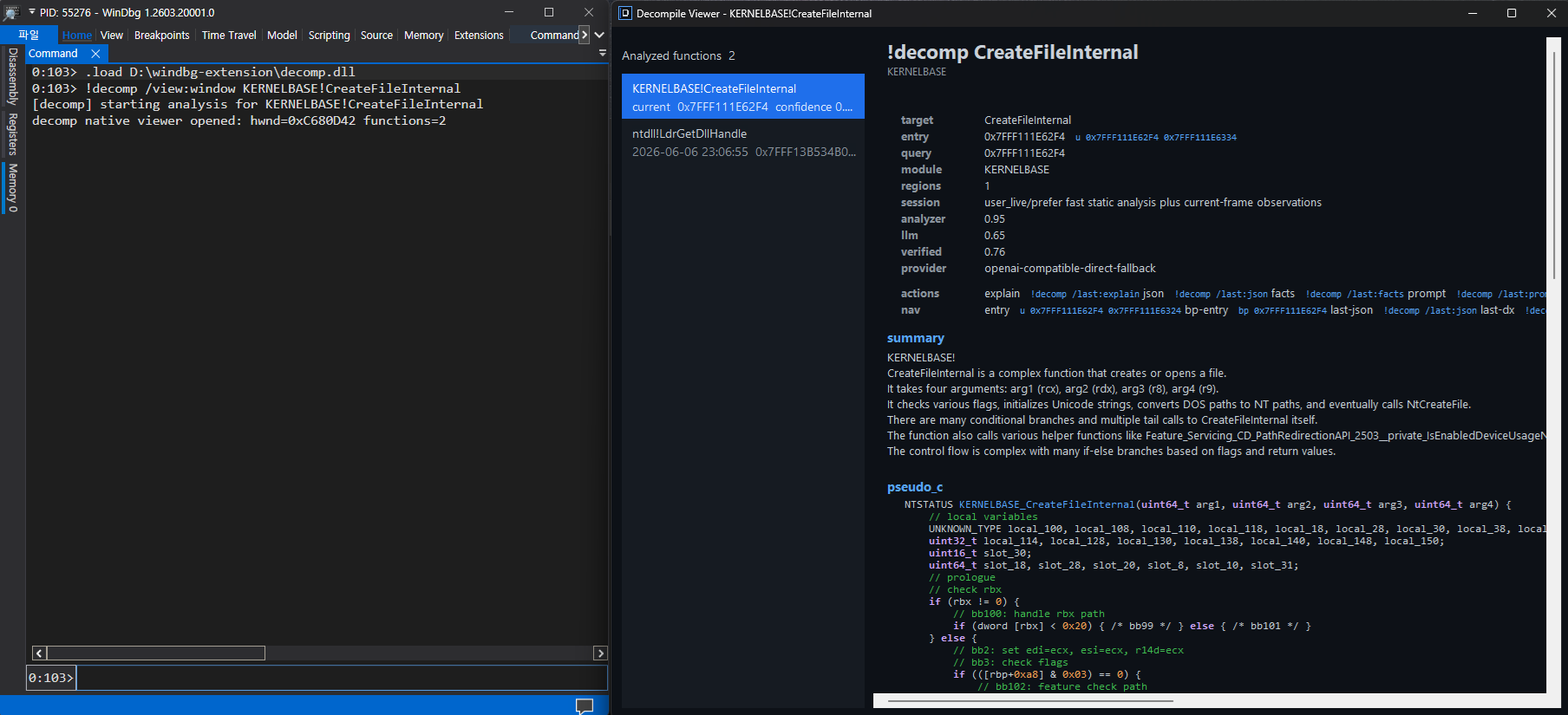
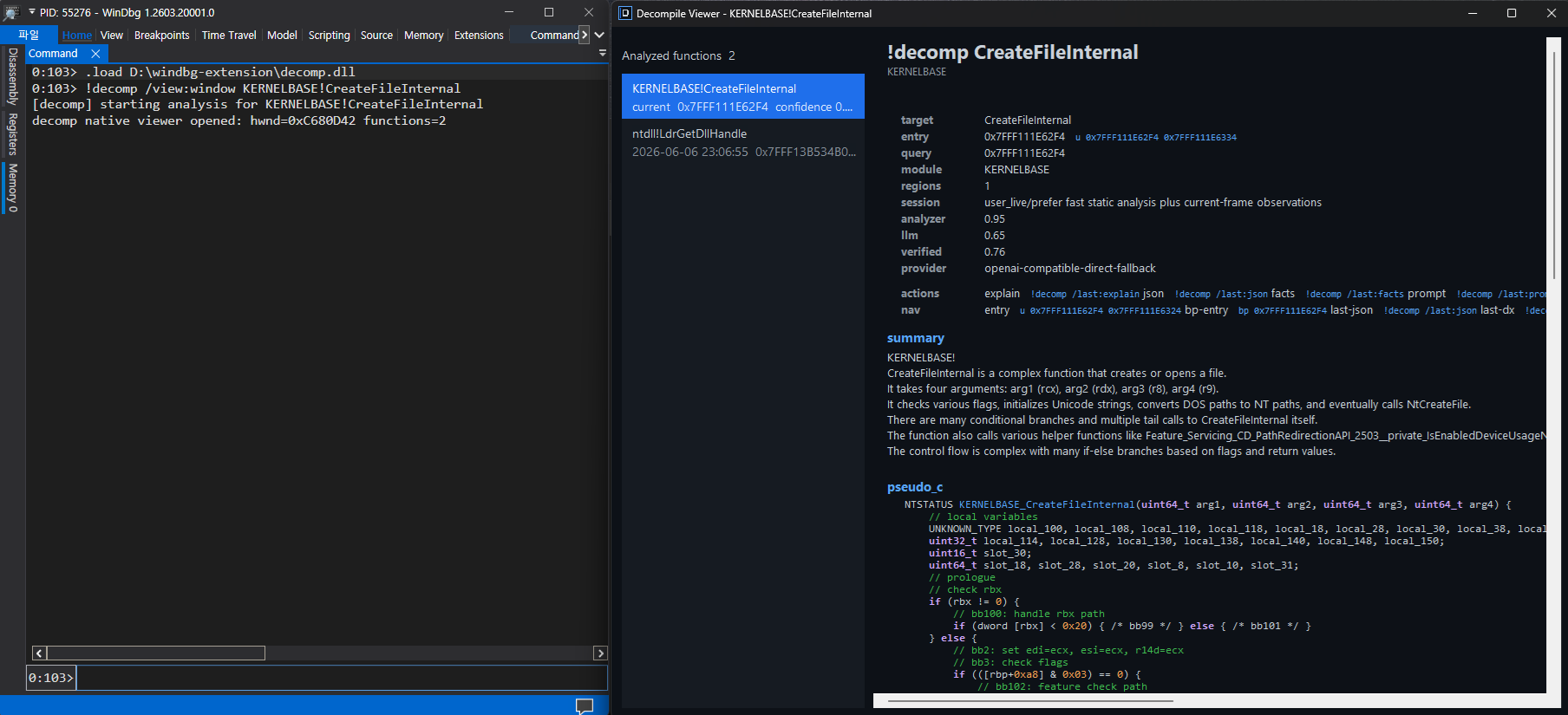
ウィンドウビューア:```text !decomp /view:window module!FunctionName !decomp /view:window /view:explain module!FunctionName
- `/view:window` は対象に対して通常の `!decomp` 結果パスを実行し、レンダリングされた完全な結果を別のビューアで開きます。
- ビューアはコンソールパスと同じレスポンスレンダラを使用し、その後、デバッガウィンドウが見つかった場合にはそのウィンドウが所有するネイティブなWin32モードレスツールウィンドウを開きます。
- デバッガ出力には、ネイティブビューアのウィンドウハンドルが報告されます。ビューアウィンドウを作成できない場合、コマンドは警告を表示し、通常のコンソール結果にフォールバックします。
- DML専用リンクは、ビューア内ではコマンド文字列付きのテキストラベルとして表示されます。RichEditが利用可能な場合、ウィンドウはセクション見出し、メタデータのスタイル、擬似コードのハイライトを備えたGitHubスタイルのRTFレイアウトを使用します。それ以外の場合はプレーンテキストにフォールバックします。
- 現在のセッションに以前のキャッシュ結果がある場合、ビューアは左側に履歴リストを表示するため、分析を再実行せずに現在の出力と以前の逆コンパイル結果を切り替えることができます。
- `/view:json`、`/view:facts`、`/view:prompt`、`/view:data` はマシンリーダブルなコンソール出力のままであり、ビューアにはリダイレクトされません。
大きな関数:```text
!decomp /limit:deep module!LargeFunction
!decomp /limit:huge module!VeryLargeFunction
!decomp /limit:12000 module!VeryLargeFunction
!decomp /timeout:120000 module!SlowFunction
/limit:deep は命令上限を 8192 に引き上げます。/limit:huge は命令上限を 16384 に引き上げます。/limit:N は明示的な命令上限を設定します。/timeout:MS はこの呼び出しのリクエストタイムアウトを上書きします。decomp.llm.json によって制御され、コマンドラインの命令上限は、プロンプト実行前に拡張機能が復元を試みるローカルコードの量を制御します。/deep、/huge、/maxinsn:N は引き続きサポートされます。難読化対応の逆コンパイル:```text !decomp /deobf:on module!FlattenedFunction !decomp /deobf:off module!FlattenedFunction !decomp /view:facts /deobf:off module!FlattenedFunction
- `/deobf:on` がデフォルトです。アナライザは引き続き生のファクトを出力しますが、信頼度の高い OLLVM 風ディスパッチャ復元、不透明なデッドエッジの証明、置換イディオム、意味的 CFG オーバーレイが、プロンプトファクト、マージポリシー、検証器の競合ポリシー、構造化された疑似 C 復元を導く場合があります。
- `/deobf:off` は `obfuscation`、`semantic_control_flow`、`deobfuscation_readiness` の各ファクトを表示したままにしますが、書き換えの安全なアクションを無効にし、制御フロー構造化を生の CFG に対して行い、プロンプト/マージ/検証器の各経路に難読化された元の形状を保持するよう指示します。
- ディスパッチャ、偽の分岐、置換の表面を直接調査したい場合は、拡張機能に難読化解除された構造の復元を依頼する代わりに `/deobf:off` を使用してください。
- `/deobfuscation:on|off` はより長いエイリアスとして受け付けられます。
キャッシュとリプレイのヘルパー:```text
!decomp /view:json module!FunctionName
!decomp /last:json
!decomp /view:explain module!FunctionName
!decomp /last:explain
!decomp /view:facts module!FunctionName
!decomp /last:facts
!decomp /view:data module!FunctionName
!decomp /last:data
!decomp /view:prompt module!FunctionName
!decomp /last:prompt
!decomp /history
!decomp /refresh module!FunctionName
!decomp /last:2:explain
!decomp /last:2:json
/last:json は解析を再実行せずに前回のリクエスト/レスポンス JSON を出力します。/last:explain は解析を再実行したり LLM を呼び出したりせずに、explain セクション付きで前回の完全な結果を再レンダリングします。/last:facts は解析を再実行せずに前回の結果からアナライザーファクトを出力します。/last:data は解析を再実行せずに前回のデータモデルのスナップショットを出力します。/last:prompt は解析を再実行せずに前回のプロンプトダンプを出力します。/history はメモリ内の結果リングバッファを一覧表示します。インデックス 1 が最新の結果です。/refresh <target> はそのターゲットの永続アーティファクトのリプレイをバイパスし、新しいローカル解析と LLM 解析を実行し、LLM による結果が成功した後に保存済みアーティファクトを置き換えます。/last:N:explain、/last:N:json、/last:N:facts、/last:N:data、および /last:N:prompt は、ローカル解析を再実行したり LLM を呼び出したりせずに、履歴インデックスで古いキャッシュされた結果をリプレイします。DML ナビゲーション:
explain、json、facts、prompt、data-model、history リンクを含む actions 行が含まれます。nav 行も含まれます。セッション認識および観測された挙動の詳細:
/view:json、/view:facts、/view:prompt、および通常の LLM モードには session_policy が含まれます。session_policy は、デバッグクラス、修飾子、実行種別、解析戦略、ダンプ/ライブ/カーネルフラグ、および TTD サポートが読み込まれているかどうかを記録します。observed_behavior は、現在の rip、rsp、読み取り可能な場合のリターンアドレス、Microsoft x64 レジスタ引数のサンプル(rcx、rdx、r8、r9)、繰り返されるメモリアクセスホットスポット、および推奨される TTD コマンドを記録します。ttdext.dll または TTDReplay.dll が読み込まれている場合、拡張機能は、トレースデータがすでに収集されているかのように静かに装う代わりに、推奨される クエリを追加します。ユーザー訂正スイッチを使用すると、デバッガーに十分なセマンティック情報がない場合に、コマンドラインからアナライザーファクトを修正できます:```text !decomp /fix:noreturn:FatalError module!FunctionName !decomp /fix:type:rcx=MY_TYPE* module!FunctionName !decomp /fix:field:[rcx+18h]=uint32_t module!FunctionName !decomp /fix:rename:v3=request module!FunctionName !decomp /fix:clear
- `/fix:noreturn:name` は、一致する呼び出しをフォールバック逆アセンブル、CFG 復元、ABI ファクト、検証チェックにおいて no-return として扱います。
- `/fix:type:expr=TYPE` は、信頼度の高いユーザー型ヒントを追加します。
- `/fix:field:expr=TYPE` は、信頼度の高いユーザーフィールドヒントを追加します。
- `/fix:rename:old=new` は、リネームヒントを追加し、最終的な疑似コード識別子にリネームを適用します。
- `/fix:clear` は、セッション永続化されたすべての修正オーバーライドをクリアします。
環境変数 `DECOMP_NORETURN_OVERRIDES` は引き続きサポートされます。コマンドラインの `/fix:noreturn:` 値は、現在の WinDbg セッションにおいて元の環境変数の値の上に重ねて適用されます。
修正スイッチはセッション間で永続化されます:
- `/fix:noreturn:`、`/fix:type:`、`/fix:field:`、`/fix:rename:` は、読み込まれた拡張機能によって記憶され、後続の `!decomp` 実行で再利用されます。
- `/fix:clear` は、セッション永続化されたすべての修正をクリアし、no-return 環境オーバーライドを拡張機能の読み込み時点の元の値に戻します。
- レガシーの `/noreturn:`、`/type:`、`/field:`、`/rename:`、`/clear-overrides` も引き続きサポートされます。
不正な修正値は無視され、キャッシュされる代わりに `uncertainties` で報告されます。たとえば、`/fix:type:rcx` は `expr=TYPE` のペアを含まないため無視されます。
推奨される調査ワークフロー:
1. `!decomp /view:facts target` から始めて、関数の範囲、ブロック、呼び出し、インポート、PDB データ、セッションファクトが妥当であることを確認します。
2. LLM リクエストを消費する前に、`!decomp /view:plan target` を使用して、チャンキング、プロンプトサイズ、タイムアウトリスク、シンボル品質を見積もります。
3. プロンプトサイズ、言語、または証拠の選択がおかしい場合は、`!decomp /view:prompt target` を使用します。
4. 検証済みの完全な疑似C結果を得るには、`!decomp target` を実行します。
5. 既存の永続アーティファクトがリプレイされているが新しい分析が必要な場合は、`!decomp /refresh target` を使用します。
6. 結果がおかしい場合は、`!decomp /view:explain target` を実行し、検証警告、証拠のカバレッジ、提案された修正を確認します。
7. `/fix:noreturn:`、`/fix:type:`、`/fix:field:`、または `/fix:rename:` などの的を絞った修正を追加し、同じターゲットを再実行します。
8. 最近の複数の結果を比較する場合は、`/history` とインデックス付きの `/last:N:*` リプレイを使用します。
9. バグを報告する場合やビルド間の動作を比較する場合は、`/view:json` または `/last:json` を取得します。
## アナライザー ファクト サーフェス
最近のアナライザーファクトは、意図的に `/view:json`、`/view:facts`、`/view:prompt`、および通常の LLM モードを通じて引き継がれます。最初に確認すべき価値の高いフィールドは次のとおりです:
- `stack_pointer` は、命令ごとのスタック差分、フレーム相対エイリアス、および信頼度を記録します。
- `call_arguments` は、呼び出しサイトで復元されたレジスタ引数とスタック引数を記録します。証拠が十分強い場合は、近くのクロスブロックスタックストアも含まれます。
- `pdb.prototype_parameters` は、構造化されたプロトタイプのパラメータ名、型、序数、ABI 位置、およびソースの信頼度を記録します。
- `control_flow` には、ループ誘導変数、初期値、ステップ、境界、方向、スイッチテーブルアドレス、ケースターゲット、デフォルトターゲット、範囲の境界、符号の有無、および復元された場合はインデックス式が含まれます。
- `callee_summaries` とコールターゲットファクトには、直接、間接、および仮想呼び出し/vtable 候補に加えて、既知の Win32/NT/Rtl メモリ、割り当て、解放、ステータスセマンティクスが含まれます。
- `obfuscation` は、OLLVM スタイルのフラットニングディスパッチャ候補、状態変数、復元されたセマンティックエッジ、不透明述語、スカラー置換イディオムを公開します。
- `semantic_control_flow` は、難読化ファクトから導出された復元済みのライブ/デッドエッジを公開し、`/deobf:off` が使用されている場合でも検査可能です。
- `deobfuscation_readiness` は、`enabled`、安全な書き換えアクション、ブロックされた仮定、優先ファクトパス、カウント、信頼度を公開します。無効な場合、ポリシー決定を記録し、難読化解除された制御フロー書き換えをブロックします。
- プロンプトファクト選択は、高シグナルのエントリを最初にランク付けし、その後スプレッドサンプリングで分布を保持するため、大きな関数でも低頻度の証拠が失われません。
## 推奨される dbgeng セットアップ
最速の方法は、ヘッダーとインポートライブラリをプロジェクトにベンダリングすることです。
想定されるベンダーレイアウト:```text
third_party\dbgeng\inc\dbgeng.h
third_party\dbgeng\lib\dbgeng.lib
あなたはそれらを手動でコピーするか、ヘルパースクリプトを使用できます。
powershell -ExecutionPolicy Bypass -File .\scripts\Prepare-DbgengVendor.ps1 ` -SourceRoot 'C:\Program Files (x86)\Windows Kits\10\Debuggers\x64'
### 明示的なファイルパスからベンダーコピーを準備する```powershell
powershell -ExecutionPolicy Bypass -File .\scripts\Prepare-DbgengVendor.ps1 `
-HeaderPath 'C:\Program Files (x86)\Windows Kits\10\Debuggers\x64\sdk\inc\dbgeng.h' `
-LibraryPath 'C:\Program Files (x86)\Windows Kits\10\Debuggers\x64\dbgeng.lib'
third_party\dbgeng が存在すると、Build.ps1 はそれを自動的に優先し、通常は DEBUGGERS_ROOT は不要です。
リポジトリは以下のいずれかを使用できます:
third_party\zydis ソースFetchContentデフォルトの動作は auto で、third_party\zydis が存在する場合はそれを優先し、CMake 設定中に Zydis を取得するフォールバックを行います。
想定されるベンダーレイアウト:```text third_party\zydis\CMakeLists.txt third_party\zydis\include\Zydis\Zydis.h third_party\zydis\dependencies\zycore\CMakeLists.txt
ベンダーコピーを更新または作成します:```powershell
powershell -ExecutionPolicy Bypass -File .\scripts\Prepare-ZydisVendor.ps1
既にダウンロード済みのローカルソースツリーからベンダリングすることもできます:```powershell powershell -ExecutionPolicy Bypass -File .\scripts\Prepare-ZydisVendor.ps1 ` -SourcePath 'C:\path\to\zydis'
## ビルド
推奨される方法は、Visual Studio Developer PowerShell または Developer Command Prompt です。
ビルドされた `decomp.dll` には、`version.txt` から取得した Windows ファイル バージョンが組み込まれます。
### 通常ビルド```powershell
powershell -ExecutionPolicy Bypass -File .\scripts\Build.ps1 -Reconfigure
cmake --build build --config Debug ctest --test-dir build -C Debug --output-on-failure cmake --build build --config Release ctest --test-dir build -C Release --output-on-failure
`decomp_snapshot_tests` は、復元されたスタック引数、SIMD/FP ABI 入力、ベクターゼロイディオム抑制、ループ誘導変数優先、スイッチメタデータ、仮想呼び出しメタデータ、OLLVM スタイルの難読化ファクト、`/deobf:off` ポリシー、既知の API サマリー、プロンプトファクト選択、および検証器のグラウンディングチェックに関する analyzer/protocol/verifier コントラクトをカバーしています。
### レガシー dbgeng ビルド```powershell
powershell -ExecutionPolicy Bypass -File .\scripts\Build-Legacy.ps1 -Reconfigure
powershell -ExecutionPolicy Bypass -File .\scripts\Invoke-ReleaseBuild.ps1
このスクリプトは、`version.txt` の最後のコンポーネントを `1` だけインクリメントし、再構成を強制してから、Release DLL をビルドします。例えば、`1.0.0.7` は `1.0.0.8` になります。
### 一般的なオプション
- `-Configuration Release|Debug`
- `-Clean`
- `-Reconfigure`
- `-ConfigureOnly`
- `-Verbose`
- `-ZydisSource Auto|Vendor|Fetch`
- `-ZydisVendorDir 'C:\path\to\zydis'`
- `-DebuggersRoot 'C:\Program Files (x86)\Windows Kits\10\Debuggers\x64'`
- `-DbgengIncludeDir 'E:\works\windbg_llm_decomp_2\windbg_llm_decomp\third_party\dbgeng\inc'`
- `-DbgengLibrary 'E:\works\windbg_llm_decomp_2\windbg_llm_decomp\third_party\dbgeng\lib\dbgeng.lib'`
### ベンダー優先の例```powershell
powershell -ExecutionPolicy Bypass -File .\scripts\Build.ps1 `
-Configuration Release `
-ZydisSource Vendor `
-Reconfigure `
-Verbose
powershell -ExecutionPolicy Bypass -File .\scripts\Build.ps1 -Configuration Release
-DbgengIncludeDir 'E:\works\windbg_llm_decomp_2\windbg_llm_decomp\third_party\dbgeng\inc' -DbgengLibrary 'E:\works\windbg_llm_decomp_2\windbg_llm_decomp\third_party\dbgeng\lib\dbgeng.lib'
-Reconfigure
ビルドスクリプトは自動的に次の場所を探します:
- PATH、スタンドアロンCMake、または Visual Studio に同梱のCMake からの `cmake.exe`
- プロジェクトルート直下の `third_party\dbgeng`
- 環境変数または一般的な Windows Kits の場所からの `DEBUGGERS_ROOT`
Zydis ソースの選択は次のように動作します:
- `Auto`: `third_party\zydis` を優先し、それ以外の場合は構成中に `Zydis` を取得します
- `Vendor`: 使用可能な `third_party\zydis` ツリー、または `-ZydisVendorDir` で渡されたパスを必要とします
- `Fetch`: ベンダーツリーを無視し、常に CMake に `Zydis` をダウンロードさせます
`DEBUGGERS_ROOT` は、次のいずれかのレイアウトを使用するデバッガールートを指す場合があります:
- `sdk\inc\dbgeng.h` および `sdk\lib\dbgeng.lib`
- `sdk\inc\dbgeng.h` および `sdk\lib\amd64\dbgeng.lib`
- `sdk\inc\dbgeng.h` および `sdk\lib\x64\dbgeng.lib`
- `sdk\inc\dbgeng.h` および `dbgeng.lib`
- `inc\dbgeng.h` および `lib\dbgeng.lib`
- `inc\dbgeng.h` および `lib\amd64\dbgeng.lib`
- `inc\dbgeng.h` および `lib\x64\dbgeng.lib`
- `dbgeng.h` および `dbgeng.lib`
お使いのインストールがこれらのレイアウトに一致しない場合は、CMake のパスを直接渡してください:```powershell
cmake -S . -B build-manual -G "Visual Studio 17 2022" -A x64 `
-DDBGENG_INCLUDE_DIR='E:\works\windbg_llm_decomp_2\windbg_llm_decomp\third_party\dbgeng\inc' `
-DDBGENG_LIBRARY='E:\works\windbg_llm_decomp_2\windbg_llm_decomp\third_party\dbgeng\lib\dbgeng.lib'
cmake --build build-manual --config Release
dbgeng.h が古すぎて、GetSymbolEntryOffsetRegions または GetSymbolEntryString でビルドが失敗する場合は、Build-Legacy.ps1 を使用するか、CMake オプションを手動で渡してください。
DECOMP_USE_SYMBOL_ENTRY_APIS=OFF を指定すると、拡張機能は以下にフォールバックします:
GetFunctionEntryByOffsetGetNameByOffset とヒューリスティック逆アセンブルこの拡張機能は、WinDbg が対象モジュールに対してすでに読み込んでいるシンボルと型情報を自動的に利用します。
PDB の拡張には、実用的なレベルが 2 つあります:
疑似コード生成への影響:
arg1 のようなヒューリスティックな名前から、ctx のような PDB 名に変更できますctx->State のようなフィールドヒントを付加できますstate == StateRunning のようなシンボル名を付加できます重要な制限事項:
現在の動作は自動です。PDB の使用に関する個別の設定スイッチはありません。品質は、WinDbg がすでに読み込んでいる内容と、現在のスコープを対象関数に一致させられるかどうかに依存します。
decomp.llm.json を decomp.dll の隣に配置してください。
このファイルは、ネットワーク LLM 設定のためだけのものではありません。
provider、endpoint、model、トークン予算、チャンク分割設定は LLM パスに影響します。display_language は、サマリーと不確実性で使用される自然言語に影響します。syntax_highlighting は、DML 対応出力が利用可能な場合の WinDbg での疑似コードレンダリングに影響します。display_language と syntax_highlighting は、/view:analyzer とモックプロバイダーの出力でも引き続き使用されます。例:```json { "provider": "openai-compatible", "endpoint": "https://api.openai.com/v1/chat/completions", "model": "gpt-5.4-2026-03-05", "api_key_env": "OPENAI_API_KEY", "timeout_ms": 120000, "max_completion_tokens": 12000, "force_chunked": false, "chunk_trigger_instructions": 900, "chunk_trigger_blocks": 36, "chunk_block_limit": 24, "chunk_count_limit": 16, "chunk_completion_tokens": 6000, "merge_completion_tokens": 12000, "display_language": { "mode": "auto", "tag": "en-US", "name": "English" }, "syntax_highlighting": { "keyword_color": "warnfg", "type_color": "emphfg", "function_name_color": "srcid", "identifier_color": "wfg", "number_color": "changed", "string_color": "srcstr", "char_color": "srcchar", "comment_color": "subfg", "preprocessor_color": "verbfg", "operator_color": "srcannot", "punctuation_color": "srcpair" } }
ChatGPT サブスクリプションの例:```json
{
"provider": "chatgpt",
"model": "gpt-5.5",
"chatgpt_auth_file": "%USERPROFILE%\\.codex\\auth.json",
"timeout_ms": 120000,
"max_completion_tokens": 12000,
"force_chunked": false,
"chunk_trigger_instructions": 900,
"chunk_trigger_blocks": 36,
"chunk_block_limit": 24,
"chunk_count_limit": 16,
"chunk_completion_tokens": 6000,
"merge_completion_tokens": 12000,
"reasoning_effort": "medium"
}
For provider: "chatgpt" の場合、endpoint はオプションで、デフォルトは https://chatgpt.com/backend-api/codex/responses です。https://chatgpt.com/backend-api/codex のようなベースURLも受け付けられ、/responses に正規化されます。この拡張機能は、設定された認証ファイルから tokens.access_token と tokens.refresh_token を読み取り、期限切れのJWTアクセストークンをOpenAI OAuthを通じて更新し、更新後のトークンセットをそのファイルに書き戻します。デフォルトの認証ファイルは %USERPROFILE%\.codex\auth.json であるため、Codex CLIのChatGPTログインをそのまま再利用できます。この拡張機能はWinDbg内からブラウザを起動したりOAuthログインフローを開始したりしません。認証ファイルがない、無効、または更新できなくなった場合は、WinDbgの外部で codex login を実行してから !decomp を再試行してください。一回限りのテストには、認証ファイルの代わりに access_token または access_token_env を使用します。api_key、、、 はOpenAI互換のAPIキープロバイダー用に予約されており、ChatGPTプロバイダーでは無視されます。
サポートされているキー:
providerendpointmodelapi_keyapi_key_envaccess_tokenaccess_token_envchatgpt_auth_filereasoning_efforttimeout_msmax_completion_tokensforce_chunkedchunk_trigger_instructionschunk_trigger_blocksサポートされている display_language キー:
modetagnamedisplay_language.mode は次を受け付けます:
autofixedサポートされている syntax_highlighting キー:
keyword_colortype_colorfunction_name_coloridentifier_colornumber_colorstring_colorchar_colorcomment_colorpreprocessor_coloroperator_colorpunctuation_colorsyntax_highlighting の色の値の仕組み:
<col fg="..."> としてWinDbg DMLにそのまま渡します。verbfg、warnfg、emphfg、srcid などの名前は、すべてのマシンで単一の普遍的な色に対応するわけではありません。#FF8800 のような任意のRGB値を設定する拡張機能側の設定はありません。実際の色は decomp.llm.json ではなくWinDbgから決定されます。実際上の影響:
syntax_highlighting のスロット名を変更してください。ハイライトが表示される場合:
/view:json 出力はDMLレンダリングされません。代わりに pseudo_c_tokens を運ぶため、外部ツールが独自の構文ハイライトを適用できます。一般的なDML前景色スロット:
wfg
ウィンドウのデフォルト前景テキスト。normfg
通常のコマンドウィンドウテキスト。emphfg
強調テキスト。Microsoftはデフォルトで水色と文書化していますが、正確な外観は依然としてテーマに依存します。warnfg
警告テキスト。errfg
エラーテキスト。verbfg
詳細テキスト。changed
変更されたデータ。Microsoftはデフォルトで赤と文書化しています。一般的なソース指向のDML前景色スロット:
srcnum
数値定数。srcchar
文字定数。srcstr
文字列定数。srcid
識別子。srckw
キーワード。srcpair
中括弧または対応する記号のペア。srccmnt
コメント。srcdrct
ディレクティブ。srcspid
特別な識別子。srcannot
ソース注釈または注釈のような要素。例:
verbfg は "詳細前景スロット" を意味し、"特定の名前の付いた青" ではありません。warnfg は "警告前景スロット" を意味し、"常に黄色またはオレンジ" ではありません。function_name_color: "srcid" は "WinDbgの識別子スロットを使用して関数名をレンダリングする" ことを意味します。ダークテーマで色を調整する場合:
srcid で関数名が暗すぎる場合は、function_name_color: "emphfg" または function_name_color: "verbfg" から始めてください。identifier_color: "normfg" または identifier_color: "wfg" を使用してください。comment_color: "subfg" を維持してください。公式リファレンス:
チェックインされている decomp.llm.json.example には、拡張機能が実際に読み取る有効なトップレベルの設定のみが含まれています。
参考のみの例:
PCのUI言語に従う:```json { "display_language": { "mode": "auto" } }
英語を強制:```json
{
"display_language": {
"mode": "fixed",
"tag": "en-US",
"name": "English"
}
}
韓国語を強制:```json { "display_language": { "mode": "fixed", "tag": "ko-KR", "name": "Korean" } }
ダーク構文ハイライトプリセット:```json
{
"syntax_highlighting": {
"keyword_color": "warnfg",
"type_color": "emphfg",
"function_name_color": "srcid",
"identifier_color": "wfg",
"number_color": "changed",
"string_color": "verbfg",
"char_color": "srcchar",
"comment_color": "subfg",
"preprocessor_color": "normfg",
"operator_color": "srcannot",
"punctuation_color": "srcpair"
}
}
ライト構文ハイライトプリセット:```json { "syntax_highlighting": { "keyword_color": "emphfg", "type_color": "warnfg", "function_name_color": "srcid", "identifier_color": "normfg", "number_color": "changed", "string_color": "verbfg", "char_color": "srcchar", "comment_color": "subfg", "preprocessor_color": "srcannot", "operator_color": "wfg", "punctuation_color": "subfg" } }
Example `/view:json` response details:
- The JSON response includes `pseudo_c` and `pseudo_c_tokens`.
- `pseudo_c_tokens` is a deterministic token stream suitable for external syntax highlighting.
- The serialized request includes `preferred_natural_language_tag` and `preferred_natural_language_name`, which reflect the resolved display language after applying `display_language.mode`.
- Analyzer facts now include P0 quality fields:
`ir_values`, `block_value_states`, `control_flow`, and `abi`.
- `ir_values` exposes SSA-like value ids, definition sites, targets, canonical expressions, use links, constant/copy flags, and dead-definition hints.
- `block_value_states` exposes per-basic-block live-in/live-out reaching definitions, canonical values, storage class, convergence state, and confidence.
- `stack_pointer` exposes per-instruction stack deltas, frame-relative aliases, raw base/offsets, and confidence.
- `control_flow` exposes structured region candidates such as `natural_loop`, `if_else_candidate`, and `switch_candidate` with block evidence, loop induction metadata, switch table/default/range metadata, signedness, index expressions, and confidence.
- `abi` exposes Microsoft x64 shadow-space assumptions, home-slot evidence, frame/prolog/epilog recognition, no-return call evidence, tail-call candidates, thunk candidates, import-wrapper candidates, and recovered call arguments from registers and stack stores.
- Analyzer facts now also include P1 semantic fields:
`type_hints`, `idioms`, and `callee_summaries`.
- `type_hints` exposes pointer, local, field-offset, array-like, enum-like, bitflag-like, and vtable-candidate evidence with source and confidence. When PDB data is available, scoped params/locals, field hints, and enum constants are also promoted into this unified type-hint stream.
- `idioms` exposes higher-level replacements for recognized helper calls and compiler patterns such as memory copy/fill, string copy, security cookie checks, stack probes, allocation/free helpers, aggregate initializers, and RIP-relative global/import loads.
- `callee_summaries` exposes direct and indirect callee return-type, parameter-model, side-effect, memory-effect, ownership, source, and confidence hints; symbol/type-enriched call targets replace the initial heuristic summaries when WinDbg can resolve them, and virtual-call candidates include target expressions plus vtable offsets when recovered.
- Known Win32/NT/Rtl API summaries describe memory copy/fill/zero, allocation, release, status, and error behavior when symbol names are available.
- Prompt facts include `analyzer_skeleton` and `graph_summary` so the model refines an evidence-backed draft instead of starting from a blank page.
- `graph_summary` provides entry block, control-flow regions, normalized conditions, and representative high-signal blocks with an explicit truncation policy. Prompt fact selection now ranks high-signal entries and uses spread sampling to keep large fact sets representative.
- `evidence_graph` exposes high-signal fact nodes and provenance edges so IR values, block value states, memory accesses, call targets, type hints, PDB hints, and observed behavior can be traced back to instruction and block evidence.
- `obfuscation`, `semantic_control_flow`, and `deobfuscation_readiness` expose OLLVM-style recovery facts and whether deobfuscation rewrite guidance is enabled for the current command.
- The verifier response includes legacy `warnings` plus structured `issues` entries. Each issue carries `severity`, `code`, `message`, and optional `evidence` so tools can filter errors such as `branch.true_target_not_successor` separately from lower-risk warnings.
- Verifier checks now compare normalized branch true/false targets against CFG successors, compare pseudo-code branch density against recovered conditional branches, cross-check direct callee summaries against pseudo-code call effects, validate evidence-graph node/edge grounding, and check block value state references back to recovered blocks and IR values.
- Normal and explain output may include a concise `suggested fixes` section. These are conservative `/fix:*` commands derived from verifier issues, PDB-backed rename opportunities, or repeated observed memory hotspots. DML-aware output renders immediately applicable suggestions as clickable rerun links for the same target; placeholder field-type suggestions remain plain text until `TYPE` is replaced.
- In LLM mode, the extension automatically feeds verifier issues back into one retry prompt. The retry is kept when it preserves or improves verifier quality; otherwise the original response is retained with an added uncertainty note.
- `session_policy` and `observed_behavior` expose WinDbg-specific context such as live/dump/kernel/TTD-like policy, current-frame register argument samples, memory hotspots, and suggested trace queries.
- The serialized request now also includes a `pdb` object when symbol/type data is available.
- `pdb.availability` reports the enrichment level such as `none`, `symbols`, `typed`, or `scoped`.
- `pdb.params`, `pdb.locals`, `pdb.field_hints`, `pdb.enum_hints`, and `pdb.source_locations` are intended as machine-readable semantic hints for external tooling or offline analysis.
Optional environment overrides:
- `DECOMP_LLM_PROVIDER`
- `DECOMP_LLM_ENDPOINT`
- `DECOMP_LLM_MODEL`
- `DECOMP_LLM_API_KEY`
- `OPENAI_API_KEY`
- `DECOMP_LLM_CHATGPT_ACCESS_TOKEN`
- `DECOMP_LLM_CODEX_ACCESS_TOKEN`
- `KERNFORGE_CODEX_ACCESS_TOKEN`
- `DECOMP_LLM_CHATGPT_AUTH_FILE`
- `DECOMP_LLM_CODEX_AUTH_FILE`
- `KERNFORGE_CODEX_AUTH_FILE`
- `DECOMP_LLM_REASONING_EFFORT`
- `DECOMP_LLM_TIMEOUT_MS`
- `DECOMP_LLM_MAX_COMPLETION_TOKENS`
- `DECOMP_LLM_FORCE_CHUNKED`
- `DECOMP_LLM_CHUNK_TRIGGER_INSTRUCTIONS`
- `DECOMP_LLM_CHUNK_TRIGGER_BLOCKS`
- `DECOMP_LLM_CHUNK_BLOCK_LIMIT`
- `DECOMP_LLM_CHUNK_COUNT_LIMIT`
- `DECOMP_LLM_CHUNK_COMPLETION_TOKENS`
- `DECOMP_LLM_MERGE_COMPLETION_TOKENS`
- `DECOMP_NORETURN_OVERRIDES`
フォールバック逆アセンブリ、CFG 後続ノードの復元、ABI ファクト、および検証チェック中に no-return ターゲットとして扱われる、カンマまたはセミコロン区切りの関数名フラグメント。例: `DECOMP_NORETURN_OVERRIDES=MyAbort;PanicAndExit`。
Quality-first note:
- The extension now supports chunked multi-pass analysis for large functions.
- The analyzer sends IR value facts, block value states, control-flow regions, evidence graph facts, and x64 ABI/no-return evidence to the LLM before refinement, so `/view:analyzer`, `/view:json`, and normal LLM mode all share the same P0 evidence base.
- The verifier cross-checks loop, switch, no-return, branch targets, return behavior, callee call effects, evidence graph grounding, block value state consistency, evidence coverage, and suspicious identifier claims against analyzer evidence. It lowers trust when confident prose outruns recovered facts and labels each issue with a stable severity/code pair.
- When verifier feedback finds schema errors, fact conflicts, or very low adjusted confidence, the LLM path performs one automatic retry with the verifier issues appended to the prompt.
- A good starting point for cloud models is `max_completion_tokens=12000`, `chunk_completion_tokens=6000`, and `merge_completion_tokens=12000`, with `force_chunked=false` and chunk triggers around `900 instructions` or `36 blocks`.
- Keep `force_chunked=true` for chunk-pipeline stress tests only. Quality-focused decompilation of flattened or dispatcher-heavy functions usually needs a single prompt until the function is large enough to exceed the configured chunk triggers.
- Keep `timeout_ms` high for cloud models. `120000` is a safer starting point than `15000`.
- If quality is still weak on huge functions, raise `chunk_count_limit` before shrinking `/limit:N`.
- If no endpoint is configured, the extension falls back to the deterministic mock provider.
- Even when the extension is using `/view:analyzer` or the mock provider, `display_language` and `syntax_highlighting` still affect what the user sees.
## WinDbg Smoke Test
1. Build with `Build.ps1` or `Build-Legacy.ps1`.
2. Place `decomp.llm.json` beside the built `decomp.dll`.
3. Start WinDbg. Environment variables are optional overrides only.
4. Load the extension.
5. Validate analyzer-only mode before enabling the LLM path.```text
.load C:\path\to\decomp.dll
!decomp /view:analyzer ntdll!RtlAllocateHeap
!decomp /view:facts kernel32!Sleep
次に、LLMモードを検証します:```text !decomp ntdll!RtlAllocateHeap !decomp /view:json ntdll!RtlAllocateHeap !decomp 0x7ffb`12345678
期待されるチェック:
- `target`、`entry`、`module` は一貫して解決されること
- `regions` は通常の関数では非ゼロであること
- `/view:analyzer` は引き続きアナライザーの信頼度と擬似コードのスタブを出力すること
- LLM モードは `summary`、`pseudo_c`、`pseudo_c_tokens`、`verified` を埋めること
- `/view:json` の出力は、シリアライズされたリクエストに `preferred_natural_language_tag` と `preferred_natural_language_name` を含めること
- プライベートまたはリッチな PDB が読み込まれた場合、`/view:json` には `pdb.prototype`、`pdb.params`、そして場合によっては `pdb.locals` も含めること
- 型付きの構造体と列挙型の場合、`/view:json` は `pdb.field_hints` と `pdb.enum_hints` を含める場合があること
## ChatGPT サブスクリプションの例```powershell
$env:DECOMP_LLM_PROVIDER = "chatgpt"
$env:DECOMP_LLM_MODEL = "gpt-5.5"
$env:DECOMP_LLM_CHATGPT_AUTH_FILE = "$env:USERPROFILE\.codex\auth.json"
$env:DECOMP_LLM_TIMEOUT_MS = "120000"
認証ファイルにリフレッシュトークンが含まれている場合、拡張機能はリクエストを送信する前に期限切れのアクセストークンを更新します。DECOMP_LLM_CHATGPT_ACCESS_TOKEN は一時的なベアラートークンとして使用できますが、通常の WinDbg セッションでは、トークンの期限切れを乗り越えるため、認証ファイルのパスを使用する方が適しています。拡張機能は !decomp 中にブラウザを開くことはありません。対話的な ChatGPT ログインが必要な場合は、WinDbg の外部で codex login を実行してください。
$env:DECOMP_LLM_ENDPOINT = "http://127.0.0.1:11434/v1/chat/completions" $env:DECOMP_LLM_MODEL = "qwen2.5-coder:14b" $env:DECOMP_LLM_API_KEY = "ollama"
### LM Studio```powershell
$env:DECOMP_LLM_ENDPOINT = "http://127.0.0.1:1234/v1/chat/completions"
$env:DECOMP_LLM_MODEL = "local-model"
$env:DECOMP_LLM_API_KEY = "lm-studio"
$env:DECOMP_LLM_ENDPOINT = "http://127.0.0.1:8000/v1/chat/completions" $env:DECOMP_LLM_MODEL = "Qwen/Qwen2.5-Coder-14B-Instruct" $env:DECOMP_LLM_API_KEY = "local"
/last:* モードはターミナルリプレイコマンドです。同じコマンドにターゲットが含まれている場合、キャッシュされたアーティファクトがリプレイされ、そのターゲットに対するローカル解析や LLM リクエストは開始されません。decomp.dll の隣の artifact フォルダにも自動的に保存されます。オペレーターが別途保存コマンドを実行する必要はありません。request、response、data_model、debug_prompt、および Win32/KD バージョン値、ビルド文字列、オプションの NtBuildLab、ビルドフィンガープリントを含む kernel_build オブジェクトが含まれます。!decomp <target> コマンドを実行すると、ターゲットの解決と関数 RVA の復元の後に、artifact\<kernel_build>\... パスが自動的にチェックされます。保存された kernel_build が現在の OS ビルドと一致する場合、拡張機能は関数バイトの読み取り、ローカルアナライザーパスの実行、LLM の呼び出しを行わずにアーティファクトをリプレイします。/last:* ビューを使用するため、explain、json、facts、prompt、data-model をクリックしても新しい逆コンパイル実行は開始されません。/last-json、/last-explain、/last-facts、/last-data-model、/last-dx、/last-prompt も引き続きサポートされます。dx @$cursession.TTD.Calls(...)api_key_envDECOMP_LLM_API_KEYOPENAI_API_KEYchunk_block_limitchunk_count_limitchunk_completion_tokensmerge_completion_tokensdisplay_languagesyntax_highlighting