
Skip to content
KitploitKITPLOIT
ツールブログ
提出
ツールブログ
提出

ハッキング、侵入テスト、サイバーセキュリティツールをあなたのセキュリティアーセナルに!

Kitploitはハッキング、サイバーセキュリティ、ペネトレーションテストのツールディレクトリです。最新のプロジェクトアップデートを見つけて、脆弱性の発見、システム分析、テストの自動化、セキュリティの強化を行いましょう。

··フィード·お問い合わせ·プライバシー·© 2026 Kitploit

ツールディレクトリ

カテゴリ

すべてのカテゴリを見る
Loading categories
EAST — 拡張可能なAzureセキュリティツール - ドキュメント | Kitploit
ツール/GitHubGitHub/jsa2/east
クラウドインフラストラクチャセキュリティ脆弱性スキャナー構成監査ペネトレーションテストクラウドセキュリティアイデンティティ&アクセス管理 (IAM)ログ分析Archived
GitHubjsa2/east

EAST

拡張可能なAzureセキュリティツール - ドキュメント

リポジトリを見る
8411123年前Kitploit レビュー済み

人気

すべて見る →

コミュニティで最も使われているツールを見つけましょう。

すべてのツールを探索

ツールコレクションを閲覧

すべてのツールを見る →
共有

Extensible Azure Security Tool

Extensible Azure Security Tool(以降E.A.S.Tと呼称)は、Azureおよびある程度Azure ADのセキュリティコントロールを評価するためのツールです。EASTの主なユースケースは、Azureアセスメントにおける評価のためのセキュリティデータ収集です。この情報(JSONコンテンツ)は、その後、さまざまなレポートツールで使用され、データのさらなる相関分析や調査に利用されます。

このツールはMITライセンスのもとで提供されています。
img

image

Collaborators

  • 私自身
  • Nixu クラウドセキュリティチーム

Table of contents

  • Extensible Azure Security Tool
  • Collaborators
  • Release notes
  • Important
  • Tool operation
    • Depedencies
    • Controls
      • Basic
      • Advanced
      • Composite
    • Reporting
      • Running EAST scan
        • Detailed Prerequisites (This is if you opted no to do the "fire and forget version")
        • Login Az CLI and run the scan
    • Licensing
  • Tool operation documentation
    • Principles
      • AZCLI USE
      • Speedup
    • Parameters reference
    • (Highly experimental) Running in restricted environments where only browser use is available
    • Developing controls
    • Updates and examples
      • Auditing Microsoft.Web provider (Functions and web apps)
      • Azure RBAC baseline authorization
    • Contributing
      • Other

Release notes

v 0.5

  • リファクタリング:
    • マネージドIDロールとAzure AD割り当ては、単一モジュールで行うようになりました。以前のバージョンは古く、ロジックが正しくなくなっていました。新しいモジュールはmiGeneral.jsです。
    • ASBはASBではなくなり、Microsoft Cloud Security Benchmarkになりました。query.jsを参照してください。

v 0.4

  • プレビューブランチを導入

    変更点:

    • インストールがAzure Cloud Shellの更新バージョン(依存関係に関して)に対応するようになりました(Cloud ShellにはNode.js v16がインストールされています)。

    • Databricksクラスタータイプのチェックをアドバイザリに基づいて追加

      • Databricksクラスターを特権昇格の可能性について監査します。このコントロールには通常、Databricksクラスターに対する権限が必要です。
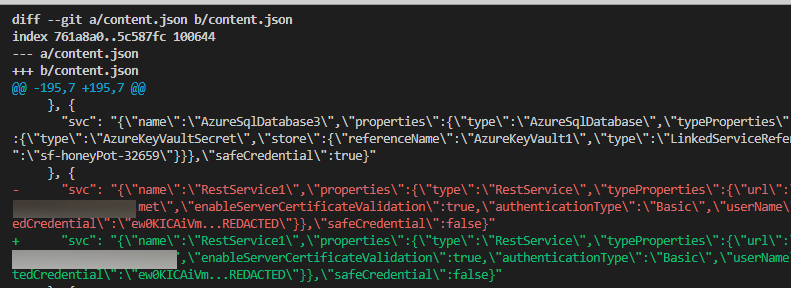
    • content.jsonにキーとコンテンツベースのソートを導入。これにより、git diff HEAD^1 ¹ でデルタチェックが可能になります(content.jsonの結果が所定の順序になっているため)。
      image

    ¹ ⚠️ 注意点:content.jsonのデルタを確認したい場合、content.jsonを.gitignoreから「アンイグノア」する必要があり、その結果が設定されている上流に公開される可能性があります。

    この機能は注意して使用し、この機能を使用するブランチにパブリックの上流が設定されていないことを確認してください。

  • 大規模データセットでの競合状態を回避するため、プログラミングパターンを変更。主に for await 形式のループでvar からlet への変更。


Important

⚠️ 現在のツールのステータスはベータ版です

  • 修正やアップデートなどは「ベストエフォート」ベースで行われ、時間や品質の保証はありません。
  • 私たちはEASTを日常業務で使用する前に、環境に関する正式な理解を深めるだけでなく、さまざまな実行環境や制限を適用するなど、追加の調整を行っています。そのため、現在のところ、EASTはテスト環境でのみ、読み取り専用権限で実行することを推奨します。
    • サービス内のすべての呼び出しは、ほぼAzure CloudのIPアドレスに対して行われるため、送信IP制限が適用された堅牢な環境でも問題なく動作するはずです。これにより、悪意のあるパッケージが含まれていても、Azure内にC2がない限り「電話をかけ直す」ことができないため、リスクが軽減されます。
      • 基本的に読み取り専用モードで実行することで、侵害されたNPMパッケージに関連するリスクを大幅に低減できます(Googleが侵害されたNPMパッケージ)。
      • バグなど: このコード内の特定の誤りから環境を保護するために、読み取り専用権限でツールを実行することができます。
  • コードの多くは「現状のまま」提供されています。つまり、特定の結果を作成するという目的のみに使用されてきました。クリーンアップやモジュール化はまだ多く残っています。
  • 現時点では、main.jsや各種高度なコントロールの変更後に実行される特定の手動チェック以外にはテストはありません。
  • 現段階でのコントロールの説明は最終版ではありません。フィードバックは歓迎しますが、ツールの焦点ではありません。
  • 名前が示すように、環境を評価するためのツールとして使用しています。現時点では監視なしで実行することを意図しておらず、また着信接続を受け入れるインターネット公開サービスで実行すべきではありません。
  • ドキュメントは現時点では不完全と言えます。
  • EASTは主にPaaSリソースに焦点を当てています。私たちのAzure評価は主にこのリソースタイプに焦点を当てているためです。
  • ⚠️ 起動パラメータに対する入力サニタイズは行われていません。これらのパラメータの入力は制御されていると常に想定しています。とはいえ、このツールは広範囲にexec()を使用しています。すべてのパスを確認したわけではありませんが、シェルコードの実行を達成するのは簡単だと考えています。このツールは敵対的な入力を想定していないため、起動引数を事前に確認せずにコマンドラインに貼り付けないことを推奨します。

Tool operation

Depedencies

コード量を減らすため、以下の依存関係を運用と美観のために使用しています(これらの素晴らしいパッケージのメンテナーの皆様に感謝します)。

ツール実行のためのその他の依存関係: Azure Cloud Shellで実行する予定の場合は、Azure CLIをインストールする必要はありません。

  • このツールはMicrosoft Azure CLIを含んでおらず、配布もしませんが、ソースシステム(EASTの主要プラットフォームであるAzure Cloud Shellなど)にインストールされている場合に使用します。

Azure Cloud Shell(BASH) または該当するLinuxディストリビューション / WSL

要件説明インストール
✅ AZ CLIAZCLI USEcurl -sL https://aka.ms/InstallAzureCLIDeb | sudo bash
✅ Node.js runtime 14EAST用のNode.jsランタイムNVMでインストール

Controls

EASTは3つのカテゴリのコントロールを提供します:Basic、Advanced、Composite

機械可読なコントロールは以下のようになります(タイプ(Basic/Advanced/Composite)にかかわらず):```json { "name": "fn-sql-2079", "resource": "/subscriptions/6193053b-408b-44d0-b20f-4e29b9b67394/resourcegroups/rg-fn-2079/providers/microsoft.web/sites/fn-sql-2079", "controlId": "managedIdentity", "isHealthy": true, "id": "/subscriptions/6193053b-408b-44d0-b20f-4e29b9b67394/resourcegroups/rg-fn-2079/providers/microsoft.web/sites/fn-sql-2079", "Description": "\r\n Ensure The Service calls downstream resources with managed identity", "metadata": { "principalId": { "type": "SystemAssigned", "tenantId": "033794f5-7c9d-4e98-923d-7b49114b7ac3", "principalId": "cb073f1e-03bc-440e-874d-5ed3ce6df7f8" }, "roles": [{ "role": [{ "properties": { "roleDefinitionId": "/subscriptions/6193053b-408b-44d0-b20f-4e29b9b67394/providers/Microsoft.Authorization/roleDefinitions/b24988ac-6180-42a0-ab88-20f7382dd24c", "principalId": "cb073f1e-03bc-440e-874d-5ed3ce6df7f8", "scope": "/subscriptions/6193053b-408b-44d0-b20f-4e29b9b67394/resourceGroups/RG-FN-2079", "createdOn": "2021-12-27T06:03:09.7052113Z", "updatedOn": "2021-12-27T06:03:09.7052113Z", "createdBy": "4257db31-3f22-4c0f-bd57-26cbbd4f5851", "updatedBy": "4257db31-3f22-4c0f-bd57-26cbbd4f5851" }, "id": "/subscriptions/6193053b-408b-44d0-b20f-4e29b9b67394/resourceGroups/RG-FN-2079/providers/Microsoft.Authorization/roleAssignments/ada69f21-790e-4386-9f47-c9b8a8c15674", "type": "Microsoft.Authorization/roleAssignments", "name": "ada69f21-790e-4386-9f47-c9b8a8c15674", "RoleName": "Contributor" }] }] }, "category": "Access" },

root@kitploit:~
### 基本

基本コントロールは、初期ARMオブジェクトに対する、該当サービスの「オン/オフ」切り替えのようなブーリアン設定のチェックを含みます。

**例: Azure Container Registry adminUser**

[acr_adminUser](https://github.com/jsa2/east/blob/public/providers/microsoft.containerregistry/functions/acr_adminUser.js)

Portal|EAST
-|-
  ![image](https://assets.kitploit.com/production/public/readmes/5701/955386627eceb05ef02ac4f9aed2c6671397ff9f86946fab1422f65c40510e5d.png) | ``if (item.properties?.adminUserEnabled == false ){returnObject.isHealthy = true }``


### 高度

高度コントロールは、初期ARMオブジェクトを超えたチェックを含みます。多くの場合、新しいリクエストを呼び出して、対象リソースと他のサービスとの関係に関する詳細情報を取得します。


**例: ロール割り当て**

サブスクリプションのロール割り当てをチェックするだけでなく、MFAのためのAzure AD条件付きアクセスレポート、および特権アカウントがパスワード(クライアントシークレットを使用したSPN)だけで保護されていないかどうかの追加チェックが実行されます。

**例: Azure Data Factory**

[ADF_pipeLineRuns](https://github.com/jsa2/east/blob/public/providers/microsoft.datafactory/functions/ADF_pipeLineRuns.js)

Azure Data Factoryのパイプラインマッピングは、パイプライン、アクティビティ、データターゲットを組み合わせ、該当アクティビティの実行履歴を介してログに漏洩したシークレットをチェックします。

![img](https://assets.kitploit.com/production/public/readmes/5701/bceb35d6b891df36e341228206a02952c46b7a271be23b40d9a72ff76a0c357f.png)

---

### 複合

複合コントロールは、パイプラインからの2つ以上のコントロール結果を組み合わせて、1つまたは複数の新しいコントロールを形成します。複合を使用することで、EASTの2つのユースケースを解決します。
1. パイプラインで返されるコントロール結果の順序を保証できない
2. 単一のチェックから複数のコントロール結果を返す必要がある

**例: [composite_resolve_alerts](https://github.com/jsa2/east/blob/public/composites/composite_resolve_alerts.js)**

1. サブスクリプションチェックでMicrosoft Cloud Defenderからアラートを取得
2. アラートに対してresourceProviderごとに新しいコントロールを形成

## レポート

EASTは自動レポート生成を提供することに重点を置いていません。主にコントロールと評価ステータスを含むJSONファイルを提供します。レポートを作成するには別のツールを使用することを想定しており、Markdown作成スクリプトや[Pandoc](https://github.com/jgm/pandoc#the-universal-markup-converter)などのツールを使って自動化するのはかなり簡単です。

- レポート作成に重点を置いているわけではありませんが、このリポジトリには、結果を単一のドキュメント形式で読みやすくするためのpandocを使用したレポート作成の自動化例が含まれています。

このツールはpandocを配布していませんが、レポート作成時に使用することができるため、以下の引用を追加しています: https://github.com/jgm/pandoc/blob/master/CITATION.cff```
cff-version: 1.2.0
title: Pandoc
message: "If you use this software, please cite it as below."
type: software
url: "https://github.com/jgm/pandoc"
authors:
  - given-names: John
    family-names: MacFarlane
    email: [email protected]
    orcid: 'https://orcid.org/0000-0003-2557-9090'
  - given-names: Albert
    family-names: Krewinkel
    email: [email protected]
    orcid: '0000-0002-9455-0796'
  - given-names: Jesse
    family-names: Rosenthal
    email: [email protected]

EASTスキャンの実行

このパートでは、BASH@linux または Azure Cloud Shell 上の BASH のいずれかでこれを実行する方法を説明します(当然ながら Cloud Shell も Linux ですが、独自の Linux マシンを持つ必要はありません)。

⚠️ Cloud Shell でツールを実行している場合、Cloud Shell はさまざまなセッション設定を保持しないため、一部のインストールを再度適用する必要があるかもしれません。

Cloud Shell での Fire and forget の前提条件```bash curl -o- https://raw.githubusercontent.com/jsa2/EAST/preview/sh/initForuse.sh | bash;

root@kitploit:~
[jump to next step](#login-az-cli-and-run-the-scan)

#### 詳細な前提条件(これは「ファイア・アンド・フォーゲット」版を選択しなかった場合)

**前提条件**```bash

git clone https://github.com/jsa2/EAST --branch preview
cd EAST;
npm install

クラウドシェルへのPandocインストール```bash

Get pandoc for reporting (first time only)

wget "https://github.com/jgm/pandoc/releases/download/2.17.1.1/pandoc-2.17.1.1-linux-amd64.tar.gz"; tar xvzf "pandoc-2.17.1.1-linux-amd64.tar.gz" --strip-components 1 -C ~

root@kitploit:~
**APTをサポートするディストリビューションでのpandocのインストール**```bash
# Get pandoc for reporting (first time only)
sudo apt install pandoc

Az CLI にログインしてスキャンを実行する```bash

Relogin is required to ensure token cache is placed on session on cloud shell

az account clear az login

cd EAST

replace the subid below with your subscription ID!

subId=6193053b-408b-44d0-b20f-4e29b9b67394

node ./plugins/main.js --batch=10 --nativescope=true --roleAssignments=true --helperTexts=true --checkAad=true --scanAuditLogs --composites --subInclude=$subId

root@kitploit:~
![img](https://assets.kitploit.com/production/public/readmes/5701/e85a6607ac555d9bbde7a179042df2a344b0a9f004e99f27ade78e0bc20af5b5.gif)


**レポート生成**

``cd EAST; node templatehelpers/eastReports.js --doc`` 

- レポートにすべてのAzure Security Benchmark結果を含めたい場合

``cd EAST; node templatehelpers/eastReports.js --doc --asb`` 

**クラウドシェルからレポートをエクスポート**

`` pandoc -s fullReport2.md -f markdown -t docx --reference-doc=pandoc-template.docx -o fullReport2.docx `` 

![image](https://assets.kitploit.com/production/public/readmes/5701/503e773de2e18294b3d74101d8c2eb6f675e1057c838e89703b440650450c374.png)

**Azure DevOps (試験的)**
パイプラインログをダンプするためのAzure DevOps制御があります。制御の実行は以下の例で指定できます:``` node ./plugins/main.js --batch=10 --nativescope=true --roleAssignments=true --helperTexts=true --checkAad=true --scanAuditLogs --composites --subInclude=$subId --azdevops "organizationName" ```

--- 
## Licensing

**Community use**
- Share relevant controls across multiple environments as community effort

**Company use**
- Companies have possibility to develop company specific controls which apply to company specific work. Companies can then control these implementations by decision to share, or not share them based on the operating principle of that company. 

**Non IPR components**
- Code logic and functions are under MIT license. since code logic and functions are alredy based on open-source components & vendor API's, it does not make sense to restrict something that is already based on open source

If you use this tool as part of your commercial effort we only require, that you follow the very relaxed terms of [MIT license](https://github.com/jsa2/east/blob/public/LICENSE)

[Read license](https://github.com/jsa2/EAST/blob/public/LICENSE)

---

# Tool operation documentation

## Principles


### AZCLI USE
**Existing tooling enhanced with Node.js runtime**

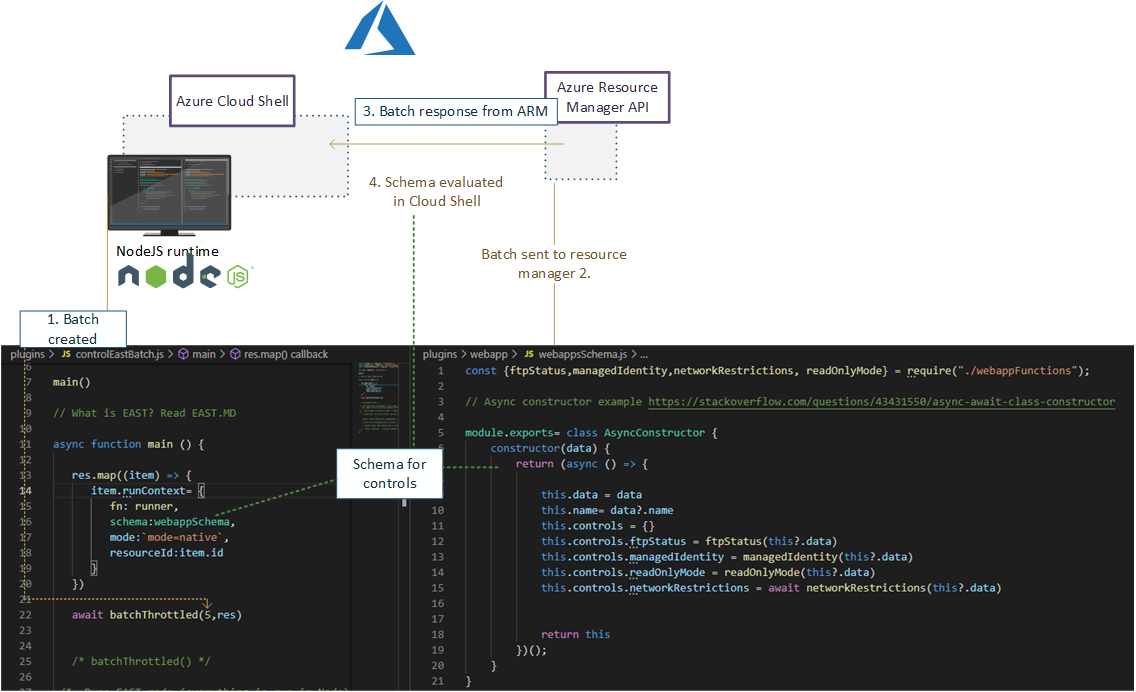
Use rich and maintained context of [Microsoft Azure CLI](https://github.com/Azure/azure-cli#microsoft-azure-cli) ``login & commands``  with Node.js control flow which supplies enhanced rest-requests and maps results to schema.
 - This tool does not include or distribute Microsoft Azure CLI, but rather uses it when it has been installed on the source system (Such as Azure Cloud Shell, which is primary platform for running EAST)

### Speedup

View more [details](https://github.com/jsa2/east/blob/public/speedup.md)

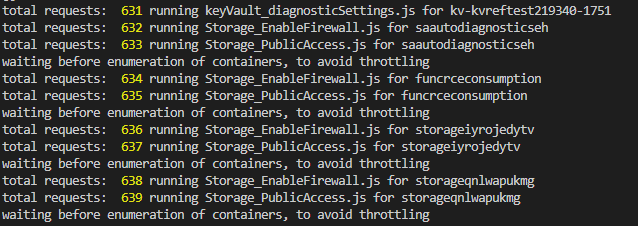
✅ Using Node.js runtime as orchestrator utilises Nodes asynchronous nature allowing batching of requests. Batching of requests utilizes the full extent of Azure Resource Managers incredible speed. 

✅ Compared to running requests one-by-one, the speedup can be up to 10x, when Node executes the batch of requests instead of single request at time

## Parameters reference


**Example:**
```shell
node ./plugins/main.js --batch=10 --nativescope --roleAssignments --helperTexts=true --checkAad --scanAuditLogs --composites --shuffle --clearTokens``` 

Param| Description | Default if undefined
-|-|-
`` --nativescope `` | Currently mandatory parameter | no values
`` --shuffle `` | Can help with throttling. Shuffles the resource list to reduce the possibility of resource provider throttling threshold being met  | no values 
`` --roleAssignments `` | Checks controls as per [microsoft.authorization](https://github.com/jsa2/east/blob/public/providers/microsoft.authorization/controls) | no values
`` --includeRG `` | Checks controls with ResourceGroups as per [microsoft.authorization](https://github.com/jsa2/east/blob/public/providers/microsoft.authorization/controls) | no values
`` --checkAad `` | Checks controls as per [microsoft.azureactivedirectory](https://github.com/jsa2/east/blob/public/providers/microsoft.azureactivedirectory/controls) | no values
`` --subInclude `` | Defines subscription scope | no default, requires subscriptionID/s, if not defined will enumerate all subscriptions the user have access to
`` --namespace `` | text filter which matches full, or part of the resource ID <br> **example** `` /microsoft.storage/storageaccounts`` all storage accounts in the scope| optional parameter
`` --notIncludes `` | text filter which matches full, or part of the resource ID <br> **example** `` /microsoft.storage/storageaccounts`` all storage accounts in the scope are **excluded**| optional parameter
`` --batch `` | size of batch interval between throttles |5
`` --wait `` | size of batch interval between throttles | 1500
`` --scanAuditLogs `` | optional parameter. When defined in hours will toggle Azure Activity Log scanning for weak authentication events <br> **defined in:** [scanAuditLogs](https://github.com/jsa2/east/blob/public/providers/microsoft.authorization/functions/scanAuditLogs.js) | 24h
`` --composites `` | read [composite](#composite)| no values
`` --clearTokens `` | clears tokens in session folder, use this if you get authorization errors, or have just changed to other `` az login `` account <br> use `` az account clear`` if you want to clear AZ CLI cache too | no values
`` --tag `` | Filter all results in the end based on single tag``--tag=svc=aksdev``  | no values
``--ignorePreCheck``  | use this option when used with browser delegated tokens| no values
``--helperTexts``  | Will append text descriptions from [general](https://github.com/jsa2/east/blob/public/providers/microsoft.general/controls) to manual controls| no values
``--reprocess``  | Will update results to existing content.json. Useful for incremental runs| no values


**Parameters reference for example report:**
```shell
node templatehelpers/eastReports.js --asb``` 

Param| Description | Default if undefined
-|-|-
`` --asb `` | gets all ASB results available to users | no values
`` --policy `` | gets all Policy results available to users | no values
``  --doc`` | prints pandoc string for export to console | no values

## (Highly experimental) Running in restricted environments where only browser use is available

Read here [Running in restricted environments](https://github.com/jsa2/EAST/tree/DelegationToken#highly-experimental---bypassing-trusted-device-requirements-for-azure-cli-in-highly-restricted-environments-where-apis-are-available-for-browser-sessions)

## Developing controls 
Developer guide including control flow description is here [``dev-guide.md``](https://github.com/jsa2/east/blob/public/dev-guide.md)

        
## Updates and examples
### Auditing Microsoft.Web provider (Functions and web apps)

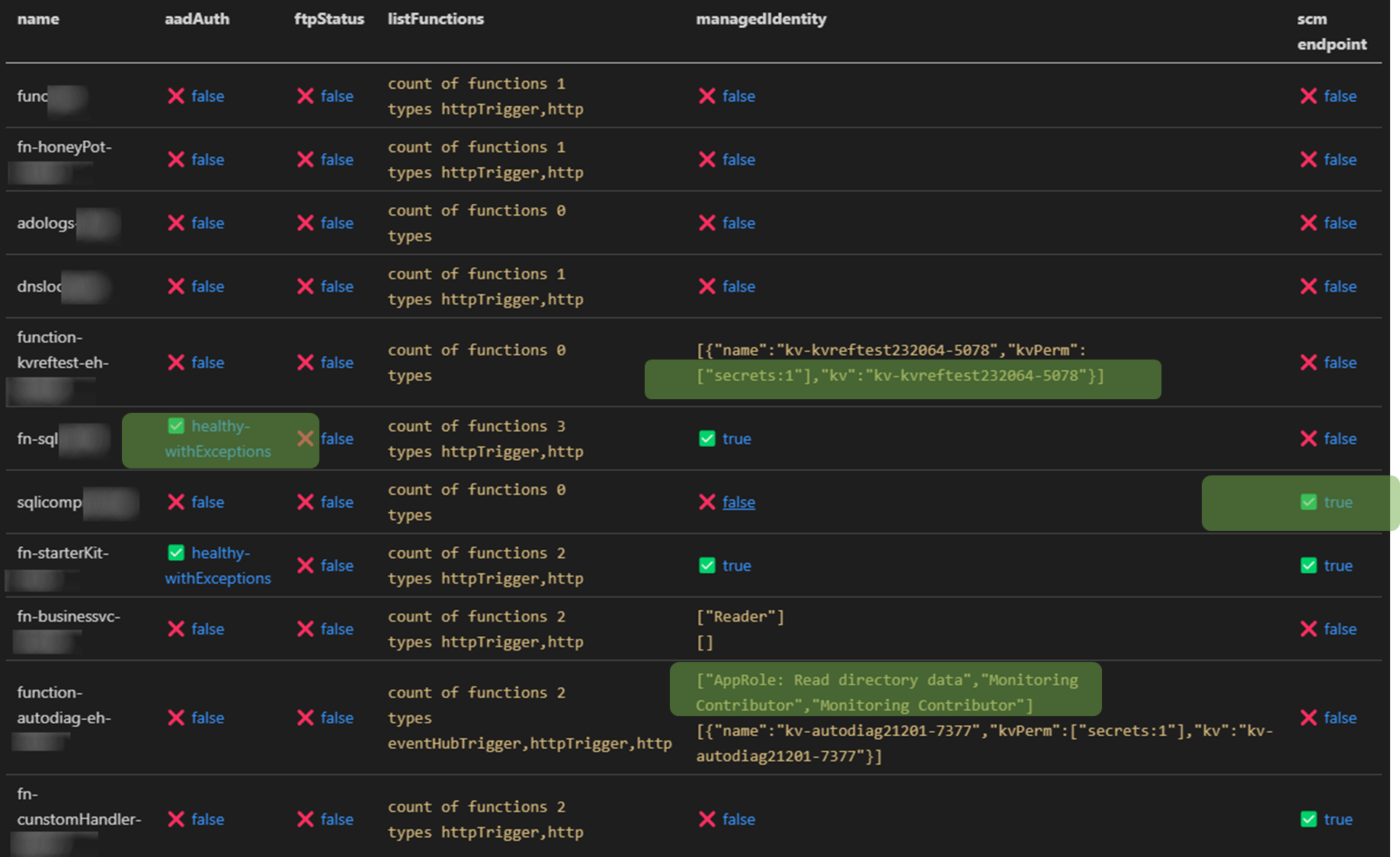
✅ Check roles that are assigned to function managed identity in Azure AD and all Azure Subscriptions the audit account has access to <br>
✅ Relation mapping, check which keyVaults the function uses across all subs the audit account has access to<br>
✅ Check if Azure AD authentication is enabled
✅ Check that generation of access tokens to the api requires assigment ``.appRoleAssignmentRequired`` <br>
✅ Audit bindings <br>
  - Function or Azure AD Authentication enabled
  - Count and type of triggers
<br>

✅ Check if [SCM](https://docs.microsoft.com/en-us/azure/azure-functions/security-concepts#secure-the-scm-endpoint) and [FTP](https://docs.microsoft.com/en-us/azure/azure-functions/security-concepts#disable-ftp) endpoints are secured 


![image](https://assets.kitploit.com/production/public/readmes/5701/b074ecdbe5d910c416ad2bbc5b5c57295c3f61348d5a8bb35146112959a15be8.png)


### Azure RBAC baseline authorization 

⚠️ Detect principals in privileged subscriptions roles protected only by password-based single factor authentication. 
-  Checks for users without MFA policies applied for set of conditions
-  Checks for ServicePrincipals protected only by password (as opposed to using Certificate Credential, workload federation and or workload identity CA policy)
  
  Maps to [App Registration Best Practices](https://docs.microsoft.com/en-us/azure/active-directory/develop/security-best-practices-for-app-registration#credential-configuration)
- *An unused credential on an application can result in security breach. While it's convenient to use  <span style="color:red">password</span>. secrets as a credential, we strongly recommend that you use x509 certificates as the only credential type for getting tokens for your application*

``✅State healthy`` - **User result example**  
```JSON
{ 
  "subscriptionName": "EAST -msdn",
  "friendlyName": "[email protected]",
    "mfaResults": {
      "oid": "138ac68f-d8a7-4000-8d41-c10ff26a9097",
      "appliedPol": [{
        "GrantConditions": "challengeWithMfa",
        "policy": "baseline",
        "oid": "138ac68f-d8a7-4000-8d41-c10ff26a9097"
      }],
      "checkType": "mfa"
    },
    "basicAuthResults": {
      "oid": "138ac68f-d8a7-4000-8d41-c10aa26a9097",
      "appliedPol": [{
        "GrantConditions": "challengeWithMfa",
        "policy": "baseline",
        "oid": "138ac68f-d8a7-4000-8d41-c10aa26a9097"
      }],
      "checkType": "basicAuth"
      },
    }

⚠️State unHealthy - Application principal example

root@kitploit:~
{ 
  "subscriptionName": "EAST - HoneyPot",
      "friendlyName": "thx138-kvref-6193053b-408b-44d0-b20f-4e29b9b67394",
      "creds": {
        "@odata.context": "https://graph.microsoft.com/beta/$metadata#servicePrincipals(id,displayName,appId,keyCredentials,passwordCredentials,servicePrincipalType)/$entity",
        "id": "babec804-037d-4caf-946e-7a2b6de3a45f",
        "displayName": "thx138-kvref-6193053b-408b-44d0-b20f-4e29b9b67394",
        "appId": "5af1760e-89ff-46e4-a968-0ac36a7b7b69",
        "servicePrincipalType": "Application",
        "keyCredentials": [],
        "passwordCredentials": [],
        "OnlySingleFactor": [{
          "customKeyIdentifier": null,
          "endDateTime": "2023-10-20T06:54:59.2014093Z",
          "keyId": "7df44f81-a52c-4fd6-b704-4b046771f85a",
          "startDateTime": "2021-10-20T06:54:59.2014093Z",
          "secretText": null,
          "hint": null,
          "displayName": null
        }],
        "StrongSingleFactor": []
        }
}

Contributing

Following methods work for contributing for the time being:

  1. Submit a pull request with code / documentation change
  2. Submit a issue
    • issue can be a:
    • ⚠️ Problem (issue)
    • 📝 Feature request
    • ❔Question

Other

  1. By default EAST tries to work with the current depedencies - Introducing new (direct) depedencies is not directly encouraged with EAST. If such vital depedency is introduced, then review licensing of such depedency, and update readme.md - depedencies
    • There is nothing to prevent you from creating your own fork of EAST with your own depedencies
ツールをダウンロード
パッケージ美的操作ライセンス
axios✅MIT
yargs✅MIT
jsonwebtoken✅MIT
chalk✅MIT
js-beautify ✅MIT