
機能 • インストール • ドキュメント • 探索ツールキット • CLI リファレンス
最新の JavaScript / TypeScript コードベース向けの依存関係分析・最適化ツールキットです。
非常に高速な CLI で依存関係グラフの衛生状態を強制し、未使用コードを削除します。
コードベースが拡大するにつれ、依存関係のメンタルマップを維持することは不可能になります。Rev-dep は、大規模な JS/TS プロジェクト全体でアーキテクチャの整合性と依存関係の衛生状態を強制するために設計された高速静的解析ツールです。
Rev-dep を依存関係グラフのための高速リンターと考えてください。
断片化された複数の低速ツールによる順次チェックを、単一の高性能エンジンに統合します。 Rev-dep は、循環、孤立、モジュール境界などを含むガバナンスチェックの一式を、1 回の並列化パスで実行します。Go で実装されているため Node ベース解析のパフォーマンスボトルネックを回避し、約 150ms で 50 万行以上の LoC プロジェクトを監査できます。 パフォーマンス比較を見る
Rev-dep は受動的なスキャンを超えて能動的な強制へと進み、難しい質問に答え(そして CI を失敗させ)ます:
node_modules は未使用か?」。Rev-dep は CI の高速ゲートキーパーとして機能し、反復開発中も依存関係グラフがスリムでアーキテクチャが無傷のままであることを保証します。
最新のワークスペース(pnpm、yarn、npm)向けに設計されています。Rev-dep は package.json の exports/imports マップ、TypeScript エイリアスをネイティブに解決し、パッケージ境界を越えた依存関係を追跡します。
受動的なスキャンを超えてください。設定エンジンを使用してモジュール境界とインポート規約を強制します。衛生チェック一式(循環、孤立、未使用モジュールなど)を単一の並列化パスで実行し、CI の高速ゲートキーパーとして機能させます。
ファイル間の依存関係に関する問題のデバッグを支援する CLI ツールキットです。ファイル間の推移的関係を理解し、問題を修正します。
Go で実装され、Node ベース解析のパフォーマンス負荷を排除しています。ファイルを並列処理することで、Rev-dep は代替ツールよりも 17 倍から 90 倍高速な実行を実現し、CI コストと開発者の待ち時間を大幅に削減します。
Rev-dep は約 150ms で 50 万行以上の LoC プロジェクトを監査できます。 パフォーマンス比較を見る
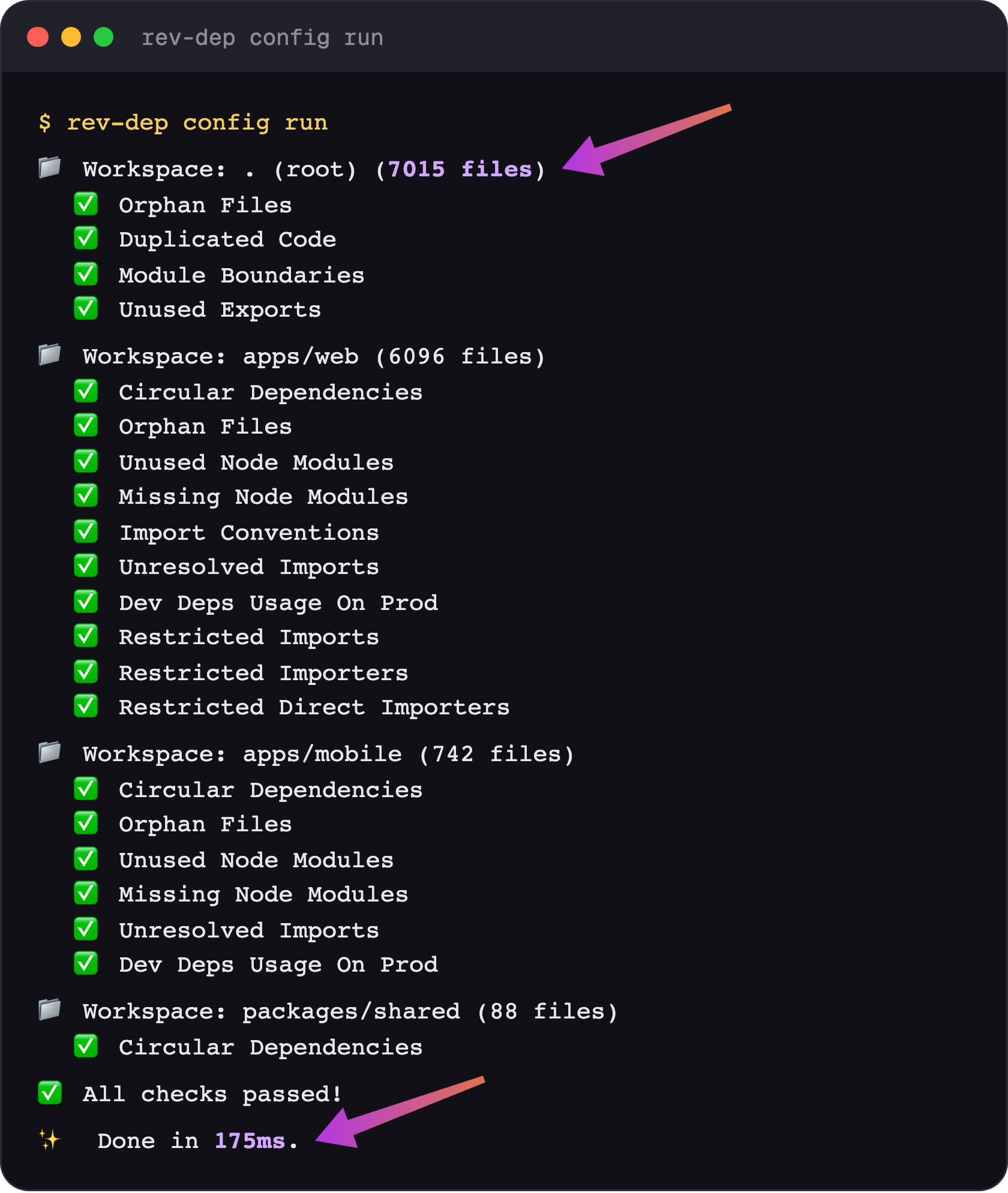
rev-dep config run を使用すると、すべてのパッケージに対して複数のチェックを 1 回のパスで実行できます。
利用可能なチェック:
moduleBoundaries - モジュール間のアーキテクチャ境界を強制します。importConventions - インポートスタイルの規約を強制します(自動修正対応)。unusedExportsDetection - 使われていないエクスポートを検出します(自動修正対応)。orphanFilesDetection - デッドファイル/孤立ファイルを検出します(自動修正対応)。unusedNodeModulesDetection - 宣言されているが使用されていない依存関係を検出します。missingNodeModulesDetection - package.json にないインポートを検出します。unresolvedImportsDetection - 未解決のインポート要求を検出します。circularImportsDetection - 循環インポートを検出します。duplicatedCodeDetection - コピー&ペーストされたコード(繰り返しブロックと JSX 要素)を検出します。devDepsUsageOnProdDetection - 本番コードで使用されている開発依存関係を検出します。restrictedImportsDetection - 選択したエントリーポイントから許可されていないファイル/モジュールのインポートをブロックします。restrictedImportersDetection - どのエントリーポイントが一連のファイル/モジュールに推移的に到達できるかをホワイトリストで制御します。アドホックな依存関係の探索には CLI コマンドを使用します:
entry-points - プロジェクトのエントリーポイントを発見します。files - 指定されたエントリーポイントの依存関係ツリーファイルを一覧表示します。resolve - ファイル間の依存関係パスを追跡します(誰がこのファイルをインポートしているか)。imported-by - ファイルを直接インポートしているものを一覧表示します。circular - 循環依存関係チェーンを一覧表示します。duplicated-code - コピー&ペーストされたコードブロックと JSX 要素を見つけます。node-modules - used、unused、missing、installed の node modules を検査します。lines-of-code - 実効 LOC を数えます。unresolved - 解決できなかったインポートをファイルごとにグループ化して一覧表示します。list-cwd-files - CWD 内のすべてのソースコードファイルを一覧表示します。完全なドキュメント: rev-dep.com/docs/intro
プロジェクトのチェックスクリプトを設定するには、ローカルにインストールします``` yarn add -D rev-dep
入力に翻訳対象のコンテンツが含まれていません(チャンクが空です)。翻訳するテキストが提供された場合は、その内容を日本語に翻訳します。```
npm install -D rev-dep
ルーターはレイヤー2での検出により、プロトコルごとに複数回スキャンされることがあります。スキャンは統合されてルーターは1回だけ表示されますが、検出された情報はすべて表示されます。このツールはデバイスを検出できるだけでなく、DNSルックアップを実行してIPアドレスに一致させることもでき、さらに、検出完了後にインポートフィルタリングを変更する機能も提供します。``` pnpm add -D rev-dep
クイックスタート用の設定ファイルを作成します:```
npx rev-dep config init
CLIツールとしてグローバルにインストールする:``` yarn global add rev-dep
**`curl`** は多くのオプションがありますが、多くの場合デフォルトでレスポンスボディを stdout に出力します。設定は必要ありません。```
npm install -g rev-dep
さらに、Hoaxshell はランダムな鍵を使ったシンプルな暗号化メカニズム(XOR)ですべてのセッション通信を暗号化し、シェルの検知を防ぎます。IDS や AV 製品を回避する効果が非常に高く、企業ネットワーク内でも気づかれずに存在し続けられるほどです。
また、簡単なペイロード生成ツール shellcrafter も同梱されており、Hoaxshell と連携する PowerShell リバースシェルペイロードを自動生成する Web GUI を提供します。
### ステップバイステップ統合ガイド
あなたのプロジェクトに合ったガイドに従って、ゼロから動作するセットアップまで進められます:
- [モノレポ統合ガイド](https://rev-dep.com/docs/monorepo-integration-guide) - `pnpm`/`yarn`/`npm` ワークスペース向け。
- [シングルワークスペース統合ガイド](https://rev-dep.com/docs/single-workspace-integration-guide) - 単一パッケージのプロジェクト向け。
## **クイック例 💡**
すぐに使える例をいくつか紹介します。ツールの雰囲気をつかむのに最適です:```bash
# Detect circular imports/dependencies
rev-dep circular
# Find copy-pasted code
rev-dep duplicated-code
# Detect unused node modules
rev-dep node-modules unused
# List all entry points in the project
rev-dep entry-points
# Check which files an entry point imports
rev-dep files --entry-point src/index.ts
# Find every entry point that depends on a file
rev-dep resolve --file src/utils/math.ts
# Resolve dependency path between files
rev-dep resolve --file src/utils/math.ts --entry-point src/index.ts
Rev-dep は、プロジェクトチェックを調整するための設定システムを提供します。設定アプローチは速度を重視して設計されており、プロジェクトチェックを実装する推奨方法です。すべてのチェックを1回のパスで実行できるため、個々のコマンドを別々に実行するよりも大幅に高速です。
利用可能なチェックは次のとおりです:
moduleBoundaries - モジュール間のアーキテクチャ境界を強制します。importConventions - インポートスタイルの規約を強制します(自動修正対応)。unusedExportsDetection - 使用されないエクスポートを検出します(自動修正対応)。orphanFilesDetection - デッドファイル/孤立ファイルを検出します(自動修正対応)。unusedNodeModulesDetection - 宣言されているが使用されていない依存関係を検出します。missingNodeModulesDetection - package json に記載されていないインポートを検出します。unresolvedImportsDetection - 未解決のインポート要求を検出します。circularImportsDetection - 循環インポートを検出します。duplicatedCodeDetection - コピー&ペーストされたコードブロックと JSX 要素を検出します。devDepsUsageOnProdDetection - 本番コードで使用されている dev 依存関係を検出します。restrictedImportsDetection - 選択したエントリポイントから拒否されたファイル/モジュールのインポートをブロックします。restrictedImportersDetection - 一連のファイル/モジュールに推移的に到達できるエントリポイントをホワイトリストに登録します。チェックはワークスペースにグループ化されます。複数のワークスペースを持つことができます(例: monorepo パッケージごと)。
プロジェクトで設定ファイルを初期化します:```bash
rev-dep config init
Behavior of `rev-dep config init`:
- Monorepo root: ワークスペースルートで `rev-dep config init` を実行すると、ルートワークスペースと、検出された各ワークスペースパッケージのワークスペースが作成されます。
- Monorepo ワークスペースパッケージまたは通常のプロジェクト: ディレクトリ内で `rev-dep config init` を実行すると、そのディレクトリに対して `path: "."` を持つ単一のワークスペースで config が作成されます。
Run all configured checks (dry run, not fixes applied yet):```bash
# Execute all workspaces and checks defined in the config
rev-dep config run
検出されたすべての問題を一覧表示:```bash
rev-dep config run --list-all-issues
修正可能なすべてのチェックを修正:```bash
# Fix checks configured with autofix
rev-dep config run --fix
設定ファイル(rev-dep.config.json(c) または .rev-dep.config.json(c))を使用すると、複数のワークスペースを定義でき、それぞれでコードベースの異なる部分を対象に、特定のチェックを有効にすることができます。
{ "configVersion": "2.0", "$schema": "https://github.com/jayu/rev-dep/blob/master/config-schema/2.0.schema.json?raw=true", "nodeModulesResolution": { "resolutionType": "entry-package", "includeDevDepsFromRoot": false }, "workspaces": [ { "path": ".", "prodEntryPoints": ["src/main.tsx", "src/pages//*.tsx"], "devEntryPoints": ["scripts/", "**/.test."], "unusedExportsDetection": { "enabled": true, "autofix": true }, "orphanFilesDetection": { "enabled": true, "autofix": true }, "unusedNodeModulesDetection": { "enabled": true }, "circularImportsDetection": { "enabled": true }, "devDepsUsageOnProdDetection": { "enabled": true, "ignoreTypeImports": true } } ] }
#### 包括的な設定例
利用可能なすべてのプロパティを示す包括的な例を以下に示します。```jsonc
{
"configVersion": "1.10",
"$schema": "https://github.com/jayu/rev-dep/blob/master/config-schema/1.10.schema.json?raw=true", // enables json autocompletion
"conditionNames": ["import", "default"],
"ignoreFiles": ["**/*.test.*"],
"nodeModulesResolution": { "resolutionType": "entry-package", "includeDevDepsFromRoot": false },
"workspaces": [
{
"path": ".",
"followMonorepoPackages": true,
"prodEntryPoints": ["src/main.tsx", "src/pages/**/*.tsx", "src/server.ts"],
"devEntryPoints": ["scripts/**", "**/*.test.*"],
"ignoreEntryPoints": ["src/legacy/oldDashboard.tsx"],
"moduleBoundaries": [
{
"name": "ui-components",
"pattern": "src/components/**/*",
"allow": ["src/utils/**/*", "src/types/**/*"],
"deny": ["src/api/**/*"]
},
{
"name": "api-layer",
"pattern": "src/api/**/*",
"allow": ["src/utils/**/*", "src/types/**/*"],
"deny": ["src/components/**/*"]
}
],
"importConventions": [
{
"rule": "relative-internal-absolute-external",
"autofix": true,
"domains": [
{
"path": "src/features/auth",
"alias": "@auth",
"enabled": true
},
{
"path": "src/shared/ui",
"alias": "@ui-kit",
"enabled": false // checks disabled for this domain, but alias is still used for absolute imports from other domains
}
]
}
],
"circularImportsDetection": {
"enabled": true,
"ignoreTypeImports": true
},
"orphanFilesDetection": {
"enabled": true,
"ignoreTypeImports": true,
"graphExclude": ["**/*.test.*", "**/stories/**/*"],
"autofix": true
},
"unusedNodeModulesDetection": {
"enabled": true,
"includeModules": ["@myorg/**"],
"excludeModules": ["@types/**"],
"pkgJsonFieldsWithBinaries": ["scripts", "bin"],
"filesWithBinaries": ["scripts/check-something.sh"],
"filesWithModules": [".storybook/main.ts"],
"outputType": "groupByModule"
},
"missingNodeModulesDetection": {
"enabled": true,
"includeModules": ["lodash", "axios"],
"excludeModules": ["@types/**"],
"outputType": "groupByFile"
},
"unusedExportsDetection": {
"enabled": true,
"autofix": true,
"ignoreTypeExports": true,
"graphExclude": ["**/*.stories.tsx"],
"ignore": {
"src/types.ts": "B*",
"**/generated/**/*.ts": "*"
},
"ignoreFiles": ["**/*.generated.ts"],
"ignoreExports": ["default", "unused*"],
},
"unresolvedImportsDetection": {
"enabled": true,
"ignore": {
"src/index.ts": "legacy-*"
},
"ignoreFiles": ["**/*.generated.ts"],
"ignoreImports": ["@internal/*"]
},
"devDepsUsageOnProdDetection": {
"enabled": true,
"ignoreTypeImports": true
},
"restrictedImportsDetection": {
"enabled": true,
"entryPoints": ["src/server.ts", "src/server/**/*.ts"],
"graphExclude": ["some-file-coupling-other-files.ts"],
"denyFiles": ["**/*.tsx"],
"denyModules": ["react", "react-*"],
"ignoreMatches": ["src/server/allowed-view.tsx", "react-awsome-lib"],
"ignoreTypeImports": true
}
}
]
}
configVersion (必須): 設定バージョン文字列$schema (任意): 検証用のJSONスキーマ参照conditionNames (任意): エクスポート解決用の条件名の配列customAssetExtensions (任意): 解決可能なインポートとして扱う追加のアセット拡張子(例: ["glb", "mp3"])。デフォルトのリストはフォント、画像、設定ファイルの一般的な拡張子をカバーします。ignoreFiles (任意): すべてのワークスペースで無視するグローバルなファイルパターン。Gitで無視されたファイルはデフォルトでスキップされます。processIgnoredFiles (任意): gitignoreまたはignoreFilesに一致しても処理するグローバルなファイルパターン。nodeModulesResolution (任意): missingNodeModules、unusedNodeModules、unresolvedImports のチェックで、各サードパーティインポートがどのに対して検証されるかを指定します。 というオブジェクトとして設定します(が生成する形式)。は(デフォルト。ワークスペースのエントリに対して検証)または(各ファイルを所有するに対して検証。pnpmのデフォルトレイアウトで使用。各パッケージが自身の依存関係のみを解決する場合)です。(デフォルト)は、モノレポルートでのみ宣言された開発依存関係をパッケージコードが使用しても、やでフラグを立てないようにします。の後方互換な省略形として、単純な文字列(例: )も受け付けられます。すべてのワークスペースに適用されます。 を参照してください。各ワークスペースには次のプロパティを含めることができます:
path (必須): このワークスペースの対象ディレクトリパス(.またはサブディレクトリ名で始まるパス)followMonorepoPackages (任意): モノレポパッケージの解決を制御します。trueはすべてのワークスペースパッケージを対象にし(デフォルト)、falseは無効にし、配列は選択したパッケージ名のみを対象にします。prodEntryPoints (任意): 検出器のデフォルトに使用するワークスペースレベルの本番エントリポイントパターンdevEntryPoints (任意): 検出器のデフォルトに使用するワークスペースレベルの開発エントリポイントパターンignoreEntryPoints (任意): もはや気にしない残りのエントリポイントのためのワークスペースレベルパターン。これらのパターンに一致するファイルは問題として処理されません。孤立ファイルとして報告されることはなく、未使用のエクスポートも報告されません。コミットに残す必要があるが、もはやアプリに配線されていないファイルに便利です。moduleBoundaries (任意): モジュール境界ルールの配列circularImportsDetection (任意): 循環インポート検出の設定(単一のオブジェクトまたはオブジェクトの配列)duplicatedCodeDetection (任意): 重複コード検出の設定(単一のオブジェクトまたはオブジェクトの配列)name (必須): 境界の名前pattern (必須): この境界内のファイルのglobパターンallow (任意): 許可されたインポートパターンの配列deny (任意): 拒否されたインポートパターンの配列(allowを上書きします)rule (必須): ルールのタイプ。現時点ではrelative-internal-absolute-externalのみautofix (任意): インポート規約違反を自動的に修正するかどうか(デフォルト: false)domains (必須): ドメイン定義の配列。文字列(globパターン)または次のプロパティを持つオブジェクトを指定できます:
path (必須): ドメインファイルが含まれるディレクトリalias (任意): このドメインのコードを絶対インポートする際に使用するエイリアスenabled (任意): このドメインのチェックをスキップするにはfalseに設定します(デフォルト: true)各検出プロパティは次のように設定できます:
CircularImportsDetection:
enabled (必須): 循環インポート検出の有効/無効ignoreTypeImports (任意): グラフ構築時に型のみのインポートを除外します(デフォルト: false)DuplicatedCodeDetection:
enabled (必須): 重複コード検出の有効/無効blindIdentifiers (任意): 名前をワイルドカードとして扱い、名前が変更されたコピーも重複としてカウントします(デフォルト: false)blindStrings (任意): 文字列とテンプレートの内容をワイルドカードとして扱います(デフォルト: false)blindNumbers (任意): 数値リテラルをワイルドカードとして扱います(デフォルト: false)minTokens (任意): 報告する最小の重複サイズ(トークン単位、デフォルト: 50)minLines (任意): 報告する最小の重複サイズ(行単位、デフォルト: 3)minDepth (任意): ブロック自体を含めた最小のネスト深度。2は少なくとも1レベルのネストを必要とします(デフォルト: 0)minStatements (任意): 最小ステートメント数。ステートメントブロックにのみ適用されます(デフォルト: 0)minDuplicates (任意): チャンクが報告されるために必要なコピー数(デフォルト: 2)skipObjects (任意): オブジェクトリテラルのみの重複を報告しません(デフォルト: false)ignoreFiles (任意): 分析から除外するglobパターンOrphanFilesDetection:
enabled (必須): 孤立ファイル検出の有効/無効validEntryPoints (任意): 有効なエントリポイントパターンの配列。省略した場合、ワークスペースレベルのprodEntryPoints + devEntryPointsにデフォルト設定されます。ignoreTypeImports (任意): グラフ構築時に型のみのインポートを除外します(デフォルト: false)graphExclude (任意): グラフ分析から除外するファイルパターンautofix (任意): rev-dep config run --fix実行時に検出された孤立ファイルを自動的に削除します(デフォルト: false)UnusedNodeModulesDetection:
enabled (必須): 未使用モジュール検出の有効/無効includeModules (任意): 分析に含めるモジュールパターンexcludeModules (任意): 分析から除外するモジュールパターンpkgJsonFieldsWithBinaries (任意): バイナリ参照を含むPackage.jsonフィールド(例: lint-staged)。プレーンテキスト検索を実行しますfilesWithBinaries (任意): バイナリ使用を検索するファイルパターン。プレーンテキスト検索を実行しますfilesWithModules (任意): モジュールインポートを検索するJS/TS以外のファイルパターン(例: シェルスクリプト)。プレーンテキスト検索を実行しますoutputType (任意): 出力形式 - "list"、"groupByModule"、"groupByFile"MissingNodeModulesDetection:
enabled (必須): 欠落モジュール検出の有効/無効includeModules (任意): 分析に含めるモジュールパターンexcludeModules (任意): 分析から除外するモジュールパターンoutputType (任意): 出力形式 - "list"、"groupByModule"、"groupByFile"、"groupByModuleFilesCount"UnusedExportsDetection:
enabled (必須): 未使用エクスポート検出の有効/無効validEntryPoints (任意): エクスポートが未使用として報告されないファイルのglobパターン。省略した場合、ワークスペースレベルのprodEntryPoints + devEntryPointsにデフォルト設定されます。ignoreTypeExports (任意): 分析からexport type / export interfaceをスキップします(デフォルト: false)graphExclude (任意): 未使用エクスポート分析から除外するファイルパターンignore (任意): 抑制するエクスポート名/指定子のglobに対するファイルパスglob(ワークスペースパスディレクトリからの相対)のマップ。各値は文字列または文字列の配列にできますignoreFiles (任意): ファイルパスglob。一致するファイルからの未使用エクスポートはすべて抑制されますignoreExports (任意): グローバルに抑制するエクスポート名/指定子(またはglob)("default"をサポート)autofix (任意): 実行時に修正可能な未使用エクスポートの変更を自動的に適用します(デフォルト: false)UnresolvedImportsDetection:
enabled (必須): 未解決インポート検出の有効/無効ignore (任意): 抑制するインポートリクエストのglobに対するファイルパスglob(ワークスペースパスディレクトリからの相対)のマップ。各値は文字列または文字列の配列にできますignoreFiles (任意): ファイルパスglob。一致するファイルからの未解決インポートはすべて抑制されますignoreImports (任意): 未解決結果でグローバルに抑制するインポートリクエスト(またはglob)DevDepsUsageOnProdDetection:
enabled (必須): 制限された開発依存関係の使用検出の有効/無効prodEntryPoints (任意): 依存関係をトレースする元となる本番エントリポイントパターン。省略した場合、ワークスペースレベルのprodEntryPointsにデフォルト設定されます。ignoreTypeImports (任意): グラフ走査とモジュールマッチングから型のみのインポートを除外します(デフォルト: false)RestrictedImportsDetection:
enabled (必須): 制限付きインポート検出の有効/無効entryPoints (有効時に必須): 到達可能な依存関係グラフを構築するために使用するエントリポイントパターン(ここではワークスペースレベルのエントリポイントは適用されません)graphExclude (任意): 制限付きインポートのグラフ分析から除外するファイルパターンdenyFiles (任意): 拒否されたファイルパスパターン(例: ["**/*.tsx"])denyModules (任意): 拒否されたモジュールパターン(例: ["react", "react-*"])ignoreMatches (任意): 制限付きインポートの結果から抑制するファイル/モジュールパターンignoreTypeImports (任意): 走査から型のみのインポートを除外します(デフォルト: false)設定アプローチには大きなパフォーマンス上の利点があります:
これにより、設定ベースのチェックは個々のコマンドを順次実行するよりも高速になります。特に複数のサブパッケージを持つ大規模なコードベースで顕著です。
実用的な例を使って、rev-dep CLIコマンドを使用してプロジェクトのコード品質チェックを探索、デバッグ、構築する方法を示します。
rev-dep resolve --file path/to/file.ts
そのファイルを暗黙的に必要とするすべてのエントリポイントと、解決パスが表示されます。
### **ファイルが使用されているか確認する方法**```
rev-dep resolve --file path/to/file.ts --compact-summary
ファイルに間接的に依存しているエントリポイントの数を表示します。
rev-dep entry-points
必要に応じて `--result-exclude` を使用してフレームワークのエントリポイントを除外します。
たとえば、pages router を使用する場合は Next.js の有効なエントリポイントを除外し、scripts ディレクトリ(スクリプトは有効なエントリポイントです)を除外し、すべてのテストファイルを除外します:```
rev-dep entry-points --result-exclude "pages/**","scripts/**","**/*.test.*"
rev-dep files --entry-point path/to/file.ts
重いコンポーネントや意図しない依存関係を特定するのに役立ちます。
### **エントリポイントの不要なインポートを削減する方法**
1. インポートされたすべてのファイルを一覧表示する: ```
rev-dep files --entry-point path/to/entry.ts
rev-dep circular
### **重複コードを検出する方法**```
rev-dep duplicated-code
繰り返された行ではなく、繰り返されたコードブロックとJSX要素(抽出可能な単位)を報告します。--blind-identifiers を追加すると、変数がリネームされたコピーも検出できます。
rev-dep node-modules unused
### **不足している node モジュールを見つける方法**```
rev-dep node-modules missing
rev-dep node-modules dirs-size
### **本番コードで使用されている開発依存関係を検出する方法**```
rev-dep config run
devDepsUsageOnProdDetection が設定で有効になっている場合、rev-dep は次の処理を行います:
package.json の devDependencies にリストされているかを確認する出力例:``` ❌ Restricted Dev Dependencies Usage Issues (2): lodash (dev dependency) - src/components/Button.tsx (from entry point: src/pages/index.tsx) - src/utils/helpers.ts (from entry point: src/pages/index.tsx) eslint (dev dependency) - src/config/eslint-config.js (from entry point: src/server.ts)
**重要な注意事項:**
- タイプのみのインポート(例:`import type { ReactNode } from 'react'`)は、`ignoreTypeImports` が有効な場合に無視されます
- package.json の `devDependencies` からの依存関係のみがフラグ付けされます
- `dependencies` からの本番依存関係は許可されます
- 本番ビルドでの実行時障害を防ぐのに役立ちます
## モノレポでの作業 🏗️
Rev-dep はモノレポプロジェクトを第一級でサポートし、ワークスペースパッケージ間での正確な依存関係分析を可能にします。
### followMonorepoPackages フラグ
`--follow-monorepo-packages` フラグは、モノレポのワークスペースパッケージからのインポート解決を有効にします。デフォルトでは、このフラグは単一パッケージプロジェクトとの互換性を維持するために `false` に設定されています。```bash
# Enable monorepo package resolution
rev-dep circular --follow-monorepo-packages
rev-dep resolve --file src/utils.ts --follow-monorepo-packages
rev-dep entry-points --follow-monorepo-packages
有効にすると、rev-dep は次のことを行います:
Rev-dep は、package.json ファイルの exports フィールドを完全にサポートしています。これは、最新の Node.js プロジェクトでパッケージのエントリポイントを定義する標準的な方法です。
exports マップのサポートには、以下が含まれます:
node、import、default、カスタム条件などの条件を使用する条件付き exportsどの条件付き exports を解決するかを制御するには、--condition-names フラグを使用します。これにより、パッケージの exports を解決する際の条件の優先順位を指定できます:```bash
rev-dep circular --condition-names=node,import,default rev-dep resolve --file src/utils.ts --condition-names=import,node rev-dep entry-points --condition-names=default,node,import
条件は指定された順序で処理され、最初に一致した条件が使用されます。一般的な条件は次のとおりです:
- `node` - Node.js 環境
- `import` - ES モジュール
- `require` - CommonJS
- `default` - フォールバック条件
- プロジェクトまたはビルドツール固有のカスタム条件
exports を含む package.json の例:```json
{
"name": "@myorg/utils",
"exports": {
".": {
"import": "./dist/index.mjs",
"require": "./dist/index.js",
"default": "./dist/index.js"
},
"./helpers": "./dist/helpers.js",
"./types/*": "./dist/types/*.d.ts"
}
}
モノレポ検出: followMonorepoPackages が有効な場合、rev-dep はワークスペース設定 (pnpm-workspace.yaml、package.json の workspaces など) をスキャンします。
パッケージ解決: ワークスペースパッケージへのインポートは、パッケージの exports 設定を使用して解決され、exports が定義されていない場合は main/module フィールドにフォールバックします。
依存関係の検証: このツールは、対象パッケージが利用側の dependencies または devDependencies にリストされている場合にのみ、パッケージ間インポートを許可することを検証します。
パス解決: すべてのパスは各パッケージのルートを基準に解決され、モノレポ全体で正確な依存関係の追跡を保証します。
これにより、rev-dep は、コード品質とアーキテクチャを維持するためにパッケージ間の依存関係の理解が不可欠な大規模モノレポプロジェクトで特に効果的です。
rev-dep は、複数のサブパッケージを含む 500k+ 行のコードのモノレポに対して、複数のチェックを約 150ms で実行できます。
Madge、dpdm、dependency-cruiser、skott、knip、depcheck などの類似ツールよりも優れたパフォーマンスを発揮します。
以下は、rev-dep と代替ツール間の特定タスクのパフォーマンス比較です。
プラットフォーム: WSL Linux Debian Intel(R) Core(TM) i9-14900KF CPU
測定条件:
hyperfine -w 4 -r 8(4回のウォームアップ + 8回の測定実行)プロジェクト: 580k 行のコード、6024 のソースコードファイルからなる next.js アプリ
以下の表は、循環インポート検出を実行するさまざまなツール間のパフォーマンス比較を示しています。
rev-dep の循環チェックは、最速の代替ツールより 約20倍 高速です。
* knip は常に型のみのインポートエッジを無視し、それらを含めるフラグを提供しません。このコードベースのすべての循環には
少なくとも1つが含まれるため、knip は 0 循環を報告します。その 3 040 ms は実際の完全な
分析であり、単により小さいグラフに対するものです。同じルールを適用する rev-dep circular -t は、
143.3 ms ± 10.3 で正確に一致します(0 循環)。
プラットフォーム: WSL Linux Debian Intel(R) Core(TM) i9-14900KF CPU
測定条件:
hyperfine -w 4 -r 8(4回のウォームアップ + 8回の測定実行)プロジェクト: 580k 行のコード、6024 のソースコードファイルからなる next.js アプリ
平均時間と使用コマンドを含む詳細な測定結果は PERFORMANCE.md を参照してください。
プロジェクト内の循環依存関係を検出します
プロジェクトを分析して、モジュール間の循環依存関係を検出します。 循環依存関係はデバッグが難しい問題を引き起こす可能性があるため、通常は避けるべきです。``` rev-dep circular [flags]
#### 使用例```
rev-dep circular --ignore-types-imports
--condition-names strings List of conditions for package.json imports resolution (e.g. node, imports, default)
-c, --cwd string Working directory for the command (default "$PWD") --follow-monorepo-packages strings Enable resolution of imports from monorepo workspace packages. Pass without value to follow all, or pass package names -h, --help help for circular -t, --ignore-type-imports Exclude type imports from the analysis --process-ignored-files strings Glob patterns to process even if they are ignored by gitignore or exclude patterns --tsconfig-json string Path to tsconfig.json (default: ./tsconfig.json) -v, --verbose Show warnings and verbose output
### rev-dep config
rev-dep 設定ファイルを作成および実行します
#### 概要
rev-dep 設定ファイルを作成および実行するためのコマンドです。
#### オプション```
-c, --cwd string Working directory (default "$PWD")
-h, --help help for config
(.)rev-dep.config.json(c) で定義されたすべてのチェックを実行します
(.)rev-dep.config.json(c) を処理し、ワークスペースごとに有効なすべてのチェック(循環インポート、孤立ファイル、モジュール境界、インポート規約、Node モジュール、未使用エクスポート、未解決インポート、制限付きインポート、制限付き開発依存関係の使用)を実行します。``` rev-dep config run [flags]
#### オプション```
-c, --cwd string Working directory (default "$PWD")
--fix Automatically fix fixable issues
--format string Output format (json, issues-list)
-h, --help help for run
--lint-config Also lint the config after running; prints only error/warning counts and fails (non-zero exit) on any lint error. Use 'config lint' for details and --fix
--lint-config-rules strings Which lint rules to run with --lint-config (comma-separated). Default: all. Implies --lint-config
--list-all-issues List all issues instead of limiting output
--recheck Run all checks again after '--fix' to validate the final state
--update-snapshot Rewrite every configured duplicated-code snapshot from this run, acknowledging what it found.
-v, --verbose Show warnings and verbose output
--workspaces strings Subset of workspaces to run (comma-separated list of workspace paths)
新しい rev-dep.config.json ファイルを初期化します
デフォルト設定で現在のディレクトリに新しい rev-dep.config.json 構成ファイルを作成します。``` rev-dep config init [flags]
#### オプション```
-c, --cwd string Working directory (default "$PWD")
-h, --help help for init
何にも一致しない設定の glob/パスパターンをレポートします(必要に応じて削除します)
(.)rev-dep.config.json(c) を走査して、発見されたファイルまたはモジュールのいずれにも一致しなくなった「無効な」glob およびパスパターン(ignore パターン、 エントリポイントパターン、ワークスペースパス、グラフ除外、拒否されたファイル/モジュール、 および類似のもの)を探します。時間の経過とともに、設定には 名前が変更されたり削除されたりしたファイルのパターンが蓄積されます。このコマンドはそれらを表面化させ、 設定を簡潔に保ちます。
--fix を指定すると、無効なパターンはその場で削除され、すべてのコメントとフォーマットが保持されます。 一部のパターンはレポートされますが、自動削除されることはありません。削除すると、チェックの 動作が変わったり、設定が無効になる可能性があるためです - ワークスペースパス、必須のエントリポイント/ファイル /モジュール、モジュール境界セレクタなど。これらは「自動削除されない」とマークされ、 手動で解決する必要があります。``` rev-dep config lint [flags]
#### オプション```
-c, --cwd string Working directory (default "$PWD")
--fix Remove dead patterns from the config file (preserves comments and formatting)
-h, --help help for lint
--rules strings Lint rules to run (comma-separated): orphan-file-globs, orphan-module-globs, overlapping-globs, trailing-commas, compact. Default: all. orphan-file-globs/overlapping-globs use file discovery; orphan-module-globs parses the dependency tree; trailing-commas and compact only read the config file.
-v, --verbose Show warnings and verbose output
v2 設定を v3 (2.0) スキーマにアップグレードします
rev-dep.config.json を v2 スキーマから v3 (config version 2.0) にアップグレードします。
安全で曖昧さのない変更をその場で適用します(トップレベルの 'rules' 配列を 'workspaces' にリネームし、'configVersion' を 2.0 に更新し、circular-imports 検出器から廃止された 'algorithm' オプションを削除します)。すべてのコメントと書式を保持します。コミットする前に git で変更内容を確認してください。
次に、自動では変更できなかった内容をリスト表示します。v3 のより厳格で gitignore に整合したルールの下でマッチセットが変化した可能性のある glob パターンと、設定ファイルの編集では対応できない動作変更です。これらは手動で確認してください - v3 の破壊的変更ガイドを参照してください。``` rev-dep config migrate [flags]
#### オプション```
-c, --cwd string Working directory (default "$PWD")
-h, --help help for migrate
パーサーとリゾルバーの内部を検査するためのデバッグツール
rev-dep がファイルを解析し、依存関係を解決する方法を検査するためのデバッグツール。出力は semver に従いません。
-h, --help help for debug
### rev-dep debug get-tree-for-cwd
デバッグ: 解析用の完全な依存関係ツリーを表示します
#### 概要
完全な依存関係ツリーを検査するためのデバッグツールです。出力はsemverに従いません。```
rev-dep debug get-tree-for-cwd [flags]
--condition-names strings List of conditions for package.json imports resolution (e.g. node, imports, default)
--cwd string Working directory for the command (default "$PWD")
--follow-monorepo-packages strings Enable resolution of imports from monorepo workspace packages. Pass without value to follow all, or pass package names
-h, --help help for get-tree-for-cwd -t, --ignore-type-imports Exclude type imports from the analysis --include-dev-deps-from-root Treat the monorepo root package.json devDependencies as available to package code, so they are not reported as missing or unresolved. Mirrors config nodeModulesResolution.includeDevDepsFromRoot --node-modules-resolution string Which package.json each import is validated against: 'entry-package' (the cwd package.json, default) or 'nearest-package' (each file's own nearest package.json) (default "entry-package") --tsconfig-json string Path to tsconfig.json (default: ./tsconfig.json) -v, --verbose Show warnings and verbose output
### rev-dep debug list-cwd-files
現在の作業ディレクトリ内のすべてのファイルを一覧表示します
#### 概要
指定されたディレクトリ内のすべてのファイルを再帰的に一覧表示し、
結果をフィルタリングするオプションを備えています。```
rev-dep debug list-cwd-files [flags]
rev-dep debug list-cwd-files --include='.ts' --exclude='.test.ts'
#### オプション```
--count Only display the count of matching files
--cwd string Directory to list files from (default "$PWD")
--exclude strings Exclude files matching these glob patterns
-h, --help help for list-cwd-files
--include strings Only include files matching these glob patterns
デバッグ: 単一ファイルの解析済みインポートを表示します
パーサーが特定のファイルをどのように処理するかを調査するためのデバッグツールです。出力はsemverに従いません。``` rev-dep debug parse-file [flags]
#### オプション```
--condition-names strings List of conditions for package.json imports resolution (e.g. node, imports, default)
--cwd string Working directory for the command (default "$PWD")
--file string file to parse
--follow-monorepo-packages strings Enable resolution of imports from monorepo workspace packages. Pass without value to follow all, or pass package names
-h, --help help for parse-file
--include-dev-deps-from-root Treat the monorepo root package.json devDependencies as available to package code, so they are not reported as missing or unresolved. Mirrors config nodeModulesResolution.includeDevDepsFromRoot
--node-modules-resolution string Which package.json each import is validated against: 'entry-package' (the cwd package.json, default) or 'nearest-package' (each file's own nearest package.json) (default "entry-package")
--tsconfig-json string Path to tsconfig.json (default: ./tsconfig.json)
-v, --verbose Show warnings and verbose output
デバッグ: 解析されたTypeScript設定エイリアスを表示
TypeScript設定がどのように解析され、どのエイリアスが抽出されるかを検査するためのデバッグツールです。出力はsemverに従いません。``` rev-dep debug parse-tsconfig [flags]
#### オプション```
-h, --help help for parse-tsconfig
--tsconfig string Path to TypeScript configuration file
プロジェクトのファイル内(およびファイル間)で重複したコードを検出します
すべてのソースファイルをスキャンし、コピー&ペースト可能なチャンク(波括弧ブロックとJSX要素)を、あらゆるネストレベルで探し、複数回出現するものを報告します。
比較ではフォーマットとコメントは完全に無視されるため、インデントし直したコピーでも一致します。
4つのフィルタが、報告する価値があるものを決定します。--min-tokens と --min-lines はサイズを測定し、--min-depth と --min-statements は複雑さを測定します。これは、重複した3キーの設定オブジェクトと重複したロジックを区別する要素であり、サイズの下限では区別できません。なぜなら、オブジェクトのキーや文字列値は長くなる可能性があるからです。--min-duplicates は、資格を得るために必要なコピー数を設定します。
デフォルトでは、コードは記述されたとおりに一致する必要があります。各 --blind-* フラグは、比較からトークンのカテゴリを1つ除外し、それらは自由に組み合わせられます:
--blind-identifiers 名前がワイルドカードになり、変数、関数、コンポーネントが リネームされたコピーでも報告されます --blind-strings 文字列とテンプレートの内容がワイルドカードになります --blind-numbers 数値リテラルがワイルドカードになります``` rev-dep duplicated-code [flags]
#### 使用例```
rev-dep duplicated-code --cwd ./src --blind-identifiers
--blind-identifiers Ignore the spelling of names, so a copy whose variables, functions or components were renamed still counts as duplication.
--blind-numbers Ignore the value of numeric literals, so a copy with different constants still counts
--blind-strings Ignore the text of string and template literals, so a copy with different messages or keys still counts
-c, --cwd string Working directory for the command (default "$PWD") -f, --format string Output format: "human" or "json". JSON reports every finding with its canonical hash and the byte and line range of each occurrence, for comparing against another run or another tool (default "human") -h, --help help for duplicated-code --ignore-files strings Glob patterns of files to leave out of the analysis. --json-snippets Include the source of each finding in JSON output. Off by default because snippets dominate the file size and a comparison keyed on ranges does not need them --min-depth int Smallest duplication to report, in nesting levels counting the block itself. 1 admits everything; 2 requires at least one nested level, which is what filters out flat objects and single JSX elements however long their keys or strings are --min-duplicates int How many copies a chunk needs before it is reported. Raise to 3 to ignore code that has only been copied once (default 2) --min-lines int Smallest duplication to report, in lines of the first occurrence (default 3) --min-statements int Smallest duplication to report, in statements directly inside the block. Applies only to statement blocks (function and control-flow bodies); object literals and JSX elements are expressions and are not filtered by it - use --min-depth for those --min-tokens int Smallest duplication to report, in tokens. Tokens rather than characters because the count does not change when a --blind-* flag is applied, so one number means the same amount of code whatever is being ignored (default 50) --process-ignored-files strings Glob patterns to analyse even when gitignore excludes them. --skip-objects Do not report duplications that are only object literals. --snapshot string Path to a JSON snapshot of acknowledged duplications. With it, the command reports what changed since the snapshot instead of everything that exists, and exits non-zero on any difference --update-snapshot Rewrite the --snapshot file from this run, acknowledging everything it found. Always explicit: nothing updates a snapshot on its own
### rev-dep entry-points
プロジェクト内のすべてのエントリポイントを検出して一覧表示します
#### Synopsis
プロジェクト構造を分析して、潜在的なエントリポイントをすべて特定します。
アプリケーションのアーキテクチャと依存関係を理解するのに役立ちます。```
rev-dep entry-points [flags]
rev-dep entry-points --print-deps-count
#### オプション```
--condition-names strings List of conditions for package.json imports resolution (e.g. node, imports, default)
-n, --count Only display the number of entry points found
-c, --cwd string Working directory for the command (default "$PWD")
--follow-monorepo-packages strings Enable resolution of imports from monorepo workspace packages. Pass without value to follow all, or pass package names
--graph-exclude strings Exclude files matching these glob patterns from analysis
-h, --help help for entry-points
-t, --ignore-type-imports Exclude type imports from the analysis
--print-deps-count Show the number of dependencies for each entry point
--process-ignored-files strings Glob patterns to process even if they are ignored by gitignore or exclude patterns
--result-exclude strings Exclude files matching these glob patterns from results
--result-include strings Only include files matching these glob patterns in results
--tsconfig-json string Path to tsconfig.json (default: ./tsconfig.json)
-v, --verbose Show warnings and verbose output
エントリポイントの依存関係ツリー内のすべてのファイルを一覧表示します
指定されたエントリポイントが必要とするすべてのファイルを再帰的に検索して一覧表示します。``` rev-dep files [flags]
#### 例```
rev-dep files --entry-point src/index.ts
--condition-names strings List of conditions for package.json imports resolution (e.g. node, imports, default)
-n, --count Only display the count of files in the dependency tree -c, --cwd string Working directory for the command (default "$PWD") -p, --entry-point string Entry point file to analyze (required) --follow-monorepo-packages strings Enable resolution of imports from monorepo workspace packages. Pass without value to follow all, or pass package names -h, --help help for files -t, --ignore-type-imports Exclude type imports from the analysis --process-ignored-files strings Glob patterns to process even if they are ignored by gitignore or exclude patterns --tsconfig-json string Path to tsconfig.json (default: ./tsconfig.json) -v, --verbose Show warnings and verbose output
### rev-dep imported-by
指定されたファイルを直接インポートするすべてのファイルを一覧表示します
#### 概要
プロジェクト内で指定されたファイルを直接インポートするすべてのファイルを検索して一覧表示します。
これは、特定のファイルへの変更が及ぼす影響を理解するのに役立ちます。```
rev-dep imported-by [flags]
rev-dep imported-by --file src/utils/helpers.ts
#### オプション```
--condition-names strings List of conditions for package.json imports resolution (e.g. node, imports, default)
-n, --count Only display the count of importing files
-c, --cwd string Working directory for the command (default "$PWD")
-f, --file string Target file to find importers for (required)
--follow-monorepo-packages strings Enable resolution of imports from monorepo workspace packages. Pass without value to follow all, or pass package names
-h, --help help for imported-by
--list-imports List the import identifiers used by each file
--process-ignored-files strings Glob patterns to process even if they are ignored by gitignore or exclude patterns
--tsconfig-json string Path to tsconfig.json (default: ./tsconfig.json)
-v, --verbose Show warnings and verbose output
プロジェクト内のコメントと空行を除いた、実際のコード行数を数えます``` rev-dep lines-of-code [flags]
#### 例```
rev-dep lines-of-code
-c, --cwd string Directory to analyze (default "$PWD") -h, --help help for lines-of-code
### rev-dep list-cwd-files
現在の作業ディレクトリ内のすべてのファイルを一覧表示します
#### 概要
指定されたディレクトリ内のすべてのファイルを再帰的に一覧表示し、
結果をフィルタリングするオプションを備えています。```
rev-dep list-cwd-files [flags]
rev-dep list-cwd-files --include='.ts' --exclude='.test.ts'
#### オプション```
--count Only display the count of matching files
--cwd string Directory to list files from (default "$PWD")
--exclude strings Exclude files matching these glob patterns
-h, --help help for list-cwd-files
--include strings Only include files matching these glob patterns
プロジェクト内の未解決インポートを一覧表示します
インポート解決中に解決できなかったインポートを検出して一覧表示します。インポートをファイルごとにグループ化します。``` rev-dep unresolved [flags]
#### オプション```
--condition-names strings List of conditions for package.json imports resolution (e.g. node, imports, default)
--custom-asset-extensions strings Additional asset extensions treated as resolvable (e.g. glb,mp3)
-c, --cwd string Working directory for the command (default "$PWD")
--follow-monorepo-packages strings Enable resolution of imports from monorepo workspace packages. Pass without value to follow all, or pass package names
-h, --help help for unresolved
--ignore stringToString Map of file path (relative to cwd) to exact import request to ignore (e.g. --ignore src/index.ts=some-module) (default [])
--ignore-files strings File path glob patterns to ignore in unresolved output
--ignore-imports strings Import requests to ignore globally in unresolved output
--include-dev-deps-from-root Treat the monorepo root package.json devDependencies as available to package code, so they are not reported as missing or unresolved. Mirrors config nodeModulesResolution.includeDevDepsFromRoot
--node-modules-resolution string Which package.json each import is validated against: 'entry-package' (the cwd package.json, default) or 'nearest-package' (each file's own nearest package.json) (default "entry-package")
--process-ignored-files strings Glob patterns to process even if they are ignored by gitignore or exclude patterns
--tsconfig-json string Path to tsconfig.json (default: ./tsconfig.json)
-v, --verbose Show warnings and verbose output
Node.js の依存関係を分析・管理する
Node.js モジュールの依存関係を分析・管理するためのツールです。 プロジェクト内の未使用・欠落・重複した依存関係を特定するのに役立ちます。
rev-dep node-modules used -p src/index.ts rev-dep node-modules unused --exclude-modules=@types/* rev-dep node-modules missing --entry-points=src/main.ts
#### オプション```
-h, --help help for node-modules
node_modules のディスク使用量を分析
node_modules ディレクトリの詳細なサイズ分析を提供します。 容量を圧迫する依存関係を特定するのに役立ちます。``` rev-dep node-modules analyze-size [flags]
#### 使用例```
rev-dep node-modules analyze-size
-c, --cwd string Working directory for the command (default "$PWD") -h, --help help for analyze-size
### rev-dep node-modules dirs-size
node_modules ディレクトリ内の累積ファイルサイズを計算します
#### 概要
現在のディレクトリとそのサブディレクトリ内の node_modules フォルダのサイズを計算して表示します。
表示されるサイズは、ディスク上で実際に占有されるファイルサイズよりも小さくなります。このツールは、ディスク上のファイルサイズ(ディスクブロックの使用に関連)ではなく、実際のファイルサイズを計算します。```
rev-dep node-modules dirs-size [flags]
rev-dep node-modules dirs-size
#### オプション```
-c, --cwd string Working directory for the command (default "$PWD")
-h, --help help for dirs-size
重複したパッケージのインストールを検出して最適化します
node_modules に複数回インストールされているパッケージを特定します。 重複したパッケージ間にシンボリックリンクを作成することで、ストレージを最適化できます。``` rev-dep node-modules installed-duplicates [flags]
#### 使用例```
rev-dep node-modules installed-duplicates --optimize --size-stats
-c, --cwd string Working directory for the command (default "$PWD") -h, --help help for installed-duplicates --isolate Create symlinks only within the same top-level node_module directories. By default optimize creates symlinks between top-level node_module directories (eg. when workspaces are used). Needs --optimize flag to take effect --optimize Automatically create symlinks to deduplicate packages --size-stats Print node modules dirs size before and after optimization. Might take longer than optimization itself --verbose Show detailed information about each optimization
### rev-dep node-modules インストール済み
プロジェクト内のインストール済み npm パッケージをすべて一覧表示します。
#### Synopsis
node_modules ディレクトリを再帰的にスキャンして、インストール済みのすべてのパッケージを一覧表示します。
モノレポ全体の依存関係の監査に役立ちます。```
rev-dep node-modules installed [flags]
rev-dep node-modules installed --include-modules=@myorg/*
#### オプション```
-c, --cwd string Working directory for the command (default "$PWD")
-e, --exclude-modules strings list of modules to exclude from the output
-h, --help help for installed
-i, --include-modules strings list of modules to include in the output
package.json にリストされていないインポート済みパッケージを探します
コード内でインポートされているが、package.json の dependencies に宣言されていないパッケージを特定します。``` rev-dep node-modules missing [flags]
#### 例```
rev-dep node-modules missing --entry-points=src/main.ts
--condition-names strings List of conditions for package.json imports resolution (e.g. node, imports, default)
-n, --count Only display the count of modules -c, --cwd string Working directory for the command (default "$PWD") -p, --entry-points strings Entry point file(s) to start analysis from (default: auto-detected) -e, --exclude-modules strings list of modules to exclude from the output -b, --files-with-binaries strings Additional files to search for binary usages. Use paths relative to cwd -m, --files-with-node-modules strings Additional files to search for module imports. Use paths relative to cwd --follow-monorepo-packages strings Enable resolution of imports from monorepo workspace packages. Pass without value to follow all, or pass package names --group-by-file Organize output by project file path --group-by-module Organize output by npm package name --group-by-module-files-count Organize output by npm package name and show count of files using it -h, --help help for missing -t, --ignore-type-imports Exclude type imports from the analysis --include-dev-deps-from-root Treat the monorepo root package.json devDependencies as available to package code, so they are not reported as missing or unresolved. Mirrors config nodeModulesResolution.includeDevDepsFromRoot -i, --include-modules strings list of modules to include in the output --node-modules-resolution string Which package.json each import is validated against: 'entry-package' (the cwd package.json, default) or 'nearest-package' (each file's own nearest package.json) (default "entry-package") --pkg-fields-with-binaries strings Additional package.json fields to check for binary usages --tsconfig-json string Path to tsconfig.json (default: ./tsconfig.json) -v, --verbose Show warnings and verbose output --zero-exit-code Use this flag to always return zero exit code
### rev-dep node-modules prune-docs
インストール済みの node_modules パッケージから markdown/docs 系ファイルを削除します
#### 概要
グロブパターンに基づいて、インストール済みの node_modules パッケージからファイルを削除します。
README/LICENSE/docs ファイルを整理して依存関係のサイズを削減するのに役立ちます。```
rev-dep node-modules prune-docs [flags]
rev-dep node-modules prune-docs --defaults rev-dep node-modules prune-docs --patterns ".md,README.md,docs/**" rev-dep node-modules prune-docs --defaults --patterns ".txt"
#### オプション```
-c, --cwd string Working directory for the command (default "$PWD")
--defaults Use default prune patterns: LICENSE, README.md, docs/**
-h, --help help for prune-docs
--pattern strings Alias for --patterns
-p, --patterns strings Glob patterns (relative to each package root) of files to remove, e.g. "*.md,README.md,docs/**"
コード内でインポートされていないインストール済みパッケージを検索します
package.json の依存関係をコードベース内の実際のインポートと比較して、 未使用の可能性があるパッケージを特定します。``` rev-dep node-modules unused [flags]
#### 例```
rev-dep node-modules unused --exclude-modules=@types/*
--condition-names strings List of conditions for package.json imports resolution (e.g. node, imports, default)
-n, --count Only display the count of modules -c, --cwd string Working directory for the command (default "$PWD") -p, --entry-points strings Entry point file(s) to start analysis from (default: auto-detected) -e, --exclude-modules strings list of modules to exclude from the output -b, --files-with-binaries strings Additional files to search for binary usages. Use paths relative to cwd -m, --files-with-node-modules strings Additional files to search for module imports. Use paths relative to cwd --follow-monorepo-packages strings Enable resolution of imports from monorepo workspace packages. Pass without value to follow all, or pass package names -h, --help help for unused -t, --ignore-type-imports Exclude type imports from the analysis --include-dev-deps-from-root Treat the monorepo root package.json devDependencies as available to package code, so they are not reported as missing or unresolved. Mirrors config nodeModulesResolution.includeDevDepsFromRoot -i, --include-modules strings list of modules to include in the output --node-modules-resolution string Which package.json each import is validated against: 'entry-package' (the cwd package.json, default) or 'nearest-package' (each file's own nearest package.json) (default "entry-package") --pkg-fields-with-binaries strings Additional package.json fields to check for binary usages --tsconfig-json string Path to tsconfig.json (default: ./tsconfig.json) -v, --verbose Show warnings and verbose output --zero-exit-code Use this flag to always return zero exit code
### rev-dep node-modules 使用
コード内でインポートされているすべての npm パッケージを一覧表示します
#### 概要
コードを解析して、実際に使用されている npm パッケージを特定します。
プロジェクトの実行時依存関係を把握するのに役立ちます。```
rev-dep node-modules used [flags]
rev-dep node-modules used -p src/index.ts --group-by-module
#### オプション```
--condition-names strings List of conditions for package.json imports resolution (e.g. node, imports, default)
-n, --count Only display the count of modules
-c, --cwd string Working directory for the command (default "$PWD")
-p, --entry-points strings Entry point file(s) to start analysis from (default: auto-detected)
-e, --exclude-modules strings list of modules to exclude from the output
-b, --files-with-binaries strings Additional files to search for binary usages. Use paths relative to cwd
-m, --files-with-node-modules strings Additional files to search for module imports. Use paths relative to cwd
--follow-monorepo-packages strings Enable resolution of imports from monorepo workspace packages. Pass without value to follow all, or pass package names
--group-by-entry-point Organize output by entry point file path
--group-by-entry-point-modules-count Organize output by entry point and show count of unique modules
--group-by-file Organize output by project file path
--group-by-module Organize output by npm package name
--group-by-module-entry-points-count Organize output by npm package name and show count of entry points using it
--group-by-module-files-count Organize output by npm package name and show count of files using it
--group-by-module-show-entry-points Organize output by npm package name and list entry points using it
-h, --help help for used
-t, --ignore-type-imports Exclude type imports from the analysis
--include-dev-deps-from-root Treat the monorepo root package.json devDependencies as available to package code, so they are not reported as missing or unresolved. Mirrors config nodeModulesResolution.includeDevDepsFromRoot
-i, --include-modules strings list of modules to include in the output
--node-modules-resolution string Which package.json each import is validated against: 'entry-package' (the cwd package.json, default) or 'nearest-package' (each file's own nearest package.json) (default "entry-package")
--pkg-fields-with-binaries strings Additional package.json fields to check for binary usages
--tsconfig-json string Path to tsconfig.json (default: ./tsconfig.json)
-v, --verbose Show warnings and verbose output
プロジェクト内のファイル間の依存関係パスをトレースして表示します
指定されたファイル間の依存関係チェーンを分析して表示します。 コードベースの各部分がどのように接続されているかを理解するのに役立ちます。``` rev-dep resolve [flags]
#### 使用例```
rev-dep resolve -p src/index.ts -f src/utils/helpers.ts
-a, --all Show all possible resolution paths, not just the first one --compact-summary Display a compact summary of found paths --condition-names strings List of conditions for package.json imports resolution (e.g. node, imports, default) -c, --cwd string Working directory for the command (default "$PWD") -p, --entry-points strings Entry point file(s) or glob pattern(s) to start analysis from (default: auto-detected) -f, --file string Target file to check for dependencies --follow-monorepo-packages strings Enable resolution of imports from monorepo workspace packages. Pass without value to follow all, or pass package names --graph-exclude strings Glob patterns to exclude files from dependency analysis -h, --help help for resolve -t, --ignore-type-imports Exclude type imports from the analysis --include-dev-deps-from-root Treat the monorepo root package.json devDependencies as available to package code, so they are not reported as missing or unresolved. Mirrors config nodeModulesResolution.includeDevDepsFromRoot --module string Target node module name to check for dependencies --node-modules-resolution string Which package.json each import is validated against: 'entry-package' (the cwd package.json, default) or 'nearest-package' (each file's own nearest package.json) (default "entry-package") --process-ignored-files strings Glob patterns to process even if they are ignored by gitignore or exclude patterns --tsconfig-json string Path to tsconfig.json (default: ./tsconfig.json) -v, --verbose Show warnings and verbose output
<!-- cli-docs-end -->
## 用語集 📚
**rev-dep** が扱う問題領域で使われる用語は、混乱を招くことがあります。
ここでは、概念を理解するための小さな用語集を紹介します。
### 依存関係(Dependency)
*依存関係*(dependency)は文字通りに理解できます。プロジェクトの依存関係グラフの文脈では、以下を指す場合があります:
* **node module / パッケージ**(パッケージはプロジェクトやファイルの依存関係)、または
* **ソースコードファイル**(あるファイルが別のファイルをインポートする場合、そのファイルは依存関係になります)。
### エントリポイント(Entry point)
*エントリポイント*とは、**他のどのファイルからもインポートされない**ソースファイルです。
以下を表すことができます:
* アプリケーションのメインエントリ
* 個々のページや機能
* 設定ファイルやテストのブートストラップファイル
- プロジェクト構造によって異なります。
### 未使用 / デッドファイル(Unused / Dead file)
ファイルが*未使用*または*デッド*と見なされる条件は、次のとおりです:
* **エントリポイント**であり(何もインポートしない)、**かつ**
* 実行しても**意味のある出力**や副作用が**発生しない**。
実際には、このようなファイルは安全に削除できることがよくあります。
### 循環依存(Circular dependency)
*循環依存*は、ファイルがインポートの連鎖を通じて**直接的または間接的に自分自身をインポートする**場合に発生します。
これは、予測不能な実行時動作、未初期化の値、または微妙なバグを引き起こす可能性があります。
ただし、**TypeScript の型のみのインポート**間の循環依存は通常は無害です。
### 逆依存関係(Reverse dependency、または「依存元」(dependents))
特定のファイルを*インポートする*ファイル。
「このファイルを変更または削除したら、何が壊れるか?」という質問に答えるのに役立ちます。
### インポートグラフ / 依存関係グラフ(Import graph / Dependency graph)
ファイルやモジュールが互いにどのようにインポートし合うかを視覚的に表現したものです。
### 欠落した依存関係 / 未使用の node module(Missing dependency / unused node module)
コードがインポートしているにもかかわらず、**package.json に記載されていない**モジュール。
### 未使用の依存関係 / 未使用の node module(Unused dependency / unused node module)
**package.json に記載されている**が、ソースコード内で**一切インポートされていない**依存関係。
### ルートディレクトリ / プロジェクトルート(Root directory / Project root)
依存関係分析の開始点として使用される最上位ディレクトリ。
## テレメトリ
Rev-Dep は、`rev-dep config run` の間だけ、単一の**匿名**イベントを収集します。詳細は[テレメトリのドキュメント](https://rev-dep.com/docs/telemetry)をご覧ください。
`REV_DEP_TELEMETRY_OFF=true` を設定すると、完全にオプトアウトできます。
## 🇵🇱 と 🇯🇵 で 🧠 により [@jayu](https://github.com/jayu) が制作
この小さなソフトウェアが、プロジェクトの複雑さを発見し理解する助けとなり、リファクタリングの際に自信を持てるようになることを願っています。このツールが役に立ったなら、遠慮なく ⭐ を付けてください!
### 私の他のプロジェクト
- [CodeQue - 構造的なコード検索](https://codeque.co)
- [構造的コード検索 VSCode](https://marketplace.visualstudio.com/items?itemName=CodeQue.codeque)
restrictedDirectImportersDetection - どのファイルが一連のファイル/モジュールを直接インポートできるかを制限します(非推移的)。debug - rev-dep が内部的に解析、解決、検出する内容を検査します。restrictedDirectImportersDetection - 一連のファイル/モジュールを直接インポートできるファイルを制限します(非推移的)。package.json{ "resolutionType": ..., "includeDevDepsFromRoot": ... }rev-dep config initresolutionType"entry-package"package.json"nearest-package"package.jsonincludeDevDepsFromRootfalsemissingNodeModulesunresolvedImportsresolutionType"nearest-package"workspaces (必須): ワークスペースオブジェクトの配列orphanFilesDetection (任意): 孤立ファイル検出の設定(単一のオブジェクトまたはオブジェクトの配列)unusedNodeModulesDetection (任意): 未使用ノードモジュール検出の設定(単一のオブジェクトまたはオブジェクトの配列)missingNodeModulesDetection (任意): 欠落ノードモジュール検出の設定(単一のオブジェクトまたはオブジェクトの配列)unusedExportsDetection (任意): 未使用エクスポート検出の設定(単一のオブジェクトまたはオブジェクトの配列)unresolvedImportsDetection (任意): 未解決インポート検出の設定(単一のオブジェクトまたはオブジェクトの配列)devDepsUsageOnProdDetection (任意): 制限された開発依存関係の使用検出の設定(単一のオブジェクトまたはオブジェクトの配列)restrictedImportsDetection (任意): 選択したエントリポイントから拒否されたファイル/モジュールのインポートを制限します(単一のオブジェクトまたはオブジェクトの配列)restrictedImportersDetection (任意): 一連のファイル/モジュールに推移的に到達できるエントリポイントをホワイトリスト化します(単一のオブジェクトまたはオブジェクトの配列)restrictedDirectImportersDetection (任意): 一連のファイル/モジュールを直接インポートできるファイルを制限します。非推移的です(単一のオブジェクトまたはオブジェクトの配列)importConventions (任意): インポート規約ルールの配列snapshotPath (任意): 承認済みの重複のコミット済みベースラインへのパス(ワークスペースからの相対パス)。これを使用すると、チェックは合計ではなく変更内容を報告しますrev-dep config run --fix| タスク | 実行時間 [ms] | 代替ツール | 代替ツールの時間 [ms] | rev-dep より遅い倍率 |
|---|
| 循環依存の検出 | 151 | knip | 3 040 | 20倍 |
| 未使用エクスポートの検出 | 186 | knip | 3 176 | 17倍 |
| 未使用ファイルの検出 | 168 | knip | 3 006 | 18倍 |
| 未使用の node_modules の検出 | 170 | knip | 3 069 | 18倍 |
| 不足している node_modules の検出 | 160 | knip | 3 076 | 19倍 |
| エントリーポイントからインポートされた全ファイルの一覧表示 | 81 | madge | 6 591 | 81倍 |
| エントリーポイントの発見 | 149 | madge | 13 632 | 92倍 |
| モジュール境界の強制 | 164 | dependency-cruiser | 8 140 | 50倍 |
| 制限付きインポートの検出 | 170 | dependency-cruiser | 10 995 | 65倍 |
| 制限付きインポーターの検出 | 179 | dependency-cruiser | 9 234 | 52倍 |
| ファイル間の依存パスの解決 | 221 | 提案を募集 | ||
| コード行数のカウント | 251 | 提案を募集 | ||
| node_modules ディレクトリサイズの分析 | 561 | 提案を募集 |
| Tool | Version | Time [ms] |
|---|
| 🥇 rev-dep | 3.0.0 | 154 |
| 🥈 knip * | 6.29.0 | 3 040 |
| 🥉 circular-dependency-scanner | 3.0.1 | 3 355 |
| dpdm-fast | 1.0.14 | 6 070 |
| dpdm | 4.2.0 | 6 667 |
| dependency-cruiser | 18.1.0 | 8 258 |
| madge | 8.0.0 | 13 569 |
| skott | 0.35.11 | 61 613 |