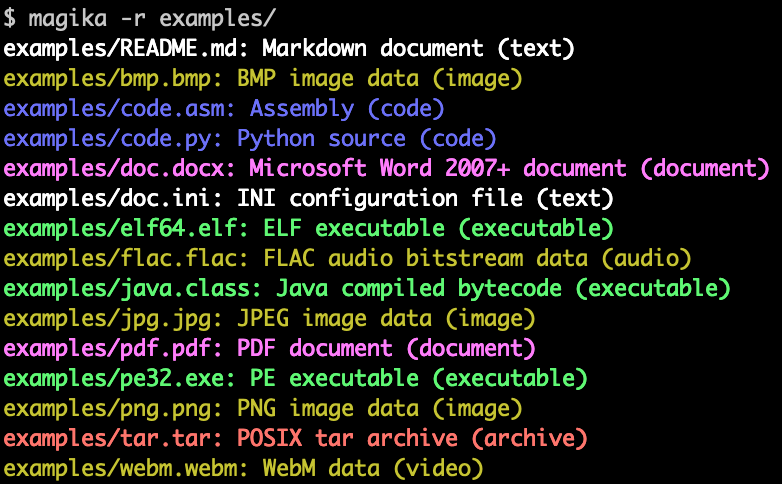
Magikaは、深層学習の最近の進歩を活用して正確な検出を提供する、AIを活用した新しいファイルタイプ検出ツールです。内部では、Magikaはわずか数MBの重さしかないカスタムの高度に最適化されたモデルを採用しており、単一のCPU上で実行している場合でも、ミリ秒以内に正確なファイル識別を可能にします。Magikaは、200以上のコンテンツタイプ(バイナリ形式とテキスト形式の両方のファイル形式をカバー)にわたる約1億サンプルのデータセットでトレーニングおよび評価されており、テストセットで平均約99%の精度を達成しています。
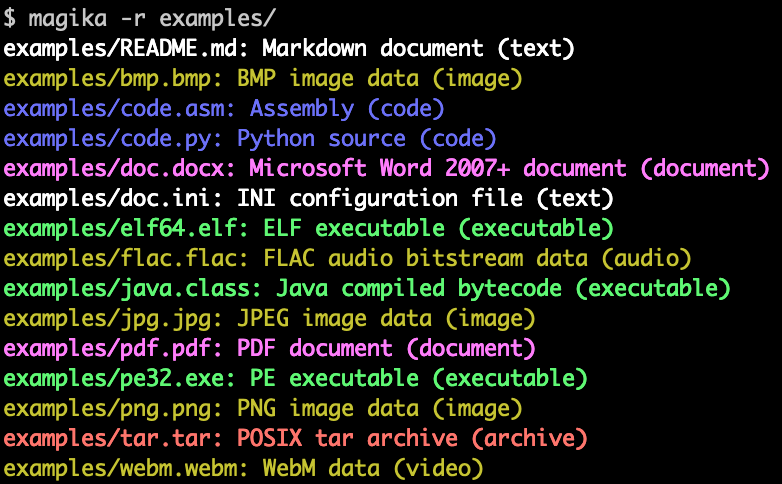
以下は、Magikaのコマンドライン出力の例です:
Magikaは、Gmail、Drive、Safe Browsingのファイルを適切なセキュリティおよびコンテンツポリシースキャナーにルーティングすることでGoogleユーザーの安全性向上を支援するために大規模に使用されており、毎週数千億のサンプルを処理しています。Magikaはまた、VirusTotal(例)およびabuse.ch(例)とも統合されています。
より詳しい背景については、最初のGoogleのOSSブログでの発表記事を読むことができ、Magikaのウェブサイトを参照でき、IEEE/ACM International Conference on Software Engineering (ICSE) 2025で発表された研究論文でさらに詳しく読むことができます。
何もインストールせずにMagikaを試すには、ブラウザでローカルに実行されるウェブデモを使用できます!
-r を使用してディレクトリを再帰的にスキャンすることもできます。high-confidence、medium-confidence、best-guess などの異なる予測モードで制御できます。Magika は Rust で書かれた CLI を提供しており、いくつかの方法でインストールできます。
magika Python パッケージ経由:
pipx install magika
Via brew(macOS / Linux)
brew install magika
インストーラスクリプトを使用する場合:
curl -LsSf https://securityresearch.google/magika/install.sh | sh
または:
powershell -ExecutionPolicy Bypass -c "irm https://securityresearch.google/magika/install.ps1 | iex"
magika-cli Rust パッケージ経由:
cargo install --locked magika-cli
pip install magika
npm install magika
ここでは、すぐに始められるようにいくつかの簡単な例を紹介します。
Magika の内部動作について学ぶには、Magika のウェブサイトの Core Concepts セクションを参照してください。
% cd tests_data/basic && magika -r * | head
asm/code.asm: Assembly (code)
batch/simple.bat: DOS batch file (code)
c/code.c: C source (code)
css/code.css: CSS source (code)
csv/magika_test.csv: CSV document (code)
dockerfile/Dockerfile: Dockerfile (code)
docx/doc.docx: Microsoft Word 2007+ document (document)
docx/magika_test.docx: Microsoft Word 2007+ document (document)
eml/sample.eml: RFC 822 mail (text)
empty/empty_file: Empty file (inode)
% magika ./tests_data/basic/python/code.py --json
[
  {
    "path": "./tests_data/basic/python/code.py",
    "result": {
      "status": "ok",
      "value": {
        "dl": {
          "description": "Python source",
          "extensions": [
            "py",
            "pyi"
          ],
          "group": "code",
          "is_text": true,
          "label": "python",
          "mime_type": "text/x-python"
        },
        "output": {
          "description": "Python source",
          "extensions": [
            "py",
            "pyi"
          ],
          "group": "code",
          "is_text": true,
          "label": "python",
          "mime_type": "text/x-python"
        },
        "score": 0.996999979019165
      }
    }
  }
]
% cat tests_data/basic/ini/doc.ini | magika -
-: INI configuration file (text)
% magika --help
Determines file content types using AI

Usage: magika [OPTIONS] [PATH]...

Arguments:
  [PATH]...
          List of paths to the files to analyze.

          Use a dash (-) to read from standard input (can only be used once).

Options:
  -r, --recursive
          Identifies files within directories instead of identifying the directory itself

      --no-dereference
          Identifies symbolic links as is instead of identifying their content by following them

      --colors
          Prints with colors regardless of terminal support

      --no-colors
          Prints without colors regardless of terminal support

  -s, --output-score
          Prints the prediction score in addition to the content type

  -i, --mime-type
          Prints the MIME type instead of the content type description

  -l, --label
          Prints a simple label instead of the content type description

      --json
          Prints in JSON format

      --jsonl
          Prints in JSONL format

      --format <CUSTOM>
          Prints using a custom format (use --help for details).

          The following placeholders are supported:

            %p  The file path
            %l  The unique label identifying the content type
            %d  The description of the content type
            %g  The group of the content type
            %m  The MIME type of the content type
            %e  Possible file extensions for the content type
            %s  The score of the content type for the file
            %S  The score of the content type for the file in percent
            %b  The model output if overruled (empty otherwise)
            %%  A literal %

  -h, --help
          Print help (see a summary with '-h')

  -V, --version
          Print version
CLI の詳細な例とドキュメントについては、https://crates.io/crates/magika-cli を参照してください。