Skip to content
KitploitKITPLOIT
ツールエクスプロイトブログ
Log in
提出
ツールエクスプロイトブログ
提出

ハッキング、侵入テスト、サイバーセキュリティツールをあなたのセキュリティアーセナルに!

Kitploitはハッキング、サイバーセキュリティ、ペネトレーションテストのツールディレクトリです。最新のプロジェクトアップデートを見つけて、脆弱性の発見、システム分析、テストの自動化、セキュリティの強化を行いましょう。

フィードお問い合わせプライバシー© 2026 Kitploit

ツールディレクトリ

カテゴリ

すべてのカテゴリを見る
Loading categories
sdrtrunk — A cross-platform java application for decoding, monitoring, recording and streaming trunked mobile and related radio protocols using Software Defined Radios (SDR). Website: | Kitploit
ツール/GitHubGitHub/dsheirer/sdrtrunk
Wireless SecurityDigital Forensics
GitHubdsheirer/sdrtrunk

sdrtrunk

A cross-platform java application for decoding, monitoring, recording and streaming trunked mobile and related radio protocols using Software Defined Radios (SDR). Website:

リポジトリを見る
2.2k354603時間23分前Kitploit レビュー済み
共有
要求された言語のコンテンツは利用できません。英語版を表示しています。

Gradle Build Nightly Release Latest Release Downloads License Discord support-google_groups-blue

sdrtrunk

A cross-platform java application for decoding, monitoring, recording and streaming trunked mobile and related radio protocols using Software Defined Radios (SDR).

📖 Read the sdrtrunk User Manual

New to sdrtrunk? Start with the Getting Started guide, then use the User Manual and How-To Guides to set up tuners, playlists, aliases and streaming.
  • Help/Wiki Home Page
  • Getting Started
  • User Manual
  • How-To Guides
  • FAQ
  • Download
  • Support

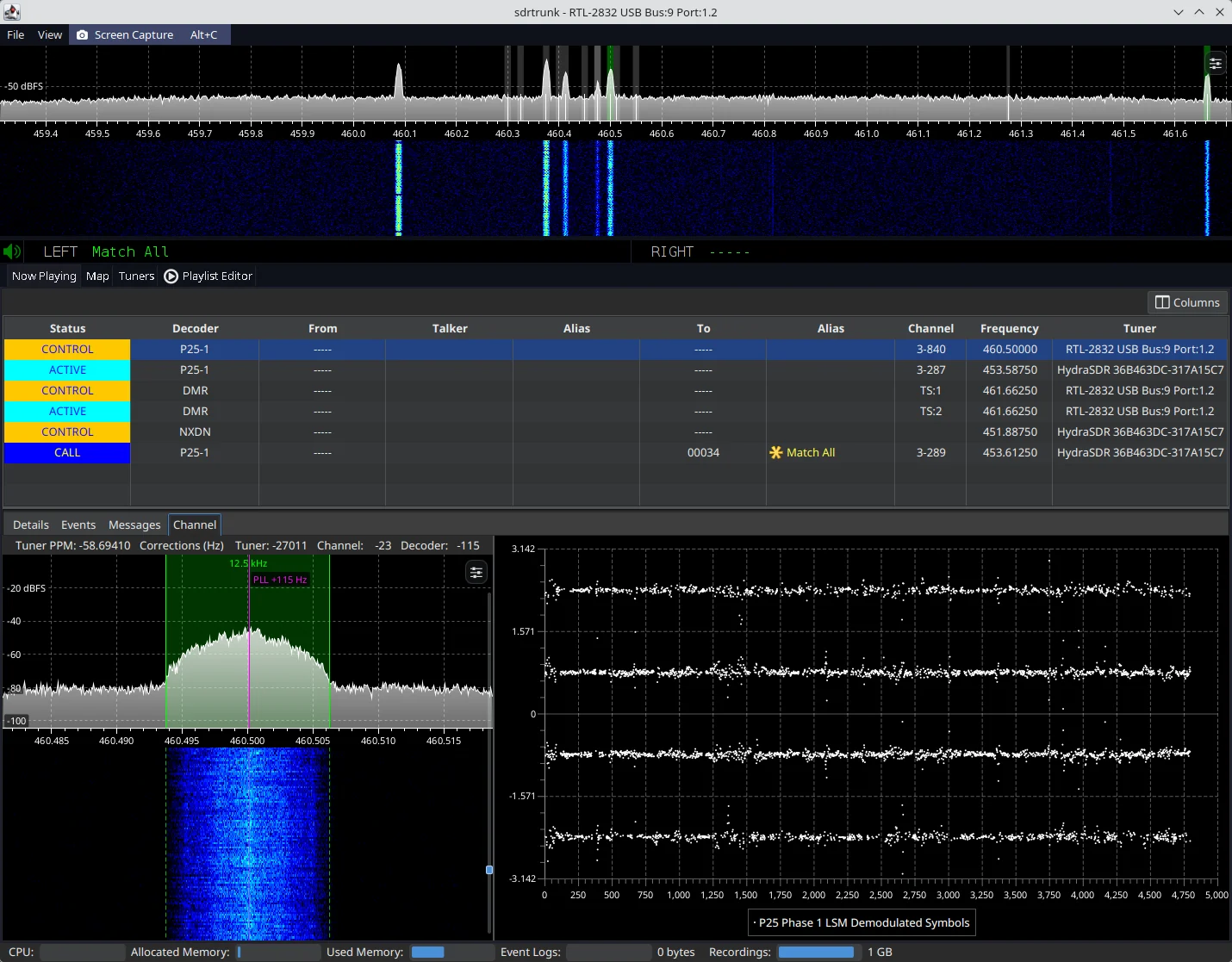
sdrtrunk primary application window decoding a P25 trunked radio system Figure 1: sdrtrunk decoding a P25 Phase 1 simulcast trunked radio system

Download the Latest Release

All release versions of sdrtrunk are available from the releases tab.

  • (alpha) These versions are under development feature previews and likely to contain bugs and unexpected behavior.
  • (beta) These versions are currently being tested for bugs and functionality prior to final release.
  • (final) These versions have been tested and are the current release version.

Download Nightly Software Build

The nightly release contains current builds of the software for all supported operating systems. This version of the software may contain bugs and may not run correctly. However, it let's you preview the most recent changes and fixes before the next software release. Always backup your playlist(s) before you use the nightly builds. Note: the nightly release is updated each time code changes are committed to the code base, so it's not really 'nightly' as much as it is 'current'.

Minimum System Requirements

  • Operating System: Windows (32 or 64-bit), Linux (32 or 64-bit) or Mac (64-bit, 12.x or higher)
  • CPU: 4-core
  • RAM: 8GB or more (preferred). Depending on usage, 4GB may be sufficient.

Creating a Release (Maintainers)

Releases are built and published automatically by the Release GitHub workflow whenever a version tag is pushed to the repository.

The version is taken from the tag, so there is no version number to update in the code. Create and push a tag with a leading v, following the naming convention described in gradle.properties (e.g. v0.6.2-alpha-1, v0.6.2-beta-1 or v0.6.2):

git tag v0.6.2-beta-1
git push origin v0.6.2-beta-1

Builds made from an untagged commit get a version like 0.6.2-beta-1-14-g4626d567 (14 commits after the v0.6.2-beta-1 tag, at commit 4626d567), with -dirty appended when there are uncommitted changes.

The workflow then:

  • Verifies that the version the build derives from git matches the tag and fails if it does not.
  • Builds and tests the code, then creates the release zips for Linux, Mac and Windows (x86-64 and aarch64).
  • Creates a GitHub release titled Version <version> with auto-generated release notes (a "What's Changed" list of the PRs merged since the previous version tag), and attaches the six zip files plus a SHA256SUMS checksum file.
  • Marks tags containing a dash (alpha and beta versions) as pre-releases. Tags without a dash become full releases.

If the workflow fails part way through, fix the problem and re-run it from the Actions tab. It resumes from the draft release left behind. It won't modify a release that has already been published. To rebuild a published release, delete the release and the tag on GitHub, then push the tag again.


ツールをダウンロード

人気

すべて見る →

コミュニティで最も使われているツールを見つけましょう。

  • 1

    OsintHunter

    letox4/osinthunter

    🎯 究極のOSINTツールキット:調査グラフ、信頼度スコアリング、エイリアスファミリー、マップ、タイムライン、レポート。49個のモジュール、400以上のサイト、APIキー不要。

    1.1k
  • 2

    ghostlock-app

    yukonga/ghostlock-app

    GhostLock ワンタップ実行アプリ(CVE-2026-43499)

    601
  • 3

    looking-glass

    anonghosty/looking-glass

    ShadowserverレポートをMongoDBに取り込み、インタラクティブなマップ、分析、調査結果、アドバイザリ、エグゼクティブダッシュボードとして再生するCSIRTプラットフォーム。

    403
  • 4

    ARTEX

    baarai/artex

    プランナー/ワーカーエージェント、資産グラフと探索グラフ、MITMトラフィック記録、脆弱性の再テストを備えたLLMマルチエージェント自律ペネトレーションテストプラットフォーム。

    319
  • 5

    CyberStrikeAI

    ed1s0nz/cyberstrikeai

    AIネイティブなサイバーセキュリティのためのアクションシステム。意図がガバナンスされた実行に変わり、証拠が運用記憶となり、すべての操作が次の操作を改善する。

    265
  • 6

    Aliens_eye

    arxhr007/aliens_eye

    ウェブ全体で7,700以上のソーシャルメディア上の身元を発見・マッピングするAI搭載OSINTエンジン

    263

すべてのツールを探索

ツールコレクションを閲覧

すべてのツールを見る →