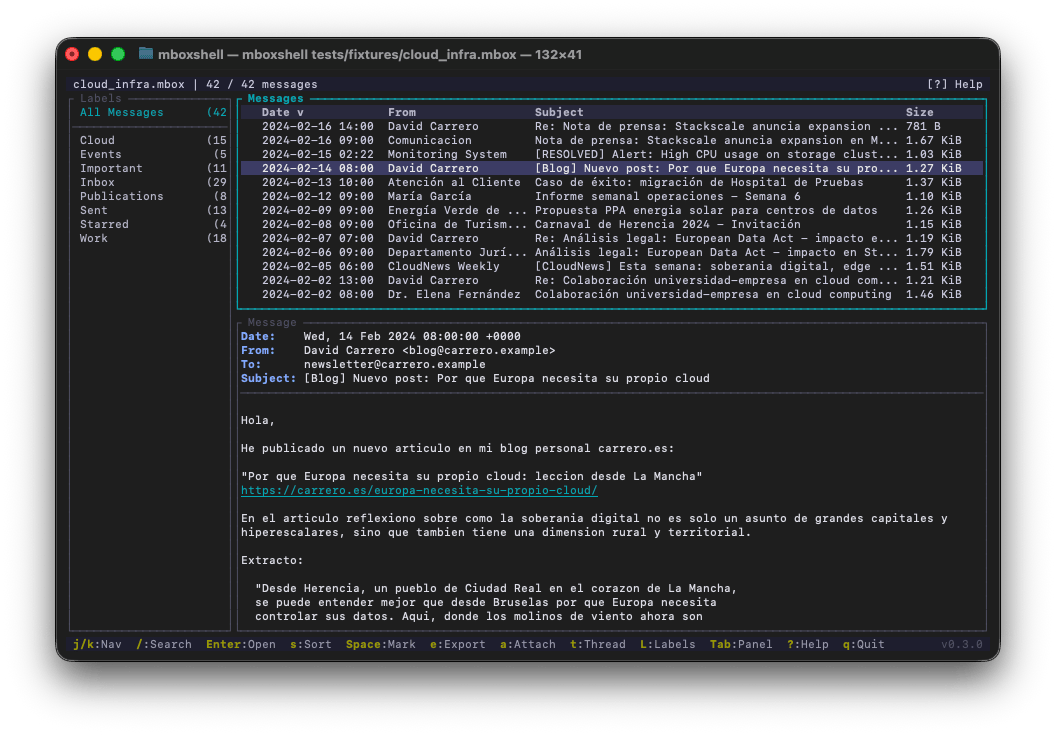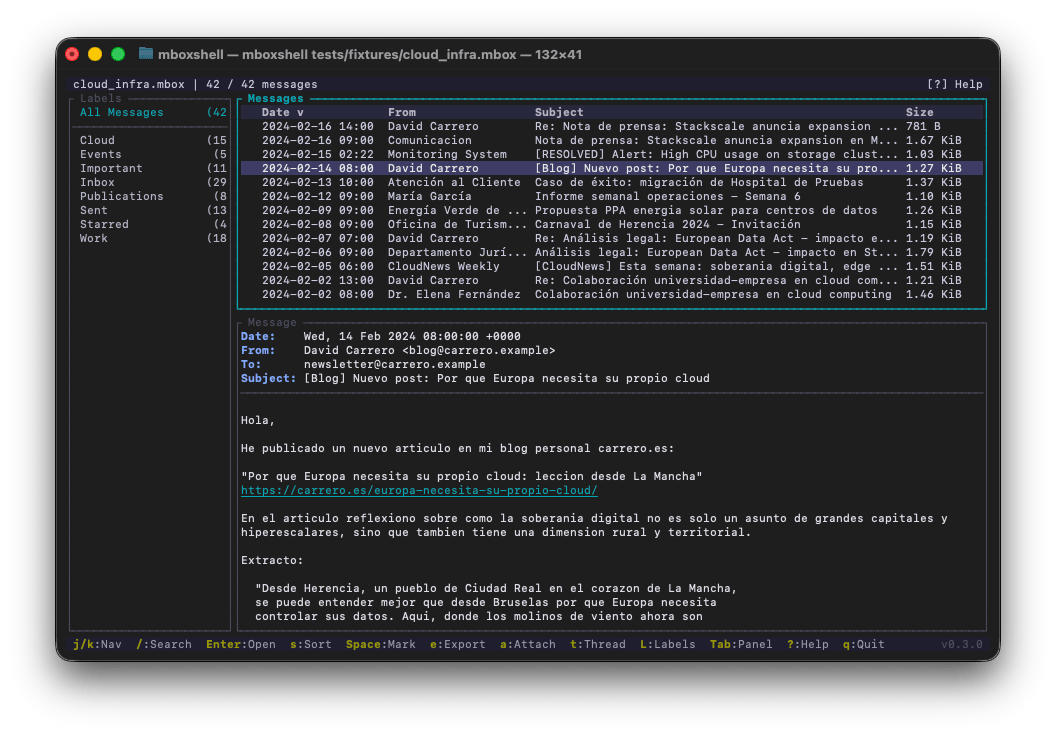

あらゆるサイズのMBOXファイルに対応した高速ターミナルビューア。Gmail Takeoutバックアップ(50 GB以上)のメールをメモリに読み込むことなく、開いて検索しエクスポートできます。


Google Takeoutを使ってGmailからメールをエクスポートすると、数十ギガバイトにもなる .mbox ファイルが1つ以上生成されます。さらに、所有するGoogleグループごとに1つのメールボックスも含まれますが、これは見落としやすく、Gmailのエクスポート自体よりも大きくなることもあります。これらのファイルをメモリに完全に読み込むことなく、効率的に開いて検索し閲覧できるクロスプラットフォームのターミナルツールは存在しませんでした。
mboxShell はこの問題を解決するために作られました。50 GBのMBOXを数秒で開き、数十万件のメッセージをスムーズにナビゲートし、送信者・日付・内容で検索し、必要なものをエクスポートできます。すべてターミナルから、GUIなし、サーバーなし、外部依存なしで実現します。
macOSでネイティブなグラフィカル体験を好む場合は、mboxViewer をチェックしてください。同じチームが開発したネイティブMacアプリです。メールクライアントにインポートすることなく、MBOXファイルを開いて閲覧・検索できる、使い慣れたメールボックス形式のインターフェースを提供します。.mbox ファイルをドラッグ&ドロップするだけで、すべてのメッセージ、添付ファイル、ラベルにクリーンなmacOSネイティブウィンドウで即座にアクセスできます。mboxShellのパースエンジンのパワーを、デスクトップGUIの快適さで利用したいユーザーに最適です。
何もインストールせずにMBOXファイルを覗きたいですか?Online Mbox Viewer をお試しください。同じ作者による無料のMITライセンスのWebアプリです。.mbox ファイルを完全にブラウザ内で開いてレンダリングします。サーバーには何もアップロードされないため、メールはあなたのマシン上に留まります。どのデバイスからでも手軽に確認するのに最適です。ソースコードは github.com/dcarrero/online-mbox-viewer にあります。
.mboxshell.idx)を作成するため、以降のオープンは1秒未満で完了します。X-Gmail-Labels を検出し、サイドバーパネルに仮想フォルダとして表示します。受信トレイ、送信済み、スター付き、カスタムラベルなどでフィルタリングできます。topics.mbox ファイルを読み込み、無意味なファイル名ではなくグループ名を付け、グループを仮想ラベルとして表示し、正確な X-GM-THRID IDで会話をスレッド化します。encoding_rs が認識するあらゆる文字セットをサポートします。from:、subject:、date:、body:、has:attachment、label: など)、日付範囲、サイズフィルター、AND/OR演算子、否定。Releases ページからお使いのプラットフォーム用の最新リリースをダウンロードしてください:
| プラットフォーム | バイナリ |
|---|---|
| Linux x86_64 | mboxshell-linux-x86_64 |
| Linux ARM64 | mboxshell-linux-aarch64 |
| Linux RISC-V 64 | mboxshell-linux-riscv64 |
| FreeBSD x86_64 | mboxshell-freebsd-x86_64 |
| macOS Intel | mboxshell-macos-x86_64 |
| macOS Apple Silicon | mboxshell-macos-aarch64 |
| Windows x86_64 | mboxshell-windows-x86_64.exe |
| Windows ARM64 | mboxshell-windows-arm64.exe |
ダウンロード後、実行可能にしてPATHに移動します:
# Linux / macOS
chmod +x mboxshell-*
sudo mv mboxshell-* /usr/local/bin/mboxshell

# Or place it in a user-local directory
mv mboxshell-* ~/.local/bin/mboxshell
Windowsでは、mboxshell-windows-x86_64.exe を PATH 内のフォルダに移動するか、直接実行してください。
要件: Rust 1.85以降。
# Clone and build
git clone https://github.com/dcarrero/mboxshell.git
cd mboxshell
cargo build --release

# The binary is at target/release/mboxshell
# Install it system-wide:
sudo cp target/release/mboxshell /usr/local/bin/

# Or for the current user only:
cp target/release/mboxshell ~/.local/bin/
# Add the target you need
rustup target add aarch64-apple-darwin      # macOS Apple Silicon
rustup target add x86_64-unknown-linux-gnu  # Linux x86_64
rustup target add aarch64-unknown-linux-gnu # Linux ARM64

# Build for a specific target
cargo build --release --target aarch64-apple-darwin
cargo install --git https://github.com/dcarrero/mboxshell.git
# Open an MBOX file in the terminal UI
mboxshell mail.mbox

# Index and show statistics
mboxshell index mail.mbox
mboxshell stats mail.mbox

# Search from the command line
mboxshell search mail.mbox "from:[email protected] date:2024"
mboxshell search mail.mbox "has:attachment subject:invoice" --json

# Export messages
mboxshell export mail.mbox --format eml --output ./emails/
mboxshell export mail.mbox --format csv --output summary.csv

# Hand over only part of an archive: a new mailbox with just the matches
mboxshell export mail.mbox --format mbox --query "from:[email protected]" -o handover.mbox

# Convert to Maildir (read/replied/flagged state kept as Maildir flags)
mboxshell export mail.mbox --format maildir -o ~/Maildir/Archive

# Extract attachments
mboxshell attachments mail.mbox --output ./attachments/

# Merge multiple MBOX files (duplicates are removed by default)
mboxshell merge file1.mbox file2.mbox -o merged.mbox

# Merge tagging every message with the mailbox it came from
mboxshell merge Inbox.mbox Sent.mbox -o merged.mbox --source-header

# Generate shell completions
mboxshell completions bash > /etc/bash_completion.d/mboxshell
mboxshell completions zsh > ~/.zfunc/_mboxshell
mboxshell completions fish > ~/.config/fish/completions/mboxshell.fish
| コマンド | 説明 |
|---|---|
mboxshell [FILE] | TUIでファイルを開く(デフォルトの動作) |
mboxshell open <path> | TUIでMBOXファイルを開く |
mboxshell index <path> [-f/--force] | バイナリインデックスを構築または再構築する |
mboxshell stats <path> [--json] | MBOXファイルに関する統計を表示する |
mboxshell search <path> <query> [--json] | コマンドラインからメッセージを検索する |
mboxshell export <path> -f <format> -o <output> [--query <q>] | メッセージをエクスポートする(フォーマット: eml, csv, txt, html, mbox, maildir) |
mboxshell merge <files...> -o <output> [--no-dedup] [--source-header] | 複数のMBOXファイルを1つにマージする |
mboxshell attachments <path> -o <output> | すべての添付ファイルを抽出する |
mboxshell completions <shell> | シェル補完を生成する(bash, zsh, fish, powershell, elvish) |
mboxshell manpage | manページを生成する |
グローバルフラグ:
| フラグ | 説明 |
|---|---|
-f, --force | インデックスが存在しても強制的に再構築する(export では -f は --format なので、そこでは --force を明示的に指定する) |
-v, --verbose | ログの詳細度を上げる(-v info, -vv debug, -vvv trace) |
--lang <en|es> | インターフェース言語を強制する(デフォルトでは自動検出) |
マージフラグ:
| フラグ | 説明 |
|---|---|
--no-dedup | 重複検出をスキップし、入力をバイト単位で連結する。改行で終わらない入力の後にのみ改行を追加する(デフォルトでは重複排除が有効: Message-IDと内容の両方が以前のものと一致する場合に重複とみなす) |
--source-header | すべてのメッセージに X-Mbox-Source: <mailbox name> ヘッダーを挿入し、マージされたアーカイブが各メールの元のメールボックスまで追跡可能になるようにする |
ソースラベルは表示されるメールボックス名です。Apple Mailのエクスポート(Inbox.mbox というディレクトリに mbox という名前のファイルが含まれる)の場合、mbox ではなく Inbox.mbox と表示されます。同じラベルを共有することになるメールボックスは、互いに区別されます(Work/Inbox.mbox と Personal/Inbox.mbox)。