 cyberark/skywrapper
SkyWrapper は、AWS における一時的なトークンの疑わしい作成形態や使用方法を発見するのに役立ちます。




SkyWrapperは、特定のAWSアカウントで作成された一時トークンの動作を分析するオープンソースプロジェクトです。このツールは、アカウント内の悪意のある活動を検出するために、一時トークンの不審な作成形態や使用法を見つけることを目的としています。このツールはAWSアカウントを分析し、現在有効な一時トークンをすべて含むExcelシートを作成します。各実行後、結果の概要が画面に表示されます。
SkyWrapper デモ:
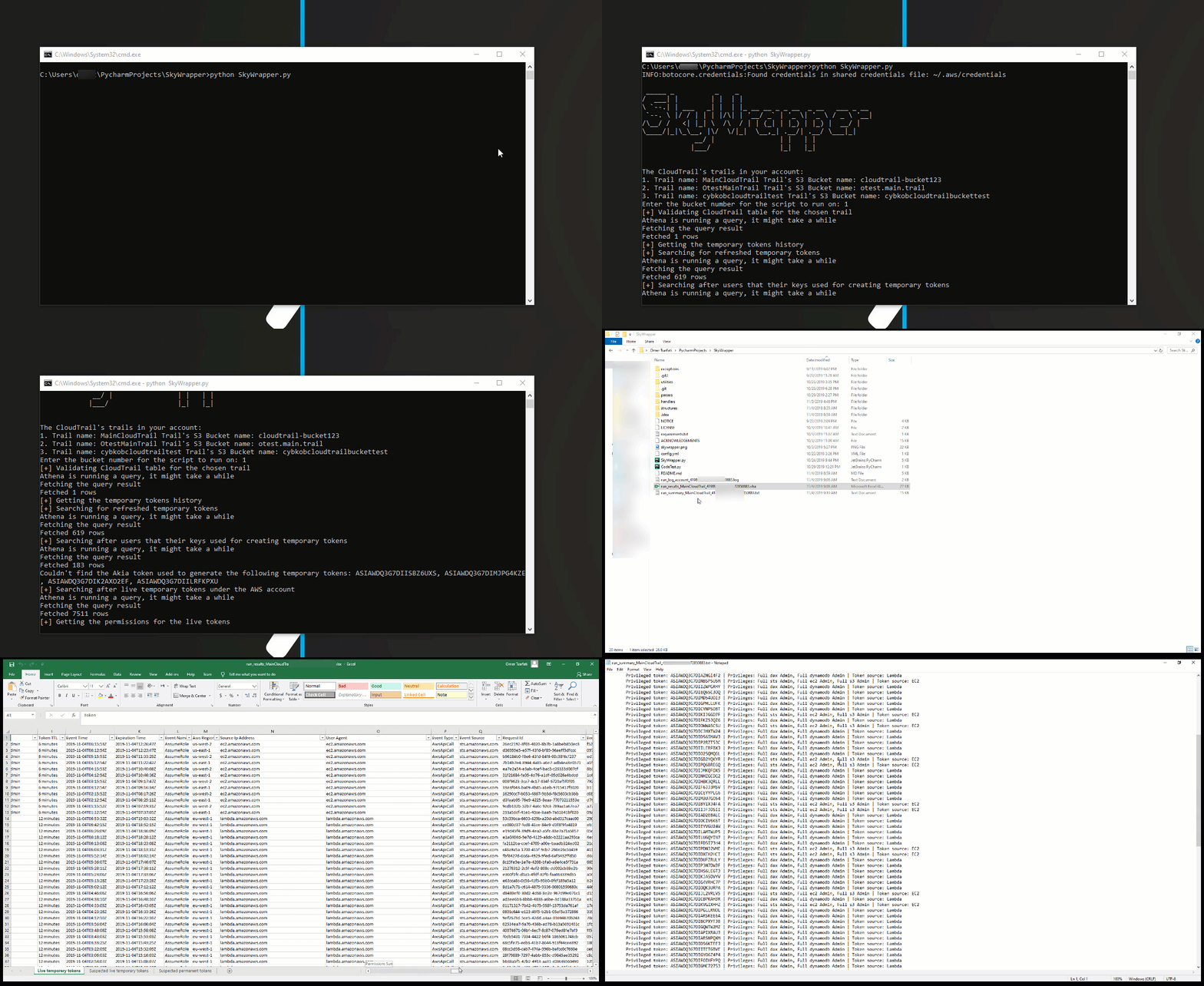
python SkyWrapper.py
このスクリプトを実行するには、少なくとも以下の権限ポリシーが必要です。
{
    "Version": "2012-10-17",
    "Statement": [
        {
            "Sid": "S3TrailBucketPermissions",
            "Effect": "Allow",
            "Action": [
                "s3:GetObject",
                "s3:ListBucketMultipartUploads",
                "s3:ListBucket",
                "s3:GetBucketLocation",
                "s3:ListMultipartUploadParts"
            ],
            "Resource": [
                "arn:aws:s3:::{cloudtrail_bucket_name}/*",
                "arn:aws:s3:::{cloudtrail_bucket_name}
            ]
        },
        {
            "Sid": "IAMReadPermissions",
            "Effect": "Allow",
            "Action": [
                "iam:ListAttachedRolePolicies",
                "iam:ListRolePolicies",
                "iam:GetRolePolicy",
                "iam:GetPolicyVersion",
                "iam:GetPolicy",
                "iam:ListRoles"
            ],
            "Resource": [
                "arn:aws:iam::*:policy/*",
                "arn:aws:iam::*:role/*"
            ]
        },
        {
            "Sid": "GLUEReadWritePermissions",
            "Effect": "Allow",
            "Action": [
                "glue:CreateTable",
                "glue:CreateDatabase",
                "glue:GetTable",
                "glue:GetDatabase"
            ],
            "Resource": "*"
        },
        {
            "Sid": "CLOUDTRAILReadPermissions",
            "Effect": "Allow",
            "Action": [
                "cloudtrail:DescribeTrails"
            ],
            "Resource": "*"
        },
        {
            "Sid": "ATHENAReadPermissions",
            "Effect": "Allow",
            "Action": [
                "athena:GetQueryResults",
                "athena:StartQueryExecution",
                "athena:GetQueryExecution"
            ],
            "Resource": "arn:aws:athena:*:*:workgroup/*"
        },
        {
            "Sid": "S3AthenaResultsBucketPermissions",
            "Effect": "Allow",
            "Action": [
                "s3:PutObject",
                "s3:GetObject",
                "s3:ListBucketMultipartUploads",
                "s3:CreateBucket",
                "s3:ListBucket",
                "s3:GetBucketLocation",
                "s3:ListMultipartUploadParts"
            ],
            "Resource": "arn:aws:s3:::aws-athena-query-results-*"
        }
    ]
}
{trail_bucket} を実際のトレイルのバケット名に変更してください!
複数のトレイルがあり、それらに対してもスクリプトを使用したい場合は、ポリシーの権限リソースセクションにそれらも追加する必要があります。
config.yaml は設定ファイルです。ほとんどの場合、設定はそのままで問題ありません。変更が必要な場合、設定ファイルには説明が記載されています。
athena: # Athena configuration
  database_name: default # The name of the database Athena uses for querying the trail bucket.
  table_name: cloudtrail_logs_{table_name} # The table name of the trail bucket name
  output_location: s3://aws-athena-query-results-{account_id}-{region}/ # The default output location bucket for the query results
output:
  excel_output_file: run_results_{trail}_{account_id}-{date}.xlsx # Excel results file
  summary_output_file: run_summary_{trail}_{account_id}-{date}.txt # Summary text results file
verify_https: True # Enable/ Disable verification of SSL certificates for HTTP requests
account:
    account_id: 0 # The account id - Keep it as 0 in case you don't know it
    aws_access_key_id: # If you keep it empty, the script will look after the default AWS credentials stored in ~/.aws/credentials
    aws_secret_access_key: # If you keep it empty, the script will look after the default AWS credentials stored in ~/.aws/credentials
    aws_session_token: # If you keep it empty, the script will look after the default AWS credentials stored in ~/.aws/credentials
コメント、提案、質問については、Omer Tsarfati (@OmerTsarfati) および CyberArk Labs までお問い合わせください。その他のプロジェクトは https://github.com/cyberark/ でご覧いただけます。
