 cc1a2b/jshunter
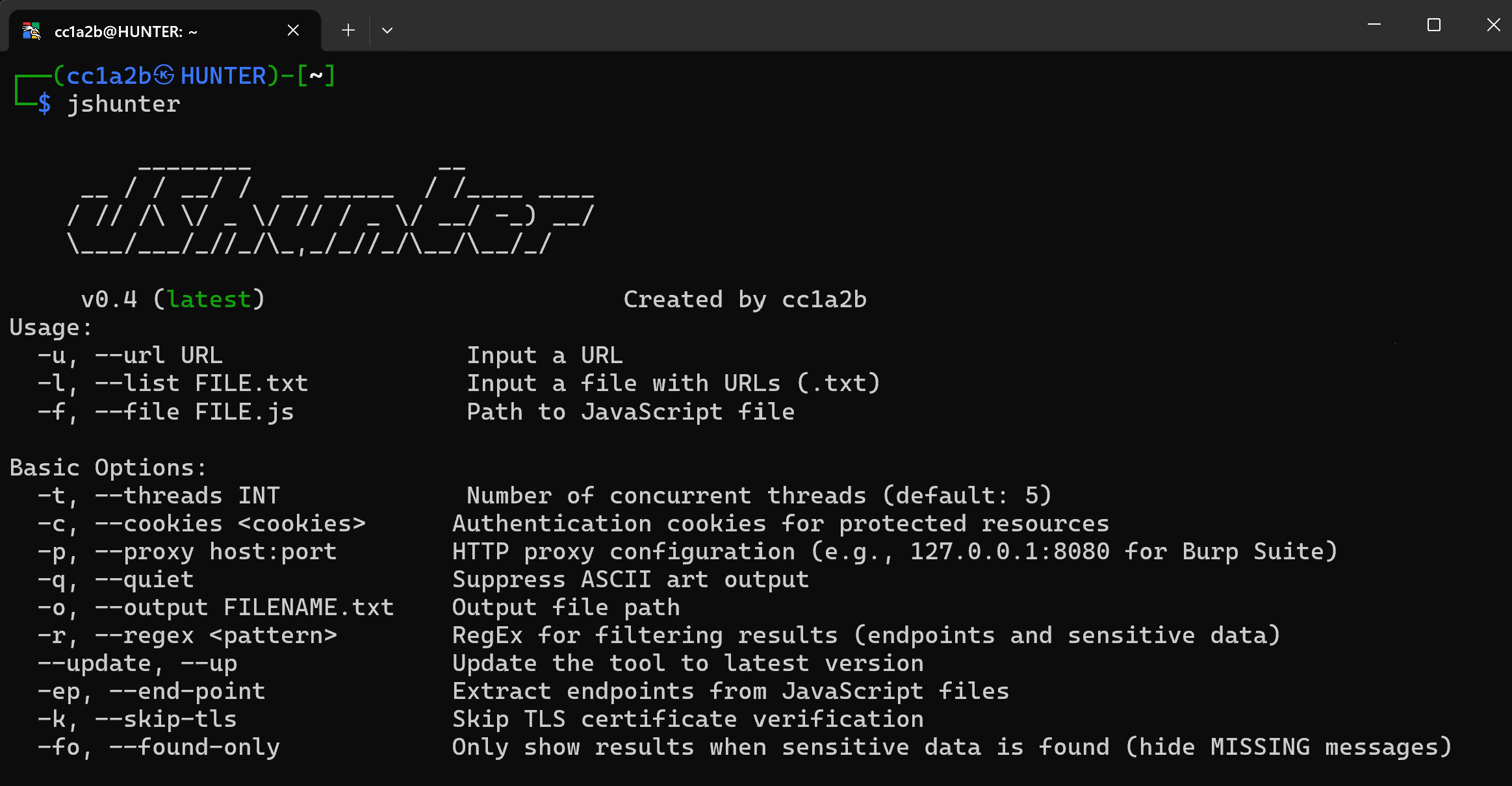
jshunterは、JavaScriptファイルを解析し、エンドポイントを抽出するために設計されたコマンドラインツールです。このツールは、APIエンドポイントや潜在的なセキュリティ脆弱性などの機密データの特定に特化しており、バグバウンティハンターやセキュリティ研究者にとって不可欠なリソースとなっています。


プロフェッショナル向け JavaScript セキュリティ分析ツール
セキュリティ専門家のための、完全なエンドポイント探索、機密データ検出、高度なコード分析
JSHunter は、JavaScript のセキュリティ分析とエンドポイント探索のための包括的なコマンドラインツールです。セキュリティ専門家、ペネトレーションテスター、開発者向けに構築されており、高精度の検出アルゴリズムとプロフェッショナルなレポート機能を備えたエンタープライズグレードの分析機能を提供します。
https://github.com/user-attachments/assets/5a5f60fa-f8dc-4aac-bd06-2e93779f9af4
JSHunter の動作風景 — CLI の実際のターミナルキャプチャ(表示されているシークレットはすべて偽のテストデータです)
高度な分析アルゴリズムによるエンタープライズグレードの精度
JSHunter は、スキャン対象の JavaScript を単にパターンマッチングするのではなく、解析します。シングルパスの ECMAScript スキャナーがレスポンスのすべてのバイトを文字列リテラル、テンプレートリテラル、コメント、正規表現リテラル、またはコードとして分類し、検出ルールはその分類に基づいて評価されます。
これが重要なのは、正規表現は自分が何にマッチしたのかを認識できないからです。同じ 40 文字の base64 文字列が、文字列リテラルの中では「認証情報」を意味し、ミニファイされた識別子の中では「チャンクハッシュ」を意味し、隣接する 2 つのトークンの境界をまたぐ場合は何も意味しません。どれに該当するかを把握することで、多数の近接ヒューリスティックが構造的な答えに置き換わります:
key という単語を探して固定長の文字ウィンドウをスキャンする代わりに、エンジンは値が実際にバインドされている識別子またはプロパティキーを復元します — const stripeSecret = "..." は {contentHash: "..."} とはまったく異なる意味を持ち、形状のみのルールはそのバインディングを要求するようになりました。role クレームから読み取られる Supabase anon JWTs、Twilio SIDs — は、リークとして報告されるのではなく分類されます。--include-public を指定すると、それらも報告されます。すべての拒否は、ボディが確実に JavaScript または JSON であることを条件としています。それ以外の場合 — .env ファイル、散文、生の HTML — エンジンは証拠を提供しますが決して抑制しないため、誤分類された入力がシークレットを隠すことはできません。--no-structural はレイヤー全体をオフにし、v0.7 の動作に戻します。
検出結果は、--json、--ndjson、および SARIF プロパティバッグ内の evidence オブジェクトとしてその根拠を保持します:```json
"exposure": "secret",
"evidence": {
"region": "string-literal",
"role": "assignment",
"bound_to": "awsAccessKeyId",
"shape": "opaque-token",
"charset": "alphanumeric",
"signals": [
{"name": "in-literal", "delta": 0.04, "detail": "value is a complete string-literal"},
{"name": "credential-binding", "delta": 0.12, "detail": "bound to 'awsAccessKeyId'"}
]
}
`--stats` は各ステージで何が削除されたかを報告するため、パイプラインは監査可能な状態に保たれます。

### チャンクグラフとルート探索

最新のアプリケーションは、1つのエントリーバンドルと、バンドラーがインライン化したマニフェストから実行時にURLが組み立てられる数百の遅延読み込みチャンクを配信します。これらへのリンクはどこにも存在しないため、クローラーがそれらを認識することはありません。`-G` はそのマニフェストを復元し、完全なアセットリストとクライアントルートテーブルを出力します:```console
$ jshunter -u https://target.example/_next/static/chunks/main-a1b2c3.js -G
[CHUNKS] https://target.example/...: next runtime, 214 chunks, 37 routes
[CHUNK]  https://target.example/...  https://target.example/_next/static/chunks/settings.11aa22bb33cc.js
[ROUTE]  https://target.example/...  /admin/users/:id
対応ランタイム: webpack 4 および 5 (__webpack_require__.u、miniCssF、
jsonpScriptSrc)、Next.js ビルドマニフェスト、Vite および Rollup (__vite__mapDeps、
__vitePreload)、プレーンな動的 import()、そして React Router、
Vue Router、Angular のルートテーブル。出力はタブ区切りで重複排除されるため、
後続スキャンの入力リストとしてそのままパイプで渡せます:```bash
jshunter -u https://target.example/main.js -G -q | awk -F'\t' '/^[CHUNK]/{print $3}' > chunks.txt
jshunter -l chunks.txt -s -j > findings.json
### プロフェッショナル HTTP & ネットワーキングスイート
<details>
<summary><strong>エンタープライズグレードのネットワーク設定</strong></summary>

**認証 & ヘッダー:**
- **カスタムヘッダー** (`-H`): 繰り返し可能な認証ヘッダーとカスタムリクエストヘッダー
- **Cookie 管理** (`-c`): 保護されたリソースにアクセスするためのセッション Cookie
- **User-Agent 制御** (`-U`): カスタム UA 文字列またはステルス用のファイルベースローテーション

**パフォーマンス & 信頼性:**
- **レート制限** (`-R`): 検知を回避するための設定可能なリクエスト遅延 (ミリ秒)
- **スマートタイムアウト** (`-T`): さまざまなネットワーク条件に対応するカスタムタイムアウト設定
- **インテリジェントリトライ** (`-y`): 失敗したリクエストに対する指数バックオフ付きの自動リトライ機構

**プロフェッショナル統合:**
- **プロキシサポート** (`-p`): 完全な Burp Suite およびカスタムプロキシ統合 (HTTP/HTTPS/SOCKS5)
- **TLS 柔軟性** (`-k`): テスト環境向けのオプションの証明書検証バイパス
- **スレッド制御** (`-t`): 最適なパフォーマンスのための設定可能な同時リクエスト処理

> **セキュリティプロフェッショナル向け機能**: ペネトレーションテストとセキュリティ評価向けに設計
> **例**: `jshunter -l targets.txt -p 127.0.0.1:8080 -H "Authorization: Bearer token" -R 1000`

</details>

### 高度な JavaScript 分析
<details>
<summary><strong>完全なコード分析 & 難読化解除スイート</strong></summary>

**コア分析ツール:**
- **難読化解除エンジン** (`-d`): 深い分析のために圧縮および難読化された JavaScript を展開
- **ソースマップパーサー** (`-m`): ソースマップから元のソースコードを抽出および分析
- **難読化検出** (`-z`): 難読化技術とパターンを識別および分類

**動的分析:**
- **Eval 分析** (`-e`): 動的コード実行 (`eval()`、`Function()`、ランタイム生成) を分析

**コードインテリジェンス:**
- **パターン認識**: 一般的な JavaScript フレームワークとライブラリを識別
- **コード構造分析**: アプリケーションアーキテクチャとデータフローをマッピング
- **コンテキスト認識検出**: コードコンテキストを理解して誤検知を削減

> **プロフェッショナルな使用法**: 分析ツールとセキュリティ検出を組み合わせて最大のカバレッジを実現
> **例**: `jshunter -u target.js -d -m -e -s -g` (完全な難読化解除 + セキュリティ分析)

</details>

### セキュリティ分析スイート
<details>
<summary><strong>完全なセキュリティ評価ツールキット</strong></summary>

**コアセキュリティ検出:**
- **シークレット検出** (`-s`): API キー、アクセストークン、パスワード、ハードコードされた認証情報
- **JWT トークン分析** (`-x`): 認証トークンの抽出、検証、ペイロード検査
- **Firebase セキュリティ** (`-F`): 設定分析、API キー、データベース URL 検出

**高度な分析:**
- **パラメータ発見** (`-P`): 隠されたフォームパラメータ、変数、設定キー
- **URL パラメータ抽出** (`-PU`): 完全な URL コンテキストを持つ高度なパラメータ分析
- **GraphQL 分析** (`-g`): スキーマ検出、クエリ抽出、エンドポイント発見
- **WAF バイパス検出** (`-B`): セキュリティバイパスパターンと回避技術

**スコープ & コンテキスト:**
- **内部エンドポイントフィルタリング** (`-i`): プライベート/内部リソースの識別と分類
- **リンク分析** (`-L`): 包括的な URL 抽出と関係マッピング

> **プロフェッショナルなヒント**: 包括的な分析のためにフラグを組み合わせる (例: `jshunter -u target.js -s -x -F -g`)

</details>

### スコープ & ディスカバリー
<details>
<summary><strong>インテリジェントなクローリング & ターゲティング</strong></summary>

- **再帰的ディスカバリー**: 多深度の JavaScript ファイルクローリング
- **ドメインスコーピング**: 特定のドメインに分析を集中
- **拡張子フィルタリング**: 特定の JavaScript ファイルタイプをターゲット

</details>

### プロフェッショナルレポーティング & エクスポートスイート
<details>
<summary><strong>エンタープライズグレードの出力 & 統合</strong></summary>

**コア出力フォーマット:**
- **コンソール表示**: プロフェッショナルなフォーマットと明確な分類による色分けされたターミナル出力
- **ファイルエクスポート** (`-o`): 包括的な結果をカスタムファイルの場所に保存
- **JSON エクスポート** (`-j`): 自動化とプログラム処理のための構造化データフォーマット
- **CSV エクスポート** (`-C`): エグゼクティブレポーティングと分析のためのスプレッドシート互換フォーマット

**プロフェッショナル統合:**
- **Burp Suite エクスポート** (`-n`): 即時テストのための Burp Suite Professional との直接統合
- **正規表現フィルタリング** (`-r`): ターゲットを絞った結果フィルタリングのためのカスタムパターンマッチング
- **詳細分析** (`-v`): デバッグ情報とコンテキストを含む詳細な分析出力

**結果管理:**
- **クリーンモード** (`--found-only`): 集中的なセキュリティレポーティングのために空の結果を非表示
- **クワイエットモード** (`-q`): 自動スクリプティングと CI/CD 統合のためにバナーを抑制

> **レポーティングワークフロー**: 自動化には JSON、管理レポートには CSV、即時テストには Burp エクスポートを使用
> **例**: `jshunter -l targets.txt -s -j -o security-findings.json` (構造化セキュリティレポート)

</details>

---

## インストール

