trufflehog v3.97.0
漏洩した認証情報を発見、検証、分析する

TruffleHog
漏洩した認証情報を見つけます。
🔎 現在スキャン中
🌐 TruffleHog Enterprise
Git、Jira、Slack、Confluence、Microsoft Teams、Sharepoint(およびその他)を継続的に監視して認証情報を探すことに興味がありますか?エンタープライズ製品が役立ちます!詳細はこちら: https://trufflesecurity.com/trufflehog-enterprise。
エンタープライズ製品の収益は、コミュニティ全体が利益を得られる、より素晴らしいオープンソースプロジェクトの資金に充てています。
TruffleHogとは? 🐽
TruffleHogは、最も強力なシークレットの発見、分類、検証、分析ツールです。この文脈では、シークレットとは、マシンが別のマシンに対して認証するために使用する認証情報を指します。これには、APIキー、データベースパスワード、秘密暗号鍵などが含まれます。
発見 🔍
TruffleHogは、Git、チャット、Wiki、ログ、APIテストプラットフォーム、オブジェクトストア、ファイルシステムなど、さまざまな場所でシークレットを探すことができます。
分類 📁
TruffleHogは800以上のシークレットタイプを分類し、それぞれが属する特定のIDにマッピングします。AWSのシークレットですか?Stripeのシークレットですか?Cloudflareのシークレットですか?Postgresのパスワードですか?SSL秘密鍵ですか?見ただけでは判断が難しいこともあるため、TruffleHogは見つけたすべてを分類します。
検証 ✅
TruffleHogが分類できるすべてのシークレットについて、実際にログインしてそのシークレットが有効かどうかを確認することもできます。このステップは、現在進行形の危険があるかどうかを知るために重要です。
分析 🔬
最も一般的に漏洩する約20種類の認証情報については、シークレットがログインできるかどうかを確認するために1回のリクエストを送信するのではなく、TruffleHogは多くのリクエストを送信して、シークレットに関するあらゆる情報を調べることができます。誰が作成したのか?どのリソースにアクセスできるのか?それらのリソースに対してどのような権限を持っているのか?
📢 コミュニティに参加しよう
質問はありますか?フィードバックは?SlackまたはDiscordに飛び込んで、一緒に交流しましょう。
Slackコミュニティに参加
📺 デモ
```bash
docker run --rm -it -v "$PWD:/pwd" trufflesecurity/trufflehog:latest github --org=trufflesecurity
# :floppy_disk: インストール
いくつかのオプションがあります。
### MacOS ユーザー向け```bash
brew install trufflehog
Docker:
以下のコマンドを実行する前に、Dockerエンジンが動作していることを確認してください:
Unix```bash
docker run --rm -it -v "$PWD:/pwd" trufflesecurity/trufflehog:latest github --repo https://github.com/trufflesecurity/test_keys
#### Windows コマンド プロンプト```bash
docker run --rm -it -v "%cd:/=\%:/pwd" trufflesecurity/trufflehog:latest github --repo https://github.com/trufflesecurity/test_keys
Windows PowerShell```bash
docker run --rm -it -v "${PWD}:/pwd" trufflesecurity/trufflehog github --repo https://github.com/trufflesecurity/test_keys
#### M1およびM2 Mac```bash
docker run --platform linux/arm64 --rm -it -v "$PWD:/pwd" trufflesecurity/trufflehog:latest github --repo https://github.com/trufflesecurity/test_keys
バイナリリリース```bash
Download and unpack from https://github.com/trufflesecurity/trufflehog/releases
### ソースからコンパイル```bash
git clone https://github.com/trufflesecurity/trufflehog.git
cd trufflehog; go install
インストールスクリプトの使用```bash
curl -sSfL https://raw.githubusercontent.com/trufflesecurity/trufflehog/main/scripts/install.sh | sh -s -- -b /usr/local/bin
### インストールスクリプトを使用し、チェックサム署名を検証する(cosignのインストールが必要)```bash
curl -sSfL https://raw.githubusercontent.com/trufflesecurity/trufflehog/main/scripts/install.sh | sh -s -- -v -b /usr/local/bin
インストールスクリプトを使用して特定のバージョンをインストールする```bash
curl -sSfL https://raw.githubusercontent.com/trufflesecurity/trufflehog/main/scripts/install.sh | sh -s -- -b /usr/local/bin
# :closed_lock_with_key: アーティファクトの検証
すべてのアーティファクトにチェックサムが適用され、結果のチェックサムファイルはcosignを使用して署名されます。
署名を検証するには以下のツールが必要です:
- [Cosign](https://docs.sigstore.dev/cosign/system_config/installation/)
検証手順は以下の通りです:
1. 必要なアーティファクトファイルと、[リリース](https://github.com/trufflesecurity/trufflehog/releases)ページから以下のファイルをダウンロードします。
- trufflehog\_{version}\_checksums.txt
- trufflehog\_{version}\_checksums.txt.pem
- trufflehog\_{version}\_checksums.txt.sig
2. 署名を検証します: ```shell
cosign verify-blob <path to trufflehog_{version}_checksums.txt> \
--certificate <path to trufflehog_{version}_checksums.txt.pem> \
--signature <path to trufflehog_{version}_checksums.txt.sig> \
--certificate-identity-regexp 'https://github\.com/trufflesecurity/trufflehog/\.github/workflows/.+' \
--certificate-oidc-issuer "https://token.actions.githubusercontent.com"
- 署名が有効であると確認されたら、ダウンロードしたアーティファクトとSHA256チェックサムが一致することを検証できます: ```shell
sha256sum --ignore-missing -c trufflehog_{version}_checksums.txt
{version} をダウンロードしたファイルのバージョンに置き換えてください
あるいは、インストールスクリプトを使用する場合は、-v オプションを指定して署名検証を実行してください。これには、インストールスクリプトを実行する前に Cosign バイナリがインストールされている必要があります。
🚀 クイックスタート
1: 検証済みシークレットのみをリポジトリでスキャンする
コマンド:```bash trufflehog git https://github.com/trufflesecurity/test_keys --results=verified
期待される出力:```
🐷🔑🐷 TruffleHog. Unearth your secrets. 🐷🔑🐷
Found verified result 🐷🔑
Detector Type: AWS
Decoder Type: PLAIN
Raw result: AKIAYVP4CIPPERUVIFXG
Line: 4
Commit: fbc14303ffbf8fb1c2c1914e8dda7d0121633aca
File: keys
Email: counter <[email protected]>
Repository: https://github.com/trufflesecurity/test_keys
Timestamp: 2022-06-16 10:17:40 -0700 PDT
...
2: GitHub Orgで検証済みのシークレットのみをスキャンする```bash
trufflehog github --org=trufflesecurity --results=verified
## 3: GitHub Organizationのスキャン(アーカイブリポジトリ除外)```bash
trufflehog github --org=trufflesecurity --exclude-archived
4: GitHubリポジトリの検証済みシークレットのみをスキャンし、JSON出力を取得
コマンド:```bash trufflehog git https://github.com/trufflesecurity/test_keys --results=verified --json
期待される出力:```
{"SourceMetadata":{"Data":{"Git":{"commit":"fbc14303ffbf8fb1c2c1914e8dda7d0121633aca","file":"keys","email":"counter \[email protected]\u003e","repository":"https://github.com/trufflesecurity/test_keys","timestamp":"2022-06-16 10:17:40 -0700 PDT","line":4}}},"SourceID":0,"SourceType":16,"SourceName":"trufflehog - git","DetectorType":2,"DetectorName":"AWS","DecoderName":"PLAIN","Verified":true,"Raw":"AKIAYVP4CIPPERUVIFXG","Redacted":"AKIAYVP4CIPPERUVIFXG","ExtraData":{"account":"595918472158","arn":"arn:aws:iam::595918472158:user/canarytokens.com@@mirux23ppyky6hx3l6vclmhnj","user_id":"AIDAYVP4CIPPJ5M54LRCY"},"StructuredData":null}
...
5: GitHubリポジトリ + そのIssueとプルリクエストをスキャンする```bash
trufflehog github --repo=https://github.com/trufflesecurity/test_keys --issue-comments --pr-comments
## 6: S3バケットを高信頼性の結果 (確認済み + 不明) のためにスキャンする```bash
trufflehog s3 --bucket=<bucket name> --results=verified,unknown
7: IAMロールを使用してS3バケットをスキャンする```bash
trufflehog s3 --role-arn=
## 8: SSH認証を使用してGitHubリポジトリをDockerでスキャンする```bash
docker run --rm -v "$HOME/.ssh:/root/.ssh:ro" trufflesecurity/trufflehog:latest git ssh://github.com/trufflesecurity/test_keys
9: 個別のファイルまたはディレクトリをスキャン```bash
trufflehog filesystem path/to/file1.txt path/to/file2.txt path/to/dir
## 10: ローカルのGitリポジトリをスキャンする
Gitリポジトリをクローンします。例えば [テストキー](https://github.com/trufflesecurity/trufflehog/blob/HEAD/[email protected]:trufflesecurity/test_keys.git) リポジトリ。```bash
git clone [email protected]:trufflesecurity/test_keys.git
親ディレクトリ(gitリポジトリの外)からtrufflehogを実行してください。```bash trufflehog git file://test_keys --results=verified,unknown
悪意のあるGit設定からローカルスキャンを保護するため(CVE-2025-41390参照)、TruffleHogはスキャン前にローカルのGitリポジトリを一時ディレクトリにクローンします。これは[Gitのセキュリティベストプラクティス](https://git-scm.com/docs/git#_security)に従っています。リポジトリをクローンするカスタムパスを指定したい場合(tmpの代わり)、`--clone-path`フラグを使用できます。ローカルクローンプロセスをスキップしてリポジトリを直接スキャンしたい場合(信頼できるリポジトリでのみ行ってください)、`--trust-local-git-config`フラグを使用できます。
## 11: 確認されたシークレットのみをGCSバケットでスキャン```bash
trufflehog gcs --project-id=<project-ID> --cloud-environment --results=verified
12: 検証済みシークレットのみをDockerイメージからスキャンする
--imageフラグを複数回使用して、複数のイメージをスキャンします。```bash
to scan from a remote registry
trufflehog docker --image trufflesecurity/secrets --results=verified
to scan from the local docker daemon
trufflehog docker --image docker://new_image:tag --results=verified
to scan from an image saved as a tarball
trufflehog docker --image file://path_to_image.tar --results=verified
## 13: CIでのスキャン
`--since-commit` フラグを、マージ先のデフォルトブランチ(例:"main")に設定します。`--branch` フラグを、PRのブランチ名(例:"feature-1")に設定します。使用するCI/CDプラットフォームに応じて、この値は動的に取得できます(例:[Circle CIのCIRCLE_BRANCH](https://circleci.com/docs/variables/) や [Travis CIのTRAVIS_PULL_REQUEST_BRANCH](https://docs.travis-ci.com/user/environment-variables/))。CI/CDワークフロー中にリポジトリがクローンされ、ターゲットブランチがすでにチェックアウトされている場合は、`--branch HEAD` で十分です。`--fail` フラグは、有効な認証情報が見つかった場合に183のエラーコードを返します。```bash
trufflehog git file://. --since-commit main --branch feature-1 --results=verified,unknown --fail
14: Postmanワークスペースをスキャンする
--workspace-id、--collection-id、--environment フラグを複数回使用して、複数のターゲットをスキャンします。```bash
trufflehog postman --token= --workspace-id=
## 15: Jenkinsサーバーをスキャンする```bash
trufflehog jenkins --url https://jenkins.example.com --username admin --password admin
16: Elasticsearchサーバーのスキャン
ローカルクラスターのスキャン
TruffleHogを使ってローカルクラスターに認証する方法は2つあります: (1) ユーザー名とパスワード, (2) サービス・トークン。
ユーザー名とパスワードを使用してローカルクラスターに接続する```bash
trufflehog elasticsearch --nodes 192.168.14.3 192.168.14.4 --username truffle --password hog
#### サービス トークンを使用してローカル クラスターに接続する```bash
trufflehog elasticsearch --nodes 192.168.14.3 192.168.14.4 --service-token ‘AAEWVaWM...Rva2VuaSDZ’
Elastic Cloud クラスターのスキャン
Elastic Cloud 上のクラスターをスキャンするには、Cloud ID と API キーが必要です。```bash
trufflehog elasticsearch
--cloud-id 'search-prod:dXMtY2Vx...YjM1ODNlOWFiZGRlNjI0NA=='
--api-key 'MlVtVjBZ...ZSYlduYnF1djh3NG5FQQ=='
## 17. GitHubリポジトリのフォーク間オブジェクト参照と削除されたコミットをスキャン
次のコマンドは、GitHubリポジトリ上の削除されたコミットや隠されたコミットを列挙し、それらをシークレットについてスキャンします。これはアルファリリースの機能です。```bash
trufflehog github-experimental --repo https://github.com/<USER>/<REPO>.git --object-discovery
In addition to the normal TruffleHog output, the --object-discovery flag creates two files in a new $HOME/.trufflehog directory: valid_hidden.txt and invalid.txt. These are used to track state during commit enumeration, as well as to provide users with a complete list of all hidden and deleted commits (valid_hidden.txt). If you'd like to automatically remove these files after scanning, please add the flag --delete-cached-data.
注意: この方法を使用してリポジトリ上のすべての有効なコミットを列挙するには、リポジトリのサイズに応じて20分から数時間かかります。列挙にかかる時間を把握できるようにプログレスバーを追加しました。実際のシークレットスキャンは非常に高速に実行されます。
Cross Fork Object Referencesの詳細については、ブログ記事をお読みください。
18. Hugging Faceのスキャン
Hugging Faceのモデル、データセット、Space、Bucketをスキャンする```bash
trufflehog huggingface
--model <model_id>
--dataset <dataset_id>
--space <space_id>
--bucket <bucket_id>
### Hugging Face OrganizationまたはUserに属するすべてのModels、Datasets、Spaces、Bucketsをスキャンする```bash
trufflehog huggingface --org <orgname> --user <username>
(オプション)組織またはユーザーをスキャンする際に、--skip-all-models、--skip-all-datasets、--skip-all-spaces、--skip-all-bucketsを使用してリソースのクラス全体をスキップできます。または、特定のリソースをスキップするには、--ignore-models <model_id>、--ignore-datasets <dataset_id>、--ignore-spaces <space_id>、--ignore-buckets <bucket_id>を使用します。
ディスカッションとPRコメントのスキャン```bash
trufflehog huggingface --model <model_id> --include-discussions --include-prs
## 19. stdin 入力のスキャン```bash
aws s3 cp s3://example/gzipped/data.gz - | gunzip -c | trufflehog stdin
❓ よくある質問
- 表示されるのは「🐷🔑🐷 TruffleHog. Unearth your secrets. 🐷🔑🐷」だけでプログラムが終了するのはなぜですか?
- それはシークレットが検出されなかったことを意味します。
- GitHub組織をスキャンするのに時間がかかるのはなぜですか?
- 認証されていないGitHubスキャンにはレート制限があります。レート制限を改善するには、
--tokenフラグに個人アクセストークンを追加してください。
- 認証されていないGitHubスキャンにはレート制限があります。レート制限を改善するには、
- 秘密鍵が検証されたと表示されますが、どういう意味ですか?
- 検証された結果とは、TruffleHogがその資格情報をサービスのAPIに対してテストし、有効であることを確認したことを意味します。秘密鍵の場合、その鍵がSSHまたはSSL認証に実際に使用できることを確認しました。詳細については、Driftwoodのブログ記事をご覧ください:ブログ記事
- 特定のシークレットを簡単に無視する方法はありますか?
- スキャン対象のソースが行番号をサポートしている場合、そのシークレットが含まれる行に
trufflehog:ignoreコメントを追加することで、そのシークレットを無視できます。
- スキャン対象のソースが行番号をサポートしている場合、そのシークレットが含まれる行に
📰 v3の新機能
TruffleHog v3はGoで完全に書き直され、多くの強力な新機能が追加されました。
- 700以上の認証情報検出器を追加し、それぞれのAPIに対するアクティブな検証をサポートしています。
- また、GitHub、GitLab、Docker、ファイルシステム、S3、GCS、Circle CI、Travis CIのスキャンをネイティブサポートするようになりました。
- 秘密鍵を数百万のGitHubユーザーおよび数十億のTLS証明書に対して即座に検証できるようになりました。Driftwood技術を使用しています。
- バイナリ、ドキュメント、その他のファイル形式をスキャン
- GitHub Actionおよびpre-commitフックとして利用可能
認証情報の検証とは?
検出された可能性のある認証情報ごとに、それに属すると思われるAPIに対してプログラムによる検証を注意深く実装しました。検証により誤検知が排除され、次の3つの結果ステータスが提供されます。
- verified: APIテストにより認証情報が有効かつアクティブであると確認されました
- unverified: 認証情報は検出されたが有効性は確認されていません(無効、期限切れ、検証無効の可能性あり)
- unknown: ネットワークまたはAPIエラーなどのエラーにより検証が試行されたが失敗しました
例えば、AWS認証情報検出器はAWS APIに対してGetCallerIdentity API呼び出しを実行し、AWS認証情報がアクティブかどうかを検証します。
📝 使用方法
TruffleHogには、スキャンしたいデータソースごとにサブコマンドがあります:
- git
- github
- gitlab
- huggingface
- docker
- s3
- filesystem (ファイルおよびディレクトリ)
- syslog
- circleci
- travisci
- gcs (Google Cloud Storage)
- postman
- jenkins
- elasticsearch
- stdin
- multi-scan
各サブコマンドには、サブコマンドに--helpフラグを指定することで確認できるオプションがあります:```
$ trufflehog git --help
usage: TruffleHog [] [ ...]
TruffleHog is a tool for finding credentials.
Flags: -h, --[no-]help Show context-sensitive help (also try --help-long and --help-man). --log-level=0 Logging verbosity on a scale of 0 (info) to 5 (trace). Can be disabled with "-1". --[no-]profile Enables profiling and sets a pprof and fgprof server on :18066. -j, --[no-]json Output in JSON format. --[no-]json-legacy Use the pre-v3.0 JSON format. Only works with git, gitlab, and github sources. --[no-]github-actions Output in GitHub Actions format. --concurrency=12 Number of concurrent workers. --[no-]no-verification Don't verify the results. --results=RESULTS Specifies which type(s) of results to output: verified (confirmed valid by API), unknown (verification failed due to error), unverified (detected but not verified), filtered_unverified (unverified but would have been filtered out). Defaults to verified,unverified,unknown. --[no-]no-color Disable colorized output --[no-]allow-verification-overlap Allow verification of similar credentials across detectors --[no-]filter-unverified Only output first unverified result per chunk per detector if there are more than one results. --filter-entropy=FILTER-ENTROPY Filter unverified results with Shannon entropy. Start with 3.0. --config=CONFIG Path to configuration file. --[no-]print-avg-detector-time Print the average time spent on each detector. --[no-]no-update Don't check for updates. --[no-]fail Exit with code 183 if results are found. --[no-]fail-on-scan-errors Exit with non-zero error code if an error occurs during the scan. --verifier=VERIFIER ... Set custom verification endpoints. --[no-]custom-verifiers-only Only use custom verification endpoints. --detector-timeout=DETECTOR-TIMEOUT Maximum time to spend scanning chunks per detector (e.g., 30s). --archive-max-size=ARCHIVE-MAX-SIZE Maximum size of archive to scan. (Byte units eg. 512B, 2KB, 4MB) --archive-max-depth=ARCHIVE-MAX-DEPTH Maximum depth of archive to scan. --archive-timeout=ARCHIVE-TIMEOUT Maximum time to spend extracting an archive. --include-detectors="all" Comma separated list of detector types to include. Protobuf name or IDs may be used, as well as ranges. --exclude-detectors=EXCLUDE-DETECTORS Comma separated list of detector types to exclude. Protobuf name or IDs may be used, as well as ranges. IDs defined here take precedence over the include list. --[no-]no-verification-cache Disable verification caching --[no-]force-skip-binaries Force skipping binaries. --[no-]force-skip-archives Force skipping archives. --[no-]skip-additional-refs Skip additional references. --user-agent-suffix=USER-AGENT-SUFFIX Suffix to add to User-Agent. --[no-]version Show application version.
Commands: help [...] Show help.
git []
Find credentials in git repositories.
github [] Find credentials in GitHub repositories.
github-experimental --repo=REPO [] Run an experimental GitHub scan. Must specify at least one experimental sub-module to run: object-discovery.
gitlab --token=TOKEN [] Find credentials in GitLab repositories.
filesystem [] [...] Find credentials in a filesystem.
s3 [] Find credentials in S3 buckets.
gcs [] Find credentials in GCS buckets.
syslog --format=FORMAT [] Scan syslog
circleci --token=TOKEN Scan CircleCI
docker [] Scan Docker Image
travisci --token=TOKEN Scan TravisCI
postman [] Scan Postman
elasticsearch [] Scan Elasticsearch
jenkins --url=URL [] Scan Jenkins
huggingface [] Find credentials in HuggingFace datasets, models and spaces.
stdin Find credentials from stdin.
multi-scan Find credentials in multiple sources defined in configuration.
json-enumerator [...] Find credentials from a JSON enumerator input.
analyze Analyze API keys for fine-grained permissions information.
例えば、`git` リポジトリをスキャンするには、```
trufflehog git https://github.com/trufflesecurity/trufflehog.git
設定
TruffleHogは、--configフラグで指定する設定ファイル内でカスタム正規表現検出器と複数のソースを定義することをサポートしています。正規表現検出器は任意のサブコマンドで使用できますが、設定で定義されたソースはmulti-scanサブコマンドのみで使用されます。
ソースの設定形式については、Truffle Securityのソース設定ドキュメントページを参照してください。
GitHubソース設定の例とオプションリファレンス:```yaml sources:
- connection:
'@type': type.googleapis.com/sources.GitHub
repositories:
- https://github.com/trufflesecurity/test_keys.git unauthenticated: {} name: example config scan type: SOURCE_TYPE_GITHUB verify: true
`sources` キーの下に複数の接続を定義することができ(上記参照)、TruffleHogはすべてのソースを同時にスキャンします。
## S3
S3ソースは、IAMユーザーに加えて、スキャン用にIAMロールを引き受けることをサポートしています。これにより、各アカウントにハードコードされた認証情報に依存することなく、ユーザーが複数のAWSアカウントをスキャンしやすくなります。
TruffleHogが最初に使用するIAM IDは、引き受ける各IAMロールの[信頼ポリシー](https://aws.amazon.com/blogs/security/how-to-use-trust-policies-with-iam-roles/)においてプリンシパルとして `AssumeRole` 権限を持っている必要があります。
ローカルに設定された認証情報、またはEC2インスタンス上の場合はインスタンスメタデータを使用して特定のバケットをスキャンするには:```bash
trufflehog s3 --bucket=<bucket-name>
特定のバケットを引き受けたロールを使用してスキャンするには:```bash trufflehog s3 --bucket= --role-arn=
複数のロールを個別の引数として渡すことができます。次のコマンドは、各ロールがS3 APIでリストする権限を持つすべてのバケットをスキャンしようとします:```bash
trufflehog s3 --role-arn=<iam-role-arn-1> --role-arn=<iam-role-arn-2>
終了コード:
- 0: エラーなし、結果も見つかりませんでした。
- 1: エラーが発生しました。一部のソースでスキャンが完了していない可能性があります。
- 183: エラーは発生しませんでしたが、結果が見つかりました。
--failフラグが使用された場合にのみ返されます。
:octocat: TruffleHog Github Action
一般的な使用方法```
on: push: branches: - main pull_request:
jobs: test: runs-on: ubuntu-latest steps: - name: Checkout code uses: actions/checkout@v4 with: fetch-depth: 0 - name: Secret Scanning uses: trufflesecurity/trufflehog@main with: extra_args: --results=verified,unknown
上の設定例では、`main` へのすべてのPRとプッシュでライブの機密情報をスキャンしています。スキャンされるのは、参照されたコミット内のコード変更のみです。ブランチ全体をスキャンしたい場合は、以下の「高度な使い方」セクションをご覧ください。
### 浅いクローン
TruffleHogをスタンドアロンのワークフローに組み込んでおり、TruffleHogと同時に他のCI/CDツールを実行していない場合は、[浅いクローン](https://git-scm.com/docs/git-clone#Documentation/git-clone.txt---depthltdepthgt)を使用してワークフローを高速化することをお勧めします。以下にその例を示します:```
...
- shell: bash
run: |
if [ "${{ github.event_name }}" == "push" ]; then
echo "depth=$(($(jq length <<< '${{ toJson(github.event.commits) }}') + 2))" >> $GITHUB_ENV
echo "branch=${{ github.ref_name }}" >> $GITHUB_ENV
fi
if [ "${{ github.event_name }}" == "pull_request" ]; then
echo "depth=$((${{ github.event.pull_request.commits }}+2))" >> $GITHUB_ENV
echo "branch=${{ github.event.pull_request.head.ref }}" >> $GITHUB_ENV
fi
- uses: actions/checkout@v3
with:
ref: ${{env.branch}}
fetch-depth: ${{env.depth}}
- uses: trufflesecurity/trufflehog@main
with:
extra_args: --results=verified,unknown
...
イベントの種類(プッシュまたはPR)に応じて、存在するコミット数を計算します。次に2を加えることで、コード変更前のベースコミットを参照できるようにします。その整数値を、該当ブランチとともにチェックアウトアクションのfetch-depthフラグに渡します。これにより、チェックアウトプロセスが大幅に短縮されるはずです。
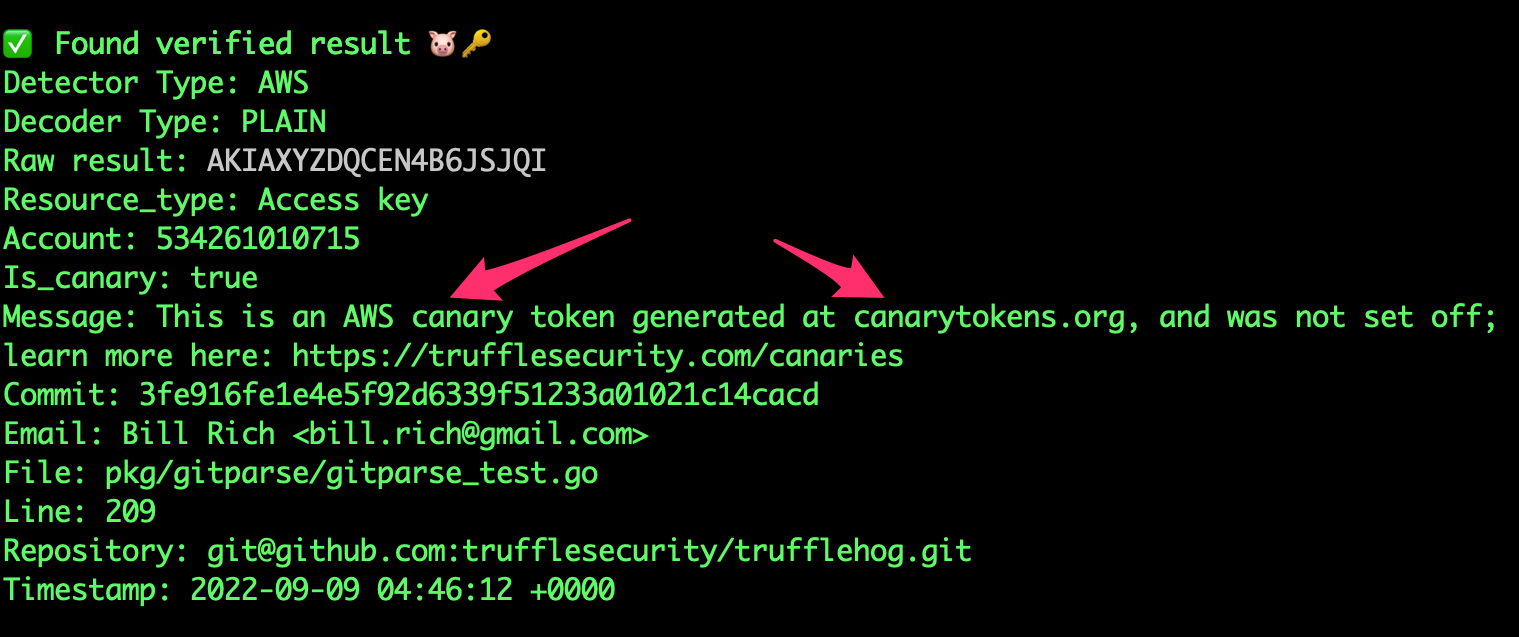
Canary detection
TruffleHogは静的にhttps://canarytokens.org/を検出します。

高度な使い方```yaml
- name: TruffleHog
uses: trufflesecurity/trufflehog@main
with:
Repository path
path:Start scanning from here (usually main branch).
base:Scan commits until here (usually dev branch).
head: # optionalExtra args to be passed to the trufflehog cli.
extra_args: --log-level=2 --results=verified,unknownScan with a specific TruffleHog version (default: latest).
version:Docker image to pull. Override to use a registry mirror (default: ghcr.io/trufflesecurity/trufflehog).
image:
特定の `base` および `head` ref を指定したい場合は、`base` 引数(TruffleHog CLI の `--since-commit` フラグ)と `head` 引数(TruffleHog CLI の `--branch` フラグ)を使用できます。これらの引数を使用するのは、デフォルトの動作が機能しない非常に特定のユースケースに限定することをお勧めします。
#### Advanced Usage: Scan entire branch```
- name: scan-push
uses: trufflesecurity/trufflehog@main
with:
base: ""
head: ${{ github.ref_name }}
extra_args: --results=verified,unknown
TruffleHog GitLab CI
使用例```yaml
stages:
- security
security-secrets: stage: security allow_failure: false image: alpine:latest variables: SCAN_PATH: "." # Set the relative path in the repo to scan before_script: - apk add --no-cache git curl jq - curl -sSfL https://raw.githubusercontent.com/trufflesecurity/trufflehog/main/scripts/install.sh | sh -s -- -b /usr/local/bin script: - trufflehog filesystem "$SCAN_PATH" --results=verified,unknown --fail --json | jq rules: - if: '$CI_PIPELINE_SOURCE == "merge_request_event"'
上記のパイプライン例では、すべてのリポジトリディレクトリとファイルでライブシークレットをスキャンしています。このジョブは、パイプラインソースがマージリクエストイベントである場合にのみ実行されます。つまり、新しいマージリクエストが作成されたときにトリガーされます。
## プリコミットフック
TruffleHogは、プリコミットフックで使用することで、資格情報がコンピュータから流出する前に漏洩を防ぐことができます。
[プリコミットフックのドキュメント](https://github.com/trufflesecurity/trufflehog/blob/HEAD/PreCommit.md)を参照してください。
## カスタム正規表現検出器(アルファ版)
TruffleHogは、カスタム正規表現の検出と検証をサポートしています。
検出には、少なくとも1つの**正規表現**と**キーワード**が必要です。
**キーワード**とは、検出対象の正規表現内またはその周辺に現れる固定のリテラル文字列識別子です。
検証の柔軟性を最大限に高めるため、正規表現の一致を含むウェブフックが使用されます。
TruffleHogは、正規表現の一致を含むJSON POSTリクエストを設定されたウェブフックエンドポイントに送信します。
エンドポイントが`200 OK`レスポンスステータスコードで応答した場合、シークレットは検証済みと見なされます。
ネットワーク/APIエラーにより検証が失敗した場合、結果はunknownとしてマークされます。
カスタム検出器は、いくつかの異なるフィルタリングメカニズムをサポートしています:エントロピー、一致全体を対象とする正規表現、キャプチャされたシークレットを対象とする正規表現、およびシークレットに対してチェックされる除外ワードリスト(キャプチャグループが存在する場合はキャプチャグループ、存在しない場合は全体の一致)。カスタム検出器に複数の`regex`が設定されている場合(この例では`hogID`と`hogToken`)、フィルターは各正規表現に適用されることに注意してください。[こちら](https://github.com/trufflesecurity/trufflehog/blob/HEAD/examples/generic_with_filters.yml)に、これらのフィルターを使用したカスタム検出器の例があります。
**注:** この機能はアルファ版であり、変更される可能性があります。
### 正規表現検出器の例
[こちら](https://github.com/trufflesecurity/trufflehog/blob/HEAD/pkg/custom_detectors/CUSTOM_DETECTORS.md)に、検証サーバーを使用したカスタム正規表現検出器の設定方法があります。
## 汎用JWT検出
TruffleHogは、見つけた汎用JWTのサブセットの検出と検証をサポートしています。
具体的には、JWTがHMACではなく公開鍵暗号を使用し、公開鍵を取得できる場合、TruffleHogはJWTが有効かどうかを判断できます。
## :mag: 分析
TruffleHogは、資格情報のより詳細な分析を実行して、その権限とアクセス可能なリソースを表示することをサポートしています。```bash
trufflehog analyze
❤️ コントリビューター
このプロジェクトは、貢献してくださるすべての方々のおかげで成り立っています。[コントリビュート]
💻 コントリビューション
コントリビューションは大歓迎です! まずはコントリビューションガイドラインをご覧ください。
TruffleHog v2 へのコントリビューションは受け付けなくなりましたが、コードは v2 ブランチで利用可能です。
新しいシークレット検出器の追加
新しいシークレット検出器を追加するためのドキュメントとツールを公開しました。一緒に検出を改善しましょう!
ライブラリとしての使用
現在、trufflehogは活発に開発中であり、現時点ではパブリックAPIの安定性について保証できません。
ライセンス変更
v3.0以降、TruffleHogはAGPL 3ライセンスでリリースされており、LICENSEに含まれています。TruffleHog v3.0は以前のコードベースを一切使用していませんが、コマンドラインインターフェースの下位互換性を保持するよう配慮されました。このリリースより前の成果物は、このリポジトリの履歴および以前のパッケージリリースとタグにおいて、GPL 2.0ライセンスで引き続き利用可能です。今後のコントリビューションを受け入れるためには、完了したCLAが必要です。