secretlint v13.0.3
プラグイン可能なリンターツールで、認証情報のコミットを防止します。
Secretlint 

Secretlintは、認証情報のコミットを防ぐプラグイン可能なlintツールです。
特徴
- スキャナー: プロジェクト内の認証情報を検出し報告します。
- プロジェクトに優しい: プロジェクトのセットアップとCIサービスの統合が簡単です。
- Pre-コミットフック: 認証情報ファイルのコミットを防止します。
- プラグイン可能: カスタムルールの作成と柔軟な設定を可能にします。
- ドキュメント: ルールがシークレットとして検出する理由を説明します。
クイックデモ
シークレットリントのlint結果はhttps://secretlint.github.io/で確認できます。
クイックスタート
ワンコマンドでプロジェクトにSecretlintを試すことができます。
すでにDockerをインストールしている場合:
docker run -v `pwd`:`pwd` -w `pwd` --rm -it secretlint/secretlint secretlint "**/*"
すでにNode.jsをインストールしている場合:
npx @secretlint/quick-start "**/*"
実行後、
結果が空で終了ステータスが0の場合、プロジェクトは安全です。
それ以外の場合はエラーレポートが表示され、プロジェクトに生データとして認証情報が含まれています。

継続的なセキュリティを確保したい場合は、以下のインストールガイドを参照し、pre-commitフックとCIを設定してください。
インストール
Dockerの使用
前提条件: Dockerが必要です。
私たちのDockerコンテナを使用すると、ダウンロードするのとほぼ同時にNode.jsとsecretlintが動作する環境を手に入れられます。
以下のコマンドで、現在のディレクトリ配下のすべてのファイルをsecretlintでチェックできます:
docker run -v `pwd`:`pwd` -w `pwd` --rm -it secretlint/secretlint secretlint "**/*"
secretlint/secretlint Dockerコンテナは設計上、設定なしで動作します。
このDockerイメージには以下のパッケージが組み込まれています:
- @secretlint/secretlint-rule-preset-recommend
- @secretlint/secretlint-rule-pattern
- @secretlint/secretlint-formatter-sarif
詳細は、secretlintのDockerfileを参照してください。
Node.jsの使用
前提条件: Node.js 22+が必要です。
SecretlintはJavaScriptで書かれています。 npmを使用してSecretlintをインストールできます:``` npm install secretlint @secretlint/secretlint-rule-preset-recommend --save-dev
次に、設定ファイルを設定してください:```
npx secretlint --init
最後に、Secretlint を任意のファイルやディレクトリで次のように実行できます:``` npx secretlint "**/*"
:memo: Secretlintは[globパターン](https://github.com/mrmlnc/fast-glob#basic-syntax)をサポートしており、globパターンはダブルクォートで囲む必要があります。
また、`npm install --global`を使用してSecretlintをグローバルにインストールすることも可能です。ただし、一部のルールがグローバルで壊れる可能性があるため、推奨しません。
### 単一実行可能バイナリの使用
**前提条件:** なし
単一実行可能バイナリを使用することで、Node.jsなしで`secretlint`コマンドを使用できます。
1. [Releasesページ](https://github.com/secretlint/secretlint/releases)から最新のバイナリをダウンロードします。
2. ファイルのパーミッションを実行可能に変更します: `chmod +x ./secretlint`
3. `./secretlint --init`を実行して設定ファイルを作成します。
4. `./secretlint "**/*"`を実行してプロジェクトをリントします。
詳細については、[publish/binary-compiler](https://github.com/secretlint/secretlint/blob/HEAD/publish/binary-compiler)のREADMEを参照してください。
## 使用法
`secretlint --help`で使用法が表示されます。
Secretlint CLI that scan secret/credential data.
Usage
$ secretlint [file|glob*]
Note
supported glob syntax is based on picomatch (the engine used by micromatch)
https://github.com/micromatch/picomatch#globbing-features
https://github.com/micromatch/micromatch#matching-features
Options
--init setup config file. Create .secretlintrc.json file from your package.json
--format [String] formatter name. Default: "stylish". Available Formatter: checkstyle, compact, github, jslint-xml, junit, pretty-error, stylish, tap, unix, json, mask-result, table
--output [path:String] output file path that is written of reported result.
--secretlintrc [path:String] path to .secretlintrc config file. Default: .secretlintrc.*
--secretlintignore [path:String] path to .secretlintignore file. Default: .secretlintignore
--stdinFileName [String] filename to process STDIN content. Some rules depend on filename to check content.
--no-color disable ANSI-color of output.
--no-terminalLink disable terminalLink of output.
--no-maskSecrets disable masking of secret values; secrets are masked by default.
--no-glob disable glob pattern interpretation; treat all inputs as literal file paths.
--no-gitignore disable .gitignore cascade respect; .gitignore files are
respected by default (since v13).
Options for Developer
--profile Enable performance profile.
--secretlintrcJSON [String] a JSON string of .secretlintrc. use JSON string instead of rc file.
Experimental Options
--locale [String] locale tag for translating message. Default: en
Examples
# Scan a single file
$ secretlint ./README.md
# Scan all files (wrap glob in double quotes to avoid shell expansion)
$ secretlint "**/*"
$ secretlint "source/**/*.ini"
# Treat inputs as literal paths (for SvelteKit (group) / Next.js [param] etc.)
$ secretlint --no-glob "src/(auth)/login.ts"
# Lint STDIN content (filename hint affects which rules apply)
$ echo "SECRET" | secretlint --stdinFileName=secret.txt
# Use a custom config file
$ secretlint "**/*" --secretlintrc=.secretlintrc.custom.json
# Scan files ignored by .gitignore (e.g. to verify build artifacts)
$ secretlint --no-gitignore "dist/**/*"
# Mask secrets in a file in-place
$ secretlint .zsh_history --format=mask-result --output=.zsh_history
# Output JSON for programmatic parsing
$ secretlint "**/*" --format=json --output=secretlint-report.json
# Output GitHub Actions annotations in CI
$ secretlint "**/*" --format=github
Exit Status
Secretlint exits with the following values:
- 0:
- Linting succeeded, no errors found.
- Found lint error but --output is specified.
- 1:
- Linting failed, errors found.
- 2:
- Unexpected error occurred, fatal error.
## 設定
Secretlintには設定ファイル`.secretlintrc.{json,yml,js}`があります。
- ドキュメント: [Configuring Secretlint](https://github.com/secretlint/secretlint/blob/HEAD/docs/configuration.md)
`secretlint --init`を実行すると、ディレクトリに`.secretlintrc.json`ファイルが作成されます。
その中には、次のようにいくつかのルールが設定されています:```json
{
"rules": [
{
"id": "@secretlint/secretlint-rule-preset-recommend"
}
]
}
id プロパティは secretlint ルールパッケージの名前です。
Secretlint には組み込みルールはありません。
ルールを追加したい場合、パッケージをインストールし、.secretlintrc ファイルにルールを追加する必要があります。
各ルールは同じ設定パターンを持ちます。
options: ルールのオプション定義。詳細は各ルールのドキュメントを参照してください。disabled:disabledがtrueの場合、ルールを無効にします。allowMessageIds:allowMessageIdsはエラーレポートを抑制したいメッセージ ID の配列です。- メッセージ ID は各ルールで定義されており、ルールのドキュメントを参照してください。
Example: options
例えば、@secretlint/secretlint-rule-example は options に allows を持っています。
この allows オプションは、無視したい RegExp ライクな文字列 のリストを定義します。```json
{
"rules": [
{
"id": "@secretlint/secretlint-rule-example",
"options": {
"allows": [
"/dummy_secret/i"
]
}
}
]
}
`@secretlint/secretlint-rule-preset-recommend` のようなプリセットを使用する場合、オプションは `rules` に指定する必要があります。
例えば、`@secretlint/secretlint-rule-preset-recommend > @secretlint/secretlint-rule-aws` のオプションです。```json5
{
"rules": [
{
"id": "@secretlint/secretlint-rule-preset-recommend",
"rules": [
{
"id": "@secretlint/secretlint-rule-aws",
"options": {
"allows": [
// it will be ignored
"xxxx-xxxx-xxxx-xxxx-xxxx"
]
}
}
]
}
]
}
例: allowMessageIds
例えば、以下のエラーレポートが secretlint の実行により得られたとします:```
$ secretlint "**/*"
SECRET.txt 1:8 error [EXAMPLE_MESSAGE] found secret: SECRET @secretlint/secretlint-rule-example
✖ 1 problem (1 error, 0 warnings)
このエラーのメッセージIDは、`@secretlint/secretlint-rule-example`内の`EXAMPLE_MESSAGE`です。
このエラーを無視したい場合は、`allowMessageIds`を使用してください。```json
{
"rules": [
{
"id": "@secretlint/secretlint-rule-example",
"allowMessageIds": ["EXAMPLE_MESSAGE"]
}
]
}
@secretlint/secretlint-rule-preset-recommend のようなプリセットを使用する場合、オプションは rules 内に記述する必要があります。
たとえば、@secretlint/secretlint-rule-aws の "AWSAccountID" と "AWSAccessKeyID" を無視したい場合は、次のように記述します。```json5
{
"rules": [
{
"id": "@secretlint/secretlint-rule-preset-recommend",
"rules": [
{
"id": "@secretlint/secretlint-rule-aws",
"allowMessageIds": ["AWSAccountID", "AWSAccessKeyID"]
}
]
}
]
}
### `.gitignore` と `.secretlintignore` によるファイルの無視
Secretlintは、Gitと同様にファイルシステムを走査し、ネストされた `.gitignore` ファイルを尊重します。ワーキングディレクトリからファイルまでのパス上にある `.gitignore` にマッチするファイルまたはディレクトリはスキップされます。
`.secretlintignore` は `.gitignore` と同じように機能し、追加で参照されます。解決順序は以下の通りです:
1. 組み込みの無視: `.git`、`node_modules`、および `.secretlintrc*` ファミリー。
2. `--secretlintignore` で指定されたファイル(デフォルト: `.secretlintignore`)。
3. 各ディレクトリの `.gitignore`(カスケードされます)。
gitignoreされているファイル(たとえば、`.env` がgitignoreされているプロジェクト内の `.env` ファイル)をスキャンするには、`--no-gitignore` を指定します:```
secretlint --no-gitignore "**/*"
v13 への移行:
.gitignoreがデフォルトで尊重されるようになりました。以前は、secretlint は.gitignoreに関係なくマッチする全てのファイルをスキャンしていました。以前の動作に戻すには--no-gitignoreを渡してください。- インクルードパターンは picomatch glob 構文(ブレース展開、
**、文字クラスなど)に従います。カスケードされた無視スタック(.gitignore、.secretlintignore、組み込みの無視リスト)は標準の.gitignoreセマンティクスに従い、ブレース展開をサポートしません。そのため、無視パターンには**/{cache,tmp}ではなく**/.cacheと記述してください。- パターンはデフォルトで glob として解釈されます。パターンが既存のディスク上のパスに解決される場合、名前が glob メタ文字(
[、(、{、?)を含んでいても、ウォーカーはそれをリテラルとして扱います(これは globby の古いconvertPathToPatternの動作を反映しています)。まだディスク上に存在しないパスに対してリテラルな扱いを強制するには--no-globを渡してください。- ディレクトリのシンボリックリンクは検索中に追跡されます(以前の globby ベースの動作と一致)が、
.gitignoreおよび.secretlintignoreのルールが参照するのは、解決されたターゲットではなく、シンボリックリンクのパスです。サイクルはrealpathによって検出されるため、各ユニークなターゲットは最大1回だけエントリされます。
コメントによる無視
@secretlint/secretlint-rule-filter-comments は secretlint-disable のようなコメントによる無視をサポートしています。```
// secretlint-disable
THIS IS SECRET, BUT IT WILL BE IGNORED
// secretlint-enable
詳細については、[Configuring Secretlint](https://github.com/secretlint/secretlint/blob/HEAD/docs/configuration.md)を参照してください。
## ユースケース
### lintエラーメッセージ内のシークレットをマスクする(デフォルト動作)
Secretlintはデフォルトでlintエラーメッセージ内のシークレットをマスクします。これにより、CIログ、ターミナル出力、またはAIエージェントツール使用時の偶発的なシークレット露出を防ぐのに役立ちます。```bash
# Secrets are masked by default
$ secretlint "**/*"
出力に実際の秘密の値を表示するには、--no-maskSecrets を使用します:```bash
$ secretlint --no-maskSecrets "**/*"
### シークレットの修正
Secretlintはシークレットを自動的に修正することはできません。
しかし、`--format=mask-result` を使用して入力ファイルのシークレットをマスクすると便利です。
例えば、`.zsh_history` ファイルのシークレットをマスクして上書きすることができます。```bash
$ secretlint .zsh_history --format=mask-result --output=.zsh_history
ルールパッケージ
Secretlintのルールは、個別のモジュールとして実装されています。
- @secretlint/secretlint-rule-npm
- @secretlint/secretlint-rule-aws
- @secretlint/secretlint-rule-gcp
- @secretlint/secretlint-rule-github
- @secretlint/secretlint-rule-gitlab
- @secretlint/secretlint-rule-privatekey
- @secretlint/secretlint-rule-basicauth
- @secretlint/secretlint-rule-slack
- @secretlint/secretlint-rule-sendgrid
- @secretlint/secretlint-rule-shopify
- @secretlint/secretlint-rule-stripe
- @secretlint/secretlint-rule-openai
- @secretlint/secretlint-rule-anthropic
- @secretlint/secretlint-rule-grafana
- @secretlint/secretlint-rule-groq
- @secretlint/secretlint-rule-linear
- @secretlint/secretlint-rule-1password
- @secretlint/secretlint-rule-database-connection-string
- @secretlint/secretlint-rule-databricks
- @secretlint/secretlint-rule-hashicorp-vault
- @secretlint/secretlint-rule-vercel
- @secretlint/secretlint-rule-azure
- @secretlint/secretlint-rule-docker
- @secretlint/secretlint-rule-figma
- @secretlint/secretlint-rule-cloudflare
- @secretlint/secretlint-rule-tailscale
- @secretlint/secretlint-rule-huggingface
- @secretlint/secretlint-rule-notion
- @secretlint/secretlint-rule-secp256k1-privatekey
- @secretlint/secretlint-rule-no-k8s-kind-secret
- @secretlint/secretlint-rule-pattern
- @secretlint/secretlint-rule-no-homedir
- @secretlint/secretlint-rule-no-dotenv
- @secretlint/secretlint-rule-filter-comments
また、Secretlintは推奨ルールセットを含むルールプリセットを提供しています。
カスタムルール
独自のSecretlintルールを作成できます。
プロジェクトに適したSecretlintルールを入手したいですか?作成することができます!Secretlintルールは単なるnpmパッケージです。
Secretlintルールの作成方法については、docs/secretlint-rule.mdを参照してください。
インテグレーション
プロジェクトごとのPre-commitフック
Secretlintは、いくつかのpre-commitツールと一緒に使用できます。 これにより、Secretlintでリンティングすることで、秘密データのコミットを防ぐことができます。
プロジェクトにSecretlintを適用して、チーム開発のセキュリティを向上させます。
Husky + lint-staged
使用例: Node.jsプロジェクトにSecretlintを導入したい場合、この組み合わせが便利です。
Husky と lint-staged をインストールしてください:``` npx husky-init && npm install lint-staged --save-dev
`.husky/pre-commit` にフックを追加する:```
npx husky add .husky/pre-commit "npx --no-install lint-staged"
package.json を編集:```json5
{
// add "lint-staged" field
"lint-staged": {
"*": [
"secretlint --no-glob"
]
}
}
> **注:** `--no-glob` フラグが必要なのは、lint-staged がグロブ特殊文字を含む可能性のあるリテラルなファイルパスを渡すためです(例: Next.js、SvelteKit などで使用される `(group)` や `[param]` ルーティングパターン)。
つまり、コミット前に Secretlint によって各ステージングされたファイルをチェックすることを意味します。
#### [pre-commit](https://github.com/pre-commit/pre-commit)
**ユースケース:** Docker で開発しているプロジェクトがある場合。secretlint に簡単に統合できます。
インストール [pre-commit](https://pre-commit.com/#install)
# macOS. see also https://pre-commit.com/#install
brew install pre-commit
`.pre-commit-config.yaml` を作成:```
- repo: local
hooks:
- id: secretlint
name: secretlint
language: docker_image
entry: secretlint/secretlint:latest secretlint
セットアップ例リポジトリ:
Bashスクリプト
あるいは、このスクリプトを .git/hooks/pre-commit として保存し、実行権限を付与します(chmod +x .git/hooks/pre-commit):```bash
#!/bin/sh
FILES=$(git diff --cached --name-only --diff-filter=ACMR | sed 's| |\ |g')
[ -z "$FILES" ] && exit 0
Secretlint all selected files
echo "$FILES" | xargs ./node_modules/.bin/secretlint --no-glob
If you using docker
echo "$FILES" | xargs docker run -v pwd:pwd -w pwd --rm secretlint/secretlint secretlint
RET=$? if [ $RET -eq 0 ] ;then exit 0 else exit 1 fi
### Pre-commit Hook globally
**ユースケース:** secretlintを使って任意のプロジェクトをチェックしたい場合、グローバルなgitフックを使用できます。
[Git 2.9+](https://github.blog/2016-06-13-git-2-9-has-been-released/)は[`core.hooksPath`](https://git-scm.com/docs/githooks)をサポートしています。
これにより、secretlintをグローバルに統合できます。
secretlint + Dockerを使用したgitフックのサンプルプロジェクトを作成しました。
- [secretlint/git-hooks](https://github.com/secretlint/git-hooks)
- 要件: Docker
以下の手順でセットアップできます:```shell script
# clone this repository
git clone https://github.com/secretlint/git-hooks git-hooks
cd git-hooks
# integrate secretlint to git hook globally
git config --global core.hooksPath $(pwd)/hooks
core.hooksPathを設定すると、secretlintはコミット前に任意のファイルをチェックします。
詳細はsecretlint/git-hooksプロジェクトを参照してください。
Node.js版はグローバルなgitフックとしても使用できます。 興味があれば、@azu/git-hooksを参照してください。
CI
GitHub Actions
既にsecretlintをNode.jsを使用して設定している場合、GitHub Actionsで自分の設定を使ってsecretlintを実行できます。
.github/workflows/secretlint.ymlをリポジトリに配置してください。```yaml
name: Secretlint
on: [push, pull_request]
permissions:
contents: read
jobs:
test:
name: "Secretlint"
runs-on: ubuntu-latest
steps:
- name: checkout
uses: actions/checkout@v3
- name: setup Node.js
uses: actions/setup-node@v3
with:
node-version: 22
- name: Install
run: npm ci
- name: Lint with Secretlint
run: npx secretlint "**/*"
##### `--format github` プルリクエストのアノテーション用
`--format github` を使用すると、プルリクエストのファイルにリントエラーをアノテーションとして表示できます。
このフォーマッタは、プルリクエスト内の変更ファイルにエラーアノテーションを直接表示する [GitHub Actions ワークフローコマンド](https://docs.github.com/en/actions/using-workflows/workflow-commands-for-github-actions) を出力します。```yaml
- name: Lint with Secretlint
run: npx secretlint --format github "**/*"
この設定は、プルリクエストのレビュー注釈を統合します。

- サンプルリポジトリ: https://github.com/secretlint/secretlint-github-actions-example
- サンプルプルリクエスト: https://github.com/secretlint/secretlint-github-actions-example/pull/1/files
差分ファイルのみをチェックしたい場合は、以下の例を参照してください。```yaml name: test-diff on: push: pull_request: jobs: test-diff: permissions: contents: read name: "Run secretlint to diff files" runs-on: ubuntu-latest steps: - name: checkout uses: actions/checkout@v4 with: # fetch history to get all changed files on push or pull_request event fetch-depth: 0 - name: Get changed files id: changed-files uses: tj-actions/changed-files@v44 with: quotepath: "false" - name: setup Node ${{ matrix.node-version }} uses: actions/setup-node@v4 with: node-version: 22 - name: Show changed files run: echo "${{ steps.changed-files.outputs.all_changed_files }}" - name: Install if: steps.changed-files.outputs.any_changed == 'true' run: npm ci - name: Run secretlint if: steps.changed-files.outputs.any_changed == 'true' run: npx secretlint --no-glob ${{ steps.changed-files.outputs.all_changed_files }}
#### Mega-Linter
[Mega-Linter](https://nvuillam.github.io/mega-linter/) は、任意のCIツールにネイティブ対応するリンターアグリゲーターであり、デフォルトで [**secretlint**](https://nvuillam.github.io/mega-linter/descriptors/credentials_secretlint/) を含む [80以上のリンターアプリ](https://nvuillam.github.io/mega-linter/supported-linters/) を組み込んでいます。
次のコマンドを使用して、任意のリポジトリプロジェクトに[インストール](https://nvuillam.github.io/mega-linter/installation/)できます(事前にNode.jsがインストールされている必要があります)```shell
npx mega-linter-runner --install

ブラウザ
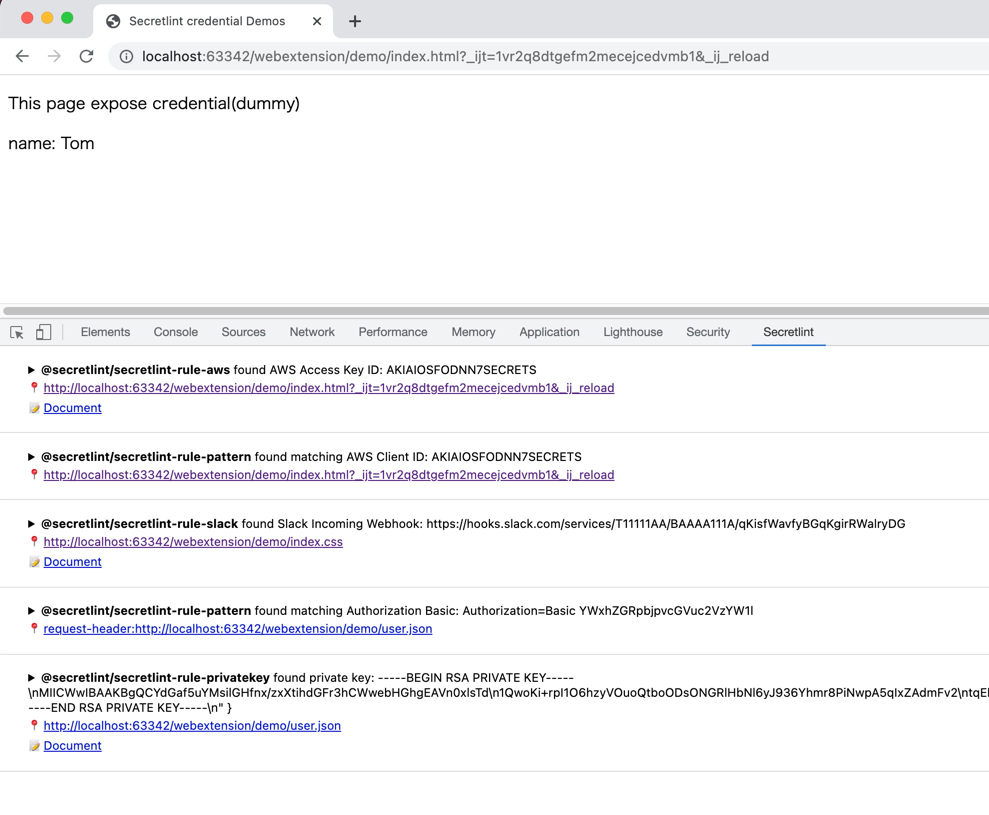
Secretlint WebExtension はブラウザで動作します。
- Firefox: https://addons.mozilla.org/ja/firefox/addon/secretlint/
- Chrome: https://chrome.google.com/webstore/detail/secretlint/hidpojbnemkajlnibhmeilpgoddkjjkf
このウェブ拡張機能は、リクエスト/レスポンスに含まれる認証情報を見つけることを目的としています。

Secretlint WebExtension は Chrome/Firefox の DevTools に統合されます。 この拡張機能は、ウェブ開発者が露出した認証情報に気付くのに役立ちます。
macOS
SecureClipboard は、Secretlint を使用して、クリップボード内のシークレットを貼り付ける前に検出してマスクする macOS メニューバーアプリケーションです。
その他
SARIF 形式のサポート
@secretlint/secretlint-formatter-sarif を使用してください。``` npm install @secretlint/secretlint-formatter-sarif --dev secretlint --format @secretlint/secretlint-formatter-sarif "**/*"
## セマンティックバージョニングポリシー
Secretlintプロジェクトは[セマンティックバージョニング](https://semver.org/ "セマンティックバージョニング")に従います([secretlint-rule-preset-canary](https://github.com/secretlint/secretlint/blob/HEAD/packages/@secretlint/secretlint-rule-preset-canary)は例外です)。
- パッチリリース(lintビルドを壊さないことが意図されています)
- CLIまたはコア(フォーマッターを含む)のバグ修正。
- ドキュメントの改善。
- リファクタリングなどのユーザーから見えない変更。
- 失敗したリリースの再リリース(つまり、誰にも機能しないリリースを公開すること)。
- マイナーリリース(lintビルドが壊れる可能性あり)
- 新しいオプション。
- 既存のルールの非推奨化。
- 新しいCLI機能の追加。
- 新しい公開APIの追加(新しいクラス、新しいメソッド、既存のメソッドへの新しい引数など)。
- TypeScriptの定義が壊れる可能性があります。
- 新しいフォーマッターの作成。
- メジャーリリース(lintビルドが壊れます)
- 既存のルールへの新しいオプションで、Secretlintがデフォルトでより多くのエラーを報告するようになる。
- 既存のフォーマッターの削除。
- ルールプリセットに新しいデフォルトルールを追加。
- 公開APIの一部が互換性のない方法で削除または変更される。
## 動機
- [git-secrets](https://github.com/awslabs/git-secrets)は便利ですが、プロジェクトごとに設定するのは困難です。
- 主なユースケースはグローバルインストール
- Secretlintはプロジェクトにインストールし、プロジェクトごとに設定をカスタマイズしたい。
- [repo-security-scanner](https://github.com/UKHomeOffice/repo-security-scanner)、[Gitleaks](https://github.com/zricethezav/gitleaks)、[truffleHog](https://github.com/dxa4481/truffleHog)は優れたスキャンツールです
- Secretlintは、無視定義やカスタムルールを含む柔軟なカスタマイズを必要とします。
- [detect-secrets](https://github.com/Yelp/detect-secrets)は類似ツールですが、オプトアウトアプローチを採用しています。
- Secretlintはオプトインアプローチを採用
- また、ユーザーによるカスタムルールも必要です
- 参照: [Bring-your own-plugins (BYOP), via --custom-plugins option by KevinHock · Pull Request #255 · Yelp/detect-secrets](https://github.com/Yelp/detect-secrets/pull/255)
- GitHubは[シークレットスキャン](https://docs.github.com/en/code-security/secret-security/about-secret-scanning)をサポートしていますが、コミット[~~push~~](https://docs.github.com/en/code-security/secret-scanning/push-protection-for-users)後にのみ機能します
- Secretlintはローカルマシンで動作し、コミットを防ぐことができます。
## 哲学
- lintの偽陽性を減らす
- 開発ワークフローへの統合
- ユーザーが貢献できるようにする
### オプトインではなくオプトイン
Secretlintはオプトインアプローチを採用しています。
私たちの経験では、デフォルトでさまざまなエラーを報告するlintツールは使いにくいです。
オプトインアプローチは、Secretlintを段階的に導入するのに役立ちます。
設定により偽陽性を減らすのに役立ちます。
### ルールとしてのドキュメント
ルールはドキュメントであると考えています。
したがって、各ルールには妥当なドキュメントが必要です。
なぜこのファイルがエラーなのかを説明する必要があります。
ドキュメントのないルールは単なる独断に過ぎません。
エラーの理由を説明することで、偽陽性エラーを減らすことにつながります。
また、Secretlint CLIはターミナルでハイパーリンクをサポートしています。
つまり、lintエラーメッセージからルールのドキュメントに直接ジャンプできます。

> iTerm 2の例:エラーのmessageIdをCmd + Clickで、[AWSSecretAccessKey](https://github.com/secretlint/secretlint/blob/master/packages/%40secretlint/secretlint-rule-aws/README.md#awssecretaccesskey)をブラウザで開きます。
対応ターミナルを知りたい場合は、[ターミナルエミュレータのハイパーリンク](https://gist.github.com/egmontkob/eb114294efbcd5adb1944c9f3cb5feda)を参照してください。
また、secretlintのドキュメントへの貢献を歓迎します!
### なぜNode.jsか?
- パッケージマネージャ
- 柔軟なプラグイン可能システムを実現するためにパッケージマネージャが必要
- Node.jsはパッケージマネージャとしてnpmとpnpmを持っている
- パッケージマネージャはユーザーがカスタムプラグイン/ルールをインストールするのに役立つ
- 既存の実装例
- Node.jsにはすでにESLint、textlint、stylelintなどのプラグイン可能なlintツールがある
- そのため、Node.jsユーザーはプラグイン可能なlintツールに慣れている
- 以前、同じアプローチでtextlintを作成したので、Node.jsに精通している
- ユーザー
- JavaScriptは人気のある言語
- ユーザーが貢献できるようにする
- ユーザーは自分の手で独自のルールを作成できる
もちろん、secretlintは[Docker](https://hub.docker.com/r/secretlint/secretlint)もサポートしています。
## 変更履歴
[リリースページ](https://github.com/secretlint/secretlint/releases)を参照してください。
## 貢献
プルリクエストとスターはいつでも歓迎します。
バグや機能リクエストは、[こちらから issue を作成してください](https://github.com/secretlint/secretlint/issues)。
併せて、[CONTRIBUTING.md](https://github.com/secretlint/secretlint/blob/HEAD/CONTRIBUTING.md) と [CODE_OF_CONDUCT.md](https://github.com/secretlint/secretlint/blob/HEAD/CODE_OF_CONDUCT.md) も参照してください。
### 新しいルールの追加
新しいルールを作成するには、`pnpm run gen:rule` コマンドを使用できます。```shell script
pnpm run gen:rule
詳細については、CONTRIBUTING.md をご覧ください。
ベンチマーク
ベンチマークワークフローはすべてのコミットで実行されます。
著者
ライセンス
MIT © azu