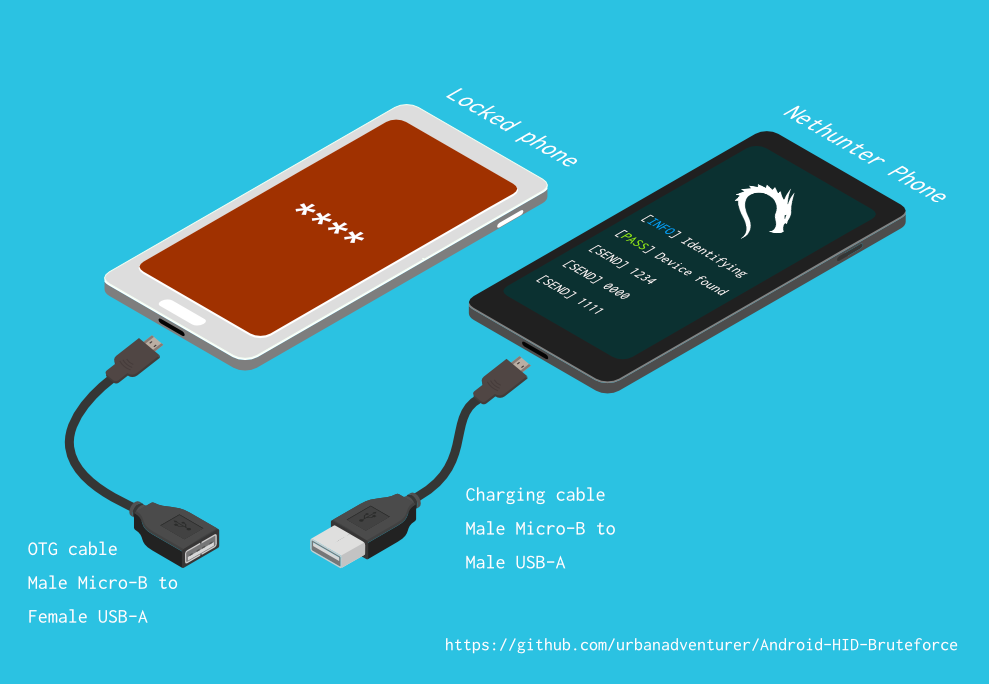

Sblocca un telefono Android (o dispositivo) eseguendo un attacco di brute force sul PIN della schermata di blocco. Trasforma il tuo telefono Kali Nethunter in uno strumento di cracking del PIN tramite brute force per dispositivi Android! (nessun root, nessun adb)
Sblocca un telefono (o dispositivo) Android forzando brutalmente il PIN della schermata di blocco.
Trasforma il tuo telefono Kali Nethunter in un cracker PIN per dispositivi Android!
Usa un cavo USB OTG per collegare il telefono bloccato al dispositivo Nethunter. Emula una tastiera, prova automaticamente i PIN e attende dopo aver provato troppi tentativi errati.
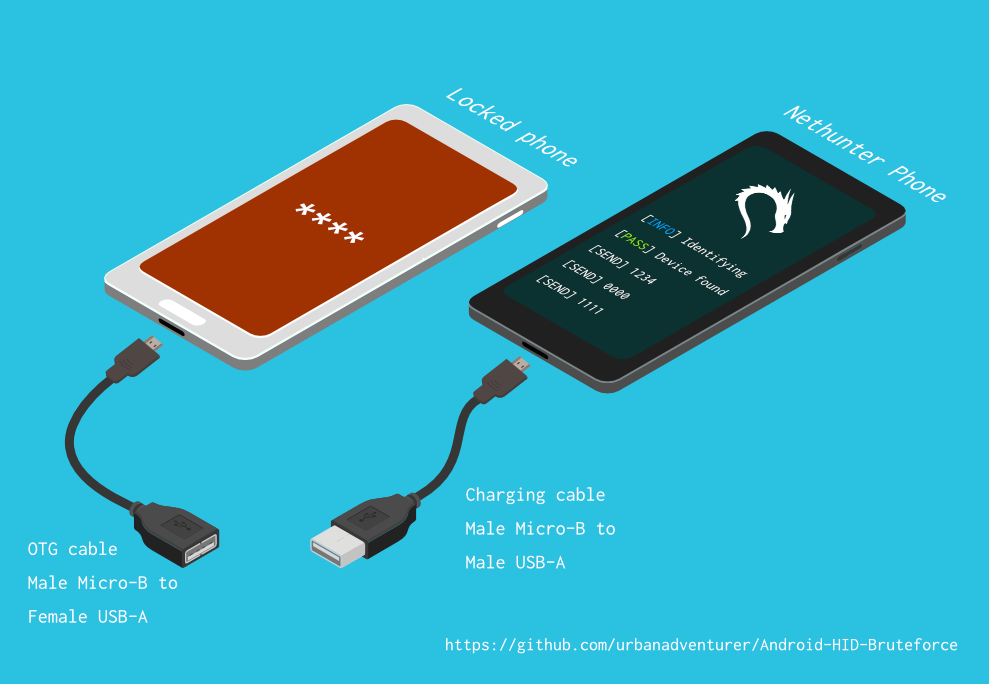
[Telefono Nethunter] <--> [Cavo USB] <--> [Adattatore USB OTG] <--> [Telefono Android bloccato]
Il driver USB HID Gadget fornisce l'emulazione di dispositivi di interfaccia umana (HID). Ciò consente a un dispositivo Android Nethunter di emulare l'input della tastiera verso il telefono bloccato. È come collegare una tastiera al telefono bloccato e premere i tasti.
⏱ Con un Samsung S5 ci vogliono poco più di 16,6 ore per provare tutti i possibili PIN a 4 cifre, ma con la lista di PIN ottimizzata dovrebbe richiedere molto meno tempo.
TBC
Se hai installato lo script su /sdcard/, puoi eseguirlo con il seguente comando.bash ./android-pin-bruteforce
Note that Android mounts /sdcard with the noexec flag. You can verify this with mount.
Android-PIN-Bruteforce (0.2) viene utilizzato per sbloccare un telefono (o dispositivo) Android forzando il PIN della schermata di blocco.
Maggiori informazioni su: https://github.com/urbanadventurer/Android-PIN-Bruteforce
Comandi:
crack Inizia la ricerca dei PIN
resume Riprendi da un PIN scelto
rewind Forza i PIN in ordine inverso a partire da un PIN scelto
diag Mostra informazioni diagnostiche
version Mostra informazioni sulla versione ed esci
Opzioni:
-f, --from PIN Riprendi da questo PIN
-a, --attempts Inizia da NUM tentativi errati
-m, --mask REGEX Usa una maschera per le cifre note del PIN
-t, --type TYPE Seleziona la ricerca per PIN o PATTERN
-l, --length NUM Forza PIN di lunghezza NUM
-c, --config FILE Specifica il file di configurazione da caricare
-p, --pinlist FILE Specifica un elenco di PIN personalizzato
-d, --dry-run Simulazione per test. Non invia alcun tasto.
-v, --verbose Output log dettagliati
Utilizzo:
android-pin-bruteforce <comando> [opzioni]```
## Supported Android Phones/Devices
This has been successfully tested with various phones including the Samsung S5, S7, Motorola G4 Plus and G5 Plus.
It can unlock Android versions 6.0.1 through to 10.0. The ability to perform a bruteforce attack doesn't depend on the Android version in use. It depends on how the device vendor developed their own lockscreen.
Check the Phone Database for more details
https://github.com/urbanadventurer/Android-PIN-Bruteforce/wiki/Phone-Database
## 🎳 PIN Lists
Optimised PIN lists are used by default unless the user selects a custom PIN list.
### Cracking PINs of different lengths
Use the `--length` commandline option.
Use this command to crack a 3 digit PIN,
`./android-pin-bruteforce crack --length 3`
Use this command to crack a 6 digit PIN
`./android-pin-bruteforce crack --length 6`
### Where did the optimised PIN lists come from?
The optimised PIN lists were generated by extracting numeric passwords from database leaks then sorting by frequency. All PINs that did not appear in the password leaks were appended to the list.
The optimised PIN lists were generated from *Ga$$Pacc DB Leak* (21GB decompressed, 688M Accounts, 243 Databases, 138920 numeric passwords).
#### The 4 digit PIN list
The reason that the 4 digit PIN list is used from a different source is because it gives better results than the generated list from *Ga$$Pacc DB Leak*.
`optimised-pin-length-4.txt` is an optimised list of all possible 4 digit PINs, sorted by order of likelihood.
It can be found with the filename `pinlist.txt` at https://github.com/mandatoryprogrammer/droidbrute
This list is used with permission from Justin Engler & Paul Vines from Senior Security Engineer, iSEC Partners,
and was used in their Defcon talk, [Electromechanical PIN Cracking with Robotic Reconfigurable Button Basher (and C3BO)](https://www.defcon.org/html/defcon-21/dc-21-speakers.html#Engler)
### Cracking with Masks
Masks use regular expressions with the standard grep extended format.
`./android-pin-bruteforce crack --mask "...[45]" --dry-run`
- To try all years from 1900 to 1999, use a mask of `19..`
- To try PINs that have a 1 in the first digit, and a 1 in the last digit, use a mask of `1..1`
- To try PINs that end in 4 or 5, use `...[45]`
## 📱 Configuration for different phones
Device manufacturers create their own lock screens that are different to the default or stock Android.
To find out what keys your phone needs, plug a keyboard into the phone and try out different combinations.
Load a different configuration file, with the `--config FILE` commandline parameter.
Example:
`./android-pin-bruteforce --config ./config.samsung.s5 crack`
You can also edit the `config` file by customising the timing and keys sent.
The following configuration variables can be used to support a different phone's lockscreen.
DELAY_BETWEEN_KEYS=0.25
PROGRESSIVE_ARRAY_ATTEMPT_COUNT__________=(1 11 41) PROGRESSIVE_ARRAY_ATTEMPTS_UNTIL_COOLDOWN=(5 1 1) PROGRESSIVE_ARRAY_COOLDOWN_IN_SECONDS____=(30 30 60)
SEND_KEYS_DISMISS_POPUPS_N_SECONDS_BEFORE_COOLDOWN_END=5
SEND_KEYS_DISMISS_POPUPS_AT_COOLDOWN_END="enter enter enter"
KEYS_BEFORE_EACH_PIN="escape enter"
KEYS_STAY_AWAKE_DURING_COOLDOWN="enter"
SEND_KEYS_STAY_AWAKE_DURING_COOLDOWN_EVERY_N_SECONDS=5
DELAY_BEFORE_STARTING=2
KEYS_BEFORE_STARTING="enter"```
We send keys before the end of the cooldown period, or optionally during the cooldown period. This is to keep the lockscreen app active and to dismiss any popups about the number of incorrect PIN attempts or a low battery warning.
Use ssh from your laptop to the NetHunter phone, and use this command to test sending keys:
In this example, the enter key is sent.
echo "enter" | /system/xbin/hid-keyboard /dev/hidg0 keyboard
In this example, ctrl-escape is sent.
echo "left-ctrl escape" | /system/xbin/hid-keyboard /dev/hidg0 keyboard
Note: Sending combinations of keys in config file variables is different. Currently only ctrl_escape is supported.
In this example, keys a, b, c are sent.
echo a b c | /system/xbin/hid-keyboard /dev/hidg0 keyboard
This Android app is a virtual USB Keyboard that you can use to test sending keys.
https://store.nethunter.com/en/packages/remote.hid.keyboard.client/
Use this list for the following variables:
To send special keys use the following labels. This list can be found in the hid_gadget_test source code.
To send more than one key at the same time, use the following list:
If you need more key combinations please open a new issue in the GitHub issues list.
The following section of the config file controls the progressive cooldown.
## Le variabili PROGRESSIVE_COOLDOWN_ARRAY agiscono come array multidimensionale per personalizzare il cooldown progressivo
## PROGRESSIVE_ARRAY_ATTEMPT_COUNT__________ è il numero del tentativo
## PROGRESSIVE_ARRAY_ATTEMPTS_UNTIL_COOLDOWN è il numero di tentativi da provare prima del raffreddamento
## PROGRESSIVE_ARRAY_COOLDOWN_IN_SECONDS____ è il cooldown in secondi
PROGRESSIVE_ARRAY_ATTEMPT_COUNT__________=(1 11 41)
PROGRESSIVE_ARRAY_ATTEMPTS_UNTIL_COOLDOWN=(5 1 1)
PROGRESSIVE_ARRAY_COOLDOWN_IN_SECONDS____=(30 30 60)```
The array is the same as this table.
| attempt number | attempts until cooldown | cooldown |
| ---------------- | ------------------------ | ---------- |
| 1 | 5 | 30 |
| 11 | 1 | 30 |
| 41 | 1 | 60 |
### Why can't you use a laptop, or is a Windows or Linux version coming soon?
This script works by emulating USB Human Interface Devices (HID), in this case it is keyboard and mouse input. Laptops have uni-directional USB ports and an Android mobile device/ phone has a bi-directional USB port. A bi-directional port is required to emulate a keyboard.
This might change in the future as USB-C is supposed to be uni-directional.
### How Android emulates a keyboard
Keys are sent using `/system/xbin/hid-keyboard`. To test this and send the key 1 you can use `echo 1 | /system/xbin/hid-keyboard dev/hidg0 keyboard`
In Kali Nethunter, `/system/xbin/hid-keyboard` is a compiled copy of `hid_gadget_test.c`. This is a small program for testing the HID gadget driver that is included in the Linux Kernel. The source code for this file can be found at https://www.kernel.org/doc/html/latest/usb/gadget_hid.html and https://github.com/aagallag/hid_gadget_test.
## 🔧 Troubleshooting
### If it is not bruteforcing PINs
#### Check the orientation of the cables
The Nethunter phone should have a regular USB cable attached, while the locked phone should have an OTG adaptor attached.
The OTG cable should be connected to the locked Android phone. The regular USB cable should be connected to the Nethunter phone.
Refer to the graphic on how to connect the phones.
#### Check it is emulating a keyboard
You can verify that the NetHunter phone is succesfully emulating a keyboard by connecting it to a computer using a regular charging/data USB cable. Open a text editor like Notepad while it is cracking and you should see it entering PIN numbers into the text editor.
Note that you will not need an OTG cable for this.
#### Try restarting the phones
Try powering off the phones and even taking out the batteries if that is possible.
#### Try new cables
Try using new cables/adaptors as you may have a faulty cable/adaptor.
### If it doesn't unlock the phone with a correct PIN
You might be sending keys too fast for the phone to process. Increase the DELAY_BETWEEN_KEYS variable in the config file.
💡 If you don't see 4 dots come up on the phone's screen then maybe it is not receiving 4 keys.
### 🔋 Managing Power Consumption
If your phone runs out of power too soon, follow these steps:
- Make sure both phones are fully charged to 100% before you begin
- Reduce the screen brightness on both the victim phone and NetHunter phone if possible
- Place both phones into Airplane mode, however you may want to enable WiFi to access the NetHunter phone via SSH.
- The locked phone will power the NetHunter phone, because it appears as a keyboard accessory
- Use a USB OTG cable with a Y splitter for an external power supply, to allow charging of the NetHunter phone while cracking
- Take breaks to charge your devices. Pause the script with CTRL-Z and resume with the `fg` shell command.
- Avoid the SEND_KEYS_STAY_AWAKE_DURING_COOLDOWN_EVERY_N_SECONDS configuration option. This will cause the locked phone to use more battery to keep the screen powered. Instead use the SEND_KEYS_DISMISS_POPUPS_N_SECONDS_BEFORE_COOLDOWN_END option (Default).
### Check the Diagnostics Report
Use the command `diag` display diagnostic information.
```bash ./android-pin-bruteforce diag```
Se ricevi questo messaggio quando il cavo USB è collegato, prova a rimuovere la batteria dal telefono Android bloccato e a riavviarlo.```[FAIL] HID USB device not ready. Return code from /system/xbin/hid-keyboard was 5.```
### How the usb-devices command works
The diagnostics command uses the `usb-devices` script but it is only necessary as part of determining whether the USB cables are incorrectly connected. This can be downloaded from
https://github.com/gregkh/usbutils/blob/master/usb-devices
### Use verbose output
Use the `--verbose` option to check the configuration is as expected. This is especially useful when you are modifying the configuration.
### Use the dry-run
Use the `--dry-run` option to check how it operates without sending any keys to a device. This is especially useful when you are modifying the configuration or during development.
Dry run will:
- Not send any keys
- Will continue instead of aborting if the `KEYBOARD_DEVICE` or `HID_KEYBOARD` is missing.
### HID USB Mode
Try this command in a shell on the NetHunter phone:
```/system/bin/setprop sys.usb.config hid```
## 💣 Problemi Noti
- Questo non può rilevare quando il PIN corretto viene indovinato e il telefono si sblocca.
- I tuoi telefoni potrebbero esaurire la batteria 🔋 prima che il PIN corretto venga trovato.
- Non fidarti dei file di configurazione del telefono provenienti da fonti sconosciute senza prima averli revisionati. I file di configurazione sono script shell e potrebbero includere comandi malevoli.
## 🚀 Roadmap
- [FATTO] Funziona
- [FATTO] Rileva i fallimenti HID USB
- [FATTO] Migliorare l'uso e le opzioni della riga di comando/file di configurazione
- [FATTO] Aggiungere brute force per PIN a n cifre
- [FATTO] Maschera per cifre note
- [FATTO] Craccare la lista PIN in ordine inverso (per trovare quale PIN recente ha sbloccato il dispositivo)
- [FATTO] Implementare un prompt di blocco schermo configurabile
- [FATTO] Implementare il cambio di raffreddamento dopo 10 tentativi
- [IN LAVORAZIONE] Trovare/testare più dispositivi da forzare
- Aggiungere barra di avanzamento
- Aggiungere ETA
- Arte ASCII
- Interfaccia più gradevole per NetHunter
- Implementare per iPhone
- Rilevare quando un telefono è sbloccato (Usare la fotocamera di NetHunter come sensore?)
- Craccare gli schemi Android (provare prima gli schemi comuni)
## 🙋 Contribuire
Le pull request sono benvenute. Per modifiche sostanziali, apri prima un issue per discutere cosa vorresti cambiare.
Assicurati di aggiornare i test come appropriato.
## 😎 Autori e ringraziamenti
Sviluppato da Andrew Horton (@urbanadventurer).
👏 Le seguenti persone sono state molto utili:
- Vlad Filatov (@v1adf): Test di molti telefoni per il Wiki Phone Database
### Motivazione
La mia motivazione originale per sviluppare questo era sbloccare un telefono Android Samsung S5. Apparteneva a una persona deceduta e la sua famiglia aveva bisogno di accedere ai dati presenti. Non avendo a portata di mano un USB Rubber Ducky o altro hardware, ho provato vari metodi, e alla fine ho capito che dovevo sviluppare qualcosa di nuovo.
### Crediti
La lista PIN ottimizzata proviene da Justin Engler (@justinengler) e Paul Vines di Senior Security Engineer, iSEC Partners
ed è stata utilizzata nel loro talk al Defcon, [Electromechanical PIN Cracking with Robotic Reconfigurable Button Basher (and C3BO).](https://www.defcon.org/html/defcon-21/dc-21-speakers.html#Engler).
### Grafica
Progettata da Andrew Horton e utilizzando con gratitudine questi pacchetti vettoriali gratuiti:
- [USB Ports Isometric Free Vector by VisionHeldup](https://www.vecteezy.com/vector-art/159576-usb-ports-isometric-free-vector)
- [HDMI and USB Vector Set by Mary Winkler](https://www.vecteezy.com/vector-art/107006-hdmi-and-usb-vector-set)
- [Isometric Data Security Illustration by Rizal.Medanguide](https://www.vecteezy.com/vector-art/661831-isometric-data-security-illustration)
- Logo Kali NetHunter
## 🗿 Confronto con altri progetti e metodi per sbloccare un telefono Android bloccato
### Cosa rende questo progetto unico?
Mi è stato chiesto cosa renda questo progetto unico quando esistono altri progetti open-source per il cracking dei PIN Android.
Android-PIN-Bruteforce è unico perché cracca il PIN sui telefoni Android da un telefono NetHunter e non richiede che il telefono bloccato sia stato precedentemente hackerato.
Funziona:
- Senza dover acquistare hardware speciale, come un Rubber Ducky, Celebrite o XPIN Clip.
- Senza accesso ADB o root (il telefono non deve essere precedentemente hackerato).
| Progetto | ADB/Debug USB | Richiede root | Richiede hardware $ | Commerciale |
------------------------------------------------------- | -------------- | ------------- | ------------------- | ------------ |
| ⭐ Android-PIN-Bruteforce | No | No | Telefono Nethunter | No |
| github.com/PentesterES/AndroidPINCrack | Sì | Sì | No | No |
| github.com/ByteRockstar1996/Cracking-Android-Pin-Lock | Sì | Sì | No | No |
| github.com/sch3m4/androidpatternlock | Sì | Sì | No | No |
| github.com/georgenicolaou/androidlockcracker | Sì | Sì | No | No |
| github.com/MGF15/P-Decode | Sì | Sì | No | No |
| github.com/BitesFor/ABL | Sì | Sì | No | No |
| github.com/wuseman/WBRUTER | Sì | No | No | No |
| github.com/Gh005t/Android-BruteForce | Sì | No | No | No |
| github.com/mandatoryprogrammer/droidbrute | No | No | Rubber Ducky $ | No |
| github.com/hak5darren/USB-Rubber-Ducky | No | No | Rubber Ducky $ | Sì |
| github.com/bbrother/stm32f4androidbruteforce | No | No | Scheda STM32F4 $ | No |
| hdb-team.com/product/hdbox/ | No | No | HDBOX $$ | Sì |
| xpinclip.com | No | No | XPINClip $$ | Sì |
| cellebrite.com/en/ufed/ | No | No | Cellebrite UFED $$$ | Sì |
Alcuni di questi progetti/prodotti sono davvero fantastici ma raggiungono un obiettivo diverso da Android-PIN-Bruteforce.
Se un progetto richiede un file gestures.key o password.key, l'ho elencato come richiedente root.
Se un progetto richiede un bootloader personalizzato, l'ho elencato come richiedente sia ADB che root.
Se desideri che il tuo progetto sia elencato in questa tabella, apri un nuovo issue.
Ci sono collegamenti a ciascuno di questi progetti nella sezione 📚 Progetti correlati e letture aggiuntive.
### 😭 Utenti normali di telefoni
- Prova i primi 20 PIN dell'[analisi PIN di DataGenetics](https://datagenetics.com/blog/september32012/index.html) che apparentemente sbloccano il 26,83% dei telefoni.
- Usa un'app di bypass del blocco schermo via SMS (richiede l'installazione dell'app prima che il telefono sia bloccato)
- Usa Samsung Find My Mobile (richiede di averla configurata prima che il telefono sia bloccato)
- Crash dell'interfaccia di blocco schermo (Android 5.0 e 5.1)
- Usa la funzione Google dimenticato pattern, dimenticato PIN o dimenticato password (Android 4.4 KitKat e precedenti)
- Reset di fabbrica (perdi tutti i tuoi dati 😭)
### 🤖 Utenti che hanno già sostituito la ROM Android
Se il telefono è già stato rootato, ha il debug USB abilitato o ha adb abilitato.
- Flash del ZIP `Pattern Password Disable` usando un recovery personalizzato (richiede TWRP, CMW, Xrec, ecc.)
- Elimina `/data/system/gesture.key` o `password.key` (richiede root e adb sul dispositivo bloccato)
- Cracca `/data/system/gesture.key` e `password.key` (richiede root e adb sul dispositivo bloccato)
- Aggiorna il database sqlite3 `settings.db` (richiede root e adb sul dispositivo bloccato)
### 🔬 Investigatori forensi
Questi metodi possono essere costosi e sono solitamente utilizzati solo da investigatori forensi specializzati in telefoni.
In ordine di difficoltà e spesa:
- Sfruttare il debug USB abilitato (Oxygen Forensic Suite)
- Forza bruta con emulazione tastiera (⭐ Android-PIN-Bruteforce, attacco RubberDucky, XPIN Clip, HBbox)
- JTAG (Interfaccia con TAP (Test Access Ports) sulla scheda del dispositivo)
- Programmazione in sistema (ISP) (Collegamento diretto ai pin dei chip di memoria flash sulla scheda del dispositivo)
- Chip Off (Dissaldare e rimuovere i chip di memoria flash dal dispositivo)
- Clock Glitching / Voltage Fault Injection (Attacchi hardware sul timing della CPU per bypassare le restrizioni PIN)
- Exploit del bootloader (Exploit zero-day che attaccano il bootloader. GrayKey di Grayshift e Cellebrite)
Le tecniche JTAG, ISP e Chip Off sono meno utili ora perché la maggior parte dei dispositivi è crittografata.
Non conosco attacchi pratici ai PIN dei telefoni che utilizzano clock glitching. Se conosci un prodotto che utilizza questa tecnica, per favore fammelo sapere così posso includerlo.
### 🕵 Professionisti della sicurezza e utenti tecnici di telefoni
Usa la forza bruta della tastiera USB HID con hardware dedicato.
- Un RubberDucky e lo script di brute-force di Darren Kitchen da Hak5
- Scrivi uno script per un USB Teensy
- Acquista hardware forense costoso
- Oppure puoi usare Android-PIN-Bruteforce con il tuo telefono NetHunter!
I tentativi di usare un altrimenti fantastico progetto Duck Hunter, per emulare un payload RubberDucky per il cracking dei PIN Android, non hanno funzionato. Ha mandato in crash il telefono probabilmente a causa della lunghezza del payload.
## 📚 Progetti correlati e letture aggiuntive
### Hardware USB HID senza NetHunter
hak5 12x17: Hack Any 4-digit Android PIN in 16 hours with a USB Rubber Ducky
https://archive.org/details/hak5_12x17
Hak5: USB Rubber Ducky
https://shop.hak5.org/products/usb-rubber-ducky-deluxe
USB-Rubber-Ducky Payloads
https://github.com/hak5darren/USB-Rubber-Ducky/wiki/Payloads
Teensy
https://www.pjrc.com/teensy/
Brute Forcing An Android Phone with a STM32F4Discovery Development Board
https://github.com/bbrother/stm32f4androidbruteforce
https://hackaday.com/2013/11/10/brute-forcing-an-android-phone/
Automated brute force attack against the Mac EFI PIN (Using a Teensy)
https://orvtech.com/atacar-efi-pin-macbook-pro-en.html
https://hackaday.io/project/2196-efi-bruteforcer
Droidbrute: An Android PIN cracking USB rubber ducky payload made efficient with a statistically generated wordlist.
https://github.com/mandatoryprogrammer/droidbrute
Discussion forum about the hak5 episode, and Android Brute Force 4-digit pin
https://forums.hak5.org/topic/28165-payload-android-brute-force-4-digit-pin/
### Attacchi tastiera HID NetHunter
NetHunter HID Keyboard Attacks
https://www.kali.org/docs/nethunter/nethunter-hid-attacks/
### Supporto HID del kernel Linux
Human Interface Devices (HID)
https://www.kernel.org/doc/html/latest/hid/index.html#
Linux USB HID gadget driver and hid-keyboard program
https://www.kernel.org/doc/html/latest/usb/gadget_hid.html
https://github.com/aagallag/hid_gadget_test
The usb-devices script
https://github.com/gregkh/usbutils/blob/master/usb-devices
### Craccare file PIN e Pattern Android
AndroidPINCrack - bruteforce the Android Passcode given the hash and salt (requires root on the phone)
https://github.com/PentesterES/AndroidPINCrack
Android Pattern Lock Cracker - bruteforce the Android Pattern given an SHA1 hash (requires root on the phone)
https://github.com/sch3m4/androidpatternlock
### Metodi di recupero generali
[Android][Guide]Hacking And Bypassing Android Password/Pattern/Face/PI
https://forum.xda-developers.com/showthread.php?t=2620456
Android BruteForce using ADB & Shell Scripting
https://github.com/Gh005t/Android-BruteForce
### Metodi e hardware forensi
PATCtech Digital Forensics: Getting Past the Android Passcode
http://patc.com/online/a/Portals/965/Android%20Passcode.pdf
XPIN Clip
https://xpinclip.com/
HDBox from HDB Team
https://hdb-team.com/product/hdbox/
Cellebrite UFED
https://www.cellebrite.com/en/ufed/
GrayKey from Grayshift
https://www.grayshift.com/graykey/
### Analisi PIN
Electromechanical PIN Cracking with Robotic Reconfigurable Button Basher (and C3BO)
https://www.defcon.org/html/defcon-21/dc-21-speakers.html#Engler
DataGenetics PIN analysis https://datagenetics.com/blog/september32012/index.html
| Key label | Key label |
|---|
| left-ctrl | f6 |
| right-ctrl | f7 |
| left-shift | f8 |
| right-shift | f9 |
| left-alt | f10 |
| right-alt | f11 |
| left-meta | f12 |
| right-meta | insert |
| return | home |
| esc | pageup |
| bckspc | del |
| tab | end |
| spacebar | pagedown |
| caps-lock | right |
| f1 | left |
| f2 | down |
| f3 | kp-enter |
| f4 | up |
| f5 | num-lock |