
 target/strelka-ui
Strelka Web UI per l'invio e l'analisi di file


[Releases][release] | [Pull Requests][pr] | [Issues][issues]
[![GitHub release][img-version-badge]][repo] [![Build Status][img-actions-badge]][actions-ci] [![Pull Requests][img-pr-badge]][pr] [![Slack][img-slack-badge]][slack] [![License][img-license-badge]][license]
La Strelka Web UI è un frontend per l'invio di file basato su browser e API per lo Strelka Enterprise File Scanner. Consente agli utenti di inviare file a un cluster Strelka e di rivedere facilmente i risultati storici delle risposte. La Strelka Web UI supporta l'autenticazione LDAP e l'accesso API, offrendo un modo sicuro e flessibile per interagire con lo scanner Strelka. Questo documento fornisce dettagli su come configurare e utilizzare la Strelka Web UI, nonché sulle sue funzionalità e sui progetti correlati.
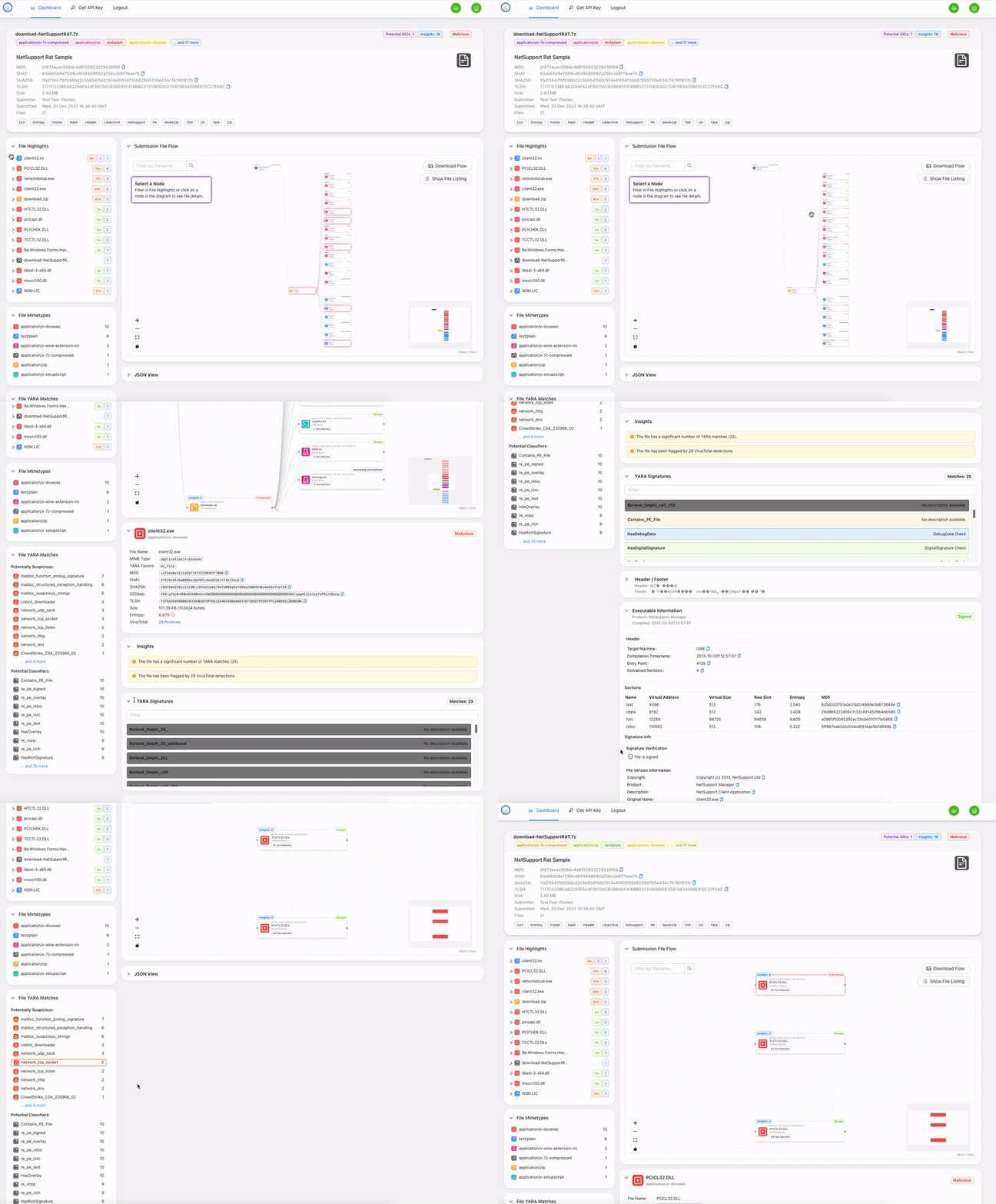
L'interfaccia di invio file fornisce le seguenti funzionalità:
Per impostazione predefinita, la Strelka UI è configurata per utilizzare un deployment "quickstart" minimale che consente agli utenti di testare il sistema. Questo deployment punterà a un'istanza Strelka locale e avvierà un database locale. Gli utenti potranno accedere a questo sistema con qualsiasi username / password desiderino. Per ulteriori informazioni su come puntare a un'istanza Strelka remota, a un database, o sull'utilizzo di LDAP per l'autenticazione, consulta la sezione Configurazione Aggiuntiva:
Start or ensure Strelka cluster is ready and accessible.
See https://github.com/target/strelka for more information.
# Terminal 1
# From the ./strelka-ui directory
$ docker-compose -f docker-compose.yml up
1) Open A Browser
2) Navigate to 0.0.0.0:8080
3) Login with:
    - Username: strelka
    - Password: strelka
Questa sezione fornisce dettagli su come puntare a un'istanza Strelka remota, a un database remoto per l'archiviazione e a un server LDAP per l'autenticazione, per un utilizzo più sicuro. Per abilitarli, puoi utilizzare variabili d'ambiente per sovrascrivere i valori predefiniti.
La configurazione del backend è fornita tramite variabili d'ambiente e può essere impostata staticamente in ./app/config/config.py.
In esecuzione locale, la precedenza della configurazione è: System environment -> .env -> ./app/config/config.py.
In esecuzione su Docker, la precedenza della configurazione è: Docker environment -> System environment -> ./app/config/config.py.
Fai riferimento a ./app/example.env per la configurazione delle variabili d'ambiente.
Di seguito sono dettagliate le voci di configurazione in ./app/config/config.py.
| Field Name | Value | Required |
|---|---|---|
| STRELKA_HOST | Strelka hostname (e.g., 0.0.0.0) | Yes |
| STRELKA_PORT | Strelka port number (e.g., 57314) | Yes |
| STRELKA_CERT | Path to certificate for Strelka, if needed (e.g., /path/to/cert.pem) | No |
| CA_CERT_PATH | Path to CA certificates for LDAP, if needed (e.g., /path/to/ca_certs) | No |
| VIRUSTOTAL_API_KEY | API Key for VirusTotal Hash Lookup | Yes |
| VIRUSTOTAL_API_LIMIT | Limit how many files should be scanned by VirusTotal (Default: 30) | Yes |
| LDAP_URL | URL to LDAP server (e.g., ldaps://ldap.example.com:636) | No |
| LDAP_SEARCH_BASE | Search base for LDAP queries (e.g., DC=example,DC=com) | No |
| LDAP_USERNAME_ORGANIZATION | Username organization for LDAP queries (e.g., org//) | No |
| LDAP_ATTRIBUTE_ACCOUNT_NAME_FIELD | LDAP attribute for account name (e.g., sAMAccountName) | No |
| LDAP_ATTRIBUTE_FIRST_NAME_FIELD | LDAP attribute for first name (e.g., givenName) | No |
| LDAP_ATTRIBUTE_LAST_NAME_FIELD | LDAP attribute for last name (e.g., sn) | No |
| LDAP_ATTRIBUTE_MEMBER_OF_FIELD | LDAP attribute for member of (e.g., memberOf) | No |
| LDAP_ATTRIBUTE_MEMBER_REQUIREMENT_FIELD | LDAP attribute for member requirement (e.g., AD Attribute) | No |
| STATIC_ASSET_FOLDER | Build folder for UI (e.g., build) | Yes |
| MIGRATION_DIRECTORY | SQLAlchemy migrations directory (e.g., ./migrations) | Yes |
| DATABASE_USERNAME | Database username (e.g., admin) | Yes |
| DATABASE_PASSWORD | Database password (e.g., password123) | Yes |
| DATABASE_HOST | Database hostname (e.g., db.example.com) | Yes |
| DATABASE_PORT | Database port number (e.g., 5432) | Yes |
| DATABASE_DBNAME | Name of the database (e.g., mydb) | Yes |
| API_KEY_EXPIRATION | Duration in days of API key expiration (e.g., 30) | Yes |
Puoi anche impostare un riferimento nella tabella di submission della UI per consentire agli utenti di passare rapidamente a un sito esterno in base al request.id. Modificando ./ui/src/config.js e seguendo l'esempio SEARCH_URL nella tabella seguente, puoi fornire agli utenti un link a un sito esterno (ad es., SIEM / logger). Assicurati che il tuo link contenga la stringa <REPLACE> e la UI sostituirà quella stringa con l'ID richiesta del file pertinente.
Campi di modifica supportati in ./ui/src/config.js:
| Field Name | Value | Example |
|---|---|---|
| SEARCH_URL | Search URL for the external application | Ex: https://search.com/?q=request.id= |
| SEARCH_NAME | Search name for the external application | Ex: Splunk |
| DEFAULT_EXCLUDED_SUBMITTERS | Default users to be exluded from Submission table view. Useful for hiding automations by default. | Ex: SearchBot |
