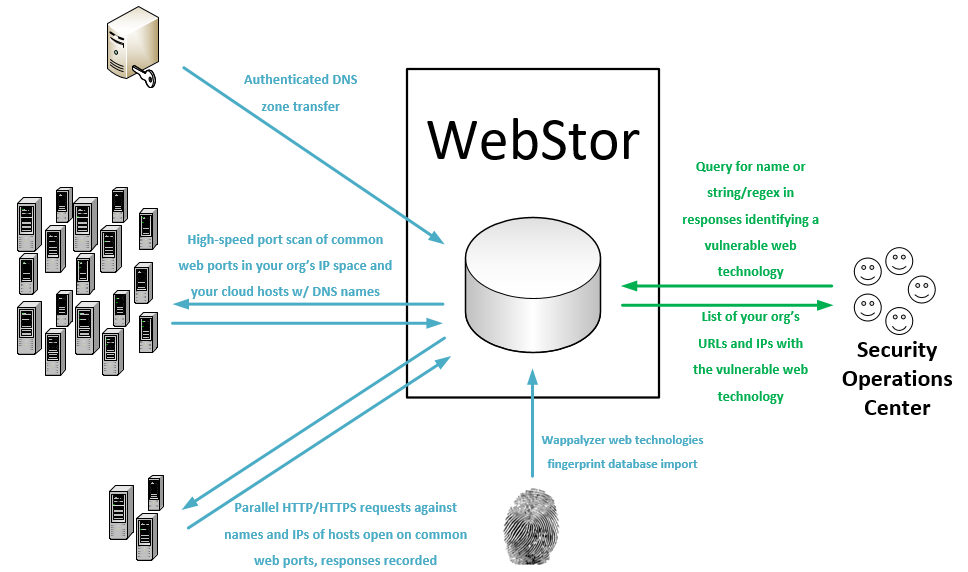

Enumera tutti i siti web attraverso le reti di un'organizzazione tramite trasferimenti di zona DNS e masscan, memorizza le risposte e consente di interrogare tecnologie web vulnerabili note e pattern regex personalizzati.
WebStor è uno strumento implementato in Python sotto licenza MIT per enumerare rapidamente tutti i siti web in tutte le reti della tua organizzazione, memorizzare le loro risposte e interrogare tecnologie e versioni web note, come quelle con vulnerabilità zero-day. È progettato in particolare per risolvere il problema unico che si presenta nelle organizzazioni di medie e grandi dimensioni con amministrazione decentralizzata, dove può essere quasi impossibile tenere traccia di tutte le tecnologie web implementate da vari amministratori distribuiti in diverse unità e reti.
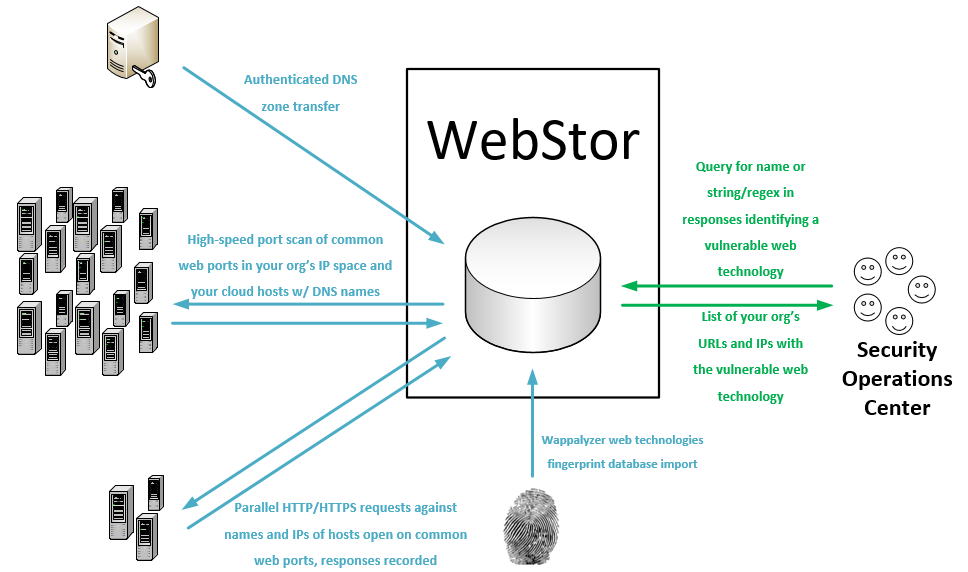
WebStor raggiunge il suo obiettivo eseguendo le seguenti azioni:
WebStor attualmente funziona su sistemi Linux. Poiché è scritto in Python, la conversione per supportare Windows sarebbe banale e probabilmente avverrà in futuro.
webstor.py [-h] [--ADD-HTTP-PORT HTTPPORTTOADD] [--CLEAR-HTTP]
[--ADD-HTTPS-PORT HTTPSPORTTOADD] [--CLEAR-HTTPS]
[--ADD-CUSTOM-FINGERPRINT FINGERPRINT]
[--DELETE-CUSTOM-FINGERPRINT FINGERPRINTNAMETODELETE]
[--IMPORT-CUSTOM-FINGERPRINT IMPORTFINGERPRINTFILE]
[--CLEAR-CUSTOM-FINGERPRINTS] [--SHOW-CONFIG]
[--SHOW-CONFIG-FULL] [--RUN-MASSCAN]
[--SET-MASSCAN-RANGES SETSCANRANGES]
[--ADD-RANGE RANGETOADD] [--DELETE-RANGE RANGETODELETE]
[--IMPORT-MASSCAN-RANGES IMPORTSCANRANGES]
[--ADD-PATH PATHTOADD] [--DELETE-PATH PATHTODELETE]
[--CLEAR-PATHS] [--REFRESH-RESPONSES]
[--RESPONSES-ADD-FOR-PATH RESPONSESADDFORPATH]
[--SEARCH-PATTERN SEARCHPATTERN]
[--SEARCH-CUSTOM-FINGERPRINT SEARCHFINGERPRINT]
[--SEARCH-WAPPALYZER SEARCHWAPPALYZER] [--NO-TSIG-KEY]
[--TSIG-KEY-IMPORT IMPORTTSIGFILE]
[--TSIG-KEY-REPLACE REPLACEMENTTSIGFILE]
[--DELETE-TSIG TSIGTODELETE]
[--USE-TSIG-FILE-ONLY USETSIGFILEONLY]
[--DOWNLOAD-NEW-WAPPALYZER] [--LIST-WAPPALYZER-TECH-NAMES]
[--ZONE-XFER] [--ADD-DOMAIN DOMAINDETAILS]
[--DELETE-DOMAIN DOMAINTODELETE]
[--IMPORT-ZONE-FILE IMPORTZONEFILE] [--CLEAR-DOMAINS]
[--LIST-DOMAINS] [--LIST-OUTSIDE] [--SQL-CREDS SQLCREDSFILE]
optional arguments:
-h, --help show this help message and exit
--ADD-HTTP-PORT HTTPPORTTOADD, -a HTTPPORTTOADD
Add a custom HTTP port.
--CLEAR-HTTP, -aC Clear any custom HTTP ports and revert to default of
80.
--ADD-HTTPS-PORT HTTPSPORTTOADD, -b HTTPSPORTTOADD
Add a custom HTTPS port.
--CLEAR-HTTPS, -bC Clear any custom HTTPS ports and revert to default of
443.
--ADD-CUSTOM-FINGERPRINT FINGERPRINT, -c FINGERPRINT
Add a custom fingerprint in the form <Name>,<RegEx>.
--DELETE-CUSTOM-FINGERPRINT FINGERPRINTNAMETODELETE, -cD FINGERPRINTNAMETODELETE
Delete a custom fingerprint by name.
--IMPORT-CUSTOM-FINGERPRINT IMPORTFINGERPRINTFILE, -cI IMPORTFINGERPRINTFILE
Import a custom fingerprint file with the path
specified.
--CLEAR-CUSTOM-FINGERPRINTS, -cC
Clears all custom fingerprints stored in DB.
--SHOW-CONFIG, -g Show current WebStor configuration (brief).
--SHOW-CONFIG-FULL, -gF
Show current WebStor configuration (full).
--RUN-MASSCAN, -m Runs a new port scan with Masscan on all configured
TCP ports for HTTP and HTTPS, against all configured
ranges and any IP addresses from DNS records that are
outside those ranges.
--SET-MASSCAN-RANGES SETSCANRANGES, -mR SETSCANRANGES
Scan range or ranges, replaces existing ranges in DB,
comma separated, such as: -s
10.10.0.0/16,10.13.0.0/16,192.168.1.0/24
--IMPORT-MASSCAN-RANGES IMPORTSCANRANGES, -mI IMPORTSCANRANGES
Import scan ranges (CIDR blocks) from a specified
file.
--DELETE-RANGE RANGETODELETE, -mD RANGETODELETE
Delete scan range.
--ADD-PATH PATHTOADD, -p PATHTOADD
Add paths for which to request and store responses
besides '/'.
--DELETE-PATH PATHTODELETE, -pD PATHTODELETE
Delete paths for which to request and store responses
besides '/'.
--CLEAR-PATHS, -pC Clear any custom URL request paths and revert to
default of '/'.
--REFRESH-RESPONSES, -r
Refresh URL responses in DB.
--RESPONSES-ADD-FOR-PATH RESPONSESADDFORPATH, -rP RESPONSESADDFORPATH
Add URL responses for a one-time path in with the
current responses in the DB.
--SEARCH-PATTERN SEARCHPATTERN, -sP SEARCHPATTERN
Search for string or regular expression in WebStor
database.
--SEARCH-CUSTOM-FINGERPRINT SEARCHFINGERPRINT, -sC SEARCHFINGERPRINT
Search for technology by name of user-provided custom
fingerprint.
--SEARCH-WAPPALYZER SEARCHWAPPALYZER, -sW SEARCHWAPPALYZER
Search for technology by name (from Wappalyzer Tech
DB) in WebStor DB.
--NO-TSIG-KEY, -tN Do not use DNSSec TSIG key stored in database or a
file, even if present.
--TSIG-KEY-IMPORT IMPORTTSIGFILE, -tI IMPORTTSIGFILE
Import a specified TSIG key file into the database
--TSIG-KEY-REPLACE REPLACEMENTTSIGFILE, -tR REPLACEMENTTSIGFILE
Replace a TSIG key in the database with a specified
file
--DELETE-TSIG TSIGTODELETE, -dT TSIGTODELETE
Delete a TSIG key from the database by name.
--USE-TSIG-FILE-ONLY USETSIGFILEONLY, -tF USETSIGFILEONLY
Only use tsig file specified (full path), do not use
TSIGs stored in the DB. Applies to all domains,
limiting WebStor to one TSIG for zone transfers in the
current execution.
--DOWNLOAD-NEW-WAPPALYZER, -w
Download a new Wappalyzer fingerprints file directly
from GitHub. Overwrites existing Wappalyzer
fingerprint data.
--LIST-WAPPALYZER-TECH-NAMES, -wL
List the names of all Wappalyzer technologies in the
database.
--ZONE-XFER, -z Forces a new zone transfer using all domains, servers,
and associated TSIG keys in DB
--ADD-DOMAIN DOMAINDETAILS, -zA DOMAINDETAILS
Add a domain in the form <Domain name>,<Server>,<TSIG
Key Name>.
--DELETE-DOMAIN DOMAINTODELETE, -zD DOMAINTODELETE
Delete a DNS domain from the database by name.
--IMPORT-ZONE-FILE IMPORTZONEFILE, -zI IMPORTZONEFILE
Add domains for zone transfers from a file.
--CLEAR-DOMAINS, -zC Clears all DNS domains stored in DB.
--LIST-DOMAINS, -zL Lists all DNS domains stored in DB.
--LIST-OUTSIDE, -e Prints a list of all names and IPs from our zone
transfers that are outside defined net ranges.
--SQL-CREDS SQLCREDSFILE, -q SQLCREDSFILE
Use SQL credentials in file at specified path.
NOTA: Questi passaggi presuppongono che la tua organizzazione utilizzi una sola chiave TSIG per i trasferimenti di zona e che tutti i record possano essere interrogati da un unico server DNS. Se non è così, vedere la sezione casi d'uso sicuri/esoterici di seguito.
# Cerca una stringa/regex associata a una tecnologia web:
./webstor.py -sP "content=\"wordpress 4.[7-9]"
# Viene restituito un elenco di siti con questa regex, risposte previste da siti Wordpress v4.7-9.
# Per salvare la regex nell'esempio sopra come impronta personalizzata che puoi interrogare per nome (e non devi ricordare la regex ogni volta):
./webstor.py -c "wordpress4.7-9,content=\"wordpress 4.[7-9]"
# Dopo aver eseguito il comando sopra, la query può essere effettuata semplicemente con:
./webstor.py -sC wordpress4.7-9
# Utilizzo di WebStor per cercare siti Wordpress tramite definizioni Wappalyzer:
./webstor.py -sW wordpress
# Viene restituito un elenco di siti Wordpress raggiungibili sulle reti della tua organizzazione. NOTA: Le ricerche Wappalyzer possono essere più lente delle ricerche per pattern/regex a causa del numero di proprietà interrogate per la verifica.
I siti vengono interrogati in base alle risposte sia ai nomi che agli indirizzi IP. Questo è importante perché alcuni server web ospitano più siti con più nomi. Altri server possono servire solo un sito predefinito o una risposta predefinita del provider quando richiesti per IP (ad esempio https://68.66.216.42) e un sito aziendale reale quando richiesti per nome (ad esempio https://www.seekerdlp.com). Per questo motivo, se hai un sito nominato che viene servito anche quando viene richiesto l'IP del server web, vedrai i risultati della query per entrambi.
Si consiglia di impostare un cron job per eseguire WebStor quotidianamente in modo che i risultati delle query riflettano sempre lo stato attuale della tua rete.
Se non desideri utilizzare le credenziali predefinite di MariaDB (root, password vuota), puoi utilizzare l'opzione -q per specificare il percorso di un file con le credenziali. La prima riga del file deve essere il server, ad esempio localhost. La seconda riga deve essere il nome utente SQL. La terza riga deve essere la password.
Se non desideri archiviare la tua TSIG nel database, puoi utilizzare l'opzione -tF per specificare il percorso di un file della chiave TSIG con ACL.
Se la tua organizzazione utilizza più chiavi TSIG, dovrai archiviarle nel database. Ciascuna può essere aggiunta con l'opzione -tI e i domini possono essere aggiunti tramite le opzioni normali, specificando la chiave e il server appropriati.
WebStor utilizza il database delle tecnologie di Wappalyzer per ricerche di tecnologie pre-popolate e indicizzate per nome sulle risposte memorizzate di WebStor. Wappalyzer è concesso in licenza secondo i termini della licenza MIT.
WebStor è stato scritto da Ross Geerlings <rjgeer@umich.edu>, <ross@seekerdlp.com>.
WebStor è concesso in licenza secondo i termini della licenza MIT, riprodotta di seguito.
La licenza MIT
Copyright (c) 2020-2024 The University of Michigan Board of Regents.
Con la presente viene concessa l'autorizzazione, gratuitamente, a chiunque ottenga una copia di questo software e dei relativi file di documentazione (il "Software"), di trattare il Software senza restrizioni, inclusi, a titolo esemplificativo ma non esaustivo, i diritti di utilizzare, copiare, modificare, unire, pubblicare, distribuire, concedere in sublicenza e/o vendere copie del Software, e di consentire alle persone a cui il Software è fornito di fare altrettanto, alle seguenti condizioni:
L'avviso di copyright sopra riportato e questo avviso di autorizzazione devono essere inclusi in tutte le copie o parti sostanziali del Software.
IL SOFTWARE VIENE FORNITO "COSÌ COM'È", SENZA GARANZIA DI ALCUN TIPO, ESPRESSA O IMPLICITA, INCLUSE MA NON LIMITATE ALLE GARANZIE DI COMMERCIABILITÀ, IDONEITÀ PER UN PARTICOLARE SCOPO E NON VIOLAZIONE. IN NESSUN CASO GLI AUTORI O I TITOLARI DEL COPYRIGHT POTRANNO ESSERE RITENUTI RESPONSABILI PER QUALSIASI RECLAMO, DANNO O ALTRA RESPONSABILITÀ, SIA IN UN'AZIONE CONTRATTUALE, ILLECITA O ALTRIMENTI, DERIVANTE DA, O IN CONNESSIONE CON IL SOFTWARE O L'USO O ALTRE OPERAZIONI NEL SOFTWARE.