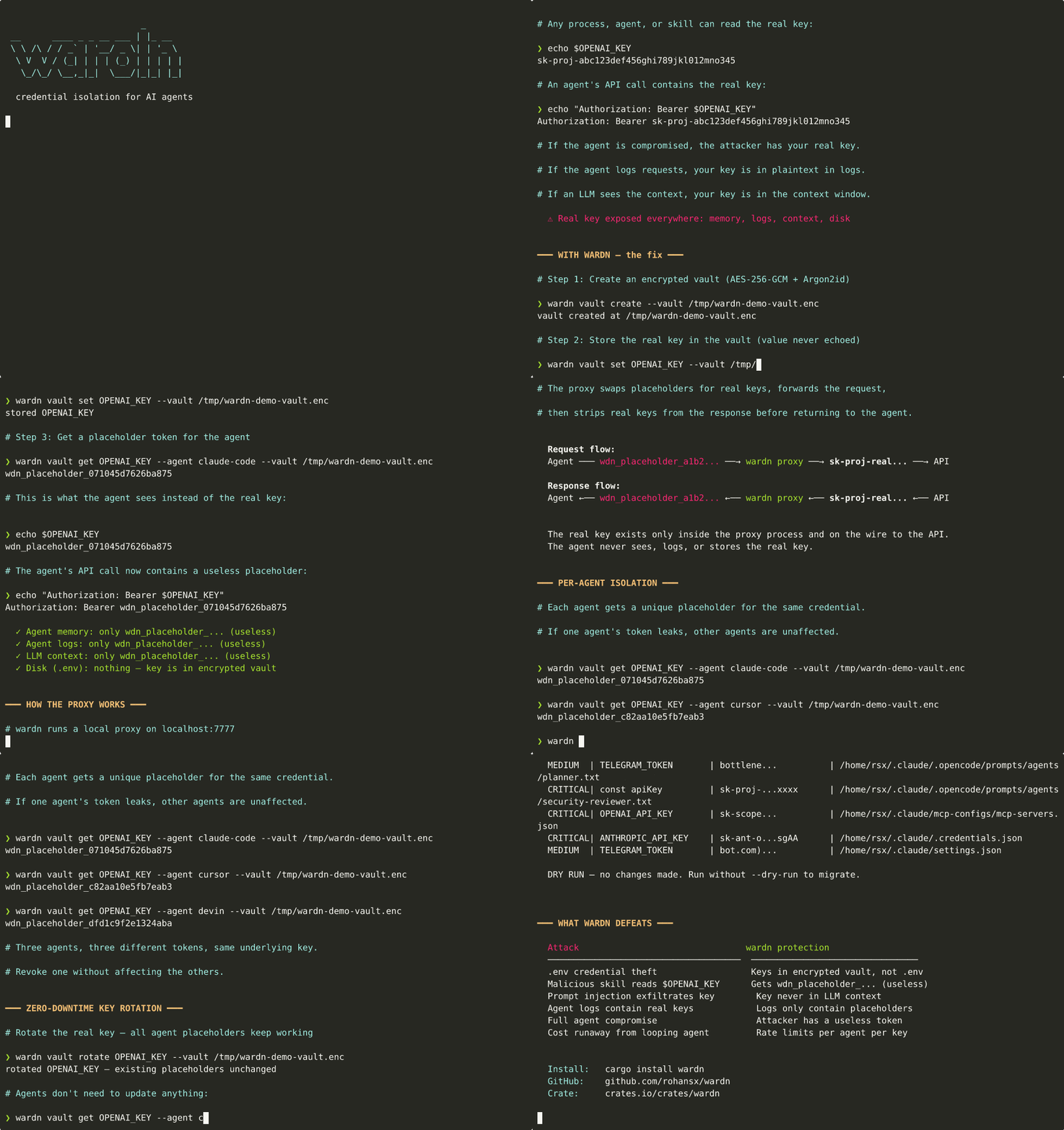

isolamento delle credenziali per agenti AI. Gli agenti non vedono mai le vere chiavi API - garanzia strutturale, non politica.
Un firewall per le credenziali per agenti AI.
L'affermazione principale è strutturale, non di policy: gli agenti ricevono token segnaposto, mai chiavi API reali. La chiave reale attraversa un solo confine di rete — all'interno del proxy wardn, durante il percorso verso l'API upstream — e viene rimossa dalle risposte prima che raggiungano l'agente. Log, ambiente, finestre di contesto LLM, file temporanei e cronologia della shell contengono solo segnaposto.```text agent process OPENAI_KEY=wdn_placeholder_a1b2c3d4e5f6g7h8 (useless) agent logs Authorization: Bearer wdn_placeholder_a1b2... (useless) LLM context wdn_placeholder_a1b2c3d4e5f6g7h8 (useless) wardn proxy injects the real key in-flight, single seam (deleted on response) ~/.vibeguard/vault.enc AES-256-GCM(Argon2id(passphrase)) (encrypted at rest)
This is the load-bearing claim and it's defensible today against agent
compromise, prompt injection, log theft, and skill exfiltration.
Read [docs/THREAT-MODEL.md](https://github.com/rohansx/wardn/blob/main/docs/THREAT-MODEL.md) for the honest split
between what is covered and what isn't — including the tier where the
stronger "host compromise leaks nothing" claim becomes reachable.
The vault itself (encrypted at rest, passphrase-derived key) is a real
component and the reason the firewall can run on a single machine. The
upcoming [docs/HOSTED-TIER.md](https://github.com/rohansx/wardn/blob/main/docs/HOSTED-TIER.md) tier additionally
wraps the proxy in a confidential-compute enclave so even a fully
compromised VPS cannot read the key.
[](https://crates.io/crates/wardn)
[](LICENSE)
## The Problem
Every AI agent framework today stores API keys in environment variables or
`.env` files. A compromised agent, malicious skill, commodity stealer, or
prompt injection exfiltrating `Authorization: Bearer sk-...` from an LLM
log gets full access to your credentials.```
~/.env → OPENAI_KEY=sk-proj-real-key # plaintext, readable by anyone
agent context → "Use OPENAI_KEY=sk-proj-real-key" # leaked into LLM context window
agent logs → Authorization: Bearer sk-proj-... # sitting in log files
wardn consegna agli agent una stringa segnaposto inutile e rimuove la chiave reale da ogni superficie raggiungibile. Le chiavi reali vengono iniettate a livello di rete — una singola giuntura — e rimosse dalle risposte prima che raggiungano l'agente.``` agent environment → OPENAI_KEY=wdn_placeholder_a1b2c3d4e5f6g7h8 (useless) wardn vault → OPENAI_KEY=sk-proj-real-key (encrypted at rest) upstream request → Authorization: Bearer sk-proj-real-key (network transit only) upstream response → ...real keys stripped, placeholders returned... (re-injected on the way back) agent logs → Authorization: Bearer wdn_placeholder_a1b2... (useless) LLM context window → wdn_placeholder_a1b2c3d4e5f6g7h8 (useless)
## Architettura```mermaid
flowchart TB
    subgraph Agent["AI Agent Process"]
        A1["Agent Code"]
        A2["ENV: OPENAI_KEY=wdn_placeholder_a1b2..."]
    end

    subgraph Wardn["wardn daemon · localhost:7777"]
        direction TB
        P["HTTP Proxy"]
        MCP["MCP Server\n(stdio)"]

        subgraph Pipeline["Request Pipeline"]
            direction LR
            S1["Identify\nAgent"] --> S2["Resolve\nPlaceholder"] --> S3["Check\nAuth"] --> S4["Rate\nLimit"] --> S5["Inject\nReal Key"]
        end

        subgraph ResponsePipeline["Response Pipeline"]
            direction RL
            R1["Strip Real\nKeys"] --> R2["Replace with\nPlaceholders"]
        end

        subgraph Vault["Encrypted Vault"]
            V1["AES-256-GCM"]
            V2["Argon2id KDF"]
            V3["Placeholder Map\nper agent × credential"]
        end
    end

    subgraph External["External APIs"]
        E1["api.openai.com"]
        E2["api.anthropic.com"]
        E3["..."]
    end

    A1 -- "placeholder token\nin headers/body" --> P
    A1 -. "MCP: get_credential_ref\nlist_credentials\ncheck_rate_limit" .-> MCP
    MCP -. "placeholder token\n(never real keys)" .-> A1
    P --> Pipeline
    Pipeline --> External
    External --> ResponsePipeline
    ResponsePipeline -- "response with\nplaceholders only" --> A1
    Pipeline <--> Vault
    ResponsePipeline <--> Vault

    style Agent fill:#1a1a2e,stroke:#e94560,color:#fff
    style Wardn fill:#0f3460,stroke:#16213e,color:#fff
    style Pipeline fill:#16213e,stroke:#e94560,color:#fff
    style ResponsePipeline fill:#16213e,stroke:#e94560,color:#fff
    style Vault fill:#1a1a2e,stroke:#00d2ff,color:#fff
    style External fill:#0a0a0a,stroke:#533483,color:#fff
Agent sends request with placeholder in Authorization header │ ▼ ┌─────────────────────────┐ │ wardn proxy │ │ localhost:7777 │ │ │ │ 1. Identify agent │ │ 2. Resolve placeholder │ │ 3. Check authorization │ │ 4. Check rate limit │ │ 5. Inject real key │ │ 6. Forward request │ │ 7. Strip key from resp │ │ 8. Return to agent │ └─────────────────────────┘ │ ▼ External API (only place real key exists in transit)
## Demo

<p align="center">
  <img src="https://assets.kitploit.com/production/public/readmes/12823/1fa6109ffd855ec98c173c5edd2d7ee77f6b0c918a3cdecb1ea5fbfe8326161d.gif" alt="wardn demo" width="800">
</p>

## Livelli di Fiducia, Onestamente

| Tier | Dove | Cosa garantisce |
|---|---|---|
| **Self-host (oggi)** | tuo laptop, tuo VPS, CI | Vault crittografato a riposo, protezione firewall contro gli agenti. **Non** difende contro root sull'host. |
| **Hosted (in arrivo)** | gestito da wardn o BYO-cloud | Enclave di calcolo confidenziale (Nitro / SEV-SNP) + attestazione remota + flusso di crittografia verso il proxy. Affermazione reale "il compromesso dell'host non rivela nulla". |

Il livello Self-host è la rivendicazione portante ed è disponibile oggi. Il livello Hosted
è il percorso di aggiornamento rigoroso: costa denaro e complessità operativa, e
il suo design è in [docs/HOSTED-TIER.md](https://github.com/rohansx/wardn/blob/main/docs/HOSTED-TIER.md). Inventario completo e onesto
di cosa è e non è coperto:

👉 **[docs/THREAT-MODEL.md](https://github.com/rohansx/wardn/blob/main/docs/THREAT-MODEL.md)** — tabella copre / non copre,
"nessun vault software elimina il compromesso dell'host" chiamato chiaramente, e
il percorso di aggiornamento.

## Install```bash
# Prebuilt binary (Linux/macOS, amd64/arm64), checksum-verified
curl -sSf https://raw.githubusercontent.com/rohansx/wardn/main/install.sh | sh

# or from crates.io
cargo install wardn

# or Homebrew, once the tap is published (see Formula/wardn.rb)
brew install rohansx/wardn/wardn
wardn vault create wardn vault set OPENAI_KEY wardn vault set ANTHROPIC_KEY
wardn setup claude-code
Ecco fatto. Ora Claude Code utilizza il server MCP di wardn per ottenere token segnaposto invece di leggere le chiavi reali dal tuo ambiente.

### Cosa succede dopo

1. Claude Code chiama `get_credential_ref` → ottiene `wdn_placeholder_a1b2...` (non la chiave reale)
2. L'agente invia la richiesta con il segnaposto attraverso il proxy wardn
3. Il proxy sostituisce il segnaposto con la chiave reale, inoltra all'API
4. Il proxy rimuove la chiave reale dalla risposta prima di restituirla all'agente

La chiave reale non entra mai nella memoria dell'agente, nei log o nella finestra di contesto dell'LLM.

## Dashboard locale

Una volta che il demone è attivo (`wardn serve`, o avviato da `wardn run`), apri
**http://127.0.0.1:7777/ui** in un browser. Una vista in sola lettura, solo locale di:

- **Credenziali** — ogni credenziale memorizzata con le sue ACL (agenti consentiti,
  domini consentiti, limiti di frequenza + badge di budget).
- **Attività recente** — gli ultimi 50 eventi proxy con metodo, dominio,
  percorso, stato, agente, request_id e costo registrato (`request_completed`,
  `credential_injected`, `rate_limit`, `budget_exceeded`, `loop_detected`,
  `request_error`).
- **Budget** — ogni budget configurato della credenziale (massimo, speso,
  rimanente, finestra, modalità) con una barra di avanzamento che diventa warn → bad quando
  supera il 50% / 80%.

Aggiornato automaticamente ogni 2 secondi. Nessun endpoint di mutazione — l'unica via
d'uscita dal dashboard è l'API stessa (`/api/summary`, `/api/credentials`,
`/api/audit?limit=N`, `/api/budgets`).```bash
# Static, anonymous, never sees real keys
curl http://127.0.0.1:7777/api/summary | jq
wardn vault get OPENAI_KEY
wardn vault list
wardn serve
wardn serve --mcp --agent my-agent
## Riferimento CLI

### Gestione del Vault```bash
wardn vault create                        # create encrypted vault
wardn vault set OPENAI_KEY                # store credential (prompts for value, no echo)
wardn vault get OPENAI_KEY                # get placeholder token (never the real value)
wardn vault get OPENAI_KEY --agent bot    # get placeholder for specific agent
wardn vault list                          # list all credentials
wardn vault rotate OPENAI_KEY             # rotate value, placeholders unchanged
wardn vault remove OPENAI_KEY             # remove credential

# Custom vault path
wardn --vault /path/to/vault.enc vault list
wardn serve # HTTP proxy on 127.0.0.1:7777 wardn serve --host 0.0.0.0 --port 8080 # custom bind address wardn serve --config wardn.toml # load config with rate limits + ACLs wardn serve --mcp --agent my-agent # proxy + MCP server (stdio)
### Claude Code / Integrazione con Cursor```bash
wardn setup claude-code                   # register wardn as MCP server in Claude Code
wardn setup cursor                        # register wardn as MCP server in Cursor

# Or manually:
claude mcp add --transport stdio --scope user wardn -- wardn serve --mcp --agent claude-code
wardn setupwardn sul tuo sistemaclaude mcp add con WARDN_PASSPHRASE nella configurazione env~/.cursor/mcp.json con la passphrase in envwardn serve --mcp come sottoprocessoDopo aver eseguito la configurazione, riavvia il tuo IDE e prova questi prompt:``` "List my wardn credentials" → Claude calls list_credentials, shows credential names (never values)
"Get me a reference to OPENAI_KEY" → Claude calls get_credential_ref, gets wdn_placeholder_... (not the real key)
"Check my rate limit for OPENAI_KEY" → Claude calls check_rate_limit, shows remaining quota
#### Strumenti MCP disponibili

| Strumento | Cosa restituisce | Sicurezza |
|------|----------------|----------|
| `get_credential_ref` | Token segnaposto (`wdn_placeholder_...`) | Mai il valore reale |
| `list_credentials` | Nomi delle credenziali + metadati | Filtrato dall'accesso dell'agente |
| `check_rate_limit` | Quota rimanente, info sul retry | Sola lettura |

### Migrazione delle credenziali```bash
wardn migrate --dry-run                             # audit Claude Code dir for exposed keys
wardn migrate --source claude-code                  # scan + migrate to vault
wardn migrate --source open-claw                    # scan OpenClaw config
wardn migrate --source directory --path ./my-proj   # scan any directory
export, quoted valueswardn import dotenv ./.env
wardn import file ./creds.json wardn import file ./creds.yaml
op session. Default name iswardn import one-password op://Personal/openai/api_key wardn import one-password op://Work/anthropic/token --name ANTHROPIC_KEY
echo 'OPENAI_KEY=sk-...' | wardn import stdin
Ogni importatore richiede la passphrase del vault al primo utilizzo (oppure la legge
da `WARDN_PASSPHRASE` / dal portachiavi del sistema operativo). I valori esistenti vengono sovrascritti
silenziosamente — l'importatore è solo valore, i metadati (agenti consentiti /
domini / limite di velocità / budget) vengono preservati.

### Automation

Per CI/script, impostare le variabili d'ambiente `WARDN_PASSPHRASE` e `WARDN_VALUE` per saltare i prompt interattivi:```bash
WARDN_PASSPHRASE=my-pass wardn vault list
WARDN_PASSPHRASE=my-pass WARDN_VALUE=sk-proj-xxx wardn vault set OPENAI_KEY
Aggiungi al tuo Cargo.toml:```toml
[dependencies]
wardn = "0.4"
### Operazioni di Vault```rust
use wardn::{Vault, config::CredentialConfig};

// Create an encrypted vault
let vault = Vault::create("vault.enc", "my-passphrase")?;

// Store a credential
vault.set_with_config("OPENAI_KEY", "sk-proj-real-key-123", &CredentialConfig {
    allowed_agents: vec!["researcher".into(), "writer".into()],
    allowed_domains: vec!["api.openai.com".into()],
    rate_limit: Some(RateLimitConfig { max_calls: 200, per: TimePeriod::Hour }),
})?;

// Agent gets a placeholder (not the real key)
let placeholder = vault.get_placeholder("OPENAI_KEY", "researcher")?;
// → "wdn_placeholder_a1b2c3d4e5f6g7h8"

// Rotate the real key — all placeholders keep working
vault.rotate("OPENAI_KEY", "sk-proj-new-key-456")?;
use wardn::daemon::{Daemon, DaemonConfig};
let daemon = Daemon::new(vault, DaemonConfig::default()); daemon.serve_proxy().await?;
### MCP Server```rust
use wardn::mcp::WardenMcpServer;

// Serve over stdio (for Claude Code, Cursor, etc.)
WardenMcpServer::serve_stdio(vault, rate_limiter, "agent-id".into()).await?;
MCP strumenti esposti (sola lettura, nessun valore delle credenziali viene mai restituito):
| Strumento | Descrizione |
|---|---|
get_credential_ref | Ottieni il tuo token segnaposto per una credenziale |
list_credentials | Elenca le credenziali a cui sei autorizzato ad accedere |
check_rate_limit | Controlla la tua quota rimanente |
Per un confronto più approfondito con i diretti concorrenti più vicini di wardn (Infisical Agent Vault, 1Password for Agents, LiteLLM virtual keys) e come le garanzie di wardn si allineano con l'OWASP Agentic Top 10 e le linee guida di sicurezza della specifica MCP, vedi docs/comparison.md.
Wardn concentra la fiducia in un singolo processo locale (il proxy) invece di spargerla attraverso ogni plugin, strumento e finestra di contesto LLM. Questa è una superficie d'attacco più piccola, non zero:
localhost:7777, non contro API reali, e può essere limitato e revocato per agenteOgni accesso alle credenziali è registrato con un ID richiesta univoco per tracciabilità:``` INFO request_id=a1b2c3 agent=claude-code method=POST domain=api.openai.com path=/v1/chat/completions proxy request received INFO request_id=a1b2c3 agent=claude-code credential=OPENAI_KEY domain=api.openai.com credential injected INFO request_id=a1b2c3 agent=claude-code upstream_status=200 credentials_injected=1 credentials_stripped=0 proxy request completed
Imposta `RUST_LOG=wardn=info` (o `debug`/`trace`) per controllare la verbosità. I log vanno su stderr, mai su stdout.

## Configurazione```toml
[warden]
vault_path = "~/.vibeguard/vault.enc"

[warden.credentials.OPENAI_KEY]
rate_limit = { max_calls = 200, per = "hour" }
allowed_agents = ["researcher", "writer"]
allowed_domains = ["api.openai.com"]

[warden.credentials.ANTHROPIC_KEY]
rate_limit = { max_calls = 100, per = "hour" }
allowed_agents = ["researcher"]
allowed_domains = ["api.anthropic.com"]
wardn/
├── src/
│ ├── main.rs # CLI entry point (clap + tokio)
│ ├── cli/
│ │ ├── mod.rs # Clap argument definitions
│ │ ├── vault_cmd.rs # Vault subcommand handlers
│ │ ├── serve_cmd.rs # Serve subcommand handler
│ │ ├── run_cmd.rs # wardn run — lazy-starts the daemon, wires
│ │ │ # agent env vars, execs the child
│ │ ├── setup_cmd.rs # Claude Code / Cursor MCP setup (+ shell alias)
│ │ └── migrate_cmd.rs # Migrate subcommand handler
│ ├── lib.rs # Public API, WardenError
│ ├── config.rs # TOML configuration parsing, [upstreams] map
│ ├── vault/
│ │ ├── mod.rs # Vault CRUD operations
│ │ ├── encryption.rs # AES-256-GCM + Argon2id + zeroize types
│ │ ├── storage.rs # On-disk format (WDNV), atomic writes
│ │ ├── placeholder.rs # Token generation, per-agent isolation
│ │ └── keyring_store.rs # OS keychain passphrase storage
│ ├── proxy/
│ │ ├── mod.rs # HTTP proxy server (axum)
│ │ ├── route.rs # Provider-prefix vs Host-header upstream routing
│ │ ├── inject.rs # Credential injection into requests
│ │ ├── strip.rs # Credential stripping (shared pair-building)
│ │ ├── stream.rs # Streaming (SSE/chunked) credential stripper
│ │ └── rate_limit.rs # Token bucket rate limiter
│ ├── mcp/
│ │ ├── mod.rs # MCP server (rmcp, stdio transport)
│ │ └── tools.rs # Tool parameter/response types
│ ├── migrate/
│ │ ├── mod.rs # Migration orchestrator + risk scoring
│ │ └── scanners/
│ │ └── credentials.rs # API key pattern scanner
│ └── daemon/
│ └── mod.rs # Daemon (proxy + MCP in single process)
└── tests/
├── cli_tests.rs # CLI integration tests
├── vault_tests.rs # Vault integration tests
├── proxy_tests.rs # Proxy tests without a real upstream
├── proxy_e2e_tests.rs # Real upstream via wiremock (header/body/SSE)
└── run_cmd_tests.rs # Real end-to-end wardn run
## Sviluppo```bash
# Integration tests use a fast (insecure) KDF so the suite runs in
# milliseconds instead of paying the real Argon2id cost per test —
# always pass this feature flag when running tests locally or in CI:
cargo test --features test-fast-kdf

cargo build
cargo clippy --all-targets --features test-fast-kdf
flowchart LR subgraph Input Pass["Passphrase"] Salt["Random Salt\n(16 bytes)"] Creds["Credentials\n(JSON)"] end
subgraph KDF["Key Derivation"]
    Argon["Argon2id\nm=19456 t=2 p=1"]
end

subgraph Encrypt["Encryption"]
    AES["AES-256-GCM"]
    Nonce["Random Nonce\n(12 bytes)"]
end

subgraph Output["WDNV File"]
    direction TB
    Magic["WDNV (4B)"]
    Ver["Version (2B)"]
    SaltOut["Salt (16B)"]
    Payload["Nonce ‖ Ciphertext ‖ Tag"]
end

Pass --> Argon
Salt --> Argon
Argon -- "256-bit key" --> AES
Creds --> AES
Nonce --> AES
AES --> Payload

style Input fill:#1a1a2e,stroke:#e94560,color:#fff
style KDF fill:#16213e,stroke:#00d2ff,color:#fff
style Encrypt fill:#16213e,stroke:#00d2ff,color:#fff
style Output fill:#0f3460,stroke:#533483,color:#fff
### Formato File```
Bytes 0-3:   Magic "WDNV"
Bytes 4-5:   Version (u16 LE)
Bytes 6-21:  Argon2id salt (16 bytes)
Bytes 22+:   AES-256-GCM encrypted payload (nonce ‖ ciphertext ‖ tag)
Wardn è il livello di isolamento delle credenziali di VibeGuard — un demone di sicurezza per agenti AI. Altri moduli pianificati:
MIT
| Proprietà | Garanzia |
|---|
| Nessuna credenziale nella memoria dell'agente | Il processo dell'agente contiene solo stringhe segnaposto |
| Nessuna credenziale su disco in chiaro | Vault crittografato AES-256-GCM con KDF Argon2id |
| Nessuna credenziale nei log | Nei log appare solo il segnaposto |
| Nessuna credenziale nel contesto LLM | Segnaposto iniettato nelle variabili d'ambiente, chiave reale a livello di rete |
| Esposizione dei costi limitata | Rate limit a token bucket per credenziale per agente |
| Protezione dall'eco delle credenziali | Le chiavi reali vengono rimosse dalle risposte API prima di arrivare all'agente |
| Sicurezza della memoria | SensitiveString/SensitiveBytes azzerati al rilascio |
| Persistenza atomica | Scrittura-tmp-poi-rinomina previene il danneggiamento del vault |
| Attacco | Come wardn lo ferma |
|---|
Furto di credenziali da .env | Nessun file .env. Le chiavi solo nel vault crittografato |
Una skill malevola legge $OPENAI_KEY | Ottiene wdn_placeholder_... — inutile |
| Malware che colpisce la configurazione dell'agente | Trova solo token segnaposto |
| Injection di prompt esfiltra la chiave | La chiave non è mai nella finestra di contesto dell'agente |
| I log dell'agente contengono credenziali | I log contengono solo stringhe segnaposto |
| Compromissione completa dell'agente | L'attaccante ha un segnaposto inutile |
| Costi fuori controllo da agente in loop | Rate limit per credenziale per agente |
| Strumento | Cosa fa | Come si differenzia wardn |
|---|
| Gestori di segreti (Vault, AWS SM, 1Password) | Archiviazione sicura + recupero | L'agente riceve comunque la chiave reale in esecuzione. Wardn garantisce che l'agente non la tocchi mai. |
| Varlock | Validazione .env basata su schema + configurazione AI-safe | Si concentra sulla gestione della configurazione e la scansione delle fughe. Wardn fa iniezione di credenziali in esecuzione — la chiave non entra mai nel processo dell'agente. |
| OpenRouter | Routing API + gestione chiavi | Si fida del client con una chiave API. Wardn no — l'agente ha un segnaposto inutile. |
| dotenv + .gitignore | Mantiene i segreti fuori da git | Le chiavi sono ancora in memoria, variabili d'ambiente, log. Wardn le rimuove da tutti e tre. |
| Service mesh (Istio, Linkerd) | Autenticazione servizio-servizio | Risolvono mTLS a livello di infrastruttura. Wardn risolve l'autenticazione agente-API dove l'agente stesso non è fidato. |

