 pvharmo2/gha-lab-6c3094af9e
Laboratorio di ricerca sulla sicurezza autorizzato che riproduce la CVE-2026-27941 (richiesta pwn nei workflow pull_request_target) — snapshot di openlit/openlit

Artifacto di ricerca automatizzato — non il progetto upstream.
Questo repository è un laboratorio monouso costruito da un sistema automatizzato per una tesi magistrale presso l'Université Laval sulla riproduzione di vulnerabilità pubblicate nei workflow di GitHub Actions. È uno snapshot integrale di
openlit/openlital commit8529a7746ce2cae946bd2346cb3792c22f86cbee(2026-02-24), ridistribuito sotto la licenza del progetto stesso, il cui file è incluso invariato in questo snapshot.Il progetto upstream non è coinvolto, non è mai preso di mira, e la vulnerabilità studiata qui è già pubblica. Ogni segreto e variabile in questo repository è un valore fittizio generato casualmente — nessuna credenziale reale è presente. I riferimenti alle action e le immagini dei runner sono bloccati a ciò a cui risolvevano al 2026-02-24; consulta
pinning.mdnell'output del sistema per ogni modifica apportata allo snapshot.Domande o obiezioni: [email protected]






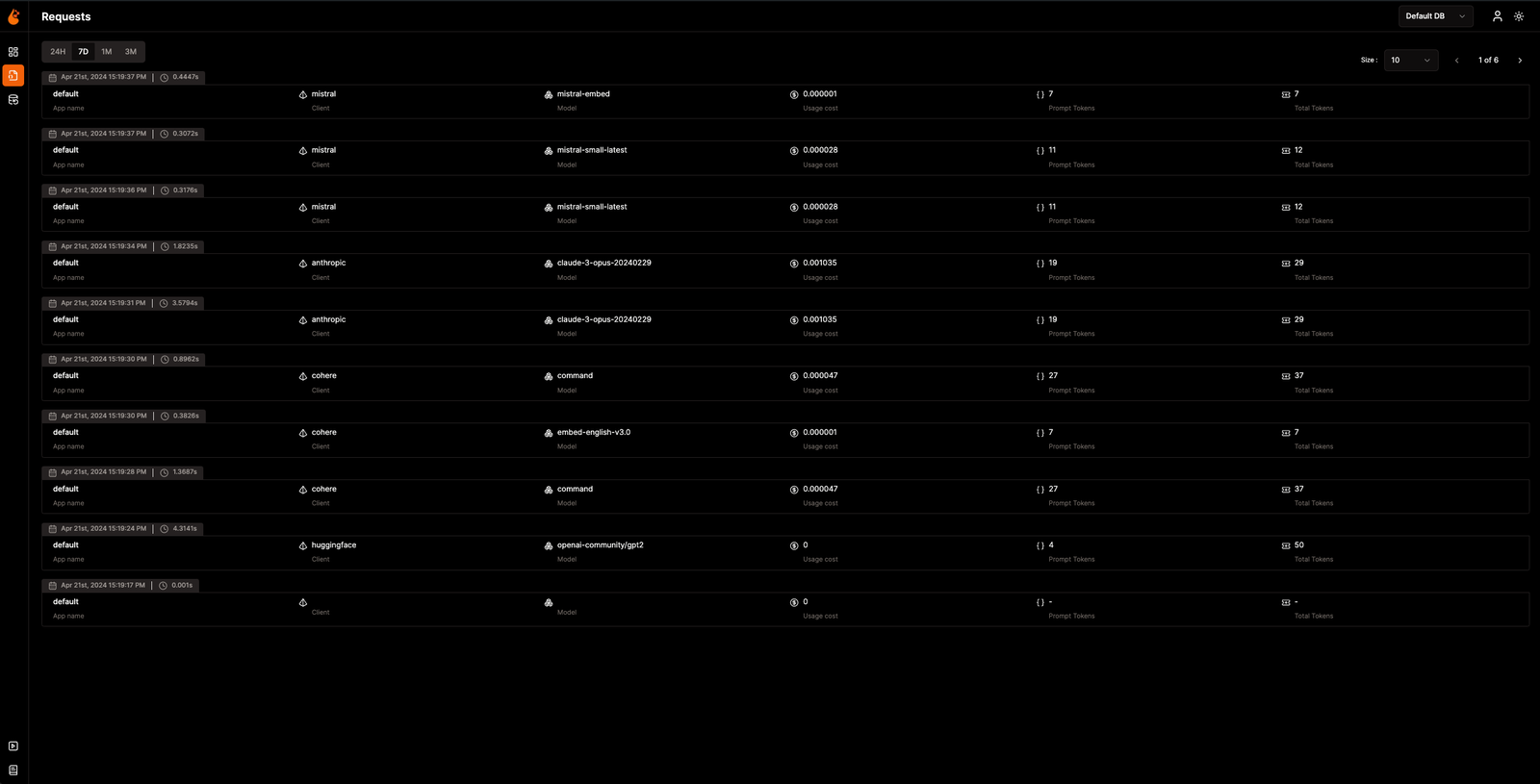
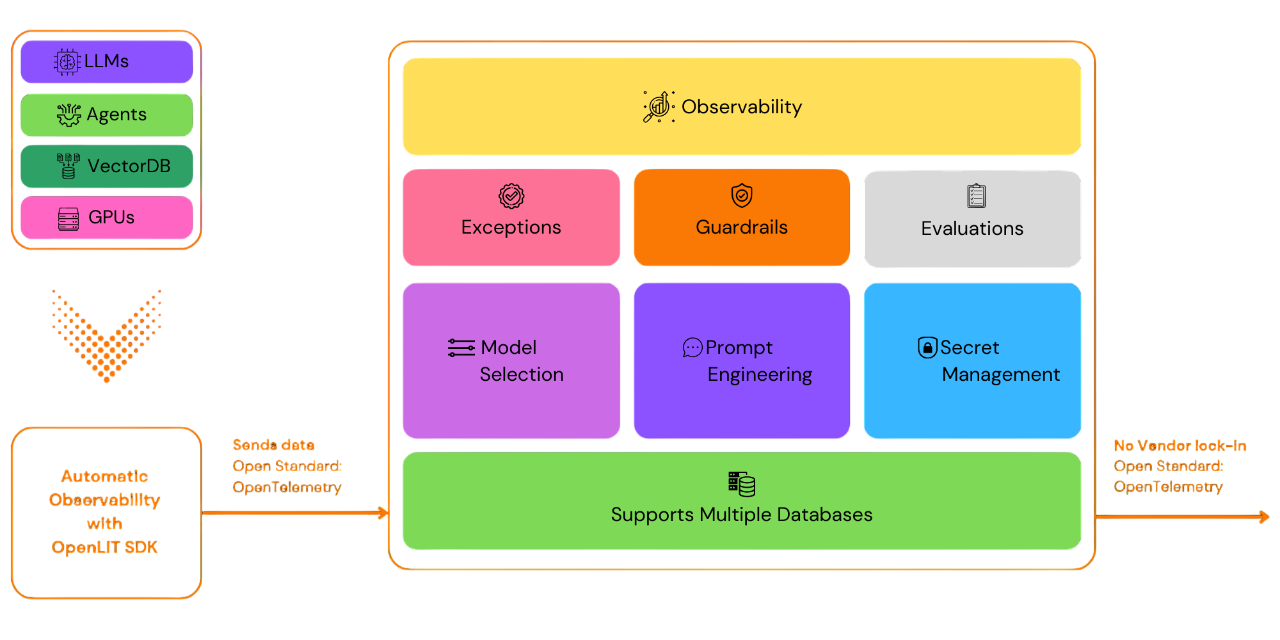
OpenLIT ti consente di semplificare il tuo flusso di lavoro di sviluppo dell'IA, in particolare per l'IA generativa e gli LLM. Semplifica attività essenziali come sperimentare con gli LLM, organizzare e versionare i prompt e gestire in modo sicuro le chiavi API. Con una sola riga di codice, puoi abilitare l'osservabilità nativa OpenTelemetry, offrendo un monitoraggio full-stack che include LLM, database vettoriali e GPU. Questo consente agli sviluppatori di creare funzionalità e applicazioni di IA con sicurezza, passando senza intoppi dal test alla produzione.
Questo progetto segue e mantiene con orgoglio le Convenzioni Semantiche con la community OpenTelemetry, aggiornandosi costantemente per allinearsi agli standard più recenti nell'osservabilità.
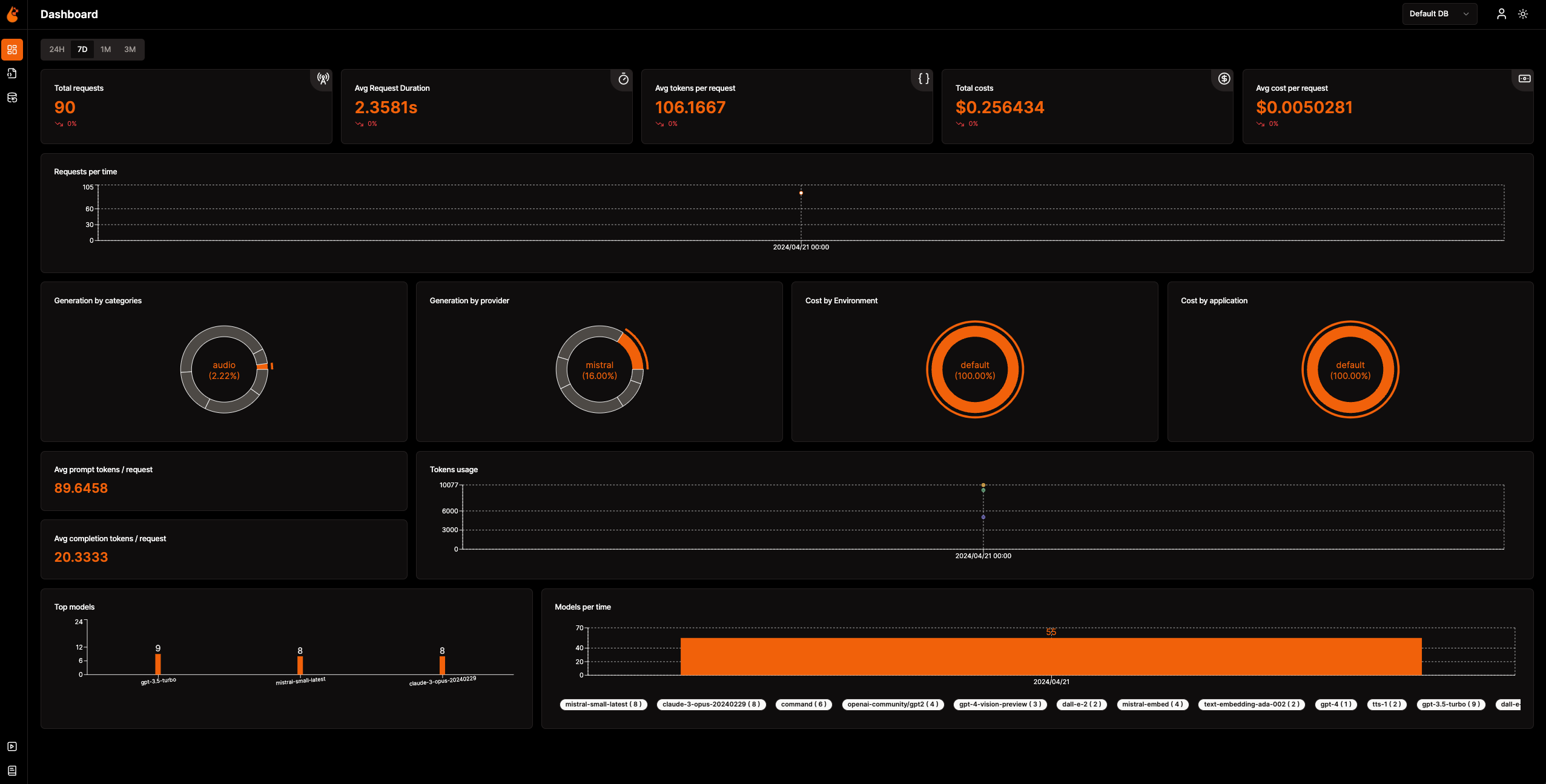
📈 Dashboard di analisi: Monitora la salute e le prestazioni della tua applicazione di IA con dashboard dettagliate che tracciano metriche, costi e interazioni degli utenti, offrendo una visione chiara dell'efficienza complessiva.
🔌 SDK di osservabilità nativi OpenTelemetry: SDK indipendenti dal vendor per inviare trace e metriche ai tuoi strumenti di osservabilità esistenti.
💲 Tracciamento dei costi per modelli personalizzati e fine-tuned: Personalizza le stime dei costi per modelli specifici utilizzando file di prezzi personalizzati per una pianificazione precisa del budget.
🐛 Dashboard di monitoraggio delle eccezioni: Individua e risolvi rapidamente i problemi tracciando eccezioni ed errori comuni con una dashboard di monitoraggio dedicata.
💭 Gestione dei prompt: Gestisci e versiona i prompt utilizzando Prompt Hub per un accesso coerente e semplice tra le applicazioni.
🔑 Gestione di chiavi API e segreti: Gestisci in modo sicuro le tue chiavi API e i tuoi segreti in modo centralizzato, evitando pratiche non sicure.
🎮 Sperimenta con diversi LLM: Usa OpenGround per esplorare, testare e confrontare vari LLM affiancati.
🚀 Fleet Hub per la gestione OpAMP: Gestisci e monitora centralmente i collector OpenTelemetry nella tua infrastruttura utilizzando il protocollo OpAMP (Open Agent Management Protocol) con comunicazione TLS sicura.
flowchart TB; subgraph " " direction LR; subgraph " " direction LR; OpenLIT_SDK[OpenLIT SDK] -->|Sends Traces & Metrics| OTC[OpenTelemetry Collector]; OTC -->|Stores Data| ClickHouseDB[ClickHouse]; end subgraph " " direction RL; OpenLIT_UI[OpenLIT] -->|Pulls Data| ClickHouseDB; end end
### Step 1: Distribuisci lo Stack OpenLIT

1. Clona il Repository OpenLIT con Git

   Apri la tua riga di comando o terminale ed esegui:   ```shell
   git clone [email protected]:openlit/openlit.git
Self-hosting con Docker
Distribuisci ed esegui OpenLIT con il seguente comando: ```shell docker compose up -d
Per istruzioni sull'installazione in Kubernetes tramite Helm, consulta la guida all'installazione Kubernetes con Helm.
Apri la riga di comando o il terminale ed esegui:```bash pip install openlit
> Per istruzioni sull'uso dell'SDK TypeScript, visita la [guida all'installazione dell'SDK TypeScript](https://github.com/openlit/openlit/tree/main/sdk/typescript#-installation).

### Passaggio 3: Inizializza OpenLIT nella tua applicazione

Integra OpenLIT nelle tue applicazioni AI aggiungendo le seguenti righe al tuo codice.```python
import openlit

openlit.init()
Configura la destinazione dei dati di telemetria come segue:
| Scopo | Parametro/Variabile d'ambiente | Per l'invio a OpenLIT |
|---|---|---|
| Inviare dati a un endpoint OTLP HTTP | otlp_endpoint o OTEL_EXPORTER_OTLP_ENDPOINT | "http://127.0.0.1:4318" |
| Autenticare i backend di telemetria | otlp_headers o OTEL_EXPORTER_OTLP_HEADERS | Non richiesto per impostazione predefinita |
💡 Info: Se
otlp_endpointoOTEL_EXPORTER_OTLP_ENDPOINTnon viene fornito, l'SDK OpenLIT invierà le tracce direttamente alla console, operazione consigliata durante la fase di sviluppo.
Aggiungi le seguenti due righe al codice della tua applicazione: ```python import openlit
openlit.init( otlp_endpoint="http://127.0.0.1:4318", )
</details>

---

<details>

---

<summary>Inizializzazione tramite Variabili d'Ambiente</summary>

Aggiungi le seguenti due righe al codice della tua applicazione:  ```python
import openlit

openlit.init()
Allora, configura il tuo endpoint OTLP utilizzando la variabile d'ambiente: ```env export OTEL_EXPORTER_OTLP_ENDPOINT = "http://127.0.0.1:4318"
</details>
---
### Passaggio 4: Visualizza e Ottimizza
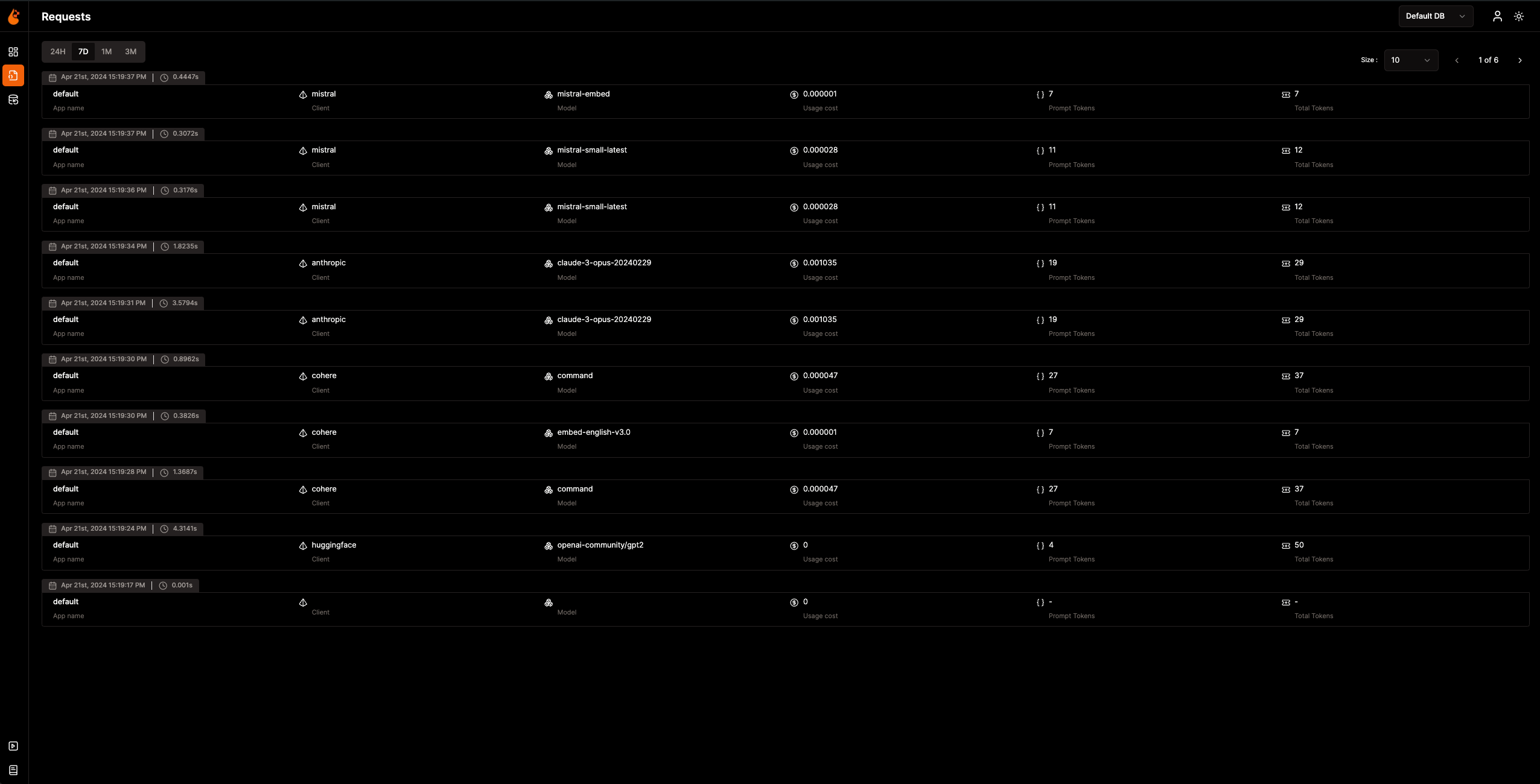
Ora che i dati di Observability vengono raccolti e inviati a OpenLIT, il passo successivo è visualizzare e analizzare questi dati per ottenere informazioni sulle prestazioni e sul comportamento della tua applicazione AI e identificare le aree di miglioramento.
Basta andare su OpenLIT all'indirizzo `127.0.0.1:3000` nel tuo browser per iniziare a esplorare. Puoi accedere utilizzando le credenziali predefinite:
- **Email**: `[email protected]`
- **Password**: `openlituser`
## 📦 Integrazioni Supportate
OpenLIT auto-strumenta **44+ provider LLM, framework AI e database vettoriali** con una singola riga di codice. Ogni integrazione produce trace e metriche [native OpenTelemetry](https://opentelemetry.io/). Fai clic su qualsiasi scheda per visualizzare la documentazione dell'integrazione.
<sub>
<img src="https://img.shields.io/badge/Python-3776AB?logo=python&logoColor=white&style=flat-square" height="16"> SDK Python
<img src="https://img.shields.io/badge/TypeScript-3178C6?logo=typescript&logoColor=white&style=flat-square" height="16"> SDK TypeScript
</sub>
### Provider LLM
<table>
<tr>
<td align="center" width="160"><a href="https://docs.openlit.io/latest/sdk/integrations/openai"><b>OpenAI</b></a><br/><img src="https://img.shields.io/badge/Python-3776AB?logo=python&logoColor=white&style=flat-square" height="18"> <img src="https://img.shields.io/badge/TypeScript-3178C6?logo=typescript&logoColor=white&style=flat-square" height="18"></td>
<td align="center" width="160"><a href="https://docs.openlit.io/latest/sdk/integrations/anthropic"><b>Anthropic</b></a><br/><img src="https://img.shields.io/badge/Python-3776AB?logo=python&logoColor=white&style=flat-square" height="18"> <img src="https://img.shields.io/badge/TypeScript-3178C6?logo=typescript&logoColor=white&style=flat-square" height="18"></td>
<td align="center" width="160"><a href="https://docs.openlit.io/latest/sdk/integrations/cohere"><b>Cohere</b></a><br/><img src="https://img.shields.io/badge/Python-3776AB?logo=python&logoColor=white&style=flat-square" height="18"> <img src="https://img.shields.io/badge/TypeScript-3178C6?logo=typescript&logoColor=white&style=flat-square" height="18"></td>
<td align="center" width="160"><a href="https://docs.openlit.io/latest/sdk/integrations/mistral"><b>Mistral AI</b></a><br/><img src="https://img.shields.io/badge/Python-3776AB?logo=python&logoColor=white&style=flat-square" height="18"> <img src="https://img.shields.io/badge/TypeScript-3178C6?logo=typescript&logoColor=white&style=flat-square" height="18"></td>
</tr>
<tr>
<td align="center" width="160"><a href="https://docs.openlit.io/latest/sdk/integrations/groq"><b>Groq</b></a><br/><img src="https://img.shields.io/badge/Python-3776AB?logo=python&logoColor=white&style=flat-square" height="18"> <img src="https://img.shields.io/badge/TypeScript-3178C6?logo=typescript&logoColor=white&style=flat-square" height="18"></td>
<td align="center" width="160"><a href="https://docs.openlit.io/latest/sdk/integrations/google-ai-studio"><b>Google AI Studio</b></a><br/><img src="https://img.shields.io/badge/Python-3776AB?logo=python&logoColor=white&style=flat-square" height="18"> <img src="https://img.shields.io/badge/TypeScript-3178C6?logo=typescript&logoColor=white&style=flat-square" height="18"></td>
<td align="center" width="160"><a href="https://docs.openlit.io/latest/sdk/integrations/together"><b>Together AI</b></a><br/><img src="https://img.shields.io/badge/Python-3776AB?logo=python&logoColor=white&style=flat-square" height="18"> <img src="https://img.shields.io/badge/TypeScript-3178C6?logo=typescript&logoColor=white&style=flat-square" height="18"></td>
<td align="center" width="160"><a href="https://docs.openlit.io/latest/sdk/integrations/ollama"><b>Ollama</b></a><br/><img src="https://img.shields.io/badge/Python-3776AB?logo=python&logoColor=white&style=flat-square" height="18"> <img src="https://img.shields.io/badge/TypeScript-3178C6?logo=typescript&logoColor=white&style=flat-square" height="18"></td>
</tr>
<tr>
<td align="center" width="160"><a href="https://docs.openlit.io/latest/sdk/integrations/bedrock"><b>AWS Bedrock</b></a><br/><img src="https://img.shields.io/badge/Python-3776AB?logo=python&logoColor=white&style=flat-square" height="18"> <img src="https://img.shields.io/badge/TypeScript-3178C6?logo=typescript&logoColor=white&style=flat-square" height="18"></td>
<td align="center" width="160"><a href="https://docs.openlit.io/latest/sdk/integrations/azure-ai-inference"><b>Azure AI Inference</b></a><br/><img src="https://img.shields.io/badge/Python-3776AB?logo=python&logoColor=white&style=flat-square" height="18"></td>
<td align="center" width="160"><a href="https://docs.openlit.io/latest/sdk/integrations/vertexai"><b>Vertex AI</b></a><br/><img src="https://img.shields.io/badge/Python-3776AB?logo=python&logoColor=white&style=flat-square" height="18"></td>
<td align="center" width="160"><a href="https://docs.openlit.io/latest/sdk/integrations/vllm"><b>vLLM</b></a><br/><img src="https://img.shields.io/badge/Python-3776AB?logo=python&logoColor=white&style=flat-square" height="18"></td>
</tr>
<tr>
<td align="center" width="160"><a href="https://docs.openlit.io/latest/sdk/integrations/reka"><b>Reka</b></a><br/><img src="https://img.shields.io/badge/Python-3776AB?logo=python&logoColor=white&style=flat-square" height="18"></td>
<td align="center" width="160"><a href="https://docs.openlit.io/latest/sdk/integrations/litellm"><b>LiteLLM</b></a><br/><img src="https://img.shields.io/badge/Python-3776AB?logo=python&logoColor=white&style=flat-square" height="18"></td>
<td align="center" width="160"><a href="https://docs.openlit.io/latest/sdk/integrations/huggingface"><b>Hugging Face</b></a><br/><img src="https://img.shields.io/badge/Python-3776AB?logo=python&logoColor=white&style=flat-square" height="18"></td>
<td align="center" width="160"><a href="https://docs.openlit.io/latest/sdk/integrations/ai21"><b>AI21</b></a><br/><img src="https://img.shields.io/badge/Python-3776AB?logo=python&logoColor=white&style=flat-square" height="18"></td>
</tr>
<tr>
<td align="center" width="160"><a href="https://docs.openlit.io/latest/sdk/integrations/gpt4all"><b>GPT4All</b></a><br/><img src="https://img.shields.io/badge/Python-3776AB?logo=python&logoColor=white&style=flat-square" height="18"></td>
<td align="center" width="160"><a href="https://docs.openlit.io/latest/sdk/integrations/premai"><b>PremAI</b></a><br/><img src="https://img.shields.io/badge/Python-3776AB?logo=python&logoColor=white&style=flat-square" height="18"></td>
<td align="center" width="160"><a href="https://docs.openlit.io/latest/sdk/integrations/sarvam"><b>Sarvam AI</b></a><br/><img src="https://img.shields.io/badge/Python-3776AB?logo=python&logoColor=white&style=flat-square" height="18"></td>
<td align="center" width="160"><a href="https://docs.openlit.io/latest/sdk/integrations/julep-ai"><b>Julep</b></a><br/><img src="https://img.shields.io/badge/Python-3776AB?logo=python&logoColor=white&style=flat-square" height="18"></td>
</tr>
<tr>
<td align="center" width="160"><a href="https://docs.openlit.io/latest/sdk/integrations/multion"><b>MultiOn</b></a><br/><img src="https://img.shields.io/badge/Python-3776AB?logo=python&logoColor=white&style=flat-square" height="18"></td>
</tr>
</table>
### Framework AI
<table>
<tr>
<td align="center" width="160"><a href="https://docs.openlit.io/latest/sdk/integrations/langchain"><b>LangChain</b></a><br/><img src="https://img.shields.io/badge/Python-3776AB?logo=python&logoColor=white&style=flat-square" height="18"> <img src="https://img.shields.io/badge/TypeScript-3178C6?logo=typescript&logoColor=white&style=flat-square" height="18"></td>
<td align="center" width="160"><a href="https://docs.openlit.io/latest/sdk/integrations/llama-index"><b>LlamaIndex</b></a><br/><img src="https://img.shields.io/badge/Python-3776AB?logo=python&logoColor=white&style=flat-square" height="18"> <img src="https://img.shields.io/badge/TypeScript-3178C6?logo=typescript&logoColor=white&style=flat-square" height="18"></td>
<td align="center" width="160"><a href="https://docs.openlit.io/latest/sdk/integrations/crewai"><b>CrewAI</b></a><br/><img src="https://img.shields.io/badge/Python-3776AB?logo=python&logoColor=white&style=flat-square" height="18"></td>
<td align="center" width="160"><a href="https://docs.openlit.io/latest/sdk/integrations/pydantic"><b>Pydantic AI</b></a><br/><img src="https://img.shields.io/badge/Python-3776AB?logo=python&logoColor=white&style=flat-square" height="18"></td>
</tr>
<tr>
<td align="center" width="160"><a href="https://docs.openlit.io/latest/sdk/integrations/phidata"><b>Agno</b></a><br/><img src="https://img.shields.io/badge/Python-3776AB?logo=python&logoColor=white&style=flat-square" height="18"></td>
<td align="center" width="160"><a href="https://docs.openlit.io/latest/sdk/integrations/browser-use"><b>Browser Use</b></a><br/><img src="https://img.shields.io/badge/Python-3776AB?logo=python&logoColor=white&style=flat-square" height="18"></td>
<td align="center" width="160"><a href="https://docs.openlit.io/latest/sdk/integrations/haystack"><b>Haystack</b></a><br/><img src="https://img.shields.io/badge/Python-3776AB?logo=python&logoColor=white&style=flat-square" height="18"></td>
<td align="center" width="160"><a href="https://docs.openlit.io/latest/sdk/integrations/letta"><b>Letta</b></a><br/><img src="https://img.shields.io/badge/Python-3776AB?logo=python&logoColor=white&style=flat-square" height="18"></td>
</tr>
<tr>
<td align="center" width="160"><a href="https://docs.openlit.io/latest/sdk/integrations/mem0"><b>Mem0</b></a><br/><img src="https://img.shields.io/badge/Python-3776AB?logo=python&logoColor=white&style=flat-square" height="18"></td>
<td align="center" width="160"><a href="https://docs.openlit.io/latest/sdk/integrations/ag2"><b>AG2 (AutoGen)</b></a><br/><img src="https://img.shields.io/badge/Python-3776AB?logo=python&logoColor=white&style=flat-square" height="18"></td>
<td align="center" width="160"><a href="https://docs.openlit.io/latest/sdk/integrations/controlflow"><b>Controlflow</b></a><br/><img src="https://img.shields.io/badge/Python-3776AB?logo=python&logoColor=white&style=flat-square" height="18"></td>
<td align="center" width="160"><a href="https://docs.openlit.io/latest/sdk/integrations/crawl4ai"><b>Crawl4AI</b></a><br/><img src="https://img.shields.io/badge/Python-3776AB?logo=python&logoColor=white&style=flat-square" height="18"></td>
</tr>
<tr>
<td align="center" width="160"><a href="https://docs.openlit.io/latest/sdk/integrations/dynamiq"><b>Dynamiq</b></a><br/><img src="https://img.shields.io/badge/Python-3776AB?logo=python&logoColor=white&style=flat-square" height="18"></td>
<td align="center" width="160"><a href="https://docs.openlit.io/latest/sdk/integrations/openai-agents"><b>OpenAI Agents</b></a><br/><img src="https://img.shields.io/badge/Python-3776AB?logo=python&logoColor=white&style=flat-square" height="18"></td>
<td align="center" width="160"><a href="https://docs.openlit.io/latest/sdk/integrations/firecrawl"><b>Firecrawl</b></a><br/><img src="https://img.shields.io/badge/Python-3776AB?logo=python&logoColor=white&style=flat-square" height="18"></td>
</tr>
</table>
### Database Vettoriali
<table>
<tr>
<td align="center" width="160"><a href="https://docs.openlit.io/latest/sdk/integrations/pinecone"><b>Pinecone</b></a><br/><img src="https://img.shields.io/badge/Python-3776AB?logo=python&logoColor=white&style=flat-square" height="18"> <img src="https://img.shields.io/badge/TypeScript-3178C6?logo=typescript&logoColor=white&style=flat-square" height="18"></td>
<td align="center" width="160"><a href="https://docs.openlit.io/latest/sdk/integrations/chromadb"><b>ChromaDB</b></a><br/><img src="https://img.shields.io/badge/Python-3776AB?logo=python&logoColor=white&style=flat-square" height="18"></td>
<td align="center" width="160"><a href="https://docs.openlit.io/latest/sdk/integrations/qdrant"><b>Qdrant</b></a><br/><img src="https://img.shields.io/badge/Python-3776AB?logo=python&logoColor=white&style=flat-square" height="18"></td>
<td align="center" width="160"><a href="https://docs.openlit.io/latest/sdk/integrations/milvus"><b>Milvus</b></a><br/><img src="https://img.shields.io/badge/Python-3776AB?logo=python&logoColor=white&style=flat-square" height="18"></td>
</tr>
<tr>
<td align="center" width="160"><a href="https://docs.openlit.io/latest/sdk/integrations/astradb"><b>Astra DB</b></a><br/><img src="https://img.shields.io/badge/Python-3776AB?logo=python&logoColor=white&style=flat-square" height="18"></td>
<td align="center" width="160"><a href="https://docs.openlit.io/latest/sdk/integrations/psycopg"><b>PostgreSQL</b></a><br/><img src="https://img.shields.io/badge/Python-3776AB?logo=python&logoColor=white&style=flat-square" height="18"></td>
</tr>
</table>
### Strumenti Specializzati
<table>
<tr>
<td align="center" width="160"><a href="https://docs.openlit.io/latest/sdk/integrations/elevenlabs"><b>ElevenLabs</b></a><br/><img src="https://img.shields.io/badge/Python-3776AB?logo=python&logoColor=white&style=flat-square" height="18"></td>
<td align="center" width="160"><a href="https://docs.openlit.io/latest/sdk/integrations/assemblyai"><b>AssemblyAI</b></a><br/><img src="https://img.shields.io/badge/Python-3776AB?logo=python&logoColor=white&style=flat-square" height="18"></td>
</tr>
</table>
## 🛣️ Roadmap
Siamo dedicati al miglioramento continuo di OpenLIT. Ecco uno sguardo a ciò che è stato realizzato e a ciò che ci aspetta:
| Funzionalità | Stato |
| --------------------------------------------------------------------------------------------------------------------------------- | ------------- |
| [SDK di Observability nativo OpenTelemetry per Tracing e Metriche](https://github.com/openlit/openlit/tree/text-upgrade/sdk/python) | ✅ Completato |
| [Monitoraggio GPU nativo OpenTelemetry](https://docs.openlit.io/latest/features/gpu) | ✅ Completato |
| [Monitoraggio di Eccezioni ed Errori](https://docs.openlit.io/latest/features/exceptions) | ✅ Completato |
| [Prompt Hub per la Gestione e il Versionamento dei Prompt](https://docs.openlit.io/latest/features/prompt-hub) | ✅ Completato |
| [OpenGround per Testare e Confrontare gli LLM](https://docs.openlit.io/latest/features/openground) | ✅ Completato |
| [Vault per la Gestione Centralizzata di Chiavi API e Segreti LLM](https://docs.openlit.io/latest/features/vault) | ✅ Completato |
| [Tracciamento dei Costi per Modelli Personalizzati](https://docs.openlit.io/latest/features/pricing) | ✅ Completato |
| [Implementazione di Guardrails in Tempo Reale](https://docs.openlit.io/latest/features/guardrails) | ✅ Completato |
| [Valutazione Programmata per le Risposte degli LLM](https://docs.openlit.io/latest/features/evaluations) | ✅ Completato |
| [Fleet Hub per la Gestione OpAMP](https://docs.openlit.io/latest/openlit/observability/fleet-hub) | ✅ Completato |
| [Metriche di Auto-Valutazione Basate sull'Utilizzo](https://github.com/openlit/openlit/issues/470) | 🔜 In Arrivo |
| [Feedback Umano per gli Eventi LLM](https://github.com/openlit/openlit/issues/471) | 🔜 In Arrivo |
| [Generazione di Dataset Basata sugli Eventi LLM](https://github.com/openlit/openlit/issues/472) | 🔜 In Arrivo |
| [Ricerca nelle Trace]() | 🔜 In Arrivo |
## 🌱 Contribuisci
Che sia grande o piccolo, amiamo i contributi 💚. Consulta la nostra [guida al contributo](https://github.com/pvharmo2/gha-lab-6c3094af9e/blob/main/CONTRIBUTING.md) per iniziare
Non sai da dove iniziare? Ecco alcuni modi per partecipare:
- Unisciti alla nostra community su [Slack](https://join.slack.com/t/openlit/shared_invite/zt-2etnfttwg-TjP_7BZXfYg84oAukY8QRQ) o [Discord](https://discord.gg/rjvTm6zd) per discutere idee, condividere feedback e connetterti sia con il nostro team che con la più ampia community di OpenLIT.
Il tuo contributo ci aiuta a crescere e migliorare, e siamo qui per supportarti in ogni fase del percorso.
[](https://www.producthunt.com/posts/openlit?embed=true&utm_source=badge-featured&utm_medium=badge&utm_souce=badge-openlit)
<a href="https://fazier.com/launches/openlit-2" target="_blank" rel="noopener noreferrer"><img src="https://fazier.com/api/v1/public/badges/embed_image.svg?launch_id=779&badge_type=daily" width="270" alt="Example Image" class="d-inline-block mt-3 p-3 rounded img-fluid" /></a>
## 💚 Community e Supporto
Connettiti con la community di OpenLIT e i maintainer per supporto, discussioni e aggiornamenti:
- 🌟 Se ti piace, lascia una stella sul nostro [GitHub](https://github.com/openlit/openlit/).
- 🌍 Unisciti alla nostra community su [Slack](https://join.slack.com/t/openlit/shared_invite/zt-2etnfttwg-TjP_7BZXfYg84oAukY8QRQ) o [Discord](https://discord.gg/CQnXwNT3) per interazioni dal vivo e domande.
- 🐞 Segnala bug sui nostri [GitHub Issues](https://github.com/openlit/openlit/issues) per aiutarci a migliorare OpenLIT.
- 𝕏 Seguici su [X](https://twitter.com/openlit_io) per gli ultimi aggiornamenti e notizie.
## Licenza
OpenLIT è disponibile sotto la licenza [Apache-2.0](https://github.com/pvharmo2/gha-lab-6c3094af9e/blob/main/LICENSE).
## 🙇♂️ Ringraziamenti
<p>Questo progetto è orgogliosamente supportato da:</p>
<p>
<a href="https://www.testmuai.com/?utm_medium=sponsor&utm_source=openlit" target="_blank">
<img src="https://assets.kitploit.com/production/public/readmes/54232/59e406ce9676e24c2e228a1804d1810579038817584ead02e904e630264533c7/3ca662f501e7be9fcc4af3ff06d2755ca0712b463591ada282d81325365618bb-display-v1.webp" style={{ verticalAlign: 'middle' }} height="80" />
</a>
<a href="https://www.digitalocean.com/">
<img src="https://opensource.nyc3.cdn.digitaloceanspaces.com/attribution/assets/SVG/DO_Logo_horizontal_blue.svg" height="80px" width="200px">
</a>
</p>