
Skip to content
KitploitKITPLOIT
StrumentiBlog
Invia
StrumentiBlog
Invia

Strumenti di Hacking, PenTest e Cybersecurity per il tuo Arsenale di Sicurezza!

Kitploit è una directory di strumenti di hacking, cybersecurity e pentesting. Scopri gli ultimi aggiornamenti dei progetti per trovare vulnerabilità, analizzare sistemi, automatizzare i test e rafforzare la tua sicurezza.

··Feed·Contatto·Privacy·© 2026 Kitploit

Directory degli strumenti

Categorie

Vedi tutte le categorie
Loading categories
Strumenti/GitHubGitHub/projectdiscovery/vulnx
OSINT (Open Source Intelligence)RicognizioneScanner di VulnerabilitàAnalisi delle VulnerabilitàRaccolta InformazioniThreat Intelligence
GitHubprojectdiscovery/vulnx

vulnx

CLI moderna per esplorare dati sulle vulnerabilità con potenti funzionalità di ricerca, filtraggio e analisi.

Vedi Repository
2.6k19215 giorni faRevisionato da Kitploit

Più Popolari

Vedi tutti →

Scopri gli strumenti più utilizzati dalla nostra community.

Esplora tutti gli strumenti

Sfoglia la nostra collezione di strumenti

Vedi tutti gli strumenti →
Condividi
vulnx — CLI moderna per esplorare dati sulle vulnerabilità con potenti funzionalità di ricerca, filtraggio e analisi. | Kitploit

vulnx

MIT License Go Report Card Go Reference GitHub Release Twitter Follow Discord Starlog Deep Dive

CLI moderno per esplorare i dati sulle vulnerabilità con potenti funzionalità di ricerca, filtro e analisi

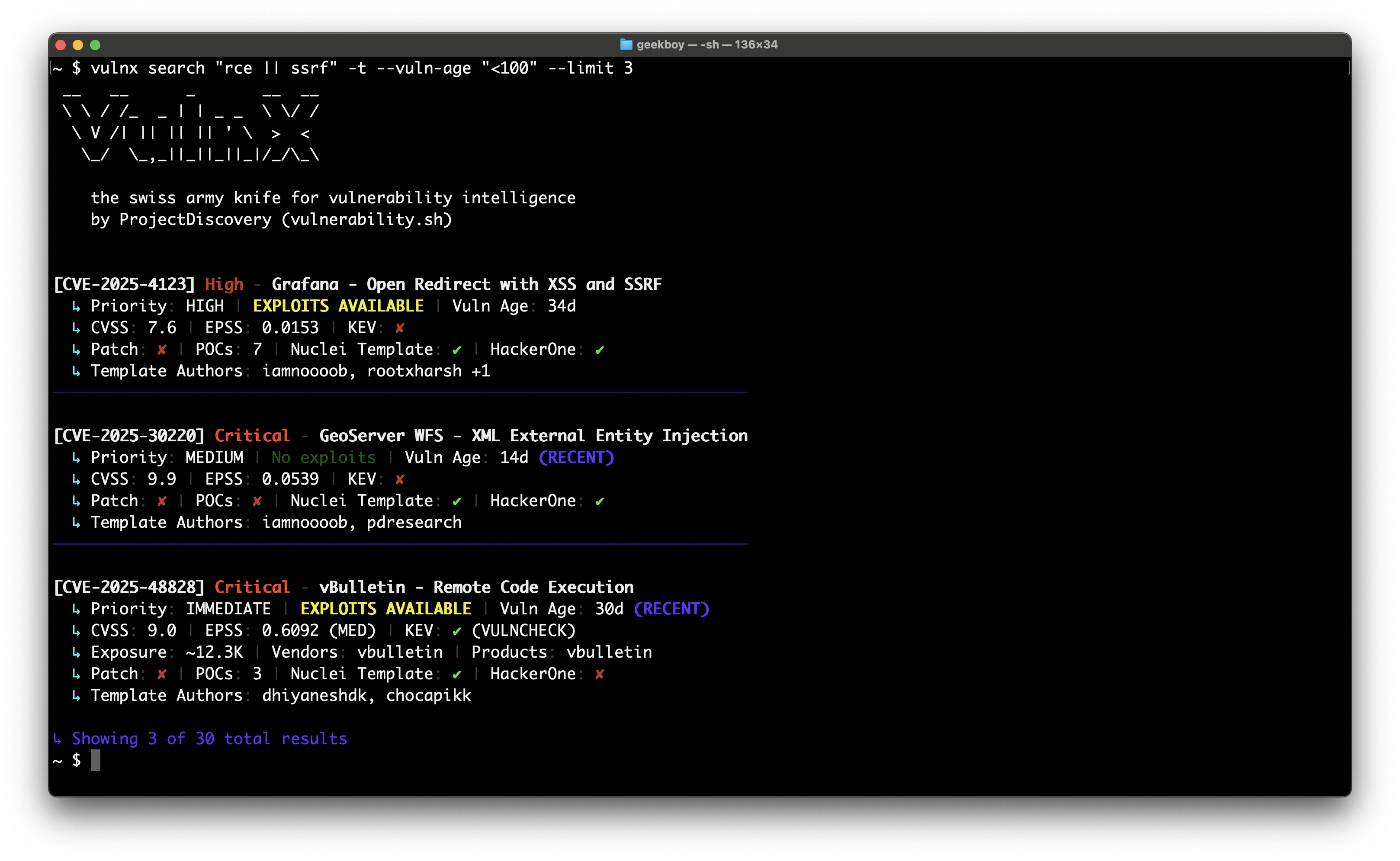
image

Avvio rapido

root@kitploit:~
# 1. Get vulnx
go install github.com/projectdiscovery/vulnx/v2/cmd/vulnx@latest

# 2. Explore commands
vulnx --help
vulnx search --help

# 3. Start exploring vulnerabilities (no API key required)
vulnx filters                          # See all available search fields
vulnx search apache                    # Basic search (subject to rate limits)

# 4. Set up your API key (recommended to avoid rate limits)
vulnx auth                              # Get free API key at https://cloud.projectdiscovery.io

# 5. Enhanced exploration with higher limits
vulnx search apache                    # No rate limits
vulnx id CVE-2021-44228               # Faster responses

Cosa fa vulnx

Cerca vulnerabilità con precisione:

root@kitploit:~
vulnx search "severity:critical && is_remote:true"
vulnx search "apache || nginx" --limit 20
vulnx search "cvss_score:>8.0 && cve_created_at:2024"

Ottieni informazioni dettagliate sulle vulnerabilità:

root@kitploit:~
vulnx id CVE-2021-44228
vulnx id CVE-2024-1234 --json

Analizza i pattern delle vulnerabilità:

root@kitploit:~
vulnx analyze --fields severity
vulnx analyze --fields affected_products.vendor

Comandi Principali

Opzioni Essenziali

Formati di output:

root@kitploit:~
vulnx search "apache" --json              # Machine-readable JSON
vulnx search "apache" --output results.json  # Save to file
vulnx search "apache" --silent            # Quiet output

Controllo della ricerca:

root@kitploit:~
vulnx search "apache" --limit 50          # Get 50 results
vulnx search "apache" --sort-desc cvss_score  # Sort by CVSS score
vulnx search "apache" --fields cve_id,severity  # Specific fields only

Ricerca avanzata:

root@kitploit:~
vulnx search --term-facets severity=5,tags=10 "apache"
vulnx search --range-facets numeric:cvss_score:high:8:10 "remote"
vulnx search --highlight "apache"            # Enable search highlighting
vulnx search --facet-size 20 "nginx"         # More facet buckets
vulnx search --detailed "xss"                # Detailed output like 'id' command

Scoprire i Campi Disponibili

Esplora cosa puoi cercare:

root@kitploit:~
vulnx filters                           # Show all available search fields
vulnx filters --json                    # Machine-readable field list
vulnx filters --output fields.json      # Save field info to file

Il comando filters mostra informazioni dettagliate su tutti i campi ricercabili, inclusi:

  • Nomi dei campi e tipi di dati
  • Descrizioni ed esempi
  • Se i campi supportano ordinamento e facet
  • Valori enum disponibili per campi specifici
  • Tipi di analyzer di ricerca

Esempio di output:

root@kitploit:~
Field: severity
Data Type: string
Description: Vulnerability severity level (e.g., critical, high, medium, low, info)
Can Sort: Yes
Facet Possible: Yes
Search Analyzer: keyword-lower
Examples: severity:critical, severity:high
Enum Values: critical, high, medium, low, info, unknown

Total: 69 filters available

Usa questo comando per scoprire nuove possibilità di ricerca e comprendere la sintassi dei campi prima di costruire query complesse.

Pattern di Ricerca Comuni

Trova vulnerabilità ad alto rischio:

root@kitploit:~
vulnx search "severity:critical && is_remote:true && is_kev:true"
vulnx search "cvss_score:>8.0 && cve_created_at:>=2024"  # High CVSS from 2024
vulnx search "is_kev:true && age_in_days:<90"            # Recent KEV exploits

Cerca per tecnologia:

root@kitploit:~
vulnx search "apache"                     # Apache vulnerabilities
vulnx search "apache || nginx"          # Multiple technologies
vulnx search "affected_products.vendor:microsoft"  # By vendor

Filtra per gravità e punteggi:

root@kitploit:~
vulnx search "severity:high"              # High severity
vulnx search "cvss_score:>7.0"            # CVSS score above 7
vulnx search "epss_score:>0.8"            # High EPSS score

Ricerche basate sul tempo:

root@kitploit:~
vulnx search "cve_created_at:>=2024"      # Published in 2024 or later
vulnx search "cve_created_at:>=2024-01-01 && cve_created_at:<2024-07-01"  # First half of 2024
vulnx search "age_in_days:<30"            # Recent vulnerabilities (last 30 days)

Trova vulnerabilità sfruttabili:

root@kitploit:~
vulnx search "is_poc:true"                # Has proof of concept
vulnx search "is_kev:true"                # Known exploited vulns
vulnx search "is_template:true"           # Has Nuclei templates
vulnx search --detailed "log4j"          # Detailed analysis of specific vuln

Flag di Filtro

Riferimento Flag di Filtro

Flag di Controllo della Ricerca

Filtro per prodotto e vendor:

root@kitploit:~
vulnx search --product apache,nginx     # Filter by products (searches both vendor and product fields)
vulnx search --vendor microsoft,oracle  # Filter by vendors only
vulnx search "NOT apache"               # Exclude products using query syntax
vulnx search "NOT affected_products.vendor:microsoft"  # Exclude vendors using query syntax

Gravità e punteggi:

root@kitploit:~
vulnx search --severity critical,high   # Filter by severity
vulnx search "NOT severity:low"         # Exclude severities using query syntax
vulnx search --cvss-score ">8.0"        # Filter by CVSS score
vulnx search --epss-score ">0.8"        # Filter by EPSS score
vulnx search --vuln-status confirmed     # Filter by status
vulnx search --vuln-age "<30"           # Recent vulnerabilities

Caratteristiche degli exploit:

root@kitploit:~
vulnx search --kev                      # KEV vulnerabilities only
vulnx search --template                 # Has Nuclei templates
vulnx search --poc                      # Has proof of concept
vulnx search --hackerone                # HackerOne reported
vulnx search --remote-exploit           # Remotely exploitable

Ricerca per ID di Vulnerabilità

Metodi di input multipli:

root@kitploit:~
# Single ID lookup
vulnx id CVE-2024-1234

# Multiple IDs (comma-separated)
vulnx id CVE-2024-1234,CVE-2024-5678,CVE-2023-9999

# Auto-detection from stdin (no 'id' command needed!)
echo "CVE-2024-1234" | vulnx
echo -e "CVE-2024-1234\nCVE-2024-5678" | vulnx

# File input
vulnx id --file ids.txt

Elaborazione in batch:

root@kitploit:~
# JSON output for automation
vulnx id --json CVE-2024-1234 CVE-2024-5678

# Save to file
vulnx id --output vulns.json --file ids.txt

# Pipeline integration
cat report.txt | grep -o 'CVE-[0-9]\{4\}-[0-9]\+' | vulnx id --json

Nomi di Campi Utili

Sintassi delle Query

Ricerche di base:

root@kitploit:~
vulnx search "apache"                     # Simple term
vulnx search "remote code execution"    # Phrase search
vulnx search "severity:critical"          # Field search

Logica booleana:

root@kitploit:~
vulnx search "apache && nginx"           # Both terms
vulnx search "apache || nginx"            # Either term
vulnx search "apache NOT tomcat"          # Exclude term
vulnx search "(apache || nginx) && severity:high"  # Grouped

Intervalli e wildcard:

root@kitploit:~
vulnx search "cvss_score:>8.0"            # Greater than
vulnx search "cvss_score:<9.0"            # Less than
vulnx search "cve_created_at:>=2024-01-01" # Date comparison
vulnx search "age_in_days:<30"            # Recent vulnerabilities
vulnx search "apache*"                    # Wildcard

Query sulle Date

Importante: i campi data richiedono operatori di confronto (>=, >, <, <=).

Confronti su data singola:

root@kitploit:~
vulnx search "cve_created_at:>=2024"      # CVEs from 2024 onward
vulnx search "cve_created_at:<2024"       # CVEs before 2024
vulnx search "cve_created_at:>2024-06-01" # CVEs after June 1, 2024

Intervalli di date:

root@kitploit:~
# CVEs from January 2024 only
vulnx search "cve_created_at:>=2024-01-01 && cve_created_at:<2024-02-01"

# High CVSS CVEs from 2024
vulnx search "cvss_score:>8.0 && cve_created_at:>=2024"

# Recent vulnerabilities (age-based)
vulnx search "age_in_days:<30"            # Last 30 days
vulnx search "age_in_days:>365"           # Older than 1 year

Formati supportati:

  • 2024 (anno)
  • 2024-01 (anno-mese)
  • 2024-01-15 (data completa)

Configurazione

Autenticazione (Opzionale)

vulnx funziona senza una chiave API, ma l'autenticazione offre vantaggi significativi:

⚠️ Senza chiave API:

  • Limite di 10 richieste al minuto
  • Soggetto a limiti di frequenza rigidi
  • Potresti riscontrare errori "429 Too Many Requests"

✅ Con chiave API:

  • Limiti di frequenza molto più elevati
  • Accesso a tutti i filtri

Configura l'autenticazione:

root@kitploit:~
vulnx auth                              # Interactive setup
vulnx auth --api-key YOUR_API_KEY       # Non-interactive (automation)
vulnx auth --test                       # Test current API key
export PDCP_API_KEY="your-key-here"     # Environment variable

Modalità di autenticazione:

  • Interattiva: vulnx auth - Configurazione guidata con prompt
  • Non interattiva: vulnx auth --api-key KEY - Ideale per automazione/CI/CD
  • Solo test: vulnx auth --test - Valida la configurazione corrente

Gestione della versione:

root@kitploit:~
vulnx version                            # Show version and check for updates
vulnx version --disable-update-check     # Show version without update check
vulnx update                             # Update to latest version
vulnx --update                           # Alternative update command

Opzioni globali:

root@kitploit:~
vulnx --json search "apache"              # JSON output
vulnx --silent search "apache"            # No banner
vulnx --timeout 60s search "apache"       # Custom timeout
vulnx --disable-update-check search "apache"  # Disable automatic update checks

Risoluzione dei Problemi

Problemi di limiti di frequenza:

root@kitploit:~
Rate limit exceeded! API key required for higher limits.
→ Run: vulnx auth to configure API key and get higher limits

Configurazione per automazione/CI/CD:

root@kitploit:~
# Docker containers
vulnx auth --api-key "$SECRET_API_KEY"

# CI/CD pipelines
vulnx auth --api-key "${PDCP_API_KEY}"

# Kubernetes init containers
vulnx auth --api-key "$(cat /secrets/api-key)"

# Test authentication in scripts
vulnx auth --test && echo "Auth OK" || echo "Auth failed"

Suggerimenti sui limiti di frequenza:

root@kitploit:~
Configure API key with 'vulnx auth' to avoid rate limits
→ This appears when no API key is configured. To remove:
  1. Set up API key: vulnx auth
  2. Or use --silent flag to suppress informational messages

Nessun risultato:

root@kitploit:~
vulnx search "is_kev:true" --limit 1      # Test with known results
vulnx healthcheck                       # Check connectivity

Set di risultati grandi:

root@kitploit:~
vulnx search "apache" --limit 100         # Increase limit
vulnx search "apache" --offset 100        # Pagination
vulnx search --fields cve_id,severity "apache"  # Fewer fields

Problemi di connessione:

root@kitploit:~
vulnx --timeout 60s search "apache"       # Increase timeout
vulnx --proxy http://localhost:8080 search "apache"  # Use proxy
vulnx --debug search "apache"             # Debug mode

Ottenere Aiuto

Comandi di aiuto (nessuna chiave API richiesta):

root@kitploit:~
vulnx --help                           # All commands overview
vulnx search --help                    # Search command help
vulnx id --help                        # ID command help
vulnx filters --help                   # Filters command help
vulnx analyze --help                   # Analyze command help
vulnx version                          # Version info with update check
vulnx version --disable-update-check   # Version info without update check

Esplorazione dei dati (soggetta a limiti di frequenza senza chiave API):

root@kitploit:~
vulnx filters                          # Show all searchable fields
vulnx search help                      # Detailed search fields
vulnx analyze help                     # Available analyze fields

⚠️ Nota Tutti i comandi funzionano senza una chiave API, ma sono soggetti a limiti di frequenza. Configura una chiave API con vulnx auth per limiti più elevati e prestazioni migliori.

Suggerimenti

  • Inizia subito: vulnx funziona senza una chiave API - basta eseguire vulnx search apache
  • Evita i limiti di frequenza: configura una chiave API con vulnx auth per un uso intensivo
  • Resta aggiornato: vulnx controlla automaticamente gli aggiornamenti; usa --disable-update-check per disabilitare
  • Usa vulnx filters per scoprire tutti i campi di ricerca disponibili e la loro sintassi
  • Inizia con ricerche ampie, poi restringi con i filtri
  • Usa --json per scripting e automazione
  • Combina più filtri per risultati precisi
  • Usa analyze per comprendere i pattern dei dati
  • Salva le query usate di frequente come alias di shell

Per pattern di utilizzo avanzati ed esempi, consulta USAGE.md.

Sviluppo

Per la configurazione dello sviluppo, i controlli di qualità del codice e le linee guida per i contributi, consulta DEVELOPMENT.md.

Licenza

vulnx è distribuito sotto licenza MIT.

Scarica lo strumento
ComandoScopoEsempio
searchTrova vulnerabilità con filtri avanzativulnx search "apache && severity:high"
idOttieni dettagli per uno specifico CVEvulnx id CVE-2021-44228
filtersElenca tutti i campi di ricerca e i filtri disponibilivulnx filters
analyzeAggrega i dati per campivulnx analyze -f severity
authConfigura l'accesso APIvulnx auth
versionMostra info sulla versione e verifica aggiornamentivulnx version
updateAggiorna vulnx all'ultima versionevulnx update
healthcheckVerifica la connettivitàvulnx healthcheck
FlagShortDescrizioneEsempio
--product-pFiltra per prodotti--product apache,nginx
--vendorFiltra per vendor--vendor microsoft,oracle
--severity-sFiltra per gravità--severity critical,high
--tagsFiltra per tag--tags rce,injection
--cvss-scoreFiltra per punteggio CVSS--cvss-score ">8.0"
--epss-scoreFiltra per punteggio EPSS--epss-score ">0.8"
--vuln-age-aFiltra per età--vuln-age "<30"
--vuln-typeFiltra per tipo di vulnerabilità--vuln-type sql_injection
--kevSolo vulnerabilità KEV--kev
--template-tHa template Nuclei--template
--pocHa proof of concept--poc
--hackeroneSegnalata su HackerOne--hackerone
--remote-exploitSfruttabile da remoto--remote-exploit
--vuln-statusFiltra per stato della vulnerabilità--vuln-status confirmed
FlagShortDescrizioneEsempio
--detailedOutput dettagliato come 'id'--detailed
--highlightAbilita evidenziazione della ricerca--highlight
--limit-nNumero di risultati--limit 50
--offsetOffset di paginazione--offset 100
--sort-ascOrdina crescente--sort-asc cvss_score
--sort-descOrdina decrescente--sort-desc cve_created_at
--fieldsSeleziona campi specifici--fields cve_id,severity
--term-facetsCalcola facet per termini--term-facets severity=5
--range-facetsCalcola facet per intervalli--range-facets numeric:cvss_score:high:8:10
--facet-sizeNumero di bucket facet--facet-size 20
CampoDescrizioneValori di esempio
severityGravità della vulnerabilitàlow, medium, high, critical
cvss_scorePunteggio CVSS (0-10)7.5, >8.0, <9.0
cve_idIdentificativo CVECVE-2021-44228
is_remoteSfruttabile da remototrue, false
is_kevVulnerabilità nota sfruttatatrue, false
is_pocHa proof of concepttrue, false
affected_products.vendorNome del vendorapache, microsoft
affected_products.productNome del prodottotomcat, windows
cve_created_atData di pubblicazione>=2024, >2024-01-01, <2023
age_in_daysGiorni dalla pubblicazione<30, >365, <=90