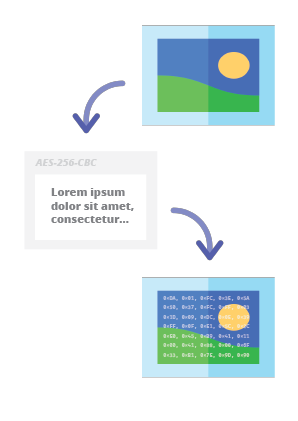

Codec steganografico online che ti consente di nascondere un messaggio crittografato con password all'interno di immagini e foto utilizzando l'algoritmo di crittografia AES con una chiave derivata da PBKDF2 a 256 bit.
Steganographic Online Codec ti consente di nascondere un messaggio crittografato con password all'interno di immagini e foto utilizzando l'algoritmo di crittografia AES con una chiave derivata a 256 bit PBKDF2.
Puoi usarlo gratuitamente su:
https://www.pelock.com/products/steganography-online-codec
Questo SDK fornisce accesso programmatico al codec e alle sue funzioni di codifica e decodifica tramite un'interfaccia WebAPI.
La steganografia è un termine che descrive l'arte e la scienza di nascondere informazioni incorporando messaggi all'interno di altri file immagine apparentemente innocui.
In questo caso, i singoli bit del messaggio nascosto crittografato vengono salvati come bit meno significativi (LSB) nei componenti di colore RGB dei pixel dell'immagine selezionata.
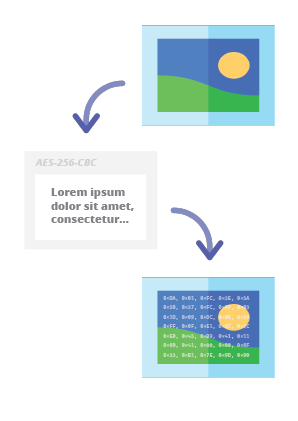
Con il nostro codificatore steganografico potrai nascondere qualsiasi messaggio di testo nell'immagine in modo sicuro e inviarlo senza destare sospetti. Sarà possibile leggere il messaggio solo dopo aver fornito una password di decrittazione valida.
Il metodo preferito per l'installazione dell'SDK Web API è tramite NPM (Node Package Manager).
Esegui:
npm i steganography-online-codec
Oppure aggiungi questa voce:
"dependencies": {
"steganography-online-codec": "latest"
},
direttamente nella sezione dependencies del tuo package.json.
Il pacchetto di installazione è disponibile su https://www.npmjs.com/package/steganography-online-codec
I pacchetti di installazione sono stati caricati nei repository per diversi linguaggi di programmazione popolari e i loro codici sorgente sono stati pubblicati su GitHub:
Se non vuoi usare il modulo Python, puoi importare direttamente dal file:
from pelock.steganography_online_codec import *
"use strict";
/******************************************************************************
*
* Steganography Online Codec WebApi interface usage example.
*
* In this example shows how to hide an encrypted secret message in an image file.
*
* Version : v1.00
* Language : JavaScript
* Author : Bartosz Wójcik (original example)
* Project : https://www.pelock.com/products/steganography-online-codec
* Homepage : https://www.pelock.com
*
* @link https://www.pelock.com/products/steganography-online-codec
* @copyright Copyright (c) 2020-2025 PELock LLC
* @license Apache-2.0
*
/*****************************************************************************/
// include Steganography Online Codec module
import { SteganographyOnlineCodec, Errors } from 'steganography-online-codec';
// or if tested locally use:
//import { SteganographyOnlineCodec, Errors } from '../src/SteganographyOnlineCodec.mjs';
// create Steganography Online Codec class instance (we are using our activation key)
const mySteganographyOnlineCodec = new SteganographyOnlineCodec('YOUR-WEB-API-KEY');
// encode a hidden message (encrypted with your password) within an image file
(async () => {
const inputFile = 'input_file.jpg';
const secretMessage = 'Secret message';
const password = 'Pa$$word';
const outputFile = 'output_file_with_hidden_secret_message.png';
try {
const result = await mySteganographyOnlineCodec.encode(inputFile, secretMessage, password, outputFile);
// result object holds the encoding results as well as other information
console.log('Secret messaged encoded and saved to the output PNG file.');
} catch (err) {
console.error('Encoding failed:', err.error_message || err.message || String(err));
}
})();
"use strict";
/******************************************************************************
*
* Steganography Online Codec WebApi interface usage example.
*
* In this example, we will see how to hide an encrypted message in an
* image file using our codec.
*
* Version : v1.00
* Language : JavaScript
* Author : Bartosz Wójcik
* Project : https://www.pelock.com/products/steganography-online-codec
* Homepage : https://www.pelock.com
*
* @link https://www.pelock.com/products/steganography-online-codec
* @copyright Copyright (c) 2020-2025 PELock LLC
* @license Apache-2.0
*
/*****************************************************************************/
// include Steganography Online Codec module
import { SteganographyOnlineCodec, Errors } from 'steganography-online-codec';
// or if tested locally use:
//import { SteganographyOnlineCodec, Errors } from '../src/SteganographyOnlineCodec.mjs';
// create Steganography Online Codec class instance (we are using our activation key)
const mySteganographyOnlineCodec = new SteganographyOnlineCodec('YOUR-WEB-API-KEY');
// encode a hidden message within the source image file
(async () => {
// full version image size limit is set to 10 MB (demo 50 kB max)
// supported image formats are PNG, JPG, GIF, BMP, WBMP, GD2, AVIF, WEBP (mail me for more)
const inputFilePath = 'input_file.webp';
// full version message size is unlimited (demo 16 chars max)
const secretMessage = 'Secret message';
// full version password length is 128 characters max (demo 8 chars max)
const password = 'Pa$$word';
// where to save encoded image with the secret message
const outputFilePath = 'output_file_with_hidden_secret_message.png';
try {
// encode a hidden message (encrypted with your password) within an image file
const result = await mySteganographyOnlineCodec.encode(inputFilePath, secretMessage, password, outputFilePath);
// result object holds the encoding results as well as other information
const versionType = result.license && result.license.activationStatus ? 'full' : 'demo';
console.log(`You are running in ${versionType} version`);
console.log(`Secret messaged encoded and saved to ${outputFilePath}`);
if (result.license && result.license.usagesCount !== undefined) {
console.log(`Remaining number of usage credits - ${result.license.usagesCount}`);
}
} catch (err) {
const errorCode = err.error;
switch (errorCode) {
case Errors.INVALID_INPUT:
console.log(`Invalid input file ${inputFilePath} or file doesn't exist`);
break;
case Errors.MESSAGE_TOO_LONG:
console.log('Message is too long for the provided image file, use larger file');
break;
case Errors.IMAGE_TOO_BIG:
console.log(`Image file is too big, current limit is set to ${err.raw?.limits?.maxFileSize ?? 'unknown'}`);
break;
case Errors.LIMIT_MESSAGE:
console.log(`Message is too long, current limit is set to ${err.raw?.limits?.maxMessageLen ?? 'unknown'}`);
break;
case Errors.LIMIT_PASSWORD:
console.log(`Password is too long, current limit is set to ${err.raw?.limits?.maxPasswordLen ?? 'unknown'}`);
break;
case Errors.INVALID_PASSWORD:
console.log('Invalid password');
break;
default:
console.log(`An error occurred: ${err.error_message ?? `Error code ${errorCode}`}`);
}
}
})();
"use strict";
/******************************************************************************
*
* Steganography Online Codec WebApi interface usage example.
*
* In this example, we will see how to extract a previously encrypted & hidden
* secret message from an image file.
*
* Version : v1.00
* Language : JavaScript
* Author : Bartosz Wójcik
* Project : https://www.pelock.com/products/steganography-online-codec
* Homepage : https://www.pelock.com
*
* @link https://www.pelock.com/products/steganography-online-codec
* @copyright Copyright (c) 2020-2025 PELock LLC
* @license Apache-2.0
*
/*****************************************************************************/
// include Steganography Online Codec module
import { SteganographyOnlineCodec, Errors } from 'steganography-online-codec';
// or if tested locally use:
//import { SteganographyOnlineCodec, Errors } from '../src/SteganographyOnlineCodec.mjs';
// create Steganography Online Codec class instance (we are using our activation key)
const mySteganographyOnlineCodec = new SteganographyOnlineCodec('YOUR-WEB-API-KEY');
// extract a hidden message from the previously encoded image file
(async () => {
// full version image size limit is set to 10 MB (demo 50 kB max)
// supported image format is PNG and only PNG!
const inputFilePath = 'output_file_with_hidden_secret_message.png';
// full version password length is 128 characters max (demo 8 chars max)
const password = 'Pa$$word';
try {
// extract a hidden message from the image (PNG files only)
const result = await mySteganographyOnlineCodec.decode(inputFilePath, password);
// result object holds the decoding results as well as other information
console.log(`You are running in ${result.license?.activationStatus ? 'full' : 'demo'} version`);
console.log(`Secret message is "${result.message}"`);
if (result.license && result.license.usagesCount !== undefined) {
console.log(`Remaining number of usage credits - ${result.license.usagesCount}`);
}
} catch (err) {
switch (err.error) {
case Errors.INVALID_INPUT:
console.log(`Invalid input file ${inputFilePath} or file doesn't exist`);
break;
case Errors.IMAGE_TOO_BIG:
console.log(`Image file is too big, current limit is set to ${err.raw?.limits?.maxFileSize ?? 'unknown'}`);
break;
case Errors.LIMIT_MESSAGE:
console.log(`Extracted message is too long, current limit is set to ${err.raw?.limits?.maxMessageLen ?? 'unknown'}`);
break;
case Errors.LIMIT_PASSWORD:
console.log(`Password is too long, current limit is set to ${err.raw?.limits?.maxPasswordLen ?? 'unknown'}`);
break;
case Errors.INVALID_PASSWORD:
console.log('Invalid password');
break;
default:
console.log(`An error occurred: ${err.error_message ?? String(err)}`);
}
}
})();
"use strict";
/******************************************************************************
*
* Steganography Online Codec WebApi interface usage example.
*
* In this example we will verify our activation key status.
*
* Version : v1.00
* Language : JavaScript
* Author : Bartosz Wójcik
* Project : https://www.pelock.com/products/steganography-online-codec
* Homepage : https://www.pelock.com
*
* @link https://www.pelock.com/products/steganography-online-codec
* @copyright Copyright (c) 2020-2025 PELock LLC
* @license Apache-2.0
*
/*****************************************************************************/
// include Steganography Online Codec module
import { SteganographyOnlineCodec, Errors } from 'steganography-online-codec';
// or if tested locally use:
//import { SteganographyOnlineCodec, Errors } from '../src/SteganographyOnlineCodec.mjs';
// create Steganography Online Codec class instance (we are using our activation key)
const mySteganographyOnlineCodec = new SteganographyOnlineCodec('YOUR-WEB-API-KEY');
// login to the service
(async () => {
try {
const result = await mySteganographyOnlineCodec.login();
// result object holds the information about the license & current limits
const versionType = result.license && result.license.activationStatus ? 'full' : 'demo';
console.log(`You are running in ${versionType} version`);
// information about the current license
if (result.license && result.license.activationStatus) {
console.log(`Registered for - ${result.license.userName}`);
const licenseType = result.license.type === 0 ? 'personal' : 'company';
console.log(`License type - ${licenseType}`);
console.log(`Total number of purchased usage credits - ${result.license.usagesTotal}`);
console.log(`Remaining number of usage credits - ${result.license.usagesCount}`);
}
// current limits (different for DEMO and FULL versions)
if (result.limits) {
console.log(`Max. password length - ${result.limits.maxPasswordLen}`);
const msgLen = result.limits.maxMessageLen === -1 ? 'unlimited' : result.limits.maxMessageLen;
console.log(`Max. message length - ${msgLen}`);
console.log(`Max. input image file size - ${mySteganographyOnlineCodec.convert_size(result.limits.maxFileSize)}`);
}
} catch (err) {
console.error(`Login failed: ${err.error_message || String(err)}`);
}
})();
Se sei interessato alla Web API Steganography Online Codec o hai domande riguardanti i pacchetti SDK, questioni tecniche o qualcosa non è chiaro, contattami pure. Sarò felice di rispondere a tutte le tue domande.
Bartosz Wójcik
| Repository | Linguaggio | Installazione | Pacchetto | GitHub |
|---|
![]() | Python | Esegui pip install steganography-online-codec | PyPI | Sources |
![]() | JavaScript, TypeScript | Esegui npm i steganography-online-codec oppure aggiungi "steganography-online-codec": "latest" sotto dependencies in package.json | NPM | Sources |
![]() | Rust | Esegui cargo add steganography-online-codec oppure aggiungi steganography-online-codec = "1" a Cargo.toml (opzionale: git / path per build non rilasciate o vendored) | crates.io | Sources |