
Skip to content
KitploitKITPLOIT
StrumentiBlog
Invia
StrumentiBlog
Invia

Strumenti di Hacking, PenTest e Cybersecurity per il tuo Arsenale di Sicurezza!

Kitploit è una directory di strumenti di hacking, cybersecurity e pentesting. Scopri gli ultimi aggiornamenti dei progetti per trovare vulnerabilità, analizzare sistemi, automatizzare i test e rafforzare la tua sicurezza.

··Feed·Contatto·Privacy·© 2026 Kitploit

Directory degli strumenti

Categorie

Vedi tutte le categorie
Loading categories
PowerShell-Pro-Obfuscator-Python — Automatizza l'offuscamento e la virtualizzazione del codice sorgente degli script PowerShell con una flessibile Web API per Python (pacchetto pip). | Kitploit
Strumenti/GitHubGitHub/pelock/powershell-pro-obfuscator-python
Analisi del CodiceScripting e AutomazioneUtilità e Framework
GitHubpelock/powershell-pro-obfuscator-python

PowerShell-Pro-Obfuscator-Python

Automatizza l'offuscamento e la virtualizzazione del codice sorgente degli script PowerShell con una flessibile Web API per Python (pacchetto pip).

Vedi Repository

Più Popolari

Vedi tutti →

Scopri gli strumenti più utilizzati dalla nostra community.

Esplora tutti gli strumenti

Sfoglia la nostra collezione di strumenti

Vedi tutti gli strumenti →
Condividi
Sito web
11 mese faNon ancora revisionato

PowerShell Pro Obfuscator — Offusca e Virtualizza Codice PowerShell

PowerShell Pro Obfuscator protegge script .ps1 proprietari con rinomina, crittografia polimorfa di stringhe e interi, appiattimento del flusso di controllo, automi a stati finiti (FSA), un motore VM, controlli di integrità auto-difensivi, un linker di protezione e sonde anti-debugging.

Offusca, virtualizza e proteggi script PowerShell .ps1 con crittografia polimorfa delle stringhe, motore VM, trasformazioni ad automi a stati finiti, controlli di auto-integrità e anti-debugging — tramite GUI, CLI, strumento online o API.

Maggiori dettagli tecnici, download e documentazione disponibili su:

https://www.pelock.com/products/powershell-pro-obfuscator
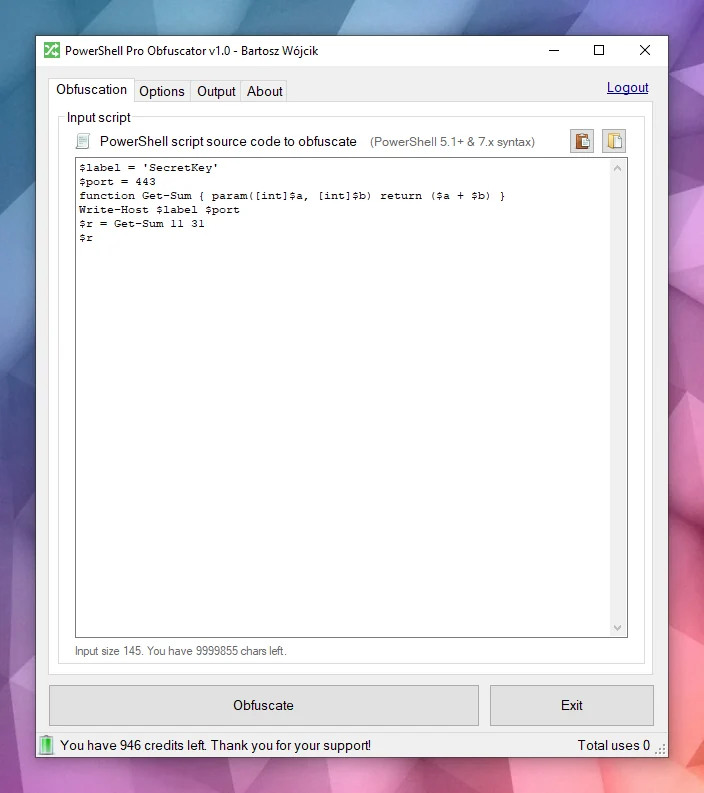
PowerShell Pro Obfuscator Windows Client

È disponibile per Windows e Linux:

  • https://www.pelock.com/products/powershell-pro-obfuscator/download

Sono disponibili molteplici API di programmazione:

  • https://www.pelock.com/products/powershell-pro-obfuscator/api

Un'interfaccia di offuscamento online:

  • https://www.pelock.com/powershell-pro-obfuscator/

Perché gli script PowerShell necessitano di offuscamento?

Gli script vengono tipicamente distribuiti come file .ps1 in chiaro o incorporati in moduli. Questa comodità significa che chiunque abbia accesso ai file può leggere l'intera logica, cercare credenziali o chiavi API nelle stringhe e rubare i tuoi algoritmi, a meno che tu non adotti misure aggiuntive per nascondere le intenzioni.

PowerShell è una shell e un linguaggio di scripting multipiattaforma basato su .NET. È ampiamente utilizzato per automazione, configurazione, pipeline DevOps e gestione degli endpoint su Windows e Linux.

Strategie di offuscamento

PowerShell Pro Obfuscator include molte strategie avanzate di offuscamento, virtualizzazione e protezione. Puoi facilmente bilanciare protezione rispetto a dimensione e prestazioni.
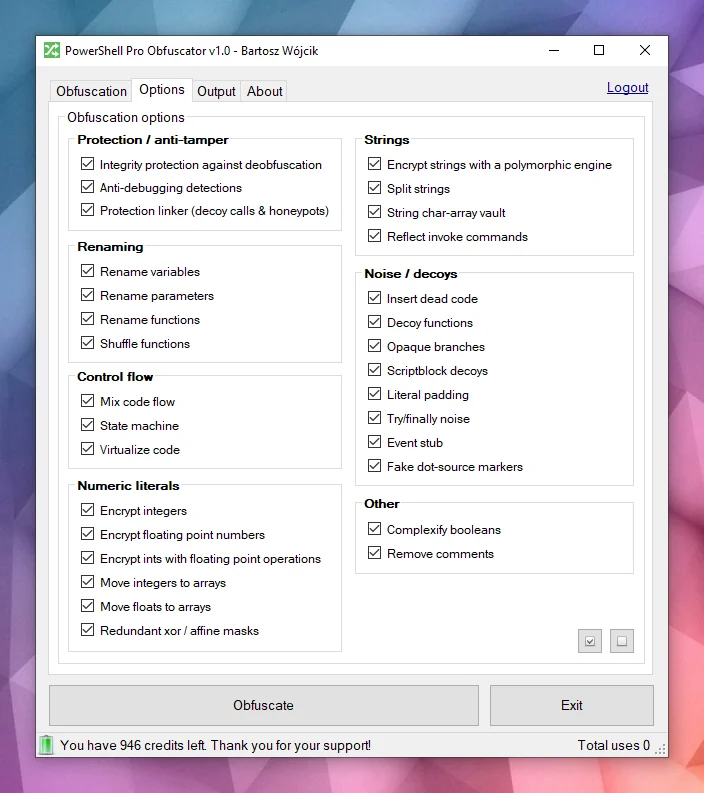
PowerShell Obfuscation options

Obfuscation Offuscamento potente

PowerShell Pro Obfuscator utilizza strategie di offuscamento all'avanguardia come crittografia polimorfa delle stringhe, crittografia di interi e float e rumore decoy. Il risultato nasconde letterali e struttura preservando il comportamento runtime testato.

Processor Virtualizzazione del codice

Le istruzioni selezionate vengono sollevate in opcode di un motore VM generato casualmente con casi switch mescolati, opcode decoy e un loop dispatcher offuscato. Gli analisti devono interpretare la macchina virtuale invece di leggere PowerShell in chiaro.

Node Automi a stati finiti (FSA)

L'offuscamento con automi a stati finiti (FSA) riscrive blocchi lineari di istruzioni PowerShell in automi a doppio stato con scheduler opachi e gestori di dispatch mescolati. Invece di leggere il codice dall'alto verso il basso, gli analisti devono seguire stati numerici, tabelle di transizione e percorsi decoy per ricostruire l'ordine originale.

Bug Anti-debugging

La protezione anti-debugging inserisce sonde polimorfe che rilevano debugger collegati, punti di interruzione PowerShell, preferenze di debug e modalità di tracciamento, oltre a segnali host correlati. Quando un controllo scatta, lo script offuscato esce silenziosamente invece di rivelare la logica protetta durante l'analisi interattiva.

System monitor Controlli di auto-integrità

Una sonda bootstrap verifica la forma dello script su disco (conteggio funzioni e token di integrità) e imposta una chiave di manomissione quando il file non corrisponde più alla build offuscata. I decrittatori di stringhe consumano quella chiave, quindi gli script modificati restituiscono dati spazzatura invece del testo in chiaro. Questo livello auto-difensivo aumenta il costo della deoffuscazione casuale e delle modifiche ai file.

Brick link Linker di protezione

Una passata finale collega resolver honeypot, chiamate helper fasulle con argomenti casuali e trappole a stack poco profondo che restano attive solo prima del completamento del bootstrap. I frammenti estratti mantengono superfici di chiamata rumorose che sembrano reali sotto revisione statica. L'esecuzione normale dopo un controllo di integrità riuscito rimane invariata.

Prima e dopo l'offuscamento

Guarda questo esempio — lo stesso script diventa più difficile da leggere a colpo d'occhio dopo l'offuscamento.

Script PowerShell di esempio prima dell'offuscamento

root@kitploit:~
function Get-Greeting {
    param([string]$Name)
    Write-Host "Hello World from $Name!"
}
Get-Greeting "PowerShell Pro Obfuscator"

Dopo l'offuscamento

root@kitploit:~
$script:_HnJTskg = 0
$jwNTQ = 297 * 400 + 36
$x4e8bfda = [Math]::Abs($jwNTQ - 8074)
$_EvKocNn = [Math]::Max($jwNTQ, $x4e8bfda) - [Math]::Min($jwNTQ, $x4e8bfda)
[void]$_EvKocNn
$script:_jUoXkBYh = 0
function gnJjzMCN3V8P {
    param([int]$slot, [int]$salt, [int]$guard)
    if (-not ((Get-Variable -Name _HnJTskg -Scope Script -ErrorAction SilentlyContinue).Value)) { return '' }
    @('JFE', 'm0ao', 'R8Ysw') | ForEach-Object { $_.ToUpper() } | Out-Null
if ((((($slot * 31) + $salt) -band 65535) -ne $guard)) { return '' }
    $tk = (Get-Variable -Name _jUoXkBYh -Scope Script -ErrorAction SilentlyContinue).Value
    $IEm39CSpDOEFp = @{ 'Ouj1' = 455; 'vjzO' = 170; 'IQNV' = 291 }
$IEm39CSpDOEFp['R5LrM'] = $IEm39CSpDOEFp['Ouj1'] + $IEm39CSpDOEFp['vjzO']
$YWxSO = ($IEm39CSpDOEFp.Values | Measure-Object -Sum).Sum
[void]$YWxSO
if ($null -eq $tk) { [long]$tk = 0 }
    $v93a130f2e4 = 508
switch ($v93a130f2e4) {
    524 { $_GYF7IA14Go = 'H1Vph' }
    561 { $_GYF7IA14Go = 'HAWoB' }
    default { $_GYF7IA14Go = $v93a130f2e4 * 2 }
}
[void]$_GYF7IA14Go
$dk = (Get-Variable -Name vb6a18ffee4 -Scope Script -ErrorAction SilentlyContinue).Value
    try { $xgLN5KZyEusFo7 = [Math]::Sqrt(850) } finally { [void]$xgLN5KZyEusFo7 }
if ($null -eq $dk) { [long]$dk = 0 }
    $d = @(46866, 46865)
    if ((((-not 113))-and(([int](272 -ne 272) -eq 21)))-and(([Math]::Sign(-12) -eq 4))) { $w4iTzi2hooy1GW = @(711, 562, 665); $w4iTzi2hooy1GW = ($w4iTzi2hooy1GW | Measure-Object -Sum).Sum }
$r = ''
    for ($s9qOSpiZzufQlVyV = 0; $s9qOSpiZzufQlVyV -lt $d.Length; $s9qOSpiZzufQlVyV++) {
        [long]$v = [long]$d[$s9qOSpiZzufQlVyV]
        for ($jL9gL7PEtQeIS = 2; $jL9gL7PEtQeIS -ge 0; $jL9gL7PEtQeIS--) {
            for ($PsbomDHxAy = 2; $PsbomDHxAy -ge 0; $PsbomDHxAy--) {
                    [long]$v = [long]$v + ([long](https://github.com/pelock/powershell-pro-obfuscator-python/blob/HEAD/230))
            }
        }
        for ($zhH33vzxjIzegl9 = 0; $zhH33vzxjIzegl9 -ge 0; $zhH33vzxjIzegl9--) {
                [long]$v = [long]$v + ([long]([int]((((((236 + (-3 * $s9qOSpiZzufQlVyV) + (3 * $zhH33vzxjIzegl9))) % 256) + 256) % 256))))
                [long]$v = [long]$v -bxor ([long](https://github.com/pelock/powershell-pro-obfuscator-python/blob/HEAD/53766))
        }
        [long]$v = [long]$v - ([long]($salt + $slot + $tk + $dk + 0))
        if ([long]$v -ge 0 -and [long]$v -le 0xFFFF) { $r += [char][int][long]$v }
        elseif ([long]$v -ge 0x10000 -and [long]$v -le 0x10FFFF) { $r += [System.Char]::ConvertFromUtf32([int][long]$v) }
    }
    return $r
}
and more...

Riconosceresti ancora l'intento originale se avessi solo il testo offuscato e nessuna copia precedente dello script?

Obfuscated PowerShell script

Come funziona PowerShell Pro Obfuscator?

Il motore analizza il codice sorgente PowerShell in un albero AST, quindi applica trasformazioni selezionabili: rinomina degli identificatori, appiattimento del flusso di controllo, automi a stati finiti (FSA), virtualizzazione VM, crittografia polimorfa di stringhe e interi, inserimento di rumore e decoy, sonde di integrità auto-difensive, linker di protezione e controlli anti-debugging. Molte tecniche sono specifiche di questo prodotto; alcune idee sono condivise con i nostri altri strumenti di protezione.

PowerShell Pro Obfuscator Pipeline

Quando tutte le passate sono completate, il motore emette un nuovo .ps1. I casi limite nella grammatica PowerShell e negli ambienti di hosting significano che dovresti sempre testare l'output nel tuo runtime di destinazione.

Proteggi i tuoi script e algoritmi PowerShell

Non correre rischi, usa PowerShell Pro Obfuscator per offuscare, virtualizzare e proteggere i tuoi script e algoritmi PowerShell.

La nostra azienda ha una lunga storia nelle tecnologie di offuscamento e negli offuscatori di codice (vedi i nostri offuscatori per x86 Assembly, AutoIt e Java).

Correggiamo attivamente bug, facciamo ricerca e sviluppiamo nuove strategie di offuscamento per i nostri strumenti.

Puoi contare sulla nostra esperienza e sul nostro supporto in questo campo.

Installazione

Il metodo preferito di installazione dell'interfaccia WebApi è tramite pip.

Esegui:

root@kitploit:~
pip install powershell-pro-obfuscator

oppure

root@kitploit:~
python3 -m pip install powershell-pro-obfuscator

E poi aggiungi questo import al tuo codice sorgente:

root@kitploit:~

from powershellproobfuscator import PowerShellProObfuscator

Il pacchetto di installazione è disponibile su https://pypi.org/project/powershell-pro-obfuscator/

Esempio di offuscamento del codice sorgente di uno script PowerShell utilizzando le opzioni predefinite

root@kitploit:~

#!/usr/bin/env python

###############################################################################
#
# PowerShell Pro Obfuscator WebApi interface usage example.
#
# In this example we will obfuscate sample source with default options.
#
# Version        : v1.0.0
# Language       : Python
# Author         : Bartosz Wójcik
# Web page       : https://www.pelock.com
#
###############################################################################

#
# include PowerShell Pro Obfuscator module
#
from powershellproobfuscator import PowerShellProObfuscator

#
# if you don't want to use Python module, you can import directly from the file
#
#from pelock.powershellproobfuscator import PowerShellProObfuscator

#
# create PowerShell Pro Obfuscator class instance (we are using our activation key)
#
myPowerShellProObfuscator = PowerShellProObfuscator("ABCD-ABCD-ABCD-ABCD")

#
# source code in PowerShell format
#
scriptSourceCode = """function Get-Greeting {
    param([string]$Name)
    Write-Host "Hello World from $Name!"
}
Get-Greeting "PowerShell Pro Obfuscator\""""

#
# by default all obfuscation options are enabled, so we can just simply call
#
result = myPowerShellProObfuscator.obfuscate_script_source(scriptSourceCode)

#
# it's also possible to pass a PowerShell script file path instead of a string with the source e.g.
#
# result = myPowerShellProObfuscator.obfuscate_script_file("/path/to/project/script.ps1")

#
# result[] array holds the obfuscation results as well as other information
#
# result["error"]         - error code
# result["output"]        - obfuscated code
# result["demo"]          - was it used in demo mode (invalid or empty activation key was used)
# result["credits_left"]  - usage credits left after this operation
# result["credits_total"] - total number of credits for this activation code
# result["expired"]       - if this was the last usage credit for the activation key it will be set to True
#
if result and "error" in result:

    # display obfuscated code
    if result["error"] == PowerShellProObfuscator.ERROR_SUCCESS:

        # format output code for HTML display
        print(result["output"])

    else:
        print(f'An error occurred, error code: {result["error"]}')

else:
    print("Something unexpected happen while trying to obfuscate the code.")

Un esempio di offuscamento del codice sorgente di uno script PowerShell con strategie di offuscamento personalizzate

root@kitploit:~
#!/usr/bin/env python

###############################################################################
#
# PowerShell Pro Obfuscator WebApi interface usage example.
#
# In this example we will obfuscate sample source with custom options.
#
# Version        : v1.0.0
# Language       : Python
# Author         : Bartosz Wójcik
# Web page       : https://www.pelock.com
#
###############################################################################

#
# include PowerShell Pro Obfuscator module
#
from powershellproobfuscator import PowerShellProObfuscator

#
# if you don't want to use Python module, you can import directly from the file
#
#from pelock.powershellproobfuscator import PowerShellProObfuscator

#
# create PowerShell Pro Obfuscator class instance (we are using our activation key)
#
myPowerShellProObfuscator = PowerShellProObfuscator("ABCD-ABCD-ABCD-ABCD")

#
# should the source code be compressed (both input & compressed)
#
myPowerShellProObfuscator.enableCompression = False

#
# global obfuscation options
#
# you can disable a particular obfuscation strategy globally if it
# fails or you don't want to use it without modifying the source codes
#
# by default all obfuscation strategies are enabled
#

#
# protection against tampering with protected code (integrity verification)
#
myPowerShellProObfuscator.selfDefending = True

#
# protection linker (decoy call graph)
#
myPowerShellProObfuscator.protectionLinker = True

#
# rename variable names to random string values
#
myPowerShellProObfuscator.renameVariables = True

#
# rename parameter names to random string values
#
myPowerShellProObfuscator.renameParameters = True

#
# rename function names to random string values
#
myPowerShellProObfuscator.renameFunctions = True

#
# shuffle function order in the output source
#
myPowerShellProObfuscator.shuffleFunctions = True

#
# change linear code execution flow via control-flow flattening
#
myPowerShellProObfuscator.controlFlowFlatten = True

#
# rewrite statement blocks into finite-state automata (state-machine obfuscation)
#
myPowerShellProObfuscator.stateMachine = True

#
# lift selected statements into a VM engine (virtualized statements)
#
myPowerShellProObfuscator.vmStrategy = True

#
# encrypt integers
#
myPowerShellProObfuscator.encryptIntegers = True

#
# split strings into concatenated chunks
#
myPowerShellProObfuscator.splitStrings = True

#
# encrypt strings using randomly generated polymorphic encryption algorithms
#
myPowerShellProObfuscator.encryptStrings = True

#
# move integers to arrays
#
myPowerShellProObfuscator.integersToArrays = True

#
# move floats to arrays
#
myPowerShellProObfuscator.floatsToArrays = True

#
# insert dead code
#
myPowerShellProObfuscator.insertDeadCode = True

#
# replace boolean conditions with equivalent complex expressions
#
myPowerShellProObfuscator.complexifyBooleans = True

#
# represent integers via floating-point math
#
myPowerShellProObfuscator.integersToFloating = True

#
# encrypt floating point numbers
#
myPowerShellProObfuscator.encryptFloating = True

#
# insert decoy functions
#
myPowerShellProObfuscator.decoyFunctions = True

#
# insert anti-debugging detections
#
myPowerShellProObfuscator.detectDebugger = True

#
# insert fake dot-source comment markers
#
myPowerShellProObfuscator.fakeDotSourceMarkers = True

#
# insert opaque predicate branches
#
myPowerShellProObfuscator.opaqueBranches = True

#
# insert scriptblock decoys
#
myPowerShellProObfuscator.scriptblockDecoys = True

#
# insert here-string padding
#
myPowerShellProObfuscator.literalPadding = True

#
# use indirect command invocation
#
myPowerShellProObfuscator.reflectInvokeCommands = True

#
# store string fragments in char-code array vaults
#
myPowerShellProObfuscator.stringCharArrayVault = True

#
# wrap code in try/finally blocks with dead noise
#
myPowerShellProObfuscator.tryFinallyNoise = True

#
# apply redundant xor / affine integer masks
#
myPowerShellProObfuscator.affineIntegerMask = True

#
# insert dead event/timer stubs
#
myPowerShellProObfuscator.eventStub = True

#
# strip comments from the output source
#
myPowerShellProObfuscator.removeComments = True

#
# source code in PowerShell format
#
scriptSourceCode = """function Get-Greeting {
    param([string]$Name)
    Write-Host "Hello World from $Name!"
}
Get-Greeting "PowerShell Pro Obfuscator\""""

#
# by default all obfuscation options are enabled, so we can just simply call
#
result = myPowerShellProObfuscator.obfuscate_script_source(scriptSourceCode)

#
# it's also possible to pass a PowerShell script file path instead of a string with the source e.g.
#
# result = myPowerShellProObfuscator.obfuscate_script_file("/path/to/project/script.ps1")

#
# result[] array holds the obfuscation results as well as other information
#
# result["error"]         - error code
# result["output"]        - obfuscated code
# result["demo"]          - was it used in demo mode (invalid or empty activation key was used)
# result["credits_left"]  - usage credits left after this operation
# result["credits_total"] - total number of credits for this activation code
# result["expired"]       - if this was the last usage credit for the activation key it will be set to True
#
if result and "error" in result:

    # display obfuscated code
    if result["error"] == PowerShellProObfuscator.ERROR_SUCCESS:

        # format output code for HTML display
        print(result["output"])

    else:
        print(f'An error occurred, error code: {result["error"]}')

else:
    print("Something unexpected happen while trying to obfuscate the code.")

Controlla lo stato della chiave di attivazione

root@kitploit:~
#!/usr/bin/env python

###############################################################################
#
# PowerShell Pro Obfuscator WebApi interface usage example.
#
# In this example we will verify our activation key status.
#
# Version        : v1.0.0
# Language       : Python
# Author         : Bartosz Wójcik
# Web page       : https://www.pelock.com
#
###############################################################################

#
# include PowerShell Pro Obfuscator module
#
from powershellproobfuscator import PowerShellProObfuscator

#
# if you don't want to use Python module, you can import directly from the file
#
#from pelock.powershellproobfuscator import PowerShellProObfuscator

#
# create PowerShell Pro Obfuscator class instance (we are using our activation key)
#
myPowerShellProObfuscator = PowerShellProObfuscator("ABCD-ABCD-ABCD-ABCD")

#
# login to the service
#
result = myPowerShellProObfuscator.login()

#
# result[] array holds the information about the license
#
# result["demo"]          - is it a demo mode (invalid or empty activation key was used)
# result["credits_left"]  - usage credits left after this operation
# result["credits_total"] - total number of credits for this activation code
# result["string_limit"]  - max. source code size allowed (it's 1000 bytes for demo mode)
#
if result:

    print(f'Demo version status - {"True" if result["demo"] else "False"}')
    print(f'Usage credits left - {result["credits_left"]}')
    print(f'Total usage credits - {result["credits_total"]}')
    print(f'Max. source code size - {result["string_limit"]}')

else:
    print("Something unexpected happen while trying to login to the service.")

Usa PowerShell Pro Obfuscator Online

L'interfaccia online per PowerShell Pro Obfuscator è disponibile su:

https://www.pelock.com/powershell-pro-obfuscator/

Client GUI Windows e versione da riga di comando

PowerShell Pro Obfuscator include anche una versione GUI completa per Windows:

PowerShell Pro Obfuscator Windows Client

Opzioni di offuscamento:

PowerShell Obfuscation options

Script PowerShell offuscato:

Obfuscated PowerShell script

Download

Puoi scaricarlo su:

https://www.pelock.com/products/powershell-pro-obfuscator/download

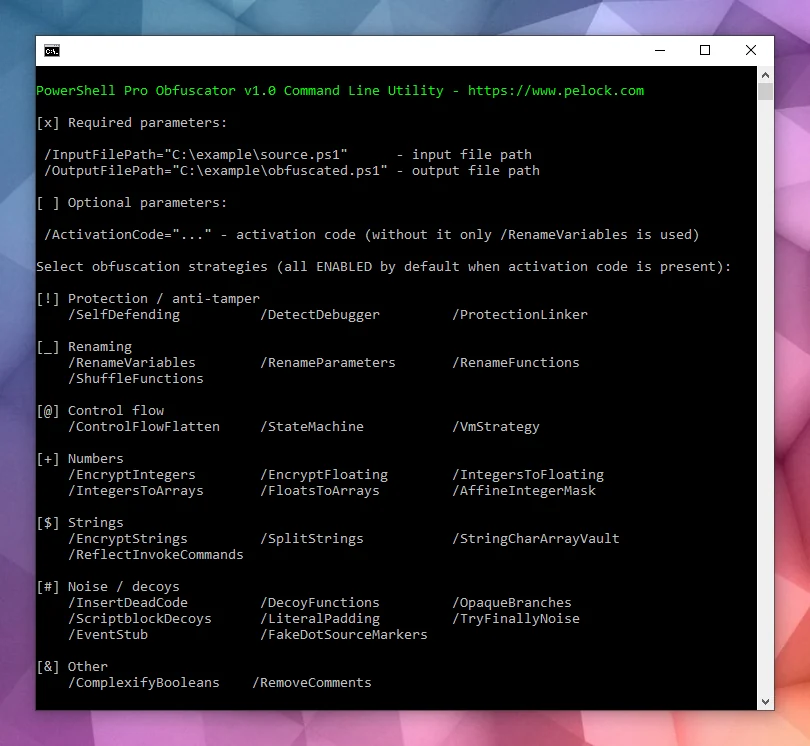
Il pacchetto di installazione contiene un'interfaccia a riga di comando aggiuntiva:

PowerShell Pro Obfuscator command-line interface

PowerShell Pro Obfuscator include un'interfaccia a riga di comando per l'automazione su Windows e Linux.

Usala per integrare l'offuscamento in server di build, job CI o packaging batch.

Bartosz Wójcik

  • Visita il mio sito su — https://www.pelock.com
  • X — https://x.com/PELock
  • GitHub — https://github.com/PELock
Scarica lo strumento