
Skip to content
KitploitKITPLOIT
StrumentiBlog
Invia
StrumentiBlog
Invia

Strumenti di Hacking, PenTest e Cybersecurity per il tuo Arsenale di Sicurezza!

Kitploit è una directory di strumenti di hacking, cybersecurity e pentesting. Scopri gli ultimi aggiornamenti dei progetti per trovare vulnerabilità, analizzare sistemi, automatizzare i test e rafforzare la tua sicurezza.

··Feed·Contatto·Privacy·© 2026 Kitploit

Directory degli strumenti

Categorie

Vedi tutte le categorie
Loading categories
ethr — CLI multipiattaforma per test delle prestazioni di rete su TCP, UDP, HTTP, HTTPS e ICMP: larghezza di banda, connessioni/s, pacchetti/s, latenza, perdita, jitter, ping e traceroute. | Kitploit
Strumenti/GitHubGitHub/microsoft/ethr
Utilità GenericheMappatura della ReteRaccolta Informazioni
GitHubmicrosoft/ethr

ethr

CLI multipiattaforma per test delle prestazioni di rete su TCP, UDP, HTTP, HTTPS e ICMP: larghezza di banda, connessioni/s, pacchetti/s, latenza, perdita, jitter, ping e traceroute.

Vedi Repository
5.9k4051 mese faRevisionato da Kitploit

Più Popolari

Vedi tutti →

Scopri gli strumenti più utilizzati dalla nostra community.

Esplora tutti gli strumenti

Sfoglia la nostra collezione di strumenti

Vedi tutti gli strumenti →
Condividi

Ethr Build Status

Ethr è uno strumento multipiattaforma per la misurazione delle prestazioni di rete scritto in golang. L'obiettivo di questo progetto è fornire uno strumento nativo per misurazioni complete delle prestazioni di rete: larghezza di banda, connessioni/s, pacchetti/s, latenza, perdita e jitter, attraverso molteplici protocolli come TCP, UDP, HTTP, HTTPS e su più piattaforme come Windows, Linux e altri sistemi Unix.
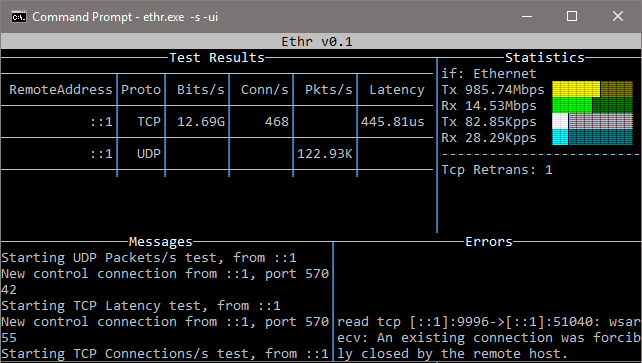
Server Ethr in azione

Ethr trae ispirazione dagli strumenti open source esistenti per la misurazione delle prestazioni di rete e sviluppa quelle idee. Per la misurazione della larghezza di banda, è simile a iPerf3 per il traffico TCP e UDP. iPerf3 ha molte più opzioni, come test con limitazione della velocità e un set di funzionalità più ricco, mentre Ethr supporta più thread, che gli consente di scalare fino a 1024 o anche un numero maggiore di connessioni, comunicazione di più client verso un singolo server, ecc. Per la misurazione della latenza, è simile a latte su Windows o sockperf su Linux.

Rispetto ad altri strumenti, Ethr offre più misurazioni di test, ad esempio larghezza di banda, connessioni/s, pacchetti/s, latenza e latenza di setup delle connessioni TCP, tutto in un unico strumento. In futuro, ci sono piani per aggiungere altre funzionalità (sperando in contributi esterni) e un supporto più ampio per i protocolli, per rendere Ethr uno strumento completo per la misurazione delle prestazioni di rete.

Grazie a golang, Ethr è nativamente multipiattaforma, rispetto alla compilazione tramite un livello di astrazione come cygwin che potrebbe limitare le funzionalità. L'obiettivo è unificare la misurazione delle prestazioni combinando le funzionalità di strumenti come iPerf3, ntttcp, psping, sockperf e latte e offrendo un unico strumento su più piattaforme e più protocolli.

Installazione

Download

https://github.com/Microsoft/ethr/releases/latest

Linux

root@kitploit:~
wget https://github.com/microsoft/ethr/releases/latest/download/ethr_linux.zip
unzip ethr_linux.zip

Windows Powershell

root@kitploit:~
wget https://github.com/microsoft/ethr/releases/latest/download/ethr_windows.zip -OutFile ethr_windows.zip
Expand-Archive .\ethr_windows.zip -DestinationPath .

OSX

root@kitploit:~
wget https://github.com/microsoft/ethr/releases/latest/download/ethr_osx.zip
unzip ethr_osx.zip

Compilazione dal sorgente

Nota: per compilare dal sorgente è richiesta la versione 1.11 o superiore di go.

Utilizziamo go-module per gestire le dipendenze di Ethr. Per maggiori informazioni, consulta come usare go-modules!

root@kitploit:~
git clone https://github.com/Microsoft/ethr.git
cd ethr
go build

Se ethr viene clonato all'interno dell'albero $GOPATH/src, assicurati di invocare il comando go con GO111MODULE=on!

Docker

Compila l'immagine usando il comando:

root@kitploit:~
docker build -t microsoft/ethr .

Crea il binario:

Linux

root@kitploit:~
docker run -e GOOS=linux -v $(pwd):/out microsoft/ethr make build-docker

Windows

root@kitploit:~
docker run -e BINARY_NAME=ethr.exe -e GOOS=windows -v $(pwd):/out microsoft/ethr make build-docker

OS X

root@kitploit:~
docker run -e BINARY_NAME=ethr -e GOOS=darwin -v $(pwd):/out microsoft/ethr make build-docker

Usando go get

root@kitploit:~
go get github.com/microsoft/ethr

Usando ArchLinux AUR

Supponendo che tu stia usando yay (https://github.com/Jguer/yay):

root@kitploit:~
yay -S ethr

Pubblicazione del pacchetto Nuget

Segui la sezione Compilazione dal sorgente per compilare ethr.exe

Modifica ethr.nuspec per aggiungere una nuova versione di release

root@kitploit:~
vim ethr.nuspec

Crea un pacchetto nuget (come Ethr.0.2.1.nupkg)

root@kitploit:~
nuget.exe pack ethr.nuspec

Carica il pacchetto su nuget.org.

Utilizzo

Utilizzo semplice

Aiuto:

root@kitploit:~
ethr -h

Server:

root@kitploit:~
ethr -s

Server con interfaccia utente testuale:

root@kitploit:~
ethr -s -ui

Client:

root@kitploit:~
ethr -c <server ip>

Esempi:

root@kitploit:~
// Start server
ethr -s

// Start client for default (bandwidth) test measurement using 1 thread
ethr -c localhost

// Start bandwidth test using 8 threads
ethr -c localhost -n 8

// Start connections/s test using 64 threads to server 10.1.0.11
ethr -c 10.1.0.11 -t c -n 64

// Run Ethr server on port 9999
./ethr -s -port 9999

// Measure TCP connection setup latency to ethr server on port 9999
// Assuming Ethr server is running on server with IP address: 10.1.1.100
./ethr -c 10.1.1.100 -p tcp -t pi -d 0 -4 -port 9999

// Measure TCP connection setup latency to www.github.com at port 443
./ethr -x www.github.com:443 -p tcp -t pi -d 0 -4

// Measure TCP connection setup latency to www.github.com at port 443
// Note: Here port 443 is driven automatically from https
./ethr -x https://www.github.com -p tcp -t pi -d 0 -4

// Measure ICMP ping latency to www.github.com
sudo ./ethr -x www.github.com -p icmp -t pi -d 0 -4

// Run measurement similar to mtr on Linux
sudo ./ethr -x www.github.com -p icmp -t mtr -d 0 -4

// Measure packets/s over UDP by sending small 1-byte packets
./ethr -c 172.28.192.1 -p udp -t p -d 0

Problemi noti e requisiti

Windows

Per i test relativi a ICMP, Ping, TraceRoute e MyTraceRoute, Windows richiede che ICMP sia consentito tramite firewall. Questa operazione può essere effettuata usando PowerShell con i seguenti comandi. Tuttavia, usa questa procedura solo se la policy di sicurezza della tua configurazione lo consente.

root@kitploit:~
// Allow ICMP packets via Firewall for IPv4
New-NetFirewallRule -DisplayName "ICMP_Allow_Any" -Direction Inbound -Protocol ICMPv4 -IcmpType Any -Action Allow  -Profile Any -RemotePort Any

// Allow ICMP packets via Firewall for IPv6
New-NetFirewallRule -DisplayName "ICMPV6_Allow_Any" -Direction Inbound -Protocol ICMPv6 -IcmpType Any -Action Allow  -Profile Any -RemotePort Any

Inoltre, per TraceRoute e MyTraceRoute basati su TCP, è richiesta la modalità amministratore, altrimenti Ethr non sarà in grado di ricevere i messaggi ICMP di TTL superato.

Linux

Per ICMP Ping, ICMP/TCP TraceRoute e MyTraceRoute, è richiesta la modalità privilegiata tramite sudo.

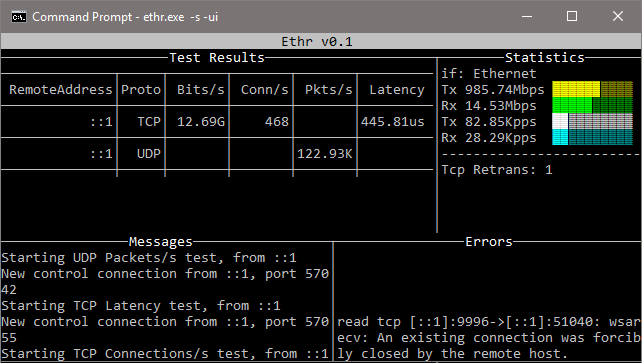
Riga di comando completa

Parametri comuni

root@kitploit:~
	-h 
		Help
	-no 
		Disable logging to file. Logging to file is enabled by default.
	-o <filename>
		Name of log file. By default, following file names are used:
		Server mode: 'ethrs.log'
		Client mode: 'ethrc.log'
	-debug 
		Enable debug information in logging output.
	-4 
		Use only IP v4 version
	-6 
		Use only IP v6 version

Parametri della modalità server

root@kitploit:~
In this mode, Ethr runs as a server, allowing multiple clients to run
performance tests against it.
	-s 
		Run in server mode.
	-ip <string>
		Bind to specified local IP address for TCP & UDP tests.
		This must be a valid IPv4 or IPv6 address.
		Default: <empty> - Any IP
	-port <number>
		Use specified port number for TCP & UDP tests.
		Default: 8888
	-ui 
		Show output in text UI.

Parametri della modalità client

root@kitploit:~
In this mode, Ethr client can only talk to an Ethr server.
	-c <server>
		Run in client mode and connect to <server>.
		Server is specified using name, FQDN or IP address.
	-b <rate>
		Transmit only Bits per second (format: <num>[K | M | G])
		Only valid for Bandwidth tests. Default: 0 - Unlimited
		Examples: 100 (100bits/s), 1M (1Mbits/s).
	-cport <number>
		Use specified local port number in client for TCP & UDP tests.
		Default: 0 - Ephemeral Port
	-d <duration>
		Duration for the test (format: <num>[ms | s | m | h]
		0: Run forever
		Default: 10s
	-g <gap>
		Time interval between successive measurements (format: <num>[ms | s | m | h]
		Only valid for latency, ping and traceRoute tests.
		0: No gap
		Default: 1s
	-i <iterations>
		Number of round trip iterations for each latency measurement.
		Only valid for latency testing.
		Default: 1000
	-ip <string>
		Bind to specified local IP address for TCP & UDP tests.
		This must be a valid IPv4 or IPv6 address.
		Default: <empty> - Any IP
	-l <length>
		Length of buffer to use (format: <num>[KB | MB | GB])
		Only valid for Bandwidth tests. Max 1GB.
		Default: 16KB
	-n <number>
		Number of Parallel Sessions (and Threads).
		0: Equal to number of CPUs
		Default: 1
	-p <protocol>
		Protocol ("tcp", "udp", "http", "https", or "icmp")
		Default: tcp
	-port <number>
		Use specified port number for TCP & UDP tests.
		Default: 8888
	-r 
		For Bandwidth tests, send data from server to client.
	-t <test>
		Test to run ("b", "c", "p", "l", "cl" or "tr")
		b: Bandwidth
		c: Connections/s
		p: Packets/s
		l: Latency, Loss & Jitter
		pi: Ping Loss & Latency
		tr: TraceRoute
		mtr: MyTraceRoute with Loss & Latency
		Default: b - Bandwidth measurement.
	-tos 
		Specifies 8-bit value to use in IPv4 TOS field or IPv6 Traffic Class field.
	-w <number>
		Use specified number of iterations for warmup.
		Default: 1
	-T <string>
		Use the given title in log files for logging results.
		Default: <empty>		

Parametri della modalità esterna

root@kitploit:~
In this mode, Ethr talks to a non-Ethr server. This mode supports only a
few types of measurements, such as Ping, Connections/s and TraceRoute.
	-x <destination>
		Run in external client mode and connect to <destination>.
		<destination> is specified in URL or Host:Port format.
		For URL, if port is not specified, it is assumed to be 80 for http and 443 for https.
		Example: For TCP - www.microsoft.com:443 or 10.1.0.4:22 or https://www.github.com
		         For ICMP - www.microsoft.com or 10.1.0.4
	-cport <number>
		Use specified local port number in client for TCP & UDP tests.
		Default: 0 - Ephemeral Port
	-d <duration>
		Duration for the test (format: <num>[ms | s | m | h]
		0: Run forever
		Default: 10s
	-g <gap>
		Time interval between successive measurements (format: <num>[ms | s | m | h]
		Only valid for latency, ping and traceRoute tests.
		0: No gap
		Default: 1s
	-ip <string>
		Bind to specified local IP address for TCP & UDP tests.
		This must be a valid IPv4 or IPv6 address.
		Default: <empty> - Any IP
	-n <number>
		Number of Parallel Sessions (and Threads).
		0: Equal to number of CPUs
		Default: 1
	-p <protocol>
		Protocol ("tcp", or "icmp")
		Default: tcp
	-t <test>
		Test to run ("c", "cl", or "tr")
		c: Connections/s
		pi: Ping Loss & Latency
		tr: TraceRoute
		mtr: MyTraceRoute with Loss & Latency
		Default: pi - Ping Loss & Latency.
	-tos 
		Specifies 8-bit value to use in IPv4 TOS field or IPv6 Traffic Class field.
	-w <number>
		Use specified number of iterations for warmup.
		Default: 1
	-T <string>
		Use the given title in log files for logging results.
		Default: <empty>		

Stato

Supporto piattaforme

Windows

Testato: Windows 10, Windows 7 SP1

Non testato: altre versioni di Windows

Linux

Testato: Ubuntu Linux 18.04.1 LTS, OpenSuse Leap 15

Non testato: altre versioni di Linux

OSX

Testato: OSX è testato dai contributori

Altro

Nessun'altra piattaforma è stata testata al momento

Elenco attività

Le attività della todo list sono mostrate di seguito. Contributi sono molto graditi per queste attività o per qualsiasi altra funzionalità e correzione di bug.

  • Testare Ethr su altre versioni di Windows, altre versioni di Linux, FreeBSD e altri sistemi operativi
  • Supporto per la latenza UDP, TraceRoute e MyTraceRoute

Come contribuire

Questo progetto accetta volentieri contributi e suggerimenti. La maggior parte dei contributi richiede di accettare un Contributor License Agreement (CLA) che dichiara di avere il diritto di concederci, e di concederci effettivamente, i diritti di utilizzo del tuo contributo. Per i dettagli, visita https://cla.microsoft.com.

Quando invii una pull request, un CLA-bot determinerà automaticamente se devi fornire una CLA e decorerà la PR di conseguenza (ad esempio, etichetta, commento). Segui semplicemente le istruzioni fornite dal bot. Dovrai farlo solo una volta in tutti i repository che usano la nostra CLA.

Questo progetto ha adottato il Microsoft Open Source Code of Conduct. Per maggiori informazioni, consulta le FAQ sul Code of Conduct oppure contatta [email protected] per qualsiasi domanda o commento.

Scarica lo strumento
ProtocolloLarghezza di bandaConnessioni/sPacchetti/sLatenzaPingTraceRouteMyTraceRoute
TCPSìSìNASìSìSìSì
UDPSìNASìNoNANoNo
ICMPNoNANANASìSìSì