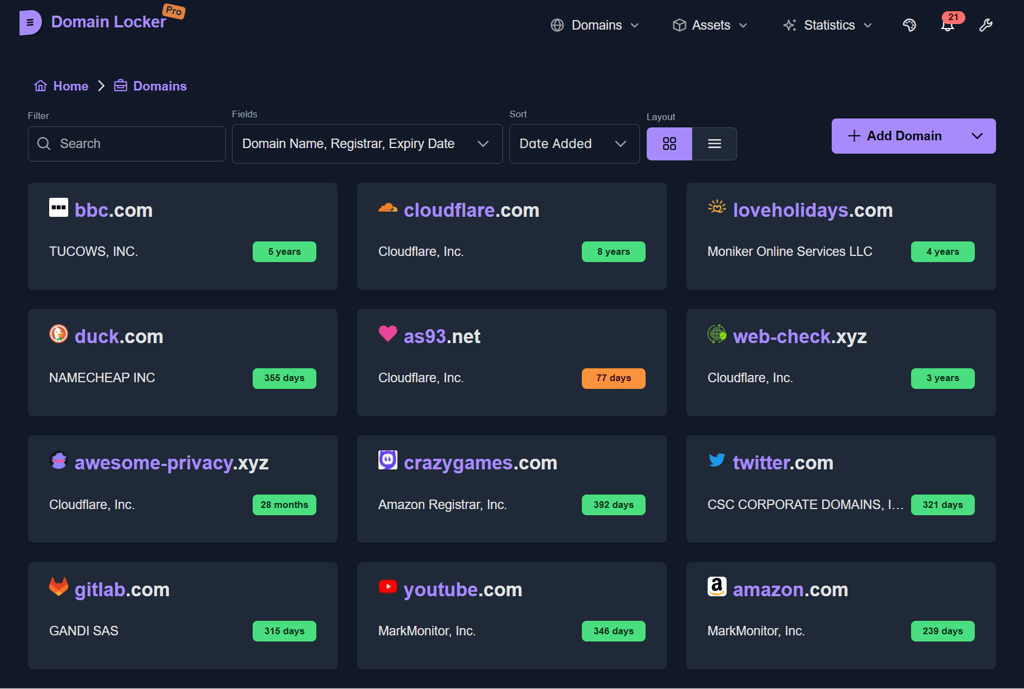
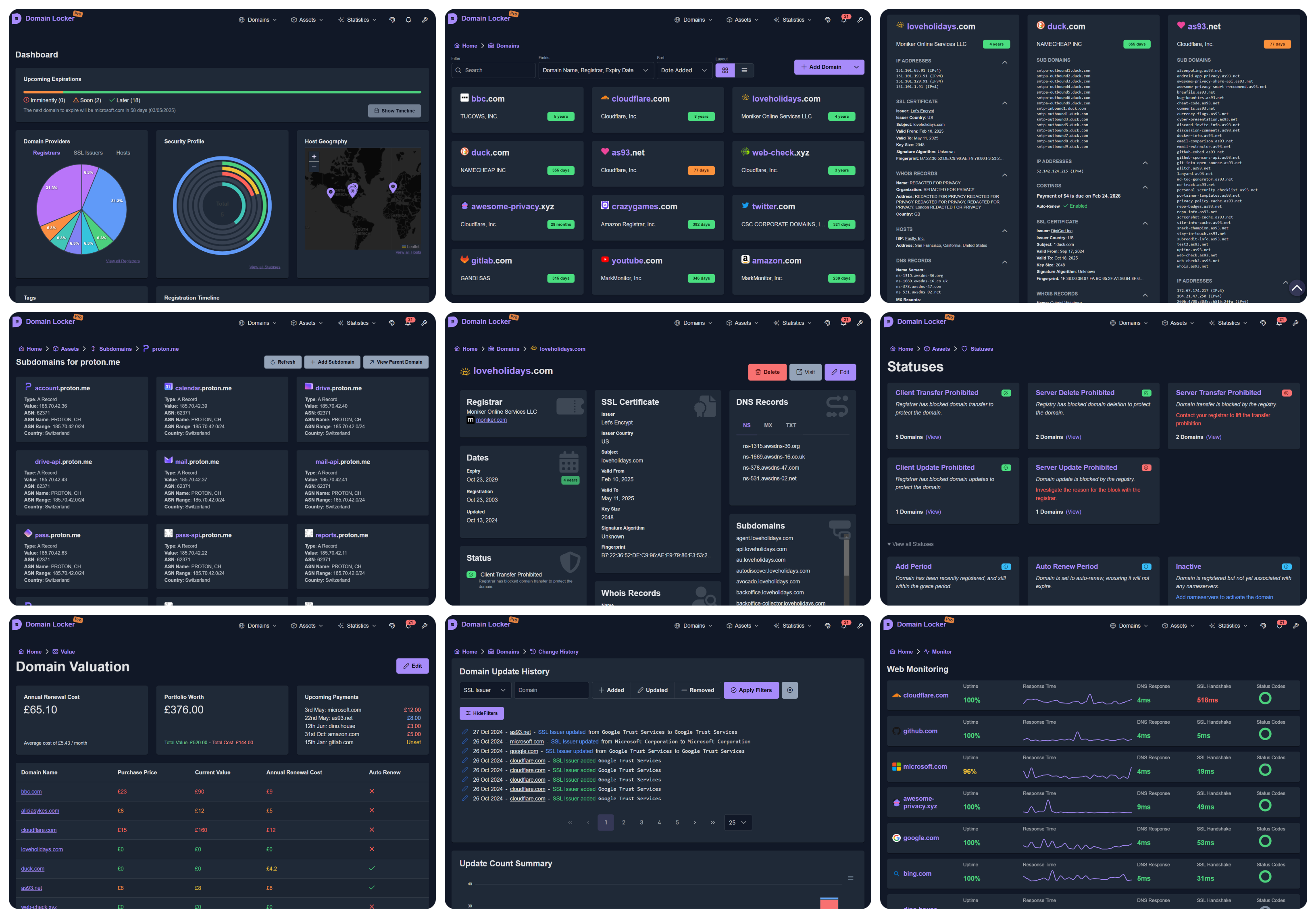
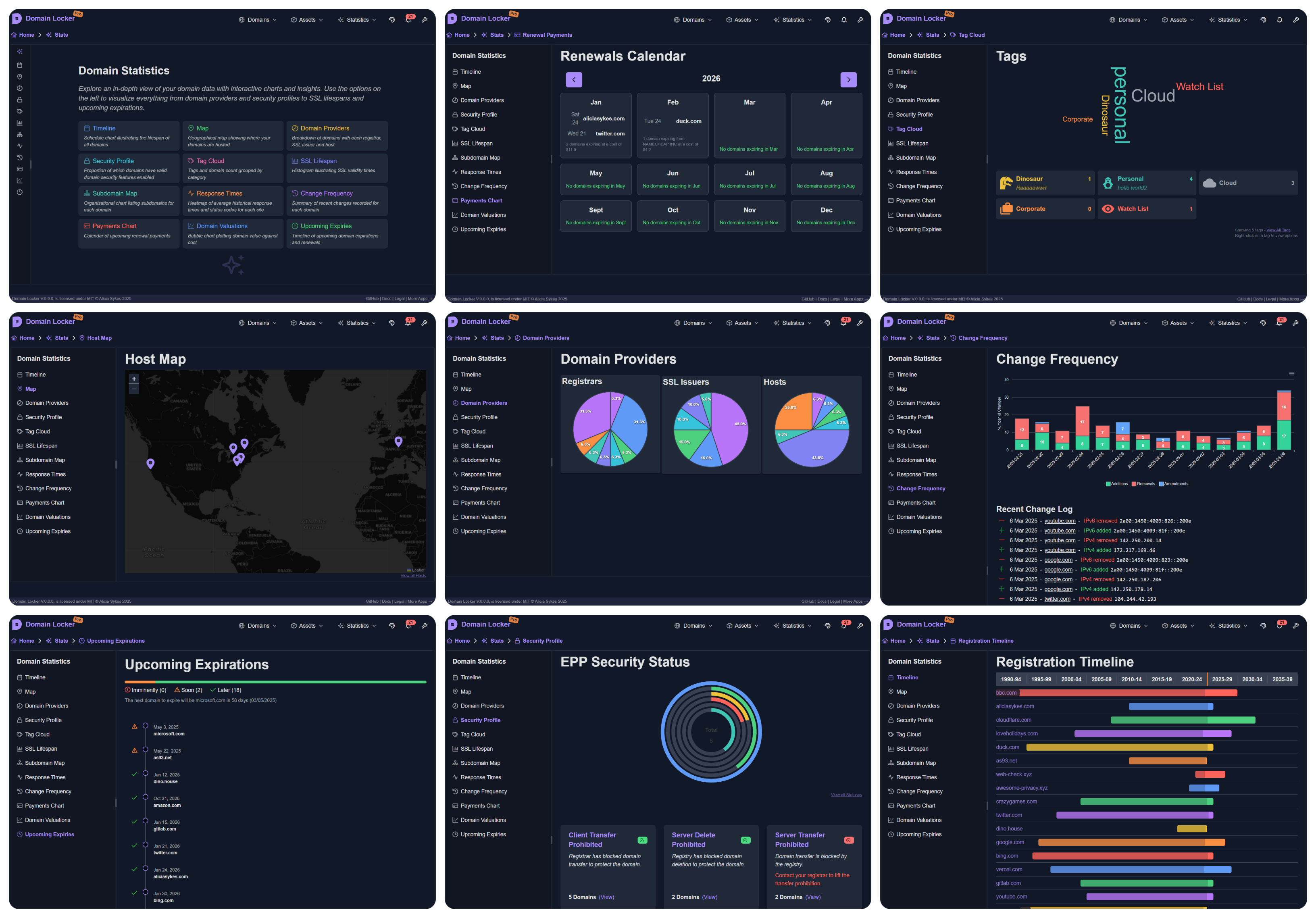
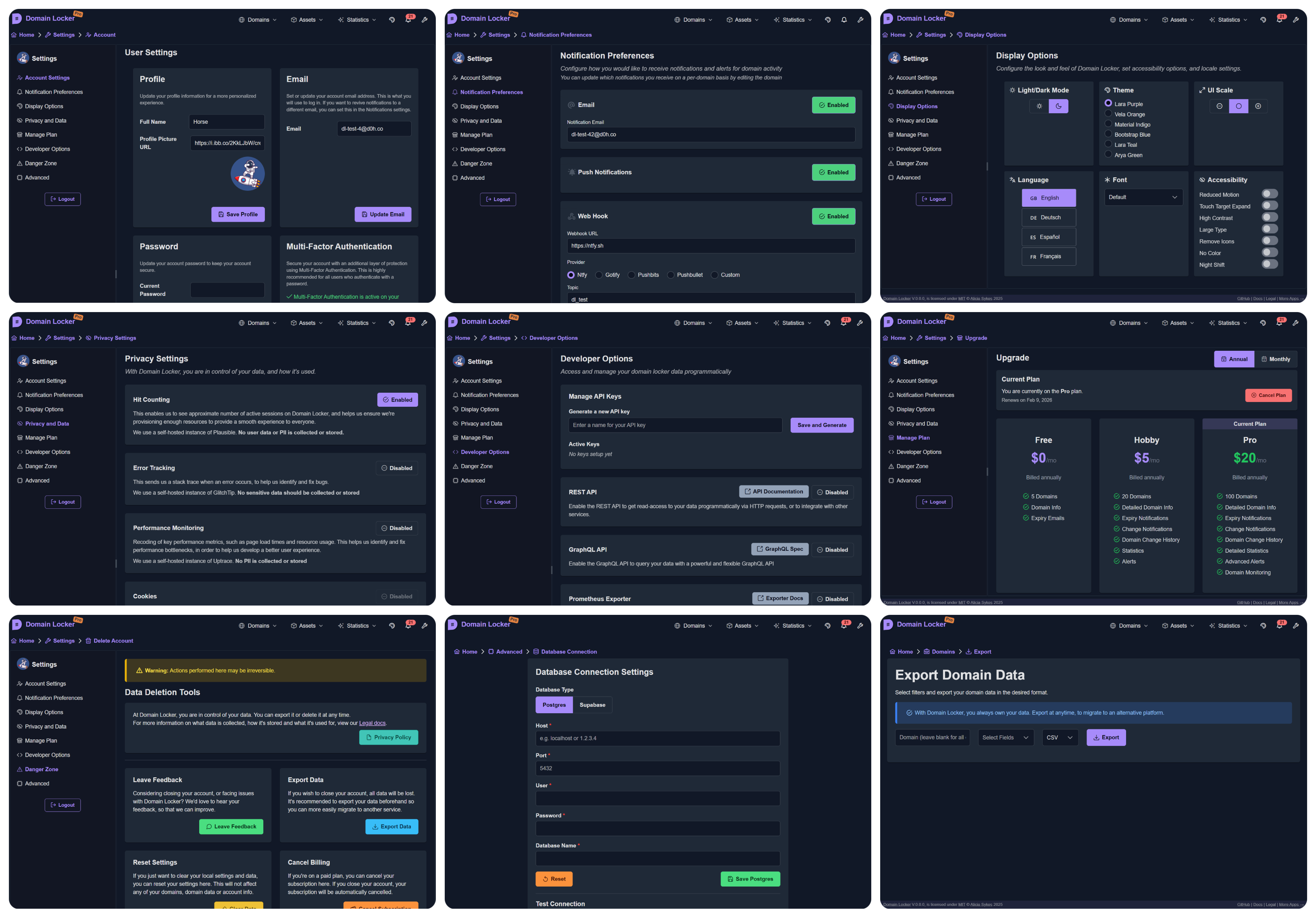
Gestore centralizzato del portfolio di domini con dati WHOIS, DNS, SSL recuperati automaticamente, avvisi di scadenza, monitoraggio dell'uptime e analisi visive. Auto-hostabile con Docker.
Il centro centrale per tutti i tuoi nomi di dominio
🌐domain-locker.com

L'obiettivo di Domain Locker è darti una visibilità completa del tuo portfolio di nomi di dominio, in un unico posto centrale.
Per ogni dominio che aggiungi, lo analizziamo e recuperiamo tutti i dati associati. Monitoriamo continuamente i tuoi domini e ti avvisiamo (secondo le tue preferenze) quando qualcosa di importante cambia o quando sta per scadere. Così otterrai analisi dettagliate del dominio, approfondimenti sulla sicurezza, cronologia delle modifiche, prestazioni recenti, dati di valutazione e molto altro.
Con Domain Locker, non perderai mai più traccia dei tuoi domini, non lascerai scadere una scadenza, né dimenticherai quale registrar e provider utilizza ogni dominio.
(Mi scuso per i 5 fps, volevo mantenere le dimensioni del file ridotte!)
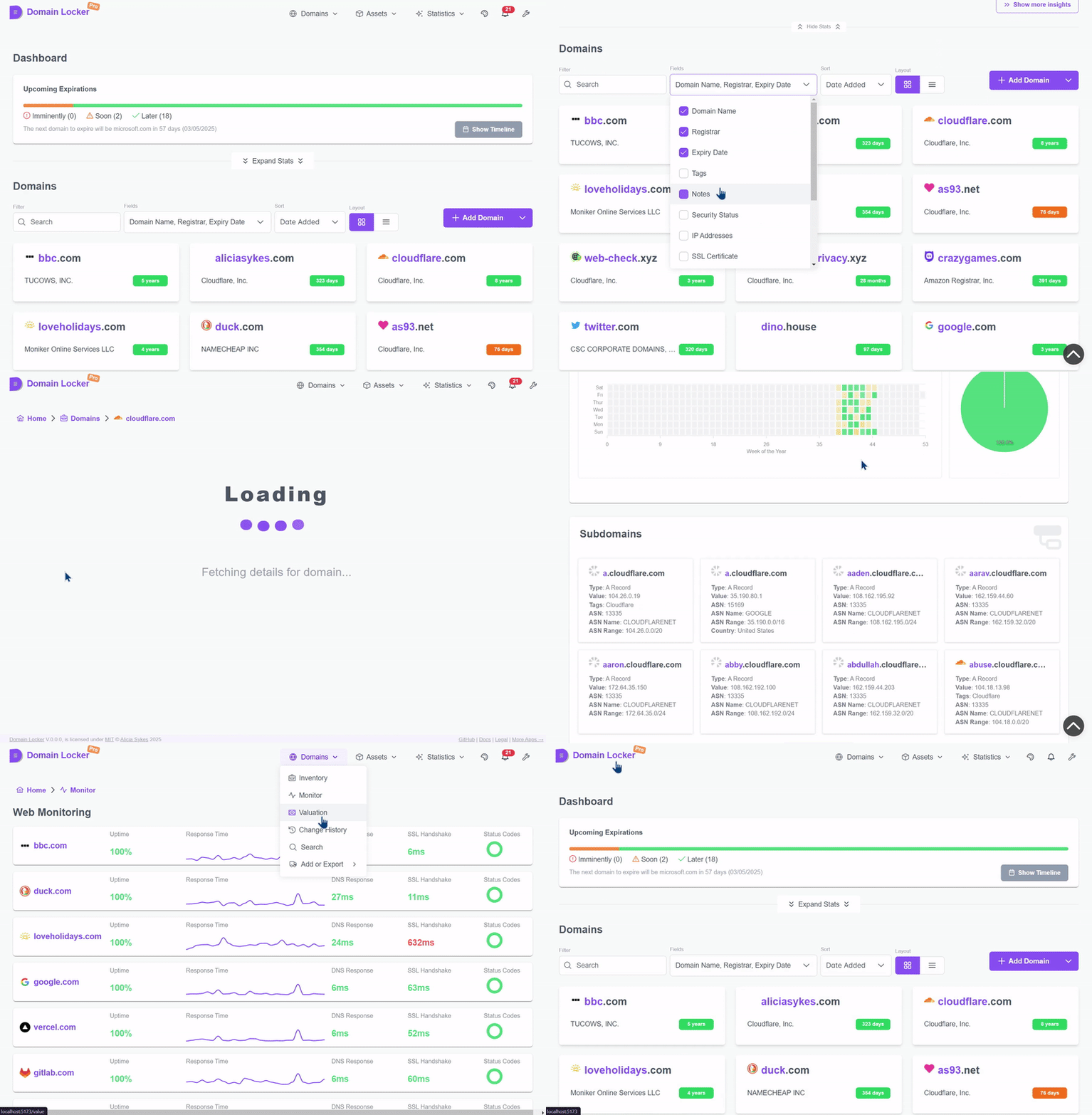
Prova la demo dal vivo su demo.domain-locker.com
(Nome utente: [email protected] Password: domainlocker)
Per utilizzare Domain Locker, hai due opzioni:
Vai sul nostro sito web e registrati con Google, GitHub o la tua email.
Il piano base è gratuito e non richiede configurazione. Basta accedere, aggiungere i tuoi domini e iniziare a monitorarli.
curl -fsSL https://install.domain-locker.com | bash
Usa il comando in una riga sopra, oppure usa il file [`docker-compose.yml`](https://github.com/Lissy93/domain-locker/blob/main/docker-compose.yml)
<details>
<summary>Dettagli</summary>
- **Prerequisiti**:
- Domain Locker è pensato per essere eseguito in un container, quindi avrai bisogno di Docker [installato](https://docs.docker.com/engine/install/) sul tuo sistema host.
- **Contenitori**:
- Abbiamo un'immagine Docker pubblicata su [`lissy93/domain-locker`](https://hub.docker.com/r/lissy93/domain-locker).
- Avrai anche bisogno di un database Postgres, come il container [`postgres:15-alpine`](https://hub.docker.com/_/postgres?tab=tags&name=15-alpine).
- **Ambiente**:
- Quando avvii il container, collega la porta `3000` del container alla tua `PORT` dell'host (default `3000`).
- Quindi specifica le variabili Postgres: `DL_PG_HOST`, `DL_PG_PORT`, `DL_PG_USER`, `DL_PG_PASSWORD` e `DL_PG_NAME`.
- **Volumi**:
- Monta un volume su `/var/lib/postgresql/data` per persistire i tuoi dati Postgres
- **Cron**
- `/api/domain-updater` - Esegui questo giornalmente per mantenere aggiornati i dati dei domini e attivare le notifiche
- `/api/domain-monitor` - Esegui questo ogni 15 minuti per monitorare l'uptime e le prestazioni del sito web
- `/api/cleanup-monitor-data` - Esegui questo settimanalmente per aggregare i vecchi dati di monitoraggio
- **Esempio**:
- Mettendo tutto insieme, puoi usare il nostro file [`docker-compose.yml`](https://github.com/Lissy93/domain-locker/blob/main/docker-compose.yml).
- Per maggiori dettagli, consulta la [Documentazione per Self-Hosting](https://domain-locker.com/about/self-hosting)
<details>
<summary>Diagramma Docker</summary>```mermaid
flowchart TB
subgraph Volume Mounts
direction TB
Vpostgresdata([📦 postgres_data]) x-. /var/lib/postgresql/data .-x postgres[(🐘 PostgreSQL DB)]
Vdbschemasql{{📄 ./db/schema.sql}} -. Mounted on Init .-> postgres
end
subgraph Network
direction TB
domainlockernetwork[/🌐 domain_locker_network/]
end
postgres -.- domainlockernetwork
subgraph app[⚙️ App Container]
SSR[HTTP Server]
CLIENT[Client App]
API[API Endpoints]
SSR --> CLIENT
SSR --> API
end
app -.- domainlockernetwork
git clone [email protected]:Lissy93/domain-locker.git # Get the code cd domain-locker # Navigate into directory npm install --legacy-peer-deps # Install dependencies cp .env.example .env # Set environmental variables npm run dev # Start the dev server
- **Prerequisiti**
- Avrai bisogno di Git e Node installati sul tuo sistema.
- **Configurazione**
- Il file `.env.sample` di esempio include le credenziali pubbliche per la nostra istanza di sviluppo Supabase
- Per usare un database alternativo, consulta la sezione [Database](#database) qui sotto per configurare con Postgres
- **Distribuzione**
- Puoi compilare il codice con `npm run build`, poi eseguire con `npm start`
- Oppure, con Docker, costruendo il container con `docker build -t domain-locker .`
- Non usare l'istanza di sviluppo Supabase in produzione, poiché viene cancellata frequentemente
---
## Architettura dell'App
#### Stack Tecnologico
Domain Locker è composto da un'app, un database e alcuni endpoint API.
- **L'app** è costruita con Angular, utilizzando Analog+Nitro con componenti PrimeNg e Tailwind per lo styling
- **Il server** è una serie di endpoint Deno con funzioni Typescript
- **Il database** può essere Postgres o Supabase
Mentre l'istanza self-hosted è pensata per essere distribuita autonomamente, la versione gestita dipende invece da alcuni servizi di terze parti aggiuntivi, che puoi vedere qui sotto, [la cui documentazione è qui](https://domain-locker.com/about/developing/third-party-docs).
<details>
<summary>Perché</summary>
Perché Angular? Come una specie di scherzo macabro al me futuro, che poi deve mantenere questo.
</details>
<p align="center">
<img width="800" src="https://assets.kitploit.com/production/public/readmes/264/1449d16cb6a07bd766d3b86a8de608aaa4075270a0a634cd6f6af1f1a1d70c49.png" />
<br>
<span>Puoi visualizzare la documentazione per le tecnologie e i servizi utilizzati <a href="https://domain-locker.com/about/developing/third-party-docs">qui</a></span>
</p>
#### Architettura
L'architettura è piuttosto semplice.
Abbiamo un'app (composta da un frontend e endpoint API), dove l'utente può leggere e scrivere sul database (tramite adattatori). Poi un servizio cron chiamerà periodicamente gli endpoint API per mantenere aggiornati i dati del dominio, tracciare le modifiche, monitorare la salute e attivare notifiche su determinate modifiche (secondo le preferenze dell'utente) o prima di una scadenza imminente.```mermaid
graph TD;
subgraph User Interactions
User[👤 User] -->|Enter domain| WebApp[🌐 Frontend];
WebApp -->|Send API request| API[⚙️ Nitro API];
API -->|Auth Check| Auth[🔐 Auth Service];
API -->|Store domain info| Database[🗄️ PostgreSQL / Supabase];
end
subgraph Automated Cron Jobs
CronService[⏳ Cron Service] -->|Trigger Updates| EdgeFunctions[⚡ Edge Functions];
EdgeFunctions -->|Fetch WHOIS, DNS, SSL| ExternalAPIs[🌎 Analysis Services];
EdgeFunctions -->|Store Data| Database;
CronService -->|Monitor Uptime| WebsiteMonitor[📡 Uptime Monitor];
WebsiteMonitor -->|Store Metrics| Database;
CronService -->|Check Expirations| ExpiryChecker[📆 Expiration Check];
ExpiryChecker -->|Update Status| Database;
CronService -->|Send Notifications| NotificationService[🔔 Notification System];
NotificationService -->|Email| Resend[📧 Resend];
NotificationService -->|SMS| Twilio[📱 Twilio];
end
Database -->|Serve Data| WebApp;
È necessario un database per archiviare tutti i tuoi domini e le informazioni associate. Domain Locker supporta sia Supabase che Postgres standard per l'archiviazione dei dati. Il database utilizzato dipenderà da quali variabili d'ambiente sono impostate.
Supabase: Segui la documentazione per il self-hosting di Supabase, poi usa dl-sb-iac per importare lo schema e configurare autenticazione, edge functions, email, ecc.
SUPABASE_URL e SUPABASE_ANON_KEYPostgres: Distribuisci un'istanza Postgres, poi applica il schema.sql
psql -h $DL_PG_HOST -U $DL_PG_USER -d $DL_PG_NAME -f ./db/schema.sqlsetup-postgres.sh (richiede accesso da superutente)DL_PG_HOST, DL_PG_PORT, DL_PG_USER, DL_PG_PASSWORD, `DL_PG_NAME````mermaid
classDiagram
class users {
uuid id
text email
timestamp created_at
timestamp updated_at
}<p align="center"><sub>Puoi scaricare lo schema da <a href="https://github.com/Lissy93/domain-locker/blob/main/db/schema.sql"<code>db/schema.sql</code></a></sub></p>
---
### Contribuire
I contributi, di qualsiasi tipo, sono sempre benvenuti e molto apprezzati! 💗
Se sei nuovo a Git, il flusso generale per contribuire è il seguente:
- Fai il fork del repository, [cliccando qui](https://github.com/lissy93/domain-locker/fork)
- Clona il tuo fork (con `git clone [email protected]:[tuo_username]/domain-locker.git`)
- Segui la [Configurazione del Progetto](#project-setup) sopra, per far funzionare il progetto in modalità sviluppo
- Implementa la tua fantastica nuova funzionalità o la tua incredibile correzione di bug...
- Crea un ramo con `git checkout -b feature-branch`, poi `git add` le tue modifiche e `git commit` usando i commit convenzionali, prima di fare `git push` sul tuo ramo
- Torna su GitHub e puoi quindi aprire una PR sul nostro ramo `main`. Non dimenticare di includere cosa hai cambiato, perché e collegare eventuali issue associate.
- Poi esamineremo, daremo feedback e uniremo, e una volta rilasciate le tue modifiche andranno in produzione e saranno disponibili anche nell'ultima immagine Docker.
<details>
<summary>Esempio di ramo Git</summary>```mermaid
%%{init: {"theme": "default"}}%%
gitGraph
commit id: "Initial commit"
branch trunk
commit id: "Feature A"
commit id: "Feature B"
commit id: "v1.0.0 (Tag)"
branch demo
checkout main
commit id: "Feature C"
commit id: "v1.1.0 (Tag)"
checkout demo
merge main id: "Merge main into demo"
checkout main
commit id: "Feature D"
commit id: "v1.2.0 (Tag)"
checkout demo
merge main id: "Merge main into demo (v1.2.0)"
checkout main
branch feature-branch-1
commit id: "Contributor Feature 1"
checkout main
merge feature-branch-1 id: "Merge contributor feature 1"
commit id: "v1.3.0 (Tag)"
checkout demo
merge main id: "Merge main into demo (v1.3.0)"
checkout main
branch feature-branch-2
commit id: "Contributor Feature 2"
checkout main
merge feature-branch-2 id: "Merge contributor feature 2"
commit id: "v1.4.0 (Tag)"
checkout demo
merge main id: "Merge main into demo (v1.4.0)"
Lissy93/Domain-Locker è concesso in licenza secondo MIT © Alicia Sykes 2025.
Per informazioni, vedi TLDR Legal > MIT
Permission is hereby granted, free of charge, to any person obtaining a copy of this software and associated documentation files (the "Software"), to deal in the Software without restriction, including without limitation the rights to use, copy, modify, merge, publish, distribute, sub-license, and/or sell copies of the Software, and to permit persons to whom the Software is furnished to do so, subject to the following conditions:
The above copyright notice and this permission notice shall be included install copies or substantial portions of the Software.
THE SOFTWARE IS PROVIDED "AS IS", WITHOUT WARRANTY OF ANY KIND, EXPRESS OR IMPLIED, INCLUDING BUT NOT LIMITED TO THE WARRANTIES OF MERCHANT ABILITY, FITNESS FOR A PARTICULAR PURPOSE AND NON INFRINGEMENT. IN NO EVENT SHALL THE AUTHORS OR COPYRIGHT HOLDERS BE LIABLE FOR ANY CLAIM, DAMAGES OR OTHER LIABILITY, WHETHER IN AN ACTION OF CONTRACT, TORT OR OTHERWISE, ARISING FROM, OUT OF OR IN CONNECTION WITH THE SOFTWARE OR THE USE OR OTHER DEALINGS IN THE SOFTWARE.
</details>
<!-- License + Copyright -->
<p align="center">
<i>© <a href="https://aliciasykes.com">Alicia Sykes</a> 2025</i><br>
<i>Concesso in licenza <a href="https://gist.github.com/Lissy93/143d2ee01ccc5c052a17">MIT</a></i><br>
<a href="https://github.com/lissy93"><img src="https://assets.kitploit.com/production/public/readmes/264/2dd6b50bb46f34f56ce0166642faf6ef16cd4102cd8a3805f1be707c9f7c0a3d.png" /></a><br>
<sup>Grazie per la visita :)</sup>
</p>
<!-- I dinosauri sono fantastici -->
<!--
. - ~ ~ ~ ~ - .
.. _ .-~ ~-.
//| \ `..~ `.
|| | } } / \ \
(\ \\ \~^..' | } \
\`.-~ o / } | / \
(__ | / | / `.
`- - ~ ~ -._| /_ - ~ ~ ~ ^| /- _ `.
| / | / ~-. ~- _
|_____| |_____| ~ - . _ _~_-_
-->
class domains { uuid id uuid user_id text domain_name date expiry_date text notes timestamp created_at timestamp updated_at uuid registrar_id timestamp registration_date timestamp updated_date }
class registrars { uuid id text name text url uuid user_id }
class tags { uuid id text name text color text description text icon uuid user_id }
class domain_tags { uuid domain_id uuid tag_id }
class notifications { uuid id uuid user_id uuid domain_id text change_type text message boolean sent boolean read timestamp created_at }
class billing { uuid id uuid user_id text current_plan timestamp next_payment_due text billing_method timestamp created_at timestamp updated_at jsonb meta }
class dns_records { uuid id uuid domain_id text record_type text record_value timestamp created_at timestamp updated_at }
class domain_costings { uuid id uuid domain_id numeric purchase_price numeric current_value numeric renewal_cost boolean auto_renew timestamp created_at timestamp updated_at }
class domain_hosts { uuid domain_id uuid host_id }
class domain_links { uuid id uuid domain_id text link_name text link_url timestamp created_at timestamp updated_at text link_description }
class domain_statuses { uuid id uuid domain_id text status_code timestamp created_at }
class domain_updates { uuid id uuid domain_id uuid user_id text change text change_type text old_value text new_value timestamp date }
class uptime { uuid id uuid domain_id timestamp checked_at boolean is_up integer response_code numeric response_time_ms numeric dns_lookup_time_ms numeric ssl_handshake_time_ms timestamp created_at }
class ssl_certificates { uuid id uuid domain_id text issuer text issuer_country text subject date valid_from date valid_to text fingerprint integer key_size text signature_algorithm timestamp created_at timestamp updated_at }
class whois_info { uuid id uuid domain_id text country text state text name text organization text street text city text postal_code }
class user_info { uuid id uuid user_id jsonb notification_channels timestamp created_at timestamp updated_at text current_plan }
class hosts { uuid id inet ip numeric lat numeric lon text isp text org text as_number text city text region text country uuid user_id }
class ip_addresses { uuid id uuid domain_id inet ip_address boolean is_ipv6 timestamp created_at timestamp updated_at }
class notification_preferences { uuid id uuid domain_id text notification_type boolean is_enabled timestamp created_at timestamp updated_at }
class sub_domains { uuid id uuid domain_id text name timestamp created_at timestamp updated_at jsonb sd_info }
users --> domains : user_id registrars --> domains : registrar_id users --> registrars : user_id users --> tags : user_id domains --> domain_tags : domain_id tags --> domain_tags : tag_id users --> notifications : user_id domains --> notifications : domain_id users --> billing : user_id domains --> dns_records : domain_id domains --> domain_costings : domain_id domains --> domain_hosts : domain_id hosts --> domain_hosts : host_id domains --> domain_links : domain_id domains --> domain_statuses : domain_id domains --> domain_updates : domain_id users --> domain_updates : user_id domains --> uptime : domain_id domains --> ssl_certificates : domain_id domains --> whois_info : domain_id users --> user_info : user_id users --> hosts : user_id domains --> ip_addresses : domain_id domains --> notification_preferences : domain_id domains --> sub_domains : domain_id